Multi Trend Scanner MT5
- Utilitaires
-
Algori Systems FZ-LLC
 Complete MT5/MT4 Software solution to automate your trading and focus on performance. To download free demos of our products visit out site : https://algoritrader.com/
 - Version: 1.1
- Activations: 5
Multi Trend Scanner for MT5
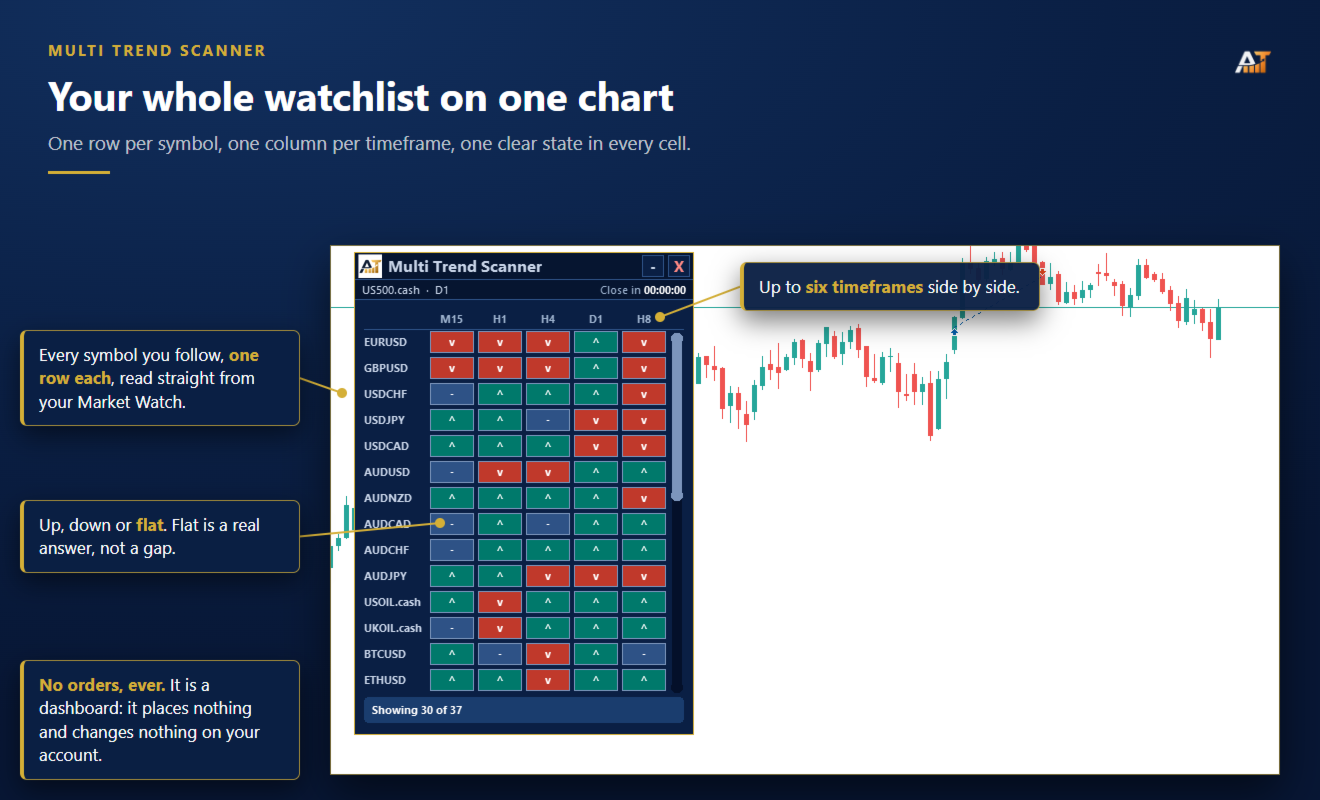
Multi Trend Scanner puts multi-symbol, multi-timeframe trend monitoring on one chart, in one draggable dashboard. Scan your Market Watch or a custom symbol list, compare trend direction across up to six timeframes, and open any symbol with one click. Built for traders who want a fast overview of market direction without opening dozens of charts.
Multi-symbol trend dashboard
-
One row per symbol and one column per timeframe.
-
Scan up to 60 symbols at once.
-
Display up to six timeframes side by side.
-
Each cell shows one of four states: Up, Down, Flat, or No Data.
-
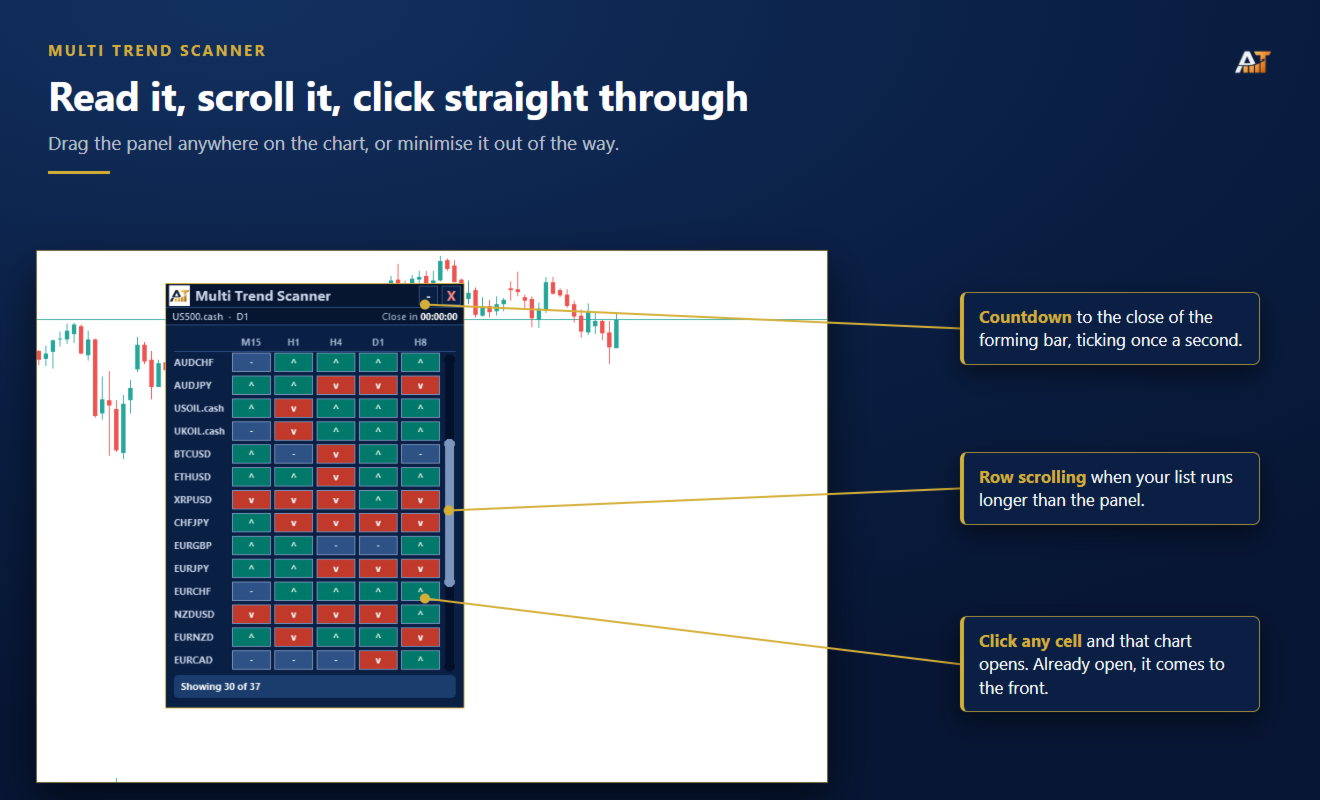
Click any cell to open that symbol and timeframe, or bring the existing chart to the front.
-
Scroll through longer symbol lists without expanding the panel.
EMA + ATR trend logic
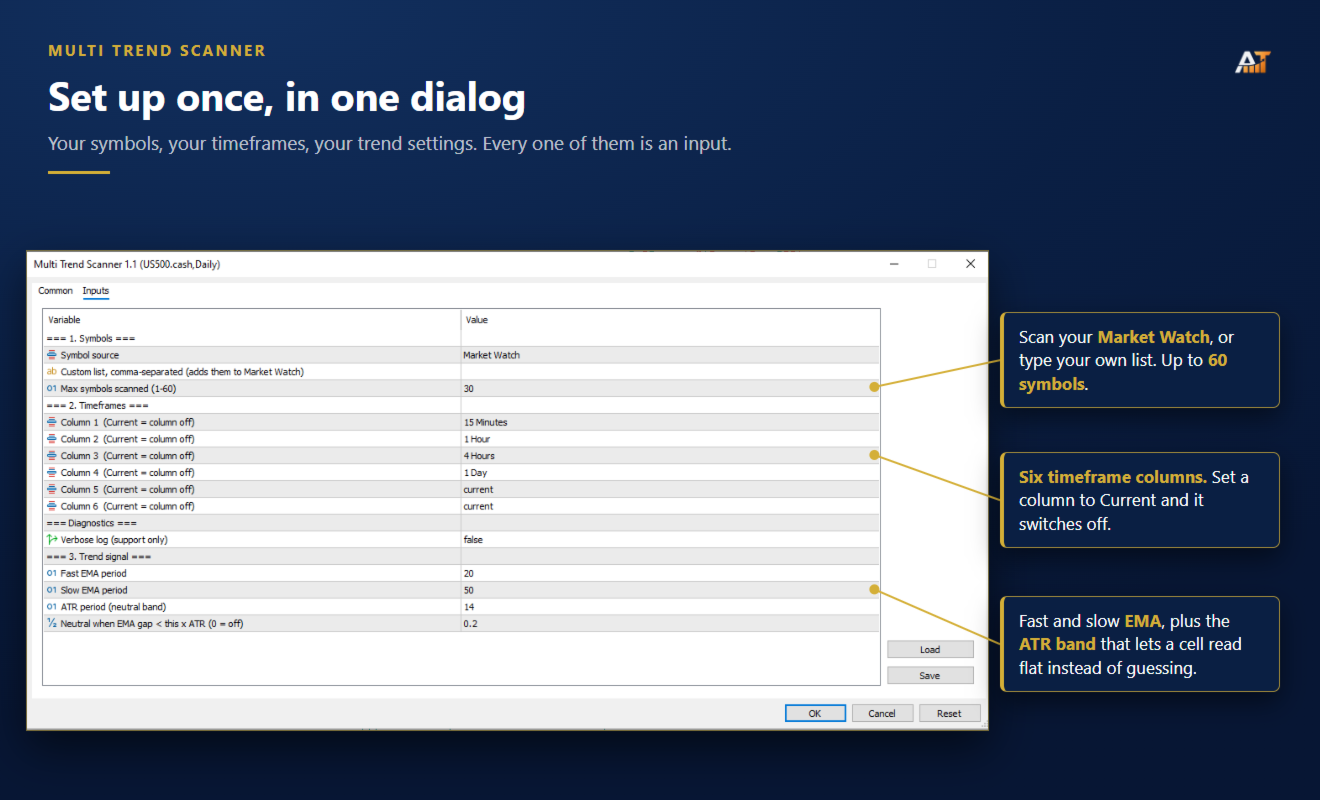
Trend direction is calculated using a fast EMA and slow EMA, with an ATR-based flat zone to filter weak separation.
-
Fast EMA default: 20.
-
Slow EMA default: 50.
-
ATR period default: 14.
-
Flat threshold default: 0.20 × ATR.
If the distance between the fast and slow EMA is smaller than the selected ATR threshold, the cell is shown as Flat instead of forcing an Up or Down reading.
Set the ATR threshold to 0 to disable the Flat state and use the EMA relationship alone.
Market Watch or custom symbols
Two symbol modes are available:
-
Market Watch — automatically scans the symbols currently loaded in Market Watch.
-
Custom List — scan your own comma-separated list of symbols.
When Custom List mode is used, the scanner adds the requested symbols to Market Watch automatically.
The maximum number of symbols can be set from 1 to 60. Default: 30.
Up to six timeframes
Each dashboard column can use a different timeframe.
Default setup:
-
Column 1: M15
-
Column 2: H1
-
Column 3: H4
-
Column 4: D1
-
Column 5: Off
-
Column 6: Off
Set any column to Current to disable it.
Live bar countdown
-
The dashboard shows the time remaining until the current bar closes.
-
The countdown updates once per second.
-
This makes it easy to see how close each reading is to the next bar update.
No Data handling
The scanner only shows a trend when enough price history is available for that symbol and timeframe.
If MetaTrader has not yet loaded enough history, the cell displays No Data instead of showing an unreliable signal.
This can happen temporarily after starting the terminal, adding new symbols, or requesting timeframes that have not yet been loaded.
Built for everyday use
-
Attach it to one chart and monitor the rest of your watchlist from there.
-
Draggable and minimizable panel.
-
Scrollable symbol list.
-
No order placement or trade management.
-
No WebRequest.
-
No external server.
-
No account information leaves the terminal.
Parameters
-
Symbol Source — Market Watch or Custom List.
-
Custom Symbol List — comma-separated symbols.
-
Max Symbols — 1 to 60, default 30.
-
Column 1 to Column 6 — selectable timeframes.
-
Fast EMA Period — default 20.
-
Slow EMA Period — default 50.
-
ATR Period — default 14.
-
Flat Threshold — default 0.20 × ATR, set to 0 to disable.
Compatibility
-
MetaTrader 5
-
Up to 60 symbols
-
Up to 6 timeframes
-
Market Watch or custom symbol lists
-
Any symbol supported by your broker