Spiders
- Experts
- Version: 4.31

SPIDERS MT5 PRO
SPIDERS MT5 PRO is a multi-signal Expert Advisor for MetaTrader 5 designed for systematic market analysis, configurable trade entries and trend-based position management.
The Expert Advisor separates entry logic from the trend exit engine. Entry decisions are calculated from several independent groups of indicators, while a separately selected trend method can manage the closing of positions.
The default configuration uses M1 for entry analysis, M5 as an additional timeframe and the SPIDERS Ribbon on M15 as the main trend and basket closing engine. All main timeframes can be changed in the inputs.
Entry system
SPIDERS includes 31 selectable entry signals divided into three logical groups.
Trend signals include EMA direction, ADX and DI, Ichimoku, MACD, SuperTrend, higher-timeframe EMA confirmation, Parabolic SAR, EMA 200, Heikin Ashi, MA Stack and additional trend state options.
Momentum signals include RSI, Stochastic, CCI, Williams Percent Range, Momentum, DeMarker, Money Flow Index, Awesome Oscillator, Relative Vigor Index and Rate of Change.
Structure and volatility signals include Bollinger Bands, Donchian breakout, ATR displacement, volume surge, candle impulse, fractal breakout, previous-bar breakout, VWAP proxy, engulfing pattern and range position.
Each signal can be enabled or disabled independently.
Signal processing
The default entry mode is Family Weighted.
Indicators are grouped into Trend, Momentum and Structure or Volatility families. Each family generates its own directional contribution, and the final entry score is calculated from configurable family weights.
Alternative modes are also available:
Simple Votes
All Enabled Agree
Any Unconflicted
Trend Aligned
Signal profiles include Fast, Balanced, Precise and Custom.
The Balanced profile is the default configuration.
Users who prefer full control can select Custom and configure minimum active signals, directional votes, agreeing families and the minimum entry score.
Trend and position closing engine
SPIDERS provides 21 selectable trend sources for position management.
Available methods include:
SPIDERS Ribbon
EMA Cross
SuperTrend
MACD
ADX and DI
Price versus EMA
EMA Slope
Price versus SMA
RSI
Momentum
Heikin Ashi
Composite trend
Ichimoku
Parabolic SAR
Bollinger midline
Donchian midline
EMA 200
Money Flow Index
Awesome Oscillator
Relative Vigor Index
Triple EMA
The default method is SPIDERS Ribbon on M15.
When a bullish trend is confirmed, the default closing mode closes eligible SELL positions managed by the Expert Advisor.
When a bearish trend is confirmed, the default closing mode closes eligible BUY positions.
The user can alternatively configure the trend engine to close all positions or positions on the same side.
Closing can also be filtered by current position profit or loss.
SPIDERS Ribbon
The SPIDERS Ribbon uses a group of moving averages together with a reference moving average.
The default configuration uses EMA calculations, a reference period of 100 and requires strong confirmation from at least 12 of the 16 Ribbon lines.
The Ribbon is used as a trend state and closing engine. It can also provide an additional directional bias to the entry score.
70/30 fleet management
On hedging accounts, SPIDERS can maintain positions in both directions.
The default Trend Share is 70 percent.
The system attempts to maintain approximately 70 percent of the active fleet in the confirmed trend direction and up to 30 percent in the opposite direction.
This value describes position allocation. It is not a profitability or win-rate target.
On netting accounts, MetaTrader 5 combines same-symbol exposure into one net position. SPIDERS automatically uses a netting-compatible execution mode instead of attempting to create a two-sided position fleet.
Position limits and lot management
The Expert Advisor supports:
Fixed lot
Balance-based margin allocation
Equity-based margin allocation
Before sending a new trade request, SPIDERS checks the broker volume rules, available margin, symbol volume limits and configured exposure limits.
Maximum positions, total volume and the number of new entries per signal bar can be configured.
Market adaptation
SPIDERS can automatically identify the general instrument type.
Supported market profiles include:
Gold and metals
Forex
Crypto
Index and CFD
Other instruments
Spread limits can be configured using broker points, price distance or ATR-based adaptive calculations.
This allows the same Expert Advisor architecture to be tested on different instruments without relying on one specific symbol name.
Trading sessions
The trading schedule can be configured using trade-server time.
Available presets include:
All sessions
Custom hours
Asia
London
New York
London and New York
Individual weekdays can also be enabled or disabled.
Trading-session filters affect new entries and do not disable normal position management.
Economic Calendar filter
SPIDERS can use the built-in MetaTrader 5 Economic Calendar as an optional entry filter during normal operation.
Users can disable the filter or configure it to react to High or Moderate and High importance events.
The time window before and after an event is configurable.
For deterministic Strategy Tester operation, calendar blocking is not used in normal historical testing.
Virtual trailing
SPIDERS can operate without broker-side Stop Loss and Take Profit levels.
The default position management includes a local virtual trailing mechanism.
For metals, trailing can be defined using price distance.
For other market types, ATR-based trailing parameters are available.
Because this protection is calculated by the Expert Advisor, the terminal and Expert Advisor must be running and receiving market prices for the virtual trailing logic to operate.
Fast Strategy Tester mode
SPIDERS includes a dedicated Strategy Tester acceleration mode.
Fast Tester is enabled by default.
During non-visual testing the Expert Advisor can skip dashboard drawing, signal arrows, chart styling and other graphical operations that do not affect the trading result.
Timer processing and persistent virtual-trailing storage can also be reduced in the tester.
Three tester modes are available:
Accurate
Fast
Ultra
Fast is intended for initial research and parameter screening.
Accurate is intended for final verification using detailed tick data.
Ultra provides additional speed for broad preliminary parameter searches but uses a simplified virtual trailing evaluation frequency.
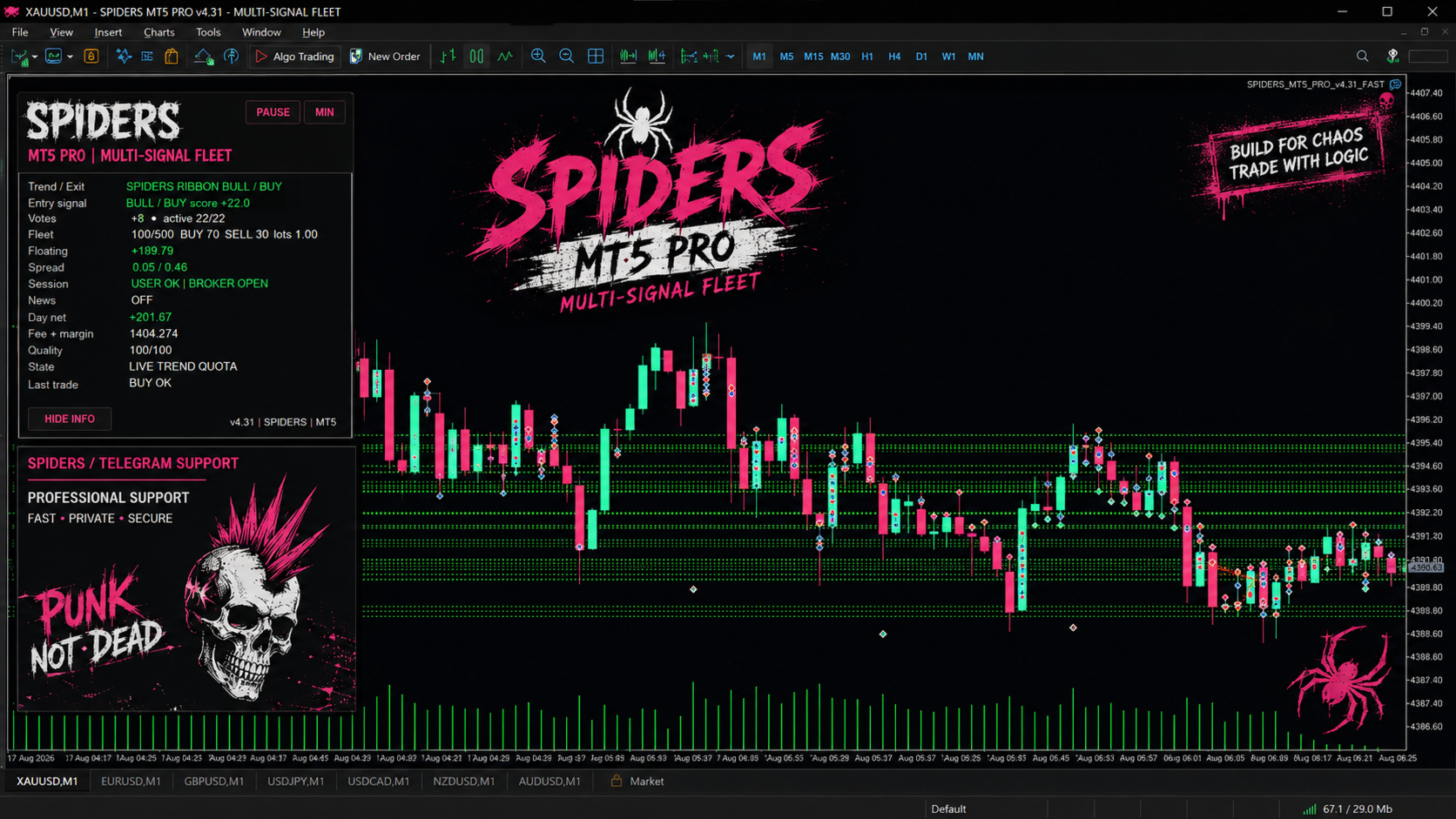
Dashboard
During normal chart operation SPIDERS provides an on-chart information panel.
The panel displays the current trend state, entry score, signal votes, market quality, spread, active positions, direction allocation, floating result and the current reason why an entry is allowed or blocked.
The dashboard does not participate in trading decisions and can be disabled.
Testing recommendations
A practical workflow is to begin with a short test using conservative position limits.
After confirming that the Expert Advisor initializes and manages trades correctly, longer historical periods can be used.
Parameter optimization should be performed in small logical groups instead of optimizing every available setting simultaneously.
For final strategy evaluation, use high-quality tick data and compare results across different market periods.
Forward testing on data that was not included in optimization is also recommended.
Risk notice
SPIDERS MT5 PRO is an automated trading tool and does not guarantee future trading results.
Trading involves financial risk.
Large position limits, leverage, spread expansion, market gaps and prolonged directional exposure can result in significant losses.
Virtual protection is local to the Expert Advisor and is not equivalent to a broker-side Stop Loss.
Historical testing does not guarantee future performance.
Users should test the Expert Advisor carefully and select risk and exposure settings appropriate for their own trading account.