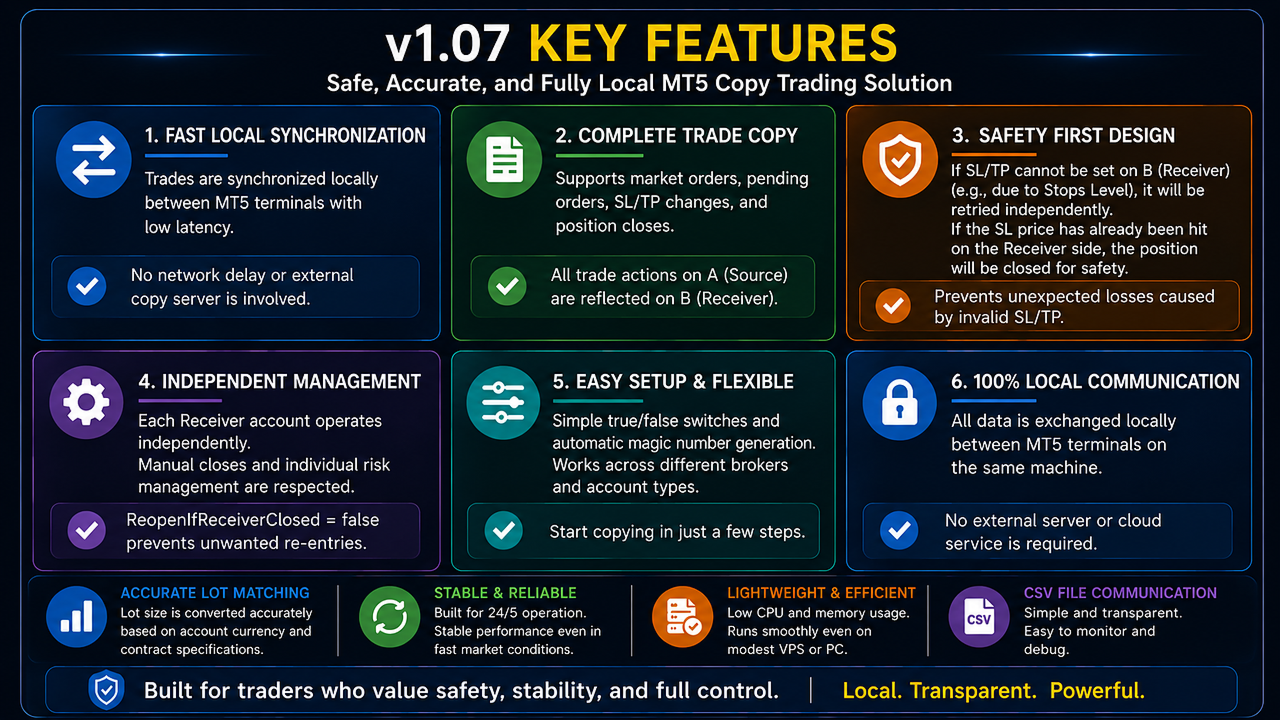
Local Trade Sync Copier

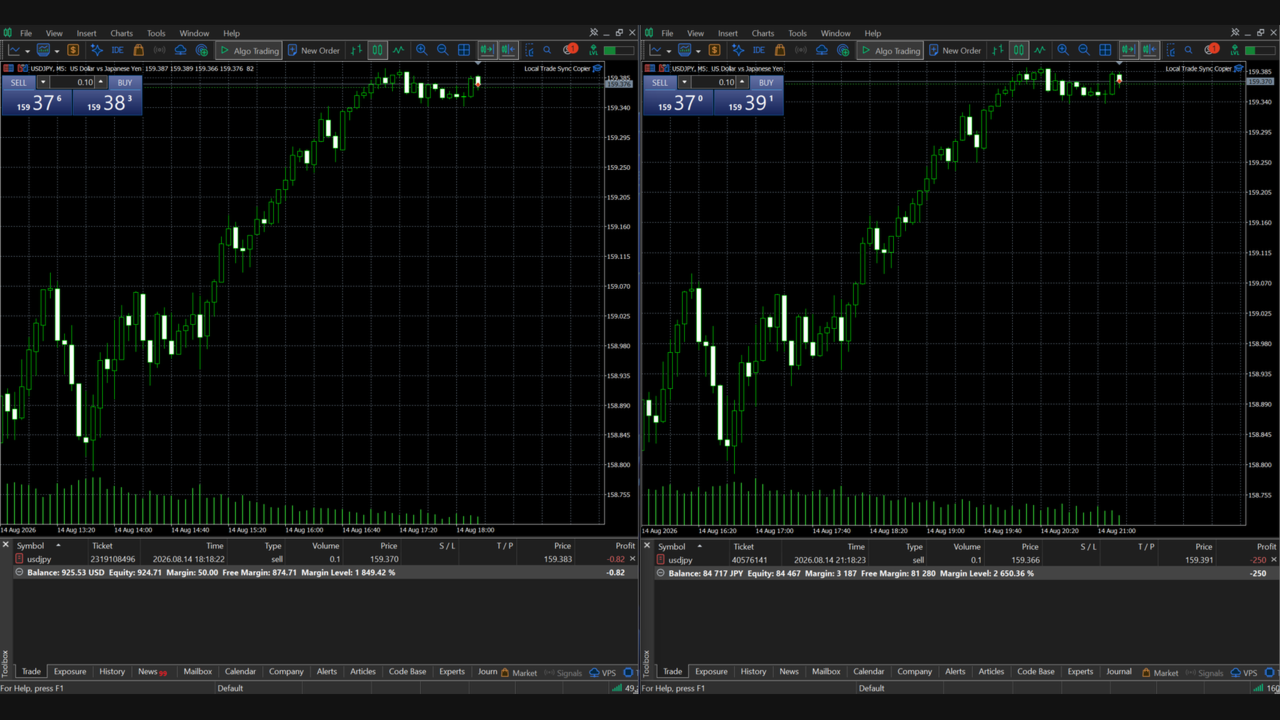
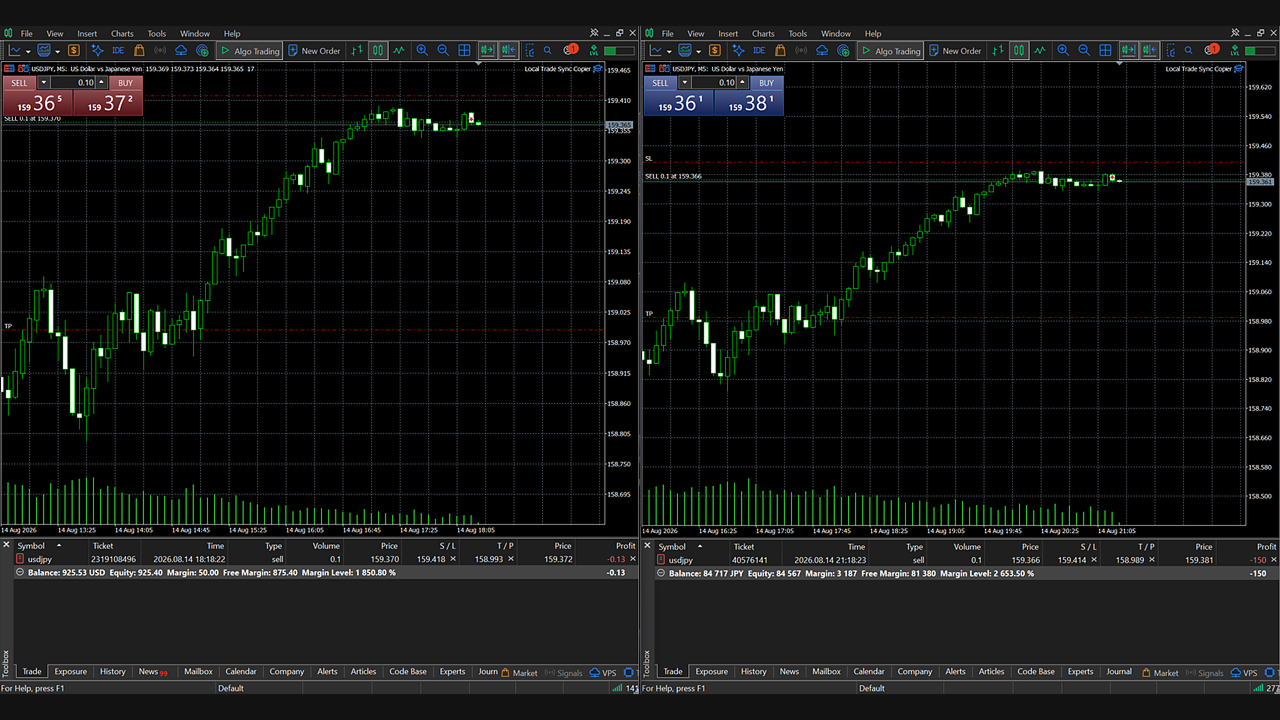
Local Trade Sync Copier is a local trade synchronization utility for copying trading activity between MetaTrader 5 accounts running on the same computer or VPS.

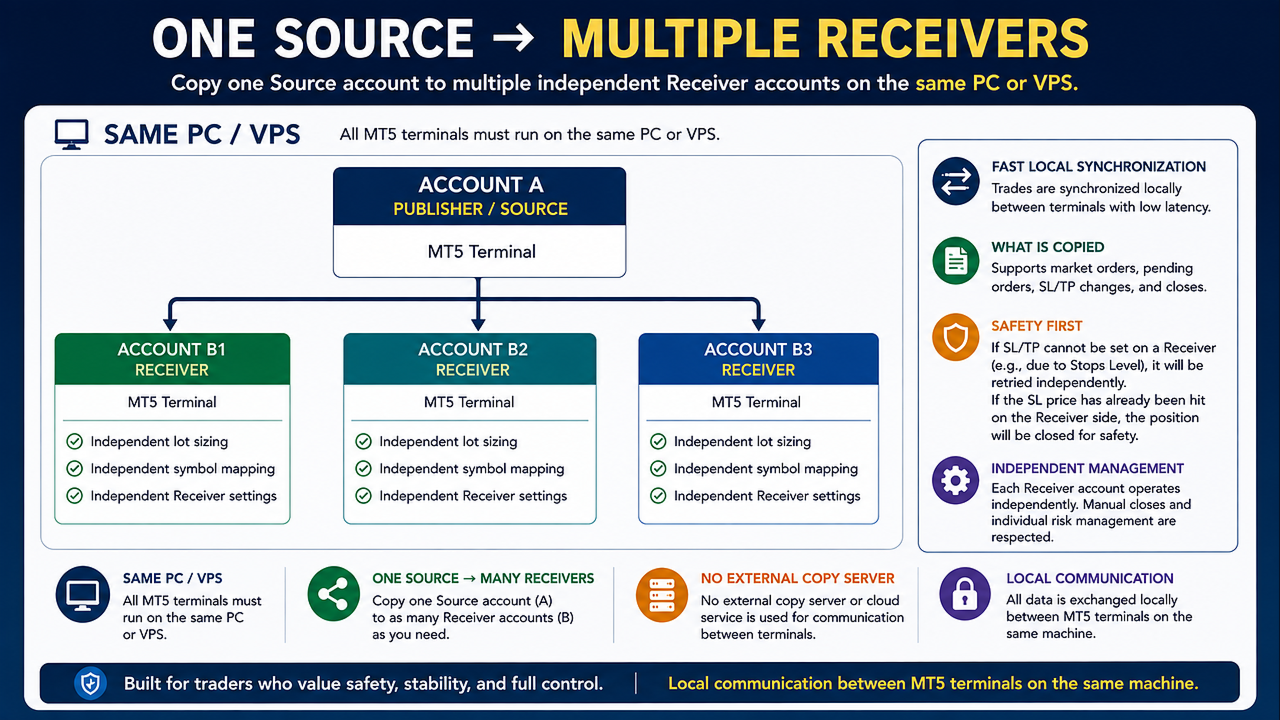
It supports both one-to-one synchronization and one-to-many synchronization, allowing one Source account to distribute its trading activity to multiple independent Receiver accounts.

This product does not generate trading signals or trading strategies.
Account A acts as the Source, while one or more Account B terminals act as Receivers.


Main Features

- One product for both Publisher and Receiver modes
- One Source account can synchronize to one or multiple Receiver accounts
- Independent management for each Receiver account
- Individual lot sizing and symbol mapping for each Receiver
- Local synchronization between MT5 terminals on the same PC or VPS
- No external copying server required
- Multi-symbol synchronization
- Different Source and Destination symbol names supported
- Market BUY and SELL synchronization
- Full close synchronization
- Partial close and position volume synchronization
- SL and TP creation, modification and removal
- Pending Limit, Stop and Stop Limit order support
- Pending order price and protection modification
- Fixed lot multiplier mode
- Balance-ratio lot sizing mode
- Automatic contract-size correction
- Account currency conversion
- Generic account-unit scaling for cent-style accounts
- Configurable handling of volumes below the broker minimum
- Volume rounding down or nearest-step rounding
- Large target volumes can be split into multiple orders
- Independent entry, synchronization and close price controls
- Automatic retry after trading operation failures
- Source-data freshness protection
- Magic Number, Position Identifier and internal mapping based ownership tracking
- Designed to avoid managing unrelated manual trades or trades from other EAs


How It Works

Install the same product in each MetaTrader 5 terminal.

Source:

Account A
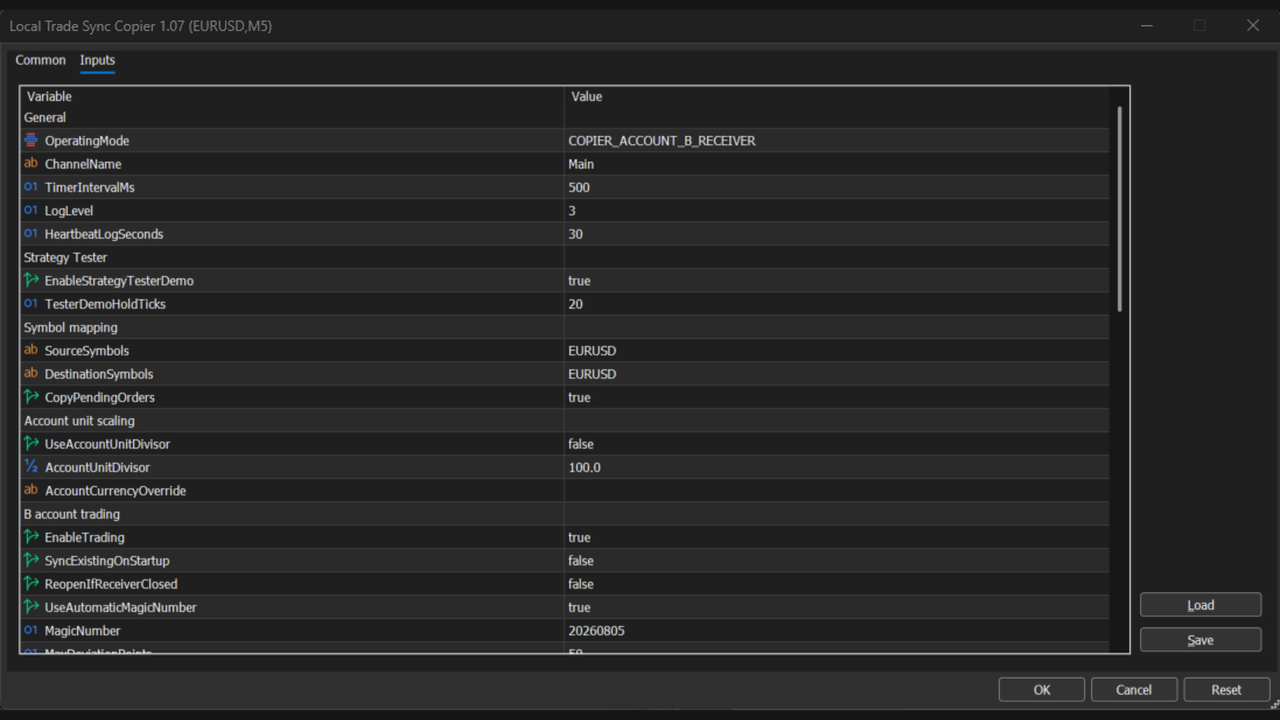
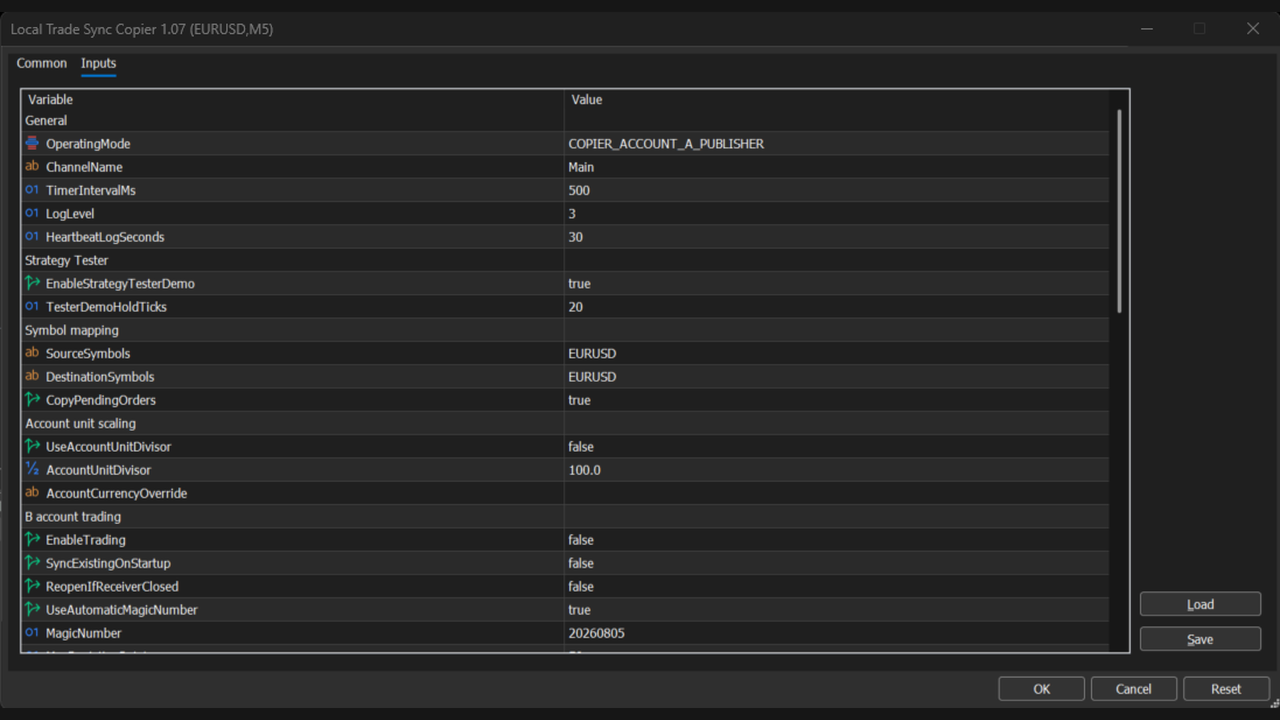
OperatingMode = COPIER_ACCOUNT_A_PUBLISHER

Receiver:

Account B
OperatingMode = COPIER_ACCOUNT_B_RECEIVER

Use the same ChannelName on the Source terminal and on every Receiver that should follow that Source.

The Source account publishes its trading state to the MetaTrader 5 common file area. Each Receiver independently reads the Source state and performs its own synchronization.


One-to-Many Configuration

The following configuration can be used on the same PC or VPS:

MT5 A:
Source Account / Publisher

MT5 B1:
Receiver Account 1

MT5 B2:
Receiver Account 2

MT5 B3:
Receiver Account 3

When a trade is created or changed on the Source account, B1, B2 and B3 independently read the Source state and synchronize according to their own Receiver settings.

Each Receiver uses its own mapping data, so the position management of B1 is kept separate from B2 and B3.

Each Receiver can also use different settings.

Example:

B1:
LotMultiplier = 1.0

B2:
LotMultiplier = 0.5

B3:
LotSizingMode = LOT_BALANCE_RATIO

This makes it possible to use the same Source account while applying different volume management rules to each Receiver.


Important Requirements

- The Source terminal and all Receiver terminals must run on the same physical computer or the same VPS.
- Each trading account should run in its own MT5 terminal.
- This product does not connect separate computers or separate VPS servers over the Internet.
- Receiver accounts must use hedging mode. Netting mode is not supported on the Receiver side.
- Use only one Publisher for each ChannelName.
- Use only one Receiver instance per Receiver account and ChannelName.
- Source and Destination symbols should normally represent the same underlying instrument.
- Algorithmic trading must be enabled on each Receiver terminal.
- Execution prices, spreads, Stop Levels, Freeze Levels, minimum volumes and maximum volumes depend on the broker. Exact identical execution between the Source and Receiver accounts cannot be guaranteed.


Symbol Mapping

Multiple symbols can be configured as comma-separated lists.

Example:

Source Account:
SourceSymbols = EURUSD,XAUUSD,USDJPY

Receiver Account:
SourceSymbols = EURUSD,XAUUSD,USDJPY
DestinationSymbols = EURUSD,XAUUSD,USDJPY

Broker suffixes can also be mapped.

Example:

SourceSymbols = EURUSD,XAUUSD
DestinationSymbols = EURUSD+,XAUUSD+

When multiple Receivers are used, each Receiver can have its own DestinationSymbols configuration.


Lot Sizing

LOT_FIXED_MULTIPLIER:

The Source position volume is multiplied by LotMultiplier to calculate the target volume for each Receiver.

LOT_BALANCE_RATIO:

The lot multiplier is calculated using the balance ratio between the Source account and each Receiver account.

Currency conversion, contract-size correction and account-unit scaling can be enabled when required.

When multiple Receiver accounts are used, each Receiver calculates its target volume independently using its own settings.


Price Difference Control

Entry, position synchronization and closing operations have independent optional price controls.

If the Receiver price is outside the configured acceptable range, the operation can remain pending and be retried instead of being permanently discarded.


Safety and Retry Logic

If Source data stops updating, Receiver reconciliation is paused so that an old snapshot is not incorrectly treated as the current trading state.

Failed entries, partial closes, full closes, pending-order operations and SL/TP modifications retain their mapping and can be retried.

Each Receiver account is managed with its own independent mapping data.


Getting Started

It is strongly recommended to perform the first setup on demo accounts.

1. Run the required number of MT5 terminals on the same PC or VPS.
2. Attach Local Trade Sync Copier to each terminal.
3. Set the Source account to Publisher mode.
4. Set each destination account to Receiver mode.
5. Use the same ChannelName on the Source and all Receivers.
6. Configure SourceSymbols and DestinationSymbols for each Receiver.
7. Enable EnableTrading on each Receiver.
8. Test synchronization using a small trading volume.

To add another Receiver account, launch another MT5 terminal on the same PC or VPS and configure it as a Receiver using the same ChannelName.


Important Notice

This product is a trade synchronization utility. It does not provide trading signals, investment advice, a trading strategy or guaranteed profitability.

Differences between Source and Receiver results can occur because of broker conditions, PC/VPS conditions, spreads, slippage, margin requirements, symbol specifications, trading hours and volume restrictions.

When multiple Receivers are used, execution results may also differ between Receiver accounts because each broker and account can have different trading conditions.

Always verify your configuration on demo accounts before using the product in live trading.


Official User Manual
For detailed setup instructions, explanations of all input parameters, SL/TP synchronization, lot-sizing settings, troubleshooting, and important limitations, please refer to the official user manual.

Local Trade Sync Copier v1.07 - Official User Manual
[https://www.mql5.com/ja/blogs/post/774152]
Produits recommandés
MT5 to MT5 Trade Copier – Fast and Reliable Trade Copying Solution The MT5 Trade Copier is a powerful tool designed to copy trades seamlessly between MetaTrader 5 accounts with minimal latency and high accuracy. Built for speed, flexibility, and ease of use, the copier works across different brokers, even when symbols use different prefixes or suffixes. This Expert Advisor is suitable for professional traders, signal providers, fund managers, and traders who manage multiple accounts. Key Featur
Copy your MT5 trades to accounts anywhere in the world with the   MetaToolsLab Master EA . Unlike local copiers that only work between terminals on the   same   PC or VPS, MetaToolsLab uses a secure cloud relay — so you can broadcast your trades to followers across   different computers, VPS providers, brokers, and continents , with   sub-second delivery   and   no broker passwords . Whether you're a signal provider, a multi-account trader, or an account manager, the Master EA installs in about
FREE
QuickCopy – Simple MT5 Local Trade Copier with Volume Factor QuickCopy is a lightweight and efficient MT5 local trade copier designed for traders who want to copy trades between accounts on the same computer quickly and reliably. With its simple setup and intuitive interface, QuickCopy makes managing multiple accounts easier than ever. Key Features: Local Account Copying: Instantly copies trades from your master account to one or more client accounts running on the same computer. Volume Factor A
Trade copier MT5
Alfiya Fazylova
4.61 (56)
Trade Copier est un utilitaire professionnel conçu pour copier et synchroniser les commandesentre les comptes de trading. Les commandes sont copiées du compte/terminal du fournisseur vers le compte/terminal du destinataire, qui sont installés sur le même ordinateur ou vps. Avant d'acheter, vous pouvez tester la version démo sur un compte démo. Version démo ici . Instructions complètes ici . Principales fonctionnalités et avantages: Prend en charge la copie des commandes MT5> MT5, MT4> MT5, MT5>
Apex Trade Copier MT5
Asanka Manikgama Arachchilage Don
Apex Trade Copier is a local trade copier for MetaTrader 4 and MetaTrader 5. It copies trades between MT4 and MT5 accounts on the same computer or VPS and works in every combination, including MT4 to MT5 and MT5 to MT4, across different brokers. It runs locally through a shared file, so there is no internet dependency, no DLL, and no monthly fee. One master account can feed any number of client accounts, and a single client can copy from up to eight masters at once. Each client sizes its trades
Copy Trader for MT5   is a professional cross-terminal trade copier that instantly replicates every trade from a Master account to one or more Slave accounts running on the same PC. No third-party servers, no cloud subscriptions, no VPS required — it works entirely through MetaTrader 5's shared common folder, giving you near-zero latency copying between terminals.
The program is use to copy trading from MT5 to MT4 and MT5 on local PC or copy  over the Internet .  Now you can easy copy trades to any where or share to friends. Only run one Flash Server on VPS, also need allow the apps if you turn on Windows Firewall. Can not add more than 20 account copier to server at same time,  include both  MT4 and MT5 Get free Copier EA  for MT4 and MT5 (only  receive signal), download here Instants copy, speed smaller 0.1 seconds, easy to setup How to setup and guide
Fast Copier Pro
Felixs Triang Rosario Alves
Fast Copier PRO - Ultimate Cross Broker, Local Connection and Cross PC/VPS only one in the world Fast Copier PRO MT5 is an ultra-lightweight, lightning-fast, and all-in-one local trade copying solution for MetaTrader 5. Designed for maximum efficiency, this utility functions as both MASTER and SLAVE within a single file.  Fast Copier PRO Promotial price $55 for 10 buyers and final price in $80 IMPORTANT PREREQUISITE : This is a Hybrid Copier. You can run both the MASTER and SLAVE terminals on t
Copy your MT5 trades to accounts anywhere in the world with the   MetaToolsLab Slave EA . Unlike local copiers that only work between terminals on the   same   PC or VPS, MetaToolsLab uses a secure cloud relay — so you can broadcast your trades to followers across   different computers, VPS providers, brokers, and continents , with   sub-second delivery   and   no broker passwords . Whether you're a signal provider, a multi-account trader, or an account manager, the Slave EA installs in about a
FREE
Run one strategy across every account you trade. Revanche Miroir Local Copier is a free local trade copier that mirrors trades between MetaTrader 5 accounts on the same computer, in real time. One program plays both parts: set it as the Master on the account you trade, and as a Slave on each account that should follow. A complete copier, free. It copies on any symbol, in any account currency, and between different brokers. If the master falls silent, open trades are held rather than closed, and
FREE
Metatrader to telegram copier
Lawrence Chilambe Mkandawire
MT5 to Telegram Copier Pro is a powerful Expert Advisor built to solve one of the biggest challenges faced by signal providers and active traders: fast, reliable, and professional trade broadcasting . Many traders lose subscribers, miss opportunities, or create confusion because they manually type signals, delay trade updates, or send incomplete trade details. Others open trades from their phone and struggle to instantly share them with their Telegram audience. This tool eliminates those problem
LT Trade Copy MT5 - Copieur de Trades Haute Performance et Haute Précision LT Trade Copy MT5 est un outil de haute performance conçu pour les traders qui ont besoin de répliquer leurs opérations entre différents terminaux MetaTrader 5 (et MetaTrader 4) sur le même ordinateur ou sur un réseau local (LAN), avec une latence minimale et une précision absolue. Que vous soyez gestionnaire de comptes, fournisseur de signaux ou trader opérant simultanément chez plusieurs courtiers (brokers), cet utilita
Run one strategy, one hand, across every account you trade. Revanche Miroir mirrors trades between MetaTrader 5 accounts on the same computer, in real time. One master can feed many accounts, or up to eight masters can run side by side, each account following the one you choose. A serious power tool for running the same book across many accounts. Every symbol, every account currency, every broker. Full control over sizing, symbol mapping and how it behaves when something goes wrong. Not a toy co
# Zikiman CopyTrader — Copieur de trades MT5 local **Zikiman CopyTrader** est un copieur MT5 vers MT5 rapide et pratique, conçu pour plusieurs terminaux MetaTrader 5 installés sur le **même ordinateur Windows ou VPS**. Un terminal devient l'**Émetteur (Master)** et un ou plusieurs terminaux deviennent des **Récepteurs**. Les opérations compatibles sont synchronisées localement, tandis que chaque Récepteur conserve ses propres règles de volume, filtres et limites de sécurité. La communication
FREE
CopyTrader Pro FAST MT5 — FREE Real-Time Trade Copier | MT4 ↔ MT5 Cross-Platform | 20ms Latency CopyTrader Pro FAST is a professional trade copier Expert Advisor that copies trades between MetaTrader terminals in real time using a high-speed file-based communication system. No VPS, no network setup, no DLL — just attach and copy. FREE VERSION : Copies up to 1 trade at a time. Upgrade to the full version, Copy Trader Pro FAST MT5 , for unlimited copying. Key Features 20ms refresh rate — in
FREE
Gold Flow Seconds Chart transforms MetaTrader 5 into a fast and convenient workspace for manual trading. The utility builds 5-second and 10-second candles from the tick data provided by your broker. M1, M5, M7, M15, M30, H1 and H4 views are also available in the same interface. MOUSE-DRIVEN CHART NAVIGATION • Drag the chart horizontally and vertically with the left mouse button. • Use the mouse wheel to change candle width. • Use Ctrl + mouse wheel to adjust the vertical scale. • Return to t
Auto Trade Copier is designed to copy trades to multiple MT4, MT5 and cTrader accounts/terminals with 100% accuracy. The provider and receiver accounts must be on the same PC/VPS. With this tool, you can copy trades to receiver accounts on the same PC/VPS. All trading actions will be copied from provider to receiver perfectly. This version can be used on MT5 accounts only. For MT4 accounts, you must use Auto Trade Copier (for MT4). Reference: - For MT4 receiver, please download Trade Receiver Fr
Demo copier of deals from MetaTrader 5 to MetaTrader 5 ( MetaTrader 4<->MetaTrader 4 version is available ; with both versions, you can copy MetaTrader 5<->MetaTrader 4, MetaTrader 4<->MetaTrader 5, MetaTrader 5<->MetaTrader 5, MetaTrader 4<->MetaTrader 4). Works only in the mode of hedging. Spread filter. Select the best price (start copying positions with a profit or loss). Configure the lot size, fixed or ratio-based (provider signals can be copied with an increased lot). Configure order copy
FREE
Copy Trade PRO - Slave EA (FREE with Master EA) Receive Trades Automatically from Your Master Account Copy Trade PRO - Slave EA is a professional trade receiver designed for MetaTrader 5. It automatically mirrors trades from the Copy Trade PRO Master EA with fast execution, intelligent symbol matching, and flexible risk management.    Telegram Support Link :   @GoldBotXSupport Need help or have questions? Contact me on WhatsApp:      https://wa.me/447378910922 This Slave EA is complete
FREE
Local Trade Copiier is a professional utility designed to copy and synchronize trades between trading accounts. With its easy 1-minute setup, this trade copier allows you to copy trades between multiple MetaTrader terminals on the same Windows computer with lightning-fast copying speeds of under 0.5 seconds. Whether you're a beginner or a professional trader, the Local Trade Copiier MT5 offers a wide range of options to customize it to your specific needs. It's the ultimate solution for anyone l
Just Copier MT5
Agung Imaduddin
4.75 (4)
"Just copier" is designed to copy trading without any complicated settings. The copy can be done in one PC. One EA can be set as master (provider) or slave (receiver). The receiver lot can be set to multiple providers lots. Please also check this product at fxina.hostingerapp.com.  Any type of copy is available. MT4 -> MT5 MT4 -> MT4 MT5 -> MT5 MT5 -> MT4 If you want to copy MT4 -> MT5 or MT5 -> MT4, please purchase "Just copier" for MT4 and "Just copier" for MT5 separately. Just Copier can copy
Indicateur unique qui met en œuvre une approche professionnelle et quantitative pour signifier le trading de réversion. Il capitalise sur le fait que le prix dévie et revient à la moyenne de manière prévisible et mesurable, ce qui permet des règles d'entrée et de sortie claires qui surpassent largement les stratégies de trading non quantitatives. [ Installation Guide | Update Guide | Troubleshooting | FAQ | All Products ] Des signaux de trading clairs Étonnamment facile à échanger Couleurs et t
Manyal trading system, CovEchoTrend Robot, focuses on reliability and flexibility. By employing statistical analysis methods to study the relationships between the base indicator and market patterns, the system enables a deeper understanding of market processes. Intelligent pattern analysis: The application of statistical data processing helps identify key trend reversal points more accurately, signaling significant market shifts. Informed decision-making is based on the intersection of indicato
SPECIAL LAUNCH OFFER: $30 (1-Month Rent) Limited time offer to build our community and gather feedback! AmbM GOLD Institutional Scalper A high-precision M5 algorithm for XAUUSD (Gold) , engineered to trade exclusively at Institutional Liquidity Levels ($5/$10 psychological marks). PERFORMANCE DATA (BUY ONLY) • Win Rate: 87.09%. • Safe Growth: +$4,113 profit on $10k (13.75% Max Drawdown). • Extreme Stress Test: Successfully generated +$22,997 in a 5-year stress test (2020-2026), proving
Fast CopyTrade LAN
Achraf Mouine
5 (6)
Fast CopyTrade LAN — Local Trade Copier for MetaTrader 5 Overview Fast CopyTrade LAN is a fast, DLL-free local trade copier for MetaTrader 5. It instantly copies trades between MT5 accounts on the same PC — copying OPEN, PARTIAL, MOD (SL/TP) and CLOSE from a Provider to one or more Receivers. This copy trader uses the MT5 Files folder for secure local messaging, requires no external files, no DLLs, and is fully Market-compliant. Advantages Fastest local copy trading with very low latency Market
FREE
TradeCopy MT5 Demo is an efficient MT4, MT5 single system only used on MT5 demo account. Features: 1, can achieve cross-MT4 and MT5 each other. 2. The transmitting end and the receiving end are in the same file, which is convenient to use. 3, can achieve cross-platform follow-up. 4, more ways to follow the order, you can follow the balance, net worth, lot ratio or fixed lot. 5, can enlarge or reduce the amount of the single. 6, the currency has a different name, you can convert. Use the wizard:
FREE
Neuron Trade Copier Universal MT5 Copieur de trading universel multi-actifs pour MetaTrader 5 Neuron Trade Copier Universal MT5 est une solution professionnelle de copie de transactions développée pour MetaTrader 5 . Le même logiciel peut fonctionner en mode Sender (Master) ou Receiver (Slave) et permet de copier les opérations entre différents comptes MT5. PRINCIPALES FONCTIONNALITÉS Sender / Master Le Sender fonctionne comme compte source. Lorsqu'une position ou un ordre en attente est ouvert
ApeX Journal MT5
Korakot Santithammarak
View User Manual       ApeX Trade Manager MT5  →     ApeX Journal MT5  →     ApeX Indicator SMC MT5  →     ApeX Indicator ICT Concepts MT5  →     ApeX Indicator Volume Profile MT5  →    ApeX Indicator ICT Macros MT5  → Your broker keeps a list of your trades. It does not keep a record of your trading. ApeX Journal turns the history already sitting in MetaTrader into the journal you keep meaning to write. Powered by ApeX Journal A complete trading journal, built directly inside MetaTrader 5.
Latency Hunting
Syamsurizal Dimjati
Latency and connection stability are truly the "lifeblood" of a trader, especially if you do scalping or news trading, where a difference of just a few milliseconds (ms) can determine whether your order experiences slippage or not. Let's break it down step by step so everything is clear, starting from the connection path to how we can implement this dashboard idea in MQL5. 1. Connection Path: What Does the Number in the Bottom-Right Corner Actually Mean? When you see the traffic bars and latenc
FREE
Guardian Copier – Le copieur de trades local protégé pour MT5, avec protection du drawdown pour comptes de prop firms et comptes financés. PRIX DE LANCEMENT – LES 10 PREMIÈRES COPIES : Guardian Copier démarre à 99 $. Après les 10 premières copies : 149 $, prix final 199 $. Option de location 35 $/mois pour tester sur un cycle de compte complet. La plupart des copieurs locaux font une chose : ils copient. Guardian Copier en fait deux : il copie vos trades entre terminaux MetaTrader 5 sur la même
Les acheteurs de ce produit ont également acheté
Trade Assistant MT5
Evgeniy Kravchenko
4.43 (216)
It helps to calculate the risk per trade, the easy installation of a new order, order management with partial closing functions, trailing stop of 7 types and other useful functions. Additional materials and instructions Installation instructions - Application instructions - Trial version of the application for a demo account Line function -   shows on the chart the Opening line, Stop Loss, Take Profit. With this function it is easy to set a new order and see its additional characteristics bef
Bienvenue sur Trade Manager EA, l’outil ultime de gestion des risques conçu pour rendre le trading plus intuitif, précis et efficace. Ce n’est pas seulement un outil d’exécution d’ordres ; c’est une solution complète pour la planification des trades, la gestion des positions et le contrôle des risques. Que vous soyez débutant, trader expérimenté ou scalpeur ayant besoin d’une exécution rapide, Trade Manager EA s’adapte à vos besoins, offrant une flexibilité sur tous les marchés, des devises et i
================================================================================ POC BREAKOUT - V20.72. Full Professional Grade Toolkit ================================================================================ POC Breakout is a full MetaTrader 5 trading dashboard for discretionary traders who want breakout signals, Point of Control (POC) context, volume profiles, order flow, market structure, news, alerts, and advanced trade planning in one professional workspace. Attached directly to you
Telegram to MT5 Multi-Channel Copier   copie automatiquement les signaux de trading de vos canaux Telegram directement vers MetaTrader 5. Pas de bots, pas d'extensions de navigateur, pas de copie manuelle. Un signal arrive sur Telegram et l'EA ouvre le trade dans votre terminal en quelques secondes. Et avant de copier un canal, le backtester intégré vous montre ce que ce canal aurait fait sur votre compte. Le produit comprend deux composants : une application Windows qui écoute vos canaux Telegr
TradePanel MT5
Alfiya Fazylova
4.88 (170)
Trade Panel est un assistant commercial multifonction. L'application contient plus de 50 fonctions de trading pour le trading manuel et permet d'automatiser la plupart des tâches commerciales. Instructions d'utilisation : https://www.mql5.com/fr/blogs/post/762589 Version d'essai de l'application pour un compte démo : https://www.mql5.com/fr/blogs/post/762644 Comment installer l'application : https://www.mql5.com/fr/blogs/post/762645 Comment tester l'application en mode visuel : https://www.mql5.
Copiez les signaux Telegram avec vos propres règles de trading Telegram to MT5 Signal Trader copie automatiquement les signaux de trading au format texte provenant de canaux et de groupes Telegram publics et privés vers MetaTrader 5. Gérez plusieurs fournisseurs et comptes MT5 depuis une seule application de bureau, avec des paramètres de risque et de trading propres à chaque fournisseur . Aucun bot Telegram ni configuration d'API n'est nécessaire pour copier les signaux. Connectez-vous simpleme
Farmed Hedge Yield Farming | All Markets (Manual - Hybrid - Semi/Automated EA) VERIFIED TRADING RESULTS - Farmed Hedge Yield Axi Copy:  https://www.mql5.com/en/signals/2356376 - Farmed Hedge Yield Exn Copy:   https://www.mql5.com/en/signals/2356404 - Farmed Hedge Yield V Copy:  https://www.mql5.com/en/signals/2357156 IMPORTANT NOTICE: FarmedHedge is a MANUAL-FOCUSED TRADING UTILITY ,not a fully automated EA. Results shown on this Signal include manual trades and overall strategic management.
Exp COPYLOT CLIENT for MT5
Vladislav Andruschenko
3.97 (35)
Copieur professionnel de trades pour MetaTrader 5 Un copieur de trades rapide, professionnel et fiable pour MetaTrader . COPYLOT permet de copier des trades Forex entre les terminaux MT4 et MT5 avec prise en charge des comptes Hedge et Netting . La version MT5 de COPYLOT prend en charge : - MT5 Hedge → MT5 Hedge - MT5 Hedge → MT5 Netting - MT5 Netting → MT5 Hedge - MT5 Netting → MT5 Netting - MT4 → MT5 Hedge - MT4 → MT5 Netting Version MT4 Description complète + DEMO + PDF Comment acheter Comme
Power Candles Strategy Scanner - Outil de recherche de configurations multi-symboles à optimisation automatique Le Power Candles Strategy Scanner utilise le même moteur d'auto-optimisation que celui qui alimente l'indicateur Power Candles, pour chaque symbole de votre Market Watch, en parallèle. Un panneau vous indique quels symboles sont statistiquement négociables à l'instant, quelle stratégie est la plus performante pour chacun, la paire Stop Loss / Take Profit optimale, et vous alerte dès qu
Signal Trading View to MT5 Pro
Mirel Daniel Gheonu
4.5 (2)
Signal TradingView to MT5 Pro Automator Exécution professionnelle instantanée entre TradingView et MetaTrader 5 Automatisez votre stratégie de trading avec le pont de communication le plus robuste entre les alertes TradingView et l'exécution réelle sur MT5. Conçu pour les traders qui exigent vitesse, flexibilité et une gestion des risques impeccable, cet Expert Advisor transforme tout message d'alerte en un ordre au marché ou à cours limité précis. POINTS FORTS ET AVANTAGES Moteur d'analyse univ
MT5 to Telegram Signal Provider est un utilitaire facile à utiliser et entièrement personnalisable qui permet l'envoi de signaux spécifiés vers un chat, un canal ou un groupe Telegram, transformant ainsi votre compte en fournisseur de signaux. Contrairement à la plupart des produits concurrents, il n'utilise pas d'importations DLL. [ Démonstration ] [ Manuel ] [ Version MT4 ] [ Version Discord ] [ Canal Telegram ]  New: [ Telegram To MT5 ] Configuration Un guide utilisateur étape par étape est
Premium Trade Manager - Le panneau de trading avec un coach intégré Premium Trade Manager intègre un coach de trading directement dans votre graphique, avec un moteur d'exécution complet en dessous. Configurez le trade comme vous le faites toujours, puis laissez Max, votre coach de trading IA, analyser ce setup exact par rapport à votre compte en direct et vous donner un verdict clair avant de vous engager : le stop est-il discipliné, le risque est-il raisonnable, une publication à fort impact e
HINN MagicEntry Extra
ALGOFLOW OÜ
4.74 (19)
HINN MAGIC ENTRY – the ultimate tool for entry and position management! SIMPLE. FASTEST. INTUITIVE. MAX AUTOMATED. Place orders by selecting a level directly on the chart! full description   ::  demo-version  :: 60-sec-video-description Key features: - Market, limit, and pending orders - Automatic lot size calculation - Automatic spread and commission accounting - Unlimited partitial take-profits  - Breakeven and trailing stop-loss and take-profit  functions - Invalidation leves - Intuitive, a
EA Overfitter
Stephen J Martret
5 (1)
That backtest looks great. But will it still be making money tomorrow, next week, next month? EA Overfitter re-runs your EA on 100 price histories it has never seen. One score tells you if the edge is real. A backtest tells you what an EA did on one price history — the one that happened to occur. What you cannot tell from it is how much of that result was the strategy and how much was the particular path. EA Overfitter answers that. It builds up to 100 synthetic price histories your EA has n
Footprint Chart Pro — Professional OrderFlow EA for MetaTrader 5 Version 6.34 | Professional tool for real traders | Institutional-Grade Visualization DEMO USERS - PLEASE SELECT EVERY TICK / REAL TICK WHEN TESTING AND YOU HAVE DOWNLOADED HISTORICAL DATA. IF YOU SEE A WAITING SCREEN AND IT IS NOT DOWNLOADING, IT MEANS YOU HAVE LOW HISTORICAL DATA. TRY 1 MIN AND 5 MIN FIRST ON 1 DAY DATA. ONE DAY DATA SHOULD BE THE NEWEST AND MOST CURRENT DATE. PLEASE WAIT UNTIL THE MARKET HAS ROLLED OVER PERIOD.
EA Slipstream
Stephen J Martret
5 (1)
Your backtest filled every order at the price it asked for. Your account does not. EA Slipstream measures what execution costs your EA, using your own fills, slippages and spreads to show you the true performance of your EA. A backtest prices every trade at the level the EA named. In live trading a pending order fills at whatever price is available when it triggers, a stop closes wherever the market is when it is hit, and the spread at that moment is whatever the account was quoting. The differ
Trade Manager DaneTrades
Levi Dane Benjamin
4.23 (30)
Trade Manager pour vous aider à entrer et sortir rapidement des transactions tout en calculant automatiquement votre risque. Y compris des fonctionnalités pour vous aider à éviter le sur-trading, le trading de vengeance et le trading émotionnel. Les transactions peuvent être gérées automatiquement et les mesures de performances du compte peuvent être visualisées dans un graphique. Ces fonctionnalités rendent ce panneau idéal pour tous les traders manuels et contribuent à améliorer la plateforme
Dynamic Fibonacci Grid
Tsvetan Tsvetanov
5 (1)
Présentation de la dernière version du Dynamic Fibonacci Grid Dashboard pour MT5. Désormais doté de nombreuses nouvelles fonctionnalités, ce tableau de bord transforme votre expérience de trading et vous permet de visualiser le marché et l’action des prix sous un angle totalement différent. Découvrez de nouvelles possibilités grâce à l’analyse simultanée de plusieurs périodes et de plusieurs symboles. Interface conviviale pour le trading manuel et la gestion des positions, avec une capacité éte
Trade Indicator Assistant   is a powerful MT5 utility designed to turn indicators into automated trading systems. Its main feature is the ability to automatically detect an indicator’s   BUY and SELL signal buffers , without requiring you to know the buffer numbers, search through indicator settings, or modify the indicator source code. Bonus Indicator:   After purchasing Trade Indicator Assistant, contact me to receive   Trade Signal Pro   completely free as a bonus indicator. [Download Demo V
Welcome to ENTRY IN THE ZONE AND SMC MULTI TIMEFRAME Entry In The Zone and SMC Multi Timeframe is a real-time market analysis tool based on Smart Money Concepts (SMC), designed to analyze market structure, price direction, and key trading zones. It supports both Single-Timeframe Analysis and Multi-Timeframe Analysis, providing a clearer view of the overall market structure across multiple timeframes, with real-time BUY / SELL signals that do not repaint. It is designed to help filter trading opp
Grid Manual MT5
Alfiya Fazylova
4.73 (22)
Grid Manual est un panneau de trading permettant de travailler avec une grille d'ordres. L'utilitaire est universel, possède des paramètres flexibles et une interface intuitive. Il fonctionne avec une grille d'ordres non seulement dans le sens des pertes, mais aussi dans le sens de l'augmentation des profits. Le commerçant n'a pas besoin de créer et de maintenir une grille d'ordres, l'utilitaire le fera. Il suffit d'ouvrir une ordre et "Grid Manual" créera automatiquement une grille de ordres po
DrawDown Limiter
Haidar Lionel Haj Ali
5 (22)
DrawDown Limiter v5.0 — Contrôleur avancé de protection de compte DrawDown Limiter v5.0 est un contrôleur de protection de compte côté client conçu pour surveiller votre compte de trading et réagir automatiquement lorsque les limites configurées de risque, de profit, d’actualités, de planification, de rollover ou de nombre de positions sont atteintes. Il peut surveiller les opérations manuelles, les stratégies automatisées, plusieurs Expert Advisors, les ordres en attente et les positions ouvert
Trade Dashboard MT5
Fatemeh Ameri
4.94 (134)
Trade Dashboard simplifies how you open, manage, and control your trades, with built-in lot size calculation. It allows you to execute trades, manage risk, and control positions directly on the chart, with tools such as partial close, breakeven, and trailing stop. Designed to reduce manual work and help you stay focused on your trading decisions. A demo version is available for testing. Detailed explanations of features are provided within the MQL5 platform. Installation instructions are include
The product will copy all telegram signal to MT5 ( which you are member) , also it can work as remote copier.  Easy to set up, copy order instant, can work with almost signal formats, image signal,  s upport to translate other language to English Work with all type of channel or group, even channel have "Restrict Saving Content", work with  multi channel, multi MT5 Work as remote copier: with signal have ticket number, it will copy exactly via ticket number. Support to backtest signal. How to s
Anchor Trade Manager
Kalinskie Gilliam
5 (9)
Your EAs cannot see each other, but Anchor can. Anchor gives you one place to coordinate your EAs, manage risk, and decide when trading is allowed. It works alongside the trading bots you already use without any changes to them. The Problem One EA opens a trade. Then another starts trading. The next thing you know, you wake up to multiple grids built across your account. Each EA may be doing exactly what it was designed to do, but together they can place far more risk on your account than you in
FUTURES ORDERFLOW FOOTPRINT CHART Professional OrderFlow EA for MetaTrader 5 Version 1.01| Professional tool for real traders | Institutional-Grade Visualization STRATEGY TESTER USERS - PLEASE SELECT EVERY REAL TICK WHEN TESTING AND YOU HAVE DOWNLOADED HISTORICAL DATA. IF YOU SEE A WAITING SCREEN AND IT IS NOT DOWNLOADING, IT MEANS YOU HAVE LOW HISTORICAL DATA. TRY 1 MIN AND 5 MIN FIRST ON 1 DAY DATA. ONE DAY DATA SHOULD BE THE NEWEST AND MOST CURRENT DATE. PLEASE WAIT UNTIL THE MARKET HAS ROL
The Expert Advisor will help you forward all alert from  MetaTrader 5 to Telegram channel/ group.  All alert must save to folder <Data folder>MQL5\Files\Alerts\ , text file with format *.txt and screenshot with format *.gif or *.png. Parameters: - Telegram Bot Token: - create bot on Telegram and get token. - Telegram Chat ID:  - input your Telegram user ID,  group / channel ID - Forward Alert: - default true, to forward alert. - Send message as caption of Screenshot: - default false, set true t
The product is used to trade base on any Alert signal in MT5 Easy to setup, simple format with custom keyword All option to management orders as trailing stop, breakeen, partial close, time filter, news filter ... Option to auto open grid orders How to setup and guide: Let read all details about setup and download indicator for auto get   Alert Signal   here Do not buy if you even can not install demo EA to your VPS ( some VPS block download EA from mql5 market) We always bring customers high q
Timeless Charts
Samuel Manoel De Souza
5 (8)
Timeless Charts est un utilitaire de trading tout-en-un destiné aux traders professionnels. Il combine des types de graphiques personnalisés tels que les graphiques en secondes et Renko avec une analyse avancée du flux d’ordre s utilisant Footprints , Clusters , Profils de Volume , études VWAP et outils d’analyse ancrés pour une compréhension plus approfondie du marché. Le trading et la gestion des positions sont effectués directement depuis le graphique via un panneau intégré de gestion des ord
Prop Guardian Risk Manager MT5 – Drawdown, Risk & Hedge Protection for Prop Firm and Managed Accounts Prop Guardian Risk Manager is a professional risk-control utility for MetaTrader 5, designed for prop firm traders, money managers and anyone who wants strict account-level risk protection. It does not generate trading signals, strategy entries or trading decisions. Instead, it runs in the background, monitors your account risk and can automatically block new exposure, close managed positions or
Plus de l'auteur
Flight Recorder for MT5 Trade Execution Trade Lifecycle Forensics is a read-only monitoring utility. Attach one instance before the trading activity you want to observe. The utility watches account-wide trade transactions generated by manual trading and other Expert Advisors, then connects related request, order, deal, position, and pending-order evidence into reviewable records. The utility does not open, modify, cancel, or close trades. It has no trading buttons and does not control other
History Integrity Scanner MT5 See what closed-bar history your current MT5 terminal actually has available before you rely on it for analysis or development. History Integrity Scanner MT5 is a read-only utility that scans a configurable symbol and timeframe matrix directly inside the terminal. Its primary purpose is terminal-native, direct, read-only, multi-symbol/timeframe closed-bar history inspection. It summarizes synchronization, requested versus copied bars, coverage dates, timestamp
Chart Context Keeper MT5 Change timeframe without losing the historical moment you were studying. MT5's fixed chart position helps with zooming, but a timeframe change can move the chart away from the date under review. Chart Context Keeper adds the missing continuity: attach it once, then keep using MT5's normal timeframe controls. Why it is useful • Keeps the captured historical time visible after a timeframe change • Adds no dashboard, recurring button, modal, or confirmation • Runs as
Chart View Slots MT5 Chart View Slots MT5 adds a compact visual-view dock directly to an MT5 chart. Switch among Focus, Trade and Review appearances without opening Chart Properties, loading a template or moving to a separate dashboard. Capture your own appearance into any slot, apply it to the active chart or all open charts, and use Undo to restore the appearance that existed immediately before the last apply. Main workflow 1. Attach the Indicator to one chart. 2. Click Focus, Trade or
Filtrer:
Aucun avis
Répondre à l'avis