Session Countdown Panel
- Indicateurs
-
Felicien Badou Diouf
 Founder & CEO of WorkFusionApp, Inc., a Delaware-incorporated U.S. technology company specializing in quantitative trading, algorithmic execution, artificial intelligence, and financial automation.
 - Version: 1.0
- Activations: 5
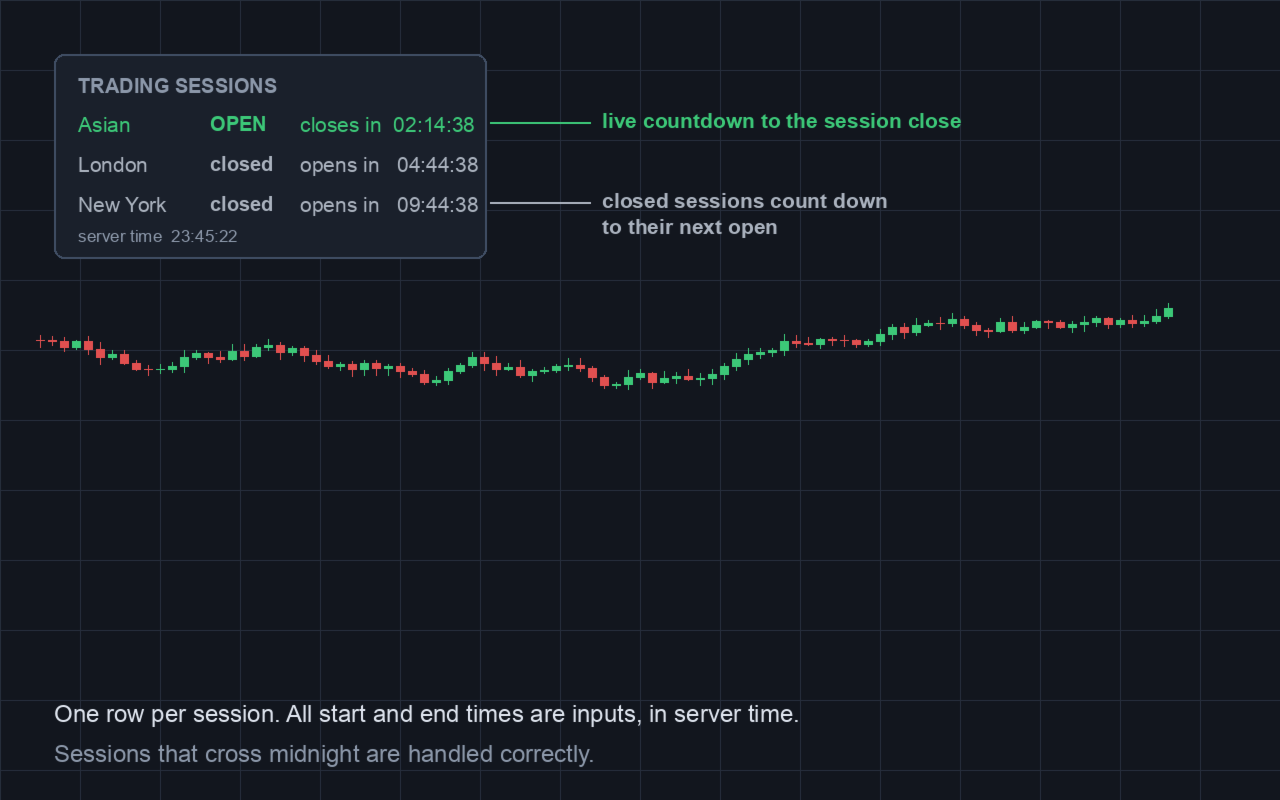
Trading Session Countdown Panel London New York Asian Timer
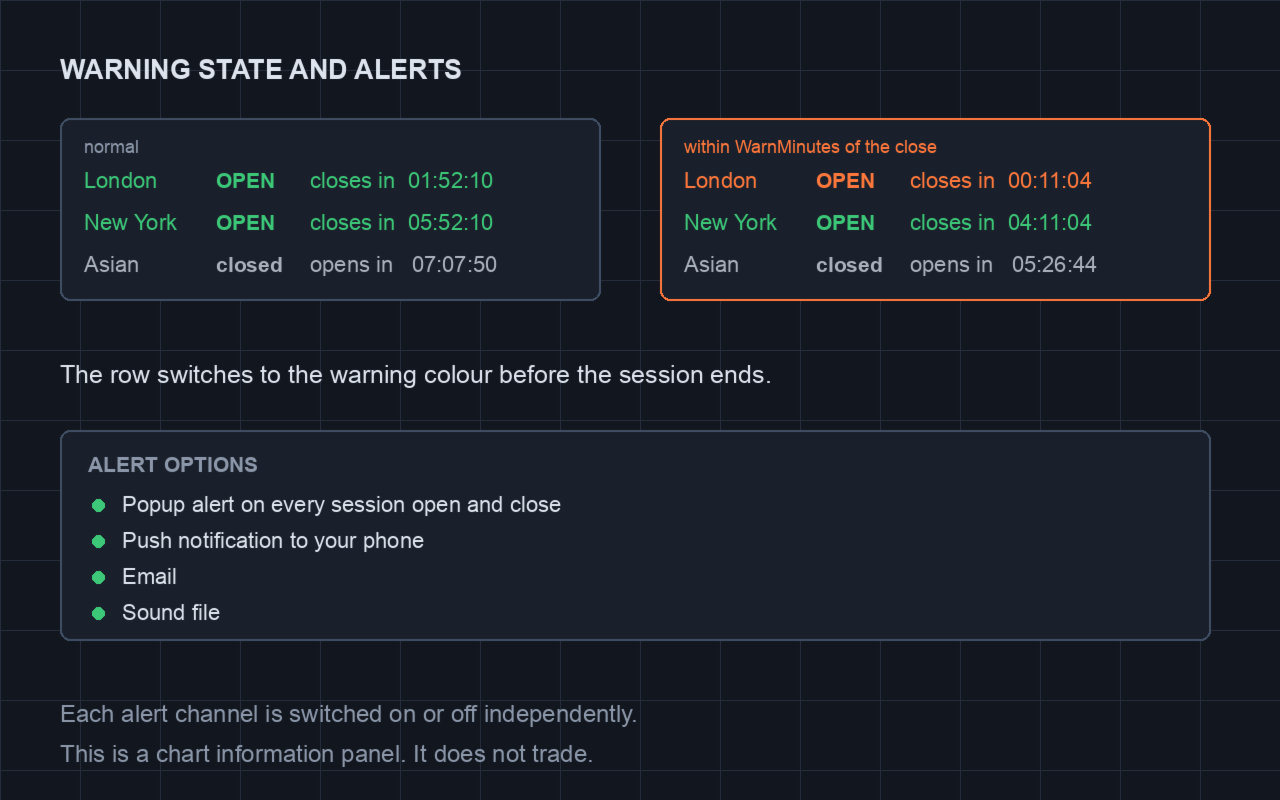
A live countdown to every session open and close, on your chart. One row per session — Asian, London and New York by default — showing OPEN or closed and a running HH:MM:SS countdown to the close when open, or to the next open when closed. The row turns to a warning colour when a session is within N minutes of closing.Know Exactly When the Market Moves — Session Timing Made Visual
Most traders know “London open at 08:00 UTC” but few track it precisely across every session, every day. This panel puts all four major sessions + kill zones on your chart with live countdowns, so you never miss the volatility windows that drive prop firm accounts.
What You See (At a Glance)
Four Session Boxes (Color-Coded):
| Session | Default Time (UTC) | Color | Significance |
|---|---|---|---|
| Sydney | 22:00–07:00 | Green | Asia open, low vol |
| Tokyo | 00:00–09:00 | Blue | Asia continuation |
| London | 08:00–17:00 | Yellow | High vol, trend starts |
| New York | 13:00–22:00 | Red | Highest vol, reversals |
Kill Zone Highlights (The Money Hours):
- London Kill Zone: 08:00–09:00 UTC — Open drive, false breakouts
- NY Kill Zone: 13:00–14:00 UTC — Open drive, continuation/reversal
- Overlap Kill Zone: 13:00–16:00 UTC — Highest volume, tightest spreads
Countdown Timers:
- Time until next session opens
- Time until current session closes
- Time until next kill zone
- All in HH:MM:SS format, updates every second
Features
1. Fully Customizable Session Definitions
input string SydneyOpen = "22:00"; // UTC input string SydneyClose = "07:00"; input string TokyoOpen = "00:00"; input string TokyoClose = "09:00"; input string LondonOpen = "08:00"; input string LondonClose = "17:00"; input string NewYorkOpen = "13:00"; input string NewYorkClose = "22:00";
Adjust for your broker's server time (auto-detects UTC offset).
2. Kill Zone Configuration
input bool ShowKillZones = true; input string LondonKillStart = "08:00"; input string LondonKillEnd = "09:00"; input string NYKillStart = "13:00"; input string NYKillEnd = "14:00"; input string OverlapKillStart = "13:00"; input string OverlapKillEnd = "16:00";
Highlight the exact windows where institutional volume enters.
3. Visual Customization
input color SessionBoxColor = clrSilver; input color KillZoneColor = clrGold; input color CountdownTextColor = clrWhite; input int FontSize = 10; input int PanelCorner = 0; // 0=TL, 1=TR, 2=BL, 3=BR input bool ShowSessionLabels = true; input bool ShowCountdowns = true; input bool ShowKillZoneLabels = true;
4. Alerts (Push / Email / Telegram)
- Session open/close (London open, NY open, etc.)
- Kill zone start/end (London kill zone starting in 5 min)
- Custom alert times (e.g., “Alert me 10 min before London open”)
- Works on VPS — no chart focus needed
5. Session Statistics (Optional)
input bool ShowSessionStats = true;
Shows for current/last session: High/Low, Range (pips), Direction (bullish/bearish/neutral), Volume proxy (tick count).
Why Session Timing Matters for Prop Firms
| Session | Prop Firm Risk | What This Panel Does |
|---|---|---|
| London Open (08:00) | Spreads 3–5x, false moves | Countdown + kill zone highlight |
| NY Open (13:00) | Volatility spike, reversals | Countdown + kill zone highlight |
| Overlap (13:00–16:00) | Highest volume, best trends | Overlap zone highlighted |
| Asian (00:00–08:00) | Low vol, range-bound | Visual session box, avoid overtrading |
Use Case: Reduce position size 50% during kill zones (London/NY open) — this panel tells you exactly when they start/end.
Compatibility
- MetaTrader 5 (build 4000+)
- Any symbol — Forex, Gold, Indices, Crypto, Futures
- Any timeframe — Panel is timeframe-independent
- Any broker — Auto-detects server UTC offset
- Works on VPS — No manual intervention
- Lightweight — Minimal CPU, updates once per second
What You Get
- Clean .mq5 source + compiled .ex5
- Full parameter documentation
- Preset files for major brokers (IC Markets, Pepperstone, FP Markets, etc.)
- Installation guide
- Lifetime updates
Part of the Session-Aware Ecosystem
Pairs with:
- Daily Loss Guardian ($35) — Auto-reduce risk during kill zones
- Global SL/TP Manager ($30) — Manage positions across sessions
- EMA Multi-Timeframe Trend EA ($39) — Session-aware trend entries
- XAUUSD Session Scalper ($69) — London/NY only Gold specialist
- Prop Firm Challenge Suite ($79) — All tools bundled (saves $16)
Upgrade path: Need automated risk scaling during kill zones? See Daily Loss Guardian ($35) — includes session-aware risk multiplier.
Disclaimer
This is a visual timing tool. It does not generate trading signals or guarantee profits. Session times vary by broker and daylight saving. Verify your broker's server time and adjust inputs accordingly. Past session behavior does not guarantee future volatility patterns.
Support
Post-delivery bug-fix support included. Customization via MQL5 Freelance.