IndicatorLab MT5 Standard

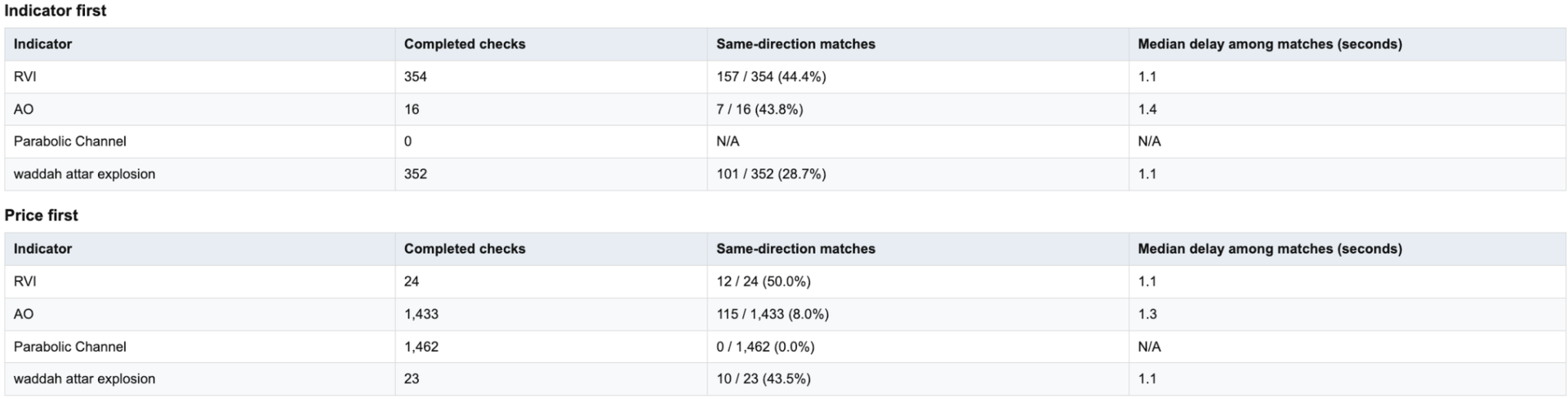
When your indicator changes direction, do you know what price does next?  Does your indicator tend to move before price, after it, or within the same observation window?  Do you know how responsive your indicator is across symbols, timeframes, and market periods?

IndicatorLab MT5 can help with that!  IndicatorLab MT5 is a utility that samples indicator values alongside price and analyzes their movement and timing relationships, presenting the results in clear HTML reports built from CSV data checked for integrity and consistency.

It was developed for indicator-based traders who want to explore and compare a variety of indicators, understand how they relate to price across symbols and changing market activity, and evaluate them conveniently before putting real money at risk.

See how your indicators behaved on your chosen symbol and timeframe, through an HTML report and supporting CSV data.

HOW IT WORKS

IndicatorLab MT5 has two test modes: Buffer Probe and Main.

  1. Check outputs if needed. If you’re unsure which indicator buffers to use or whether they provide readable values, configure your indicators in Buffer Probe and run it. Review the results before selecting buffers for Main.

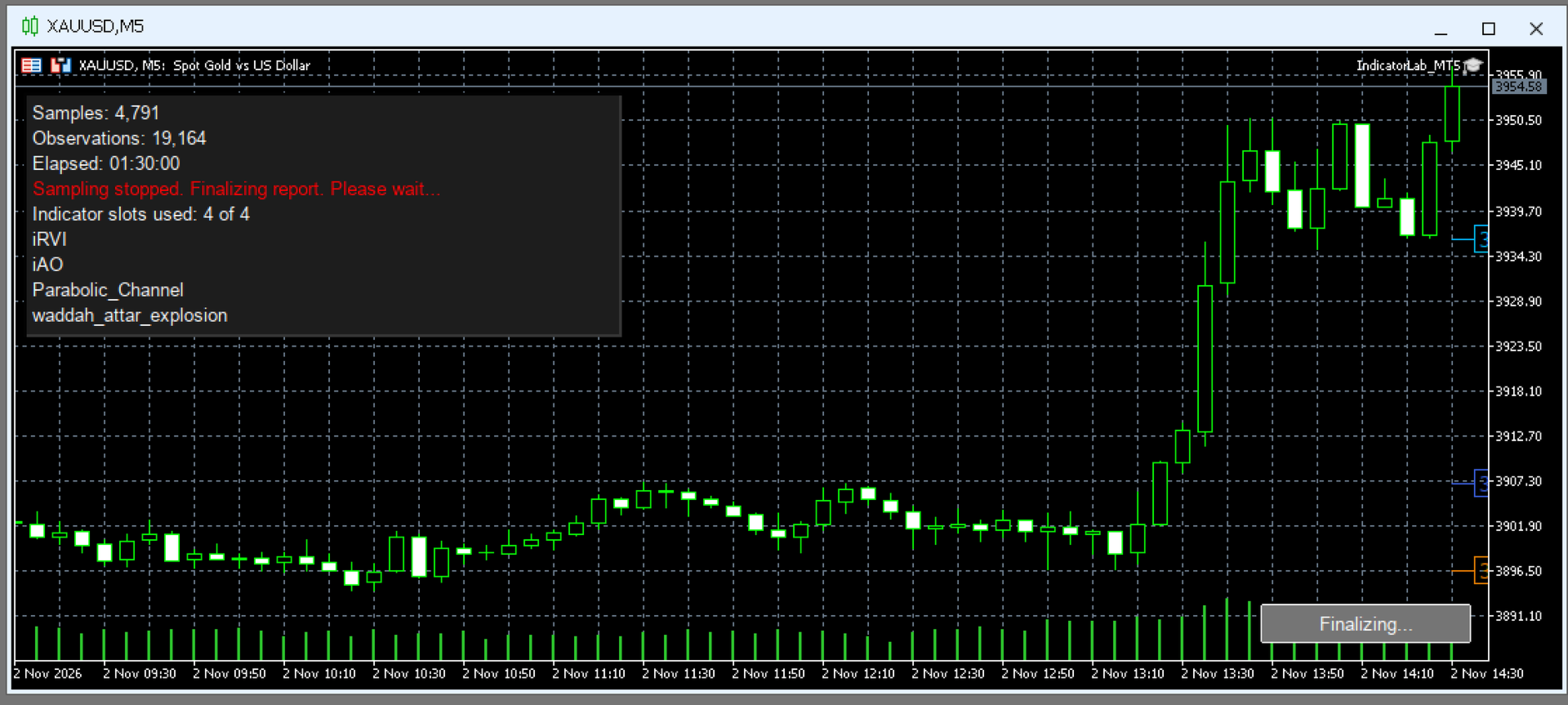
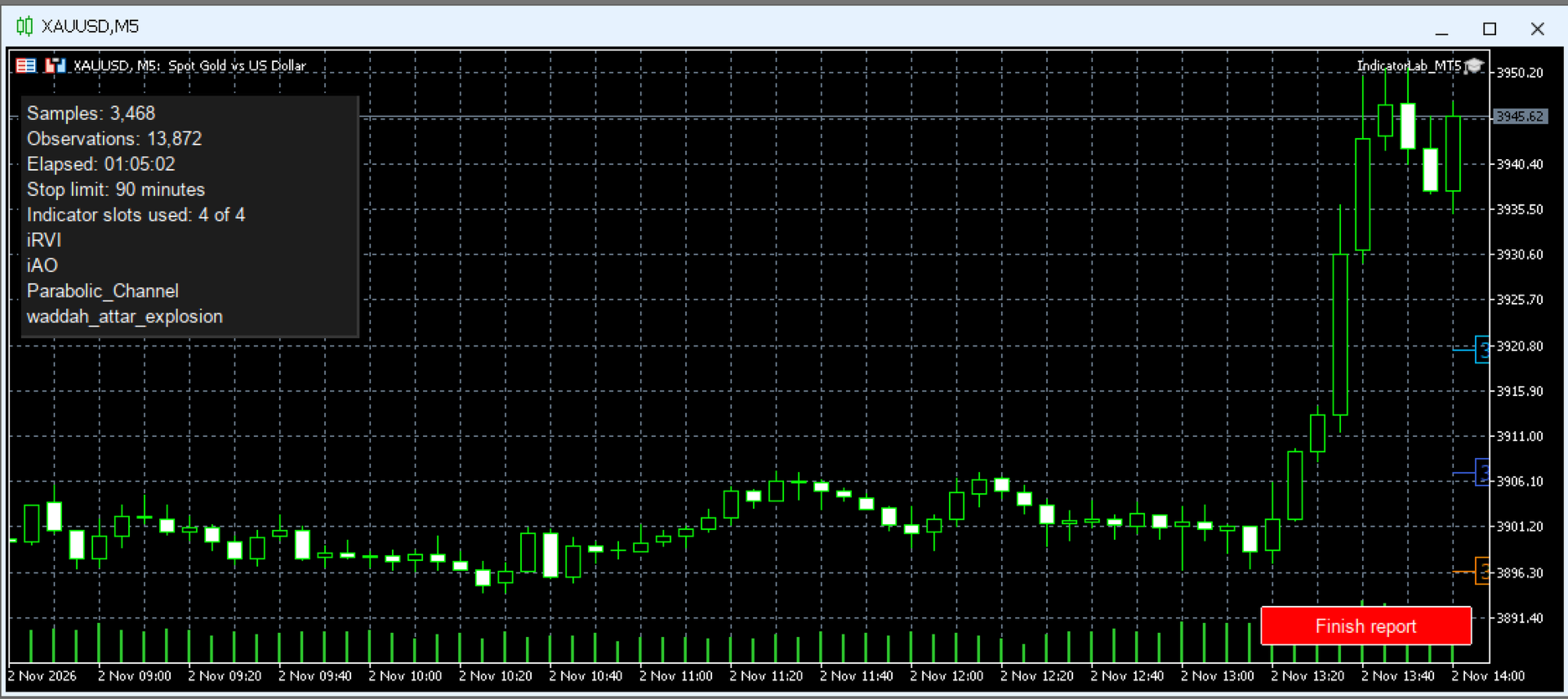
  2. Configure and run Main. Choose a symbol, timeframe, and one to four built-in or compatible installed custom indicators, including mixed combinations. Select their output buffers, test duration, and maximum indicator read time. Run on a chart or in the local Strategy Tester. Collection stops automatically when the selected duration elapses; on a chart, you can also stop early with Finish report. Allow finalization to complete before opening the report.

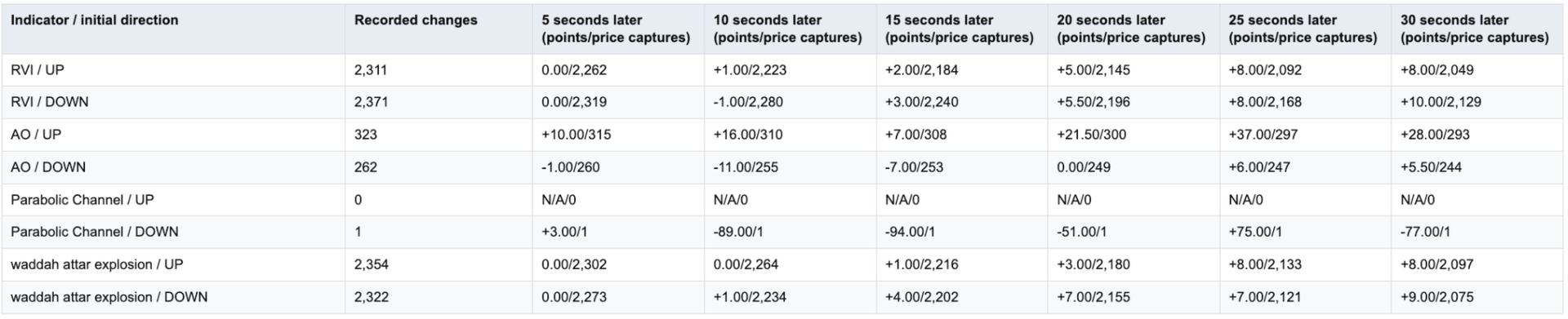
  3. Review the results. After finalization, open the HTML report to examine indicator-to-price movement, response timing, and data coverage. Supporting CSV files are available for reference or further analysis in spreadsheets and other tools.

  4. Build and refine your own strategy. Use what you learn to select indicators, define your trading rules, and test your ideas across symbols, timeframes, and market conditions. You decide what fits your approach, then evaluate it in strategy testing and demo trading before risking real money.

IndicatorLab MT5 helps you move from chart impressions to recorded evidence:

  • See what follows an indicator change: examine subsequent price movement and observed response timing.

  • Compare indicators on common ground: evaluate built-in and compatible custom indicators over the same recorded period.

  • Explore different market conditions: compare behavior across the symbols, timeframes, and periods you test.

  • Know what supports your conclusions: distinguish usable observations from missing data and limited coverage.

  • Keep the evidence: revisit HTML reports or explore the supporting CSV data in Excel, Google Sheets, Python, and other tools.

  • Make the strategy your own: use your findings to choose indicators and refine your trading ideas before putting money at risk.

Don’t just watch your indicators. Understand their behavior—and decide how they fit your strategy.


COMPATIBILITY AND LIMITS

  • Indicator access: Custom indicators must be installed, licensed where required, and provide readable buffer values. Chart drawings alone may not be readable. Required dependencies must also be installed.

  • Settings: IndicatorLab uses indicator defaults with supported Period / Length adjustments. Arbitrary custom parameter lists and Parameter Probe are not available.

  • Markets and testing: Tested examples include currencies and gold. Symbols and history depend on your broker; local Strategy Tester support depends on the indicator. Remote/cloud use with custom indicators and Market-demo exports are not guaranteed.

  • Interpretation: Sampling can miss activity between observations. Results describe recorded behavior, not predictions, trading signals, or proof of simultaneous movement.

Runs directly in MT5. No separate launcher or Python required.
Support: Product comments or MQL5 messaging.


INDICATORLAB MT5 USER GUIDE

Record indicator and price activity, then explore their relationships in an HTML report with supporting CSV data. IndicatorLab observes; it does not place or manage trades.

1. Install and prepare

Install IndicatorLab through your Market purchase, or place an authorized EX5 file in MQL5/Experts. Install custom indicators and their required dependencies according to the supplier’s instructions.

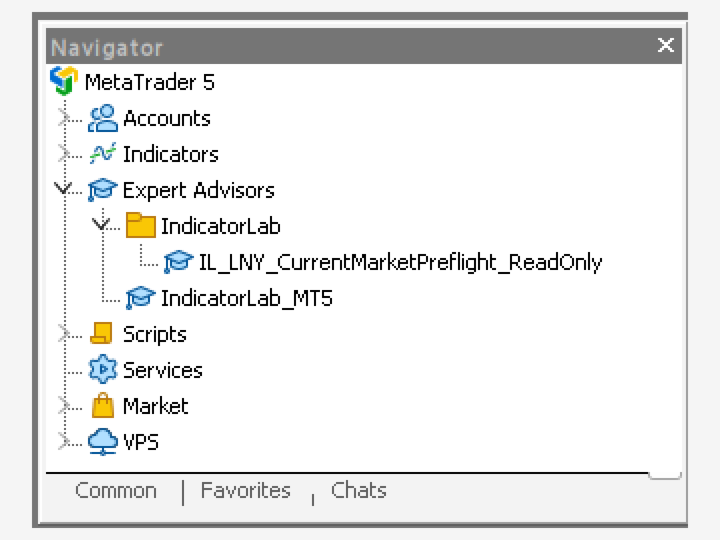
Open your chosen symbol and timeframe, then attach IndicatorLab from Navigator → Expert Advisors. Load a preset or enter your settings in Inputs. A preset does not change the chart’s symbol or timeframe. Review your settings and capture any screenshots before clicking OK.

No separate launcher, Python, or configuration file is needed. Do not enable DLL access or trading permissions just to run IndicatorLab.

2. Check buffers if needed

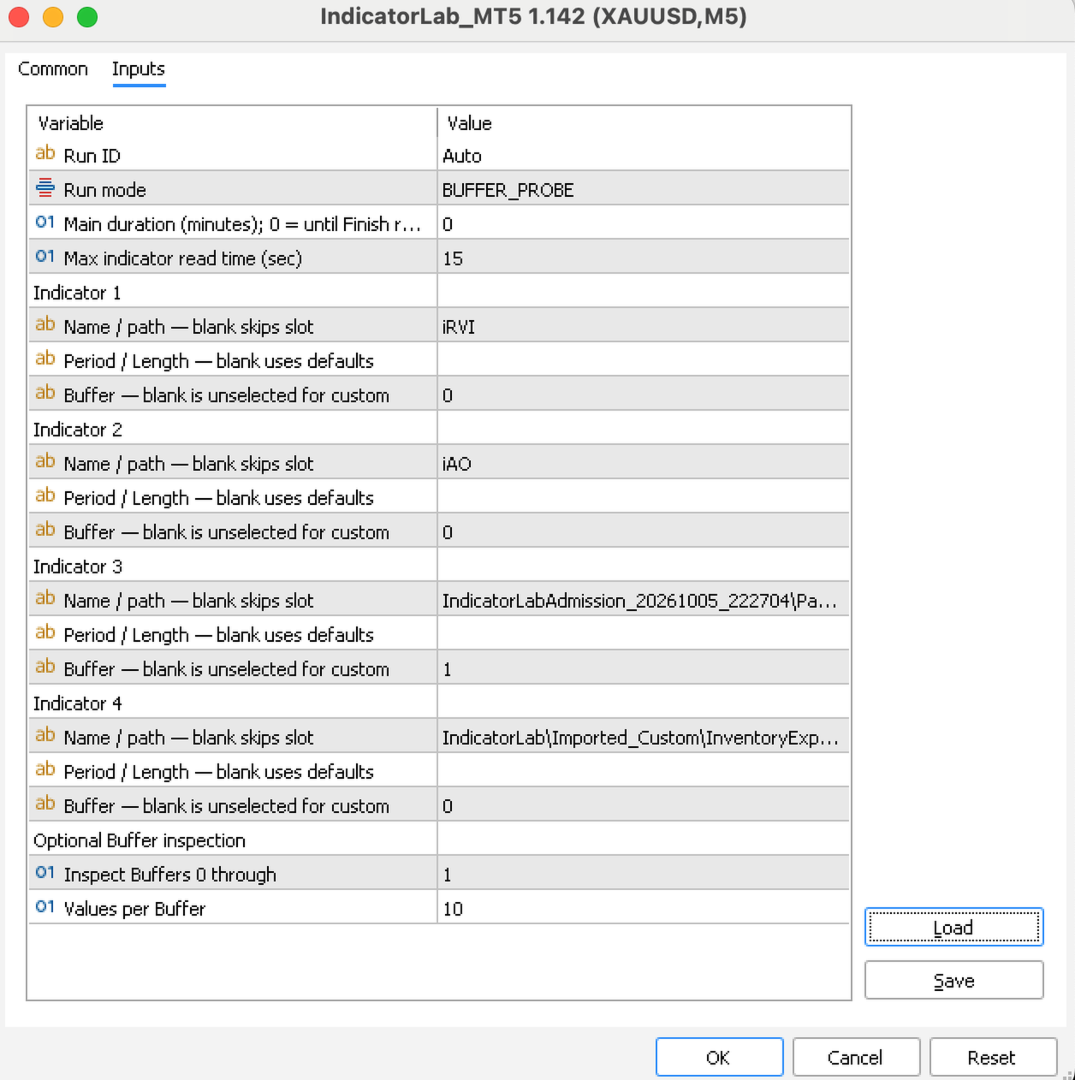
Choose Buffer Probe if you’re unsure which outputs to read. Configure up to four indicators and set the buffer range and values to inspect. The probe checks each enabled indicator, saves its findings, and finishes automatically.

A zero can be a valid value; an empty buffer does not necessarily mean an indicator is broken. Review the findings, then select the intended custom buffer in Main yourself. Probe does not transfer settings automatically.

3. Configure and run Main

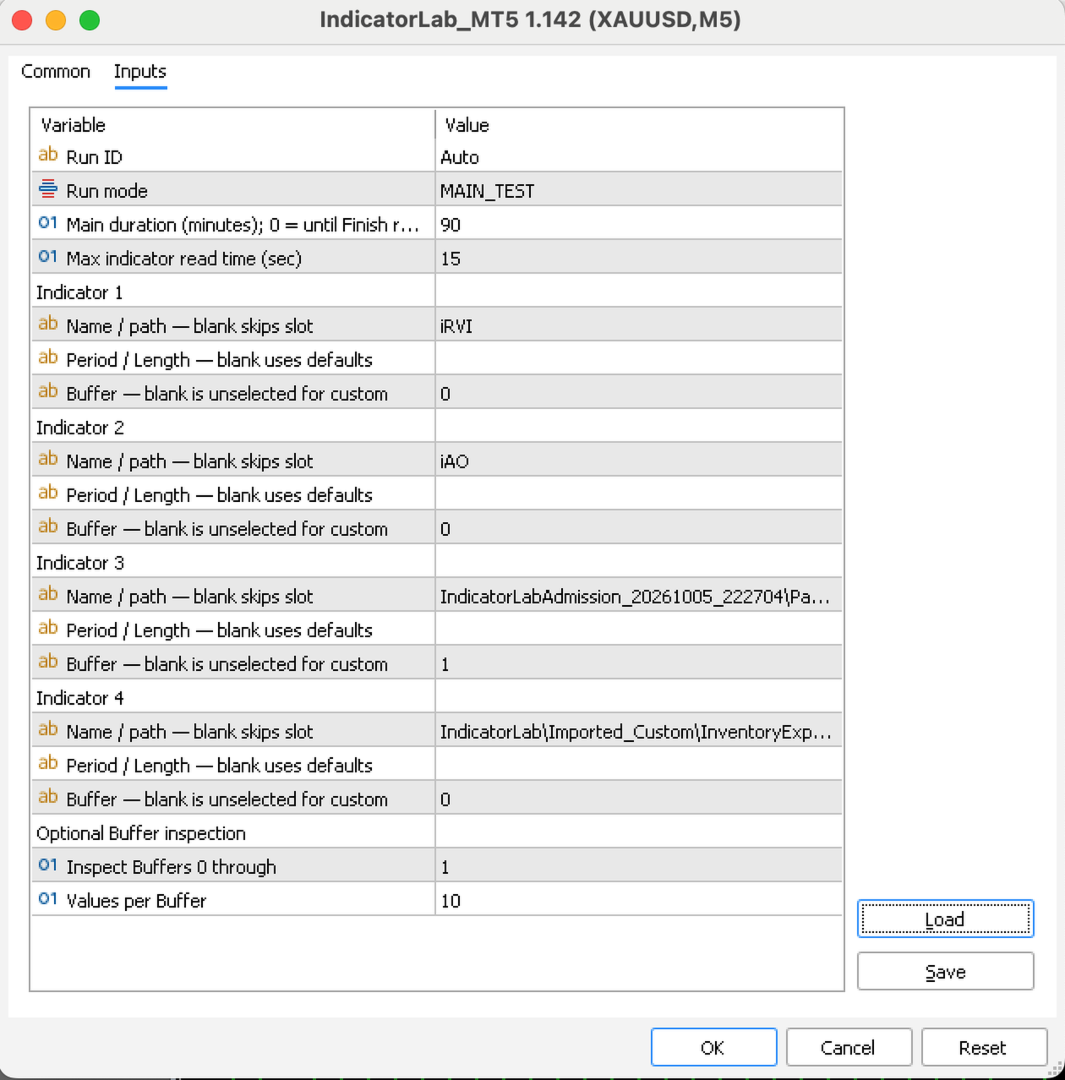
Select MAIN_TEST and configure one to four built-in or compatible custom indicators:

  • Name/path: Enter a built-in name, such as iRSI, or a custom path relative to MQL5/Indicators. Leave unused slots blank.

  • Period/Length: Leave blank for defaults. Only supported adjustments are accepted; this is not a general custom-parameter editor.

  • Buffer: Select the custom output you want to examine. A blank custom buffer is unselected. Built-ins can use their supported primary output when left blank.

  • Duration: The default is 8 minutes. Choose another positive duration, or 0 to continue until you select Finish report on a chart.

  • Run ID: Leave Auto selected to keep each run’s results separate.

  • Maximum read time: The default is 15 seconds.

For a simple first test, use iRSI, Period 14, Buffer 0, and leave the other slots blank. Settings on a separate chart indicator do not configure IndicatorLab’s reads.

4. Finish and review

Let the duration expire or click Finish report. Wait for finalization before closing the terminal or removing IndicatorLab. Saving may take several minutes; check Experts for confirmation. Normal completed closeout removes IndicatorLab from the chart.

For chart results, open File → Open Data Folder → MQL5 → Files → IndicatorLab, then the run folder shown in Experts. Open IndicatorLab_IndicatorLab_Report.html and keep its companion CSV files. You can export a PDF through your browser.

Start with the outcome, stopping reason, duration, and data health:

  • PASS: The run met its success requirements; this is not a trading recommendation.

  • Completed with limited coverage: Useful results are available, with stated limitations.

  • FAIL: Review the reported cause before drawing conclusions.

Finishing early or recording fewer than 500 observations does not, by itself, reduce an otherwise successful result. The sample-size recommendation is advice, not a configurable requirement.

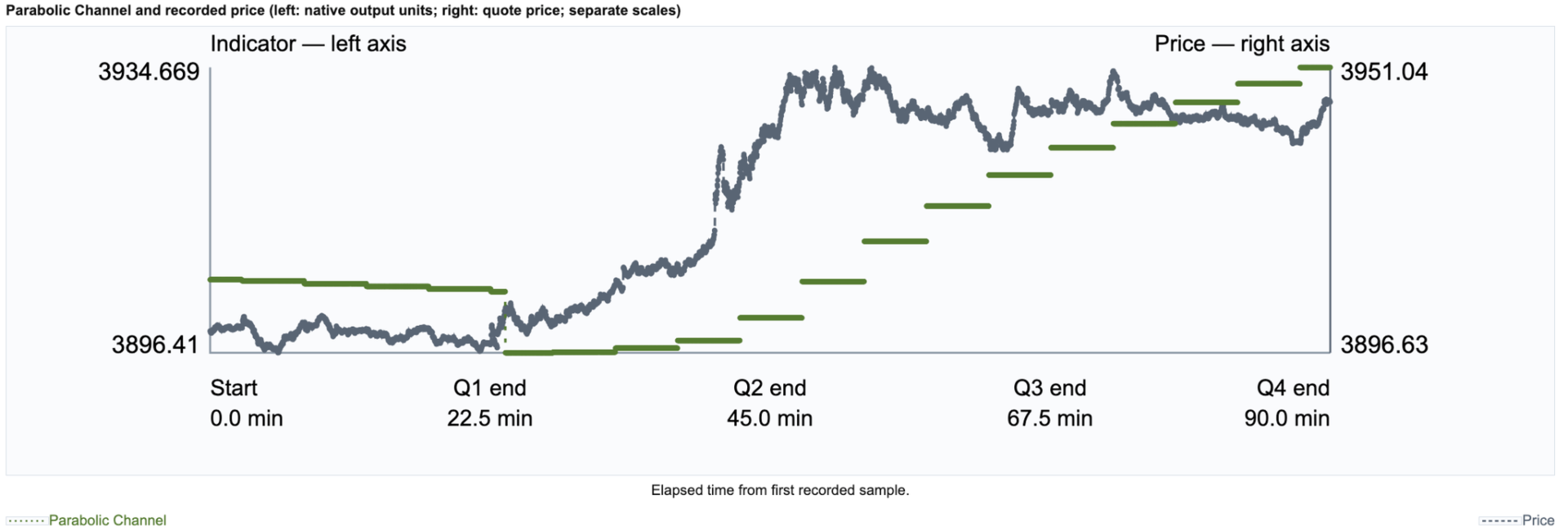
Read chart labels carefully: indicators may share price units or use separate scales. Coverage notes explain overlapping lines and missing comparisons. Results describe sampled behavior, not predictions or trading signals.

USING STRATEGY TESTER

Select IndicatorLab as the Expert Advisor, choose the symbol, timeframe, historical dates, and tick model, then configure Main. Custom indicators and their dependencies must work in that local Tester environment.

Let the test finish by duration or available history; do not rely on an interactive Finish button in a nonvisual test. Local Main testing is supported. Grouped Buffer Probe in Tester, remote/cloud custom delivery, and Market-demo exports are not guaranteed.

IMPORTANT LIMITS

  • Sampling has a one-second minimum interval, but ticks, data availability, and read time affect the actual rate. Activity between samples can be missed.

  • Reads are sequential. The read-time limit detects an overrun only when the call returns; it cannot interrupt a frozen indicator.

  • Supported Period/Length edits are limited to mapped indicators. Arbitrary custom parameter lists and Parameter Probe are unavailable.

  • Symbols, history, indicator access, and Tester compatibility depend on your broker and indicator supplier.

TROUBLESHOOTING AND SUPPORT

If a run does not start or save, check Experts/Journal and retain its diagnostics. Do not restart over an unfinished run.

Contact support through product comments or MQL5 messaging. Include the version, mode, symbol/timeframe, Run ID, exact message, and relevant files, with private account information removed.
Produits recommandés
Somewhere over the rainbow It is a system that tries to operate the market from the exhaustion of the trend with a correction algorithm that tries to cut losses at the cost of increasing the margin This system makes all the adjustments automatically, analyzing the pair and the market to decide which is the most efficient step to reach your destination. Somewhere over the rainbow is a multiple trade and multi lot system(The maximum batch can be up to 5 times the initial batch distributed in mult
RRtoolBox
David Ruiz Moreno
RRtoolbox - Professional Tools: Risk:Reward Trading Tool (SL/TP Horizontals + Pending orders + Diagonals), Alerts set on trend lines (for alerts on diagonal levels), SelfManagement (BE, partials...), close/cancelling by time, Statistics, Info and trading on chart. One-Click Trading with Visual Risk:Reward Management RRtoolbox is a comprehensive trading panel that combines one-click order execution,  statistics and  powerful visual Risk:Reward tools, alerts set with trendlines, on chart butt
Luck or Edge
Leandro Alberto Carrasco Matos
Your account shows a 78% win rate and a positive average. Does that mean your strategy works, or did you get lucky? Most history tools answer a different question. They show balance, equity, profit by symbol. Useful, but none of them tell you whether the number you are looking at is a real edge or noise. Luck or Edge reads your closed trades and answers that one question. WHAT IT SHOWS Verdict. A single line at the top: Real edge, Could be luck, Systematic loss, or Sample too small. Most of the
Introduction Our system is more than just a tool—it’s your personal guide in the dynamic trading landscape. Expertly developed and optimized using advanced strategies, this groundbreaking predictor gives traders a powerful edge. It’s not just about the features; it’s about a trading journey that stands out from the crowd. Get ready for an enhanced trading experience like never before! What It Does Next Candle Prediction: Imagine gaining insights into the market’s next move before it happens. Our
Link to download it from my website, it's cheaper($20) there. And you get both pips based breakeven and percentage based breakeven as a bundle for one price- ( www.ashantipearls.com/l/breakeven ) This is a break even/break even plus EA. It moves your stop loss to break even(BE) or BE+ based on pre-set number of pips in profit. You can edit this in the input section. This EA sets breakeven for both manually and auto-opened trades. Moving stop-loss to a     breakeven   is popular among traders who
Forex Diamond EA MT5
Lachezar Krastev
4.67 (3)
BLACK FRIDAY SPECIAL: 70% OFF + FREE GIFT! Massive savings on our top automated systems: Buy Forex Diamond EA: Only $197 (Save 70% — Regular price: $547) BONUS EA: Get Crypto Master EA 100% FREE (Regular price: $497) Total Value: $1044 — Yours today for just $197! How to claim: Direct message (DM) us your purchase confirmation to unlock your free Crypto Master EA license! Full offer details & live performance stats: https://www.mql5.com/en/blogs/post/778315 Live Results:   https://www.mql5.com/
OtayQuantumAllAssetPro - GRATIS PER 24 ore     + Supporto EA professionale per M15 (Oro, Argento, WTI, Crypto, Forex) Fibonacci automatico Multi-timeframe trend analysis Gestione risk completa Trailing e breakeven inclusi OFFERTA LIMITATA: 24 ore GRATIS ------------------------------------------------------------------------------- PROMOZIONE DI LANCIO - SOLO 5 POSTI RIMASTI A QUESTO PREZZO! OTAY Quantum All Asset Pro v5.6 PRIMI 5 ACQUIRENTI: $999 PREZZO NORMAL
AlgoForge PropGuard
Daniel Oladipupo Anjorin
PropGuard watches your account every second and steps in before you break a daily loss or maximum loss rule. When a limit gets close, it closes the trades it manages, deletes their pending orders and blocks new trades until the next daily reset. A clear on-chart panel always shows how much room you have left. It is a risk tool, not a trading strategy. It never opens trades on a live account. WHO IT IS FOR - Traders taking prop-firm challenges or trading funded accounts - Anyone who wants a har
RelicusRoad Pro MT5
Relicus LLC
4.96 (25)
Arrêtez de deviner vos trades. Sachez quand entrer, où sortir et dans quel sens va le marché, le tout sur un seul graphique. RelicusRoad Pro réunit près de vingt outils dans un seul indicateur, et vous activez ceux qui correspondent à votre façon de trader. Entrées claires. Sorties claires. Un plan sur chaque graphique. Ça vous dit quelque chose ? Vous achetez, et le prix se retourne contre vous une minute plus tard. Vous clôturez trop tôt, puis vous regardez le mouvement continuer sans vous. Ci
Le niveau Premium est un indicateur unique avec une précision de plus de 80 % des prédictions correctes ! Cet indicateur a été testé par les meilleurs Trading Specialists depuis plus de deux mois ! L'indicateur de l'auteur que vous ne trouverez nulle part ailleurs ! À partir des captures d'écran, vous pouvez constater par vous-même la précision de cet outil ! 1 est idéal pour le trading d'options binaires avec un délai d'expiration de 1 bougie. 2 fonctionne sur toutes les paires de devises
Account Protection Suite
Akonte Opuye Taylor-harry
Account Protection Suite protects the whole trading account from one chart. It covers trades you open by hand and trades opened by other Expert Advisors. Protection modules - Stops and targets: adds a stop loss and a take profit to any trade opened without them. The distance can follow the typical market move (Average True Range), be a fixed number of pips, risk a set share of the account, or sit beyond the nearest support or resistance. Stops can be moved clear of nearby levels. - Daily loss
MT5 To Telegram Copier
Levi Dane Benjamin
2.67 (3)
Envoyez des signaux entièrement personnalisables de MT5 à Telegram et devenez un fournisseur de signaux ! Ce produit est présenté dans une interface graphique conviviale et visuellement attrayante. Personnalisez vos paramètres et commencez à utiliser le produit en quelques minutes seulement ! Guide de l'utilisateur + Démo  | Version MT4  | Version Discord Si vous souhaitez essayer une démo, veuillez consulter le Guide de l'utilisateur. L'émetteur de MT5 vers Telegram NE fonctionne PAS dans le t
If you wish to draw Support and Resistance lines, view: daily market opening, classical pivot levels, Fibonacci pivot levels, trend lines, Fibonacci levels, the remaining time to candle closing, and current spread. If you seek to place your orders with the exact lot that meets your desired stop loss risk. If you wish to do all this and more with just one click, then this is the perfect tool to use. This tool will allow you to feel more relaxed when deciding to open orders, as well as predicting
Trade Replay Exit Optimizer Backtestez vos propres trades avec une sortie différente Vos entrées sont peut-être bonnes. Vos sorties pourraient discrètement vous coûter cher. Trade Replay Exit Optimizer lit l'historique réel de votre compte MetaTrader 5, conserve exactement les mêmes entrées , et les rejoue dans le Strategy Tester avec une règle de sortie différente, afin que vous puissiez enfin voir si un stop, un target, un trailing ou une sortie basée sur le temps aurait amélioré vos résultats
Trade Control System — Complete Feature List A manual trade-management panel and market-context dashboard for MT5.   It never opens a trade by itself   — every entry is a human click or keypress. Everything below either helps you execute faster, protects what you already have open, or shows you market context without ever pulling the trigger for you. 1. The Panel Itself BUY / SELL buttons   — one-click market entry in either direction at the current lot size. Lot Size box   — type a lot size dir
Key Features: 200+ Fully Implemented Patterns   across all categories Advanced Market Structure Analysis Smart Money Integration   (Wyckoff, Order Blocks, Liquidity) Professional Risk Management Multi-Timeframe Analysis AI-Powered Confidence Scoring Advanced Visualization Real-time Alerts Pattern Categories: Single Candle Patterns (Hammer, Doji, Marubozu, etc.) Multi-Candle Patterns (Engulfing, Stars, Harami, etc.) Chart Patterns (Head & Shoulders, Cup & Handle, Triangles, etc.) Harmonic Pattern
FREE
Bober Real MT5
Arnold Bobrinskii
4.88 (16)
Bober Real MT5 is a fully automatic Forex trading Expert Advisor. This robot was made in 2014 year and did a lot of profitbale trades during this period. So far over 7000% growth on my personal account. There was many updates but 2019 update is the best one. The robot can run on any instrument, but the results are better with EURGBP, GBPUSD, on the M5 timeframe. Robot doesn't show good results in tester or live account if you run incorrect sets. Set files for Live accounts availible only for cu
CRT Master EA MT5
Javier Sobrino Vega
CRT Master EA is an automated trading system based on Candle Range Theory (CRT) and market structure concepts (Accumulation, Manipulation, and Distribution). The Expert Advisor identifies liquidity sweeps where price temporarily manipulates outside a defined accumulation range before returning inside. It automatically executes trades based on structural confirmation, managing position sizing, stops, targets, and trailing rules. A manual indicator version of this logic is available as the CRT Mas
XAUUSD BREAKOUT EA — Stop Predicting the Market. Trade the Breakout. You do not need to sit in front of the chart all day waiting for gold to break support or resistance. This XAUUSD Breakout EA is designed to identify market consolidation, detect meaningful price expansion, and automatically execute trades when predefined breakout conditions are met. BACKTEST RESULTS — 99% QUALITY Initial Deposit: $1,000 Total Net Profit: +$21,115 Profit Factor: 2.37 Expected Payoff: $213 per trade Total Tr
TradePilotmt5
Hossein Khalil Alishir
TradePilot Expert Advisor (EA) for MetaTrader 5 TradePilot is a professional and user-friendly Expert Advisor (EA) for MetaTrader 5 (MT5) . It simplifies automated trading , risk management , and trade execution with a smart trading panel . Perfect for beginners and experienced traders looking for a reliable trade manager EA with automated lot size calculation and smart position management. Key Advantages User-Friendly Trading Panel: Customizable panel with buttons and hotkeys for fast ex
Pulse Trade EA Intelligent Trading. Disciplined Management. Automated Trading | Prop-Firm-Oriented Risk Management | Research-Optimized Profiles | Simple Setup Pulse Trade EA is a fully automated trading system for MetaTrader 5, developed by MyB2B Inc. using proprietary market-analysis algorithms, extensive historical research and instrument-specific optimization. Designed for traders who value disciplined risk management, including those participating in proprietary trading firm evaluations, Pu
Introducing Your New Go-To Trading EA! Boost your trading performance with this Bollinger Bands-based Expert Advisor, specially designed for XAU (Gold) and various Forex pairs. Why this EA is a must-have: Clean, user-friendly interface – perfect for all trader levels Built-in Hidden Take Profit & Stop Loss for added strategy security Ideal for both beginners and experienced traders Ready to use out of the box – no complex setup required. Trade smarter, not harder!
Grid10 Gold Scalper Short description Gold (XAUUSD) scalper that buys pullbacks in the direction of the long-term trend, adds a small averaging grid and closes the whole basket at a fixed profit from its average price. Description Grid10 Gold Scalper is an Expert Advisor made only for GOLD / XAUUSD. It runs two independent units inside one EA — an M5 unit and an M15 unit — and works the same on any chart timeframe. Attach it to one GOLD chart and it is ready to trade. How it t
**MT5 → Telegram & Discord Auto Post Bot** Want to automate your trading and stop wasting time on manual posting? This bot is for you. **What does it do?** It connects directly to MetaTrader 5 and automatically posts to Telegram & Discord: ️ Open trades ️ Closed trades ️ SL / TP levels ️ Profit and loss ️ Real-time signals **Advantages:** • Fully automated process • No delay – posts in real time • Perfect for signal groups and channels • Increases trust and transparency • Works
UNIVERSAL RISK TRADE MANAGER MT5 Control Your Risk. Protect Your Capital. Trade with Confidence. Successful trading is not only about finding the right entry. It is about controlling how much you can lose when the market moves against you. Universal Risk Trade Manager MT5 is a professional risk-management and trade-execution assistant designed to calculate position sizes, protect trading capital, and manage open trades directly from a clear, easy-to-use chart panel. Whether you trade Forex, Gold
Fabii Half Trend Baseline
Fabien Georges Andre Guillemaud
Cessez de trader contre la tendance du timeframe supérieur. Deux baselines, un graphique. No repaint. Toute paire, tout timeframe. Sur votre graphique en 2 minutes. Démo gratuite dans le Strategy Tester. Get more indicators here Baselines, volatility filters and oscillators. No repaint. Pourquoi vous en avez besoin Vous entrez en position parce qu'une ligne est passée au vert sur votre graphique. Puis vous ouvrez un timeframe supérieur et vous voyez que la tendance de fond va dans l'autre sen
Apex Fibo Tracer — Smart Auto-Fibonacci Tool Apex Fibo Tracer is a professional analytical indicator that automates one of the most powerful methods in technical analysis — Fibonacci retracement levels. By combining a high-precision ZigZag algorithm with dynamic Fibonacci plotting, the tool delivers instant and accurate visualization of market structure directly on your chart. Most traders lose valuable seconds manually adjusting Fibonacci grids during high volatility. Apex Fibo Tracer eliminate
Scan a fixed list of assets (Ibovespa) in the chosen timeframe (TimeFrame). For each pair and for various periods. Calculate a regression model between the two assets (and, if desired, using the bova11 index as a normalizer). Generate the spread of this relationship, its mean, standard deviation, speculative deviation, and betas (B1 and B2). Apply an ADF test without exclusion (cointegration/stationarity). Calculate the Z-score of the current exclusion (how many standard deviations are away from
FREE
ICT Optimal Trade Entry Tool
Aesen Noah Remolacio Perez
2 (1)
Trading ICT's OTE Concept is simplified with the ICT Optimal Trade Entry Tool. This semi-automatic EA/utility allows trading with manually defined Fibonacci retracement levels. Simply anchor the Fibonacci between swing highs and lows, select your desired entry level in the graphical panel, and the tool automatically opens positions based on your predefined direction. No more waiting in front of charts for price action to reach your entry levels; set the Fibonacci, enable your chosen entry level,
Market Trend Indicator Analog Copyright 2025, Jose María Molina Sánchez molinatrader67@gmail.com | Version 1.00 Introduction Le Market Trend Indicator Analog est un indicateur avancé conçu pour mesurer la force et la direction de la tendance du marché en temps réel. Contrairement aux oscillateurs traditionnels, cet indicateur utilise un système de filtrage adaptatif qui réagit dynamiquement aux conditions du marché, offrant une représentation analogique précise entre -100 et +100. Son
Les acheteurs de ce produit ont également acheté
Trade Assistant MT5
Evgeniy Kravchenko
4.43 (216)
It helps to calculate the risk per trade, the easy installation of a new order, order management with partial closing functions, trailing stop of 7 types and other useful functions. Additional materials and instructions Installation instructions - Application instructions Line function -   shows on the chart the Opening line, Stop Loss, Take Profit. With this function it is easy to set a new order and see its additional characteristics before opening.   Risk management  - The risk calculation
Bienvenue sur Trade Manager EA, l’outil ultime de gestion des risques conçu pour rendre le trading plus intuitif, précis et efficace. Ce n’est pas seulement un outil d’exécution d’ordres ; c’est une solution complète pour la planification des trades, la gestion des positions et le contrôle des risques. Que vous soyez débutant, trader expérimenté ou scalpeur ayant besoin d’une exécution rapide, Trade Manager EA s’adapte à vos besoins, offrant une flexibilité sur tous les marchés, des devises et i
Farmed Hedge Yield Farming | All Markets (Manual - Hybrid - Semi/Automated EA) VERIFIED TRADING RESULTS - Farmed Hedge Yield Axi Copy:  https://www.mql5.com/en/signals/2356376 - Farmed Hedge Yield Exn Copy:   https://www.mql5.com/en/signals/2356404 - Farmed Hedge Yield V Copy:  https://www.mql5.com/en/signals/2357156 IMPORTANT NOTICE: FarmedHedge is a MANUAL-FOCUSED TRADING UTILITY ,not a fully automated EA. Results shown on this Signal include manual trades and overall strategic management.
Telegram to MT5 Multi-Channel Copier   copie automatiquement les signaux de trading de vos canaux Telegram et Discord directement vers MetaTrader 5. Pas de bots, pas d'extensions de navigateur, pas de copie manuelle. Un signal arrive sur Telegram ou Discord et l'EA ouvre le trade dans votre terminal en quelques secondes. Et avant de copier un canal, le backtester intégré vous montre ce que ce canal aurait fait sur votre compte. Le produit comprend deux composants : une application Windows qui éc
TradePanel MT5
Alfiya Fazylova
4.88 (172)
Trade Panel est un assistant commercial multifonction. L'application contient plus de 50 fonctions de trading pour le trading manuel et permet d'automatiser la plupart des tâches commerciales. Instructions d'utilisation : https://www.mql5.com/fr/blogs/post/762589 Version d'essai de l'application pour un compte démo : https://www.mql5.com/fr/blogs/post/762644 Comment installer l'application : https://www.mql5.com/fr/blogs/post/762645 Comment tester l'application en mode visuel : https://www.mql5.
News Trade EA MT5
Konstantin Kulikov
4.55 (11)
Je voudrais vous présenter un robot efficace que j'utilise depuis plusieurs années. Il peut être utilisé en mode semi-automatique, comme en mode totalement automatique. >>> Chat <<< Le programme comporte des paramètres souples pour le commerce sur les nouvelles du calendrier économique. Il est impossible de le vérifier dans le testeur des stratégies. Ce qu’il faut, c’est le travail réel. Téléchargez la dernière archive des paramètres : https://www.mql5.com/en/blogs/post/747929 Surveillance des
Copiez les signaux Telegram avec vos propres règles de trading Telegram to MT5 Signal Trader copie automatiquement les signaux de trading au format texte provenant de canaux et de groupes Telegram publics et privés vers MetaTrader 5. Gérez plusieurs fournisseurs et comptes MT5 depuis une seule application de bureau, avec des paramètres de risque et de trading propres à chaque fournisseur . Aucun bot Telegram ni configuration d'API n'est nécessaire pour copier les signaux. Connectez-vous simpleme
================================================================================ POC BREAKOUT - V20.72. Full Professional Grade Toolkit ================================================================================ POC Breakout is a full MetaTrader 5 trading dashboard for discretionary traders who want breakout signals, Point of Control (POC) context, volume profiles, order flow, market structure, news, alerts, and advanced trade planning in one professional workspace. Attached directly to you
The product will copy all telegram signal to MT5 ( which you are member) , also it can work as remote copier.  Easy to set up, copy order instant, can work with almost signal formats, image signal,  s upport to translate other language to English Work with all type of channel or group, even channel have "Restrict Saving Content", work with  multi channel, multi MT5 Work as remote copier: with signal have ticket number, it will copy exactly via ticket number. Support to backtest signal. How to s
EA Overfitter
Stephen J Martret
5 (3)
That backtest looks great. But will it still be making money tomorrow, next week, next month? EA Overfitter re-runs your EA on 100 price histories it has never seen. One score tells you if the edge is real. A backtest tells you what an EA did on one price history — the one that happened to occur. What you cannot tell from it is how much of that result was the strategy and how much was the particular path. EA Overfitter answers that. It builds up to 100 synthetic price histories your EA has n
Power Candles Strategy Scanner - Outil de recherche de configurations multi-symboles à optimisation automatique Le Power Candles Strategy Scanner utilise le même moteur d'auto-optimisation que celui qui alimente l'indicateur Power Candles, pour chaque symbole de votre Market Watch, en parallèle. Un panneau vous indique quels symboles sont statistiquement négociables à l'instant, quelle stratégie est la plus performante pour chacun, la paire Stop Loss / Take Profit optimale, et vous alerte dès qu
Anchor Trade Manager
Kalinskie Gilliam
5 (8)
Your EAs cannot see each other, but Anchor can. Anchor gives you one place to coordinate your EAs, manage risk, and decide when trading is allowed. It works alongside the trading bots you already use without any changes to them. The Problem One EA opens a trade. Then another starts trading. The next thing you know, you wake up to multiple grids built across your account. Each EA may be doing exactly what it was designed to do, but together they can place far more risk on your account than you in
VirtualTradePad PRO SE MT5 — centre de contrôle de trading professionnel pour MetaTrader 5 VirtualTradePad PRO SE est un panneau de trading premium basé sur le graphique et un espace de gestion des trades pour MetaTrader 5 . Il est conçu pour les traders qui souhaitent une exécution plus rapide, un contrôle plus clair des positions, une gestion structurée des trades, une planification visuelle des niveaux et un flux de travail professionnel directement depuis le graphique. Ce n’est pas seulement
Trade Indicator Assistant   is a powerful MT5 utility designed to turn indicators into automated trading systems. Its main feature is the ability to automatically detect an indicator’s   BUY and SELL signal buffers , without requiring you to know the buffer numbers, search through indicator settings, or modify the indicator source code. Bonus Indicator:   After purchasing Trade Indicator Assistant, contact me to receive   Trade Signal Pro   completely free as a bonus indicator. [Download Demo V
Trade Manager DaneTrades
Levi Dane Benjamin
4.13 (31)
Trade Manager pour vous aider à entrer et sortir rapidement des transactions tout en calculant automatiquement votre risque. Y compris des fonctionnalités pour vous aider à éviter le sur-trading, le trading de vengeance et le trading émotionnel. Les transactions peuvent être gérées automatiquement et les mesures de performances du compte peuvent être visualisées dans un graphique. Ces fonctionnalités rendent ce panneau idéal pour tous les traders manuels et contribuent à améliorer la plateforme
Prochaine mise à jour — Version 2.52 bientôt disponible ! [NOUVEAU] Préparez-vous à découvrir 4 nouvelles fonctionnalités majeures conçues pour améliorer votre analyse du marché et votre flux de travail de trading Nous faisons passer l’analyse du marché au niveau supérieur avec 4 nouvelles fonctionnalités conçues pour répondre à vos besoins en trading. Découvrez : 1. TRADE OVERVIEW DASHBOARD 2. CONFLUENCE AT ZONE 3. STRONG & WEAK HIGH/LOW 4. OTE 1. TRADE OVERVIEW DASHBOARD Un tableau de bord qu
MT5 to Telegram Signal Provider est un utilitaire facile à utiliser et entièrement personnalisable qui permet l'envoi de signaux spécifiés vers un chat, un canal ou un groupe Telegram, transformant ainsi votre compte en fournisseur de signaux. Contrairement à la plupart des produits concurrents, il n'utilise pas d'importations DLL. [ Démonstration ] [ Manuel ] [ Version MT4 ] [ Version Discord ] [ Canal Telegram ]  New: [ Telegram To MT5 ] Configuration Un guide utilisateur étape par étape est
DrawDown Limiter
Haidar Lionel Haj Ali
5 (23)
DrawDown Limiter v5.0 — Contrôleur avancé de protection de compte DrawDown Limiter v5.0 est un contrôleur de protection de compte côté client conçu pour surveiller votre compte de trading et réagir automatiquement lorsque les limites configurées de risque, de profit, d’actualités, de planification, de rollover ou de nombre de positions sont atteintes. Il peut surveiller les opérations manuelles, les stratégies automatisées, plusieurs Expert Advisors, les ordres en attente et les positions ouvert
RETAILBERG FOOTPRINT CHART PRO — Order-Flow Workspace for MetaTrader 5 Version 7.00  |  Professional System  |  31 tools  |  One chart A full 150-page illustrated User Manual is included. Please read the full manual to understand this feature packed footprint chart elements and ui. https://www.mql5.com/en/blogs/post/777982 DEMO / STRATEGY TESTER — PLEASE READ FIRST
Assistant de trading sur graphique et panneau de gestion des risques Outil complet sur graphique avec Stop Loss (SL) & Take Profit (TP) multi-mode (ATR, R:R, points, devise du compte), analyses en temps réel et calendrier économique Ergotick Trade Manager est un panneau de trading professionnel tout-en-un conçu pour les traders discrétionnaires, les candidats aux challenges de prop firms et les scalpeurs. Il regroupe le calcul automatique et instantané de la taille des lots, des configurations m
Master Your Trading Discipline   Stop losing your hard-earned gains to overtrading and emotional decisions. The Discipline Tool is your ultimate trading assistant, ensuring strict risk management in real-time. Key Protection Features: Advanced Drawdown Defense : Automatically halts trading if your daily drawdown exceeds a preset threshold (percentage or dollar amount). Real-Time Equity Lock : Safeguard profits by referencing peak equity, ensuring drawdown stays within control. Hard Profit Target
Sentinel Master
Luca Barone
5 (1)
PROFESSIONAL MULTI-ACCOUNT TRADE COPYING FOR METATRADER 5 Sentinel Master is a trade-publishing Expert Advisor designed to work together with Sentinel Follower , providing a reliable and configurable solution for copying trades between MetaTrader 5 accounts. The system is designed for traders who manage multiple accounts and want to replicate their trading activity without manually opening and closing positions on every account. Sentinel Master continuously monitors the source account and publis
Dealer Panel
Mian Rameez Ali
Dealer's Panel No signal decides anything here — a hand does. One click, and the panel calculates what's underneath: lot size from risk, target from a 30-step balance ladder that remembers exactly how far an account has climbed. Toggle between market and pending without touching an input field. Set a stop, and the take-profit can write itself — a fixed share of the balance, translated into price with no arithmetic left for the trader to get wrong. One trade live at a time; it won't let a seco
Astro Trade MT5
Indra Maulana
5 (8)
25% discount on the release of the tool: only for the next 3 buyers Send a message to receive a demo version. AstroTrade Trading Assistant AstroTrade is a comprehensive multi-functional trading utility developed for the MetaTrader 5 platform. It integrates essential tools for trade execution, risk management, and technical monitoring into a single unified interface. The application is designed to assist traders in managing their daily operations through a visual and structured environment. Vi
My Chart Generator
Trade The Volume Waves Single Member P.C.
5 (1)
What if your chart adapted to the market instead of the clock?   THE PROBLEM IT SOLVES   Instead of trying to find the best indicator that fits your timeframe chart, build a chart and find the most appropriate indicator.   My Chart Generator is a MetaTrader 5 background service that builds  live, fully historical three types of custom charts :1. Range/Volume Balanced chart, 2.  Range/Volume Absorption chart and 3. Constant Volume chart from any symbol — Forex pairs, crypto, indices, commodities,
Auto DCA EA
Truong Giang Hoang
5 (1)
All new interface and function Add telegram notify (you have to get Telegram bot API and chat ID). With this ea, you can earn 10-40% even more profit/month! 1. This EA is used to automatically take profit or DCA your orders on MT5 according to the parameters you set. You can enter first order on your phone or MT5 terminal on your computer and it automatically take profit or DCA your orders. 2. Enter buy/sell limit-stop price * Buy limit price/ Sell limit price/ Buy stop price/ Sell stop price:
AlgoRadar
Stephen J Martret
5 (4)
AlgoRadar is an on-chart analytics dashboard for MT5 that aggregates Expert Advisor performance across multiple accounts, brokers, and platforms, including both MT4 and MT5 data, into a single live view on your MT5 chart. All analysis runs from the chart interface, with no external applications or manual report processing required. EA Analysis and Ranking For traders running multiple Expert Advisors, AlgoRadar provides a consolidated view of each EA's performance across accounts. Active EAs a
REVDEN AI Desk : pilotez votre trading depuis une seule conversation avec votre propre IA, sur le contexte de marché de REVDEN Imaginez piloter votre trading depuis une seule conversation. REVDEN AI Desk l'apporte dans MetaTrader 5 : vous demandez à votre propre IA comment elle lit le marché, et elle répond à partir du contexte complet de REVDEN sur les symboles que vous tradez, avec leur état, leur profil de risque et les publications à venir. Ses propositions arrivent avec entrée, stop, object
MULTI-ACCOUNT TRADE COPYING WITH ADVANCED RISK MANAGEMENT Sentinel Follower is an automated trade-copying Expert Advisor for MetaTrader 5, designed to receive and execute trading positions published by Sentinel Master . The system allows traders to replicate trading activity across multiple accounts while maintaining independent control over position sizing, risk exposure, basket management, and trade execution. Unlike traditional trade copiers, Sentinel Follower includes additional risk-managem
Signal Trading View to MT5 Pro
Mirel Daniel Gheonu
4.5 (2)
Signal TradingView to MT5 Pro Automator Exécution professionnelle instantanée entre TradingView et MetaTrader 5 Automatisez votre stratégie de trading avec le pont de communication le plus robuste entre les alertes TradingView et l'exécution réelle sur MT5. Conçu pour les traders qui exigent vitesse, flexibilité et une gestion des risques impeccable, cet Expert Advisor transforme tout message d'alerte en un ordre au marché ou à cours limité précis. POINTS FORTS ET AVANTAGES Moteur d'analyse univ
Plus de l'auteur
When your indicator changes direction, do you know what price does next? Does your indicator tend to move before price, after it, or within the same observation window? Do you know how responsive your indicator is across symbols, timeframes, and market periods? IndicatorLab MT4 can help with that! IndicatorLab MT4 is a utility that samples indicator values alongside price and analyzes their movement and timing relationships, presenting the results in clear HTML reports built from CSV data chec
Filtrer:
Aucun avis
Répondre à l'avis