James Cater / Perfil
- Información
|
10+ años
experiencia
|
16
productos
|
1779
versiones demo
|
|
0
trabajos
|
0
señales
|
0
suscriptores
|
We specialise in delivering complex front office systems without compromising performance, including FX, derivatives and risk management.
Blahtech Limited was founded in 2006 and since 2013 we've been working with traders from proprietary trading companies to produce software that compliment and streamline their strategies.
The products we publish here are in constant use by professional traders around the world.
Market Stalkers - YouTube : https://www.youtube.com/MarketStalkers
Books | Training | Mentoring : https://marketstalkers.thinkific.com
https://www.mql5.com/en/market/product/13712#!tab=updates
Enhancements
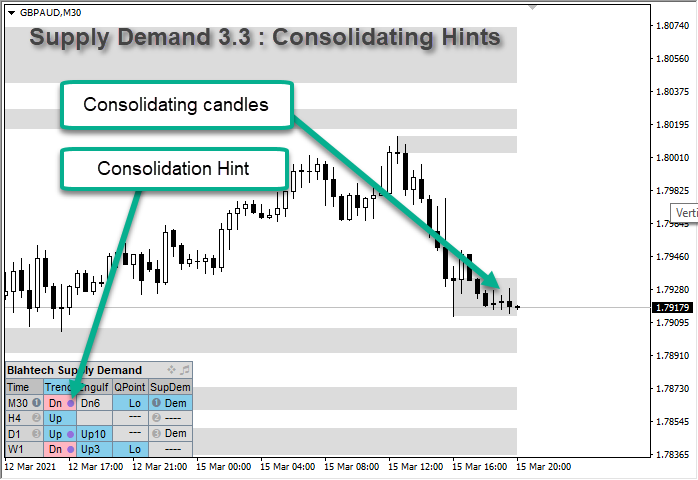
- Summary Trend - Display dot next to the trend direction when recent bars are consolidating
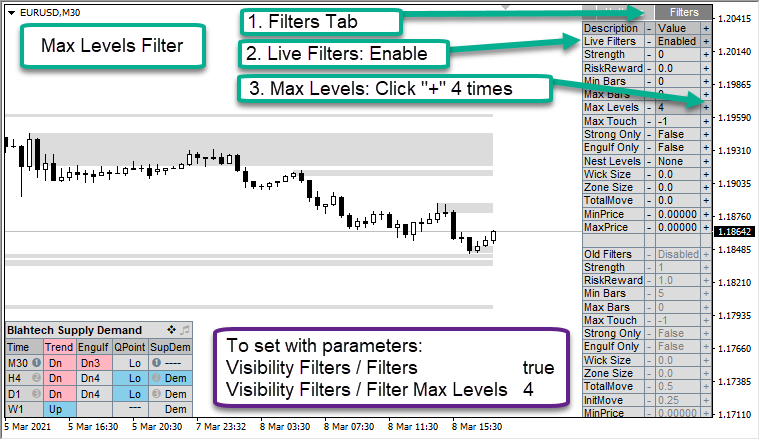
- Filters - Add Max Levels filter to allow the user to restrict the number of levels on the chart
- Zone Highlight - Add parameter to change highlighting mode (None/Strength/Untouched)
- Parameters - Write simple list of changed parameters to experts log when Ctrl+Q keys are pressed
- Parameters - Create detailed report of changed parameters in Files/Blahtech directory to assist users and support
Fixes
- Q Points - Add Min Risk Reward parameter
- Trend Change - Add Min Range and rename Min Risk Reward parameters
- Overall Trend Alerts - Print all three timeframe directions in alert message
- Summary SupDem - Improve highlighting accuracy with overlapped zones
- Old Zones - Enable detection of old zones with just two bars
- Consolidation - Fix edge case in consolidation zones detection
- Hotkeys - Revert regression from 3.1 release where [ and ] were swapped round
- Expert Advisor Mode - Change to a single option named "Reserved For iCustom Calls"
Documentation and Presets
https://www.mql5.com/en/blogs/post/700820
.
https://www.mql5.com/en/market/product/13712#!tab=updates
Enhancements
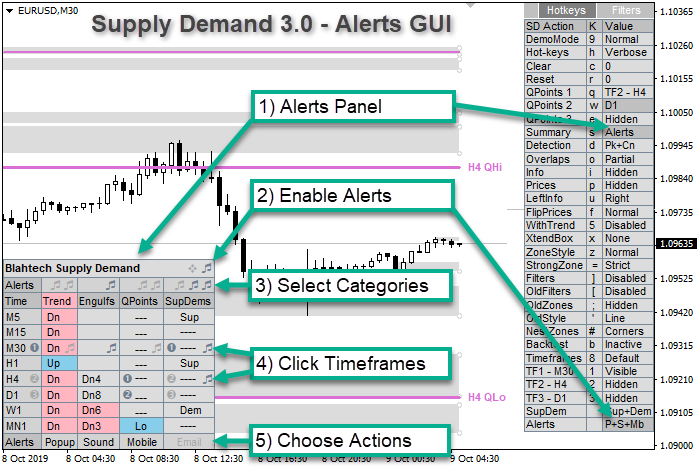
- Alerts - Add parameter "Filter Nested (Levels)" to control raising alerts for nested zones only
- Alerts - Add parameter "Trigger Alerts Early" to trigger touch/break alerts N points before the level
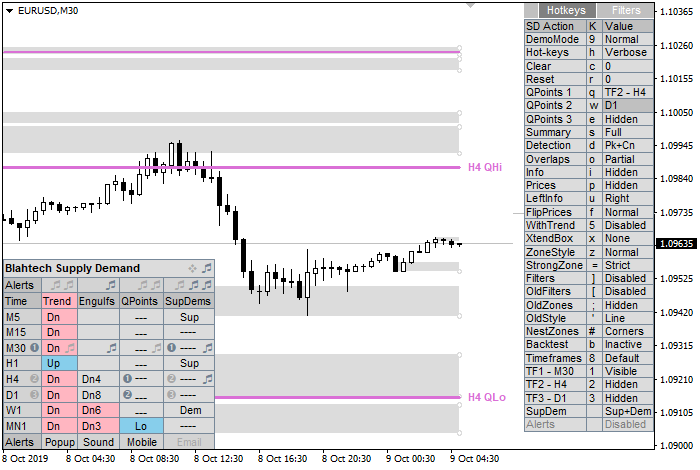
- Hotkey Panel - Add "Alerts Nest" button to allow user to modify the nested zone filter from the GUI
- Summary - Alerts panel - Add icon next to title to show "Trigger Early Alerts" points value
- Summary - Alerts panel - Improve alerts icon tooltips
- Touches - Increase accuracy of Touches and add optional Touch/Untouch points parameters
- Info - Add parameter to control the precision of the {lots1} substitution string
- Info - Add a second user custom format string
Fixes
- Alerts - Fix edge case where duplicate alerts could be raised
- Alerts - Remove overlaps from Retouch alerts and apply filters to New alerts
- Alerts - Don't raise alerts for levels hidden from display by the "Zone Visibility" parameter
- Alerts - Improve text format, add bid price and number of touches
- Trend Change - Modify trend change parameter to OVERLAP_ALL to improve consistency of trend reversals
- Summary Panel - Improve accuracy of summary panel when price retraces from touched levels
- Summary Panel - Optimise summary panel redraw to compensate for increased accuracy
- HotKey Panel - Adjust panel Y location when position changed to Bottom left/right
Documentation and Presets
https://www.mql5.com/en/blogs/post/700820
.
https://www.mql5.com/en/market/product/37576
Enhancements
- Change colour to Indian Red for final 10 seconds of the countdown
- Allow user to move the text to one of the chart corners
- Allow user to define a prefix description before the timer text
- Add option to set Custom Periods Seconds for non-standard custom charts
Fixes
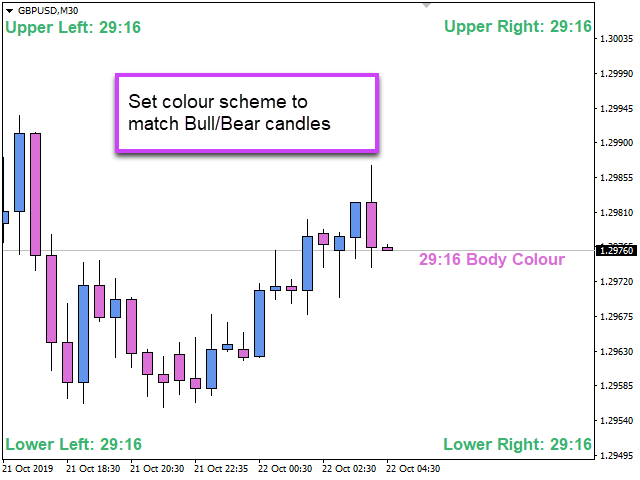
- Improve colour handling and respond to colour scheme change events
- Use Outline colour when body colour matches background
- Enable user configurable suffix text
.
Full list of changes https://www.mql5.com/en/market/product/13712#!tab=updates
https://www.mql5.com/en/market/product/13712#!tab=updates
Enhancements
- Add a third mode to the Summary panel GUI to control all alerts
- Alow user to set individual alert timeframes for Trend, Engulfings, QPoints and Levels
- Allow M30,H4,D1 as well as 1,2,3 when setting alerts timeframe parameters
- Enable Summary Timeframe Bubble Numbers by default
- Add bubble numbers to QPoints and SupDem columns in the Summary panel
- Add option to adjust the zone start bar of a level to the begining of a consolidation
- Add Timeframe hints to the TF section of the Hotkey panel
- Add {lots3} option to Info format
Fixes
- Change default colour of QPoint 2 from MediumOrchid to PaleVoiletRed
- Change Invert Style and colour parameters to be more intuitive
- Change text colour of oversized Q Points on the chart to Gray
- Change Summary heading from TimeF to Time
- Improve the behaviour of the Q Points hotkeys
- Modify all lines drawn by the indicator to be unselectable
- Include first bar in search for max move away of zones and Q Points
- Reset hotkey settings when indicator is removed from chart or chart is closed
- Only call TerminalInfoInteger to get ctrl status when key pressed or object clicked
Documentation and Presets
https://www.mql5.com/en/blogs/post/700820
.
MetaTrader sees the Windows 10 May 2019 Update (version 1903) as a new operating system. As a result you will need to re-activate your products after the upgrade
.
Más de 100.000 usuarios en MT4 y MT5 Blahtech Candle Timer muestra el tiempo restante antes de que la barra actual se cierre y se forme una nueva barra. Se puede utilizar para la gestión del tiempo Enlaces [ Instalar | Actualizar | Formación ] Características destacadas El único temporizador de velas en MT5 sin tartamudeo y sin lag Ubicación seleccionable Sigue la hora del servidor, no la hora local Múltiples esquemas de color Texto configurable Alertas y mensajes personalizables Optimizado
Más de 100.000 usuarios en MT4 y MT5 Blahtech Candle Timer muestra el tiempo restante antes de que la barra actual se cierre y se forme una nueva barra. Se puede utilizar para la gestión del tiempo Enlaces [ Instalar | Actualizar | Formación ] Características destacadas El único temporizador de velas en MT4 sin tartamudeo y sin lag Ubicación seleccionable Sigue la hora del servidor y no la hora local Múltiples esquemas de color Texto configurable Alertas y mensajes personalizables Optimizado
To double check GMTOffset, your first bar of the London session should appear at 08:00 BST
Actual time in London (BST) https://greenwichmeantime.com/uk/london/time
Real time World Stock Exchange status https://www.worldtimezone.com/markets24.php
El indicador Blahtech Moving Average es una versión multitiempo del indicador estándar Moving Average. También está mejorado con alertas personalizables, saltos de periodo y otras opciones de configuración. Las medias móviles de 50 y 200 días son ampliamente seguidas por inversores y operadores, y las rupturas por encima y por debajo de las líneas MA se consideran señales de interés. Enlaces [ Instalar | Actualizar | Formación | Todos los productos ] Características destacadas Hasta tres marcos