Bibliotecas: cIntBMP - una librería para la creación de imágenes BMP
En Windows 7 64 bit no funcionan.
Estoy intentando crear uno transparente. Pero no funciona. Usted podría encontrar un error. O una cIntBMP Trasnparent Añadir funciones.

//+------------------------------------------------------------------+
//|prueba.mq5
//| Copyright 2011, MetaQuotes Software Corp. | |
//| http://www.mql5.com
//+------------------------------------------------------------------+
#property copyright "Copyright 2011, MetaQuotes Software Corp."
#property link      "http://www.mql5.com"
#property version   "1.00"
//+------------------------------------------------------------------+
//| Función de inicio del programa de script|
//+------------------------------------------------------------------+

#import "user32.dll"
   int GetDC(int hwnd);
   int ReleaseDC(int hwnd,int hdc);
#import "gdi32.dll"
 int GetPixel(int hdc,int x,int y);
 int SetPixel(int hdc,int x,int y, int c);
#import

void OnStart()
  {

int i, H, V, shH=0, shV=0, header;
  double hgh;
  color screen [80][80];
  color r, g, b, cv=Red;

//---
long  hwnd=ChartGetInteger(ChartID(),CHART_WINDOW_HANDLE);
int   hdc=GetDC((int)hwnd);


for(V=0; V<80; V++)
{
   for(H=0; H<80; H++)
   {
   screen[V][H]=GetPixel(hdc,V,H);

   }
}

for(V=0; V<80; V++)
{
   for(H=0; H<80; H++)
   {

   cv=screen[V][H];

     cv=AlphaBlend(cv ,clrRed );

   SetPixel(hdc, V+shV,H+shH,cv);

   }
}


Sleep(3000);


  }
//+------------------------------------------------------------------+

/* rutina de mezcla alfa */
int AlphaBlend(int bg, int src)
{
int alpha = 100;
return (src * alpha / 255 + bg * (255 - alpha) / 255);

   int a = src >> 24;    /* alfa */

   /* Si el píxel de origen es transparente, sólo devuelve el fondo */
   if (0 == a) return (bg);

   /* alpha blending the source and background colours */
 int rb = (((src & 0x00ff00ff) * a) +
      ((bg & 0x00ff00ff) * (0xff - a))) & 0xff00ff00;
 int    g  = (((src & 0x0000ff00) * a) +
      ((bg & 0x0000ff00) * (0xff - a))) & 0x00ff0000;

    return (  (src & 0xff000000) | ((rb | g) >> 8)   );
}
Chicos, ¿quizás haya otras formas de mejorar la imagen?
Dmitry Fedoseev cada tick. La máquina es de hierro, pero déjala que se ocupe de tareas más útiles.
¿Quieres decir que la unica forma de tener transparencia en esos objetos rectangulo y triangulo es reproduciendo la solucion que tenemos en este articulo? Estudiando la clase CCanvas. Como Dibujar Objetos Transparentes - MQL5 Articles

Studying the CCanvas Class. How to Draw Transparent Objects
- www.mql5.com
Do you need more than awkward graphics of moving averages? Do you want to draw something more beautiful than a simple filled rectangle in your terminal? Attractive graphics can be drawn in the terminal. This can be implemented through the CСanvas class, which is used for creating custom graphics. With this class you can implement transparency, blend colors and produce the illusion of transparency by means of overlapping and blending colors.

Está perdiendo oportunidades comerciales:
- Aplicaciones de trading gratuitas
- 8 000+ señales para copiar
- Noticias económicas para analizar los mercados financieros
Registro
Entrada
Usted acepta la política del sitio web y las condiciones de uso
Si no tiene cuenta de usuario, regístrese
cIntBMP - una librería para la creación de imágenes BMP:
Una clase para la creación y producción de imágenes BMP.
Un ejemplo del método DrawTriangle()
Un ejemplo del método DrawRectangle()
Un ejemplo del método DrawCircle()
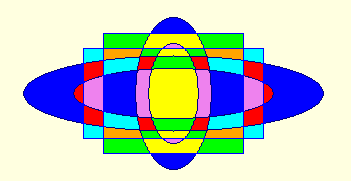
Un ejemplo del método Fill()Autor: Dmitry Fedoseev