Edge Snap Met4
- Experts
- Version: 1.0
- Activations: 5

Catch the reversal before everyone else.
FOX WAVE – EdgeSnap EA is a fully automated multi-symbol Expert Advisor that continuously scans your entire trading universe for high-quality reversal opportunities.
Instead of monitoring dozens of charts, EdgeSnap does the work for you.
It ranks every valid setup, calculates the correct position size from your predefined account risk, manages trades automatically from entry to exit, and displays everything on a real-time dashboard directly on your chart.
You always know exactly what the EA is about to do—before it does it.
Why EdgeSnap?✅ Scan your entire Market Watch simultaneously
✅ Automatically rank the best opportunities
✅ Risk-based position sizing
✅ Intelligent stop-loss placement
✅ Partial profit taking & ATR trailing
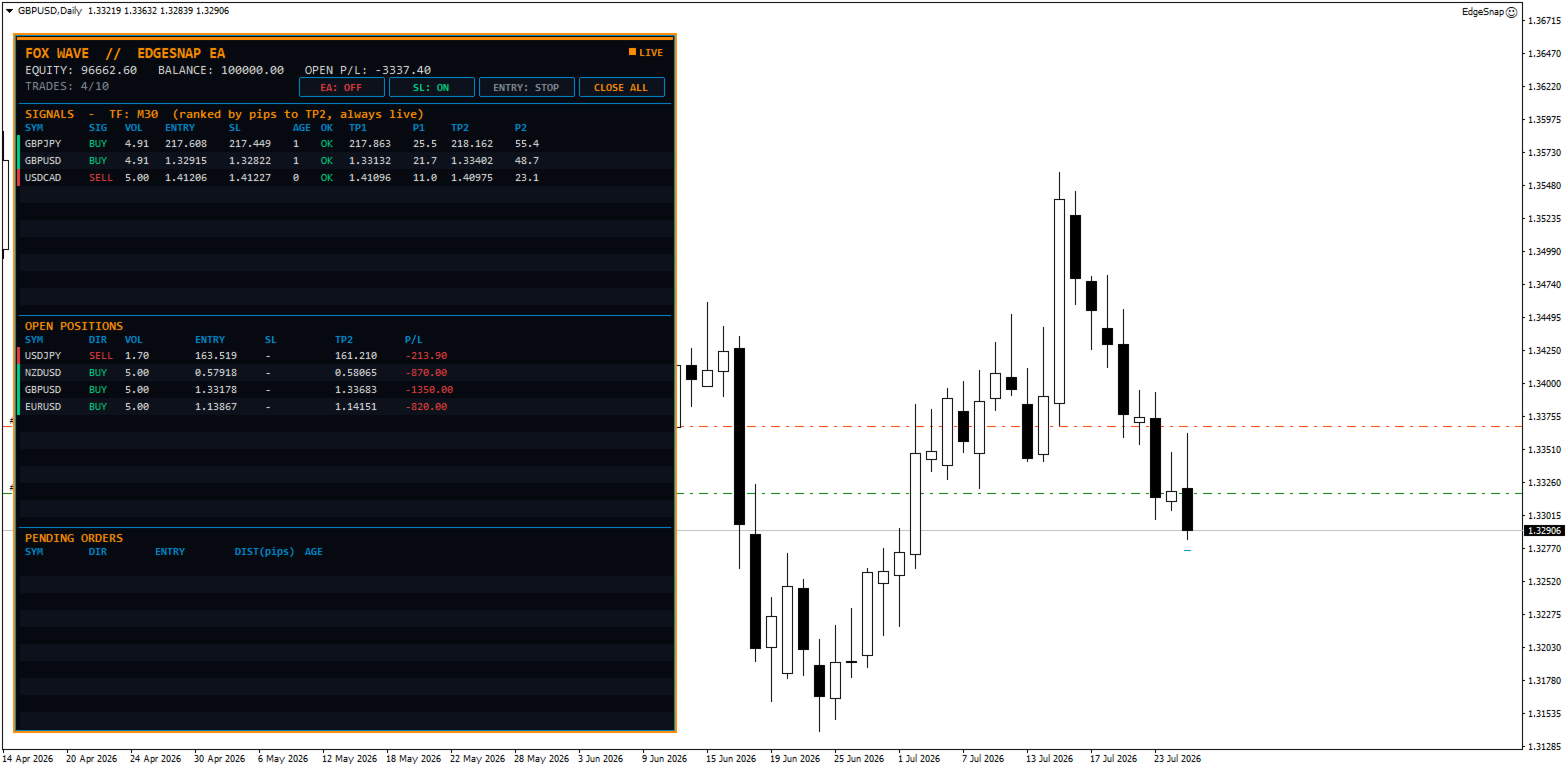
✅ Live dashboard with complete trade overview
✅ One-click control panel
✅ No DLLs • No external services • Lightweight
Intelligent Multi-Symbol ScannerStop searching chart after chart.
EdgeSnap continuously scans every symbol in your Market Watch (or your own custom symbol list), automatically handling broker suffixes such as:
EURUSD
EURUSD.p
EURUSDm
EURUSDpro
Every qualifying setup is sorted by opportunity size, allowing the EA to always prioritize the strongest trades first.
Smart Signal DetectionEdgeSnap searches for a specific price reversal pattern:
• Price extends beyond a defined range
• Market rejects the move
• Price closes back inside the range
Every signal is then evaluated using multiple quality filters including:
✔ excursion strength
✔ volatility
✔ distance from range midpoint
✔ overall setup quality
Poor-quality setups are discarded automatically.
Full Lookback DetectionUnlike many Expert Advisors that only inspect the most recently closed candle, EdgeSnap scans the entire configurable lookback window.
This means slightly older—but still completely valid—signals are not missed.
Each signal is traded only once and only while its entry, stop-loss and targets remain valid.
Two Entry ModesSTOP Mode (Classic)
Places a pending Stop order beyond the signal candle.
Ideal for traders who prefer confirmation before entry.
NOW Mode
Skip the breakout confirmation entirely.
Enter immediately at market price while preserving the original profit targets.
Because price may already have moved significantly, EdgeSnap automatically rebuilds the stop-loss using current ATR volatility instead of the original signal candle.
Perfect for catching opportunities that are already moving.
Professional Risk ManagementEvery position size is calculated automatically from:
• Account Balance
• User Risk %
• Actual Stop-Loss distance
Before any trade is sent, EdgeSnap verifies:
✔ Free Margin
✔ Broker Volume Limits
✔ Maximum Lot Size
If required, lot size is automatically reduced—or the trade is skipped entirely.
Intelligent Stop-LossEdgeSnap never places arbitrary stop-losses.
STOP entries
SL is positioned beyond the excursion candle that invalidates the reversal idea.
NOW entries
SL is rebuilt using current ATR volatility, providing realistic protection for immediate market entries.
Advanced Trade ManagementEvery position can manage itself automatically.
Stage 1
Partial close at Target 1
↓
Move Stop-Loss to Breakeven
↓
Stage 2
Optional ATR Trailing Stop
↓
Ride larger market moves toward Target 2
Trailing updates only after completed candles and respects a minimum movement step to eliminate unnecessary stop adjustments.
Opportunity RankingWhen several valid setups appear simultaneously, EdgeSnap doesn't simply trade the first symbol it finds.
Instead it automatically ranks every opportunity according to remaining distance to target.
The strongest opportunities always receive priority.
Live Trading DashboardEverything is visible directly on the chart.
Signals
• Symbol
• Entry Price
• Lot Size
• Stop-Loss
• Target 1
• Target 2
• Distance to Targets
Open Positions
Live overview of every active trade.
Pending Orders
Complete pending order management.
Account Overview
• Balance
• Equity
• Floating Profit/Loss
• Current Open Trades
• Trade Limit Status
One-Click Control PanelControl the EA instantly without opening Inputs.
Buttons include:
🟢 Trading ON / OFF
⚡ STOP / NOW Entry Mode
🛡 Stop-Loss ON / OFF
❌ Close All (double-confirmation)
Trading always starts OFF when the EA is attached to a chart, ensuring complete user control.
Safety FeaturesEdgeSnap includes multiple built-in protection systems.
✔ Maximum simultaneous trades
✔ One trade per symbol
✔ Pending order expiration
✔ Trading session filter
✔ Weekend protection
✔ Manual news blackout schedule
✔ Margin verification
✔ Volume verification
✔ Broker compatibility checks
No external news feed.
No DLL.
No internet dependency.
Lightweight ArchitectureEdgeSnap uses only standard MQL5 functionality.
• No DLLs
• No external files
• No web services
• Low CPU usage
• Fast multi-symbol scanning
Main InputsSymbol Universe
• Automatic Market Watch
• Manual Symbol List
• Broker Suffix
• Maximum Symbols
Strategy
• Timeframe
• Lookback Window
• Volatility Period
• Excursion Filters
• Quality Thresholds
Entries
• STOP Buffer
• SL Buffer
• Pending Expiration
• Default Entry Mode
Money Management
• Risk %
• Maximum Lot
• Partial Close %
• Break Even
• ATR Trailing
• ATR Multiplier
• Minimum Trail Step
Trade Limits
• Maximum Active Trades
• Magic Number
Filters
• Trading Sessions
• Weekend Filter
• Manual News Blackout
Dashboard
Fully customizable:
• Position
• Colors
• Fonts
• Size
Key Advantages✔ Fully Automated
✔ Multi-Symbol Scanner
✔ Opportunity Ranking
✔ Risk-Based Position Sizing
✔ Smart Stop-Loss Logic
✔ Partial Close
✔ ATR Trailing
✔ Live Dashboard
✔ One-Click Control
✔ Lightweight
✔ No Grid
✔ No Martingale
✔ No Averaging Down
✔ Netting & Hedging Compatible
Designed for Professional TradersEdgeSnap isn't built to open the most trades.
It's built to identify the best reversal opportunities, execute them with disciplined risk management, and manage every position automatically—allowing you to focus on the market instead of constantly monitoring charts.