Edge Snap Met4

FOX WAVE — EDGESNAP EA

Catch the reversal before everyone else.

FOX WAVE – EdgeSnap EA is a fully automated multi-symbol Expert Advisor that continuously scans your entire trading universe for high-quality reversal opportunities.

Instead of monitoring dozens of charts, EdgeSnap does the work for you.

It ranks every valid setup, calculates the correct position size from your predefined account risk, manages trades automatically from entry to exit, and displays everything on a real-time dashboard directly on your chart.

You always know exactly what the EA is about to do—before it does it.

Why EdgeSnap?

✅ Scan your entire Market Watch simultaneously

✅ Automatically rank the best opportunities

✅ Risk-based position sizing

✅ Intelligent stop-loss placement

✅ Partial profit taking & ATR trailing

✅ Live dashboard with complete trade overview

✅ One-click control panel

✅ No DLLs • No external services • Lightweight

Intelligent Multi-Symbol Scanner

Stop searching chart after chart.

EdgeSnap continuously scans every symbol in your Market Watch (or your own custom symbol list), automatically handling broker suffixes such as:

EURUSD

EURUSD.p

EURUSDm

EURUSDpro

Every qualifying setup is sorted by opportunity size, allowing the EA to always prioritize the strongest trades first.

Smart Signal Detection

EdgeSnap searches for a specific price reversal pattern:

• Price extends beyond a defined range

• Market rejects the move

• Price closes back inside the range

Every signal is then evaluated using multiple quality filters including:

✔ excursion strength

✔ volatility

✔ distance from range midpoint

✔ overall setup quality

Poor-quality setups are discarded automatically.

Full Lookback Detection

Unlike many Expert Advisors that only inspect the most recently closed candle, EdgeSnap scans the entire configurable lookback window.

This means slightly older—but still completely valid—signals are not missed.

Each signal is traded only once and only while its entry, stop-loss and targets remain valid.

Two Entry Modes

STOP Mode (Classic)

Places a pending Stop order beyond the signal candle.

Ideal for traders who prefer confirmation before entry.

NOW Mode

Skip the breakout confirmation entirely.

Enter immediately at market price while preserving the original profit targets.

Because price may already have moved significantly, EdgeSnap automatically rebuilds the stop-loss using current ATR volatility instead of the original signal candle.

Perfect for catching opportunities that are already moving.

Professional Risk Management

Every position size is calculated automatically from:

• Account Balance

• User Risk %

• Actual Stop-Loss distance

Before any trade is sent, EdgeSnap verifies:

✔ Free Margin

✔ Broker Volume Limits

✔ Maximum Lot Size

If required, lot size is automatically reduced—or the trade is skipped entirely.

Intelligent Stop-Loss

EdgeSnap never places arbitrary stop-losses.

STOP entries

SL is positioned beyond the excursion candle that invalidates the reversal idea.

NOW entries

SL is rebuilt using current ATR volatility, providing realistic protection for immediate market entries.

Advanced Trade Management

Every position can manage itself automatically.

Stage 1

Partial close at Target 1

Move Stop-Loss to Breakeven

Stage 2

Optional ATR Trailing Stop

Ride larger market moves toward Target 2

Trailing updates only after completed candles and respects a minimum movement step to eliminate unnecessary stop adjustments.

Opportunity Ranking

When several valid setups appear simultaneously, EdgeSnap doesn't simply trade the first symbol it finds.

Instead it automatically ranks every opportunity according to remaining distance to target.

The strongest opportunities always receive priority.

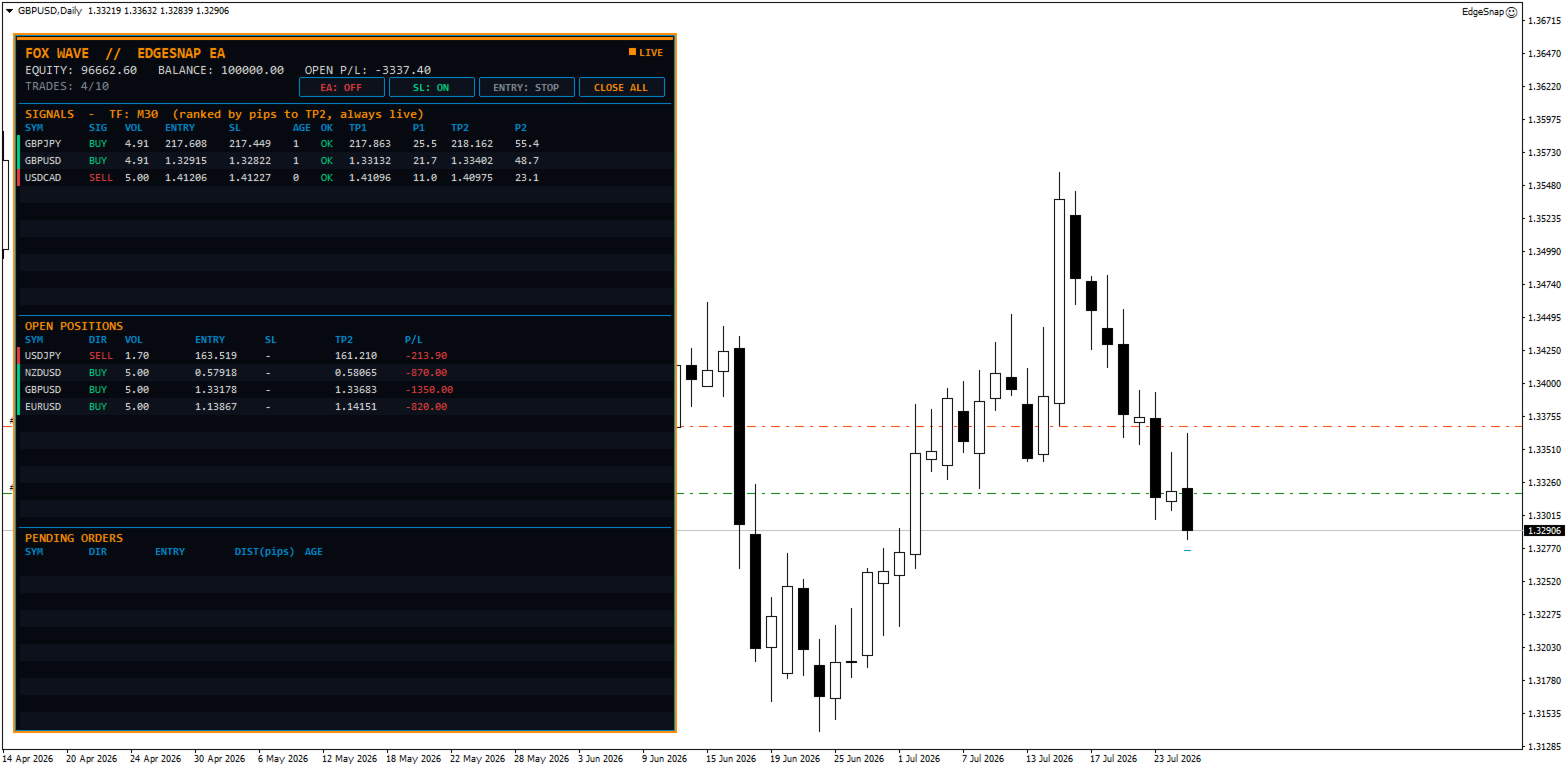
Live Trading Dashboard

Everything is visible directly on the chart.

Signals

• Symbol

• Entry Price

• Lot Size

• Stop-Loss

• Target 1

• Target 2

• Distance to Targets

Open Positions

Live overview of every active trade.

Pending Orders

Complete pending order management.

Account Overview

• Balance

• Equity

• Floating Profit/Loss

• Current Open Trades

• Trade Limit Status

One-Click Control Panel

Control the EA instantly without opening Inputs.

Buttons include:

🟢 Trading ON / OFF

⚡ STOP / NOW Entry Mode

🛡 Stop-Loss ON / OFF

❌ Close All (double-confirmation)

Trading always starts OFF when the EA is attached to a chart, ensuring complete user control.

Safety Features

EdgeSnap includes multiple built-in protection systems.

✔ Maximum simultaneous trades

✔ One trade per symbol

✔ Pending order expiration

✔ Trading session filter

✔ Weekend protection

✔ Manual news blackout schedule

✔ Margin verification

✔ Volume verification

✔ Broker compatibility checks

No external news feed.

No DLL.

No internet dependency.

Lightweight Architecture

EdgeSnap uses only standard MQL5 functionality.

• No DLLs

• No external files

• No web services

• Low CPU usage

• Fast multi-symbol scanning

Main Inputs

Symbol Universe

• Automatic Market Watch

• Manual Symbol List

• Broker Suffix

• Maximum Symbols

Strategy

• Timeframe

• Lookback Window

• Volatility Period

• Excursion Filters

• Quality Thresholds

Entries

• STOP Buffer

• SL Buffer

• Pending Expiration

• Default Entry Mode

Money Management

• Risk %

• Maximum Lot

• Partial Close %

• Break Even

• ATR Trailing

• ATR Multiplier

• Minimum Trail Step

Trade Limits

• Maximum Active Trades

• Magic Number

Filters

• Trading Sessions

• Weekend Filter

• Manual News Blackout

Dashboard

Fully customizable:

• Position

• Colors

• Fonts

• Size

Key Advantages

✔ Fully Automated

✔ Multi-Symbol Scanner

✔ Opportunity Ranking

✔ Risk-Based Position Sizing

✔ Smart Stop-Loss Logic

✔ Partial Close

✔ ATR Trailing

✔ Live Dashboard

✔ One-Click Control

✔ Lightweight

✔ No Grid

✔ No Martingale

✔ No Averaging Down

✔ Netting & Hedging Compatible

Designed for Professional Traders

EdgeSnap isn't built to open the most trades.

It's built to identify the best reversal opportunities, execute them with disciplined risk management, and manage every position automatically—allowing you to focus on the market instead of constantly monitoring charts.


作者的更多信息
Edge Snap Indicator
Zbynek Liska
5 (1)
FoxWave EdgeSnap — Multi-Timeframe Reversal Scanner with Quality Filter FoxWave EdgeSnap by Fox Wave watches your symbol across every timeframe simultaneously and flags the exact moment price breaks outside its dynamic volatility envelope and snaps back inside — a well-known mean-reversion pattern — then runs each signal through a quality filter before it ever reaches your eyes, so you're not chasing every minor wobble. Key features: Multi-timeframe scan (M1 through MN1, fully toggle-able) — one
Fox Wave Pattern Scanner  SHORT DESCRIPTION  Multi-timeframe candlestick pattern scanner: 24 patterns across M5-D1, live dashboard, on-chart markers, one-click TF toggles, alerts. FULL DESCRIPTION Fox Wave Pattern Scanner continuously reads your chart's symbol across six timeframes at once and reports every candlestick pattern it finds in a clean dark dashboard — so you never have to manually flip through timeframes looking for a setup again. Instead of scrolling between M5, M15, M30, H1, H4 and
If you need more information than a few numbers in the iExposure index, this indicator is for you. Better iExposure indicator is an improvement over the original information, such as: Separate profit column for BUY and SELL Separate SL column for BUY and SELL Separate TP column for BUY and SEL Average Price as Horizontal Line in Chart Pip Value Profit https://www.facebook.com/groups/prop4y iExposure will show the opening of trading positions in tabular form in the sub-window below the main wi
Cool iExposure
Zbynek Liska
5 (1)
If you need more information than a few numbers in the iExposure index, this indicator is for you. Better iExposure indicator is an improvement over the original information, such as: Separate profit column for BUY and SELL Separate SL column for BUY and SELL Separate TP column for BUY and SEL Average Price as Horizontal Line in Chart Pip Value www.foxwave.eu
Basic tool Showing annual candle, range for Day, range for Week, range for Month, range for Year. Showing fibonacci for Day fibonacci for Week, fibonacci for Month, fibonacci for Year. Showing percent change for Day, percent change for Week, percent change for Month, percent change for Year. Showing distance of the current value the previous close for Day, Week, Month, Year.
What are Fibonacci Numbers and Lines? Fibonacci numbers are used to create technical indicators using a mathematical sequence developed by the Italian mathematician, commonly referred to as "Fibonacci," in the 13th century. The sequence of numbers, starting with zero and one, is created by adding the previous two numbers. For example, the early part of the sequence is 0, 1, 1, 2, 3, 5, 8, 13, 21, 34, 55, 89,144, 233, 377, and so on. The Fibonacci sequence is significant because of the so-calle
This is a simple and very effective utility for closing in profir or in loss. Constant overview of daily Draw Down, Current profit and Daily profit This utility will save your deposit in case of a sharp market change. Just add it to any free chart and use it for your daily trading. Thanks to the minimal set of parameters, you can easily set up the utility for any symbol in MT4
Edge Snap MT4
Zbynek Liska
oxWave EdgeSnap — Multi-Timeframe Reversal Scanner with Quality Filter FoxWave EdgeSnap by Fox Wave watches your symbol across every timeframe simultaneously and flags the exact moment price breaks outside its dynamic volatility envelope and snaps back inside — a well-known mean-reversion pattern — then runs each signal through a quality filter before it ever reaches your eyes, so you're not chasing every minor wobble. Key features: Multi-timeframe scan (M1 through MN1, fully toggle-able) — one
Easy EA for closing positions with profit or loss. All positions of chart's symbol are counted separately. Settings: TPforSymbol — set profit amount to indicate when to close every positions for the symbol of the chart. Swap and commission are decreasing your profit. SLforSymbol — set SL amount to indicate SL for every positions for the symbol of the chart. Swap and commission are increasing your loss. SLforSyblol is always below/equal zero.
This multi-currency annual dashboard analyzes the nearest high and low to the current price for a chosen number of recent years. It displays how many pips away the price is from the nearest high or low. You can set a pip threshold, and the alert will notify you when the price gets close to the specified levels. In real-time, the dashboard also provides an overview of the closest high or low values for each specific year, helping you make informed trading decisions.
Key level analysis : The indicator tracks the nearest annual high and low to the current price over a chosen number of years. Proximity alerts : It triggers an alert when the price reaches a specified number of pips from the nearest high or low. Customizable notification intervals : You can set how often alerts repeat, for example, every 30 minutes. Historical perspective : Enables long-term tracking of market levels and effective planning of trading strategies. Multi-currency support : This ind
iExposure Fox Wave – Comprehensive Position Monitoring Indicator iExposure Fox Wave is an advanced MetaTrader indicator designed to provide detailed monitoring of all open trading positions in a clear, tabular format. This tool is perfect for traders who want all essential trade information in one place. Key Features: Symbol: Displays the instruments (currency pairs or other symbols) with open positions. Deals: Number of open trades (transactions) for each symbol. Buy lots & Buy price: Total vol
RangeDashboard – Multi-symbol Daily, Weekly, and Monthly Range Overview with Alerts RangeDashboard is a powerful and user-friendly indicator that displays the current range (high-low) of selected currency pairs or instruments over a chosen timeframe (D1, W1, MN1) directly on the chart. It allows you to input a customizable list of symbols, add suffixes if needed, and select the timeframe from which the ranges are calculated. Key Features: Dynamic calculation of ranges for any number of symbols o
Fox Wave PSAR – PSAR Dashboard for Multiple Symbols and Timeframes Description: Fox Wave PSAR is a powerful indicator for MetaTrader 5 that allows you to monitor the Parabolic SAR (PSAR) across multiple symbols and timeframes directly in a clear and convenient dashboard. It is ideal for scalping, intraday, and long-term trading strategies. Key Features: Clear dashboard with a list of symbols and their current PSAR status. Supports any number of symbols and customizable suffixes (e.g., ".m"). Di
New High / Low Dashboard Scanner is not a common indicator. It is a market-structure control system designed to monitor, in real time, the creation of new Highs and Lows across Daily, Weekly, Monthly, and Yearly time horizons — while simultaneously measuring the exact distance of price from these critical levels in pips. This tool is built for traders who do not want to react late, but instead want to stand at the origin of market movement . What the system does The dashboard continuously scan
Short Description Fox Wave Account Nexus is a professional dashboard for real-time monitoring of multiple MetaTrader 5 accounts across different terminals from a single chart. Full Description  Fox Wave Account Nexus Professional Multi-Account Monitoring Dashboard for MetaTrader 5 Fox Wave Account Nexus is a powerful visual dashboard designed for traders who operate multiple MT5 accounts simultaneously and need instant, centralized control . The indicator collects live data from all con
Fox Wave Pro Copier - Professional Multi-Master Trade Copier Copy trades from multiple Master accounts simultaneously with advanced risk management Key Features Multi-Master Architecture Copy from unlimited master accounts simultaneously Automatic master account detection or manual configuration Real-time trade synchronization via file system Independent risk management for each master Advanced Risk Management Individual risk settings per master account Automatic lot size calculation based
TREND SCANNER PRO - Multi-Timeframe Trend Analysis Dashboard Professional real-time trend scanner that monitors up to 15 currency pairs across 8 timeframes simultaneously. Get instant market overview with epic visual dashboard, smart alerts, and zero lag performance. KEY FEATURES
Professional Averaging Calculator - Essential Risk Management Tool for Every Trader Whether you're a beginner learning position averaging or a professional managing complex grid strategies, this calculator is your must-have tool. Beginners instantly see how averaging works, understand maximum loss scenarios, and learn proper risk management before entering trades - no more "I didn't know I could lose that much" surprises. Professionals save time and eliminate calculation errors with instant simu
SMC Pro — Smart Money Concepts All-in-One The only indicator you need to trade like the institutions. SMC Pro combines five core Smart Money Concepts tools into a single, clean, and fully customizable indicator for MetaTrader 5. No repainting. No clutter. Everything you need to read the market the way banks and hedge funds do. What it does Order Blocks Automatically detects bullish and bearish Order Blocks — the price zones where institutional orders were placed before a major move. The indic
Calculate the exact entry price or lot size needed to reach your target average — directly on the chart. Full description A lightweight MT5 indicator that solves a common trading problem: if I add to my position at market price, what volume do I need to reach my target average? Or the reverse: if I want to add a fixed lot size, at what price must I enter? The panel reads your open positions automatically, displays the current average entry price with a dashed line on the chart, and lets you s
Spread Recorder — Multi-Symbol Max/Min Dashboard Spread Recorder is a real-time multi-symbol dashboard that continuously monitors live spreads across your entire watchlist and permanently records the maximum and minimum spread ever seen for each symbol — with timestamps. Key features: Monitor 10, 28, 50+ symbols simultaneously from a single customizable text file Auto-adaptive grid layout — the panel automatically resizes its rows and columns to fit however many symbols you load, from a handful
Swap Monitor — Multi-Symbol Buy/Sell Swap Dashboard with Alerts Swap Monitor is a real-time multi-symbol dashboard that displays live SELL and BUY swap rates for your entire watchlist in one compact, color-coded panel — and can alert you the instant any swap rate changes. Key features: Monitor 10, 28, 50+ symbols simultaneously from a single customizable text file Auto-adaptive grid layout — the panel automatically resizes to fit however many symbols you load Displays both SELL and BUY swap valu
Volume Suite
Zbynek Liska
FoxWave Volume Suite combines three essential volume-based tools into a single indicator: a horizontal Volume Profile with Point of Control and Value Area, a real-time volume spike detector with instant alerts, and a buy/sell pressure delta gauge. No need to run three separate indicators — everything you need to read volume is in one clean Fox Wave panel. What it does Volume Profile (POC / VAH / VAL) Builds a horizontal histogram showing how much volume traded at each price level over your cho
FoxWave SMC Trend Suite  SHORT DESCRIPTION  Smart Money Concepts trend tool: Market Structure (BOS/CHoCH), Order Blocks, FVG and EQH/EQL — fully toggleable, with alerts. FULL DESCRIPTION FoxWave SMC Trend Suite brings the four foundational building blocks of Smart Money Concepts trading into a single, clean indicator: Market Structure shifts (Break of Structure / Change of Character), Order Blocks, Fair Value Gaps, and Equal Highs/Equal Lows liquidity pools. Every component can be switched on or

Profit Loss Tracker A clean, draggable on-chart panel that shows your floating profit/loss in real time — one symbol at a time or your entire account at once — with permanent high/low watermark history and one-click close. Stop scrolling through the Trade tab or doing mental math. zProfit Loss Tracker keeps your floating P/L, your best and worst moments on every symbol, and your account health always visible in a compact, modern panel — and lets you close positions with a single click, right whe

Edge Snap
Zbynek Liska
One purchase. Two professional trading tools. Buy EdgeSnap EA today and receive this Edge Snap Indicator  as a complimentary bonus. Simply contact me on MQL5 after your purchase, and I'll send it to you personally. FOX WAVE — EDGESNAP EA A fully automated multi-symbol trading robot that scans your entire Market Watch for price-reversal setups, sizes every trade from account risk with built-in margin and volume safety caps, manages partial profit-taking and trailing on its own, and shows you e
FoxWave EdgeSnap Multi-Symbol — Scan Every Pair for Reversal Setups at Once FoxWave EdgeSnap Multi-Symbol by Fox Wave takes the same quality-filtered reversal detection from EdgeSnap and runs it across every symbol you trade at once — Market Watch or a custom list, one timeframe, one panel — so instead of flipping through 20+ charts looking for a setup, the setup finds you. Key features: Scans your entire Market Watch automatically, or a custom symbol list with broker-suffix support (up to 60 sy
筛选:
无评论
回复评论