META TESTER 5 Cloud Network — Agents disconnected and unable to self reconnect
Startup — MetaTester 5 build 5876 MQL5 account: XXXXXXX, cloud network mode Initialization complete.
very old version. and it is also a beta. But also yes, i am sure it is, to your question regarding blocking of excessive reconnections.
The actual version is the newest.
6140 is newest "release", but the 5876 was a beta version. much more probable to be "buggy".
you mentioned 3 different versions in your message. Can i assume that you do often do "manual" updates via the help menu option? i recommend that you stop doing that and only update with "release" versions.
backup the latest release version 6140, metatester, terminal.exe and metaeditor, all versions 6140 and DO NOT update again, unless there is an automatic update. doing constant updates, betas especially, could cause intermittend or too frequent reconnections. I read 3 similar threads a few months ago and these stopped after the user updated to the release version.
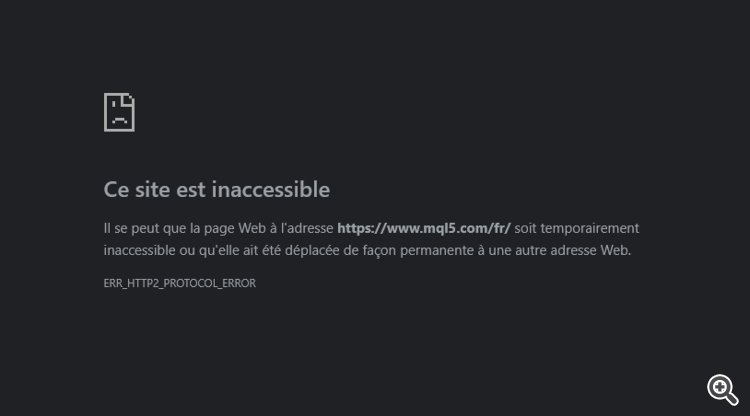
The website is sometimes completely inaccessible on multiple internet service providers.
6140 is newest "release", but the 5876 was a beta version. much more probable to be "buggy".
you mentioned 3 different versions in your message. Can i assume that you do often do "manual" updates via the help menu option? i recommend that you stop doing that and only update with "release" versions.
backup the latest release version 6140, metatester, terminal.exe and metaeditor, all versions 6140 and DO NOT update again, unless there is an automatic update. doing constant updates, betas especially, could cause intermittend or too frequent reconnections. I read 3 similar threads a few months ago and these stopped after the user updated to the release version.
i dont do manual update, i let the program do by himself.
i also work newly with an IT specialized in server side and lan application.
what we consider more now is a fully or partial block from ISP thailand. or a bandwidth privileges.
we have seen pass many complain about it, and on my personnal experience as a trader, the most afraid thing is for day trading, as packet data are not send and receive properly sometimes .
Occur during USA session for example, and abnormal increase of speed volatility in candle drawing. make trade decisions very hard to manage.
mean also that datas packets are not sent/received real time , but delayed so much that the trade i scalp/ day trade can be already in lose state when i take it due to delay. and also watched by a big brother.
same for meta tester, ISP lock down data transmission result on data corruption in roaming, lead to permanent disconnection.
Seems more an Internet connection issue than something directly related to MT5.
also, we seen that many others from some very high level of censorship country experience the same kind of problem.

- 2026.03.25
- www.mql5.com
6140 is newest "release", but the 5876 was a beta version. much more probable to be "buggy".
you mentioned 3 different versions in your message. Can i assume that you do often do "manual" updates via the help menu option? i recommend that you stop doing that and only update with "release" versions.
backup the latest release version 6140, metatester, terminal.exe and metaeditor, all versions 6140 and DO NOT update again, unless there is an automatic update. doing constant updates, betas especially, could cause intermittend or too frequent reconnections. I read 3 similar threads a few months ago and these stopped after the user updated to the release version.
What you (and many of the moderators here) don't seem to understand is that MetaTester can be installed free-standing (download link here), apart from MetaTrader 5 and its update mechanisms. Regardless of how it's installed, if MetaTester agents are installed and active on the Cloud Network, it updates itself automatically—sometimes even daily, often with beta builds that cannot be found anywhere else. If you try to inhibit it from updating, it keeps trying over and over again every few hours. The reason he mentions three different versions is because every time you turn around and look, it's automatically running a different version than before.
Im a remote worker in Thailand.
i understand well how common.ini work
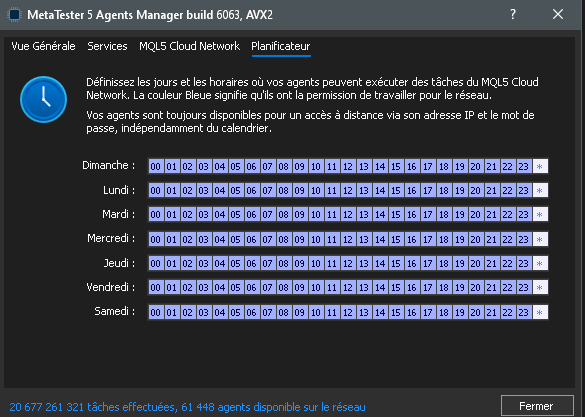
Since updating to build 6090 (August 10, 2026), agents are no longer connecting to the MQL5 Cloud Network.
A complete reinstall does not resolve the issue.
The manager log only displays "initialization finished" without any connection attempts.
Setting Schedule=0 and Schedule=1 both results in 0/44 agents being connected. Build 6033 worked perfectly.
What changed in build 6090 regarding the cloud connection logic?
The website is sometimes completely inaccessible on multiple internet service providers.
Both the website and the metadata are no longer working.
I have never seen the common.ini file schedule change itself in response to anything. It is solely user-configured via the Agents Manager window. Stop trying to edit the file manually; doing so can cause formatting and settings propagation errors. Stop all the services, delete that file, and start over, filling out your account and cloud info in the Agents Manager. Also, you have the "0" and "1" state backwards; "1" (white) designates when it is unavailable, while "0" (dark) allows it to work.
What you (and many of the moderators here) don't seem to understand is that MetaTester can be installed free-standing (download link here), apart from MetaTrader 5 and its update mechanisms. Regardless of how it's installed, if MetaTester agents are installed and active on the Cloud Network, it updates itself automatically—sometimes even daily, often with beta builds that cannot be found anywhere else. If you try to inhibit it from updating, it keeps trying over and over again every few hours. The reason he mentions three different versions is because every time you turn around and look, it's automatically running a different version than before.
I have never seen the common.ini file schedule change itself in response to anything. It is solely user-configured via the Agents Manager window. Stop trying to edit the file manually; doing so can cause formatting and settings propagation errors. Stop all the services, delete that file, and start over, filling out your account and cloud info in the Agents Manager. Also, you have the "0" and "1" state backwards; "1" (white) designates when it is unavailable, while "0" (dark) allows it to work.
yes i finally found that the 00000000 are the activators.
What you (and many of the moderators here) don't seem to understand is that MetaTester can be installed free-standing (download link here), apart from MetaTrader 5 and its update mechanisms. Regardless of how it's installed, if MetaTester agents are installed and active on the Cloud Network, it updates itself automatically—sometimes even daily, often with beta builds that cannot be found anywhere else. If you try to inhibit it from updating, it keeps trying over and over again every few hours. The reason he mentions three different versions is because every time you turn around and look, it's automatically running a different version than before.
Apart from the image of the contents of common.ini file, the OP did NOT mention that they had modified the file themselves -- and i would have assumed that was the main trouble, as you did find -- good find there.

- Free trading apps
- Over 8,000 signals for copying
- Economic news for exploring financial markets
You agree to website policy and terms of use
Im a remote worker in Thailand.
Link to the program: https://cloud.mql5.com/en/download

i understand well how common.ini work

Since updating to build 6090 (August 10, 2026), agents are no longer connecting to the MQL5 Cloud Network.
A complete reinstall does not resolve the issue.
The manager log only displays "initialization finished" without any connection attempts.
Setting Schedule=0 and Schedule=1 both results in 0/44 agents being connected. Build 6033 worked perfectly.
What changed in build 6090 regarding the cloud connection logic?
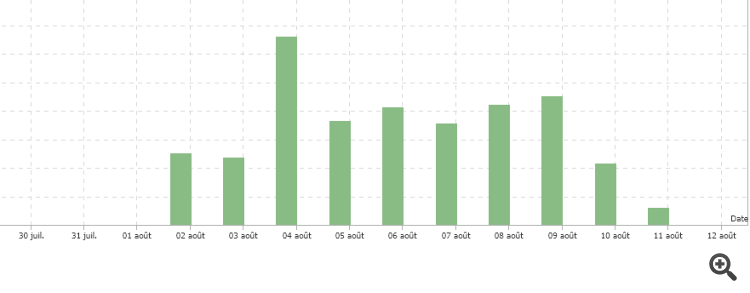
Since August 15th at 9:00 AM Paris time, all cloud connections have been down.
Unable to reconnect.
Again.
Cloud disconnection for no apparent reason.
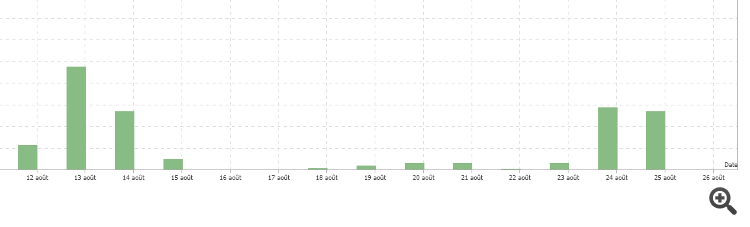
Over 15,000 passes processed in 48 hours, on August 24th and 25th.
And it's happening again...
version AVX2 build 6140
The website is sometimes completely inaccessible on multiple internet service providers.
Both the website and the metadata are no longer working.