MT5 - Market Page Blank!
- My purchase not showing in the purchased section. PLEASE HELP!
- Blank window
- Cant add new currency pairs to the market watch in MT5 on mac
What is written in Metatrader journal?
Because most often reason is the following: Microsoft Edge WebView2 should be installed/re-installed, and/or Microsoft Edge should be installed.
But the correct reason of this issue is related to what was written in Metatrader journal. So, you can check it by yourself for example.
Hi - Thanks for the reply. I have the following message in the Journal
Virtual Hosting failed to get list of virtual hosts [1009] (raw - read failed, 10054 wsa error, 1 bytes needed)
It was working okay until last week!
Hi - Thanks for the reply. I have the following message in the Journal
Virtual Hosting failed to get list of virtual hosts [1009] (raw - read failed, 10054 wsa error, 1 bytes needed)
It was working okay until last week!
Sorry, not very good with this sort of thing! You mean the entire log or a screenshot?
All the log (in txt file).
-----------------
error 1009 is access denied. And it has nothing to do with with MQL5 VPS log which you uploaded here.
Are you talking about Market? So, why did you upload the log about VPS in this Sunday (the forex market is close during the weekend)?
-----------------
read this thread about this error: MQL5 Market failed to get list of user products
-----------------
As an option (about what to do) - you can try to re-install WebView2 (it is only I can help sorry):
Forum on trading, automated trading systems and testing trading strategies
Blank screen when try to view new trading reports
Miguel Antonio Rojas Martinez, 2023.12.20 13:23
Thanks so much
Valid link: https://developer.microsoft.com/ru-ru/microsoft-edge/webview2?form=MA13LH (the link was edited by moderator)

I think this is what you mean by the logs?
It is what I mean:

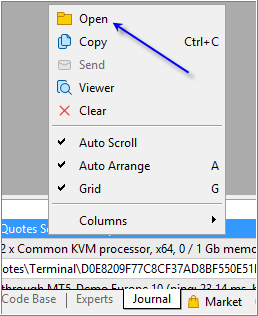
----------------------
How to report technical issues?
----------------------
Because the information about Microsoft Edge WebView2 (which may be absent) and so on - should be on this log file (in most of the cases for example).

- 2023.06.20
- www.mql5.com
It is 3 lines of the logs ... but the information about Microsoft Edge WebView2 (which may be absent) and so on - should be on this log file (in most of the cases for example), so if you see whole the logs for today or yesterday (but we on the forum can not see them) - you can check everything and compare with the replied on the thread about it ...
---------------------
I had similar issue with my Metatrader on new laptop of Windows 11, and I had to re-install Microsoft Edge WebView2, and once I did it - I could see the Market tab and my purchases. But the reason (about WebView2) was written in log file ... so that is why I am talking about it (because I had an experience with same issue for example).

- Free trading apps
- Over 8,000 signals for copying
- Economic news for exploring financial markets
You agree to website policy and terms of use