I still can't download the indicator from the market
- Metatrader 5 does not start after update.
- Help. Indicators from Market stop working after Windows update.
- New MetaTrader 4 Platform build 940: Optimized for high-resolution screens

- 2024.10.14
- Alonso Asteinza
- www.mql5.com
Hãy xem chủ đề này: Tôi không thể cài đặt chuyên gia trên thiết bị đầu cuối của mình
Thanks. But these instructions do not work. I do not use any VPS.
I am sure that this error is due to MT5 programming problem, because I tried to install MT4 of a broker that I am trading with and use this MT4 to download the indicator from the market, MT4 still loads normally.
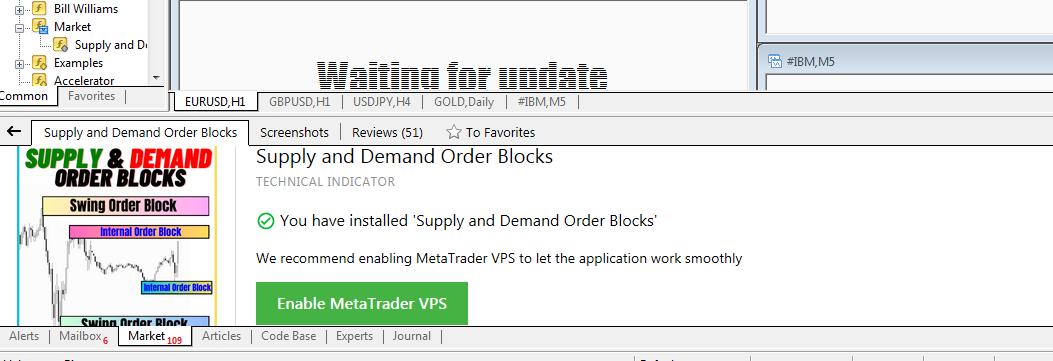
But when I go back to MT5 to download the same indicator (version written for MT5), an error appears as in the picture I attached above.
Try resetting the platform settings:
- File menu->Open Data Folder
- Double click on "Config" to open the folder
- Close the MT5 terminal
- Delete the file Terminal.ini (or rename it)
- Restart MT5
Thanks. But these instructions do not work. I do not use any VPS.
I am sure that this error is due to MT5 programming problem, because I tried to install MT4 of a broker that I am trading with and use this MT4 to download the indicator from the market, MT4 still loads normally.
But when I go back to MT5 to download the same indicator (version written for MT5), an error appears as in the picture I attached above.
read below -
Forum on trading, automated trading systems and testing trading strategies
I cannot install experts on my terminals
Sergey Golubev, 2024.10.14 09:16
- What is OS ...? Windows 7 or Windows 8? or Windows server 2012 ?
- Did you install WebView2 ...? and enable TLS 1.2 ?
- ...
Everything is written here
Summary: Installation Failed - Error 403 and more
More -
Error 12029 and error 1001
According to google:
"Error "12029" is a WinHTTP error code that indicates that a socket connection failed because encrypted communication could not be established".
And it is some decision from Microsoft about how to fix it:
To resolve this problem, enable TLS 1.2 support on Windows 7. To do this, follow the guidance in the following Knowledge Base article, and then, restart the computer:
Update to enable TLS 1.1 and TLS 1.2 as default secure protocols in WinHTTP in Windows
I am also is getting "socket connection failed" with my Windows 10 64-bit laptop when I am making the messages in the channels in very quick way so I am waiting, restarting computer, and doing (making the posts/messages) it once again (but in slow way for now).

- 2024.08.16
- simonxjx
- learn.microsoft.com
There is my summary post about this error 1001 (I collected everything from the forum about how the users fixed this 1001 error and what does it mean for example) -
Forum on trading, automated trading systems and testing trading strategies
I can not install EAs from market
Sergey Golubev, 2023.02.02 08:30
I found same issue reported on Russian forum (for external VPS and for computer).
- First case: the user installed too many Metatrader instances on computer so the memory was not enough to run all of them in the same time.
- Second case (the other user): something with his Windows - he installed many software/programs, and all of them are connected to the internet (decision: the computer/OS should be clean manually or by some specialized cleaning programs).
- The 3rd user had this issue but it was fixed by itself after he restarted his computer many times.
One of reply (in Russian) about error 1001 and the reasons - post #160
So, it may be something with your computer related to the software/programs you are using (too many Metatrader instances installed for example or memory is not enough).
---------------
..
if i was at this point, I would be assuming that it was caused by windows update. The only sure way to check or fix it is to format c drive and do a full install of windows.
if i was at this point, I would be assuming that it was caused by windows update. The only sure way to check or fix it is to format c drive and do a full install of windows.
Maybe. But I don't understand why MT4 can still download indicators from the market but MT5 can't. In previous versions (about 2 or 3 months ago) of MT5 I could still load indicators from the market.
Oh, MT5 on my computer just automatically updated to version 5.00 build 4731 (7 Dec 2024) but I still can't download indicators from the market.

But I don't understand why MT4 can still download indicators from the market but MT5 can't.
MT5 is using Microsoft Edge WebView2 together with Microsoft Edge (both of them should be installed on computer), and TLS 1.1 and TLS 1.2 (which should be installed too).
I personally had similar issue (but with error 403) on my new computer with Windows 11 64 bit, and I had to re-install WebView2.
- support.microsoft.com

- Free trading apps
- Over 8,000 signals for copying
- Economic news for exploring financial markets
You agree to website policy and terms of use