Discussion of article "Bi-Directional Trading and Hedging of Positions in MetaTrader 5 Using the HedgeTerminal Panel, Part 1" - page 5

You are missing trading opportunities:
- Free trading apps
- Over 8,000 signals for copying
- Economic news for exploring financial markets
Registration
Log in
You agree to website policy and terms of use
If you do not have an account, please register
In general, I think it's time for us to stop floundering. As server rightly said, constructive criticism is welcome. Except for zaskok'a no one has asked any questions on the topic so far. It's strange that no one has any questions about how it all works. Although there should be a lot of such questions. (probably not everyone has had time to read it yet)
Wake up. I'm sorry, but it's worthy of the annals. It's been like this from the very beginning, back in 2009, and you're just now finding out?
So behind the lofty notions of "locky nets"(???) and bubble side effects(?!) were these little things.
You need to be more modest.
So behind the lofty notions of "loquacious nets"(???) and bubble side effects(?!) before these little things.
You need to be humble.
Finally got to the article and the hedge terminal. Here are my comments and wishes:
I had 26000 trades on my account and reading the file takes 16 sec. After the first restart I thought that something broke and the Expert Advisor is not loading - so long there was no hint of work.
I realise that not everything can be done unambiguously, but we cannot deprive the user of his trading history.
Full-fledged transition - so full-fledged transition!
Maybe I forgot something else, go through the properties.
I read - I thought I was going crazy ;)
I should ask MQ function to open a common folder of terminals (with selected subfolder), it is inconvenient to search for them manually.
Not up to 100, maybe more. And I don't have it displayed at all (0 all the time).
When specifying a larger lot - add to this position or open a new one. It will be an alternative to the standard entry window.
You change SL - and it is too close, but you can understand it only by looking at the tab "Experts", it is inconvenient.
I.e. in the TP column write exactly the TP that the position had, and write the exact trigger price in close_price.
...
Oh hey, I've been waiting for your comments:)
Let's start in order:
I have 26000 trades on my account and it takes 16 seconds to read the file. After the first restart I thought that something broke and the Expert Advisor is not loading - there was no hint of work for so long.
Yes, I thought about it myself, but I couldn't get my hands on it. Well, according to the requests of the workers, now it is written and shows the degree of history loading:
By the way, thanks to it, the non-linearity of the speed of history parsing was found out. I had suspected before that there was something wrong with the speed. I need to look into it. Profiling refers to system functions.
Maybe I forgot something else, go through the properties.
Fixed. Now the panel looks prettier:
I checked the bar. There's nothing wrong with it. It gives a slight asymmetry to the interface and makes a minimalist design more complete. It's kind of like the wide bar and thin border in modern apps: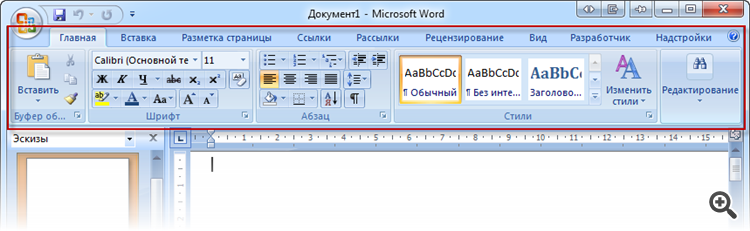
...Or monitors:
(I have one of these at home by the way:))))
I know a lot of people don't like the modern interface of windows and its applications. But this asymmetry and wide bar in the panel will be preserved.
About saving positions to a file: "One of them will contain information about long positions, the other - about short ones."
I read - I thought I was going crazy ;).
Corrected. Of course it means not long and short positions, but active and historical positions. The changes will take effect after the moderator updates the article.
Not up to 100, maybe more. And I don't have it displayed at all (0 all the time).
Fixed. Classic error: forgot to multiply the result by 100.0:
When specifying a larger lot - add to this position or open a new one. It will be an alternative to the standard entry window.
I agree about closing a position when specifying zero volume. Such a function will be introduced.
As for specifying a larger volume - it is not obvious here. Firstly, you cannot add to a hedge position, you can only reduce its volume or open a new position of the same direction. Opening a new position is also not an obvious solution. It is better to delegate it to a special panel, which can be opened right next to the HT button:
Planned, but a bit later. There will be a custom date template right in Settings.xml, like this: "YYYYY.MM.DD.hh:mm:ss". + it will be possible even to put milliseconds, and the year, on the contrary, to remove.
I.e. in the TP column write exactly the TP that the position had, and write the exact trigger price in close_price.
I think I've got it. Not yet, maybe a little later. But custom TP price can be implemented as a separate column through the custom columns mechanism. It is not available yet, but if it appears, it will be a revolution in tabular data display. It will be possible to create various and exotic columns via MQL and HedgeTerminalAPI library.
You change SL - and it is too close, but you can understand it only by looking at the tab "Experts", it is inconvenient.
If you mean creating your own journal with a separate tab on the panel - the idea is good, and quite realisable. I was thinking about it myself. But unfortunately it's difficult and with the current demand for HT - not yet:(
I understand that not everything will be possible to do unambiguously, but it is impossible to deprive the user of his trading history.
Full-fledged transition - so full-fledged transition!
I think I understand. This is not a simple question, it requires serious work. I hope that if we can develop into something serious, such a mechanism will definitely appear.
Why not do it like in MT?
Margin is the current margin used for positions, and this value is in the currency of the deposit, not a percentage.
Free Margin - similarly
MarginLevel - in % = 100*AccountEquity()/AccountMargin()
Yeah, I've been thinking about it myself, just haven't got round to it. Well, according to the requests of workers now it is written and shows the degree of loading history:
It would be better to load and draw a panel (empty, a little shaded), and show the loading in the centre with a progress_bar (there are ready-made ones in the base).
Or at least just a progress_bar in the centre, so that you don't have to look for a small comment.
I checked the bar. There's nothing wrong with it. It gives a slight asymmetry to the interface and makes the minimalist design more complete. It's kind of like the wide stripe and thin border in modern apps :
I disagree. In Word it's all taken up by controls, but in HT it just takes up space.
It's like making all charts window title bar 2 times wider - why?
Let the chrome panel be an example:
As for specifying a larger volume - it is not obvious here. Firstly, you cannot add to a hedge position, you can only reduce its volume or open a new position of the same direction. Opening a new position is not an obvious solution either. It is better to delegate it to a special panel, which can be opened right next to the HT button:
I didn't realise such a feint. I should write about it somewhere.
Planned, but a bit later. There will be a custom date template right in Settings.xml, like this: "YYYYY.MM.DD.hh:mm:ss". + it will even be possible to put milliseconds, and the year, on the contrary, to remove.
Later let it be cool. For now, let it be seconds )
I think I've got it. Not yet, maybe a little later. But the custom TP price could be implemented as a separate column through the custom columns mechanism. It doesn't exist yet, but if it does, it will be a revolution in tabular data display. It will be possible to create the most different and exotic columns through MQL and HedgeTerminalAPI library.
You don't need custom ones, just leave the value entered by the user.
In MT it is also like this - the history shows exactly the SL and TP that were there, but the closing price can be worse or better.
If you mean creating your own journal with a separate tab on the panel - the idea is good, and quite realisable. I've been thinking about it myself. But unfortunately it is difficult to implement and with the current demand for HT - not yet:(
Maybe just one line with the last message?
In the same wide bar at the top or in the "status bar" at the bottom.
Why not do it like in MT?
Margin is the current margin used for positions, and this value is in the currency of the deposit, not a percentage.
Free Margin - similarly
MarginLevel - in % = 100*AccountEquity()/AccountMargin()
+1, own inventions should supplement, not replace the usual. Well, or customisable.
By the way, the basic settings could be displayed in inputs. The window stretches, lists-enumerations allow convenient selection.
And record the made choice in a file and use it until the user changes something else.
Why not do it like in MT?
Margin is the current margin used for positions, and this value is in the currency of the deposit, not a percentage.
Free Margin - similarly
MarginLevel - in % = 100*AccountEquity()/AccountMargin().
I have a simple answer to this: HT is not a clone of MT terminal. For example, you will be very surprised at the swaps that will soon appear in it.
Personally, I could not get used to Margin Level, which often shows fairy-like percentages like 10500%. Percentages greater than 100% are not intuitive. People perceive a clear scale from 0 to 100, so Margin in %, and zero to a hundred.
Besides, imho, it is much more convenient to know that the current depot load is, for example, 12% of the maximum possible than to smoke what is 803%.
In the future we may have the Shoulder. But unfortunately the total line is limited by symbols, so it will be difficult to cram the leverage into it.
In the exchange industry, by the way, the concepts are somewhat different from MT.
No, opening with MT quick panel is not suitable - it is only for the current instrument, and changing an instrument on the chart with HT is 16 seconds (25K trades).
We should think about opening a new hedge position via HT.