Experts: Simple EA MA plus MACD
Hello,
is there any possibility to make for me a setting only to make buy orders, or only sell orders or both?
br
Rafael
Hello,
is there any possibility to make for me a setting only to make buy orders, or only sell orders or both?
br
Rafael
You can. I already made a new setting in my trading engine a month or two ago:
New parameter ' Trading mode: ' - Restriction in which direction to trade. It can take the values " Buy only BUY positions ", " Allow only SELL positions " and " Allow only BUY and SELL positions".
You only need to rewrite this advisor in a new trading machine.
You can. I already made a new setting in my trading machine a month or two ago:
New parameter ' Trading mode: ' - Restriction in which direction to trade. It can take the values " Buy only BUY positions ", " Allow only SELL positions " and " Allow only BUY and SELL positions".
You only need to rewrite this advisor in a new trading machine.
OK, am pretty new to this. Can you show/link the instructions for how I put this into the EA?
OK, I'm pretty new to this. Can you show/link the instructions on how to add this to the EA?
Would you like to learn how to write consultants? This never happens quickly - you need to learn to write counsellors.
Want to learn how to write consultants? This never happens quickly - you need to learn how to write consultants.
I have to, don't I? :)
Edit: OK, I want to learn.
I have to, don't I? :)
Edit: OK, I want to learn.
Have a look around the forum to see what others are advised to do.
C-Tutorial is a good start.....
Trading strategy idea
Development of the first version of ' Simple EA MA plus MACD '
New in version 2:
- There can only be one 'Market entry' transaction in the bar (this is an internal parameter that is not output to the input parameters and is not related to the ' Only one position ' parameter).
- New parameter ' Trading mode: ' - restriction in which direction to trade. It can take the values ' Buy only BUY positions ', ' Allow only SELL positions ' and ' Allow only BUY and SELL positions'.
A simple guide for two indicators: iMA (Moving Average, MA) and iMACD (Moving Average Convergence / Divergence, MACD). It does not hold more than one position in the market (only if the parameter ' Only one position ' is set to ' true ') - therefore it can be used for netting and hedge accounts.
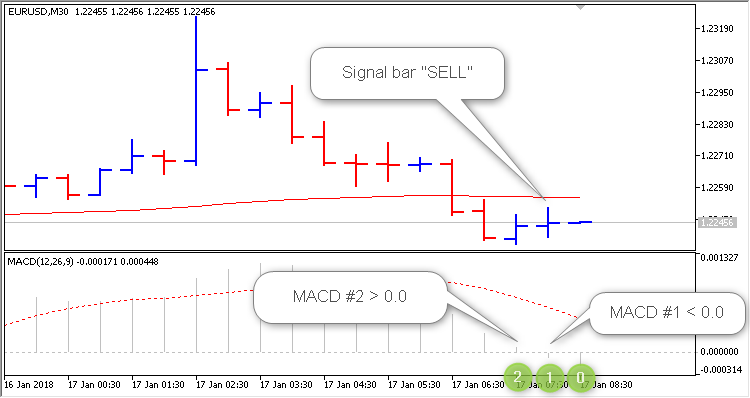
First, a signal bar is searched: At the time a new bar is born (this is bar no. 0), we check if the MACD indicator on bar no. 1 has crossed the zero line. If there is a crossover, the signal bar is found. An example of a signal bar "SELL":
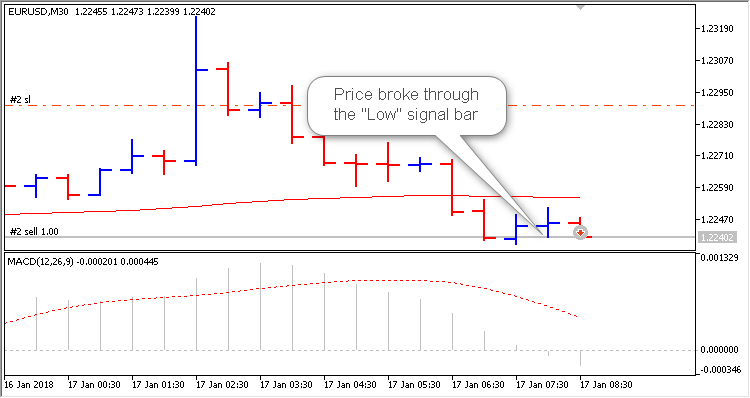
Once the signal bar is found, we remember the high and low prices of the signal bar and expect when the price crosses above one of the prices. Using the "SELL" signal bar as an example: When the price is low - open the SELL position,
If the price breaks high, we reset the SELL signal.
More details about the Advisor settings:
Trading settings
In the EA you can switch on and off " Stop Loss", " Take Profit" and " Trailing Stop". To deactivate the selected parameter set to "0.0".
Trailing can be triggered either after N seconds or only at the moment a new bar is created. The trailing interval in seconds is set to " Trailing in seconds". General rule: If the interval is less than "10" - this means ONLY at the moment a new bar is born, if the interval is set exactly or greater than "10" - this means that work is done every "N" seconds.
You can restrict the type of trading - the 'Trading mode: ' parameter takes one of the following values: ' BUY positions only ', ' SELL positions only ' or ' BUY and SELL positions only '.
Additional functions
- Only one position - there is always only one position on the market
- Reverse - a reversal of a trade signal
- Closeopposite - close positions opposite the trading signal, and first the opposite position is guaranteed to be closed and only then a new position is opened in the direction of the signal
Please note: The trading signal has the highest priority! You can only restrict execution with the parameter ' Only one position'. If ' Only one position ' equals ' true' and the number of positions opened by this EA on this symbol is greater than "1", the trading signal is ignored.
The parameter ' Close opposite' is equal to ' true ': First we close the opposite position, then we process the trading signal.
Position size management (lot calculation)
The lot can be either permanent (' Money management' set to ' Constant lot' and the lot size set to ' The value for 'Money management'' ) or dynamic - as a percentage of the risk per trade (' Money management ' set to ' Risk in' per cent for a deal ' and set the percentage of risk in ' The value for "Money management" ' ). You can also set a permanent lot that corresponds to the minimum lot - ' Money Management ' to ' Lots Min'.
HI there,
how is this EA ,
How is its performence like? is it profitable??
HI there,
how is this EA ,
How is its performence like? is it profitable??
Test/optimize it and you can see for yourself.
tried but not workiing, even in live mode
i dont know where the fault is.
if have any tips advise please.

- Free trading apps
- Over 8,000 signals for copying
- Economic news for exploring financial markets
You agree to website policy and terms of use
Simple EA MA plus MACD:
Brief description
Author: Vladimir Karputov