
99 USD
Demo heruntergeladen:
12 012
Veröffentlicht:
31 Mai 2019
Aktuelle Version:
3.61
Keinen passenden Roboter gefunden?
Geben Sie Ihren Eigenen in Auftrag
auf Freelance!
Gehen Sie zu Freelance
Geben Sie Ihren Eigenen in Auftrag
auf Freelance!
Wie man einen Roboter oder Indikator kaufen kann
Starte Deinen EA im
Virtual Hosting
Virtual Hosting
Teste einen Indikator/Roboter vor dem Kauf
Möchtest Du Geld im Market verdienen?
Wie man Produkte richtig präsentiert

Sie verpassen Handelsmöglichkeiten:
- Freie Handelsapplikationen
- Über 8.000 Signale zum Kopieren
- Wirtschaftsnachrichten für die Lage an den Finanzmärkte
Registrierung
Einloggen
Sie stimmen der Website-Richtlinie und den Nutzungsbedingungen zu.
Wenn Sie kein Benutzerkonto haben, registrieren Sie sich
Hello. Is it also possible to work with the original Metatrader Buy/Sell button? I am often on the road and like to work with my mobile phone, but would have liked to include the preset values of the Trade Manager.
Hello,
Yes, absolutely! You can place orders from your phone or any other terminal, and the Trade Manager will manage these transactions. For detailed information on how to set this up, please contact our technical support team at https://www.investsoft.eu/contact.
Let us know if you need any further assistance!
Best Regards,
InvestSoft Team
Hi,
Is there any way to make the traded manager window larger? It is very small on my MT5. Can't figure out how to make it larger.
Thanks,
Hi,
Is there any way to make the traded manager window larger? It is very small on my MT5. Can't figure out how to make it larger.
Thanks,
Hi,
Thank you for reaching out!
Yes, there is an option to adjust the zoom of the Trade Manager panel. To get detailed instructions on how to configure this, please contact our technical support team via this link: https://www.investsoft.eu/contact. They will be happy to assist you with the setup.
Best regards,
InvestSoft Team
This forex trade manager is really great. The settings are great and with a few minutes of practice, the trades are very easy to implement. You can trade directly with one click and then adjust your settings afterwards. You can set the trailing stop and BEs to automatic so that they automatically increase when the desired pips are reached. The program is really great. The support is also very quick to respond. Sometimes you get an answer as early as 6:30 in the morning. Really great.
Thank you so much for your amazing feedback! 😊 We're thrilled to hear that you're enjoying the Trade Manager and finding it easy to use. It's great to know that the features like one-click trading, trailing stops, and automatic break-even adjustments are making your trading experience smoother.
We always strive to provide quick and efficient support, so we're glad to hear our efforts are appreciated. If you ever have more suggestions or questions, don't hesitate to reach out. Happy trading!
Best Regards,
InvestSoft Team
Excellent Product and Great Support!
I recently purchased the Trade Manager Ver. 3.41 for MT5, and it has exceeded my expectations! The software is intuitive, powerful, and has streamlined my trading process significantly. It offers all the tools I need to manage trades efficiently, making my experience smoother and more productive.
The seller was also very responsive and helpful, addressing any questions I had quickly. It’s clear they care about providing a quality product and ensuring customer satisfaction.
Highly recommend this software to anyone looking to take their trading to the next level!
Excellent Product and Great Support!
I recently purchased the Trade Manager Ver. 3.41 for MT5, and it has exceeded my expectations! The software is intuitive, powerful, and has streamlined my trading process significantly. It offers all the tools I need to manage trades efficiently, making my experience smoother and more productive.
The seller was also very responsive and helpful, addressing any questions I had quickly. It’s clear they care about providing a quality product and ensuring customer satisfaction.
Highly recommend this software to anyone looking to take their trading to the next level!
Thank you for your amazing feedback! We’re thrilled that Trade Manager Ver. 3.41 has streamlined your trading process and exceeded your expectations. Providing powerful tools and responsive support is our top priority, and we’re glad to hear it’s making a difference.
Thank you for recommending us, and we wish you continued success in trading! If you ever need assistance, feel free to reach out.
Best Regards,
InvestSoft Team
Hi, I'm having problems! I get the following message but I have everything installed correctly!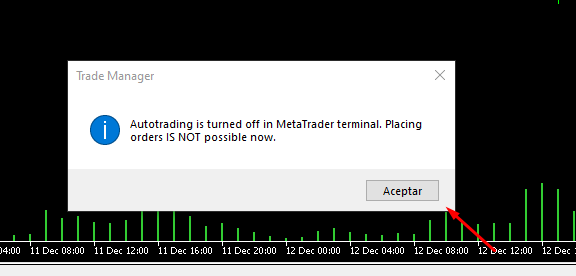
Hi, I'm having problems! I get the following message but I have everything installed correctly!
I need help! What can I do?
Hi, I'm having problems! I get the following message but I have everything installed correctly!
Hi, I'm having problems! I get the following message but I have everything installed correctly!
I need help! What can I do?
Hello,
Thank you for reaching out!
The message "autotrading disabled by server" indicates that algorithmic trading is disabled on your broker's server. This is not related to the settings in your terminal but rather a restriction imposed by your broker.
We recommend contacting your broker directly to clarify this issue and determine if they can enable autotrading for your account.
If you need any further assistance, feel free to let us know.
Best Regards,
InvestSoft Team
Hi
Hi,
To address this, you’ll need to adjust some parameters for break-even and trailing stop. This way, there’s no need to rely on SL or TP distance.
Please reach out to our technical support team at https://www.investsoft.eu/contact, and we’ll guide you through the process.
Best Regards,
InvestSoft Team
can you please send me a installations instruction ?
thank you very much.
best regards
hello i have bought the trade mager and somehow i am not able to execute a order.
can you please send me a installations instruction ?
thank you very much.
best regards
Hello,
If you are unable to execute an order, it’s possible that Automated Trading is not enabled in your MT5 terminal.
Please make sure that Automated Trading is activated by clicking on the "Algo Trading" button in the toolbar of your MetaTrader 5 platform. This is necessary for the Trade Manager to function correctly.
If the issue persists, kindly contact our support team through this link: https://www.investsoft.eu/contact. We will provide you with detailed instructions on what settings need to be adjusted to resolve the problem.
We’re here to help.
Best regards,
InvestSoft Team
Hey, is it possible to manage a position that I placed without the Trade Manager?
Hi,
Yes, the Trade Manager can manage trades that were opened outside the program, whether they were placed manually or by another EA.
To make the program "see" these orders, simply go to the Trade Manager’s settings window (press F7) and set the "Only current magic No" option to FALSE. Once you’ve done this, the Trade Manager will be able to manage all your trades.
Best Regards,
InvestSoft Team
Hello, Everytime I try to place a pendent order, it becomes automatically a market and opens imemdiatelly. Could you please let me know how to set pendent orders: Tks
Hello,
To assist you in resolving this issue, please contact our support team through the following link: https://www.investsoft.eu/contact. Our technical experts will be happy to analyze the situation and guide you through the correct setup.
Best Regards,
InvestSoft Team
It is an essential tool for scalping.
Thank you for your feedback. We're glad to hear that Trade Manager is supporting your scalping strategies.
Best Regards,
InvestSoft Team