在Facebook查找我们! 加入我们的粉丝群
使用MetaTrader 5新的可能性
本 EA 基于 RSI 的超卖和超买级别。 95% 的开仓交易成功率, 剩余的 5% 可用马丁格尔管理, 它们中的 0.5% 可以采用止损终极方案。 您可以禁用马丁格尔, 如果您愿意, 可以只用止损。 获得较佳结果的有 EURUSD, GBPUSD, EURJPY 和 GBPJPY。 冻结按钮允许您停止交易,"手动模式"/"自动模式" 按钮,可以让您自己来平仓。 本 EA 显示分形支撑 / 阻力可有助于半自动交易模式。 如有任何问题,请随时与我联系。
自适应剥头皮 EA 是一款多货币剥头皮 EA,用在 EURUSD 和 GBPUSD 的 M15 时间帧。使用若干策略,在市场条件下适应性强。交易基于若干指标,并且不是即时报价剥头皮 EA。自适应剥头皮 EA 使用一个智能风险管理系统 - 在 4 个时间帧里自动检测价格走势,并且根据当前条件行动。建议在低点差的经纪商平台和 VPS 上使用。您可以从 $100 开始。 参数: ExpertName = 改变 EA 名称,可以对经纪商隐藏 MagicNumber = 策略1 的独有号码 MagicNumber1 = 策略 2 的独有号码 MagicNumber2 = 策略 3 的独有号码 MagicNumber3 = 策略4 的独有号码 OpenHour = EA 开始工作时间 CloseHour = EA 停止工作时间 SafeMode = 智能风险管理系统, 请一直设为 True Lots = 如果 Risk = 0,固定交易手数 LotDecimal = 如果您的经纪商以 0.01 手开始,且增量为 0.01,将之设为 2。如果您的经纪商以 0.1 手开始,且增量为 0.1 手,将之
指标捕捉趋势并显示入场的点位。指标可在小时间帧内用于剥头皮,以及长线交易。
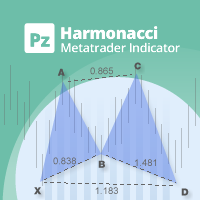
可以说,这是您可以为MetaTrader平台找到的最完整的谐波价格形成自动识别指标。它检测19种不同的模式,像您一样认真对待斐波那契投影,显示潜在的反转区域(PRZ),并找到合适的止损和获利水平。 [ 安装指南 | 更新指南 | 故障排除 | 常见问题 | 所有产品 ] 它检测19种不同的谐波价格形态 它绘制了主要,衍生和互补的斐波那契投影(PRZ) 它评估过去的价格走势并显示每个过去的形态 该指标分析其自身的质量和性能 它显示合适的止损和获利水平 它使用突破来表明合适的交易 它在图表上绘制所有样式比率 它实现了电子邮件/声音/视觉警报 受斯科特·M·卡尼(Scott M. Carney)的书的启发,该指标旨在满足最纯粹和最熟练的交易者的需求。但是,它采取了一种使交易更容易的方式:在向交易发出信号之前,它会等待Donchian朝正确方向突破,从而使交易信号非常可靠。 斐波那契投影与向量无关 它实现了电子邮件/声音/推送警报 它绘制了ABCD投影 重要提示: 为了符合 Scott M. Carney先生 的商标申诉,某些图案名称已重命名为不言自明的替代方式, Scott M.
最好的实时外汇分析,以及为专业交易员和 EA 开发者使用的强大附加功能。 这清楚地布局瞬间为您展示全球外汇市场上进行交易的最佳货币组合。 每个主要货币对的强弱度在每次即时报价到达时计算,结果按照财经区域排序以便研究它们的关联性。 重要提示: 您必须在市场观察里显示所有外汇符号,才能得到 100% 的正确计算结果! 请下载 分析者专业版用户手册 得到详尽信息。 最佳实践: 强势区: 大于 5.5。 中性区: 在 3.5 和 5.5 之间。 弱势区: 小于 3。 简单策略: 买强卖弱 (例如, NZD: 5.9 和 CAD: 2.6 -> 做多 NZDCAD)。 额外功能: 在您希望的时候自动创建您自己的历史计算文件来验证您的交易和设置。 在您的全自动交易系统里,通过 iCustom 选择启用的缓冲区,并使用计算值来入场和出场。 此产品是我们的 蓝球交易系统 的一部分。
你想成为一个持续盈利的五星级外汇交易商吗? 1. 阅读我们简单的 交易系统 的基本描述 以及 它在2020年的主要策略更新 2. 发送你的购买截图,以获得我们独家交易聊天的个人邀请 Lighthouse 是一个惊人的精确和可靠的支撑和阻力指标。 它显示最重要的交易水平,并根据其相关性绘制。 如果一个水平被明显打破,它将改变其作用和颜色。支撑位变成阻力位,反之亦然。 主要特点 自动调整到基础时间框架 只显示重要的支撑和阻力水平 如果一个水平被明显突破,立即作出图形反应 较厚的SR水平比较薄的水平更重要 一般设置 分析模式: 在三种不同的扫描模式(日内、中度和高度时间框架)中选择,或使用默认设置的自动调整。 自动模式根据基础图表时间框架调整使用的分析模式。 敏感模式。敏感模式可以识别更多的支持和阻力水平。如果您是一个日内交易员,我们建议使用它。将此设置为 false ,如果您想减少绘制的SR水平的数量。 SR距离(点)。这个可改变的数值是内置支撑和阻力位距离检查的基础。它测量当前价格与下一个Lighthouse水平之间的距离。如果当前价格与下一级别的距离超过5个点,你将看到 "等待
The Expert Advisor BotMAn 4 uses Moving Average data and an adaptation block. The entry/exit points are located at the points of intersection of the moving averages. The direction is determined by the adaptive system of the Expert Advisor using values of the moving averages. Input Parameters First MA Period - period of the first moving average indicator; First MA Method - averaging method of the first indicator; Second MA Period - period of the second moving average indicator; Second MA Method -
CMI - Profit from trending and ranging markets. The CMI indicator is a two-part system used to trigger both trend and counter-trend trades, that has been introduced by Daniel Fernandez in an article published in Currency Trading Magazine (August 2011 issue). It is a simple, yet effective indicator, which gauges whether the market has behaved in a choppy (non-directional) manner or trending (directional) manner. CMI calculates the difference between the most recent bar's close and the close n bar
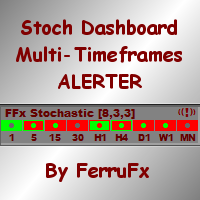
The FFx Dashboard MTF alerter will show you on a single chart all the timeframes (M1 to Monthly) with their own status for the indicator. 2 Alert Options: Single timeframe: each selected timeframe alert separately when a signal occurs Multi timeframes: all selected timeframes must agree for an alert to be triggered Both options have an input to select the timeframes to be used for the alert(s). How to understand the status: Green/Red square: Stoch above/below 50 line Green square + Red border:
您试过网格策略吗? 现在, 您不必再花时间坐在您的电脑前。仅需开一单, 则 手工交易者 将完整剩余的! 这是一键交易!简单点击面板上的 买 或 卖 按钮, 以及 手工交易者 将设置一个止盈, 挂单和尾随终止。 开单之后,您就可以做其它事情了。 您可以用策略测试的可视模式对产品进行检查。 输入参数 Buy - 买单按钮。 Sell - 卖单按钮。 Close - 所有持仓平仓。 Lots - 首单开仓手数。 Step - 生成网格的步距。 Martin - 后续订单的乘数。 TakeProfit - 止盈点数。 SLPersent - 止损为本金百分比; 若不使用设为 0。 TrailStart - 止盈点数, 开始放置尾随终止。 TrailDistance - 价格距尾随终止的点数。 TrailStep - 尾随终止步距点数。 Orders - EA 放置挂单的数量。 Slippage - 订单执行时的滑点点数。 TimeOut - 开单失败后的重复尝试间隔,以秒为单位。
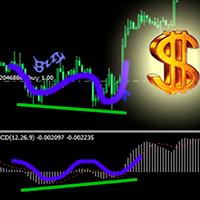
本指标为任意选定的指标建立发散/收敛。 您可以用它的自定义设置自由添加自己的指标代码。 本指标有两条基本线绘制方法 (**): 从前一根柱线开始搜索封顶 (MODE = 0) 从指标与 "零轴线" 交叉以后开始搜索 (即, "零轴线" 为 RSI = 50.0) (MODE = 1) 基本设置包括 17 个包括在 MT4 终端里的标准指标,您可以自由添加您的任何指标。 当信号出现时,指标有内置的警示。 标准指标包括在设置里 (指标代码 (*)): AC (加速振荡器) (MODE = 0 / 1) AD (累积/派发) (MODE = 0) ADX (平均动向指数) by MAIN LINE (MODE = 0) ATR (平均真实范围) (MODE = 0) AO (动量振荡器) (MODE = 0 / 1) 空头力度 // (MODE = 0 / 1) 多头力度 // (MODE = 0 / 1) CCI (商品通道指数) (MODE = 0 / 1) DeMarker (MODE = 0 / 1) 强推指数 (MODE = 0 / 1) 动量 (MODE = 0) OsMA (移
PIPSPEED PRO 是一款真正的专业 EA,它测量价格动作的戏剧性变化,并据此行动。未使用滞后指标。所有交易有严格的止损,和天才的盈利方式。它每年大概每个货币对交易 100 次。盈利每年平均国超过 100%。每个货币对的开仓不会超过 2 单。 它已经针对 13 个货币对优化: eurusd, eurusd, usdchf, gbpusd, usdcad, audusd, nzdusd, eurjpy, usdjpy, gbpjpy, euraud, eurcad, eurgbp 和 xauusd。 您在网络里将不会找到像这样的系统了。 PIPSPEED PRO 已经针对 H1 图表优化。 现在就试试演示版! EA 的主要特点: 无马丁格尔, 网格或均摊策略!许多在售的 EA即使简单的马丁格尔系统,最终,它们总是会失败! 无剥头皮, 所以可以在所有经纪商工作平台上! 同时最大 2 单! 专业资金管理! 用户友好: 仅有很少一些参数需要修改。 可调的保守和激进交易风格,可调 RISK-因子。 自动适应 4-5 位经纪商报价。 主要参数: DevFactor - Deviation_F
轴点经常被专业交易员用来预测即将到来的市场走势。我们已开发出了一个易于使用的指标,来为您做这些。您可以将其放于任何图表,并定制轴点的计算周期。 支撑和阻力位帮助判断当前趋势的任意潜在的反转。好迹象是,只要价格高于轴点 (PP) 市场被视为利多,而价格低于轴点,它被视为利空市场。 它显示了轴点,起始点和三级支撑和阻力,并允许您定制使用不同的颜色。 也可以为指标添加一个 barshift,因此轴点计算可以向左边偏移。
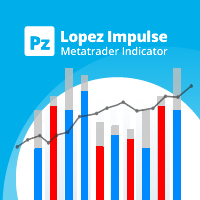
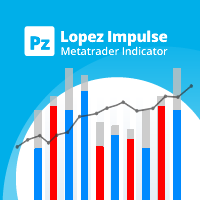
该指标同时评估波动率和价格方向性,从而发现以下事件。 [ 安装指南 | 更新指南 | 故障排除 | 常见问题 | 所有产品 ] 决定性和突然的价格变动 大锤子/流星图案 大多数市场参与者都支持强劲的突破 犹豫不决但动荡的市场形势 这是一个非常易于使用的指标... 蓝色直方图代表看涨的冲动 红色直方图代表看跌冲动 灰色直方图表示当前的波动率 移动平均线是平均波动率 该指标实施各种警报 指示器不重涂或重涂 ...具有直接的交易含义。 当看涨冲动超过平均波动率时,您可以购买 当看跌冲动超过平均波动率时,您可以卖出 该指标跟踪市场波动以及每个单个柱的看涨和看跌冲动。如果看涨的冲动超过平均波动率,那可能是做多空头的好机会。这些强劲的价格走势是可靠的,因为其他市场参与者可能会补仓。如果使用得当,此指示器功能非常强大。 作者 ArturoLópezPérez,私人投资者和投机者,软件工程师和Point Zero Trading Solutions的创始人。
该指示器基于renko,但其周期等于ATR指示器的周期。 XOATRHIST版本指示器,在图表上显示波段。更加信息化。 关闭波段以外的柱形,会形成x或者o , 这时候报警指示灯会提示 参数: §ATRPeriod - 用于计算ATR的步骤周期。§ 注意:指示器以收盘价格运作,因此需要考虑形成的柱形。 ------------------------------------------------------------------------ ------------------------------------------------------------------------ ------------------------------------------------------------------------
当进行外汇交易时, 我们同时交易一对货币。例如 EUR/USD。如果我们做多 EUR/USD 它意味着我们期望 EUR 相对于 USD 获得强势。如果我们做空 EUR/USD 它意味着我们期望 EUR 相对于 USD 获得弱势。您应该都很熟悉这个概念。 有关货币对的关键点是,它们只是表明一种货币 相对于 另一种的强度。如果我们看到 EUR/USD 上涨,是不是因为 EUR 正在加强,或 USD 正被削弱?不太可能只通过孤立地观察 EUR/USD 就这样讲。 本指标使用的公式,计算以下 8 种货币的 '货币强度': USD, EUR,GBP, CHF, JPY,CAD, AUD 和 NZD。
Simple, convenient and reliable indicator of Support and Resistance levels. It does not overload the chart with excessive information and reflects only relevant levels of the current situation on the market. Gets updated once a day. Thick lines mark the most significant levels. The indicator does not get redrawn at the change of a timeframe. Resistance lines are drawn in red and the lines of support are in blue.
This indicator works on two signal lines combined with a channel. It produces a sell or buy signal depending on the lines. As output for an Expert Advisor there are 6 buffers. The high and low channels, the high and low signal lines and the buy and sell signals themselves. EATChannelSignals works on all periods and all symbols. Three parameters can be changed by the user: Signalline - Moving Average of the signal lines. ChannelAverage - Moving Average of the channel. ChannelWidth - width of the
MasEuro is an EA for MetaTrader 4, which opens orders by signals from MA, CCi, ATR, and William. MasEuro is a fully automated EA that works without human intervention. EA has complicated logic to perform transactions in the EURUSD market and uses a smart risk-management system that automatically detects price movement on M5 timeframes and acts according to the current condition. You can start using it with $50 only. Minimum Requirements Proсessor: Сore i3 RAM: 2GB Fast Internet Acсess or low l
The Expert Advisor sets the specified order grid depending on orderType value: 2: BuyLimit 3: SellLimit 4: BuyStop 5: SellStop 6: BuyStop - BuyLimit 7: SellStop - SellLimit 8: BuyStop - SellStop 9: BuyLimit - SellLimit Parameters: LotSize - lot size. TP - take profit. SL - stop loss. CountOrders - number of opened orders in each direction. MagicNumber - magic number. FirstShift - distance from the current price, at which orders are to be placed. SecondShift - distance between placed ord
返佣机器人 执行大量交易,不光可以从外汇市场盈利,而且可以收到许多返佣 (返回点差的一部分)。 因为证券锁仓所需的保证金大约为 25-50% (依经纪商), 返佣机器人 在出现适当信号时双向并发下单。 下单基于 交易者之梦 指标的当前颜色。如果颜色为蓝, EA 走多头。如果颜色为红, 走空头。若价格走势方向错误, 则 返佣机器人 加仓。买和卖序列彼此不相连。它们之中的每一单都有自己的止盈和尾随终止。 常用推荐 您可以在所有货币对中并发启动 EA,经过测试的,或优化其它对; 使用经纪商提供的返佣; 证券所需的锁仓保证金越少越好。 输入参数描述 本产品在 4 和 5 位报价平台上均可工作。当使用 4 位报价时 Pips 乘以输入参数等于 1, 当使用 5 位报价时它是 10 (输入乘以 10)。 Intial Lot - 初始手数; Maximum Lot - 最大手数; Lot Multipler - 第二和后继开单的手数乘数; Maximum number of position - EA 的最大开单数; Pips multiplier - 若是 5-位报价,参数乘数为 10; G
Copyist MT4 Universal is a universal trade copier. it runs as an Expert Advisor in a single file without any additional DLLs. The copier runs both as the provider of trades (master) and the receiver of trades (slave). The EA uses multi-level algorithms, whose main task is to achieve the best possible copy speed. Settings General Mode - Expert Advisor operation mode: Master_Mode - the EA will operate in the Master mode (Source of copied trades) Slave_Mode - the EA will operate in the Slaver mode
This three dimensional indicator (based on moving averages) can help you do 100% stress-free, successful manual trading based on M1, M5, M15 or higher timeframes. It is an excellent indicator for traders who wish to scalp on M1 or M5 time frames; or carry out long-term trend trading on higher time frames such as M15, M30, H1, H4, D1 or W1. Usage BUY when all lines have made a turn upwards, and bid price has moved up above the lines. SELL when all lines have made a turn downwards, and bid price
The "TiModel Tendency" indicator is a ready to use semiautomatic trading system. Benefits Considers market changes; Only one input parameter; Pattern recognition algorithm is used; Trend "target" and "support" levels are calculated; Trend strength is estimated; Gives comments on trade condition; Contains a separate information menu; A nice color scheme; Works on all markets and instruments. Strategy Recognizes pattern "Reversal-Impulse-Correction"; Support levels are calculated and set based on
This is a complete oscillator primarily based on Moving Average Convergence Divergence - a tool any trader must have to improve technical analysis. How to use: Please refer to the attached video or watch on YouTube . Compared to the standard MACD, the product shows better representation of price action. It can be customized into three different drawing modes to easily identify, which data in MACD one looks for. Line Mode is the best in showing divergences Standard mode is the best in showing mar
This is our newer and improved tool to assist you in the Elliott Wave counting, which represents an improved version of the ElliottWaveTool7pasos idea. How to Use It Start counting a new wave Start by clicking the "<>" button to indicate you want to deselect any previous wave (if applied). Set the pattern's type that you want to count (if you do not have our free Elliott Wave Font, you will see the letters instead of the pattern's icons in the Type's Section buttons: I=Impulse, D=Diagonal, Z=Zig
Indicator based in Volume Spread Analysis (VSA) that draws market reversal signals and provides a market strength scanner to be used as a filter. Demo Version In the first initialization in a given pair, it'll take a longer time than usual, as Metatrader needs to download data for the background to be computed. In the tester, multitimeframe analysis has to be disabled, and as such the signals from the upper timeframes won't appear and the background will only be computed for the current timefram
Identifying the trend of the market is an essential task of traders. Trendometer implements an advanced algorithm to visualize the trend of the market. The major focus of this indicator is to evaluate the market in the lower time frames (i.e., M1, M5 and M15) for the scalping purposes. If you are a scalper looking for a reliable indicator to improve your trade quality, Trendometer is for you. The indicator runs on a separate window showing a histogram of red and green bars. A two consecutive gre
The market price is moved by the market makers with large amounts of equity. The only way to understand intentions of big players is to track their activity by concentration of volumes on one level or another. Volume Ticks ResSup draws a level with the maximum concentration of a tick volume since the beginning of a day. In most cases, such level is an actual support or resistance level. Parameters ColorLevelSupport - support line color; ColorLevelResistance - resistance line color; BarsDayCount
Lighthouse LITE is a great support and resistance indicator with a reduced set of available features provided by the full version of Lighthouse . It shows you the most important trading levels and draws them according to their relevance. It is also a useful addition for our new easy-to-use trading system for beginners and professional traders . With Lighthouse you can easily set your stops and profit targets. If a level is clearly broken, it changes its role and color. Support becomes resistance
Stochastic Oscillator is one of the most popular and accurate oscillators widely used by traders to capture overbought and oversold areas of price action. Although the Stochastic indicator works fine for an interval of the market, it fails to generate profitable signals when the market conditions change, and hence it produces wrong signals resulting in big losses. Have you ever thought about an adaptive Stochastic indicator that adapts its period of calculation based on the market conditions? Th
Currency Power Meter shows the power of major currencies against each other. The indicator shows the relative strength of currency/pair at the current moment in a period of time (H4, daily, weekly, monthly). It is useful for day traders, swing traders and position traders with suitable period options. Currency power is the true reason of market trend: The strongest currency against the weakest currency will combine into a most trending pair. As we know, trend makes money and all traders love tre
Trajecta Neuron is a Trading Signal Indicator Platform using evolutionary, non-repainting, and self adjusted algorithms of Trajecta Labs. Trajecta Neuron Signals: 1-Cortex, 2-Gene, 3-Vector, 4-Layer, 5-Nodes, 6-Brain, 7-Mutual, 8-Nervous, 9-Mimic and 10-Model Exclusive Advantages of Platform Version: Backtesting: from 2,000 bars to 50,000 bars Fast signal selection: 10 signals to test for each timeframe Panel personalization: adjustment of panel mode of exhibition Description of the Platform
There is a newer version available: Please follow this link to the new product version This clearly arranged display shows you instantly, which currency combination is best to trade on the global Forex market. The strength or weakness of every major currency is calculated tick by tick and the results are sorted by their economic areas to consider their correlation. Important notice: You have to display all Forex symbols in your market watch to get a 100% correct calculation result! Please downl
你想成为一个持续盈利的五星级外汇交易商吗? 1. 阅读我们简单的 交易系统 的基本描述 , 以及它在2020年的主要策略更新 2. 发送您的购买截图,以获得您的个人邀请,参加我们的独家交易聊天 该交易管理器 是所有喜欢使用全自动交易管理的 FX趋势 用户的理想补充。 它立即检测您手动开启的交易,并沿FX趋势线自动管理其止损。 完全自由地浏览所有时间框架而不影响你的订单。 你的交易是根据你在交易经理属性中设置的固定计算设置来管理的。 一个非常特殊和强大的功能是检测和管理由外部专家顾问开出的订单。 设置正确的EA魔法号码,你就能够按照你的个人趋势交易风格管理这些EA订单 。 功能 介绍 自动检测有效订单 自动设置初始止损 自动跟踪止损 自动检测活跃的专家顾问订单 自动管理活跃的专家顾问订单 反趋势交易的安全止损 可选择使用盈亏平衡止损 可选择设置止盈 一些交易操作的通知选项 在所有种类的交易符号上运行,如外汇、股票、商品、债券等。 在所有种类的离线图表上运行,如Renko和范围条形图 主要设置 时间框架。从下拉列表中选择用于计算趋势线的时间框架 外汇趋势周期。选择你喜欢的趋势线计算的
Prototype 4 is an automated trading system, which opens positions in trend direction from correction based on data of built-in indicators. Test results show a stable profits for almost 15 years since 2000 (see. the screenshots), as well as in real trading. Monitoring: https://www.mql5.com/en/users/r0s/seller This Expert Advisor can be used in combination with Prototype 1 . Part of the orders of two Expert Advisors is hedged (opened in different directions). The Expert Advisor works on any accou
Description A universal colored indicator Stochastic. The rising and falling lines and the levels of the indicator can be colored. The indicator can be calculated as the standard one on the basis of a price or as a derivative on the basis of the following nineteen other indicators included in the standard package of the MetaTrader 4 terminal: AD - an indicator of accumulation and distribution of volume. OBV - On Balance Volume. Volume - tick volume indicator. AC - indicator of acceleration. AO
此版 EA 只可用最小的 0.01 手针对 EURUSD 进行交易。这是廉价版的 DynamicScalperEA 可以较低成本在实盘里测试。 EA 只需要低点差和快速执行。不能针对此版本进行优化。 参数 OrdersID - Orders' ID (0 = 每个品种自动生成一个 ID)。 MaxSpread - 每笔交易可接受的最大点差 (0 = 不检查点差)。 CommissionInPip - 经纪商佣金点数。 CommissionInCur - 经纪商佣金货币。 CheckExecution - 检查经纪商的点差和执行。
本 EA 不使用任何技术指标。当价格速度开始急剧增加,则 EA 将按照它的移动方向开单。测量当前价格的速度,基于突破虚拟级别,即从价格到设置在 PriceStep 的距离,并在 TimeStep 指定的秒数之后修改。本 EA 不使用高风险交易策略, 如马丁格尔, 并且不采用任何技术指标。本 EA 在 4 和 5 位报价平台上均可工作。建议的最小存款是 100 美元, 货币对是 EURUSD 和 EURJPY。 本 EA 包括缺口保护功能,它可以在周五收市前将所有持仓平仓,并在周一之前不再开新单 - TimeOnFriday 参数。为测试 EA,在策略测试员里启用可视模式并设置所有报价。时间帧无所谓。 参数 MaxRisk - 每笔交易的最大风险; Lots - 固定交易手数, 如果 MaxRisk = 0; TakeProfit - 止盈点数; StopLoss - 止损点数; ProfitClose - 盈利为本金的 % 则平仓; MaxDrawdown - 回撤为本金的 % 则平仓; TrailingStart - 开始尾随停止; TrailingStep
这是 MetaTrader 4 版本的 FxBrainBot EA。它是一款以数学为基础的 EA,使用周期和力度,并结合α、β、γ 和 δ 的权重入场交易。 由于它的能力几乎可适用于任何市场条件,本 EA 可以针对几乎所有货币对和时间帧进行优化。 为了降低您的风险, 您可以使用一个资金管理系统和简单的尾随终止。 详细手册 有关 FxBrainBot EA 的详尽手册 在此 提供。 作者 Yannick Deubel, 交易系统开发者, Tradarz.com 拥有者。
指标-预测员。作为助理十分有用, 作为一个关键点来预测未来价格走势。 采用搜索历史中最相似的部分 (形态) 做出预测。 指标以绘制线条形式显示柱线收盘价的变化结果。历史深度, 预测柱线的数量, 形态大小和搜索品质可通过指标设置调整。 设置: PATTERN_Accuracy_ - 搜索品质。 PATTERN_Size_ - 形态大小 (柱线)。 PROGNOSIS_Bars_ - 预测柱线数量。 SEARCH_Deep_ - 搜索历史的深度 (柱线)。若设为零, 则搜索整个可用历史。 PROGNOSIS_Start_Bar_Shift_ - 开始预测的柱线数量。数量是在旧的柱线方向。0 是最新的柱线。
There is a newer version available: Please follow this link to the new product version This Powerplay LITE version contains a reduced set of available features provided by the full version of Powerplay . Powerplay LITE is an easy-to-use trading system for beginners, advanced and professional traders. The multi timeframe display is the perfect complement to unleash the full potential of Powerplay. You'll see at a glance and for all timeframes at which direction the trend is running. Catch the tr
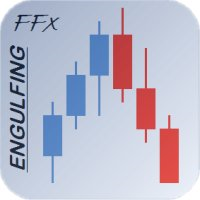
FFx Engulfing Setup Alerter gives trade suggestions with Entry, Target 1, Target 2 and StopLoss. Below are the different options available: Entry suggestion - pips to be added over the break for the entry 3 different options to calculate the SL - by pips, by ATR multiplier or at the pattern High/Low 3 different options to calculate the 2 TPs - by pips, by ATR multiplier or at Risk/Reward Offset the dashboard - any place on the chart Remove the suggestion once the price reached the SL line Lines
Easy Order is an Expert Advisor allowing you to enter any type of trade with one click based on your RISK preferences. You can choose to enter a trade and automatically calculate your lot size based on how much of your account you want to risk. Risk is calculated based on your Stop Loss placement. You can use a fixed lot size if you don't want to use risk based calculation of lot size. Your previous setting of risk based or fixed lot size remains saved for your next use of this Expert Advisor. T
Blue Butterfly is an implementation of Gartley Butterfly pattern. This indicator predicts price reversals well enough allowing traders to catch large movements (up to 1 000 pips) with small risks. Indicators for efficient traders cost about $300 and higher, while Blue Butterfly can be purchased at a more attractive price. The red butterfly indicates entering sells given that the price is closed below the rectangle (the so-called "reversal zone"). The blue butterfly indicates entering buys given
I have worked very hard to improve MFMv3.0. MFMv3.0 only worked with non ECN / STP brokers, fixed spread = 1pip, 4 digits. Now MFMv4.0 was able to perform well for ECN / STP brokers, 5 digits, can spread up to 3 pips, or even 4 pips (including commission). Available Settings: Settings for trade functions: CommentInfo - this is comment is used for orders and for journal messages. MagicNumber - magic number used for the EA to manage positions. If 0, magic number is not used. Risk/Money Management
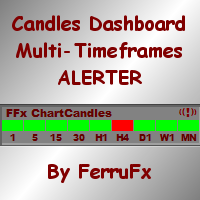
The FFx Dashboard MTF alerter will show you on a single chart all the timeframes (M1 to Monthly) with their own status. 2 Alert Options: Single timeframe: each selected timeframe alert separately when a signal occurs Multi timeframes: all selected timeframes must agree for an alert to be triggered Both options have an input to select the timeframes to be used for the alert(s). How to understand the status: Green/Red square: bullish/bearish candle Options available in the FFx Dashboard Alerter
新闻加载机专业版 是一款从若干在线数据源获取实时的详细信息,并自动更新财经新闻的工具。它采用了独特的技术,加载来自流行外汇交易网站的数据详情。在即将发布新闻时,发送提示到您的移动终端或邮箱。此外,它也在图表上标记新闻发布点,用于进一步查验和研究。 在外汇交易中,新闻可以说是推动市场的重要因素之一。关注新闻可以帮助您更好地做出交易决策, 如果您是新闻交易者, 更能助您进行正确的交易。 利用这款工具,整个新闻中心现在就可以加载到您的 MT4。 演示版: 由于这不是一个交易机器人, 您需要下载单独的演示版本: https://www.mql5.com/zh/market/product/5897 参考: 高级版的新闻操盘手专业版, 可以自动进行新闻交易, 它在此提供: https://www.mql5.com/zh/market/product/5558 注: 您必须添加数据源的 URL, 选项 -> 智能程序 -> '允许 WebRequest 访问列出的 URL', 以便新闻加载机能够从数据源加载新闻数据。 请调整您的计算机时钟,以便新闻装载机可依据正确的定时器运行。 突出特点 支持
该指标基于高级数学计算,估算最可能出现的短期价格走势。 功能特点 估算图表时间周期及所有更高时间周期上的即时价格走势; 计算真实的市场趋势; 计算最重要的支撑位和阻力位; 在出现密集区、价格穿越水平位和趋势变化时发出警报; 占用系统资源少:线条和面板只在数值变化时才更新; 自动适应:适用于任何交易品种和任何时间周期,无需调整参数; 可与同一图表上的其他指标、EA 和脚本一起运行。 简介 构成常见交易策略的大多数经典指标都基于简单的数学。这并不是因为在这些指标诞生时没有杰出的数学家,而是因为当时还没有计算机,或者计算机的处理能力太低,无法持续进行复杂的数学运算。如今,任何一部智能手机的性能都远远超过几十年前最强大的计算机。 Advanced Price Movement Predictor(APMP)指标利用当今的计算能力,通过高级的数学、统计和概率方法来捕捉价格波动的本质。 APMP 本身并不提供预测,因为价格走势是一个非平稳的随机过程,因此无法预测。但它会对即时价格走势做出动态估算。 基于同样的分析,APMP 会显示当前市场的真实趋势。迄今为止,趋势几乎总是通过移动平均线、布林带
复制交易者是用于 MetaTrader 4 终端的快速,简便,可靠的复制机。程序很容易使用。安装两个终端: 在其中一个终端上选择 "服务器" 模式, 即此终端是仓位源。 在另外一个终端上选择 "客户" 模式, 即此终端是仓位复制的目的地。 输入参数描述 Mode - 选择模式: Server 或 Сlient; 以下设置仅用于 Сlient 模式, 即它们用在目的地终端上。 Server account number - 运行 Server 模式的 EA 帐号。 Max. Slippage - 最大允许的滑点。 Lot Multiplier - 开仓的手数系数, 若为 1,则开仓手数与服务器端相同。 Prefix to be deleted - 如果服务器端有前缀,而客户端没有前缀,则删除前缀。 Suffix to be deleted - 如果服务器端有后缀 (如 ".m"),而客户端没有后缀,则删除后缀。 Prefix to be added - 如果服务器端有前缀,而客户端没有前缀,则添加前缀。 Suffix to be added - 如果必要,添加后缀。 及时的产品技术支持
本 EA 针对小资金或是大资金均可工作。只是依据您的起始手数。 本 EA 使用 蓝蝴蝶 指标。 它可与 AUDUSD, NZDUSD 在 M15 时间帧工作。 实盘账户监控: https://www.mql5.com/zh/signals/33021 , https://www.mql5.com/zh/signals/50542 常用推荐 使用 StartLots=0.01 每 500-1 000 货币单位 使用不同的魔幻数字来同步交易几个货币对 输入参数 本 EA 在四位或五位平台上均可工作。按照 5 位数字指定输入参数的点数值,EA 将自动换算 4 位数字。 StartLots - 初始手数; StopLoss - 入金百分比作为止损; GridStep - 订单间隔点数; Martin - 加仓手数的倍数; LockOrderNo - 首单锁定单号; Klock - 来自可用序列的锁定比率 (单位分数); TakeProfit - 止盈; TrailStart - 激活移动止损的盈利点数; TrailDistance - 移动止损距离; TrailStep - 移动止损步长;
顾问半手术刀。所有的测试通过了的默认设置为欧元兑美元的ECN账户截图。不同的兼容性测试,在测试和控制工作。我只是相信穿上模拟或真实账户仅为1天的专家。测试仪,测试,只用一分钟和提基。用于优化一个月内(2014.07.17-2014.08.17),然后的时间段上的前一个月进行测试,以及从年初的故事,并用于稳定控制与2010.01.01。专家通过所有的测试去!然后检查测试一个月以后(2014.08.17-2014.09.17)去完美,2.09%的资金回撤。为优化,一个特殊的渐进功能,可用于通过激活模式定义。如果你不改变的风险,专家开1000元从0.01手,最高0.11〜10的订单(可以100美元的工作)。所有交易都投保SL,这是强制性的。还有一个止盈,可以将其关闭。如果成功的话,运动用很短的拖网。还有的关闭位置时,所述输入信号的函数。对于更大的收益顾问若干货币对使用,它是没有必要的,以减少风险,因为是重叠的效果(上一个样的锁)。在数学上利润增长强劲(乘),以及缩编略有增加(平均)。与要优化设置,显示在屏幕截图。同样,缺省设置被分配以EURUSD工作。测试是在ECN账户进行。的利润损失5的平
本 EA 基于 交易者的梦想 指标 https://www.mql5.com/zh/market/product/2492 实盘账户监控: https://www.mql5.com/zh/signals/34001 无初始本金限制。 本产品在 4 和 5 位报价平台上均可工作。 本交易机器人使用两个参数定义横盘 - MaxPriceWidth 价格范围 (点数) 设置最后的柱线数量 (NumberOfBars) - 并根据指标的信号开仓。您可以在评论栏目里的设置或自行设置。 输入参数 Pips Multiplier - 使用 1 与 4 位报价工作或 10 当报价为 5 位时 NumberOfBars - 分析横盘的柱线数量 MaxPriceWidth - 价格范围 Stop Loss - 止损 Take Profit - 止盈 Trailing Stop - 尾随终止 MinProfitForTS - 最小盈利, 此时尾随终止出现 TrailingStopStep - 尾随步长 Lot - 负数 (例如, -3) 代表本金百分比, 正数 (例如, 0.1) 表示固定手数 LotMu
Alex 盈利 EA 仅通过挂单交易 EURUSD。挂单放置在重要级别的突破位置。 本 EA 工作于 H1。建议账户类型 - ECN, 建议杠杆 - 1:500。 本 EA 不需要很大本金,并可以从 $50 开始。 每笔交易以停止位保护 (止损和止盈)。仓量依据可用基金数量。 当赢得了最小利润,订单转移到盈亏平衡位,让我们将交易的亏损降到最低。 实盘账户监控: https://www.mql5.com/zh/users/sania2010s/seller Alex 盈利是全自动 EA,并不需要任何交易者的行动。 本 EA 不使用马丁格尔。它需要一个低点差的经纪商和一个 VPS。 参数 TP - 挂单的止盈; SL - 挂单的止损; BBUSize - 盈利点数, 此时止损会移动到盈亏平衡位; BBUSizepip - 盈亏平衡点数大小; Magic - 魔幻数字; UseTrailing - 尾随开关; TrailingStart - 盈利点数, 之后尾随开始; TrailingStep - 步长大小, 每多盈利一步,止损将移动到下一阶段; TrailingStop - 步长大小,
这是基于即时报价的剥头皮系统。它的基础是分析即时报价,而非柱线。本产品可在 4 和 5 位报价的平台上工作。重新报价是至关重要的。最小延迟执行的平台是必需的。 本 EA 不使用保存在数据库中的历史数据。它在线下载历史数据并创建它自己的数据库,保存在内部的内存里。重启之后, 数据库被删除并将会再次下载。通过 CountTick 参数管理内部内存的大小,并再开始工作时指定将有多少即时报价会写入数据库。所提到的数据库被用于长线分析。从长线数据库提取的信息设计为堆栈,用于短线分析和入场。换句话说, 本 EA 使用的来自堆栈的许多当前选择的即时报价,均接收自长线数据库的信息。 在下载了指定数据之后, 本 EA 开始由两个阶段构成的操作。在第一阶段期间, 下载的即时报价数据按照指定数量 (CountTick) 进行分析, 周期性则通过 ReOptimization 参数设置。本 EA 在工作时将会选择最佳的参数。换言之,最好的结果是通过穷举法搜索并选择的。由于没有太多的参数以供选择,这种方法是合理的。为进行搜索,三个内部参数被选择: 调整堆栈大小,从 1 至 CountSteck。 检查入场 (
快速、高品质的交易拷贝机,可用于您的实盘/模拟账户。此 EA 开发用于从 МetaTrader 4 终端拷贝交易。 多客户端交易拷贝机: 本 EA 将无延迟拷贝所有持仓。 一个 EA 拷贝所有持仓。 本拷贝机可工作在最高速度,独立且无须等待新的即时报价 (Use_Speed_Exchange = true)。 对于多终端拷贝机来说,终端数量 (接收者/源提供者) 是无限的。 本 EA 不使用 dll。 能够选择哪些交易将会被拷贝的终端 (МТ4/МТ5)。 可与其它任何 EA, 指标和脚本无障碍工作。 此外,通过相关认可,您有机会添加免费的附加功能,而不会对拷贝机的整体运作造成任何负面影响。这需要您与卖家直接联系。 无论是家用 PC 以及远程的 Windows 服务器,它都展示了高效能。 许可证激活数量 30。 如果您使用 Speed 功能 - 循环中断在毫秒级 (1 秒 = 1000 毫秒, Use_Speed_Exchange = true), 则不要在 EA 运行期间修改任何设置。在修改它们之前, 从图表中移除 EA。如果您不喜欢它并接受降低速度进行拷贝, 您可以切换 EA 至标
Golder trading system provides a trader with buy and sell signals. Robot Golder does not redraw the entry points! When a signal appear, the robot sends an email and a push notification. Golder trading system is able to determine the entry points for any currency pair and any timeframe. Buy signal is when a blue arrow appear. Sell signal is when a red arrow appear. You can test this trading robot for free in real time mode on a demo account.
The exp_iCustomNew Expert Advisor allows to trade using any custom and standard indicators, using their various values: arrows, the intersection of two lines, level crossing, extremum, color. To define the entry signal, the EA can use one main indicator and up to four indicators to confirm by trend and up to four indicators to confirm by volatility. Confirmation indicators can be calculated on any other symbol and timeframe. Additionally, the entry signals are filtered by time (up to three sessi
The Pioneer Of Trend Detection! A Powerful Indicator That Avoids Whipsaws And Uncertain Market Noise. Functions mainly as a filter to help you trade in the direction of the trend. It works in any pair or timeframe. Features Advanced trend detection software using complex algorithms that can be used as the supporting tool or system. Unique trend detection that avoids whipsaws and uncertain market noise Analyzes statistics of maximum profits and calculates possible targets for the next signal Fle
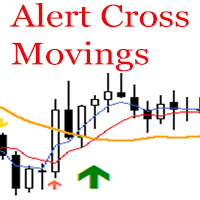
This indicator represents a trading system that is based on 3 moving averages. When a crossover of all three moving averages occurs, the indicator gives an alert and displays a big arrow in the trend direction. When a crossover of two fast moving averages occurs, the indicator gives an alert and displays a small arrow in the microtrend direction. Periods of moving averages and alert parameters can be adjusted in the indicator settings. The indicator can be used as a standalone trading system, as
There is a newer version available: Please follow this link to the new product version Powerplay is an easy-to-use trading system for beginners, advanced and professional traders. The multi timeframe display is the perfect complement to unleash the full potential of Powerplay. You'll see at a glance and for all timeframes at which direction the trend is running. Catch the trends at an early stage and ride the wave till it breaks. Improve your trading results with a great support and resistance i
DS Events Copy simplifies Elliott Wave Analysis markup. I am a practicing wave trader and I regularly mark out Elliott waves, horizontal and vertical lines, Fibonacci levels, etc. when working with charts and quotes. If you are a wave trader yourself, you should know how difficult it is to mark out the waves on a single currency pair opened on different timeframes. Of course, you can mark out the waves on a single chart switching between the timeframes, but it is too inconvenient. The wave analy
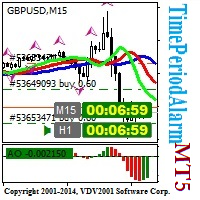
The TimePeriodAlarm indicator shows time till closure of a bar. If the 'Time period' is specified explicitly (i.e. not 'current'), the indicator displays the time till bar closure of the current period and the explicitly specified period. Ten seconds before the closure of the bar (at the period specified explicitly), a preliminary sound alert is played and a color alert is generated, then the main signal (can be set by the user) in the parameter 'Sound file(.wav)' is played. The sound file shoul
The algorithm of this indicator is based on a high-performance digital filter. The unique digital filtering algorithm allows receiving timely trading signals and estimating the current situation objectively while conducting technical analysis. The indicator is effective on small and big timeframes. Unlike common classic indicators, digital filtering method can significantly reduce the phase lag, which in turn allows obtaining a clear signal earlier than when using other indicators.
自动交易复制器旨在以 100% 的准确度在多个 MT4/MT5 账户/终端之间复制交易。提供商和接收方账户必须位于同一台 PC/VPS 上。使用此工具,您可以将交易复制到同一台 PC/VPS 上的接收方账户。所有交易操作都将从提供商复制到接收方,不会有任何延迟。此版本仅适用于 MT4 账户。对于 MT5 账户,您必须使用 MT5 的自动交易复制器。参考: 参考: 对于 MT4 接收器,请下载“Trade Receiver Free” 这里 . 对于 MT5 接收器,请下载“Trade Receiver Free MT5” 这里 . 对于同一台 PC/VPS 上的 MT5 提供商,请检查“Auto Trade Copier MT5” 这里 . 如果您需要通过互联网在不同的 PC/VPS 上进行账户复制,请查看“Trade Copier Pro” 这里 . 如果您需要通过互联网在不同的 PC/VPS 账户之间进行复制,且接收方数量不限,请查看“无限交易复制器专业版” 这里 . 以下是重点功能 在 MT4 和 MT5 账户之间复制。 一个提供商可以将交易复制到多个接收者的账户。 一个提
Energy Trade shows the currency strength, analyzes ticks that allows you to enter the market at the very beginning of the trend. Energy Trade is a good complement to any trading system. Values of Energy Trade range from 0 to 10: the higher the value, the stronger the currency; the smaller the value, the weaker the currency; average values of the indicator suggest that the currency is in flat. How to use - buy strong currencies and weak ones. The indicator has two scales: the first scale analyzes
Did you have to start again the very same analysis because the original one, from where you want to modify, just have so much information that no longer fits? Have you ever wanted to change some in one of your charts and make this new line, Fibo or channel automatically appear in some or the rest of your set of charts? Object Copier is the solution to replicate any object into one or several charts at your desire. No matter if you changed an object, or made it from the scratch. With Object Copie
本 EA 是著名 (或臭名昭著) 的,高分比社群交易者采用的网格策略。 它的目标是在趋势行情中收获最大利润 (自动模式),并在趋势中调整。有经验的交易者也可以在手工交易时使用它。许多拥有 500 多名付费订阅者的成功交易者正在使用这类系统。 结合您的交易经验与自动策略!它包含适用于 GBPJPY 的网格,也可以轻松扩展到其它货币。 您也可以从头开始构建自己的网格! 网格策略可以用模型质量较低的 "仅用开盘价模式" 进行测试 (结果仅有微弱不同)。感谢这种可能性,您可以在任何时间检验数以百万计的组合。而寻找适合每次报价的网格可能要用数月,此策略允许您在低速电脑上寻找较佳方案。 此策略也支持止损选项,不会令您血本无归。 针对 GBPJPY 进行测试 06.2012 - 11.2013 任意时间帧 (每次即时报价)。对于仅用开盘价, 您应使用 M1 时间帧。 其它对: CHFJPY, EURJPY, CADJPY, USDJPY。 也可在任意货币对的趋势行情中测试 (例如, GBPUSD 06.2013-11.2013) 或振荡行情。 该 EA 十分容易配置。给我发送私信,获得更多详情,或观
此 EA 基于一个十分简单的策略:突破策略。 您可以选择 EA 搜索最高价和最低价的周期, 一旦价格突破这个范围: 高于最高价格则开多头仓位 低于最低价格则开空头仓位 每根新蜡烛产生后,EA 判断新的最高和最低价格,并改变止损。 所以此 EA 不使用止盈,它只是在新蜡烛产生后,将止损修改为您选择的周期内的最低价位。 此处有两种资金管理选项: 如果您选择 "exponential" 为 false, 每次开单时的大小都用您在 "LOT" 里的输入值 如果您选择 "exponential" 为 true, 则开仓大小处理如下: 您账户里的每 100 美元,相应增加您在 "LOT" 里输入的数值。 例如: "exponential" = true , "LOT"=0.01 账户: 2499$ => 订单大小是 0.24 手 账户: 2500$ => 订单大小是 0.25 手 备注:我建议采用指数模式,0.01 手,H1 时间帧,对于周期的设置,我建议您先用打算进行交易的货币对做一个回测,因为不同货币对的不同周期都有利可图。 正如您在图片里看到的,我仅针对 H1 时间帧,EURJPY 和
CAP 网格管理 对于使用网格策略的交易者十分有用。这是一键交易!您只需在面板上点击 买 或 卖 按钮, 则 CAP 网格管理 将设置止盈, 挂单和尾随停止。 输入参数 1. 订单配置 LotSize : 首单的开单手数。 Gaps : 其后的网格生成点数。 Multiple : 每笔后续订单的乘数。 MaxOrders : EA 可放置的挂单数量。 TakeProfit : 固定止盈点距。 MaxLoss : 止损的资金百分比; 设为 0 则禁用。 2. 基本部分 MagicNumber : 设置唯一数字。 Slippage : 交易滑点。 TradeComment : 交易注释。 3. 尾随管理 TrailingSL : true - 激活尾随 (省缺 - false )。 TrailingStart : 尾随停止开始工作时的盈利大小,但只在持仓盈利时。 TrailingStop : 尾随停止与价格的点距。 TrailingStep : 触发尾随停止的步长。 所有参数计量单位均为报价的点, 而非点数。 您可以用策略测试的可视模式对产品进行检查。 作者 Capilta Forex S
EasyPen is designed as beautiful and innovative way to create and manage all your chart analysis, scribbles, notes and more. The app takes advantage of new MQL5 technology to offer an experience unseen in the other apps or in older MQL versions. An App That Changes Everything There is no existing drawing app that allows the level of customization that EasyPen offers. Change color of your pen, choose brush size, save drawings, keep drawings attached to specific position in chart, and more. With o
Controladora 在西班牙语中意为控制器, 这是一款简单而强大的 EA, 可令您轻松、精确地控制您的交易。 您是否希望在价格穿越趋势线时终止您的交易?不要担忧, Controladora 能够做到。您是否希望在价格到达通道顶端时止盈?Controladora 能够做到。 按照您帐户的确切比例计算开单, 其大小代表亏损时占您余额的百分比, 如果您正在剥头皮, 进行这种计算时间昂贵且几乎不可能对您有帮助。利用 Controladora 则无此问题, 使用标准止损点数或您希望的的一个固定值。 当您希望评价一个交易信号, Controladora 通过显示级别帮助您查看是否风险盈利与您的策略标准相匹配, 在何处您需要离场来兑现风险回报。 您是否希望将一笔交易自动划分为多个止盈价位?利用 Controladora 这没问题, 它可以放置每笔交易作为完整操作或划分为若干笔小交易。 您是否只用收盘价停止 (意即只在蜡烛高于或低于给定的级别时才开、平仓), Controladora 能够做到。 利用 Controladora 您可以通过点击买入和卖出按钮直接开单, 但您也可以将停止程序化并利用
CorExTi is a tool that will save you literally hours in your daily routine to draw lines and other graphic elements in your charts. With a temporary panel discreetly displayed on your screen at the touch of a graphic element as trendline: Changes the object between 4 favorite line styles (with color, line thickness and style) Cuts trendlines, when are extended, just at the point where you touch them Extends trendlines (active property of Ray) which are not extended Or deactivates visualizat
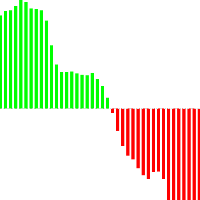
The indicator allows determining the strength and direction of the trend precisely. The histogram displayed in a separate window shows changes of the slope of the regression line. A signal for entering a deal is crossing the zero line and/or a divergence. The indicator is also useful for wave analysis. Input Parameters: Period - period of calculation, 10 on default; Angle threshold - slope at which a flat is displayed, 6.0 on default (within the range from -6.0 to 6.0); Filter by volume - volume
"Expert X" Expert Advisor using the Martingale system (grid). Only the basic parameters are used: tp - Take Profit from the average price of all the opened orders in one direction; step - step to place new orders; mult - multiplier for new orders. When you attach the Advisor to the chart you can choose which positions the Expert can open (Long, Short or Long&Short).
The indicator works on any currency pair. The preferred timeframe is M15 or higher. When a signal is triggered, an appropriate arrow with a definite color, text and stop loss line are displayed on a chart: Blue color and up arrow - buy Red color and down arrow - sell The indicator is non-repainting. Below are my recommendations on working with it: Open a trade after a signal is triggered and a candle is closed. Stop loss is to be placed 5-10 points above the candle, at which the last signal is r
基于该指标AO比尔威廉姆斯顾问“Gold profitx1”。显示了黄金,差价合约等图表的好成绩 止损 - 动态。 选项: TP - 止赢止损的百分比(从101到1000) pctp - 终场前就赢利的位置一半比例,下半年转移到盈亏平衡点(0.01〜1) Lot - 位置尺寸(0.02〜100) 注意:你的经纪人一定要保持局部平仓。
Super Signal 4H 指标可用于任何货币对的 H4 时间帧。在您挂载指标的瞬间, 您可以在图表上清晰看到指示的峰值和谷底。入场点以箭头标记。当一个新箭头出现在图表上, 一个 信号 将给出。这种方法极其便利 - 没有信号会被忽视。 交易的主要原理是利用超级信号 4H 当向上箭头 (蓝色) 在图表中出现,开多单。 当向下箭头 (红色) 在图表中出现,开空单。
本 EA 利用一个独特策略跟踪市场订单并修改挂单。本产品可以小本金工作。建议本金是 1 000 美元 (1000 美分)。本 EA不使用高风险交易策略, 如马丁格尔, 并且不采用任何技术指标。它直接靠价格工作 (无论 4 或 5 位报价)。在交易器人里两类尾随终止可作为选项使用: 首先, 市价单成交后,行情超过前一根柱线的最高价/最低价时,尾随终止开始执行。 测试应该在 "每次报价" 模式,且具有 99.9% 模型品质。您不会得到正常结果,若报价品质精度较低。 建议 使用 H1 时间帧。在实盘账户启动 EA 前,确认所有设置正确。用 99.9% 的报价质量,对去年同期进行测试。使用经纪商最小点差和终止位。如果您怀疑所选的经纪商, 请购买之前联系我。 参数 所有计算基于历史数据。 MaxRisk - 每笔交易风险 / 建议 0.05%。 Lots - 固定交易手数如果 risk = 0。 BarHistory - 分析历史柱线数量。 ShowInfo - 显示/隐藏交易信息。 PeriodBH - 分析历史周期。 RBHTP - 赢利计算。 RBHT - 二次赢利计算。 BHTS -
超级仓鼠 EA 是一宽专为 NZDUSD 设计的 EA。它即使用最少本金也可工作。 此 EA 基于 RSI + 它有两个附加过滤器, 使用马丁格尔功能将亏损交易扭亏为盈,并可以根据本金的百分比设置止损功能。 购买 EA 之后, 您将免费收到更新和优化! 我将帮助您选择正确的参数以便实现任何目标 (增加本金, 用于 PAMM 账户的低风险, 稳定的信号分布)! 实盘监控账户信号在此: https://www.mql5.com/zh/signals/33021 输入参数描述 本 EA 在四位或五位平台上均可工作。按照 5 位数字指定输入参数的点数值,EA 将自动换算 4 位数字。 StartLots - 初始手数; Depo - 随着余额增长,手数自动增加指定数值。0 值禁用该功能; RsiPeriod - RSI 周期; RsiPrice - RSI 计算的价格; Rsi1 - 优化参数 (多头仓位); Rsi2 - 优化参数 (空头仓位); GridStep - 订单间隔点数; Martin - 随后的订单手数系数; LockOrderNo - 根据锁定的持仓开单; Klock -
剥头皮策略指标,仅针对 M1 时间帧,适用于任何货币对。 每当您有时间在您的 PC 或笔记本前坐下来,在此指标的帮助下,您可以在 15-30 分钟内获利。 红线意为下跌趋势, 您要做空。 蓝线意为上涨趋势, 您要做多。 注意!在您开始交易过程之前, 很重要的事情是等待信号。
If you're interested in trading news you may heard of THG Straddle Trader Diamond and Straddle Trader Pro, I've used both of those and over time I came to conclusion to write my own because I often needed additional features to reduce slippage and increase stability. This robot is based on almost a year and half of experience and constant improvements, includes unique features I've never seen before nowhere and gives the greatest stability. I remember I traded NFP on Friday once with an initial
Support and resistance lines are very important in trading. When the lines are drawn for the High and Low price on a low timeframe, it is good, but when they are drawn for an upper timeframe, it is not true. Why? Because the distance between High and Low and Open and Close prices can be tens and hundreds of pips, and at this points, the resistance and support areas and support/resistance lines for these areas are pointless. This indicator simply shows these areas and helps you to detect this Con
Bee is an Expert Advisor specially designed for EURUSD M15. The Expert Advisor is based on candlestick analysis and Bollinger bands. The EA works both with four and five decimal points. Parameters OpenDay - The EA will start trading from this day. 0=sun,1=mon,2=tue,3=wed,4=thu,5=fri,6=sat OpenHour - The EA will start trading from this hour (24-hour clock). MagicNumber - The number for the EA to recognize its own positions. If you use other EA on the same account, please ensure that each of them
This is a panel for manual trading with automatic lot calculation. The demo version only work on EURO pair One Click Contest Features Risk percentage based on lot Close all orders Close all profit orders Close all loss orders
Angry Scalping Expert Advisor is based on MACD indicator (TF M15). The input parameters are optimized for EURUSD M5. This strategy is designed for ECN broker with NO commission.
Indicator finds most prominent extremums (highs and lows) in history and displays their price levels for currently visible range of prices. 8 levels are shown at most. This is a tool for those who used to lookup the history for important levels formed by reversal points outliers. If price scale is changed manually or adjusted automatically for changes in time scale, indicator visualize all found levels (if any) inside visible area. The width (importance) of a level depends from a number of times
FourAverage: A Breakthrough in Trend Identification With evolving information technology and increasing number of market participants, financial markets get less and less analyzable using good old indicators. Common technical analysis tools, such as Moving Average or Stochastic alone, are not capable of identifying the trend direction or reversal. Can a single indicator show the right direction of the future price, without changing its parameters over 14 years' history, while at the same time re
The indicator calculates support and resistance lines. Signals are displayed as dots that take on extremum values of control bars. This allows to keep the price chart free of unnecessary objects. The indicator is easy to set and use. It demonstrates perfect performance on all charts, regardless of the time frame value and the number of decimal places in the price. It is a non-lagging and non-redrawable indicator. The program provides for the possibility of using sound alerts.
我的资金管理 像是一个风险控制器, 它用符合您期望的亏损风险的确定交易量下单。 它也可以帮助您在下单之前预览您的入场/止损/止盈价位,只需在图表上拖拽这些价位即可,并在持仓期间持续报告。 拥有此工具, 您在决定开单时感觉更舒适, 而且可以预测您的订单的盈利/亏损。现在,下单将是十分精确和专业的工作。 此工具是从自动交易驱动器 https://www.mql5.com/zh/market/product/4217 中分离出来的资金管理部分。 注: 用于测试的演示版可在此找到: https://www.mql5.com/zh/market/product/5400 突出特点 计算精确的交易量以符合您期望的亏损风险 (余额 %), 包括经纪商收取的佣金费用。 允许在图表上直接拖拽入场/止损/止盈价位,可以在下单前预览。 提供所有订单类型的一键交易。 开单之后持续报告止损/止盈价位的评估。 实时控制面板。 停机或断电后恢复之前的设置。 设置参数 Commission Setting (Menu): 设置您的经纪商如何收取每手交易的佣金。它对于计算符合您的亏损风险期望的所需交易量很重要。 C
Need to open a pending order at news time, or need to open a pending/instant order at a specific time? CAP News Trading EA is the right tool for you. The News Trading EA opens pending orders at a specific time or specific date for you avoiding human errors and enhancing your trading activity. It is useful for news traders who open pending orders before the news come out. News trading is one of the most difficult disciplines – but it can also be one of the most profitable ones if you know t
The indicator works on any currency pair. Preferred timeframes are from M15 to D1. When a signal is triggered, an appropriate arrow with a definite color and stop loss line is displayed on a chart. These lines can also be used as support/resistance levels. The indicator does not redraw. Below are my recommendations on working with the indicator. Open a trade after the signal is triggered and the next candle is closed. Stop loss is to be placed 5-30 points away from an arrow or a stop line. I ca