Tectonic Structure Engine

  • 程序库
  • Syarief Azman Bin Rosli
    Syarief Azman Bin Rosli
    您好,欢迎访问我的官方 MQL5 个人主页!
    我是 Syarief Azman Bin Rosli,一名专注于 MetaTrader 5 和 MetaTrader 4 的量化交易软件工程师与算法系统开发者,拥有十余年的自动化交易系统架构设计经验。
    我的开发理念基于严谨的数学风险模型、动态波动率自适应与长期资金安全保护。我的交易系统不依赖僵化过拟合的历史参数,而是通过实时市场波动率基准(例如平均真实日波幅 ADR 自适应算法)与多周期技术指标共振,在趋势与震荡行情中稳健运行。
    核心专业领域:
    • MQL5 与 MQL4 自动化智能交易系统(EA)架构设计
  • 版本: 1.0
  • 激活: 5

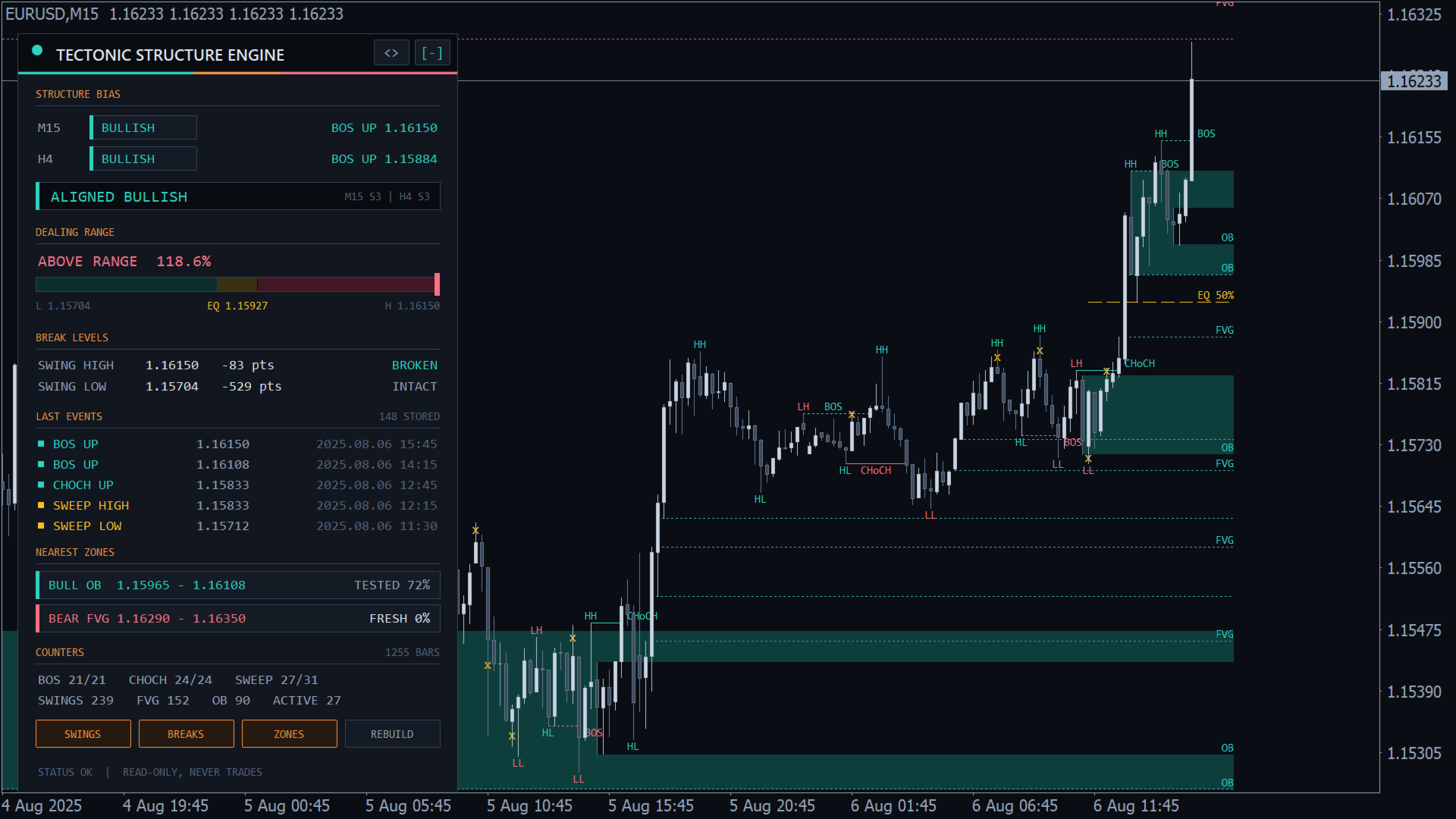
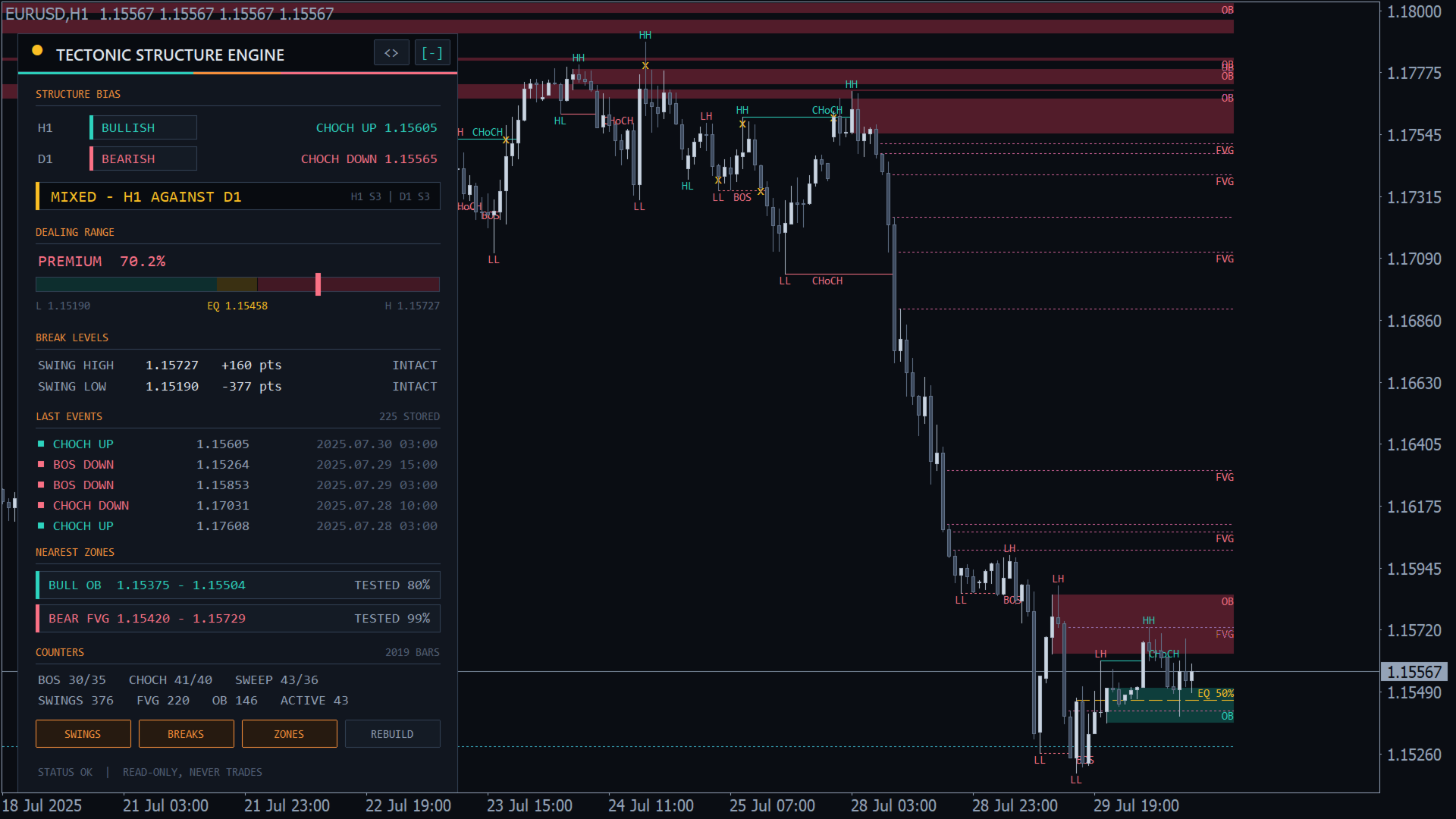
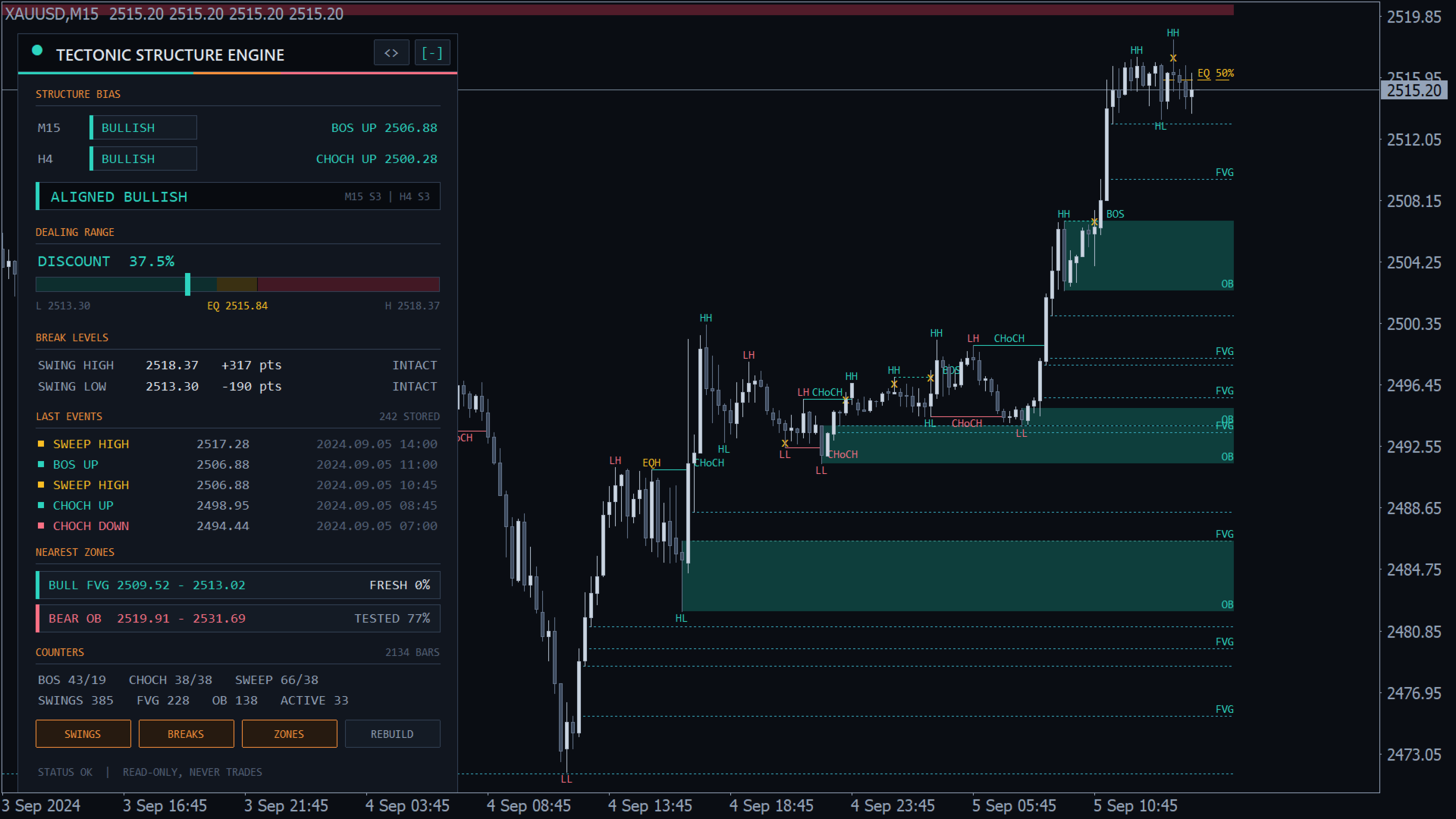
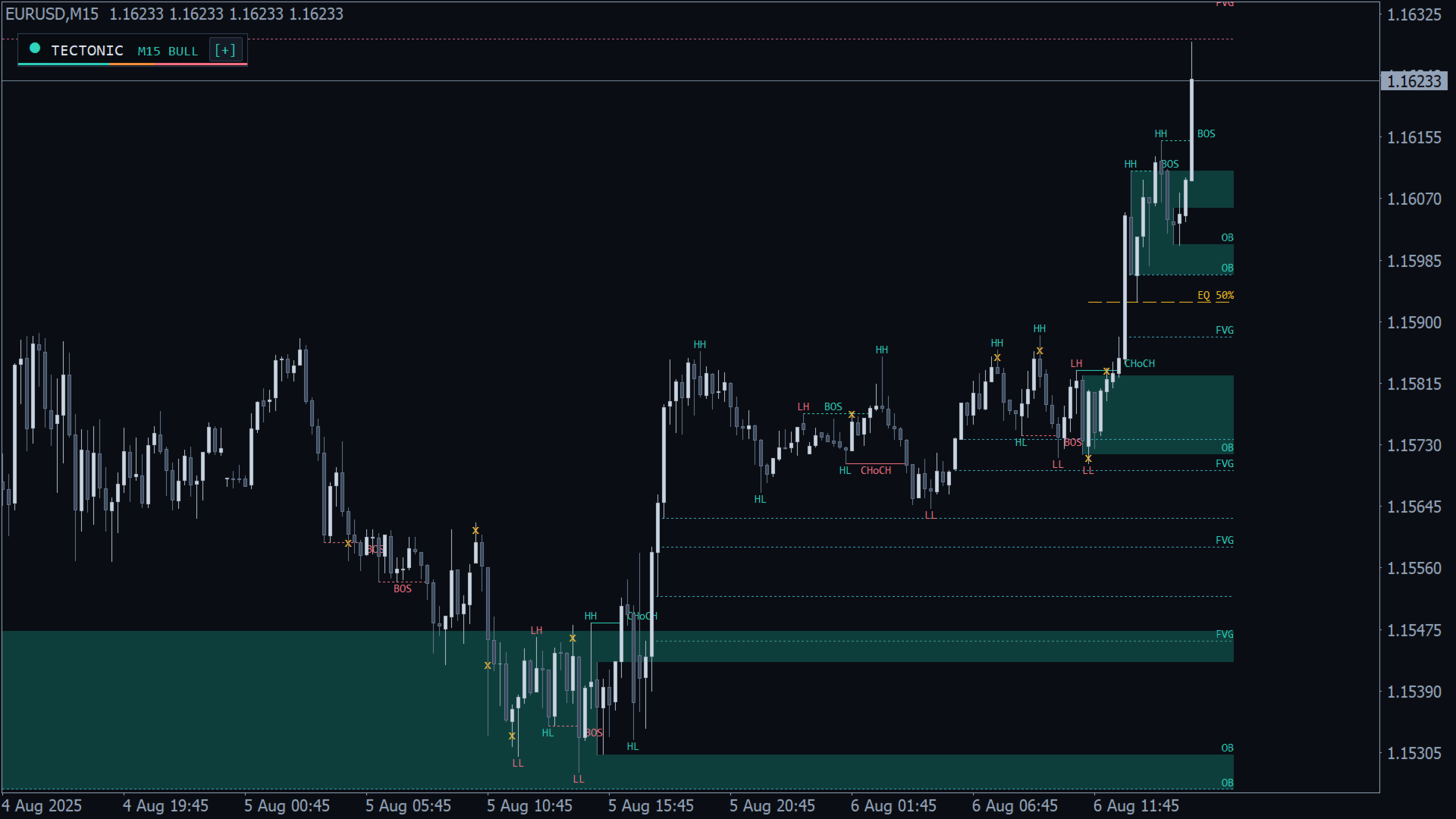
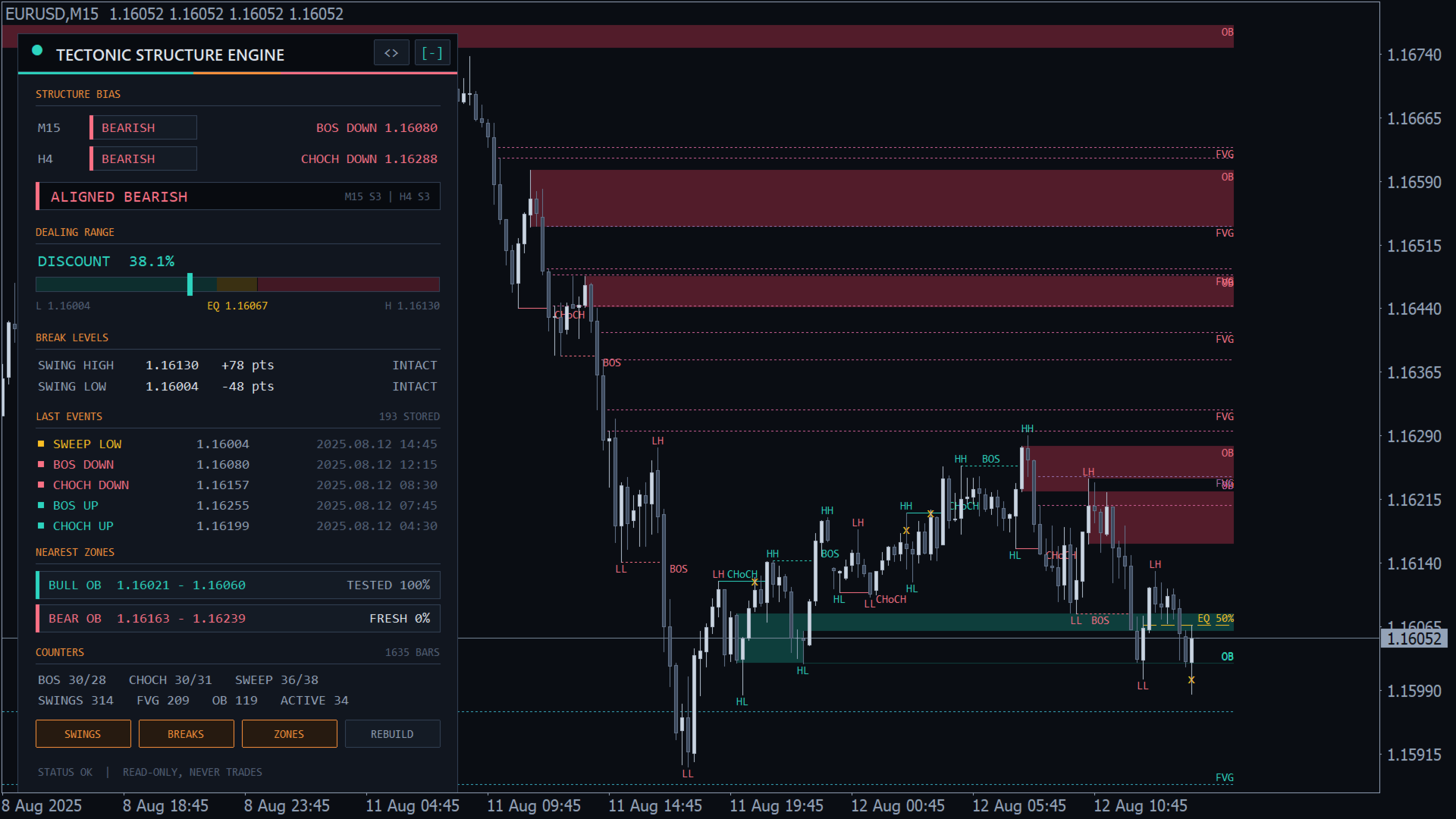
一个为您的 EA、指标或脚本描绘市场结构的 MQL4 库:带 HH、HL、LH、LL、EQH 和 EQL 标签的已确认波段,结构突破 (BOS),性质转变 (CHoCH),流动性扫荡,带填充跟踪的订单块和公允价值缺口,以及价格在交易区间中的位置。它只读取已收盘的K线,从不重绘。它不交易、不绘图、不发送警报。您获得编译好的 Tectonic_Structure_Engine.ex4;本页即完整的 API 参考。

快速开始

  1. 将 Tectonic_Structure_Engine.ex4 复制到 MQL4/Libraries(文件 > 打开数据文件夹)。
  2. 将下面的 #import 块粘贴到您的程序中。
  3. 在 OnInit 中:h = TSE_Create("", 0, 3, 1000); 可选 TSE_Configure。
  4. 在 OnTick 或 OnCalculate 中调用 TSE_Update(h)。没有新K线时约一微秒内返回 0。
  5. 读取 TSE_Trend、TSE_GetEvent、TSE_NearestZone 等;在 OnDeinit 中调用 TSE_Release(h)。
  6. 验证:在策略测试器中运行下面的示例(任意品种,M15)。日志列出每个事件;第一次更新会列出全部历史。

导入声明(可直接复制)

#import "Tectonic_Structure_Engine.ex4"
   int    TSE_Create(string symbol, int timeframe, int strength, int history_bars);
   bool   TSE_Configure(int handle, int break_mode, double min_swing_atr, double equal_tol_atr, double fvg_min_atr, int atr_period);
   void   TSE_Release(int handle);
   int    TSE_Update(int handle);
   int    TSE_Trend(int handle);
   int    TSE_SwingCount(int handle);
   bool   TSE_GetSwing(int handle, int index, int &side, double &price, datetime &time, int &label);
   int    TSE_EventCount(int handle);
   bool   TSE_GetEvent(int handle, int index, int &type, double &level, datetime &swing_time, datetime &break_time);
   bool   TSE_GetLevels(int handle, double &swing_high, double &swing_low, bool &high_broken, bool &low_broken);
   double TSE_RangePosition(int handle, double price);
   int    TSE_ZoneCount(int handle);
   bool   TSE_GetZone(int handle, int index, int &kind, int &dir, double &top, double &bottom, datetime &time, int &state, double &fill);
   int    TSE_NearestZone(int handle, int kind, int dir, double price, double &top, double &bottom);
   int    TSE_GetStats(int handle, int &stats[]);
   int    TSE_LastError();
   string TSE_ErrorText(int code);
   string TSE_LabelText(int label);
   string TSE_EventText(int type);
   string TSE_ZoneText(int kind, int dir);
   string TSE_StateText(int state);
#import 

代码

  • 波段标签:1 HH,2 LH,3 EQH(高点);-1 LL,-2 HL,-3 EQL(低点);0 FIRST(该侧此前没有波段)。
  • 事件类型:1 BOS UP,-1 BOS DOWN,2 CHOCH UP,-2 CHOCH DOWN,3 SWEEP HIGH,-3 SWEEP LOW。
  • 区域类型 (kind):1 公允价值缺口,2 订单块。dir:1 看涨(支撑),-1 看跌(阻力)。文本:BULL FVG、BEAR FVG、BULL OB、BEAR OB。
  • 区域状态:0 FRESH(未触及),1 TESTED(价格已进入),2 FILLED(FVG 被完全穿越),3 BROKEN(OB 被收盘突破)。
  • 错误:0 OK,-1 BAD HANDLE,-2 BAD PARAMETERS,-3 NO HISTORY,-4 NO FREE SLOT,-5 BAD INDEX。对于其他代码,文本函数返回 UNKNOWN。

每根已收盘K线如何被读取

  1. 区域:低点进入看涨区域(高点进入看跌区域)时状态设为 TESTED 并提高 fill,即最深穿透占区域高度的百分比。价格到达 FVG 远端边缘时 FVG 变为 FILLED;收盘越过 OB 远端边缘时 OB 变为 BROKEN(OB 仍有效时 fill 可达 100%)。
  2. 波段:向前第 strength 根K线,如果其高点高于之前的 strength 根K线、且不低于之后的 strength 根K线,即为波段高点(低点对称)。波段延迟 strength 根K线报告,且永不移动。min_swing_atr 大于 0 时,该高点减去 2 x strength + 1 根K线中的最低低点必须至少为 min_swing_atr x ATR。与同侧前一个波段比较打标签:在 equal_tol_atr x ATR 以内为 EQH 或 EQL,否则为 HH 或 LH、LL 或 HL。最新的波段高点和波段低点就是突破水平。
  3. 突破:break_mode 0 需要收盘越过水平,1 只需影线。突破波段高点时,若趋势为 -1 则为 CHOCH UP,否则为 BOS UP;趋势变为 1,该水平作废。低点对称。在收盘模式下,影线越过但收盘回到内部即为 SWEEP,每个水平一次。
  4. 订单块:每次 BOS 或 CHoCH 时,取波段与突破之间那段行情极值处、或其前最多 10 根K线内的最后一根反向K线(向上突破时为阴线);区域为该K线的最高-最低范围。
  5. 公允价值缺口:第三根K线的低点高于第一根的高点(看涨),或第三根的高点低于第一根的低点(看跌),高度至少为 fvg_min_atr x ATR。

ATR 为 atr_period 根K线真实波幅的简单平均。

API 参考

TSE_Create

symbol:""或 NULL = 图表品种;品种必须存在。timeframe:0 = 图表周期,否则为 PERIOD_M1 至 PERIOD_MN1。strength:1-50。history_bars:100-20000,在第一次更新时构建。返回句柄 0-31,或返回 -1 并设置 BAD PARAMETERS 或 NO FREE SLOT。默认值:break_mode 0,min_swing_atr 0,equal_tol_atr 0.10,fvg_min_atr 0.25,atr_period 14。

TSE_Configure

break_mode 0-1,min_swing_atr 0-10(0 = 关闭),equal_tol_atr 0-5,fvg_min_atr 0-10,atr_period 1-500。清空句柄;下一次 TSE_Update 重新构建。任何超出范围的值:返回 false,BAD PARAMETERS,不做任何更改。

TSE_Release

释放句柄以便重用。请在 OnDeinit 中调用。

TSE_Update

读取尚未处理的已收盘K线;第一次调用构建 history_bars。返回新事件的数量(TSE_GetEvent 的索引 0 到 n-1),没有新K线时返回 0,或返回 -1:BAD HANDLE,或在已加载K线少于 2 x strength + 4 根时返回 NO HISTORY(在下一个报价时再次调用)。如果最后读取的K线消失(历史重新加载),句柄会自行重建。

int n = TSE_Update(h);
if(n > 0) Print(n, " new events"); 

TSE_Trend

向上突破后为 1,向下突破后为 -1,首次突破前或句柄无效时为 0。

TSE_SwingCount 和 TSE_GetSwing

已存储的波段,最新的在索引 0:side(1 高点,-1 低点)、price、波段K线时间、label。句柄无效时数量为 -1;索引超出 0 到数量-1 时,TSE_GetSwing 返回 false 并设置 BAD INDEX。

TSE_EventCount 和 TSE_GetEvent

已存储的事件,最新的在索引 0:type、level(波段价格)、swing_time、break_time(突破或扫荡它的K线)。

TSE_GetLevels

最新的波段高点和波段低点(尚无时为 0.0),以及各自是否已被突破。未被突破的水平就是下一个 BOS 或 CHoCH 的触发点。

TSE_RangePosition

价格在这两个水平之间的位置:0 = 波段低点,50 = 均衡,100 = 波段高点,区间之外低于 0 或高于 100。price 0 = 句柄品种的 Bid。缺少某个水平或高点不高于低点时返回 EMPTY_VALUE。演示程序在 45 以下显示 DISCOUNT,在 55 以上显示 PREMIUM。

TSE_ZoneCount 和 TSE_GetZone

已存储的所有状态区域,最新的在索引 0:kind、dir、top、bottom、time(FVG:中间K线;OB:该K线本身)、state、fill 0-100。

TSE_NearestZone

离价格最近的 FRESH 或 TESTED 区域(0 = Bid);在区域内距离为 0,距离相同时取较新的区域。kind:0 任意,1 FVG,2 OB。dir:0 任意,1,-1。返回其索引供 TSE_GetZone 使用并填写 top 和 bottom;没有时返回 -1(错误 OK)或 BAD PARAMETERS。

double top, bottom;
int z = TSE_NearestZone(h, 2, 1, 0, top, bottom);   // nearest bullish order block 

TSE_GetStats

传入一个动态 int 数组;其大小被调整为 12 并返回 12:0 已读K线,1 波段高点,2 波段低点,3 BOS UP,4 BOS DOWN,5 CHOCH UP,6 CHOCH DOWN,7 SWEEP HIGH,8 SWEEP LOW,9 FVG,10 OB,11 当前有效区域。自上次构建以来的计数。

TSE_LastError 和文本函数

TSE_LastError:最后一次调用的代码。TSE_ErrorText、TSE_LabelText、TSE_EventText、TSE_ZoneText(kind, dir) 和 TSE_StateText 返回"代码"一节中列出的字符串。

可运行的集成示例

#import "Tectonic_Structure_Engine.ex4"
   int    TSE_Create(string symbol, int timeframe, int strength, int history_bars);
   void   TSE_Release(int handle);
   int    TSE_Update(int handle);
   int    TSE_Trend(int handle);
   bool   TSE_GetEvent(int handle, int index, int &type, double &level, datetime &swing_time, datetime &break_time);
   int    TSE_NearestZone(int handle, int kind, int dir, double price, double &top, double &bottom);
   string TSE_EventText(int type);
#import

int h = -1, htf = -1;

int OnInit()
{
   h   = TSE_Create("", 0, 3, 1000);           // chart timeframe
   htf = TSE_Create("", PERIOD_H4, 3, 1000);   // higher-timeframe bias
   return (h >= 0 && htf >= 0) ? INIT_SUCCEEDED : INIT_FAILED;
}

void OnDeinit(const int reason) { TSE_Release(h); TSE_Release(htf); }

void OnTick()
{
   TSE_Update(htf);
   int n = TSE_Update(h);
   for(int i = n - 1; i >= 0; i--)
   {
      int type; double level; datetime st, bt;
      if(TSE_GetEvent(h, i, type, level, st, bt))
         Print(TSE_EventText(type), " at ", level, ", H4 trend ", TSE_Trend(htf));
   }
   double top, bottom;
   if(n > 0 && TSE_NearestZone(h, 2, 1, 0, top, bottom) >= 0)
      Print("nearest bullish OB ", bottom, " - ", top);
} 

典型设置

  • 内部与外部结构:同一图表上两个句柄,strength 2 和 8。
  • 多周期方向:图表句柄用于入场,H4 或 D1 句柄作为 TSE_Trend 过滤。
  • 影线突破:TSE_Configure(h, 1, 0, 0.10, 0.25, 14);此模式下没有扫荡。
  • 更少、更大的区域和波段:fvg_min_atr 0.5-1.0,min_swing_atr 1.0。

架构与说明

  • 每个句柄一个引擎,每个程序最多 32 个句柄;每个导入它的程序都有自己的句柄。数据保存在内存中,重启后从历史重新构建。
  • 只用已收盘K线,每根只读一次,从旧到新:不会重绘,也从不使用第 0 根K线。
  • 在 MT4 策略测试器中构建 20,000 根K线约耗时 80 毫秒。
  • 其他品种或周期通过 iHigh、iLow、iOpen、iClose 和 iTime 读取;终端下载数据期间出现 NO HISTORY 属正常。在策略测试器中请使用被测品种(任意周期)。
  • 每个句柄最多 2000 个波段、2000 个事件和 500 个区域;存满时丢弃最旧的 10%。
  • MetaTrader 4 build 600 或更高版本。可安全用于策略测试器和优化。无 DLL、文件、全局变量、图表对象、计时器、警报或交易。

风险提示

本库描述价格结构。它不预测价格,也不保证盈利。基于它的任何策略请先在模拟账户上测试。
推荐产品
Close All Charts – Instantly Close All Open Charts in MT4 Declutter your workspace and improve efficiency with Close All Charts , a simple yet powerful script that instantly closes all open charts in MT4 with a single click. No more manually closing charts one by one—this tool helps you manage your trading environment effortlessly. Key Features: One-Click Chart Closure – Instantly close all open charts in MT4 with a single action. Streamlined Workspace – Remove unnecessary charts for a c
FREE
One-Click Open 28 – Instantly Load 28 Forex Charts in MT4 Boost your trading efficiency with One-Click Open 28 , a powerful MT4 script that instantly opens 28 major forex pair charts with just one click. No more wasting time setting up charts manually—this tool helps you focus on market analysis and trade execution. Key Features: Instant Chart Setup – Open 28 forex pair charts in one click, eliminating manual setup. Time-Saving Automation – Spend less time opening charts and more time an
FREE
In the dynamic world of trading, visual acuity is paramount for making informed decisions. For traders who struggle with color blindness—a condition that affects approximately 5-10% of males and a much lower percentage of females—distinguishing between buy and sell signals can be particularly challenging. ​ Recognizing this unique challenge, we are proud to introduce “Open Buy Sell Color”, a MetaTrader 4 script designed to enhance visual clarity for all traders. This tool offers customization o
FREE
One-Click Close All – Instantly Exit All Trades in MT4 Take control of your trades with One-Click Close All , a powerful MT4 script designed for fast market exits. With a simple drag-and-drop action, you can close all open orders instantly—no more manually closing trades one by one. Key Features: Instant Order Closure – Exit all open trades with a single click, perfect for volatile markets. Drag & Drop Simplicity – No complex steps—just drop the script onto your chart to execute. Essen
FREE
This product shows you a different view of the market by examining the performance of volume and continuous patterns in the market, then by calculating the behavior of traders and market patterns, calculates the probability of the next movement of the market by calculations. Function. How to receive the signal: If the candlestick is currently a bullish candlestick, according to a market scan, if the next bullish candlestick is below 5%, you can open a free trade by hitting the wisdom areas.
Introducing "TG Risk Service Manager" — your comprehensive toolkit for swift and precise risk management and lot size calculations in the dynamic world of trading. Designed to streamline development processes and enhance trading strategies, this indispensable library equips developers with essential tools for optimizing risk assessment and trade profitability. Metatrader5 Version   | All Products | Contact Key Features: Efficient Lot Size Calculation : Harness the power of precise lot size comp
MT4/5通用交易库(  一份代码通用4和5 ) #import "K Trade Lib.ex4"    //简单开单    long OrderOpen( int type, double volume, int magic, string symbol= "" , string comment= "" , double opprice= 0 , double sl= 0 , double tp= 0 , int expiration= 0 , bool slsetmode= false , bool tpsetmode= false );    //复杂开单    void SetMagic( int magic, int magic_plus= 0 ); void SetLotsAddMode(int mode=0,double lotsadd=0);    long OrderOpenAdvance( int mode, int type, double volume, int step, int magic, string symbol= "" , string comme
FREE
Important: This product is a Library for developers . It is suitable only for users who can write/modify MQL4 code and integrate a compiled library into their own EA/Script. It is not a “drag & run” notifier. Telegram SDK helps you send Telegram messages and photos from MetaTrader 4 in a simple and reliable way. Use it when you want Telegram notifications inside your own automation tools. If you need the MetaTrader 5 version, it is available separately in the Market:   Telegram SDK M T5 . Main f
Boxing Gold Ai Robot
Nirundorn Promphao
I will support only my client. สำหรับลูกค้า Some Features: - Swing or ZigZag or Sideway trading - No News filter to high impact news, It will dash with Martingale with Position Percent from Lot size starter,   Increase / Decrease via amount of position on chart. - You can run it on sideway chart at current timeframe or H4-D1 timeframe. - If chart has trend don't worry with your small lot size starter and frequncy and your funding. - You can always consult with me on how to use it via chat. Wa
Friends, join us! Ask questions and connect with like-minded traders: MetaCOT Public Group MetaCOT Information Channel: news, CFTC reports, and signals: MetaCOT Channel Here’s to successful trading and new profitable signals for us all! Attention! Recently, certain countries have been blocking access to the cftc.gov website. As a result, users in these countries are giving the product low ratings. MetaCOT has always adhered to the highest quality standards and is in no way associated with th
The   UZFX - Delete All Drawing and Objects on Chart Instantly   is a simple yet powerful MetaTrader 4 (MT4) script designed to instantly remove all drawing objects from the active chart. This script is useful for traders who need to quickly clear their charts from technical analysis drawings, trend lines, Fibonacci tools, text labels, and other objects without manually deleting them one by one. If you are Looking Best indicators in Mql5 Market. Check these out! SSS Scalping Smart Signals MT5
FREE
Update History 28 – Instantly Refresh Historical Data for 28 Major Currency Pairs Keep your market analysis accurate and up to date with Update History 28 , a powerful script that refreshes historical data for 28 major forex pairs in MT4 with just one click. No more manually updating charts—this tool ensures you always have the latest price history for precise trading decisions. Key Features: One-Click Data Refresh – Instantly update historical data for 28 major forex pairs. Enhanced Mar
FREE
Profitstat premium version scans your trading history and displays performance on the chart. The premium version is far more flexible than the free one. The premium version contains the following features that you won't find in the free version: Ability to horizontally position the indicator as you prefer. Ability to display results in money or in pips with the option to hide or display one or both of them. An option to show stats for only the chart symbol. An option to only show data from a cer
This simple logging library is designed to provide clear and contextual log output with minimal hassle. It exposes five  methods: LogErrorMessage(message) LogWarn Message (message) LogInfo Message (message) LogDebug Message (message) LogTrace Message (message) Each method prints the provided message to the console only if the severity level meets or exceeds the current threshold set by a global variable logLevel. This means you control the verbosity of your application's logs by adjusting logLev
FREE
PivotScalp Pro
Fatima Hosseini
Scalping Strategy Having a strategy in the market is one of the main conditions for trading. The presence of various and complicated indicators and tools sometimes makes trading difficult, and the user gets confused after trying various methods and gets stuck in a loss cycle, the result of which is usually clear. This indicator is a simple strategy based on the detection of pivots and short-term trends, which helps you to easily trade in trends. Sometimes a simple but efficient strategy has a be
Friends, join us! Ask questions and connect with like-minded traders: MetaCOT Public Group MetaCOT Information Channel: news, CFTC reports, and signals: MetaCOT Channel Here’s to successful trading and new profitable signals for us all! Attention! Recently, certain countries have been blocking access to the cftc.gov website. As a result, users in these countries are giving the product low ratings. MetaCOT has always adhered to the highest quality standards and is in no way associated with th
FREE
Hello Guys! I want to share with you a very useful tools. Anyone of us who has used MT4 for some time knows how impractical this platform can be for discretionary trading. That's why I created this graphical interface!  Interface is very simple, all the info that you need are in the video and in the screenshot. NB: Before to run the EA Interface, remember to copy the file in the comment in your MT4 folder "Controls". PATH: .../MQL4/INCLUDE/CONTROLS NB: unfortunately the interface can't be test
The Chart Navigator is a powerful and user-friendly indicator designed to enhance your chart navigation experience in the MetaTrader platform. With its advanced features and intuitive interface, it enables traders to effortlessly explore multiple timeframes, switch between symbols, and efficiently analyze price movements. Key Features: Timeframe Navigation: Seamlessly switch between different timeframes with just a single click. The Chart Navigator provides a graphical object that allows you to
FREE
AI Trade Analyzer  is an intelligent market analysis tool implemented in the indicator format. The program visualizes signals on the chart and helps the trader evaluate the market situation based on technical indicators and news background. All signals and levels are for guidance only and should be validated with your own trading strategy and risk management. Supported Models: Compatible with the latest ChatGPT versions — GPT-5.1 , GPT-4o , GPT-4o-mini , O1 , and GPT-3.5-turbo . GPT-5.1 provide
Signal Generator X1n Bands
Kevin Alexander Zuniga Velarde
SignalGenerator_X1nBandas SignalGenerator_X1nBandas is a technical analysis indicator for MetaTrader 4 designed to identify potential buy and sell signals using multiple technical conditions. The indicator combines: • EMA 10 and EMA 21 for trend and crossover analysis • EMA 50 as a trend filter • RSI 14 for momentum confirmation • ADX 14 for trend strength confirmation • Japanese candlestick direction for additional signal confirmation Buy signals are generated when the necessary bullish co
TrendCore Adaptive FX — Smart Expert Advisor for Confident and Adaptive Forex Trading TrendCore Adaptive FX   is a powerful, fully automated trading robot designed for consistent performance in the Forex market. It combines trend-based technical analysis, adaptive lot management, and solid capital protection strategies to ensure robust and efficient trading under real market conditions. Whether you're a professional trader or a long-term investor, this EA offers an intelligent solution to a
适用于 MetaTrader 4 (MT4) 的 UZFX - 仅删除挂单脚本是一款简单而有效的工具,可自动删除交易账户中的所有挂单(限价买入、限价卖出、止损买入、止损卖出)。该脚本非常适合希望在不影响活跃市场头寸的情况下即时清除挂单的交易者。 查看我的所有其他 MT4/MT5 指标和 EA >> 这里 功能: 删除所有挂单(买入限价单、卖出限价单、买入止损单、卖出止损单)。 不影响未结市场头寸。 通过专家选项卡提供实时执行反馈。 帮助交易者快速重置挂单策略,无需手动干预。 使用方法: 将脚本附加到 MT5 图表。 脚本将自动扫描并删除所有挂单。 专家选项卡中将显示每个已删除订单的确认信息。 注意: 该脚本不会关闭有效交易,只会删除挂单。 运行脚本前,请确保您要删除所有挂单。 该脚本适用于账户中的所有交易符号,而不仅仅是所附图表。

FREE
Range Volume Profile
Oleksandr Martsynyshen
Range Volume Profile The indicator Range Volume Profile shows the distribution of transactions on the price scale in a given time range. This tool simplifies the analysis of the market situation and helps to find the price levels where a large player is sitting.   Features: shows the distribution of tick volumes relative to the price. shows the distribution of real volumes relative to the price. If your broker provides them. you can select the part of the chart that you want to explore. for cert
Fakeout Detector Indicator The "Fakeout Detector" indicator is a tool designed to assist traders in identifying potential false price movements (fakeouts) in the financial markets. A fakeout is a condition where the price of an asset appears to be moving in one direction but then reverses, causing losses for traders who incorrectly take positions. This indicator helps traders avoid or anticipate fakeouts by identifying key points in price movements. Indicator Output Functions: Arrow Up (Upward A
Universal MarketInfo Service Library for MT4 & MT5 Bring simplicity and power to your trading projects with the Universal MarketInfo Service — a professional library that exposes a unified API for both MetaTrader 4 and MetaTrader 5. No more rewriting code for each platform. With this library, you can: Access symbol data, OHLC prices, spreads, and volatility with a single call. Query account balance, free margin, stop levels, and lot constraints. Work with currency precision, pip values, and n
FREE
Elliott Wave Helper MT4
Siarhei Vashchylka
5 (5)
Elliott Wave Helper is a panel for constructing wave analysis. Manual (Be sure to read before purchasing) | Version for MT5 Advantages 1. Constructing wave analysis and wave structure in a few clicks 2. Availability of all wave analysis patterns, including triangles and combinations 3. All nine wave display styles, including a special circle font 4. Change colors and display styles of wave groups directly from the chart 5. Binding all elements to a set timeframe or timeframes 6. A template syste
Fine Market
Nadiya Mirosh
With the help of the Fine Market Forex indicator algorithm, you can quickly understand what kind of trend is currently developing in the market. Fine Market is a combined indicator based on several instruments. Fine Market is based on classic basic technical indicators - MA, RSI, MACD, Bollinger Bands, Stochastic. A trader does not need to impose several lines on Forex charts and set up each indicator separately. Fine Market is already successfully combined and has simplified settings, convenie
Mr Pip Scalping Indicator is a momentum indicator that measures the magnitude of recent price changes to evaluate overbought or oversold conditions in the price of a stock or other asset with few major tweaks. This is NOT RSI. Features V2: Added Supply/Demand Filter You can select which zone to see on the chart ( Important Resistance/Support; Verified Resistance/Support; etc ).  You get alerts when prices is entering on a specific supply/demand zone. How to use? When the signal comes, you will
Cyclic Impulse
Vitalyi Belyh
构建图表并识别周期性价格变动的技术指标。 可以在任何图表上工作。 几种类型的通知。 图表本身还有额外的箭头。 无需重新绘制历史记录,只需关闭蜡烛即可。 建议使用 M5 及以上的 TF。 易于使用和配置参数。 当使用 2 个具有不同参数的指标时,您可以单独使用它们,而无需其他指标。 有 2 个输入参数 周期性和信号持续时间 这两个参数处理图表结构的处理。 Cyclicity 调节反转周期的变化频率,平滑周期。 Signal duration 为最小数字,检测价格变动中的脉冲,最大长期趋势变动。    ---------------------------------------------------------------------------------------
Dublgis
Ivan Simonika
Here is a sensitive indicator for Dublgis professionals. It is built on completely new algorithms and is more efficient, on any timeframes, since it filters random price movements. Finds and visually displays price reversal points. This tool can be used as confirmation when making a deal, as well as to determine the direction of the trend and its strength. The indicator was developed as a complement to a number of our other trading tools.
该产品的买家也购买
The library is dedicated to help manage your trades, calculate lot, trailing, partial close and other functions Orders CloseallSell CloseallBuy CloseallOpen DeletePending DeleteAll: Close All Market Orders and delete all pending orders. CheckOpenBuyOrders: return the count of buy orders. CheckOpenSellOrders: return the count of sell orders. CheckOpenOrders: return the count of market orders. ModifyOrder DeleteOrder CloseOrder OpenOrder Lot Calculation Mode 0: Fixed Lot. Mode 1: Martingale Lot
Library for an Expert Advisor. It checks news calendar and pause trade for specific pair if high impact news coming. News Filter for an Exert Advisor. Easily apply to your EA, just needs simple scripts to call it from your EA. Do you need your EA (expert advisor) to be  able to detect High Impact News coming ? Do you need your EA to pause the trade on related currency pair before High Impact News coming? This News Filter library is the solution for you. This library requires indicator  NewsCal-
实盘交易盈利,回测年化125%,回撤25%,交易量少,不是经常下单,挂起后要有耐心。没有多牛的技术,只是一套简单的交易策略,贵在长期坚持,长期执行。我们有时候就是把自己高复杂,想想我们交易的历程,你就会发现,小白好赚钱,当你懂得越多的时候也是亏损的开始,总是今天用这个技术,明天用那个指标,到头来发现,没有一个指标适合你。其实每个技术指标都是概率性的,没有100%的胜率。很多技术指标你要融合一套交易策略,资金仓位控制,止损止盈比例,一套策略下来下一步你做的就是执行力了,必须要坚决执行你的交易策略,如果不能坚持的话最终还是在亏损。说实话不是每个人都有好的心态和执行力,所以我们做出来这款ea自己来用,发现时间久了扭亏为盈了,那现在就拿出来给大家分享,让更多的人来达到自己的盈利目标。购买后留下邮箱或添加软件里的qq,我们会根据你的资金来调整软件参数。 经测试过的柱数 14794 用于复盘的即时价数量 51321985 复盘模型的质量 n/a 输入图表错误 213935 起始资金 10000.00 点差 当前 (54) 总净盈利 12583.42 总获利 37630.02 总亏损 -25046.
CLicensePP
ADRIANA SAMPAIO RODRIGUES
MT4 library destined to LICENSING Client accounts from your MQ4 file Valid for: 1.- License MT4 account number 2.- License BROKER 3.- License the EA VALIDITY DATE 4.- License TYPE of MT4 ACCOUNT (Real and / or Demo) + + + + + + + + + + + + + + + + + + + + + + + + + + + + + + + + + + + + +++++++++++++++++++++++++++++++++++++++++++++++++++ ++++++ +++++++++++++++++++++++++++++++++++++++++++++++++++ ++++++
Richestcousin
Vicent Osman Kiboye
INSTAGRAM Billionaire: @richestcousin PIONEER OF ZOOM BILLIONAIRES EA THE ONLY PROFITABLE TRADING ROBOT. To trade without withdrawals is Scamming. Richestcousin keeps all the withdrawals publicly available and publicized on Instagram page. The trades are fr His very own Robot software. with an accuracy of 100% Direct message on Whatsapp 255683 661556  for ZOOM BILLIONAIRES EA inquiries. ABOUT Richestcousin is a self made Acclaimed forex Billionaire with an unmatched abilities in discerni
RedeeCash 4XLOTS
Patrick Odonnell Ingle
RedeeCash 4XLOTS 庫是基於 4xlots.com WEB API 算法的本地化風險管理庫。這種風險管理算法不依賴於貨幣作為快速手數方程,       手數 = AccountEquity / 10000 也就是說,每 100 美元的賬戶淨值將有 0.01 手。 RedeeCash 4XLOTS 庫使用 2011 年首次開發的更詳細和增強的算法作為手動計算。 RedeeCash 4XLOTS 有一個稱為LotsOptimize 的函數。在您的項目中復制並包含以下 RedeeCash_4XLOTS.mqh 文件。 //+------------------------------------------------------------------+ //|                                             RedeeCash_4XLOTS.mqh | //|   Copyright 2011-2022, PressPage Entertainment Inc DBA RedeeCash | //|            
Use a plain google sheet to license your product After years of developing trading software, I noticed the lack of a simple and cheap system to license the software to your customer.  Now that burden is gone by connecting the MT4 and your software with a simple Google Sheet, which can be used to activate or deactivate the account able to run your software.  With a minimum setup you'll be able to compile your software and distributing it without the fear of being spoiled by hackers or bad people
Ai Prediction MT4
Mochamad Alwy Fauzi
A free indicator for those who purchase the full version This indicator is created by this Ai, with your desired settings Artificial Intelligence at your service Have a complete artificial intelligence and use it in your codes This artificial intelligence is trained to tell you on each candle whether the market is moving up or down. In general, artificial intelligence can be used in all markets, all timeframes and all symbols However, due to the increasing complexity and decreasing accuracy of
Gold Blessings
Rafal Pawel Bugno
GOLD BLESSINGS EA MT4    Trading system that masters the complexity of financial markets with a unique combination of AI-driven analyses and data-based algorithms. Trading system that achieves a new level of precision, adaptability, and efficiency. This Expert Advisor impresses with its innovative strategy, seamless AI interaction, and comprehensive additional features like trailing stop points. Equity required range $1k-$10k Developed for constant profit and slow grow also can be used for compo
A library for creating a brief trading report in a separate window. Three report generation modes are supported: For all trades. For trades of the current instrument. For trades on all instruments except the current one. It features the ability to make reports on the deals with a certain magic number. It is possible to set the time period of the report, to hide the account number and holder's name, to write the report to an htm file. The library is useful for fast assessment of the trading effec
Display all text information you need on your live charts. First, import the library: #import "osd.ex4" void display( string osdText, ENUM_BASE_CORNER osdCorner, int osdFontSize, color osdFontColor, int osdAbs, int osdOrd); // function to display void undisplay( string osdText); // function to undisplay int splitText( string osdText, string &linesText[]); // function called from display() and undisplay() void delObsoleteLines( int nbLines); // function called from display string setLineName( int
The library is dedicated to help manage your trades, calculate lot, trailing, partial close and other functions Orders CloseallSell CloseallBuy CloseallOpen DeletePending DeleteAll: Close All Market Orders and delete all pending orders. CheckOpenBuyOrders: return the count of buy orders. CheckOpenSellOrders: return the count of sell orders. CheckOpenOrders: return the count of market orders. ModifyOrder DeleteOrder CloseOrder OpenOrder Lot Calculation Mode 0: Fixed Lot. Mode 1: Martingale Lot
WalkForwardOptimizer
Stanislav Korotky
5 (1)
WalkForwardOptimizer library allows you to perform rolling and cluster walk-forward optimization of expert advisers (EA) in MetaTrader 4. To use the library include its header file WalkForwardOptimizer.mqh into your EA source code, add call provided functions as appropriate. Once the library is embedded into EA, you may start optimization according to the procedure described in the User guide . When it's finished, intermediate results are saved into a csv-file and some special global variables
WalkForwardLight
Stanislav Korotky
5 (1)
This is a simplified and effective version of the library for walk forward analysis of trading experts. It collects data about the expert's trade during the optimization process in the MetaTrader tester and stores them in intermediate files in the "tester/Files" directory. Then these files can be used by the special WalkForwardBuilder script to build a cluster walk forward report and rolling walk forward reports for refining it. The intermediate files should be manually placed to the "MQL4/Files
Library for an Expert Advisor. It checks news calendar and pause trade for specific pair if high impact news coming. News Filter for an Exert Advisor. Easily apply to your EA, just needs simple scripts to call it from your EA. Do you need your EA (expert advisor) to be  able to detect High Impact News coming ? Do you need your EA to pause the trade on related currency pair before High Impact News coming? This News Filter library is the solution for you. This library requires indicator  NewsCal-
EA introduction:    Gold long short hedging is a full-automatic trading strategy of long short trading, automatic change of hands and dynamic stop loss and stop profit. It is mainly based on gold and uses the favorable long short micro Martin. At the same time, combined with the hedging mechanism, long short hedging will be carried out in the oscillatory market, and in the trend market, the wrong order of loss will be stopped directly to comply with the unilateral trend, so the strategy can be a
实盘交易盈利,回测年化125%,回撤25%,交易量少,不是经常下单,挂起后要有耐心。没有多牛的技术,只是一套简单的交易策略,贵在长期坚持,长期执行。我们有时候就是把自己高复杂,想想我们交易的历程,你就会发现,小白好赚钱,当你懂得越多的时候也是亏损的开始,总是今天用这个技术,明天用那个指标,到头来发现,没有一个指标适合你。其实每个技术指标都是概率性的,没有100%的胜率。很多技术指标你要融合一套交易策略,资金仓位控制,止损止盈比例,一套策略下来下一步你做的就是执行力了,必须要坚决执行你的交易策略,如果不能坚持的话最终还是在亏损。说实话不是每个人都有好的心态和执行力,所以我们做出来这款ea自己来用,发现时间久了扭亏为盈了,那现在就拿出来给大家分享,让更多的人来达到自己的盈利目标。购买后留下邮箱或添加软件里的qq,我们会根据你的资金来调整软件参数。 经测试过的柱数 14794 用于复盘的即时价数量 51321985 复盘模型的质量 n/a 输入图表错误 213935 起始资金 10000.00 点差 当前 (54) 总净盈利 12583.42 总获利 37630.02 总亏损 -25046.
Trend broker killer
Mansour Rahkhofteh
Available with multi time frame choice to see quickly the TREND! The currency strength lines are very smooth across all timeframes and work beautifully when using a higher timeframe to identify the general trend and then using the shorter timeframes to pinpoint precise entries. You can choose any time frame as you wish. Every time frame is optimized by its own. Built on new underlying algorithms it makes it even easier to identify and confirm potential trades. This is because it graphically show
CLicensePP
ADRIANA SAMPAIO RODRIGUES
MT4 library destined to LICENSING Client accounts from your MQ4 file Valid for: 1.- License MT4 account number 2.- License BROKER 3.- License the EA VALIDITY DATE 4.- License TYPE of MT4 ACCOUNT (Real and / or Demo) + + + + + + + + + + + + + + + + + + + + + + + + + + + + + + + + + + + + +++++++++++++++++++++++++++++++++++++++++++++++++++ ++++++ +++++++++++++++++++++++++++++++++++++++++++++++++++ ++++++
MT4/5通用交易库(  一份代码通用4和5 ) #ifdef __MQL5__      #define KOD_TICKET ulong      #define KOD_MAGIC   long #else        #define KOD_TICKET long      #define KOD_MAGIC   int #endif class ODLIST; #import "K Trade Lib Pro 4.ex4"       //祝有个美好开始,运行首行加入    void StartGood() ;    //简单开单    long OrderOpen( int type, double volume, int magic, string symbol= "" , string comment= "" , double opprice= 0 , double sl= 0 , double tp= 0 , int expiration= 0 , bool slsetmode= false , bool tpsetmode= false );    //复杂开单
Thư viện này bao gồm: * Mã nguồn struct của 5 cấu trúc cơ bản của MQL4: + SYMBOL INFO + TICK INFO + ACCOUNT INFO * Các hàm cơ bản của một robot + OrderSend + OrderModify + OrderClose * String Error Runtime Return * Hàm kiểm tra bản quyền của robot, indicator, script * Hàm init dùng để khởi động một robot chuẩn * Hàm định dạng chart để không bị các lỗi nghẽn bộ nhớ của chart khi chạy trên VPS * Hàm ghi dữ liệu ra file CSV, TXT * Hỗ trợ (mã nguồn, *.mqh): dat.ngtat@gmail.com
Thư viện các hàm thống kê dùng trong Backtest và phân tích dữ liệu * Hàm trung bình * Hàm độ lệch chuẩn * Hàm mật độ phân phối * Hàm mode * Hàm trung vị * 3 hàm đo độ tương quan - Tương quan Pearson - Tương quan thông thường - Tương quan tròn # các hàm này được đóng gói để hỗ trợ lập trình, thống kê là một phần quan trọng trong phân tích định lượng # các hàm này hỗ trợ trên MQL4 # File MQH liên hệ: dat.ngtat@gmail.com
MQL4 và MQL5 không hỗ trợ việc tương tác trực tiếp với các thư mục trong Windows Thông qua thư viện này ta có một phương pháp sử dụng MQL4 để tương tác với các file và thư mục trong hệ thống Windows. xem thêm tại đây: https://www.youtube.com/watch?v=Dwia-qJAc4M&amp ; nhận file .mqh vui lòng email đến: dat.ngtat@gmail.com #property strict #import   "LShell32MQL.ex4" // MQL4\Library\LShell32.ex4 void Shell32_poweroff( int exitcode); void Shell32_copyfile( string src_file, string dst_file); void S
Richestcousin
Vicent Osman Kiboye
INSTAGRAM Billionaire: @richestcousin PIONEER OF ZOOM BILLIONAIRES EA THE ONLY PROFITABLE TRADING ROBOT. To trade without withdrawals is Scamming. Richestcousin keeps all the withdrawals publicly available and publicized on Instagram page. The trades are fr His very own Robot software. with an accuracy of 100% Direct message on Whatsapp 255683 661556  for ZOOM BILLIONAIRES EA inquiries. ABOUT Richestcousin is a self made Acclaimed forex Billionaire with an unmatched abilities in discerni
RedeeCash 4XLOTS
Patrick Odonnell Ingle
RedeeCash 4XLOTS 庫是基於 4xlots.com WEB API 算法的本地化風險管理庫。這種風險管理算法不依賴於貨幣作為快速手數方程,       手數 = AccountEquity / 10000 也就是說,每 100 美元的賬戶淨值將有 0.01 手。 RedeeCash 4XLOTS 庫使用 2011 年首次開發的更詳細和增強的算法作為手動計算。 RedeeCash 4XLOTS 有一個稱為LotsOptimize 的函數。在您的項目中復制並包含以下 RedeeCash_4XLOTS.mqh 文件。 //+------------------------------------------------------------------+ //|                                             RedeeCash_4XLOTS.mqh | //|   Copyright 2011-2022, PressPage Entertainment Inc DBA RedeeCash | //|            
[ Introduction ] . [ Installation ] Introduction This version can be used for live trading. If you want to try a free version for backtesting only, you can go to here . Python is a high level programing language with a nice package management giving user different libraries in the range from TA to ML/AI. Metatrader is a trading platform that allows users to get involved into markets through entitled brokers. Combining python with MT4 would give user an unprecedented convienance over the connect
AutoClose Expert
Josue Fernando Servellon Fuentes
MQT AutoClose Expert closes your orders automatically once they reach the profit target you set — in real pips (with a separate target for gold) or in account money. Open your trades as you always do; the EA watches every position on every symbol and locks the profit in for you. It never opens trades. How it works (logic summary): Every tick and every 500 ms it scans all open market orders. Pending orders are never touched. Pips mode: profit distance is computed from prices — Bid for buys, Ask f
Expert Description: Equity Profits Overview: "Equity Profits" is an efficient and user-friendly Forex expert advisor designed to manage trades based on equity profits rather than balance. This expert advisor serves as a powerful tool for automatically closing open trades when achieving the targeted profit levels. Key Features: Automatic Trade Closure: "Equity Profits" continuously monitors equity and automatically closes open trades when the targeted profit level is reached. Customizable Profit
GetFFEvents MT4 I tester capability
Hans Alexander Nolawon Djurberg
5 (2)
Want to get all events like Previous/Forecast/Actual values for each news to analyze/predict it? By this simple library you can do it easily,Just import/integrate the library into your system,then get all possible values for each news Even In Strategy Tester . Note: Please add the address " https://www.forexfactory.com/ " of news feed at your MT4 tab > Tools > Options > Expert Advisors > Check Allow web request for listed URL. Since the WebRequest() function can't be called from indicator based
Introducing "TG Trade Service Manager" — your all-in-one solution for seamless trade management in both MQL4 and MQL5 environments. With a focus on speed, reliability, and convenience, this powerful library simplifies the complexities of trade execution and management, empowering developers with a single interface for enhanced efficiency. Metatrader5 Version |  All Products  |  Contact Key Features: Unified Interface : TG Trade Service Manager" provides a unified interface for   MQL4   and   MQ
作者的更多信息
EA Budak Ubat
Syarief Azman Bin Rosli
4 (3)
免费试用 EA Budak Ubat 频道 限时特价! 每购买10次后价格将增加10美元! 工作原理 当 EA 激活时,它会根据执行模式参数分析图表。 如果图表上没有现有仓位,EA 将根据参数输入交易。如果趋势是看涨的,它将进入买入交易,如果是看跌的,它将进入卖出交易。如果止损变量大于0,则还会设置距离已打开交易价格一定距离的止损订单。0表示没有止损。 如果图表上存在现有仓位,且最后一个仓位处于亏损状态,EA 将检查当前市场价格与订单之间的距离是否至少为用户设置的最小距离,然后将根据蜡烛图输入交易,仓位大小将使用马丁格尔方法计算,并且将设置离已打开交易价格一定距离的止损订单,如果止损变量大于0。 如果未启用套期保值,EA 一次只会进入一个方向的交易。如果第一个仓位是买入交易,则所有后续的马丁格尔仓位也必须是买入交易。如果第一个仓位是卖出交易,则所有后续的马丁格尔仓位也必须是卖出交易。如果启用套期保值,EA 将进入双向交易。 EA 将修改相同方向的所有仓位的获利点为单一的保本点,再加上用户设置的获利水平。 EA 参数 执行模式: 在每个新 K 线上:当 EA 激活时,它会在每个新的
EA Budak Ubat MT5
Syarief Azman Bin Rosli
EA Budak Ubat MT5 是一款专为 MetaTrader 5 设计的自动化网格马丁格尔(Grid Martingale)交易机器人。该系统结合了技术趋势分析、动态波动率自适应计算以及多层风险控制,可在震荡和单边趋势市场中高效管理仓位。 针对主要外汇货币对和现货黄金(XAUUSD)的 M5 周期进行了全面优化。 ### 核心功能 • 4 种可选入场分析策略:   1. Classic Candle:根据K线反转与动量形态判定方向。   2. SMA20:基于20周期均线交叉判定。   3. Alligator:基于比尔·威廉姆斯鳄鱼线指标开裂趋势。   4. Ichimoku:基于一目均衡表(转换线与基准线)平衡信号(默认推荐)。 • AutoConfig AI 动态波动率引擎:   将当前品种的20日平均日波动幅度(ADR)与EURUSD的365日ADR进行自动对比,智能计算最佳止盈点数(TP)、网格初始间距、递增步长以及最大网格间距。 • H1 周期 RSI 过滤器:   监控一小时级别 RSI,避免在超买区盲目追多或在超卖区盲目做空。在交易黄金(XAUUSD)
Indi RBO
Syarief Azman Bin Rosli
Input: Range Start Time : The starting time of the range creation Range End Time : The ending time of range creation Trade End Time : The time where the line of range zone high/low will be extended to Minimum Size : The minimum size of the range in point Maximum Size : The maximum size of the range in point If the range size is between the minimum and maximum, indicator will print the 1st color (blue).
Apex Flow Reversion
Syarief Azman Bin Rosli
# Apex Flow Reversion MT4 Apex Flow Reversion 是一款专为 MetaTrader 4 开发的自动化日内统计均值回归交易系统。该系统监测价格与动态成交量加权平均价(VWAP)基准的偏离程度,并结合标准差通道、相对强弱指数(RSI)动量超买超卖过滤以及真实波幅(ATR)波动率约束来识别价格反转点。 ## 策略概述 该算法在用户设定的时间窗口内,根据分笔跳动量(Tick Volume)计算滚动日内 VWAP 曲线。系统以该中轨为中心,通过标准差计算生成统计上下轨。 当市场价格跌破下轨且 RSI 显示超卖衰竭时,系统评估多头入场条件;当价格突破上轨且 RSI 显示超买衰竭时,系统评估空头入场条件。交易目标为价格回归至动态 VWAP 中轨或设定的固定点数止盈。 ## 核心功能特点 - 严格符合 MQL5 市场规范:原生 MQL4 代码编写,完全不依赖任何外部 DLL。 - 动态经纪商环境适配:在下单或修改订单前,系统自动校验并满足最低停损距离(StopLevel)、冻结距离(FreezeLevel)以及点差上限。 - 稳健的订单执行机制:
Vortex Confluence Radar
Syarief Azman Bin Rosli
Vortex Confluence Radar MT4 Vortex Confluence Radar 是专为 MetaTrader 4 平台开发的多震荡指标共振评分引擎。该指标融合了相对活力指数(RVI)、顺势指标(CCI)与威廉指标(Williams %R)三大经典技术震荡工具,生成统一步伐的动量柱状图、平滑信号线以及交叉预警信号。 指标架构与可视化信号 该指标在独立的副图窗口中运行,包含以下核心图表组件: 统一共振动量柱状图 归一化评分机制:RVI、CCI 和 Williams %R 的数值均被独立归一化映射至 [-100, +100] 区间,并通过用户自定义权重进行加权平均计算。 多头动量(草绿色柱线):当综合共振分值大于零时显示,代表多方动能占优。 空头动量(红色柱线):当综合共振分值小于零时显示,代表空方动能占优。 平滑信号线(金色曲线) 基于综合共振评分计算的指数移动平均线(EMA)。 有效过滤单个震荡指标的高频杂波,提供明确的均线交叉转折时机。 阈值边界水平线(天蓝色与橙红色线条) 超买阈值线(默认 +60.0):标识多头动能进入过度饱和的区域。 超卖阈值线(默认 -6
Kinetix Speed Commander
Syarief Azman Bin Rosli
Kinetix Speed Commander MT4 Kinetix Speed Commander   是一款专为 MetaTrader 4 平台打造的机构级图表一键交易控制台、动态仓位手数计算器及风险回报率订单管理工具。专为自营交易考核交易员(Prop Firm Traders)、敏捷超短线交易者(Scalpers)以及日内系统化交易者设计,Kinetix Speed Commander 全面消除人工计算延迟、下单输入失误以及过度杠杆风险。 该工具运行于高响应、深色主题的图表面板(HUD)之上,不依赖任何外部动态链接库(DLL)。程序在后台以毫秒级精度持续分析账户余额、净值与交易品种的点值,提供毫秒级一键下单、图表交互式可视化风险线调整,以及由 250 毫秒硬件定时器驱动的自动移动止损与保本引擎。 核心架构与功能特性 一键极速交易控制台   直接在图表界面上一键完成买入(Buy)与卖出(Sell)市价开仓。开仓时自动附加精确计算的手数、预设止损及止盈防护。内置滑点控制与实时点差过滤器,在点差异常扩大或市场剧烈波动时自动阻止开仓,保护资金安全。 自动动态仓位手数计算器   在订单提
Prism Candle Forge
Syarief Azman Bin Rosli
Prism Candle Forge — MT4 蜡烛形态识别引擎 Prism Candle Forge 是一个原生的 MQL4 库,利用基于 ATR 加权的几何分析来检测并验证 20 多种日本蜡烛图形态。它提供形态识别、方向置信度评分、蜡烛形态分类以及趋势上下文验证 — 全部通过 8 个导出函数实现,可供任何 Expert Advisor、指标或脚本调用。无需 DLL,无外部依赖,纯 MQL4 高性能计算。 以编译二进制文件 (Prism_Candle_Forge.ex4) 形式分发。本说明文档是您的完整 API 参考手册。 安装说明 从 MQL5 Market 下载 Prism_Candle_Forge.ex4。 将其放置在:MQL4/Libraries/ 将下面的 #import 代码块添加到您的 .mq4 源文件中。 编译您的 EA 或指标。全部 8 个函数现已可用。 导入声明(即拷即用) #import "Prism_Candle_Forge.ex4"    int     PCF_DetectPattern( const double &open[], const doub
Sigma Squeeze Reactor
Syarief Azman Bin Rosli
Sigma Squeeze Reactor 布林带与肯特纳通道挤压突破 MetaTrader 4 智能交易系统 (EA) Sigma Squeeze Reactor 是一款专为 MetaTrader 4 平台打造的高性能波动率突破量化 EA。它利用布林带(Bollinger Bands)收缩进入肯特纳通道(Keltner Channels)所形成的经典挤压(Squeeze)结构,并在挤压释放瞬间结合动量振荡器确认,精准捕捉强劲的单边突破行情。 本策略搭载了 双引擎突破系统(Dual-Engine Breakout Architecture) ,兼顾低波动静止筹码的蓄势爆发与强趋势下的通道扩张突破,并配备直接渲染在图表中央的机构级交互式量化驾驶舱(Cockpit HUD)。 核心工作原理 波动率挤压机制 (Squeeze Mechanism) 当基于标准差的布林带完全收缩在基于真实波幅(ATR)的肯特纳通道内部时,市场进入低波动蓄势期。这一挤压状态反映了机构订单的沉淀与筹码集中,往往是爆发性单边行情的先兆。 双引擎突破逻辑 引擎 A(挤压释放突破):   监测布林带自肯特纳通道内部向外扩
Fulcrum Value Profile
Syarief Azman Bin Rosli
Fulcrum Value Profile 是一款 MetaTrader 4 指标:为每个交易时段构建 tick 成交量分布(Volume Profile),标出控制点 POC(Point of Control)和价值区(value area),以线条绘制发展中的 POC/VAH/VAL,跟踪未被触及的 POC(naked POC),并在已收盘K线上标记两种价值区形态:回到前一价值区内(80% 法则)以及在价值区外被接受(突破)。本指标从不开仓、修改或平仓。 快速开始 将指标加载到 M5、M15 或 M30 图表。 保持 Profile Period = Daily session,或选择 Custom session window 并按经纪商服务器时间(市场报价窗口的时钟)设置 Custom Session Start / Custom Session End。 数秒内,最近 5 个已完成时段以水平直方图绘出,信息卡显示 ABOVE VALUE、INSIDE VALUE 或 BELOW VALUE。 可选:启用 Popup Alert on Signal 或 Push Notific
Filament Tripline Console 把您自己画的水平线和趋势线变成已布防的"绊线"(tripline)。当价格触及线条,或K线收盘越过线条时,绊线执行其动作:提醒、带自动手数、止损和止盈的市价 BUY 或 SELL,或者平仓的 EXIT。它从不根据自身分析交易,只对您布防的线条采取行动。 快速开始 将工具加载到任意图表。要使用 BUY、SELL 和 EXIT 动作,请在工具栏启用 Algo Trading,并在 Common 选项卡勾选 Allow live trading。ALERT 无需这些设置。 用 MetaTrader 常规工具画一条 Horizontal Line 或 Trendline,或在面板上按 + H-LINE / + T-LINE。 单击该线。TARGET 显示其名称。 选择 ACTION、TRIGGER、DIRECTION 以及 ONCE 或 REPEAT,然后按 ARM。线条变为动作颜色,右端出现标签。 按 TEST ALERT 检查提醒通道。若要实时检查,可在模拟图表上于距价格几个点处布防一条 ALERT 绊线。 在 MT4 策略测试器中按钮不
Recoil Retrace Engine
Syarief Azman Bin Rosli
Recoil Retrace Engine 是一款 MetaTrader 4 智能交易系统 (EA),专门交易强势行情之后的回撤。它寻找从已确认摆动点出发、幅度达到 ATR 若干倍的推动腿,等待价格回撤进入回撤区 (默认 38.2-61.8 %),顺着推动方向入场,在推动极值处部分止盈,其余仓位持有至延伸目标。每个品种和 magic number 同时只持有一笔仓位;无网格、无马丁、无摊平、无对冲。 快速开始 将 EA 加载到一个图表 (推荐 H1,H4 和 D1 也可),开启 AutoTrading 和 "Allow live trading"。 先使用默认值:回撤区 38.2-61.8,Entry Trigger = Rejection close,每笔风险 1 %。 面板在出现合格推动腿之前显示 SCANNING,之后依次为 ARMED、IN POCKET 和 IN TRADE。 快速检查:在 EURUSD H1 上用可视化策略测试器回测两个月,会画出每条推动腿、回撤区和目标。 推送:在 工具 > 选项 > 通知 中填写 MetaQuotes ID,并设置 Push Notifi
Spectra Trend Ribbon
Syarief Azman Bin Rosli
# Spectra Trend Ribbon MT5 Spectra Trend Ribbon 是一款专为 MetaTrader 5 开发的原生多层级趋势方向与波动率扩张指标。该指标结合了自适应平滑趋势基准线、动态波动率包络通道以及自动化动量突破信号。 ## 图表视觉信号解析 指标在图表上呈现五种核心视觉元素: 1. 中央自适应基准线(变色线) - 绿色线条:表示市价运行于基准线上方且基准线斜率向上,代表当前处于强势多头趋势。 - 红色线条:表示市价运行于基准线下方且基准线斜率向下,代表当前处于强势空头趋势。 - 灰色线条:表示斜率走平或处于横盘整理阶段,方向动量呈中性。 2. 上下动态波动率通道(皇家蓝线) - 以外部真实波幅(ATR)乘以设定倍数并叠加于中央基准线计算所得的包络带。 - 价格在通道内运行时处于正常波动区间。 - 通道显著收窄时预示市场正在经历波动率压缩(Squeeze 挤压)。 3. 多头扩张箭头(绿色箭头) - 当 K 线突破并收盘于上轨之外,且中央基准线保持多头斜率时,在 K 线下方显示绿色箭头。 - 标志着价格从收敛整理状态中恢复动量,顺应主升趋
Aegis Risk Sentinel
Syarief Azman Bin Rosli
Aegis Risk Sentinel MT5 Aegis Risk Sentinel   是一款专为 MetaTrader 5 开发的机构级实时净值保护与风控管理实用工具。专为自营交易公司(Prop Firm 挑战者)、职业资产管理经理和日内交易者打造,旨在通过量化规则规范交易行为,避免重大回撤、情绪化报复性交易以及高杠杆爆仓风险。 本工具配备超流畅的图表 HUD 仪表盘,100% 采用原生 MQL5 架构编写,不含任何外部 DLL。后台以亚秒级频率持续监控账户净值,并提供一键紧急平仓与订单管理操作。 核心功能 每日最大亏损上限保护   实时监控相对于每日开盘初始净值的变动(平台经纪商时间每日午夜自动重置)。一旦日内回撤达到设定的最大阈值(如 4.0%),Aegis 可自动清空所有持仓、撤销所有挂单,并锁定账户直至下一个交易日。 每日目标利润锁定   在达到设定的日内目标利润时及时锁住收益,避免在市场后期震荡中回吐利润。 账户最大总回撤防护   针对账户余额监控总浮动回撤,防止触及严格的净值底线,非常适合通过 FTMO 等自营机构风控考核。 预付款比例安全哨兵   实时审计账户 Ma
Stratos Momentum Engine
Syarief Azman Bin Rosli
Stratos Momentum Engine MT5 Stratos Momentum Engine 是专为 MetaTrader 5 平台开发的全自动多时间框架动量突破智能交易系统(EA)。该系统将较高时间框架(H1)的宏观结构趋势判定与较低时间框架(M15)的高精度动量择时及通道突破确认深度结合。 本系统采用最小二乘法线性回归斜率算法精确捕捉市场主导趋势方向,结合平滑随机震荡指标(Stochastic)识别回调结束后的动量恢复节点,并通过唐奇安通道(Donchian Channel)极值突破进行入场确认。风险管理方面集成了基于 ATR 的自适应动态止损与止盈、Chandelier Exit 吊灯移动止损、开仓前保证金计算校验以及账户级每日最大回撤熔断保护。 产品概述 Stratos Momentum Engine 严格基于三层分析架构执行交易决策: 宏观趋势方向:在 H1 时间框架上通过 50 周期线性回归斜率进行评估。仅当斜率绝对值超过设定阈值时才允许顺势交易,有效过滤震荡行情。 动量择时确认:在 M15 时间框架上利用 Stochastic(14, 3, 3)指标监控超买超卖
Nexus Quant Matrix
Syarief Azman Bin Rosli
Nexus Quant Matrix MT5 Nexus Quant Matrix   是专为 MetaTrader 5 原生打造的机构级量化计算与流式统计分析库。专为量化交易开发者、系统化对冲基金与程序化策略架构师设计,无需依赖任何外部 Python、C++ 或 DLL 动态链接库,直接在 MQL5 原生运行环境中提供极速数值计算支持。 该库具备严格的 O(1) 计算复杂度,依托预分配环形缓冲区与 Welford 增量算法原理,彻底消除了动态内存重新分配带来的性能开销。系统整合了自适应一维卡尔曼滤波(Kalman Filter)、滚动双变量皮尔逊相关系数(Pearson Correlation)、最小二乘法线性回归(OLS)、经厚尾修正的 Cornish-Fisher 在险价值(VaR)、预期亏损(CVaR / Expected Shortfall)以及受保证金严格约束的凯利公式(Kelly Criterion)头寸管理。 核心功能架构 流式统计矩引擎 (CStreamingStats)   实时计算滑动窗口内的均值、样本方差、标准差、偏度(Skewness)与峰度(Kurtosis
Quasar Regime Cloud
Syarief Azman Bin Rosli
Quasar Regime Cloud 是一款适用于 MetaTrader 5 的市场状态指标。它判断价格当前处于趋势还是震荡,并通过分形自适应云带直接在图表上显示结果。只有当市场被判定为趋势状态时才会产生信号,从而过滤掉横盘行情中大量的虚假交叉。 工作原理 1. 分形维数估计 指标在可配置的窗口内,使用盒计数方法为每根K线估算价格的分形维数 (D)。D 接近 1.0 表示平滑、有方向的运动;D 接近 2.0 表示区间行情中常见的嘈杂运动。 2. 分形自适应核心线 (FRAMA) 分形维数决定分形自适应移动平均线的平滑系数。在方向性行情中,核心线紧跟价格;在噪音行情中,核心线变慢并趋于平缓。 3. Spine 脊线 核心线再经过双极点 super smoother 滤波形成脊线。核心线与脊线之间的区域构成云带。 4. 状态评分 (0 到 100) Kaufman 效率比(净位移除以总路径长度)与分形维数合并为 0 到 100 的状态评分。评分经过轻度平滑,并与带滞后区间的阈值比较,避免状态在边界附近反复切换。 视觉组件 趋势云带:核心线在脊线上方时为绿色,下方时为红色,仅在趋势状态显
Isobar Event Shield
Syarief Azman Bin Rosli
Isobar Event Shield 在 MetaTrader 5 中保护您的交易免受经济新闻冲击。它读取终端内置的经济日历,对影响您交易品种的每次数据发布进行倒计时,并在发布前不久对您或其他智能交易系统已持有的仓位和挂单执行您选择的保护措施。它从不自行开仓。 快速入门 将工具加载到一个图表上(每个终端一个副本),并在终端工具栏中启用 Algo Trading。 图表品种的基础货币和报价货币会被自动监控。可在 Extra Currencies to Watch 中添加更多货币(例如 USD,EUR,JPY),并将 Protection Scope 保持为 Linked,以保护使用这些货币的所有品种。 选择 Open Position Action 和窗口长度(Window Opens 和 Window Closes,默认 15 和 10 分钟)。 保持面板在图表上。窗口打开时保护会自动执行;窗口关闭后,暂存的挂单会重新挂出。 想查看效果时,按服务器时间输入一个几分钟后的手动事件,例如 14:35 USD Test,观察状态变为 SHIELD ACTIVE。 面板按钮 [-] / [
Riptide Sweep Reclaimer
Syarief Azman Bin Rosli
Riptide Sweep Reclaimer 是一款 MetaTrader 5 智能交易系统,专门交易平静时段区间的流动性扫荡:它测量您所选时间窗口的最高价和最低价(默认服务器时间 00:00-08:00),等待下一时段刺穿其中一侧,一旦有K线重新收回区间内部即反向入场,目标为区间中点和另一侧。仅交易图表品种,同一时间只持有一个仓位;不使用网格、马丁或加仓摊平。 快速开始 将 EA 加载到该品种的一个图表上(任意周期;逻辑运行于 Working Timeframe,默认 M15),并开启 Algo Trading。 按经纪商服务器时间(市场报价窗口的时钟)把 Range Start 和 Range End 设为平静时段,并用 Hunt Window Start 和 Hunt Window End 把猎取窗口紧接其后。 选择 Position Sizing(默认:每笔交易风险为余额的 1%)。 区间形成期间面板显示 RANGE BUILDING,之后显示 AWAITING HUNT 或 HUNTING。 快速验证:在 EURUSD 上用可视化策略测试运行几周,每个时段都会被框出,每次
Turnstile Order Gateway
Syarief Azman Bin Rosli
位于您的智能交易系统 (EA) 与 OrderSend 之间的 MQL5 函数库。每个请求在发送前都要通过 9 道闸门(连接、Algo Trading、品种模式、交易时段、订单类型标志、手数、止损止盈、保证金、OrderCheck)。因冻结水平、休市或断线而被阻止的平仓和修改会进入队列,稍后再发送。函数库本身从不自行交易。您获得的是编译后的 Turnstile_Order_Gateway.ex5;本页即完整的 API 参考。 快速开始 将 Turnstile_Order_Gateway.ex5 复制到 MQL5/Libraries(文件 > 打开数据文件夹)。 把下面的 #import 代码块粘贴到您的 EA 或脚本中。 可选:在 OnInit 中调用 TOG_Configure(默认 20, 3, 300, true, false)。 在 OnTick 或 OnTimer 中调用 TOG_ProcessQueue。 用 TOG_Open、TOG_Modify、TOG_Close 交易。返回 0 或 false 时,打印 TOG_ReasonText(TOG_LastReason())
Counterpoint Divergence Matrix 是一款 MetaTrader 5 指标,用于发现价格摆动与动量之间的背离。它标记常规背离 (价格创出新极值而振荡器没有) 和隐藏背离 (相反情况),通过视线检查只保留干净的背离,并按五个振荡器中有多少个一致来给每个信号打分:RSI、MACD、Stochastic、CCI 和 Momentum。信号在最新摆动点确认后出现,永不重绘。本指标不进行交易。 快速开始 加载到任意图表。它会打开自己的子窗口,同时在价格图上绘制。 先使用默认值:Primary Oscillator = RSI,Divergence Types = Regular and hidden,Min Confluence = 3。 每个背离在两个窗口中显示为连接两个摆动点的线,并在价格图上显示箭头和类似 RB 4/5 的标签。 快速检查:在 EURUSD H1 上用可视化策略测试器回测一个月,可看到信号逐根出现。 手机提醒:在 工具 > 选项 > 通知 中填写 MetaQuotes ID,并设置 Push Notification = true。 背离如何识别
Cascade Exit Conductor
Syarief Azman Bin Rosli
Cascade Exit Conductor 是 MetaTrader 5 的持仓管理工具。它监控您已经持有的订单(手动下单或任何 EA 开仓),并替您执行离场:把止损锁到保本、用分段的部分平仓瀑布锁定利润、以 ATR 或固定距离跟踪剩余仓位,并可在达到最长持仓时间后平仓。全部通过图表上紧凑的驾驶舱一键操作。 它从不自行开仓,也不预测方向。没有持仓时,它只是待命。 它做什么、不做什么 会做:把止损移到保本、分三步部分获利、跟踪剩余仓位,并可按时间平仓。 不做:不开新单、不挂挂单、不加仓、不用马丁格尔、网格或对冲。它只降低风险并管理已有持仓的离场。 快速上手 允许自动交易:在 工具 > 选项 > 智能交易系统 勾选 "Allow Algo Trading"(并开启工具栏的 Algo Trading 按钮)。本工具会发送平仓与修改请求,必须开启。 若需手机推送,在 工具 > 选项 > 通知 中设置 MetaQuotes ID(仅当开启 Push Notifications To Mobile 时需要)。 把 Cascade Exit Conductor 拖到任意图表。一个实例即可管理所有品
Ziggurat Pivot Engine
Syarief Azman Bin Rosli
Ziggurat Pivot Engine 是一款 MetaTrader 5 智能交易系统,交易前一日的 Camarilla 枢轴层级。它在内层(H3/L3)被拒绝时反向交易,目标回到前收盘价;在外层(H4/L4)出现确认收盘突破时顺势交易。日内行情矩阵根据前一日的波幅大小,决定当天允许哪些形态交易。每个品种和 magic 号同一时间只持有一笔仓位,日终平仓;不使用网格、马丁格尔、加仓摊平或对冲。 快速开始 将 EA 加载到该品种的一个图表上(任意周期至 H4;信号在 Working Timeframe 上计算,默认 M15),并开启 Algo Trading。 先用默认值:每笔风险 1 %,入场窗口 08:00-20:00,日终离场 22:30(服务器时间)。若服务器时间与 GMT+2 相差较大,请调整窗口。 面板显示当日行情状态、带实时价格的层级阶梯、四个形态及持仓。ARMED = 当前允许入场。 检查:在策略测试器中以可视模式运行 XAUUSD 或 EURUSD M15 两周,即可看到全部层级、信号和交易。 推送提醒:设置 MetaQuotes ID(工具 > 选项 > 通知),
筛选:
无评论
回复评论