Gold Position Manager

  • 实用工具
  • Md Mahadi Hassan Rakib
    Md Mahadi Hassan Rakib
    Hi, I'm MD MAHADI HASSAN RAKIB, the developer behind PositionBoss.
    PositionBoss builds practical tools for MetaTrader traders: tools that help you manage risk, protect your trades and follow your own rules with discipline. No signals, no hype, no profit promises.
  • 版本: 1.46
  • 激活: 5
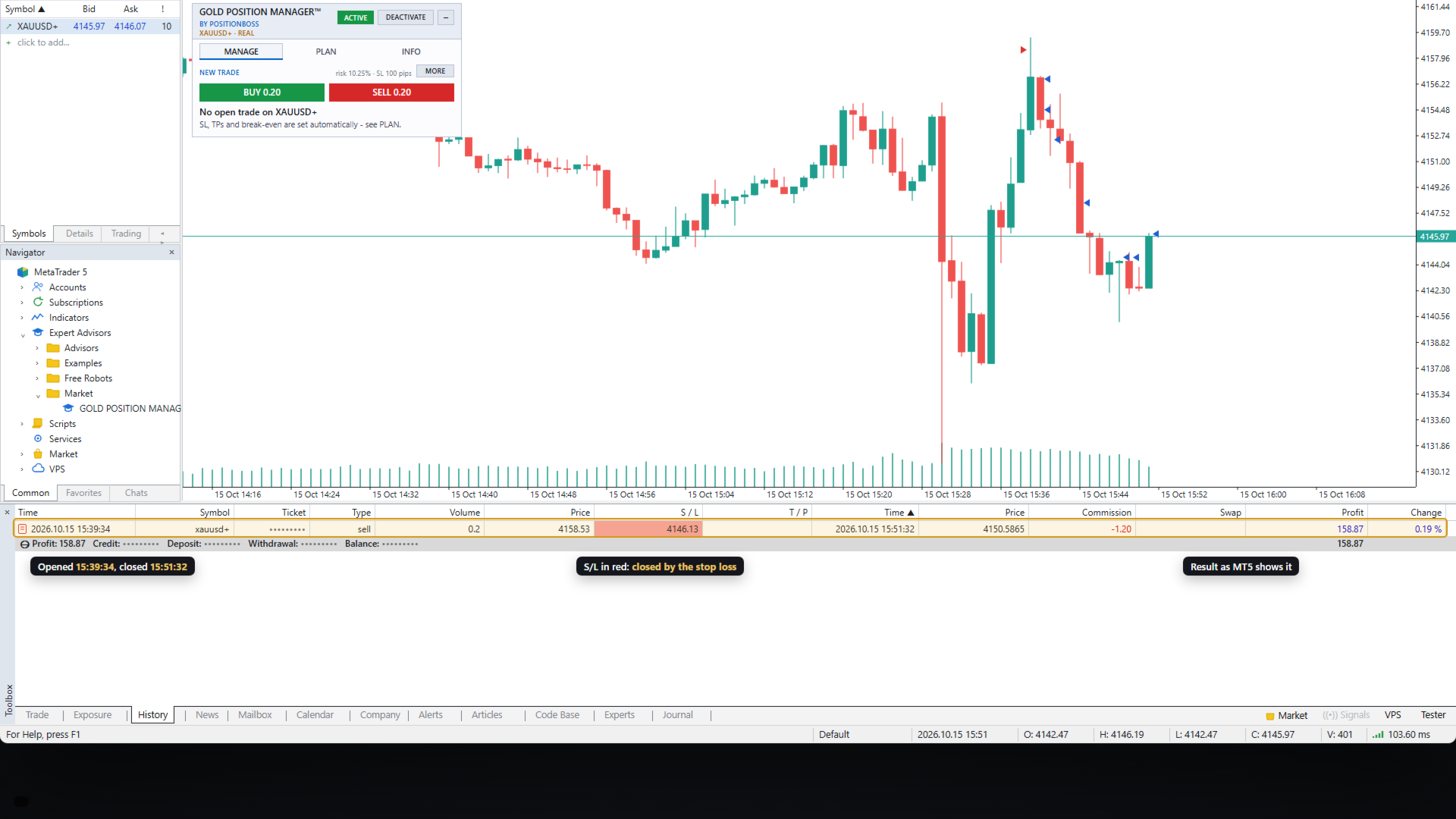
Gold Position Manager is a trade manager for MetaTrader 5, made only for gold (XAUUSD).

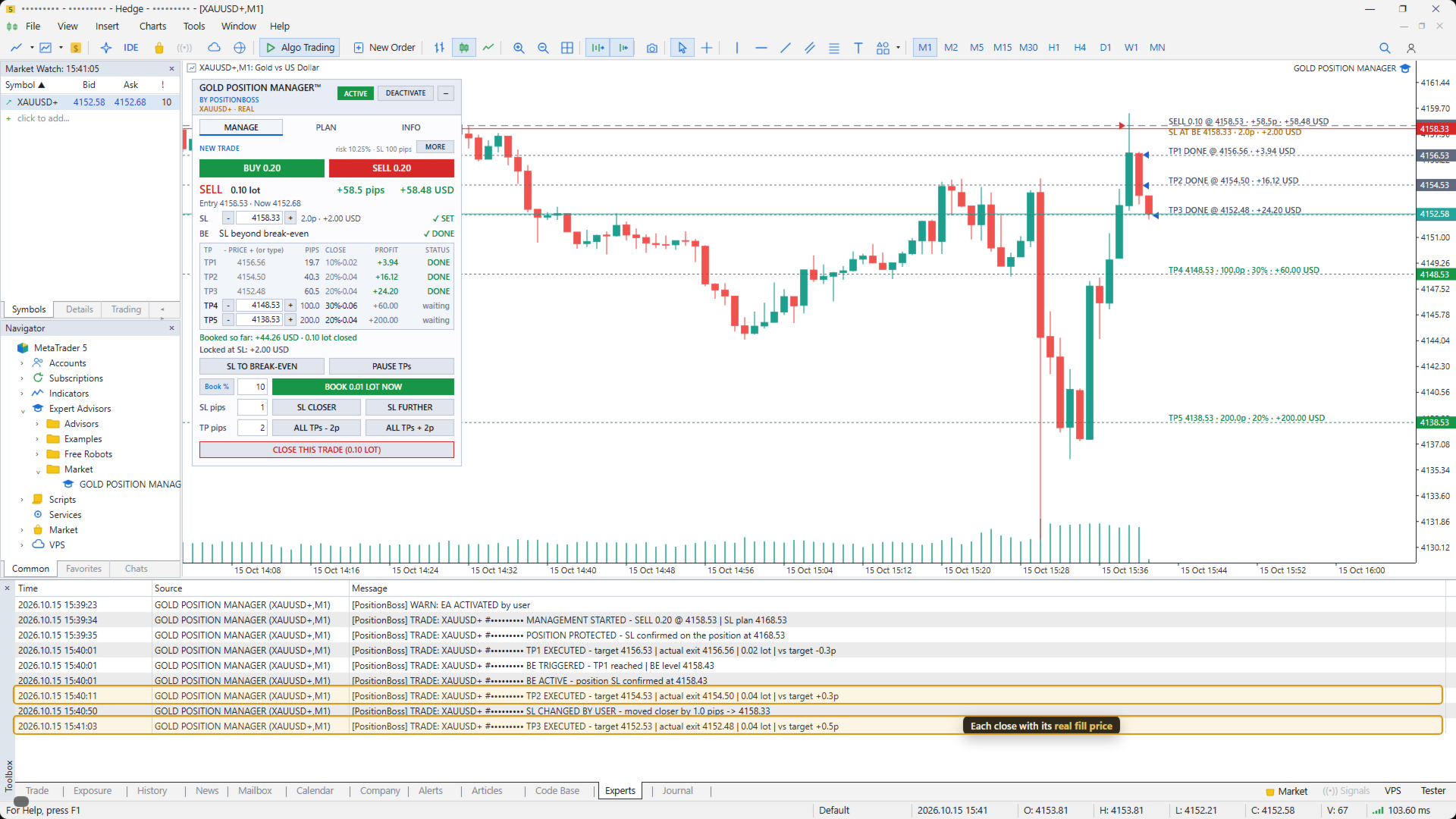
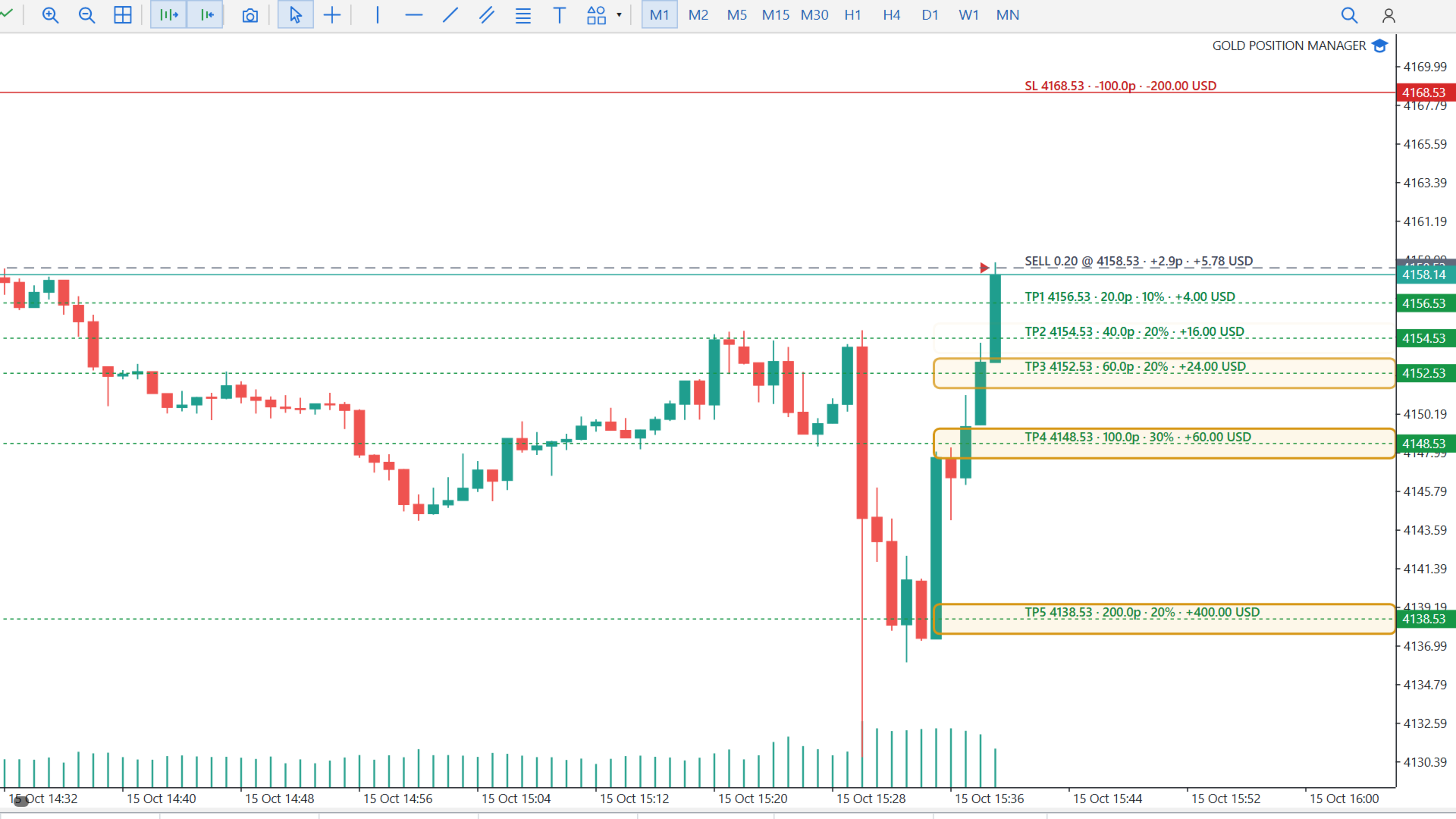
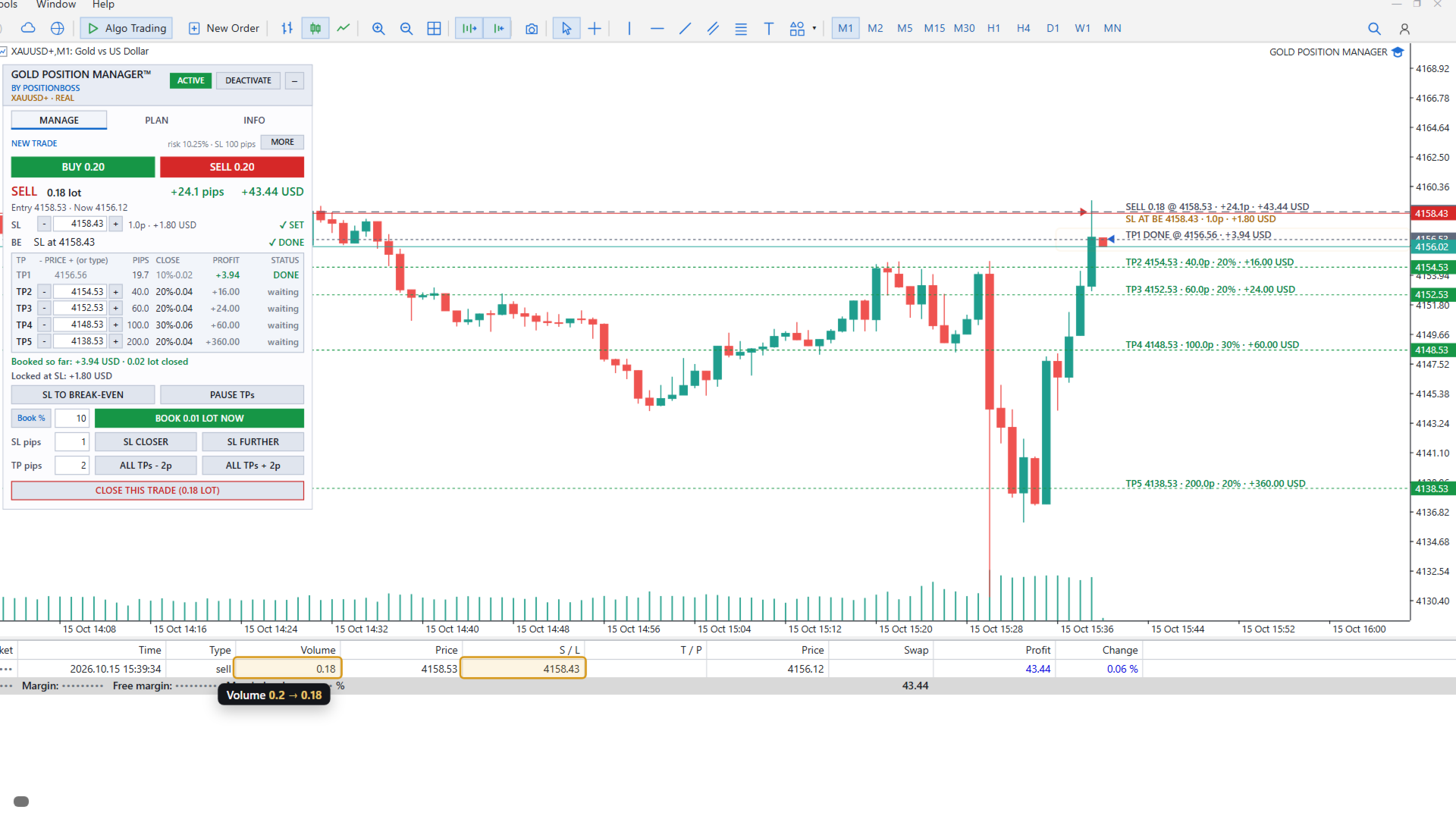
You open the trade, with the panel buttons, the normal MT5 order window or the MT5 phone app. Gold Position Manager then applies your plan to it automatically: it places the stop loss, closes the trade in steps at your take-profit levels and moves the stop loss to break-even. It does not give signals and it never opens a trade on its own on a live chart.

HOW IT WORKS
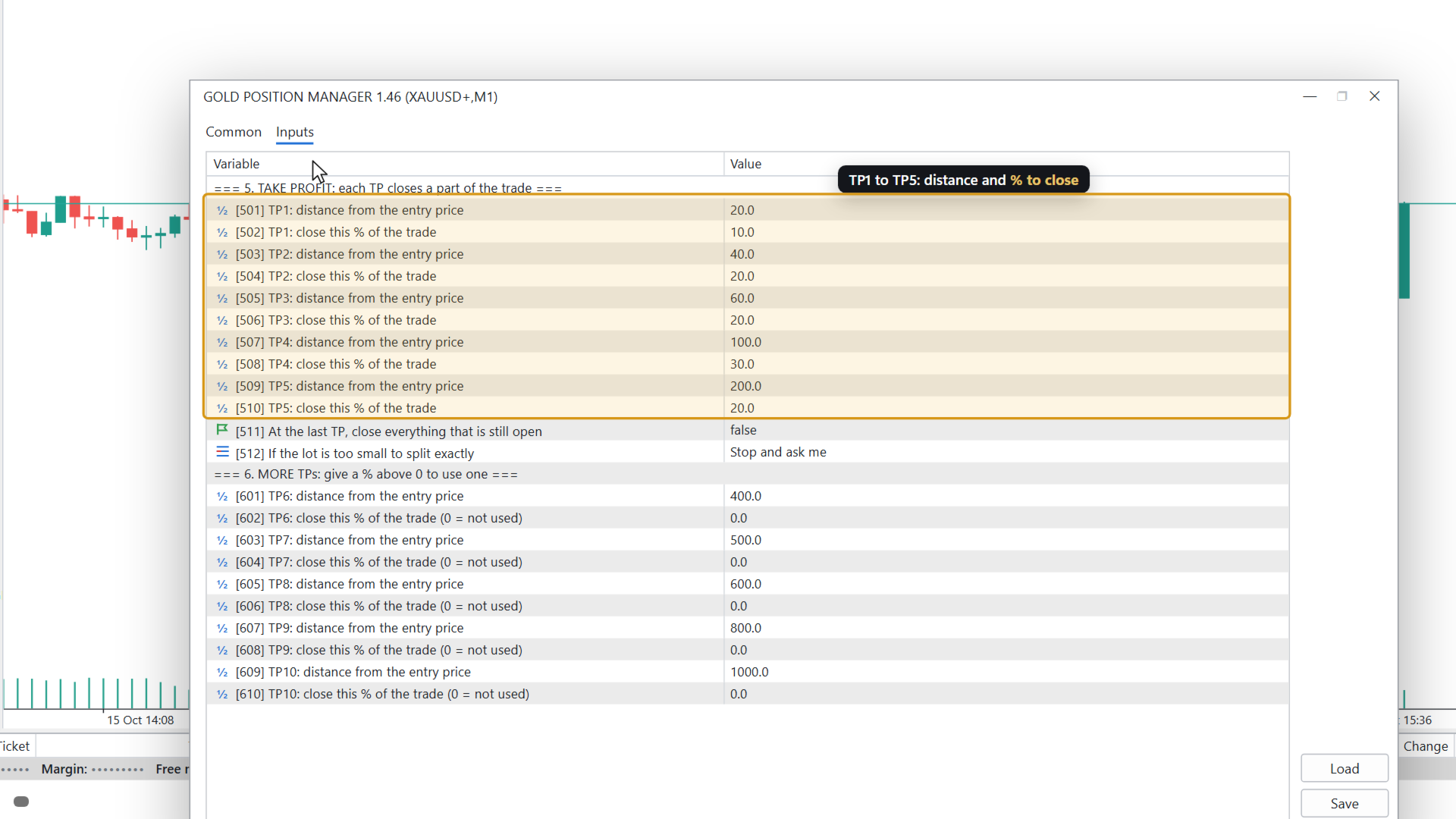
1. Set your plan once: stop loss distance, up to 10 take-profit steps (distance and % to close at each step) and the break-even rule.
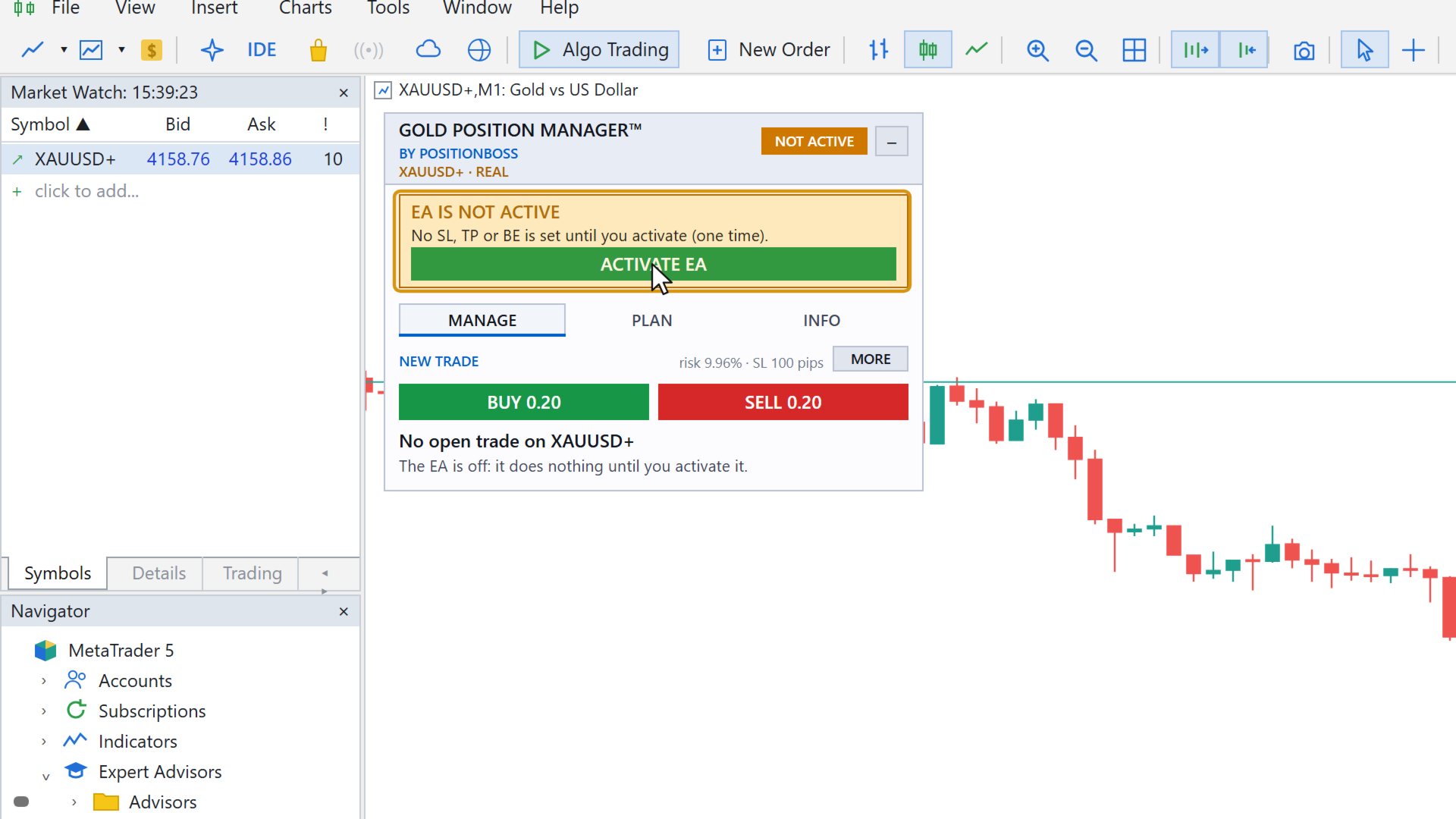
2. Click ACTIVATE once on the panel.
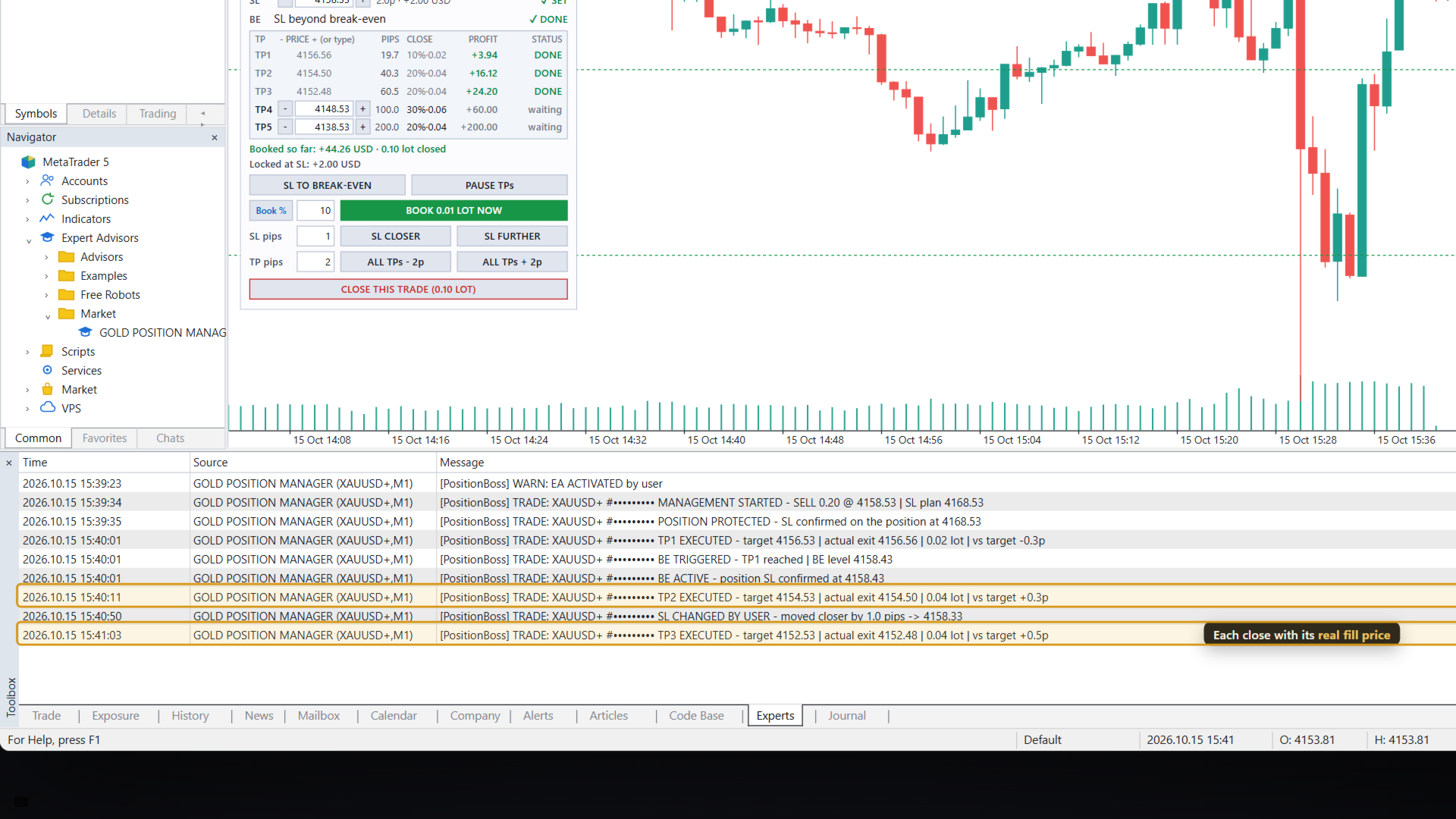
3. Every XAUUSD trade you open, market or pending, gets the plan at once. The panel shows each step: which take-profit is done, what is booked, where the stop loss is.

MAIN FEATURES
- Stop loss on every trade as soon as it opens, also on pending orders (limit and stop)
- Take profit in up to 10 steps, each closing a part of the trade (for example 20% at TP1, 20% at TP2 ...)
- Break-even by itself: after TP1, after another TP number, or at a profit distance you choose, with an optional offset to keep a little profit
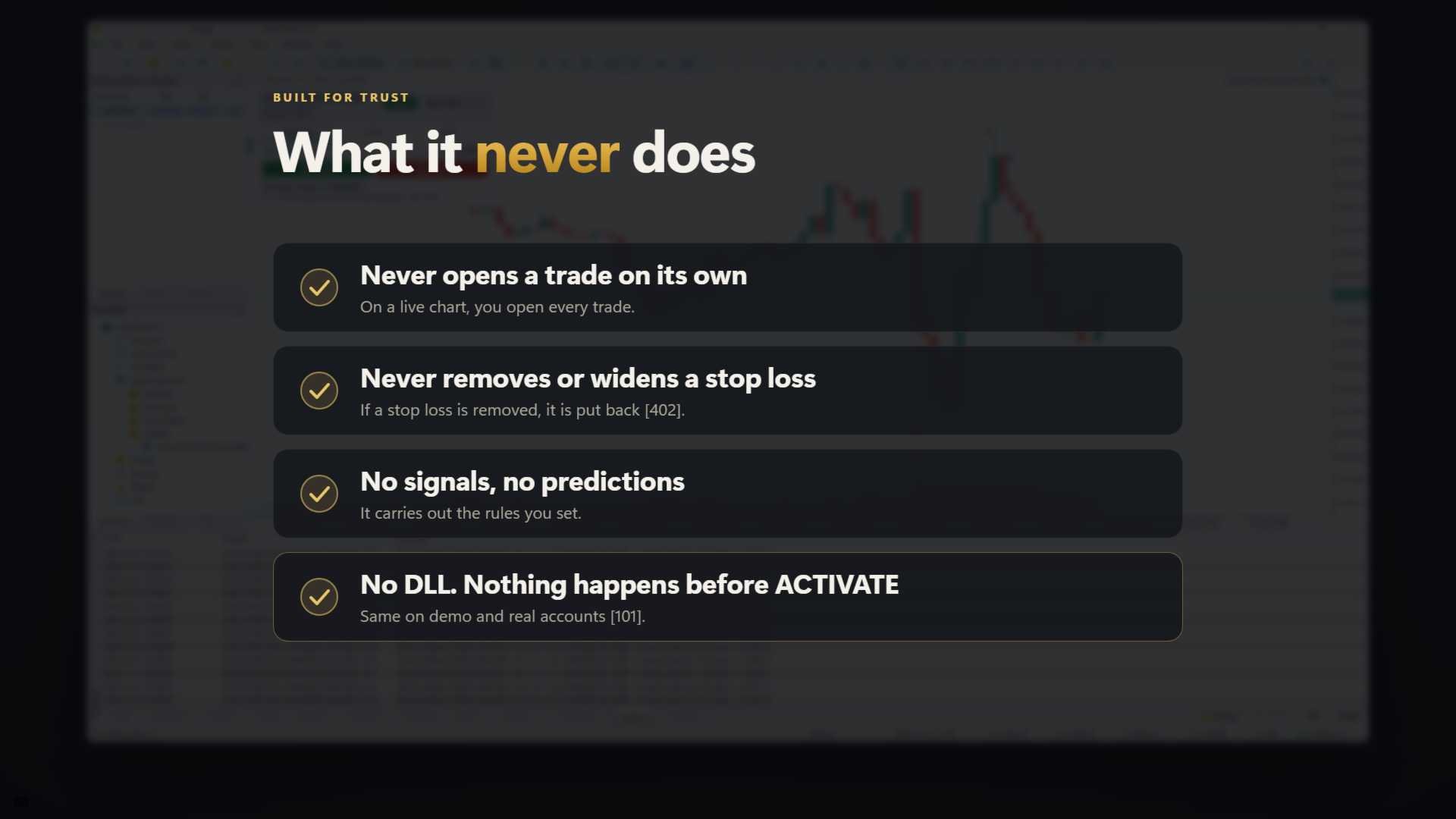
- If a stop loss is removed from a trade, it is put back
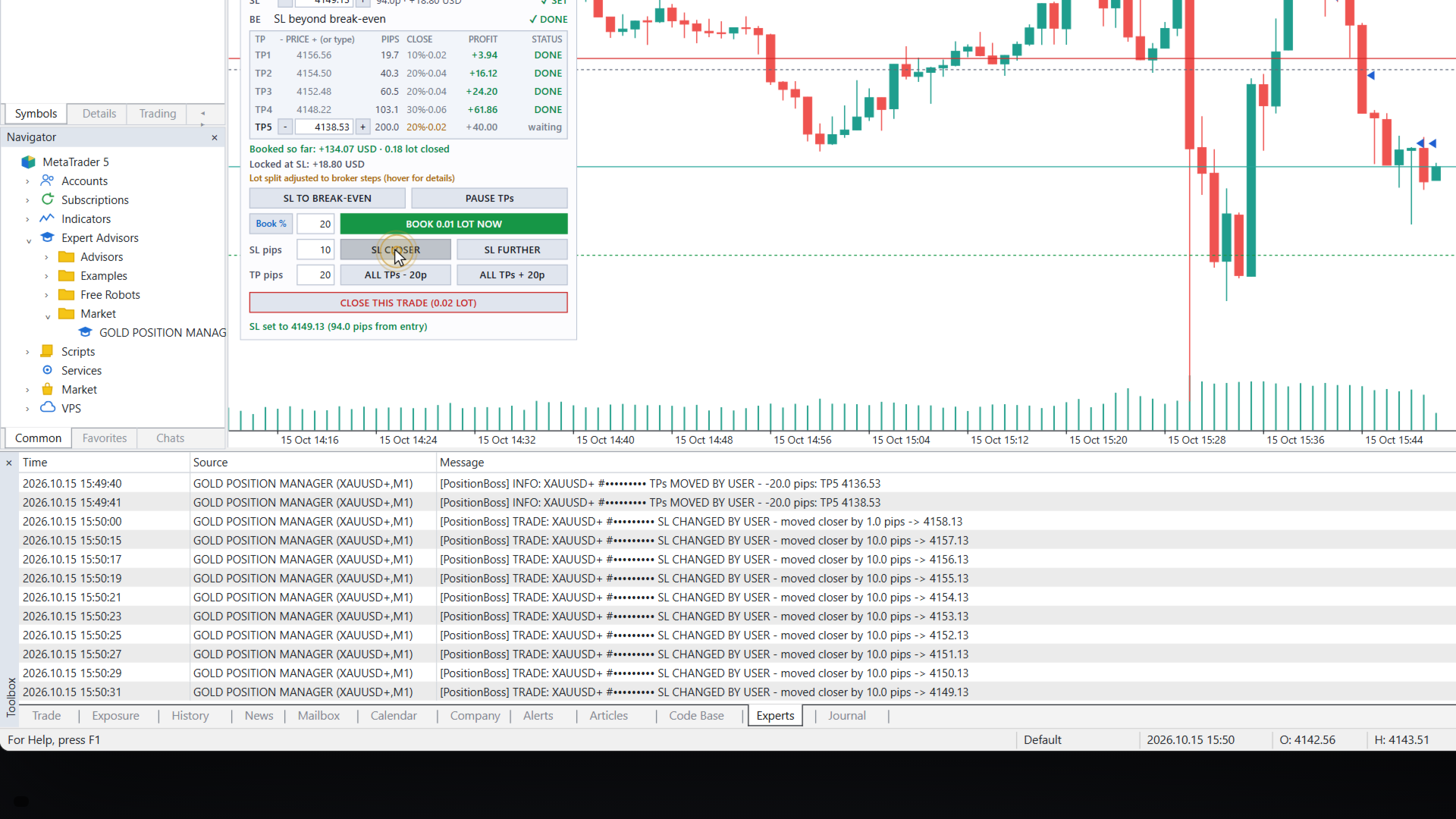
- One-click actions on the panel: book a part of the trade now, move the stop loss closer or further, move all waiting take-profits, close the trade
- All trades at once: the same actions for all trades, the BUY trades, the SELL trades or only the trades in profit
- Drag the stop loss and take-profit lines on the chart
- Risk calculator: lot size from your risk % or a risk amount, loss at the stop loss, margin needed, with a warning when one trade would risk too much
- BUY and SELL buttons that open the trade with the plan's stop loss
- Daily limits: biggest loss per day (% or money), most trades per day, most open trades, pause after a stop loss. When a limit is reached the BUY and SELL buttons are locked
- Spread limit and a warning when the market moves very fast
- INFO tab: balance, equity and margin, profit and loss for today, this week and this month, spread, buy and sell pressure, broker time and an economic calendar for the news topics you choose
- Alerts: pop-up, sound and push notifications to your phone (MetaQuotes ID)
- Keeps its progress: after a restart of MT5 or the PC it continues where it was
- Safe with several charts and several MT5 terminals on one account: only one copy manages a trade, so no step is closed twice

SAFETY FIRST
- It never removes or widens a stop loss
- Nothing happens until you click ACTIVATE (a second click confirms)
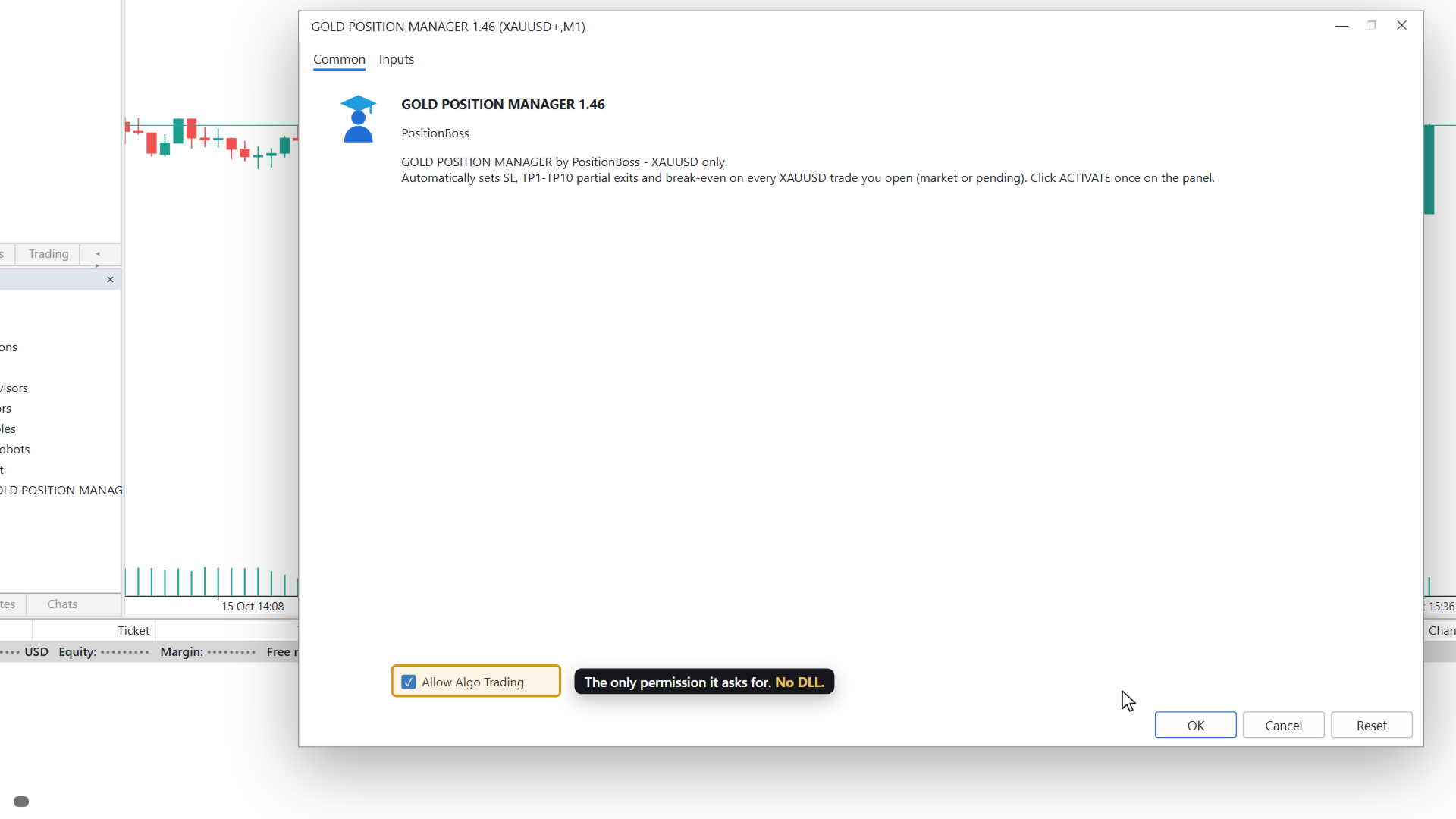
- No DLL, nothing extra to install
- Every setting has a number in [ ] and a plain description, so a question about a setting is easy to ask

STRATEGY TESTER (FREE DEMO)
In the Strategy Tester nobody can click the panel buttons. So in the tester the EA opens example trades by itself (setting 1401, on by default), BUY and SELL in turn, and manages them with your plan. Run it in visual mode on XAUUSD to watch the stop loss, the take-profit steps and the break-even. On a live chart the EA never opens a trade by itself.

REQUIREMENTS
- MetaTrader 5, symbol XAUUSD (gold); broker suffixes such as XAUUSD.m or XAUUSD+ are recognised, and so is a differently named gold symbol that the broker lists as XAU priced in USD
- A hedging account is recommended
- Algo Trading must be enabled in MT5
- The EA works only while MT5 is running. When the PC is off or asleep, only the stop loss at the broker protects your trades. For 24/7 management, run MT5 on a VPS; you can then open trades from your phone and your plan stays active

MAIN SETTINGS (the numbers are shown in the EA settings)
[101] Start only after ACTIVATE
[201] Which trades to look after (your own trades, trades from the panel buttons, every gold trade including other robots, one magic number or one ticket)
[301] Measure distances in pips (gold: 1 pip = 0.10 in price), points, price or percent
[401] Stop loss distance, [402] put a removed stop loss back
[501] to [610] Take-profit steps: distance and % to close
[701] Break-even rule, [704] profit to keep at break-even
[902] Risk per trade in %, [1203] largest risk allowed for one trade
[1001] to [1009] Daily limits
[1401] Strategy Tester example trades

WHAT IT IS NOT
It is not a trading robot and not a signal service. It does not decide when to buy or sell and it cannot make a losing trade win. It carries out the rules you set.

Trading gold carries a high risk of loss. Gold Position Manager is software that carries out your rules: it cannot promise any result, and results differ from trade to trade.

Questions or ideas? Send me a private message here on MQL5, or write in the comments. Tell me the setting number and I explain it.

推荐产品
No Overnight Closer is a smart risk-management utility designed to automatically close your trades before daily rollover or overnight holding time. It protects your profits from swap fees, spread spikes, sudden volatility, and broker reset risks. This tool is perfect for day traders, scalpers, crypto traders, and prop firm traders who prefer to finish the day flat without exposing capital to unnecessary overnight danger. MT4 Version - https://www.mql5.com/en/market/product/164795/ Join To Lea
Order Manage MT5 is an Expert Advisor for pending order management and open position management in MetaTrader 5. It monitors specified levels, cancels pending orders when their conditions are met, and can partially close positions while moving Stop Loss to the entry price. The EA performs the following actions: Cancels Buy Limit and Sell Limit orders if price reaches Take Profit before execution starts. Cancels Buy Stop and Sell Stop orders if price reaches Stop Loss before execution starts. Clo
Open Risk Budget Cap enforces a total open stop-loss risk budget across your account. It does not choose direction and does not open discretionary trades on a live chart. Attach it to one chart; the symbol and timeframe do not matter. What it measures Every open position and every pending order is priced to its stop-loss in account currency using OrderCalcProfit. Positions or orders without a stop-loss are counted and shown on the panel as "without stop-loss". They are excluded from the budget
HedgeSafe Trade Assistant 一款以风险控制为核心的 MetaTrader 5 手动交易面板。 HedgeSafe 可帮助您在点击 BUY 或 SELL 之前,直接在图表上准备、验证和管理交易。 HedgeSafe 不是信号服务、行情预测工具、AI 机器人或自动交易策略。它不会替您选择交易方向,也不承诺盈利。每项交易决定均由交易者本人负责。 主要功能 按账户余额百分比或账户货币中的固定金额计算手数。 按点数或价格规划 Stop Loss;按点数、价格或 R 倍数规划 Take Profit。 实时预览风险金额、潜在收益、手数和风险回报比。 图表上的 Entry、Stop Loss 和 Take Profit 线与面板数值同步。 分别显示 BUY 与 SELL 的就绪状态,并在执行前进行方向相关的最终检查。 验证最小/最大交易量、交易量步长、tick size、tick value、stops level 和 freeze level。 检查市场可用性、品种交易模式、点差、允许偏差及 filling mode。 识别 hedging 与 netting 账户,并说明
BulkOp Trade Manager
Ahmed Jumaa Saif Ali Almheiri
BulkOp Trade Manager 交易更快速。管理更智能。平仓更自信。 BulkOp Trade Manager 是一款强大的 MT5 交易管理工具 EA,专为需要速度、控制力和清晰执行体验的交易者打造,可直接在图表上管理交易。 它适合活跃的手动交易者、剥头皮交易者、黄金交易者,以及希望用更少点击管理多个仓位的交易者。 为什么选择 BulkOp? 超快速 Buy 和 Sell 执行 一键批量平仓盈利订单 一键批量平仓亏损订单 支持键盘快捷键交易控制 批量开仓功能 快速关闭 Buy 或 Sell 仓位 支持管理 MT5 手动和手机端交易 智能风险工具:SL、TP、ATR、Break-even 或无 SL/TP 模式 使用可视化价格线管理挂单 网格订单工具 保存和加载常用设置 图表上的清晰下拉式控制面板 为速度而生 BulkOp 专为快速市场反应而设计。 通过一个专业面板,即可开仓、锁定利润、控制亏损、管理风险并控制多个仓位。 适合人群 XAUUSD / 黄金交易者 剥头皮交易者 日内交易者 手动交易者 需要快速执行的交易者 管理多个仓位的交易者 核心功能 Main Contro
DR Trade and Risk Manager: MT5的基础算法风险控制台 对于自主交易者来说,最大的敌人不是市场,而是缺乏纪律的自我。您拥有一个可靠的策略,但在高压时刻,您能完美地、始终如一地遵守您的规则吗?您能毫不犹豫地止损吗?您能让盈利的头寸持续增长,而不是因为恐惧而过早地了结吗?对大多数人来说,答案是否定的。这个在策略和执行之间的鸿沟,正是利润流失的地方。 DR Trade and Risk Manager 是弥合这一鸿沟的终极工具。它是一个基础的风险与交易管理控制台,旨在成为您坚定不移的算法合作伙伴。这个工具不预测市场,它强制执行您的计划。它提供了一个机构级的框架,以数学般的精度来管理您的交易,让您从导致结果不一致和账户爆仓的情绪过山车中解脱出来。 我们专注于专业交易管理的绝对要素:一个强大的算法引擎、一个统一的风险仪表板和稳健的执行。这个控制台是为那些不寻求灵丹妙药,而是寻求一个强大武器,将自己的战略规则锻造成持续、可盈利行动的严肃交易者而打造的。 为什么即使是最好的策略也会失败(以及如何修正) 没有纪律的执行,一个盈利的策略也毫无用处。这正是大多数交易者失败的地方,
别让一个表现不佳的EA拖累整个账户。 您在同一个账户上运行多个EA。每个EA都按全部余额交易,彼此互不知情。当某个策略开始失效时,您通常要等到损失已经发生才发现:凌晨3点,在您没有盯着的VPS上,它正悄悄吞噬其他正常运行的EA的收益。 Virtual Risk Desk Monitor 为账户中的每个EA分配独立的预算和独立的限制,在一个面板上统一监控,并在问题出现之前按您设定的规则执行。买家还可获得配套仪表板,在图表面板之外增加账户层面的规划与复盘。 它能为您做什么 一眼看出是哪个EA在拖后腿。每个EA通过魔术号(magic number)识别(手动交易单独显示一行),并在图表面板上显示其结果、回撤、持仓和状态。不必再翻查历史记录寻找原因。 按每个EA自己的预算来评估,而不是按整个账户。为每个策略设置一个 Passport:允许其使用的运营资金。回撤按该金额计算,因此表现吃力的EA会尽早显现,而不会被大额余额掩盖。 在仍有时间应对时收到提醒。每个EA设有三个级别(警告20%、干预26%、放弃32%,按运营资金计算),每当某个EA的级别恶化时,终端都会发出一次清晰的提醒,不会刷屏。 自
INTRODUCTORY LAUNCH OFFER: $139 • Exclusive introductory price for the first 10 copies only. • Price will be permanently adjusted to $279 after the first 10 activations. • Next price step: $199 -> Final price: $279. Fortress Risk Manager is an institutional-grade, all-in-one Capital Protection and Risk Management Cockpit built natively for MetaTrader 5. Engineered specifically for prop firm challenge accounts, funded trader programs, and discipl
Trade Manager Simple
Juan Andres Montoya Robledo
Trade Manager Simple NQ and XAUUSD — Manual Trading Panel and Local Replicator Open the trade once. Your other MT5 terminals open it on their own, each with the lot size that fits that account. TMS is two tools in one: a panel for trading by hand with your risk under control, and a replicator that copies your entries to every other MetaTrader 5 terminal running on the same computer. No VPS, no signal service, no connection between brokers. The terminals talk through MetaTrader's shared folder,
Protect your equity and trade stress-free with the Smart Risk Manager EA ! Designed as an all-in-one risk management and account protection utility, this EA guarantees that no trade is ever left unprotected . Whether you trade manually or run multiple EAs simultaneously, this tool automatically manages your Risk-to-Reward, secures profits, and protects your capital from bad entries, market spikes, slippage, and high-impact news events. It is the ultimate solution for Prop Firm traders (FundedNex
MGA – Manual Gold Assistant A Different Way to Manage Difficult XAUUSD Exposure What if a difficult position did not always have to be immediately realized as a loss, but could instead be frozen, reduced, and managed progressively when the market offers new opportunities? MGA – Manuel Gold Assistant is a complete manual trading environment developed primarily for XAUUSD . It combines, within a single interface: market analysis, position management, risk management, hedging, progressive exposure
Trade Copilot - 黄金(XAUUSD)及任意品种的半自动风险管理面板 Trade Copilot 是一款半自动交易面板,专为希望拥有EA纪律性、同时保留自主入场控制权的手动交易者设计。您决定方向和价位,面板自动计算风险仓位、设置止损、管理止盈并保护交易。 主要功能 - 基于风险的手数计算 - 可选择风险百分比、风险金额或固定手数;面板根据止损距离自动计算仓位大小 - 3种止损模式 - ATR倍数、固定点数或固定美元距离 - 一键市价单与挂单 (立即买入/卖出、挂单买入/卖出),入场/止损/止盈线可拖动调整 - 网格交易 - 在价格区间内按钟形曲线分布手数放置一系列挂单(并非马丁格尔 - 手数由距中心的距离决定,亏损时绝不加倍) - 多重止盈 (最多4级) - 可拖动止盈线,分别位于主目标距离的20/40/60/80%处;每个级别部分平仓,应用后视觉上锁定 - 自动保本 (+点差) - 将止损移至真正的保本位,并计入当前点差,避免小幅亏损离场 - 4种自动移动止损模式 - 固定步长、ATR距离、前一根K线高低点、或移动平均线 - 风险防护 (Risk Guard)
TradePilotmt5
Hossein Khalil Alishir
TradePilot Expert Advisor (EA) for MetaTrader 5 TradePilot is a professional and user-friendly Expert Advisor (EA) for MetaTrader 5 (MT5) . It simplifies automated trading , risk management , and trade execution with a smart trading panel . Perfect for beginners and experienced traders looking for a reliable trade manager EA with automated lot size calculation and smart position management. Key Advantages User-Friendly Trading Panel: Customizable panel with buttons and hotkeys for fast ex
GoldEdge Quantum Grid Scalper
Vittaya Klangpimanarkart
Short Description A smart grid scalping system designed to generate consistent profits from market fluctuations, combining precision entries with adaptive grid recovery and controlled risk management. Full Description GoldEdge Grid Scalper Pro is a high-efficiency trading system built to capitalize on small price movements using a structured grid and precision scalping logic. Unlike traditional grid systems that carry high risk, this EA is engineered with controlled exposure and intelligen
Trading panel for manual trading. Has a fairly wide functionality. Allows you to automatically calculate the order size, open both market and pending orders. It has a wide range of options for closing orders, it is possible to partially close orders, close orders after reaching a certain profit or loss, separately close profitable and unprofitable, buy and sell, as well as pending orders. The panel also contains a simple implementation of a grid of pending orders, reverse and lock functions, tr
Crystal Trade Manager
Muhammad Jawad Shabir
4.25 (4)
Crystal Trade Manager – 全能交易控制中心 概述 Crystal Trade Manager (CTM) 是一款 MetaTrader 5 风险管理与即时交易执行工具。集成风险保护、自动化和交易控制,适合手动交易者、挑战 prop firm 的交易者以及 专业资金管理者。 核心功能 风险保护 :每日回撤限制 (1–70%) ,自 动平仓,挂单删除,每日锁定 (FTMO 规则兼容 ) 。 盈 亏目 标 :自 动平仓达到的利润 / 亏 损目标。 自 动 SL/TP :新 订单自动附加 SL/TP 。 保本保 护 :到达盈利后自 动移动至 BE+ 缓冲。 移 动止损 : 动态跟随止损。 手数控制 : 设定最大手数,超出自动部分 / 全部平 仓。 快捷操作面板 : 6 个按 钮 ( 平 50% , 转 BE ,平全部, 删挂单,加倍仓位, Profit Shield) 。 信息面板 :余 额、净值、浮盈亏、当日盈亏 % 、 风险暴露、回撤。 通知系 统 :横幅、推送、声音提醒。 安全 逻辑 : 检测锁仓违规, pip 精度,重启恢复。 适用人群 Prop firm 交
FREE
SetSizer is a visual Risk & Position Manager for MetaTrader 5. Choose how much you want to risk, place Entry, Stop Loss and Take Profit directly on the chart, and SetSizer calculates the broker-valid lot size, Actual Risk, Risk-to-Reward ratio and potential TP reward before you place the trade. Three simple sizing modes: Risk % — risk a percentage of current Equity Risk Amount — risk a specific amount of account currency Lot Size — use an exact trade volume Set Your Risk. Size Your Trade. Quick
The Ultimate All-In-One Trade Manager & Prop Firm Guardian for MT5. Nexus Pro Trade Manager is the most advanced, all-in-one trading assistant designed for both manual traders and Prop Firm challengers. Featuring a stunning, lag-free UI (Dark/Light mode), it completely transforms your MT5 into a professional trading terminal. Whether you are trading a personal account or trying to pass evaluations for FTMO, FundedNext, or other prop firms, Nexus Pro protects your capital, automates your risk cal
It Will Close Your All Trade   in Half of second  no matter you open 100 plus trade open it will close all trade half of second  . it good work for 1 -5 min scalping   this Ea have  many function see the pic i uploaded   there  . ea that have function close all trade , close all lossing trade , close all profit trade . also have lot system where you can put your  expected lot and buy sell button and it can close 100 trade in 1 second  
PropWin EA
Nasimul Haque Choudhury
PropWin EA is an advanced automated trading system designed specifically for prop firm traders. It employs a sophisticated hedging strategy that protects your investment by trading simultaneously on your funded prop account AND your personal live account. The result? Even if you don't pass the challenge, your live account profits offset the challenge fee—ensuring you never truly lose money on the attempt. Key Features Automatic Trade Hedging Lightning-fast 100ms scan interval for near-instant
Veyra Monitor
Fisokuhle Ntokozo Mthembu
Veyra Monitor is an automated risk-management and trade-monitoring utility for MetaTrader 5, designed to help traders maintain disciplined risk controls while trading.  Veyra Monitor continuously monitors trading activity and applies predefined risk-management rules to help traders manage exposure, positions, and account-level risk. Key Features: Automated Trade Monitoring — Continuously monitors active positions and trading activity. Risk Management Controls — Helps enforce predefined risk p
Grid Guard
Sotirios Karkalakos
您的网格 EA 十笔里赢九笔。问题从来不在这里。 我把最畅销的黄金机器人所使用的机制——网格、加仓补救、任何持仓都没有止损、只有一个硬性的净值止损——放在四年真实 XAUUSD 数据上运行,点差取自每一根K线的真实记录,佣金和隔夜利息也都是真实的。 169 组序列中有 156 组盈利。胜率 92.3%。 账户最终亏损 86.2%,最大回撤 96.8%。 这两个数字同时为真,问题恰恰就在这里。92% 是写在销售页面上的那个;8% 是某个星期二找上门来的那个。 GRID GUARD 不替换您的 EA,它盯着您的 EA。 把它挂到您已经买下的那个机器人所在的同一张图表上。它读取已开仓位,从中测出网格的真实间距和手数递增比例,并回答您的 EA 从不告诉您的那一个问题: 如果它再加四层,这一篮持仓会让我付出多少? 这个数字,以您的账户货币和净值百分比两种形式显示,字体大到隔着房间也能看清。 它怎么知道的 它从不查看您的 EA 的计划,也不需要。 间距是取已开层级之间空隙的中位数还原出来的,手数递增比例取相邻手数比值的中位数。用中位数而不是平均数,是为了让某一层在新闻尖峰中延迟成交时不会污染估计值
PPM Trade Manager for MetaTrader 5 PPM Trade Manager is an on-chart trade management  for MetaTrader 5 designed to provide fast and convenient control over open positions and pending orders directly from the trading chart. The EA combines essential account information, real-time profit and loss monitoring, position statistics, and trade-management functions in a compact on-chart panel. Most operations are applied only to the symbol of the chart where the EA is attached, helping reduce the risk o
专业的 MT5 模块化交易面板。集成了自动风控计算、分批止盈(PTP)、移动止损及独创的“订单焦点管理”功能。支持中英阿日四国语言。 让手动交易像量化一样精准。 KAB 操盘指挥中心 (V33) 专为日内交易者设计,彻底告别繁琐的手动计算和默认下单面板的局限性。 核心亮点: 可视化下单 (Ghost Lines):   下单前在图表上直接拖拽“幽灵线”设定入场、止损和止盈,所见即所得。 智能风控:   输入您愿意承担的金额风险(例如 $50),面板自动计算合适的手数,防止重仓。 独创“焦点管理 (Focus Mode)”:   多数面板只能全平或全改,我们允许您锁定一张特定的订单,对其进行独立的反手、部分平仓或保本操作。 分批止盈 (PTP):   设置多级隐形止盈位,价格触碰自动平仓部分手数,落袋为安。 界面模块化:   下单、风控、工具箱均为独立悬浮窗,可随意拖动或关闭,不遮挡K线。 多语言适配:   完美支持中文、英语、阿拉伯语(修正字体显示)和日语。 智能风控计算 (Smart Risk Calculation) – 在考虑止损距离的情况下,自动计算新订单的成交量(手数)。它允
Recovery Assistant Pro for MT5 Manual Recovery Trading Assistant Recovery Assistant Pro is a Manual Trading Assistant EA for Recovery trade calculations and management. Helps calculate the appropriate Lot Size. Designed to calculate Recovery trade parameters based on floating loss and the selected Target USD. Simplifies Recovery calculations that would otherwise require manual calculation. The trading panel provides direct access to the main Recovery functions from the chart. Includes a Recov
Manual Trade Panel EA MT5
Juvenille Emperor Limited
5 (2)
手动交易面板 EA MT5   是您可以找到的最简单易用的 MT5 交易面板。它的所有选项和功能都集中在一个表面上,无需打开额外的窗户或面板。它是一个订单管理、风险计算器、部分关闭和帐户保护实用程序,都在一个极其方便的界面中使用! 通过使用 手动交易面板 EA MT5 ,您可以比传统的手动交易方法更快、更准确地进行多次交易,这让您有更多时间和更清晰的头脑专注于您的交易决策。 账户保护是我们的首要任务,因此 手动交易面板 EA MT5  也是一个很好的账户保护实用程序,它可以在账户止盈或止损后关闭所有未平仓交易、删除所有挂单并关闭所有附加有任何 EA 的终端图表已达到亏损净额。这在盈利情况下非常方便,当您的资产低于您想要的止损水平时,可以避免您的交易账户进一步亏损。 提示: 您可以在您的模拟账户中下载并试用 手动交易面板 EA MT5   模拟版: 这里 将下载的免费演示文件粘贴到您的 MT5 >> 文件 >> 打开数据文件夹 >> MQL5 >> 专家文件夹并重新启动您的终端。 免费演示版本每次可在 4 小时内发挥全部功能,仅限演示帐户。 要重置试用期,请转至 MT5 >> 工具
Neopips Engine EA
Md Billal Hossain
NeoPips Engine EA – 终极交易革命已然到来! “交易的真正力量在于洞察他人所忽略的。NeoPips Engine 不随波逐流,而是掌控市场。” 关于 NeoPips Engine EA:您的智能交易盟友 NeoPips Engine EA 并非普通的交易机器人。它是一款多维度、AI 优化的专家顾问,专为追求精准度、适应性和长期表现的交易者打造。 与那些规则僵化的过时机器人不同,NeoPips Engine 是一种动态策略——它会实时思考、学习并适应市场。 这不仅仅是自动化,更是一场持续的进化。 更上一层楼的智能:让您自由发挥的核心功能 人工智能决策 动态模式识别 预测趋势分析 基于实时数据的智能进出逻辑 多引擎策略核心 – 四种模式,同一个目标:赢。 NeoPips 引擎会根据实时信号自动切换引擎: 剥头皮模式 – 捕捉快速波动的爆发 波动模式 – 瞄准长期趋势阶段 突破模式 – 在重大经济新闻发布时激活 ️ 安全守护模式 – 在市场波动时介入 效果:无缝过渡,在所有市场阶段
Trailing Stop Utility MT5 for automatic closing of deals by trailing stop levels.  Allows you to take the maximum from the profit. Created by a professional trader for traders.   Utility   works with any market orders opened manually by a trader or using advisors. Can filter trades by magic number. The utility can work with any number of orders simultaneously. WHAT THE UTILITY CAN DO: Set virtual   trailing stop   levels from 1 pip Set real   trailing stop   levels W ork with each order separat
DDKiller Pro
Njaratahiry Michael Randrianiaina
Stop Blowing Your Account. Once and For All. DDKiller Pro is the MT5 risk guardian that runs silently on your chart and shuts down trading the moment you hit a limit — whether you're grinding a prop firm challenge or managing your own CFD account. The problem every trader knows: You set your rules. You break them anyway. One revenge trade. One overleveraged position. One session that erases a month of gains. DDKiller Pro removes that decision from your hands entirely. What it does: The second yo
SolarTrade Suite 金融机器人:LaunchPad 市场专家 - 专为开启交易而设计! 这是一个使用特殊创新和先进算法来计算其价值的交易机器人,是您在金融市场世界中的助手。 使用我们来自 SolarTrade Suite 系列的指标集来更好地选择启动此机器人的时机。 在描述底部查看我们来自 SolarTrade Suite 系列的其他产品。 您想自信地驾驭投资和金融市场的世界吗? SolarTrade Suite 金融机器人:LaunchPad 市场专家是一款创新软件,旨在帮助您做出明智的投资决策并增加您的利润。 SolarTrade Suite 金融机器人的优势:LaunchPad 市场专家: - 准确计算:我们的机器人使用先进的算法和分析方法来准确预测市场走势。 计算购买和出售资产的最佳时机。 - 用户友好界面:直观的界面将使您能够轻松掌握程序并在安装后立即开始享受其好处。 - 专家支持:我们的专业团队随时准备为您解答任何问题,并为您提供有关使用该程序的建议。 立即试用 SolarTrade Suite 金融机器人:LaunchPad Market
该产品的买家也购买
News Trade EA MT5
Konstantin Kulikov
4.55 (11)
在此向大家介绍一款我本人使用多年的机器人。该产品支持半自动和全自动交易模式。 >>> Chat <<< 本程序包含基于经济日历新闻的灵活交易设置功能。不支持策略测试器检验。仅可进行实际操作。需在终端设置允许URL 列表中添加新闻网站。点击服务 > 设置 > 智能交易系统。选中“允许WebRequest对下列URL发出请求:”。添加下列(删除空格):https://  nfs.faireconomy.media 下載最新的設定檔: https://www.mql5.com/en/blogs/post/747929 訊號監控: https://www.mql5.com/en/signals/author/test-standart 请参考博客中各类参数说明自行实现个性化设置   : https://www.mql5.com/en/blogs/post/748545   。 主要默认设置说明 单一图表英镑/GBP(英镑美元/GBPUSD、欧元英镑/EURGBP、英镑日元/GBPJPY、英镑加拿大元/GBPCAD、英镑澳大利亚元/GBPAUD、英镑瑞士法郎/GBPCHF)货币对操作。英镑/
Farmed Hedge Yield Farming | All Markets (Manual - Hybrid - Semi/Automated EA) VERIFIED TRADING RESULTS - Farmed Hedge Yield Axi Copy:  https://www.mql5.com/en/signals/2356376 - Farmed Hedge Yield Exn Copy:   https://www.mql5.com/en/signals/2356404 - Farmed Hedge Yield V Copy:  https://www.mql5.com/en/signals/2357156 IMPORTANT NOTICE: FarmedHedge is a MANUAL-FOCUSED TRADING UTILITY ,not a fully automated EA. Results shown on this Signal include manual trades and overall strategic management.
Dealer's Panel No signal decides anything here — a hand does. One click, and the panel calculates what's underneath: lot size from risk, target from a 30-step balance ladder that remembers exactly how far an account has climbed. Toggle between market and pending without touching an input field. Set a stop, and the take-profit can write itself — a fixed share of the balance, translated into price with no arithmetic left for the trader to get wrong. One trade live at a time; it won't let a seco
The Patch
Mian Rameez Ali
The Patch It never opens a trade. It walks behind the ones that did. Every open position, every pending order — checked twice a second for the one thing that's easy to forget: a stop, a target. Found bare, it doesn't ask. It writes the missing number in, measured in points from wherever the position began, and moves on to the next. No strategy, no opinion on direction. Just the quiet assumption that nothing should ever sit on the market unprotected — not because someone decided it shouldn't,
Floor Watch
Syed Tauqeer Hussain Shah
Floor Watch One number, watched every thirty seconds: how far equity has fallen since the day began — or since its highest point, if it's told to trail the peak instead of the open. Cross the line and it doesn't argue. Every open position closes, every pending order vanishes, and anything that slips through afterward gets shut the moment it appears. Not asked. Removed. The floor holds until the clock turns 5 AM Pakistan time — then, and only then, does the day start over. One rule. No except
YuClusters
Yury Kulikov
4.93 (43)
Attention: You can view the program operation in the free version  YuClusters DEMO .  YuClusters is a professional market analysis system. The trader has unique opportunities to analyze the flow of orders, trade volumes, price movements using various charts, profiles, indicators, and graphical objects. YuClusters operates on data based on Time&Sales or ticks information, depending on what is available in the quotes of a financial instrument. YuClusters allows you to build graphs by combining da
一次购买,即可免费获得我所有 MT4 和 MT5 指标,包括现有指标及未来发布的指标。 购买后请联系我,了解领取方式。 计划每售出 10 份后提价 50$,最高至 999$。 实际价格以结算时的 Market 标价为准。 保留您信赖的指标,让相关操作自动完成。 您的信号。您的规则。您的交易执行。 您已有信赖的 MT5 指标,却仍需盯盘、等待信号、计算手数、下单并手动管理每个持仓? Stratiora Signal Engine MT5 将这些环节连接起来。它可将兼容的买入和卖出缓冲区信号转化为完整的自动化流程:入场、交易量计算、止损、止盈、过滤、持仓管理及账户保护。 更换指标或交易思路时,无需每次另行定制 EA。您可以使用同一个灵活的执行引擎,自行决定每个信号的交易方式。 您的信号。您的规则。您的交易执行。 为什么开发 Stratiora 许多交易者已有熟悉且信赖的指标,但仍需手动盯盘、等待信号、计算手数、下单和管理持仓。 Stratiora 的目的就是连接这些步骤。 指标仍负责生成交易信号,Stratiora 负责按您的规则执行和管理。您决定何时读取信号、如何计算交易量、设置哪些保
Master Your Trading Discipline   Stop losing your hard-earned gains to overtrading and emotional decisions. The Discipline Tool is your ultimate trading assistant, ensuring strict risk management in real-time. Key Protection Features: Advanced Drawdown Defense : Automatically halts trading if your daily drawdown exceeds a preset threshold (percentage or dollar amount). Real-Time Equity Lock : Safeguard profits by referencing peak equity, ensuring drawdown stays within control. Hard Profit Target
Quant AI Agents
Ho Tuan Thang
5 (1)
Quant AI Agents are independent trading Expert Advisors. Instead of trading using a fixed strategy like other conventional EAs, Quant AI Agents   is a   multi-agent AI trading framework   that turns natural-language strategy prompts into live.  WANT THE SAME RESULTS AS MY LIVE SIGNAL?   Use the exact same brokers I do:   IC MARKETS , IC TRADING   .  Unlike the centralized stock market, Forex has no single, unified price feed.  Every broker sources liquidity from different providers, creating un
Trading Chaos Expert
Hennadii Stanilevych
5 (11)
世界上没有本软件的同等产品,它代表一个覆盖交易信号的通用交易 "控制台",自动入场,设置止损和止盈,还有在单一窗口里同时进行多交易尾随终止。EA 的 "三次点击" 直观控制,确保在不同计算机上全方位使用所有功能,包括平板电脑。 与附加的信号指标交互来标记图标,给出实际市场的全貌,EA 令您做出正确的选择,以及在大多数情况下成为胜者一方。内置资金管理算法, 还有自动计算手数, 虚拟订单交易, 以及一些其它从崩溃账户里挽救交易者的 "诀窍"。它不是一个 "黑盒子"。而是一个深思熟虑的交易员的不可或缺的助理, 至少要尝试一次它的动作。 注,在面板上形成的 EA 不能在策略测试员中测试。可以在您的模拟账户里以实时模式检查它, 您可以下载本 EA 的免费版 - 混沌交易 EA 演示 。 EA 表现为一个面板,带有内置功能的交易机器人的,自动基于交易者可直观检查的交易信号入场,完全按照比尔·威廉姆斯的策略“混沌交易:第二版”和“新贸易维度”。在单独的窗口里,EA 识别价格走势的导向,用于指定品种和时间帧的全自动交易模式,也可以多品种并发。 它同时分析 MetaTrader 5“市场观察”窗口中显示
Copy your MT5 trades to Interactive Brokers You keep using MT5. Every order you open or close is sent to your IB account. In real time. No coding. No changes to your strategy or EA. Try it first Rent 1 month: $30. Test on a live or paper account. What it does Real-time copying: same direction, reverse, or one side only. Map any MT5 symbol to any IB symbol. Set a lot ratio for each. Forex, Futures, Stocks, CFDs, Metals and Crypto. Position sync: both accounts checked, any difference fixed. Optio
The  Easy Strategy Builder (ESB)  is a " Do It Yourself " solution that allows you to create a wide range of the automated trading strategies without any line of codes. This is the world’s easiest method to automate your strategies that can be used in STP, ECN and FIFO brokers. No drag and drop is needed. Just by set conditions of your trading strategy and change settings on desired values and let it work in your account. ESB has hundreds of modules to define unlimited possibilities of strategi
HINN Lazy Trader
ALGOFLOW OÜ
5 (1)
The core idea: using the user interface, you configure the parameters the chart must meet before entering a position (or positions), choose which entry models to use, and set the rules for when trading and planning should end. Lazy Trader  handles the rest: it  takes over all the routine chart watching and execution! full description  :: 3 key videos [1] ->  [2]   ->  [3] What can it do? - Understands Larry Williams market structure - Understands swing market structure by Michael Huddleston
AI Arbitron — an MT5 Spot vs Future Gold Arbitrage Bot designed to capture price discrepancies between correlated Spot and Future instruments through hedged, non-directional trading. Platform: MT5 Use Swap Free Accounts, many of the regulated broker gives swap free accounts for 7 days, make use of it by only buying lower price asset and selling higher price asset, hold your position for 2-3 days. Asset: Mainly Gold (XAUUSD) using Spot + Future/CFD price feeds. Core strategy: It monitors the p
Mentfx Mmanage mt5
Anton Jere Calmes
4.25 (8)
The added video will showcase all functionality, effectiveness, and uses of the trade manager. Drag and Drop Trade Manager. Draw your entry and have the tool calculate the rest. Advanced targeting and close portions of a trade directly available in tool (manage trades while you sleep). Market order or limit order on either side with factored spread. Just draw the entry, the tool does the rest. Hotkey setup to make it simple. Draw where you want to enter, and the stop loss, the tool calculates al
MT5 Trading Deck
Manuel Michiels
5 (2)
One button. One trade. MT5 Trading Deck is a hotkey trading panel for MetaTrader 5 that turns the platform into a keyboard-driven execution cockpit. Stop loss, take profit and lot size are pre-calculated for every key; the moment you press, a market order is live on the broker. A complete technical user manual is attached in the product Comments section. It documents every input parameter, the full hotkey map, the recommended Stream Deck XL layout, and the advanced workflows for Pre-Limit orders
Features   With MT5 to Interactive Brokers(IB) Trader, you can: 1. Load chart data from IB to MT5, and Analyze with all standard or customer Indicators. 2. Place Orders to IB Account Directly in MT5. 3. Make your Own EAs upon IB Securities by only making minus changes of the trading function. Usage 1) Installation Copy the "Mt5ToIBTraderEn.ex4" and sample files to [MT5 Data Folder]->MQL5->Experts.  2)  MT5 Settings Add the IP Address to the MT5 Allowed URLs in 'Tools->Options->Expert Adviso
Unlimited Trade Copier Pro MT5 is a tool to copy trade remotely to multiple MT4, MT5 and cTrader accounts at different computers/locations over internet. This is an ideal solution for you if you are a signal provider and want to copy your trades to other receivers globally on your own rules. One provider can copy trades to multiple receivers and one receiver can get trade from multiple providers as well. The provider can even set the subscription expiry for each receiver, so that receiver will n
Adam FTMO MT5
Vyacheslav Izvarin
5 (2)
ADAM EA Special Version for FTMO Please use ShowInfo= false for backtesting ! Our 1st EA created using ChatGPT technology Trade only GOOD and checked PROP FIRMS  Default parameters for Challenge $100,000 Tested on EURUSD and GBPUSD only  Use 15MIN Time Frame Close all deals and Auto-trading  before Weekend at 12:00 GMT+3  Friday For Prop Firms MUST use special Protector  https://www.mql5.com/en/market/product/94362 --------------------------------------------------------------------------------
QCML Assistant
Maxime Turcotte-lafreniere
QCML Assistant MT5 Your Trading. Our Assistant. Your Edge. Looking for a tool that completely transforms your experience on MetaTrader 5? QCML Assistant is the all-in-one solution built by traders, for traders. Just one tool installed on your chart, and you get access to an ultra-complete, ultra-fast, and ultra-simple trading platform. No more hours wasted setting up your workspace. No more complicated trade entries. With QCML Assistant, everything becomes simple, smooth, and efficient right fro
Latency Arbitrage
Heri Yusufu Kaniugu
Latency Arbitrage – Ultra Fast Execution & Price Inefficiency Capture Latency Arbitrage  utility tool is designed to exploit short-term price inefficiencies between fast and slow price feeds. Instead of predicting market direction, the EA focuses on execution speed and price deviation opportunities, allowing traders to capture micro-movements before the market fully adjusts. With built-in risk controls and smart filtering, it ensures precise and disciplined trading performance. Price increases b
TradePad
Ruslan Khasanov
5 (1)
TradePad 是一種既可用於手動交易又可用於演算法交易的工具。我們為您提供一個簡單的解決方案,用於快速交易操作和控制多種交易工具的持股。 注意,該應用程式不適用於策略測試器! 模擬帳戶應用程式的試用版和所有工具的描述 應用程式介面適應高解析度顯示器,簡單直覺。為了方便工作,我們為交易者提供了以下工具: 熱鍵管理器,用於管理交易操作、在主圖表的週期之間切換、在 TradePad 工具之間切換; 標記交易等級的工具,用於在開倉或設定掛單時評估虧損風險並計算潛在利潤; MultiCharts 工具用於直觀地監控多個交易符號,以及接收演算法交易的交易訊號。為了方便起見,您可以組織交易對的集合,這將使您有機會在多個時間範圍內監控價格並進行多幣種交易; 用於查看任何歷史時期的交易統計資料的資訊模組,能夠產生擴展的 HTML 報告、查看交易符號的特徵和有關交易帳戶的資訊; 掛單管理器用於管理掛單 - 設定單一或一組(網路)掛單,可按訂單類型和單一符號或交易帳戶上的所有類型進行分組刪除; 設定賣出停損限價和買入停損限價掛單的工具; 頭寸管理器用於管理一個或多個頭寸(取決於帳戶類型) - 全部
Hedge Trimmer EA
Michael Sipho Bhiya
Hedge Trimmer & Roll-Over EA Managing a hedged position means carrying two opposing trades simultaneously. Over time, the losing side grows while the profitable side offsets it. The standard problem is that closing the loser costs money you may not have sitting in cash — it has to come from somewhere. Hedge Trimmer EA solves this by using the floating profit on your winning trades as the funding source to progressively close down the losing side. It identifies which trades are in profit, uses a
Gamma Edge Pro MT5 — GexBot Classic API Integration Gamma Edge Pro brings institutional-grade Gamma Exposure (GEX) data directly onto your MetaTrader 5 chart — the same data used by professional options traders to anticipate price magnets, hedging flows, and dealer positioning. Powered by the GexBot Classic API, this indicator automatically maps options market data from US-listed instruments onto any MT5 CFD instrument — Forex pairs, Gold, indices, and more — with intelligent price conversion bu
News Trader Pro is a unique robot that allows you to trade the news by your predefined strategy. It loads every piece of news from several popular Forex websites. You can choose any news and preset the strategy to trade it, and then News Trader Pro will trade that news by selected strategy automatically when the news comes. News release gives opportunity to have pips since the price usually has big move at that time. Now, with this tool, trading news becomes easier, more flexible and more exciti
Elliott Wave Counter 是一个面板,用于快速和用户友好地手动标记 Elliott 波浪。可以选择一种颜色和一个级别的标记。还有用于删除最后一个标记和工具制作的整个标记的功能。一键制作标记。点击五次 - 有五波!艾略特波浪计数器对于艾略特波浪的初学者和专业分析师来说都是一个很好的工具。 艾略特波浪计数器安装和输入指南 如果你想得到   关于 EA 添加 URL (   http://autofxhub.com   ) MT5 终端的 通知 (见截图)。 MT4版本 https://www.mql5.com/en/market/product/14016 MT5版本 https://www.mql5.com/en/market/product/15081 一般输入: 波形类型按钮: 此按钮允许用户选择他们想要在图表上突出显示的波形类型。可用的选项包括推动波、调整波和其他自定义波模式。 波级按钮: 这个按钮   允许用户选择他们想要在图表上突出显示的波形级别。可用的选项包括初级、中级和次级波级别。 波浪颜色: 这个   按钮   允许用户选择他们想要在图表上突出显示的波浪图
If you wish to draw Support and Resistance lines, view: daily market opening, classical pivot levels, Fibonacci pivot levels, trend lines, Fibonacci levels, the remaining time to candle closing, and current spread. If you seek to place your orders with the exact lot that meets your desired stop loss risk. If you wish to do all this and more with just one click, then this is the perfect tool to use. This tool will allow you to feel more relaxed when deciding to open orders, as well as predicting
如果产品有任何问题或者您需要在此产品上添加功能,请联系我 Contact/message me if you encounter any issue using the product or need extra feature to add on the base version. There is Demo version of this panel Dashboard Babon Scalping System MT5 Demo in my product list, please try it out to get familiar with all functionalities for free. Free version: LINK MT4 version: LINK This system basically utilizes TDI, Heiken Ashi Trend, Price Trend on H1 time-frame and TMA on H1&H4 time-frame to generate the trend (big picture). Then
The new version of  MirrorSoftware 2021  has been completely rewriten and optimized.  This version requires to be loaded only on a single chart because  it can detect all actions on every symbol and not only the actions of symbol where it is loaded. Even the  graphics and the configuration mode  have been completely redesigned. The MirrorSoftware is composed of two components (all components are required to work):  MirrorController  (free indicator): This component must be loaded into the MASTER
ClusterSecond
Rafil Nurmukhametov
4.78 (32)
该工具允许绘制不同类型的图表。 秒图从1秒到86400秒 从1滴答开始的滴答图 成交量图 三角洲图 仁科图 范围图 用于体积分析的内置指标。 该工具的演示版 https://www.mql5.com/ru/channels/clustersecond 每日市场概况和所选时间框架的市场概况。 集群搜索。 不平衡。 VWAP。 动态POC、VAH、VAL 价格窗口简介 具有不同表现形式的垂直体积。 δ,有不同的可视化选项。 当前的和高的时间框架极 地下室指标烛台显示 也可以从图表中进行交易。 注意:该工具是为具有真实(交换)量的市场设计的。 它不适合外汇市场。它在VPS上不起作用。它在策略测试器中不起作用。 为了控制该图表,我们使用了 鼠标左键 - 移动图表,在设置中选择不同的模式,调用位于屏幕左下角带螺丝刀的钥匙图标下的主设置窗口。 鼠标右键 - 用于输入位于屏幕左上角图标下的图形结构的设置,以及绘制垂直、水平、趋势线和矩形的单独设置。 在图表区域旋转鼠标滚轮--左右移动图表,按住Ctrl键--上下移动图表,在价格比例区域--按价格比例,在时间轴区域--按时间比例。 H键--在
筛选:
无评论
回复评论