Lighthouse Market Structure MT4

LIGHTHOUSE — 一眼看清市场结构。不重绘。

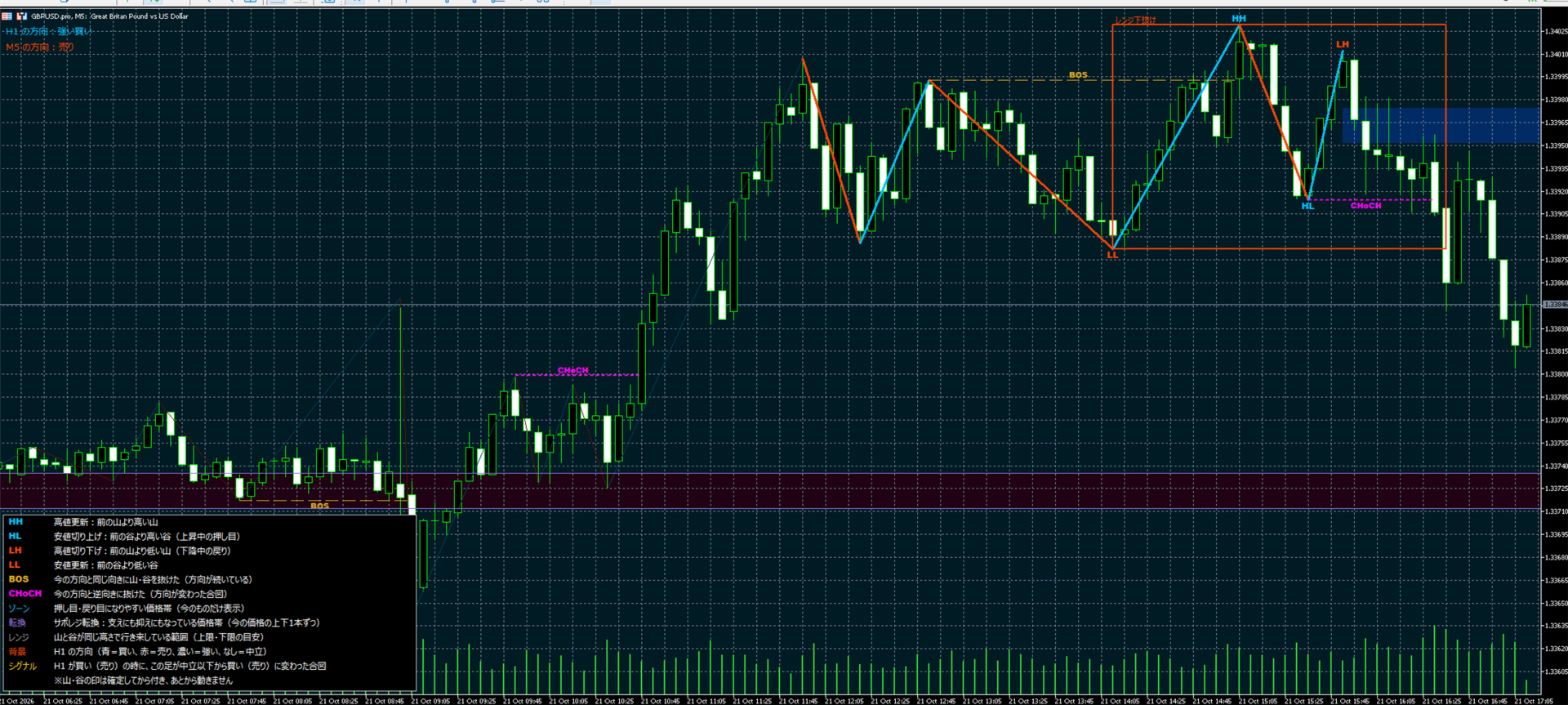
LIGHTHOUSE 根据已确认的波段高低点读取价格结构,并以简洁清晰的方式显示在图表上。它回答每位主观交易者入场前都会问的三个问题:高周期往哪走?当前图表往哪走?重要价位在哪里?
这是一个辅助决策的工具,不会下单,也不预测价格。

为什么叫“LIGHTHOUSE”(灯塔)?
灯塔为船只指路、提示礁石的位置,但掌舵的仍是船长。LIGHTHOUSE 在图表上也是如此:显示市场方向和价格容易反应的区域,交易决定始终由您做出。

工作原理

  • 波段高低点只在K线收盘后确认。标签一旦出现就不会移动或消失。
  • 结构突破以收盘价判断,而不是影线。
  • 趋势方向由最近一次结构突破的方向和最近两个高点、低点的排列(道氏理论)决定。
  • 同样的逻辑也应用于高周期(默认 H1)。

主要功能

  • 5级趋势判断:Strong Buy、Buy、Neutral、Sell、Strong Sell,分别显示高周期和当前图表。
  • HH、HL、LH、LL 标签与双色之字线。
  • BOS(延续)和 CHoCH(性质转变)线。
  • 当前波段的一个回调区域。
  • 支撑阻力互换区:既做过支撑又做过阻力的窄带,价格上下各显示一个。被突破的区域会变淡。
  • 区间框:高点和低点在相近价位反复出现时绘制;突破时变色(上破蓝色,下破红色)。
  • 方向一致信号:高周期为 Buy 或更强、当前图表从 Neutral 或更弱转为 Buy 或更强时,面板显示带时间的“Buy signal”。卖出同理。
  • 信号、BOS、CHoCH 的弹窗提醒和推送通知,可分别开关。
  • 内置图例,三种显示级别(Simple、Standard、Full)。
  • 占用资源少:历史只计算一次,之后只处理每根新收盘的K线。

典型用法

  • 避免逆高周期交易。
  • 结合支撑阻力互换区,在区间边缘交易。
  • 用之前的 BOS/CHoCH 线和区域规划出场。

推荐设置

  • 在 M5 上以 H1 为高周期开发和验证(EURUSD、GBPUSD、USDJPY、XAUUSD)。
  • 适用于任何品种和周期。M15 图表可选 H4 作为高周期。

主要参数

  • 高周期及其K线数、波段K线数、最大K线数、显示级别
  • 最近波段与标签数、颜色、线宽、字号、图例
  • 支撑阻力互换区设置、区间框设置
  • 信号、BOS、CHoCH 提醒,推送通知

说明

  • 这是分析工具,不会开仓或平仓。
  • 任何指标都无法保证未来结果。请先在模拟账户上测试。
  • 如有问题,请通过评论区或 MQL5 私信联系。

推荐产品
Power Flow Binary
Ganesh Tanaji Lohar
POWER FLOW PRO — Binary Options Edition For the first time ever, the POWER FLOW PRO cumulative dominance logic is specially optimized for Binary Options trading. POWER FLOW PRO is a smart real-time pressure-flow indicator designed to detect aggressive market momentum and short-term directional dominance for fast Binary Options entries. The system analyzes: Real-time buying pressure Real-time selling pressure Momentum candle strength Cumulative dominance flow Continuation pressure to generate hig
Dear Trader It is my pleasure to introduce to you my tool called the " Forex Sniper Indicator" . The major aim of this tool is to help serious traders and investors in all type of Financial Markets to catch price next movement right at the moment the price direction is about to change. This tool can be used to snipe the price direction in both down trend, uptrend and ranging markets. This tool can be used as the stand alone tool though it may be combined with other tools as well. My goal is to h
Fibonacci Trend Marker
Grigoriy Malychenko
斐波那契趋势标记 ( Fibonacci Trend Marker ) 是一种趋势指标,通过使用斐波那契回撤水平分析当前K线相对于前几根K线的最高-最低 (HL) 范围的行为。它通过K线颜色的变化,直观地跟踪趋势强度,提示可能的趋势减弱或反转。 特点: 专为趋势交易者设计,帮助基于斐波那契水平快速识别趋势变化。 在市场波动性充足且有3-5根K线形成明显趋势时,适用于任何时间框架。 K线大小自动适应图表比例,确保缩放时显示正确。 对趋势变化的高度敏感性源于对当前K线的实时分析,使其非常适合在M1和M5时间框架上进行剥头皮交易。 如何交易? 入场: 在前一根已关闭的K线颜色变化后开仓。例如,如果一根K线在红色后关闭为蓝色,表明上升趋势—开启买入 (Buy) 交易。 离场: 当前一根K线的颜色反转时平仓,或在达到目标时平仓,例如趋势方向上的1-2根K线,具体取决于市场波动性。 当前(未关闭)K线的颜色会随报价变化而改变,这对剥头皮交易者尤其有用,可在K线完成前提前平仓。 设置: 周期 (Period) — 设置用于计算的前几根K线的数量(例如3、5、10)。 斐波水平 (Fibo

Currency Strength Table HYBRID v1.33   - Professional Multi-Timeframe Currency Strength Analyzer (PRO) BREAKTHROUGH CURRENCY ANALYSIS SOLUTION FOR SERIOUS FOREX TRADERS!  *Note: Most suitable for Professionals, Advanced & Intermediate traders!   * ADDITIONAL BONUS:   Rent for 3months and get a free ex.4 dual switch momentum (RSI+Prcie/Bid Ratio) Currency Bar Meter . See attached screenshot 6 .  Limited offer (first 50 purchases). The Ultimate All-In-One Currency Strength Dashboard EXPLAINED. St
F ully automated Expert Advisor using the  advanced   algorithm for trading the EURUSD Designed for profit in a short period of time and big profit in a long run. Prefers EURUSD 1H. Principle of operation The SELL and BUY orders are opened (depending on the parameters set), guided by signals and the market situation.     Recommended parameter: Use an ECN broker account. minimum deposit of 100$ USD. use it in H1 time frame recommended symbol is EURUSD input parameter: TrendType                 
FiboPlusWaveRunner
Sergey Malysh
3.29 (7)
Expert.   Automatic and manual trading. Ready-made trading system based on   Elliott waves   and Fibonacci retracement levels . It is simple and affordable. Display of the marking of Elliott waves (main or alternative option) on the chart. Construction of horizontal levels, support and resistance lines, a channel. Superposition of Fibonacci levels on waves 1, 3, 5, A Alert system (on-screen, E-Mail, Push notifications).    visual panel for opening orders in manual trading. visual panel for sett
Alphabet AI MT4
Sergei Pomytkin
Alphabet AI 是一款基于均值回归策略的顾问工具——这意味着它利用市场的自然属性,在出现大幅偏离后回归到平均值。该算法会持续分析资产的当前价格,并将其与计算出的平均水平进行比较。当价格大幅偏离平均值时,顾问工具会将其解读为行动信号:当价格超过上限时,它会开空头仓位,预期价格下跌;当价格跌破下限时,它会开多头仓位,预期价格上涨。我们顾问工具的独特之处在于它采用自适应方法来确定通道边界并过滤错误信号,这使得它即使在温和趋势条件下也能有效运作。该顾问工具在价格通道内波动明显的货币对上表现尤为出色。 该顾问程序已经过 20 多年的数据测试,在此期间它可以承受最不稳定的时期。 如果您没有机会让您的计算机保持 24/5 运行,那么建议使用 VPS 服务器服务。 顾问拥有超过 12 个月的稳定交易且回撤较低。 限时价格仅为 379.99 美元! 每购买 10 次,价格将上涨 50 美元! 最终售价 2999.99 美元 实时信号: https://www.mql5.com/en/users/delmare/seller MT5 版本可在此处获取: https://www.mql5.com/
TPO Profile MT4
Kyra Nickaline Watson-gordon
5 (1)
Definition : TPO is a Time Price Opportunity. Instead of using bars or candles with an Open, High, Low, and Close price, each "bar" in a Market Profile is represented by horizontal bars against the price It is called Market Profile terminology. In other words time-price-opportunity (TPO) profiles are histograms of how much time was spent at each price within the span of the profile. By using a TPO chart, you are able to analyze the amount of trading activity, based on time, for each price level
Diamond Trend
Segundo Calvo Munoz
Indicator which identifies Trend and also buy/sell opportunities. Use for entries aligned to the Trend.  Although Diamond Trend is very accurate identifying entry points, it is always recommended to use a support indicator in order to reconfirm the operation. Remind to look for those Assets and Timeframes which best fit to your trader behavior/need... Valid for Scalping and Long Term operations. Please, set up a Bars Chart to be able to visualize the indicator properly...  ...And remind to give
Infinite Forex EA
Roman Pozdnyakov
1 (1)
We are pleased to present to you, our new product, this is the next step in the development of automated trading in the Forex market. This is a revolutionary algorithm developed by our team of programmers. Here all the accumulated experience for 10 years of work in the Forex market is gathered. The adviser uses several strategies for different stages of the market (Trend, Flat, Volatile market or Very weak). The algorithm passed all testing with different brokers, at different quotes. Advisor is
Milch Cow Harmonic EA "Tool designed to trade 28 currency pairs according to 88 harmonic patterns plus one customized according to your parameters The expert graph interface guides you to the pattern names when passing over the pattern circle You can activate or disable any number of currency pairs and patterns for your trade by clicking on the currency pair circle or the harmonic pattern (green = activate    red = disable) You can set more than one time frame within which the expert will look f
Sell Signall
Dmitriy Kashevich
This indicator is named so for a reason, because it will show the reverse side of the market. It has several math indicators built in that are tuned to show the best signals for currency pairs! Ideally proved to be in work on the M5-M15 no more and no less! Only at the same time it shows up to 86.5% of correct signals! The settings include the colors of the arrows, the alert, and the same parameters so that you can reconfigure the indicator and trade on cryptocurrency and raw materials! If
ZigZag Lower Entry and Top Entry
Jose Alejandro Alcala Lira
MQL4 LOWER ENTRY AND UPPER ENTRY IN ZIGZAG 1.- ENTRIES AT THE HIGHEST POINT OF THE ZIGZAG INDICATOR WHEN YOU BUY (EXTREMUM HIGH) AND AT THE LOWEST POINT OF THE ZIGZAG INDICATOR WHEN YOU SELL (EXTREMUM LOW), MANUALLY ADDING THE LOTS, SLIPPAGE, STOP LOSS AND TAKE PROFIT, IT COMES WITH AN ALERT AND A SOUND WHEN THE ROBOT ADD THE PENDING OPERATION. 2.- YOU CAN DECIDE BY TRUE OR FALSE IF YOU WANT THE PENDING ORDERS TO BE MODIFIED IF A NEW ZIGZAG IS MADE AT A HIGHER POINT WHEN YOU ARE SELLING OR A NEW
Sweet Waffle
Christophe Godart
The arrows are calculated with: -     2 Parabolic  parameters -     2 ADX parameters -     4 Stochastic parameters We recommend to combine it with Parabolic, ZigZag or Elliot waves indicator. Always trade the trend! If you make sure to draw your trend lines and support/resistance zones you will just have to wait for the signal to appear. Take the trade. For Binary Options it is advisable to set the expiry time to 5-15 min in M1 chart. THIS INDICATOR IS ZERO REPAINT Best assets to trade: - EUR
New York AM Session Profile NY AM Session Profiling Framework | Non-Repainting | Real-Time | FX & Index Presets | MT5 Version Available Full Setup Guide & Strategy Playbook: https://www.mql5.com/en/blogs/post/771380 MT5 Version: https://www.mql5.com/en/market/product/180798 Indicator Overview The New York AM Session Profile framework is a   professional market-structure visualization tool   designed for traders who study liquidity, session behaviour, and institutional price delivery. Instead
Project IG MT4
Ruslan Pishun
1.78 (9)
The EA is not a scalper. The EA uses a strategy based on the breakdown of local support and resistance levels, also uses the reverse and rebound from support and resistance levels.  The EA is based on the original author's strategy. Real monitoring:   https://www.mql5.com/en/signals/author/profi_mql Detailed description of the strategy here:  https://www.mql5.com/ru/blogs/post/728430 This is a link for general discussion of the EA:  https://www.mql5.com/ru/blogs/post/728430 Hidden Take profit,
Rtc ML Ai Predictor MT4
Muhammad Faisal Sagala
Rtc ML Ai | Predictor CORE MACHINE LEARNING ENGINE Adaptive ML Market Predictor – Multi-Bar Trend & Candle Forecast What This Indicator Does This indicator is a  real-time market prediction engine  designed to analyze price behavior and estimate  future market tendencies . Unlike conventional indicators, this system  does not rely on static parameters or historical curve-fitting , but adapts its internal state dynamically during live market operation. Instead of using static rules, the indic
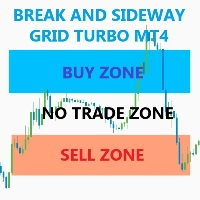
The EA trades when momentum reach more volume factor . Any pair, time frame any broker no limited, recommend minimum deposit 500$ SETTING Symbol - Name of pair (ex.EURUSD#) Breakout_factor - Volume peak factor (Recommend for forex use 0.5-1.5). Sideway_factor - Volume low factor ( Recommend for  forex use 0.1-0.5). Lots - start lot. Max_lots -    maximum lot. Grid_boost -  Frequency of opening position (Less more order). Grid_minimum_pips - Check distance grid from last order. TP_pips - take pr
FREE
Asteroid
Evgeniy Zhdan
The basis of the work of the adviser is to use the change in trend strength to determine the optimal entry points to the market. The logic of the advisor’s work combines two strategies: control of price consolidation and its “explosion” and control of the trend end to work in the channel. The EA does NOT use dangerous trading methods. Each trade has a stop loss and take profit. Recommended trading tools (5m): EURUSD, GBPUSD, USDJPY, USDCAD. Settings: MaxRisk - Value for calculating the tradi
Supply and Demand Tracker MT4  US PPI, Fed Interest Rates, and FOMC Trade Setup Time Lapse: U.S. dollar(DXY) and Australian dollar vs U.S. dollar(AUD/USD) https://youtu.be/XVJqdEWfv6s  May CPI Trade Setup Time Lapse: Gold, Euro/US dollar, US Tech 100, and USDX Experience the power of our cutting-edge supply and demand system as we delve into the captivating world of market dynamics surrounding the release of the consumer price index (CPI). Our system, built on the principles of supply and deman
The EA’s unique algorithm calculates the average price (reflected in the form of a trend line on the chart), which is the center of price attraction in the framework of the traded timeframe. At times of increasing volatility, the adviser begins work with the goal of fixing profit in the region of the center of attraction of the price. Advisor does not use dangerous trading methods. It is recommended to install a trading expert on a remote server (VPS). Recommended Trading Instruments (TF 5M)
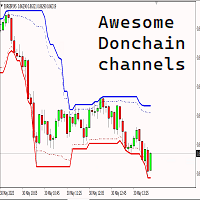
为您介绍MQL4的Donchian通道指标,这是一个强大的技术分析工具,旨在提升您的交易成功率。该指标由四条线组成,代表了在指定时期内价格运动的上限和下限。 通过Donchian通道指标,您可以轻松识别市场潜在的突破和反转。上线显示指定时期内的最高点,而下线代表最低点。这两条线之间的空间形成一个通道,为您提供了有关资产交易价格范围的有价值见解。 但这还不是全部 - 我们进一步改进了这个令人难以置信的指标。我们的修改允许您按照一定百分比(表示为'shadowTop'和'shadowBottom')减小通道宽度。通过缩小通道,您可以更敏锐地感知价格波动,并准确定位入场和出场点。 无论您是经验丰富的交易者还是初学者,带有减小通道宽度的Donchian通道指标都是您交易工具箱中必备的工具。它能够让您基于市场波动和价格行为做出明智的决策。 不要错过将您的交易推向新高度的机会。体验带有减小通道宽度的Donchian通道指标的强大功能,释放您的交易潜力吧。
Visual River Flow Divergence Indicator MT4
AL MOOSAWI ABDULLAH JAFFER BAQER
Introducing the River Flow Divergence Indicator Are you ready to unlock your trading potential? Meet the River Flow Divergence Indicator, a powerful tool designed to help you navigate market trends and reversals with precision. This indicator is tailored for traders who are eager to fine-tune their strategies and take control of their success. Note: This indicator is not optimized out of the box. It’s crafted for you to customize and optimize according to your unique trading style and goals. Ho
Magic EA MT4
Kyra Nickaline Watson-gordon
3 (1)
Magic EA is an Expert Advisor based on Scalping, Elliot Waves and with filters such as RSI, Stochastic and 3 other strategies managed and decided with the robot smartly. Large number of inputs and settings are tested and optimized and embedded in the program thus inputs are limited and very simple. Using EA doesn't need any professional information or Forex Trading Knowledge. EA can trade on all symbols and all time frames, using special and unique strategies developed by the author. The EA wo
Gold Strike Predator
Ignacio Agustin Mene Franco
GoldStrike Predator – Professional Expert Advisor for XAUUSD GoldStrike Predator is an advanced, high-precision Expert Advisor (EA) designed exclusively for trading the XAUUSD pair (Gold vs. US Dollar) on the MetaTrader 4 platform. Developed with a sophisticated hybrid architecture, it combines multiple layers of technical and predictive analysis to identify high-probability opportunities in the gold market, one of the world's most volatile and profitable instruments. Trading Strategy The sys
QuantEx Pivot Indicator
Savia Forex Software Solutions
QuantEx Pivot Indicator is a practical MT4 technical analysis tool designed to help traders identify important Fibonacci-based pivot, support, and resistance levels directly on the chart. The indicator monitors price action and plots key levels using a structured calculation framework, giving traders a clearer view of potential reaction zones across different market conditions. QuantEx Pivot Indicator can be used on compatible currency pairs, indices, commodities, stocks, metals, and cryptocurre
HighScalpel
Ivan Simonika
5 (1)
Introducing the HighScalpel scalping system. It is enough to optimize once, for example, per month. After that, he shows excellent results on the forward period (several times larger), which can be seen in the screenshots. Be attentive to the spread indicators of your broker! The higher the spread, the less often the market entries. If the spread is above 20 pips, then the number of inputs falls by two orders of magnitude. It is ideal to use a broker with a floating spread of 6 pips. Such bro
Ruby Scalper EA MT4
Telio Ivan Ezequiel Macie
# Ruby Scalper EA – Automated Trading Robot Ruby Scalper EA is designed for traders who want an automated tool that follows structured trading rules with speed and precision. The system applies a multi-timeframe confirmation process, where entries are aligned across different timeframes for additional confluence. It can be applied to multiple markets, though it has been most frequently used on **Gold (XAU/USD)** on the 1-minute chart with the default settings. --- ### Key Features * **Multi
Binary Option Signal
Yaroslav Varankin
Indicator for binary options arrow is easy to use and does not require configuration works on all currency pairs, cryptocurrencies buy signal blue up arrow sell signal red down arrow tips do not trade during news and 15-30 minutes before their release, as the market is too volatile and there is a lot of noise it is worth entering trades one or two candles from the current period (recommended for 1 candle) timeframe up to m 15 recommended money management fixed lot or fixed percentage of the depo
Know the direction. Know the plan. Know when to stand aside. CS Trend Pro turns a busy chart into a clear decision. It shows which way the market is moving and marks the moment that changes. With every signal it gives you a complete plan: where to enter, where the idea is wrong, and where to take profit. It is built for swing traders and scalpers who move with the swing: take a part of the profit at each target, and stay in for as long as the move lasts. Built on volatility and on support and re
该产品的买家也购买
Miraculous Indicator Binary & Forex v3 StrategySafe Miraculous Indicator Binary & Forex v3 StrategySafe 是一款专业交易指标,适合希望获得清晰信号、强大确认工具以及结构化交易方式的 Binary 和 Forex 交易者。 v3 版本加入了 MIR Dashboard、Miraculous Confirmation Dashboard、GANN Law、Square of 9 水平线、GANN 角度以及更强的 Forex 分析模式。 核心功能 同时支持 Binary 和 Forex 交易模式。 MIR Dashboard 可快速读取市场状态。 Miraculous Confirmation Dashboard 用于确认交易机会。 GANN Law drawing lines 用于 Forex 市场结构分析。 Square of 9 线条、方向和关键价格水平。 1x1 GANN Angle 用于判断趋势压力。 Entry Information TP 帮助寻找合理止盈区域。 Strateg
TrendMaestro
Stefano Frisetti
4 (4)
Attention: beware of SCAMS, TRENDMAESTRO is only ditributed throught MQL5.com market place. note: this indicator is for METATRADER4, if you want the version for METATRADER5 this is the link:  https://www.mql5.com/it/market/product/108106 TRENDMAESTRO ver 2.5 TRENDMAESTRO recognizes a new TREND from the start, he never makes mistakes. The certainty of identifying a new TREND is priceless. DESCRIPTION TRENDMAESTRO identifies a new TREND in the bud, this indicator examines the volatility, volumes a
FFx Engulfing Setup Alerter gives trade suggestions with Entry, Target 1, Target 2 and StopLoss. Below are the different options available: Entry suggestion - pips to be added over the break for the entry 3 different options to calculate the SL - by pips, by ATR multiplier or at the pattern High/Low 3 different options to calculate the 2 TPs - by pips, by ATR multiplier or at Risk/Reward Offset the dashboard - any place on the chart Remove the suggestion once the price reached the SL line Lines
FFx InsideBar Setup Alerter gives trade suggestions with Entry, Target 1, Target 2 and StopLoss. Below are the different options available: Entry suggestion - pips to be added over the break for the entry Minimum candle size - to avoid too close buy/sell entry suggestions 3 different options to calculate the SL - by pips, by ATR multiplier or at the pattern High/Low 3 different options to calculate the 2 TPs - by pips, by ATR multiplier or at Risk/Reward Offset the dashboard - any place on the c
FFx OutsideBar Setup Alerter gives trade suggestions with Entry, Target 1, Target 2 and StopLoss. Below are the different options available: Entry suggestion - pips to be added over the break for the entry. 3 different options to calculate the SL - by pips, by ATR multiplier or at the pattern High/Low. 3 different options to calculate the 2 TPs - by pips, by ATR multiplier or at Risk/Reward. Offset the dashboard - any place on the chart. Remove the suggestion once the price reached the SL line.
FFx PinBar Setup Alerter gives trade suggestions with Entry, Target 1, Target 2 and StopLoss. Below are the different options available: Entry suggestion - pips to be added over the break for the entry Minimum candle size - to avoid too small candles 3 different options to calculate the SL - by pips, by ATR multiplier or at the pattern High/Low 3 different options to calculate the 2 TPs - by pips, by ATR multiplier or at Risk/Reward Offset the dashboard - any place on the chart Remove the sugges
FFx MACD Divergences
Eric Venturi-Bloxs
The purpose of this new version of the MT4 standard indicator provided in your platform is to display in a sub-window multiple timeframes of the same indicator with its divergences. See the example shown in the picture below. But the display isn't like a simple MTF indicator. This is the real display of the indicator on its timeframe. Here's the options available in the FFx divergences indicator: Select the timeframes to be displayed (M1 to Monthly) Define the width (number of bars) for each tim
FFx RSI Divergences
Eric Venturi-Bloxs
The purpose of this new version of the MT4 standard indicator provided in your platform is to display in a sub-window multiple timeframes of the same indicator with its divergences. See the example shown in the picture below. But the display isn't like a simple MTF indicator. This is the real display of the indicator on its timeframe. Here's the options available in the FFx divergences indicator: Select the timeframes to be displayed (M1 to Monthly) Define the width (number of bars) for each tim
FFx CCI Divergences
Eric Venturi-Bloxs
The purpose of this new version of the MT4 standard indicator provided in your platform is to display in a sub-window multiple timeframes of the same indicator with its divergences. See the example shown in the picture below. But the display isn't like a simple MTF indicator. This is the real display of the indicator on its timeframe. Here's the options available in the FFx divergences indicator: Select the timeframes to be displayed (M1 to Monthly). Define the width (number of bars) for each ti
The FFx Dashboard MTF alerter will show you on a single chart all the timeframes (M1 to Monthly) with their own status for the indicator. 2 Alert Options: Single timeframe: each selected timeframe alert separately when a signal occurs Multi timeframes: all selected timeframes must agree for an alert to be triggered Both options have an input to select the timeframes to be used for the alert(s). How to Understand the Status: Green/Red square: histogram above/below 0 line Green square + Red bord
The FFx Dashboard MTF alerter will show you on a single chart all the timeframes (M1 to Monthly) with their own status for the indicator. 2 Alert Options: Single timeframe: each selected timeframe alert separately when a signal occurs Multi timeframes: all selected timeframes must agree for an alert to be triggered Both options have an input to select the timeframes to be used for the alert(s). How to understand the status: Green/Red square: RSI above/below 50 line Green square + Red border: R
The FFx Dashboard MTF alerter will show you on a single chart all the timeframes (M1 to Monthly) with their own status for the indicator. 2 Alert Options: Single timeframe: each selected timeframe alert separately when a signal occurs Multi timeframes: all selected timeframes must agree for an alert to be triggered Both options have an input to select the timeframes to be used for the alert(s). How to understand the status: Green/Red square: Stoch above/below 50 line Green square + Red border:
The FFx Dashboard MTF alerter will show you on a single chart all the timeframes (M1 to Monthly) with their own status for the indicator. 2 Alert Options: Single timeframe: each selected timeframe alert separately when a signal occurs Multi timeframes: all selected timeframes must agree for an alert to be triggered Both options have an input to select the timeframes to be used for the alert(s). How to understand the status: Green/Red square: Price above/below Cloud (Kumo) Green square + Red bo
The FFx Dashboard MTF alerter will show you on a single chart all the timeframes (M1 to Monthly) with their own status for the indicator. 2 Alert Options: Single timeframe: each selected timeframe alert separately when a signal occurs Multi timeframes: all selected timeframes must agree for an alert to be triggered Both options have an input to select the timeframes to be used for the alert(s). How to understand the status: Green/Red square: MA pointing Up/Down Green square + Red border: MA po
The FFx Dashboard MTF alerter will show you on a single chart all the timeframes (M1 to Monthly) with their own status for the indicator. 2 Alert Options: Single timeframe: each selected timeframe alert separately when a signal occurs. Multi timeframes: all selected timeframes must agree for an alert to be triggered. Both options have an input to select the timeframes to be used for the alert(s). How to understand the status: Green square: Price above PSAR Red square: Price below PSAR Options
The FFx Dashboard MTF alerter will show you on a single chart all the timeframes (M1 to Monthly) with their own status for the indicator. 2 Alert Options: Single timeframe: each selected timeframe alert separately when a signal occurs Multi timeframes: all selected timeframes must agree for an alert to be triggered Both options have an input to select the timeframes to be used for the alert(s). How to understand the status: Green/Red square: CCI above/below levels (ie. 100/-100) Grey square: C
The FFx Dashboard MTF alerter will show you on a single chart all the timeframes (M1 to Monthly) with their own status for the indicator. 2 Alert Options: Single timeframe: each selected timeframe alert separately when a signal occurs Multi timeframes: all selected timeframes must agree for an alert to be triggered Both options have an input to select the timeframes to be used for the alert(s). How to understand the status: Green/Red square: ADX above level Grey square: ADX below level Red bor
The FFx Dashboard MTF alerter will show you on a single chart all the timeframes (M1 to Monthly) with their own status. 2 Alert Options: Single timeframe: each selected timeframe alert separately when a signal occurs Multi timeframes: all selected timeframes must agree for an alert to be triggered Both options have an input to select the timeframes to be used for the alert(s). How to understand the status: Green/Red square: bullish/bearish candle Options available in the FFx Dashboard Alerter
THE GRAFF III
Charles Harper
The [GRAFF] III manual trading system is based on multiple MetaTrader (MT4) indicators. Together, the entire PACK of GRAFF III indicators makes an advanced trading tool. The system consists of over 20 different custom-built indicators which have been carefully selected and tested in the long term to produce strong and efficient trading signals. The particular indicators are based on different mathematical formulas, so the entire system is calibrated to remove false signals from its own indicator
FFx Universal Strength Meter PRO is more than a basic strength meter. Instead of limiting the calculation to price, it can be based on any of the 19 integrated strength modes + 9 timeframes. With the FFx USM, you are able to define any period for any combination of timeframes. For example, you can set the dashboard for the last 10 candles for M15-H1-H4… Full flexibility! Very easy to interpret... It gives a great idea about which currency is weak and which is strong, so you can find the best pai
Pan PrizMA CD Phase is an analogue of the МetaТrader 5 indicator , and is an option based on the Pan PrizMA indicator. Details . Averaging by a quadric-quartic polynomial increases the smoothness of lines, adds momentum and rhythm. Extrapolation by the sinusoid function near a constant allows adjusting the delay or lead of signals. The value of the phase - wave status parameter (which is close in meaning to the trigonometric phase or the angle of the radius-vector rotation in the trigonometric p
Green Wall Arrows
Daniel Luchinger
1 (1)
The Name Green Wall : Arrows hits a lot of TP, by changing the idea of non using SL as something bad, but instead use Small TP and a lot of free Margin and Patience. Use micro TP and a lot of Free Margin with this indicator on Forex. It also can be used with Binary Options. This strategy is intended to be traded Manually. This Indicator runs on Open Bar, arrows will delete when price are against it. The only Indicator Parameter is Alerts true/false, all the rest is included inside the code. Arro
Golden Monowave
Ahmed Mohamed Ali
Golden Monowave is monowave indicator, the monowave theory is one of Elliott wave approach and one of most complicate and accurate method. Golden Monowave can shortcut many major steps to identify and describe the monowave. It works on any timeframe and with any trading instrument, including currencies, indices, futures, etc. Input Parameters initial_Bars - set the initial number of bars to calculate. wave_color - select the color of the wave. label_color - select the color of labels. temp_labe
Ticks Size
Viktor Kolmakov
This indicator displays in a separate window the difference between the number of points which increased the price, and the number of points that decreased the price during the time interval specified in the settings. The time interval for calculation is expressed as the number of bars of the chart the indicator is attached to. This approach allows you to evaluate the movement direction (growth or fall) of the instrument's price, the strength of the movement and the size of the movement in point
FFx Basket Scanner
Eric Venturi-Bloxs
MetaTrader 5 version available here : https://www.mql5.com/en/market/product/24882 FFx Basket Scanner is a global tool scanning all pairs and all timeframes over up to five indicators among the 16 available. You will clearly see which currencies to avoid trading and which ones to focus on. Once a currency goes into an extreme zone (e.g. 20/80%), you can trade the whole basket with great confidence. Another way to use it is to look at two currencies (weak vs strong) to find the best single pairs
NostradamusMT4
Andrey Spiridonov
1 (1)
NostradamusMT4 is a powerful indicator from the set of professional trader. The indicator is based on Andrei Spiridonov's original price calculation method (ESTIMATED PRICE) for the current candle price. Advantages The indicator does not redraw. It works on any timeframes. Works with any trading instruments. Perfectly suitable for scalping and trading binary options. Parameters Color - color of the ESTIMATED PRICE FUTURE line. How to work with the indicator The indicator forms the ESTIMATED P
FFx Pivot SR Suite PRO
Eric Venturi-Bloxs
MetaTrader 5 version available here: https://www.mql5.com/en/market/product/25794 FFx Pivot SR Suite PRO is a complete suite for support and resistance levels. Support and Resistance are the most used levels in all kinds of trading. Can be used to find reversal trend, to set targets and stop, etc. The indicator is fully flexible directly from the chart 4 periods to choose for the calculation: 4Hours, Daily, Weekly and Monthly 4 formulas to choose for the calculation: Classic, Camarilla, Fibonac
BinaryIndicator
Andrey Spiridonov
BinaryIndicator is a highly accurate indicator for trading binary options. It shows excellent results in scalping. This indicator is based in multifactor analysis of trend indicators, as well as confirmation oscillators, which in the end gives an increased accuracy of signals. Advantages of the indicator Increased accuracy of signals. Excellent results when trading binary options with a short expiration time from M30 to M1 . It works on any timeframes. Works with any trade symbols. Parameters
作者的更多信息
Golden jungle
Takafumi Morishita
for xau/usd marthingale expert adviser. ・The initial lot is carefully selected for both buying and selling. ・When there is a large price movement, or there is a trend, we do not have a new position. ・Nanping also does not have a new  positions when there is a trend or there is a sudden change (when it rises or falls). ・Separately setting for buying and selling can use,(for example  Nanpin ratio, Nanpin Interval, Nanpin Interval_add,and profit take method.) «two type of profit take method» 1) s
Glacier Crown MT4
Takafumi Morishita
GLACIER CROWN — 以明确限制为核心的 GBPCHF 网格EA。 GLACIER CROWN 在 GBPCHF 的 M5 图表上交易。当入场过滤条件一致时,先开一笔小仓位;只有当价格反向运行时,才以逐步扩大的间距加仓。整个篮子以从平均价格计算的追踪止损平仓。 大多数篮子都会较早平仓。回测中,96% 的盈利平仓发生在持仓 2 单以内,持仓时间中位数约 3.4 小时,77% 的篮子在 24 小时内平仓。 风险限制(均为默认参数) 每个方向最多 10 单。加仓步长在参数中固定,最大持仓量可事先确定。 篮子止损:单边浮亏达到余额的 8% 时,平掉该方向。 时间平仓:买入篮子 60 天后、卖出篮子 45 天后仍亏损则平仓,以限制长期持仓的隔夜利息成本。 出现逆向强趋势时暂停加仓。 每次下单前检查保证金,可用保证金不足时跳过下单。 最大点差过滤、服务器零点后暂停、禁止入场时段和每月禁止入场日期。 交易方式 买入和卖出篮子独立运行。 仅当价格处于近期支撑/阻力区间内且入场过滤条件一致时开新篮子。 下一单的间距随持仓数量增加而扩大。 出场:篮子相对平均价格的盈利达到追踪启动值后,追踪止损跟
Alpine Mirror MT4
Takafumi Morishita
ALPINE MIRROR — 设有固定限制、风格稳健的 EURCHF 网格EA。 ALPINE MIRROR 在 EURCHF 的 M5 图表上交易。EURCHF 经常在窄幅区间内波动,适合带追踪出场的网格。当入场过滤条件一致时先开一笔小仓位,只有价格反向运行时才以逐步扩大的间距加仓。整个篮子以从平均价格计算的追踪止损平仓。 风险限制(均为默认参数) 每个方向最多 10 单,最大持仓量可事先确定。 篮子止损:单边浮亏达到余额的 10% 时,平掉该方向。 时间平仓:卖出篮子 45 天后仍亏损则平仓。 每次下单前检查保证金,可用保证金不足时跳过下单。 最大点差过滤、服务器零点后暂停、禁止入场时段和每月禁止入场日期。 交易方式 买入和卖出篮子独立运行。 仅当价格处于近期支撑/阻力区间内且入场过滤条件一致时开新篮子。 下一单的间距随持仓数量增加而扩大。 出场:篮子相对平均价格的盈利达到追踪启动值后,追踪止损平掉整个篮子。 回测(MT5,EURCHF M5,每个报价,10,000 USD,1:100,首单 0.01) 2017.01 – 2026.10:净利润 +3,000 USD,盈利因子
Dual Aurora MT4
Takafumi Morishita
DUAL AURORA — 宽间距、耐心等待的 NZDCAD 网格。 DUAL AURORA 在 NZDCAD 的 M5 图表上交易。NZDCAD 由两种商品货币组成,常在较宽的区间内波动。DUAL AURORA 的加仓间距较宽(约 200 点),因此很少加仓,耐心等待价格回归。 回测(MT5,NZDCAD M5,每个报价,10,000 USD,1:100) 2017.01 – 2026.10:净利润 +4,184 USD,盈利因子 2.28 2017 至 2026 年每个自然年均为盈利 测试期间未触发篮子止损 净值最大回撤 12.15%(约 1,215 USD),余额最大回撤 2.88%(约 288 USD) 每年约 19 个篮子 回测结果不代表未来收益。 风险限制(默认参数) 每个方向最多 10 单,最大持仓量可事先确定。 篮子止损:单边浮亏达到余额的 16% 时,平掉该方向。 出现逆向强趋势时暂停加仓。 每次下单前检查保证金,可用保证金不足时跳过下单。 最大点差过滤、服务器零点后暂停、禁止入场时段和每月禁止入场日期。 手数倍率 整个手数序列由一个参数“Lot size multi
Golden Eclipse MT4
Takafumi Morishita
GOLDEN ECLIPSE — 随波动率自适应的黄金网格。 黄金在平静的日子可能只波动几美元,在活跃的日子则可能波动几十美元。某一年有效的固定点数间距,往往在下一年失效。GOLDEN ECLIPSE 测量每日波动率,并据此设定加仓间距和追踪出场:黄金波动大时网格放宽,平静时网格收窄。 回测(MT5,XAUUSD M5,每个报价,10,000 USD,1:100,首单 0.01) 2021.01 – 2026.10:净利润 +2,301 USD,盈利因子 1.44 胜率 90.4%(281 笔中 254 笔盈利),最长连胜 52 笔 净值最大回撤 14.2%(约 1,420 USD),余额最大回撤 12.3%(约 1,230 USD) 测试期间篮子止损 4 次 回测结果不代表未来收益。 特点 随波动率调整的间距。加仓间距、追踪启动和追踪距离均为每日波动率的倍数。 日线市场状态。EA 将日线趋势分为上涨、震荡、下跌。上涨和震荡时开新的买入篮子,仅在下跌时开新的卖出篮子。已开篮子始终会被管理。 可选新闻过滤(MT5 版,仅实盘)。使用 MetaTrader 经济日历,在重要数据公布后暂停开
Glacier Crown MT5
Takafumi Morishita
GLACIER CROWN — 以明确限制为核心的 GBPCHF 网格EA。 GLACIER CROWN 在 GBPCHF 的 M5 图表上交易。当入场过滤条件一致时,先开一笔小仓位;只有当价格反向运行时,才以逐步扩大的间距加仓。整个篮子以从平均价格计算的追踪止损平仓。 大多数篮子都会较早平仓。回测中,96% 的盈利平仓发生在持仓 2 单以内,持仓时间中位数约 3.4 小时,77% 的篮子在 24 小时内平仓。 风险限制(均为默认参数) 每个方向最多 10 单。加仓步长在参数中固定,最大持仓量可事先确定。 篮子止损:单边浮亏达到余额的 8% 时,平掉该方向。 时间平仓:买入篮子 60 天后、卖出篮子 45 天后仍亏损则平仓,以限制长期持仓的隔夜利息成本。 出现逆向强趋势时暂停加仓。 每次下单前检查保证金,可用保证金不足时跳过下单。 最大点差过滤、服务器零点后暂停、禁止入场时段和每月禁止入场日期。 交易方式 买入和卖出篮子独立运行。 仅当价格处于近期支撑/阻力区间内且入场过滤条件一致时开新篮子。 下一单的间距随持仓数量增加而扩大。 出场:篮子相对平均价格的盈利达到追踪启动值后,追踪止损跟
Alpine Mirror MT5
Takafumi Morishita
ALPINE MIRROR — 设有固定限制、风格稳健的 EURCHF 网格EA。 ALPINE MIRROR 在 EURCHF 的 M5 图表上交易。EURCHF 经常在窄幅区间内波动,适合带追踪出场的网格。当入场过滤条件一致时先开一笔小仓位,只有价格反向运行时才以逐步扩大的间距加仓。整个篮子以从平均价格计算的追踪止损平仓。 风险限制(均为默认参数) 每个方向最多 10 单,最大持仓量可事先确定。 篮子止损:单边浮亏达到余额的 10% 时,平掉该方向。 时间平仓:卖出篮子 45 天后仍亏损则平仓。 每次下单前检查保证金,可用保证金不足时跳过下单。 最大点差过滤、服务器零点后暂停、禁止入场时段和每月禁止入场日期。 交易方式 买入和卖出篮子独立运行。 仅当价格处于近期支撑/阻力区间内且入场过滤条件一致时开新篮子。 下一单的间距随持仓数量增加而扩大。 出场:篮子相对平均价格的盈利达到追踪启动值后,追踪止损平掉整个篮子。 回测(MT5,EURCHF M5,每个报价,10,000 USD,1:100,首单 0.01) 2017.01 – 2026.10:净利润 +3,000 USD,盈利因子
Dual Aurora MT5
Takafumi Morishita
DUAL AURORA — 宽间距、耐心等待的 NZDCAD 网格。 DUAL AURORA 在 NZDCAD 的 M5 图表上交易。NZDCAD 由两种商品货币组成,常在较宽的区间内波动。DUAL AURORA 的加仓间距较宽(约 200 点),因此很少加仓,耐心等待价格回归。 回测(MT5,NZDCAD M5,每个报价,10,000 USD,1:100) 2017.01 – 2026.10:净利润 +4,184 USD,盈利因子 2.28 2017 至 2026 年每个自然年均为盈利 测试期间未触发篮子止损 净值最大回撤 12.15%(约 1,215 USD),余额最大回撤 2.88%(约 288 USD) 每年约 19 个篮子 回测结果不代表未来收益。 风险限制(默认参数) 每个方向最多 10 单,最大持仓量可事先确定。 篮子止损:单边浮亏达到余额的 16% 时,平掉该方向。 出现逆向强趋势时暂停加仓。 每次下单前检查保证金,可用保证金不足时跳过下单。 最大点差过滤、服务器零点后暂停、禁止入场时段和每月禁止入场日期。 手数倍率 整个手数序列由一个参数“Lot size multi
Golden Eclipse MT5
Takafumi Morishita
GOLDEN ECLIPSE — 随波动率自适应的黄金网格。 黄金在平静的日子可能只波动几美元,在活跃的日子则可能波动几十美元。某一年有效的固定点数间距,往往在下一年失效。GOLDEN ECLIPSE 测量每日波动率,并据此设定加仓间距和追踪出场:黄金波动大时网格放宽,平静时网格收窄。 回测(MT5,XAUUSD M5,每个报价,10,000 USD,1:100,首单 0.01) 2021.01 – 2026.10:净利润 +2,301 USD,盈利因子 1.44 胜率 90.4%(281 笔中 254 笔盈利),最长连胜 52 笔 净值最大回撤 14.2%(约 1,420 USD),余额最大回撤 12.3%(约 1,230 USD) 测试期间篮子止损 4 次 回测结果不代表未来收益。 特点 随波动率调整的间距。加仓间距、追踪启动和追踪距离均为每日波动率的倍数。 日线市场状态。EA 将日线趋势分为上涨、震荡、下跌。上涨和震荡时开新的买入篮子,仅在下跌时开新的卖出篮子。已开篮子始终会被管理。 可选新闻过滤(MT5 版,仅实盘)。使用 MetaTrader 经济日历,在重要数据公布后暂停开
LIGHTHOUSE — 一眼看清市场结构。不重绘。 LIGHTHOUSE 根据已确认的波段高低点读取价格结构,并以简洁清晰的方式显示在图表上。它回答每位主观交易者入场前都会问的三个问题:高周期往哪走?当前图表往哪走?重要价位在哪里? 这是一个辅助决策的工具,不会下单,也不预测价格。 为什么叫“LIGHTHOUSE”(灯塔)? 灯塔为船只指路、提示礁石的位置,但掌舵的仍是船长。LIGHTHOUSE 在图表上也是如此:显示市场方向和价格容易反应的区域,交易决定始终由您做出。 工作原理 波段高低点只在K线收盘后确认。标签一旦出现就不会移动或消失。 结构突破以收盘价判断,而不是影线。 趋势方向由最近一次结构突破的方向和最近两个高点、低点的排列(道氏理论)决定。 同样的逻辑也应用于高周期(默认 H1)。 主要功能 5级趋势判断:Strong Buy、Buy、Neutral、Sell、Strong Sell,分别显示高周期和当前图表。 HH、HL、LH、LL 标签与双色之字线。 BOS(延续)和 CHoCH(性质转变)线。 当前波段的一个回调区域。 支撑阻力互换区:既做过支撑又做过阻力的窄带,价
筛选:
无评论
回复评论