SI Connect

FREE
Yayınlandı:
6 Mart 2020
Mevcut sürüm:
2.400
Uygun bir robot bulamadınız mı?
Freelance üzerinden kendi
robotunuzu sipariş edin
Freelance'e git
Freelance üzerinden kendi
robotunuzu sipariş edin
Bir alım-satım robotu veya gösterge nasıl satın alınır?
Uzman Danışmanınızı
sanal sunucuda çalıştırın
sanal sunucuda çalıştırın
Satın almadan önce göstergeyi/alım-satım robotunu test edin
Mağazada kazanç sağlamak ister misiniz?
Satış için bir ürün nasıl sunulur?

Alım-satım fırsatlarını kaçırıyorsunuz:
- Ücretsiz alım-satım uygulamaları
- İşlem kopyalama için 8.000'den fazla sinyal
- Finansal piyasaları keşfetmek için ekonomik haberler
Kayıt
Giriş yap
Web sitesi politikasını ve kullanım şartlarını kabul edersiniz
Hesabınız yoksa, lütfen kaydolun
Good day,
I rented the FX volume indicator and installed it on my MT4. I received an alert stating that Data not updated please start connect EA. I followed the instructions on SI Connect which says go to your Terminal Options -> Subcategory Expert Advisors and insert http://stein.investments to the list of allowed URLs. I have done this and the data is still not showing on the fx volume indicator. What am I missing or what steps must I still run.
Regards,
Eric
Good day,
I rented the FX volume indicator and installed it on my MT4. I received an alert stating that Data not updated please start connect EA. I followed the instructions on SI Connect which says go to your Terminal Options -> Subcategory Expert Advisors and insert http://stein.investments to the list of allowed URLs. I have done this and the data is still not showing on the fx volume indicator. What am I missing or what steps must I still run.
Regards,
Eric
Hi Eric,
do you run the SI Connect EA in one of your charts? That's necessary to get all data updates for FX Volume.
If you already do this, please share a screenshot of the connection state you'll see in the upper left corner of this chart.
Thanks and best regards
Daniel
sl connect all installed
But nothing is visible
Please help
Hi, I bought it for rent.
sl connect all installed
But nothing is visible
Please help
As we can see in your screenshot, your terminal cannot connect to our data centre.
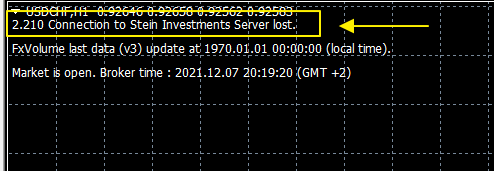
Please take care you added the correct URL https://stein.investments in the list of allowed URLs.
Once done, the connection status should change to "established", and you'll see the FX Volume data on your chart.
Apart from that, we highly recommend running SI Connect on a separate chart in the background of your terminal. It's unnecessary to have it on the same chart as FX Volume.
Best regards
Daniel
We’ve seen so many EAs struggles or kill their user’s accounts.
SIEA is different and provides a long-lasting positive experience for its users due to its outstanding risk-reward ratio.
Join team Stein Investments and benefit from our professional SIEA trading systems.
Get more information about it at https://www.mql5.com/en/blogs/post/745358.
All the best
Daniel & Alain