SI Connect

FREE
Published:
6 March 2020
Current version:
2.400
Didn't find a suitable robot?
Order your own one
on Freelance
Go to Freelance
Order your own one
on Freelance
How to buy а trading robot or an indicator
Run your EA on
virtual hosting
virtual hosting
Test аn indicator/trading robot before buying
Want to earn in the Market?
How to present a product for a sell-through

You are missing trading opportunities:
- Free trading apps
- Over 8,000 signals for copying
- Economic news for exploring financial markets
Registration
Log in
You agree to website policy and terms of use
If you do not have an account, please register
Good day,
I rented the FX volume indicator and installed it on my MT4. I received an alert stating that Data not updated please start connect EA. I followed the instructions on SI Connect which says go to your Terminal Options -> Subcategory Expert Advisors and insert http://stein.investments to the list of allowed URLs. I have done this and the data is still not showing on the fx volume indicator. What am I missing or what steps must I still run.
Regards,
Eric
Good day,
I rented the FX volume indicator and installed it on my MT4. I received an alert stating that Data not updated please start connect EA. I followed the instructions on SI Connect which says go to your Terminal Options -> Subcategory Expert Advisors and insert http://stein.investments to the list of allowed URLs. I have done this and the data is still not showing on the fx volume indicator. What am I missing or what steps must I still run.
Regards,
Eric
Hi Eric,
do you run the SI Connect EA in one of your charts? That's necessary to get all data updates for FX Volume.
If you already do this, please share a screenshot of the connection state you'll see in the upper left corner of this chart.
Thanks and best regards
Daniel
sl connect all installed
But nothing is visible
Please help
Hi, I bought it for rent.
sl connect all installed
But nothing is visible
Please help
As we can see in your screenshot, your terminal cannot connect to our data centre.
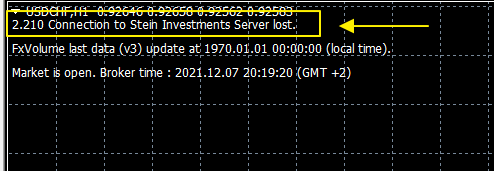
Please take care you added the correct URL https://stein.investments in the list of allowed URLs.
Once done, the connection status should change to "established", and you'll see the FX Volume data on your chart.
Apart from that, we highly recommend running SI Connect on a separate chart in the background of your terminal. It's unnecessary to have it on the same chart as FX Volume.
Best regards
Daniel
We’ve seen so many EAs struggles or kill their user’s accounts.
SIEA is different and provides a long-lasting positive experience for its users due to its outstanding risk-reward ratio.
Join team Stein Investments and benefit from our professional SIEA trading systems.
Get more information about it at https://www.mql5.com/en/blogs/post/745358.
All the best
Daniel & Alain