Tidebreaker
- Uzmanlar
-
Alex Amuyunzu Raymond
 I’m an experienced MQL5 developer and software engineer specializing in building robust, high-performance algorithmic trading systems for MetaTrader 5. My work goes beyond standard EA development — I design intelligent, scalable solutions that combine market logic, automation, and external
- Sürüm: 1.0
- Etkinleştirmeler: 5
Tidebreaker – Ride the H1 Tide. Strike on the M15 Pullback.
Trade with the market, not against it.
Most traders lose money by fighting the trend or chasing price after the move is already over. Tidebreaker is built on the opposite idea. It identifies the dominant direction on the H1 chart, waits patiently for a short-term pullback on M15, and enters only at the moment momentum turns back in the direction of the main trend. It is a disciplined trend-pullback system with strict risk control. It does not use martingale or grid techniques, and it never averages down.
THE CORE IDEA
Strong trends do not move in a straight line. They advance, pull back, and advance again. The pullback is where the best risk-to-reward entries live, because price has temporarily moved against the trend and the stop loss can sit close. Tidebreaker automates exactly this setup, one trade at a time, with a fixed risk and a fixed reward ratio.
HOW IT WORKS
- Trend filter (H1, 200 EMA)
The EA reads the last closed H1 candle against the 200-period exponential moving average.
- Close above the EMA: only buy trades are allowed.
- Close below the EMA: only sell trades are allowed.
Counter-trend trades are never taken.
- Entry trigger (M15, Stochastic 5,3,3)
On every new M15 bar the EA checks the closed bars only, so signals never repaint.
- Buy: the Stochastic crosses upward out of oversold territory (below 20) while the H1 trend is up.
- Sell: the Stochastic crosses downward out of overbought territory (above 80) while the H1 trend is down.
Two signal modes are available. The default requires %K to cross %D inside the zone. The alternative triggers when %K leaves the zone (crosses 20 or 80).
- Dynamic stop loss (ATR)
The stop loss is placed at 1.5 times the ATR(14) on the H1 timeframe, so it adapts automatically to current volatility. In quiet markets the stop is tight, and in volatile markets it breathes. - Fixed take profit (1:2)
The take profit is set at twice the stop distance, a 1:2 risk-to-reward ratio. The ratio is adjustable. - One trade at a time
There is never more than one open position per symbol. No grid, no martingale, no hedging tricks, no stacking.
RISK MANAGEMENT
- Automatic position sizing: you choose the percentage of your balance or equity to risk per trade (default 1%), and Tidebreaker calculates the lot size from the actual stop distance. The calculation uses the broker’s own tick value, so it works correctly on forex, gold, indices and crypto.
- Margin protection: the lot is checked against free margin and the symbol’s volume limits before every order, and reduced automatically if needed. The EA will not send an order it cannot afford.
- Optional hard lot cap for extra safety.
- Minimum-lot handling: if the calculated lot is below the broker’s minimum, the EA can use the minimum lot only when the resulting risk stays within a safe multiple of your target. Otherwise the trade is skipped.
TRAILING STOP
Once a trade is up by a set multiple of its initial risk (default 1R), the trailing stop activates and follows price at an ATR-based distance (default 1.5 x ATR). Profit is secured as the trade develops, and the stop only ever moves in your favour. Modifications respect the broker’s stop and freeze levels, and the EA avoids pointless modifications, so your log stays clean.
TIME AND NEWS FILTERS
- Friday filter: new trades are blocked after a time you choose (default 20:00 server time) to avoid weekend gaps. Optionally, an open trade can also be closed at the cut-off.
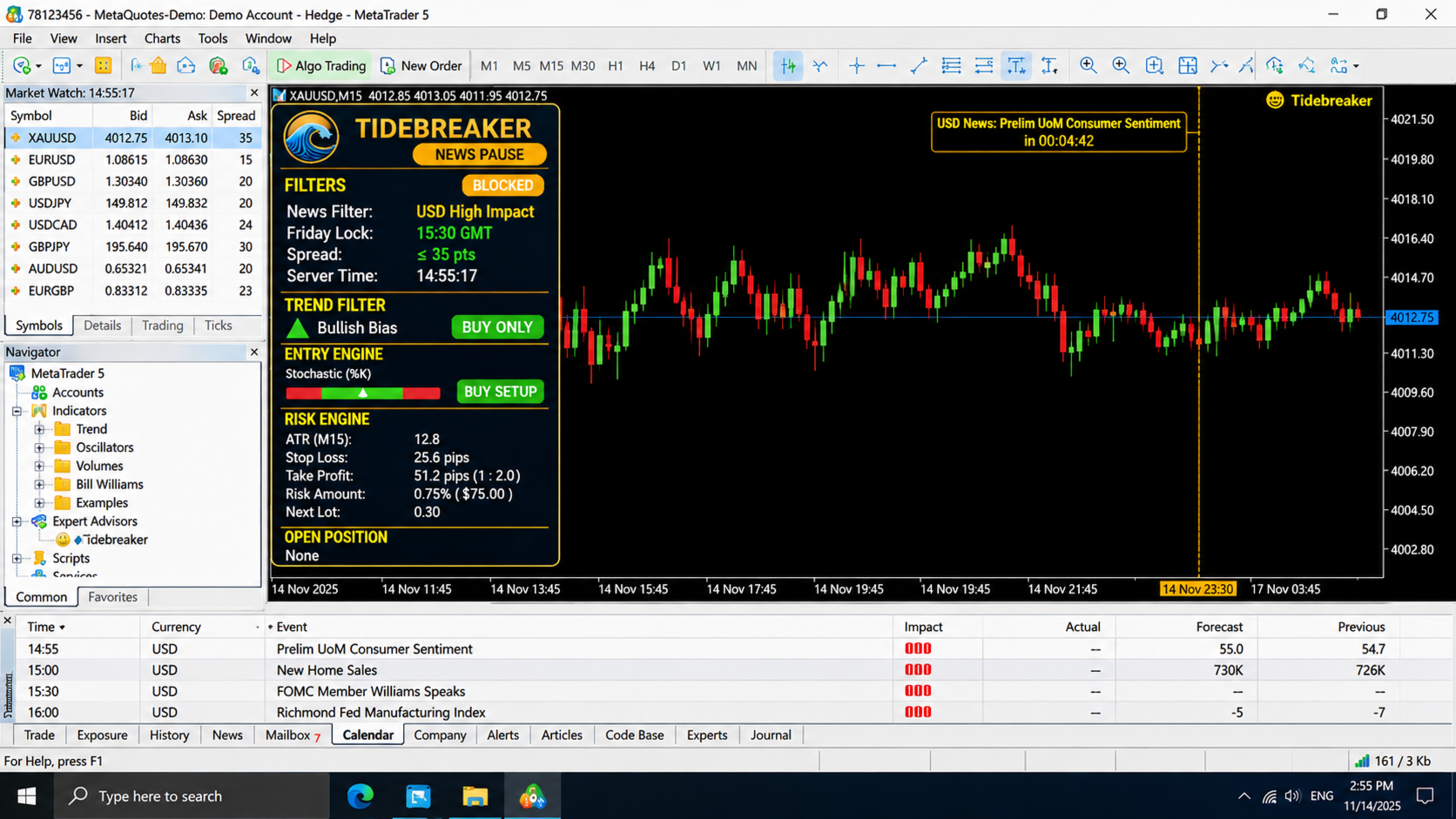
- News filter: trading pauses 30 minutes before and after high-impact economic news affecting either currency of the traded symbol. It uses the built-in MetaTrader 5 Economic Calendar, so no external services or WebRequest permissions are needed. The Economic Calendar is not available in the Strategy Tester, so this filter operates in live and demo trading only.
- Spread filter: optionally block entries when the spread exceeds your limit.
BROKER INDEPENDENT
- Works with any broker and account type, both hedging and netting.
- Enter the base symbol name (for example XAUUSD) and the EA finds the broker’s version with any prefix or suffix. Leave it empty to trade the chart symbol.
- Order filling mode is detected automatically.
- Stop levels and freeze levels are re-checked against live prices at order time, and stops are placed on the real fill price in a second step. This is the safest method for brokers with strict stop rules.
- Handles can be created on any chart timeframe. The H1 and M15 data are requested internally, so you can attach the EA to any chart of the symbol.
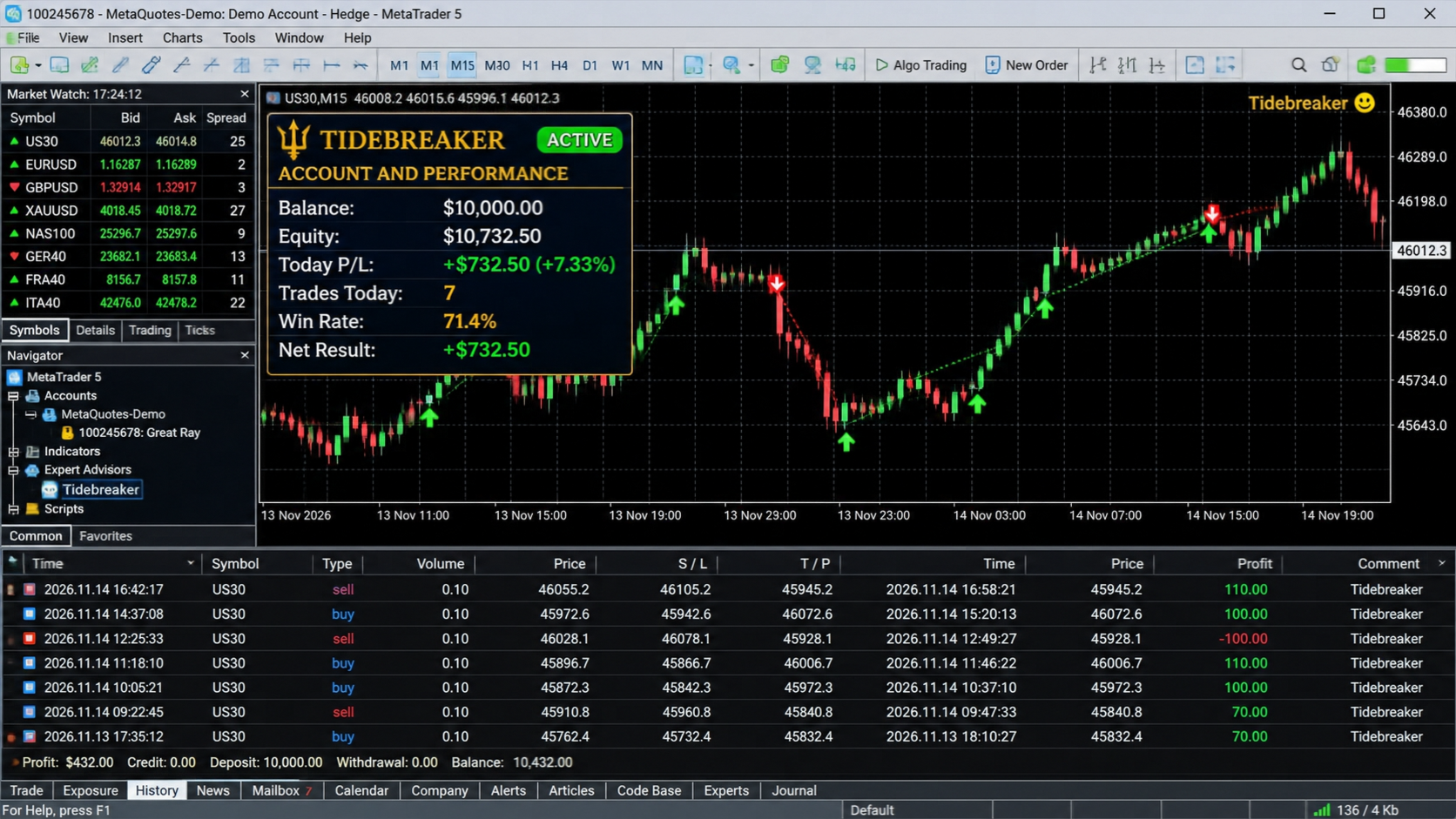
PROFESSIONAL LIVE DASHBOARD
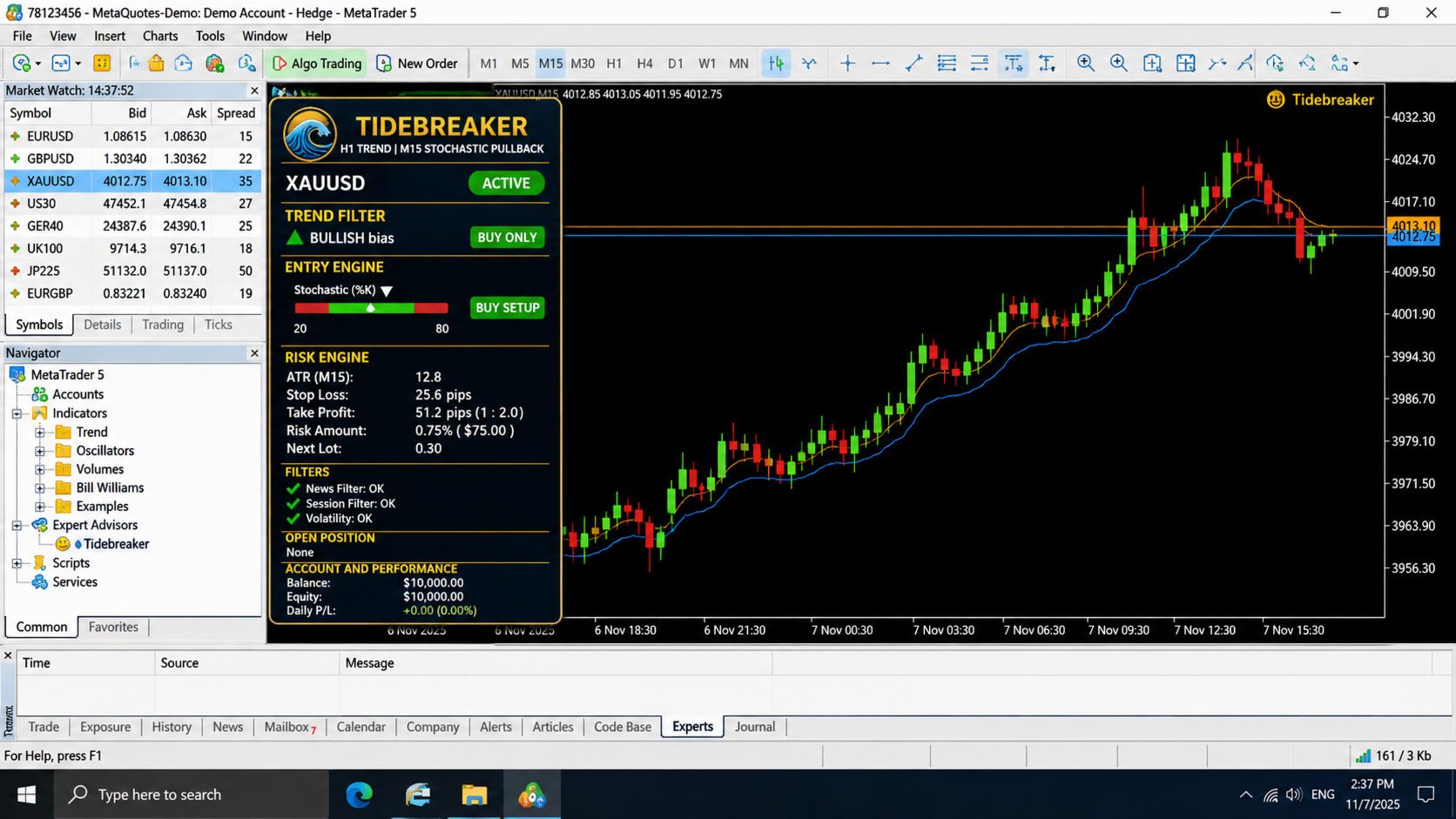
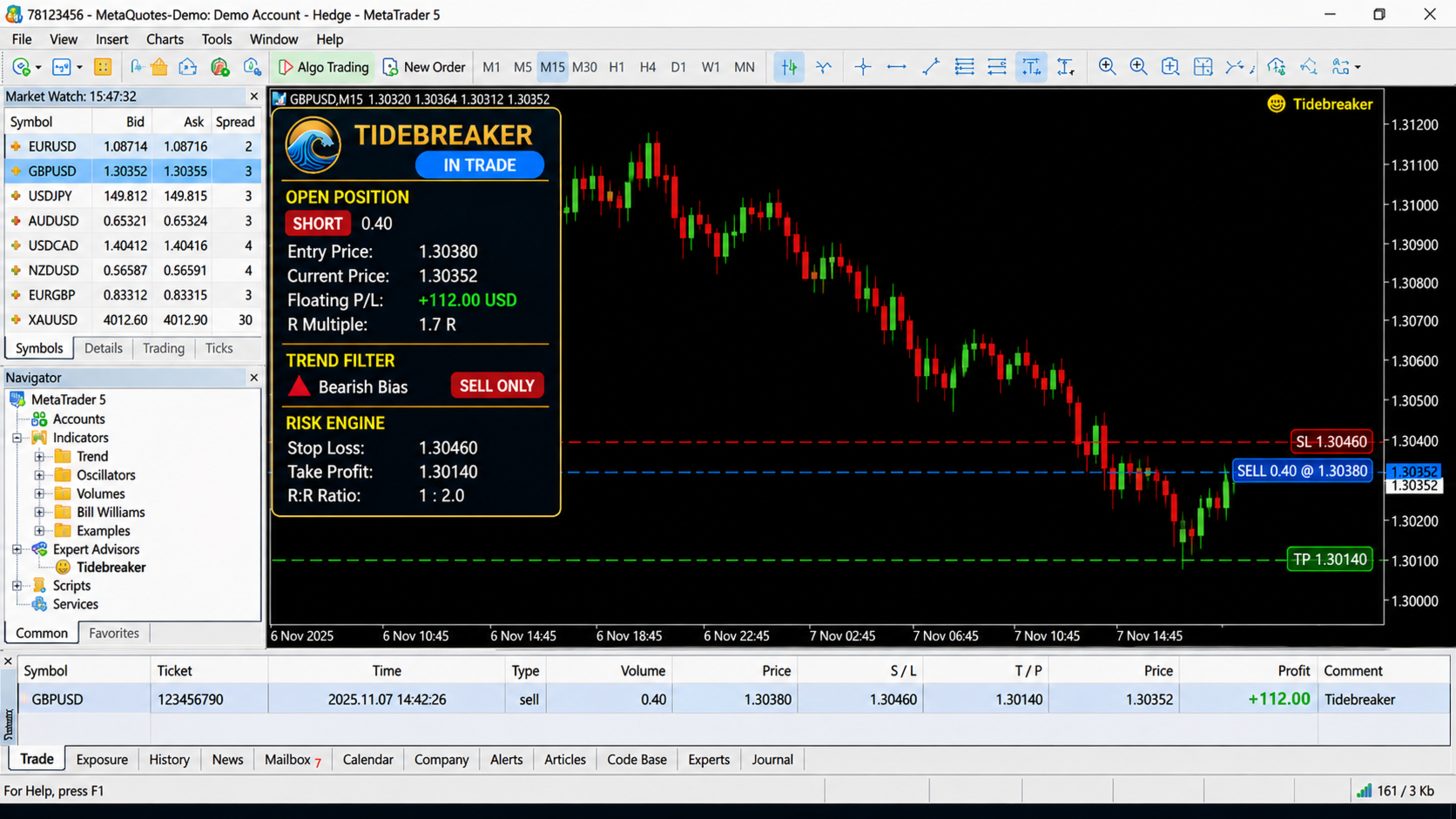
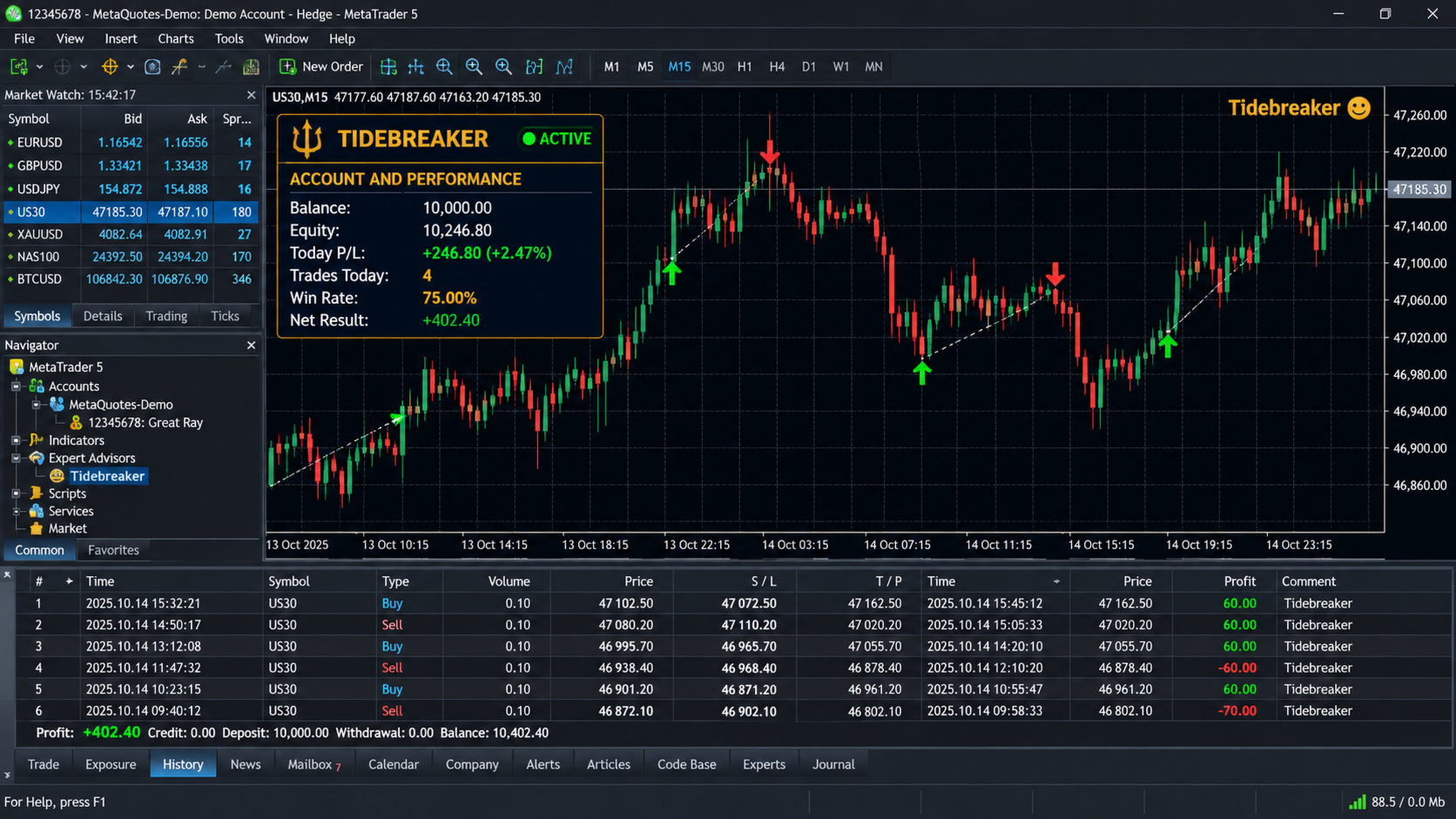
Tidebreaker includes a dark, gold-accented dashboard that shows exactly what the EA is doing at any moment:
- Status pill: ACTIVE, IN TRADE, NEWS PAUSE, FRIDAY LOCK, SPREAD HIGH or MARKET CLOSED, colour coded.
- Trend panel: last H1 close, EMA value, bias direction and distance from the EMA.
- Entry engine: live Stochastic %K and %D, a visual gauge with oversold and overbought zones, and a setup indicator that shows when a buy or sell setup is forming.
- Risk engine: current ATR, stop distance, take-profit distance, risk amount and the next lot size.
- Filters: Friday lock, news status, spread and server time.
- Open position: volume, entry, floating profit and the live R-multiple.
- Account and performance: balance, equity, today’s result, trades today, win rate and net result for the EA.
A button in the header collapses the panel when you need more chart space. The dashboard position is adjustable, and an optional dark chart theme is included.
RECOMMENDED USE
- Symbols: liquid instruments that trend cleanly, such as the major forex pairs, XAUUSD and major indices. You can run it on several symbols by attaching it to separate charts.
- Chart timeframe: any (M15 or H1 is convenient). The strategy timeframes are set in the inputs.
- Make sure Algo Trading is enabled in the terminal and allowed for the EA.
- Always test on a demo account first and tune the risk to your own tolerance.
MAIN INPUTS
- Trend timeframe and EMA period (default H1, 200)
- Entry timeframe and Stochastic settings (default M15, 5/3/3, levels 20/80), signal mode
- Risk percent, risk base (balance or equity), ATR timeframe, period and multiplier, reward ratio
- Trailing on/off, start level in R, trail distance in ATR
- Friday filter hour and minute, optional Friday close
- News filter on/off and minutes before and after
- Maximum spread, slippage, magic number, order comment
- Dashboard on/off, position and chart theme
WHY TIDEBREAKER
- Simple, transparent logic that you can understand and trust, with no black box.
- Every trade has a defined stop and a defined target from the first moment.
- Entries come from closed-bar signals, so nothing repaints.
- Built for clean execution on real brokers, with careful volume, margin and stop-level handling.
- A dashboard that tells you what the EA is doing and why it is or is not trading.
Risk warning: Trading leveraged products carries a high risk of loss. Past performance does not guarantee future results, and no trading system wins every trade. Test on a demo account and risk only capital you can afford to lose.