Relaywire Telegram Bridge
- Yardımcı programlar
- Sürüm: 1.0
- Etkinleştirmeler: 10

(Free edition: Relaywire Notify - MT5 -> Telegram notifications only, no signal copying.)
Read trade signals from Telegram, turn them into orders with your own risk, and get every trade event back on your phone.
Relaywire is an Expert Advisor for MetaTrader 5 that connects the terminal with Telegram in both directions:
- Telegram -> MT5: it reads signal messages, understands BUY / SELL, entry or entry zone, SL, up to 5 targets and management messages ("close half", "SL to entry", "close all", "cancel"), calculates the lot from your risk and places the orders.
- MT5 -> Telegram: it sends trade opened / closed / partial close / SL or TP hit / modified / pending order messages, a daily summary and a drawdown warning to your own Telegram bot.
Relaywire only trades what a signal message says. It has no own entry strategy, no grid and no martingale. Every copied trade needs a stop loss (from the message or from your default SL setting).
Where Relaywire Reads Signals
1. Your own Telegram bot (Bot API, getUpdates):
- groups where your bot is a member (disable "Group Privacy" for the bot in @BotFather so it can read all messages),
- channels where your bot is an administrator,
- messages you forward to your bot. This is the way for private or paid channels that you can read but where you cannot add a bot: forward the signal to your bot and Relaywire handles it like a channel post (the original channel name is used for your per-channel settings).
2. Public channels without a bot: Relaywire reads the public web preview of a channel (t.me/s/name) and handles new posts and edited posts. This works only for public channels that have a web preview.
3. A local inbox file (MQL5\Files\Relaywire\inbox.txt) for tests and manual signals.
Signal Parser
- BUY / SELL / LONG / SHORT, German words (KAUF, VERKAUF, ZIEL, EINSTIEG, SCHLIESSEN ...).
- Entry price, entry zone ("2350-2345", "2350 / 2345"), "now", "market", "@", BUY LIMIT / BUY STOP / SELL LIMIT / SELL STOP.
- SL and TP1 ... TP5 in many spellings ("Stop loss:", "S/L", "SL@", "Target 2", "Ziel 1:", emoji markers).
- Values as price or as pips ("SL 30 pips"); a value that cannot be a price is read as a distance and the panel says so.
- Symbol aliases: GOLD / XAU -> XAUUSD, DAX -> GER40, US30 / DOW, NAS100 / USTEC, BTC, ETH, OIL, short forms like GU / UJ, plus your own alias list. Broker suffixes and prefixes are detected automatically (for example XAUUSDm, EURUSD.r, .US30Cash).
- Decimal commas and thousands separators ("1,0850", "90,500").
- Management messages: close all, close half / 50% / 1/2, move SL to entry (break-even), new SL, new TP, cancel pending orders. Replies to the original signal are matched to that signal.
- Edits: when the channel edits the original signal, Relaywire updates SL / TP of the copied orders.
- Unclear messages are ignored and the reason is shown: no BUY / SELL, no symbol, two symbols, BUY and SELL in one message, conditional wording ("wait for", "if price breaks", "possible"), result reports ("TP1 hit +30 pips"), message too old.
- Developer test: 65 real-world style messages (English, German, emojis, ranges, pips, management, tricky cases) pass the built-in parser test; 20 posts of a real public news channel produced no false signal.
Execution
- Risk per signal: % of balance, % of equity, fixed money or fixed lot. The lot is split across the targets: one position per target, each with its own TP.
- Lot calculation from tick value and tick size, cross-checked with the terminal's own profit calculation; the larger loss is used, so rounding goes towards less risk. Volume step, min / max lot and margin are checked before sending.
- Market or pending order by the distance between the signal entry and the current price; entry zones use the nearest edge, a price inside the zone means market.
- Filters and limits: max spread, max executed signals per day, daily loss block (% equity loss from the day-start balance), max entry deviation in %, max signal age, pending order expiry.
- Optional: SL to entry after the first target is hit.
- Per-channel settings: risk multiplier, allowed symbols, max targets, reverse option (off by default).
- Magic number and order comment with channel tag and message id.
- Pause button on the panel, or /pause /resume /status from your own Telegram chat.
MT5 -> Telegram Notifications
- Trade opened, closed, partial close, SL hit, TP hit, SL / TP modified (bundled, no spam during trailing), pending order placed / removed.
- Daily summary at an hour you choose, equity drawdown warning.
- Optional chart screenshot for trades of the chart symbol.
- Filter by symbol and magic number, own message templates with placeholders, English or German.
- Queue with rate limit and retries (respects Telegram's limits and "retry after" answers).
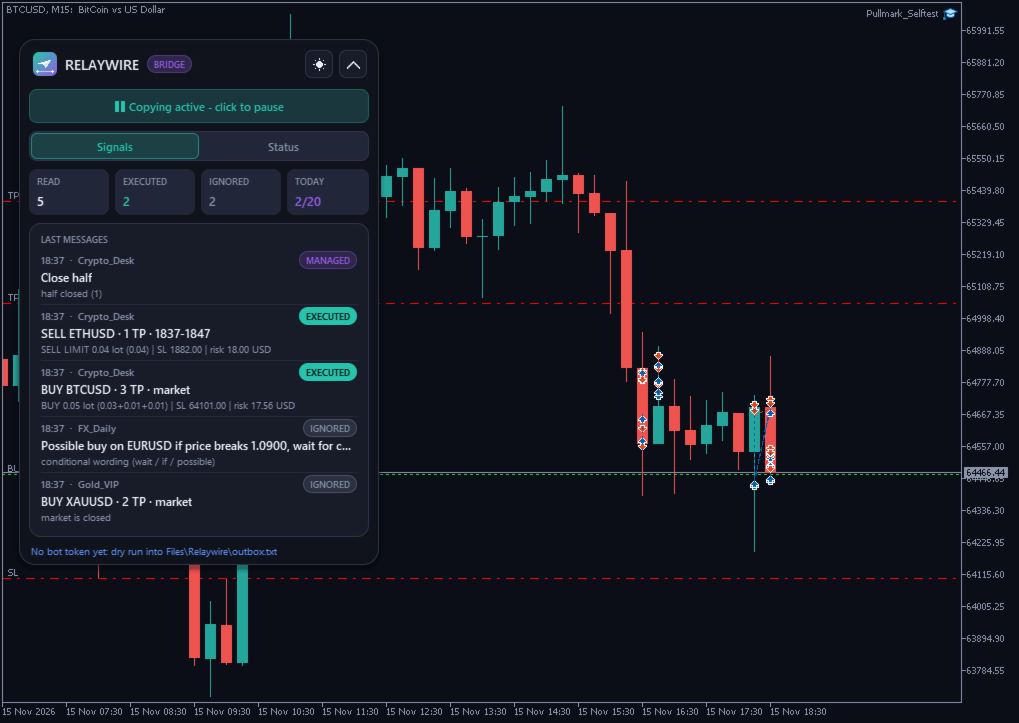
- Dry run mode: messages are written to MQL5\Files\Relaywire\outbox.txt instead of being sent, useful for a first test without a bot.
Panel
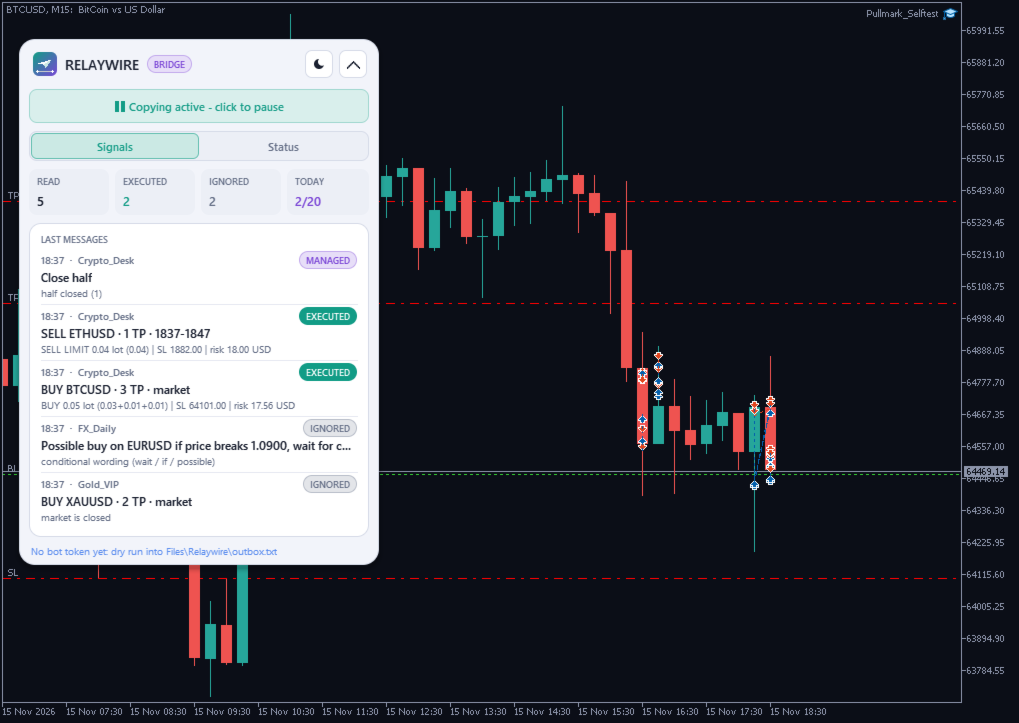
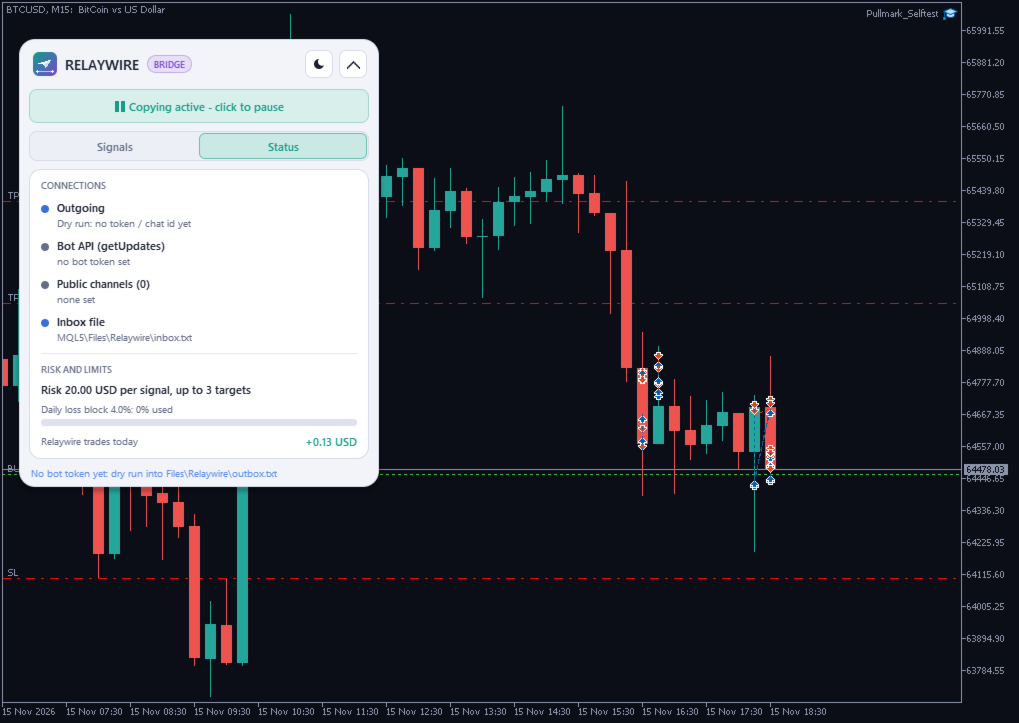
- Modern panel on the chart, dark and light theme, collapsible, draggable.
- Signals tab: read / executed / ignored counters, executed signals today, the last messages with the result (EXECUTED, IGNORED, MANAGED) and the reason.
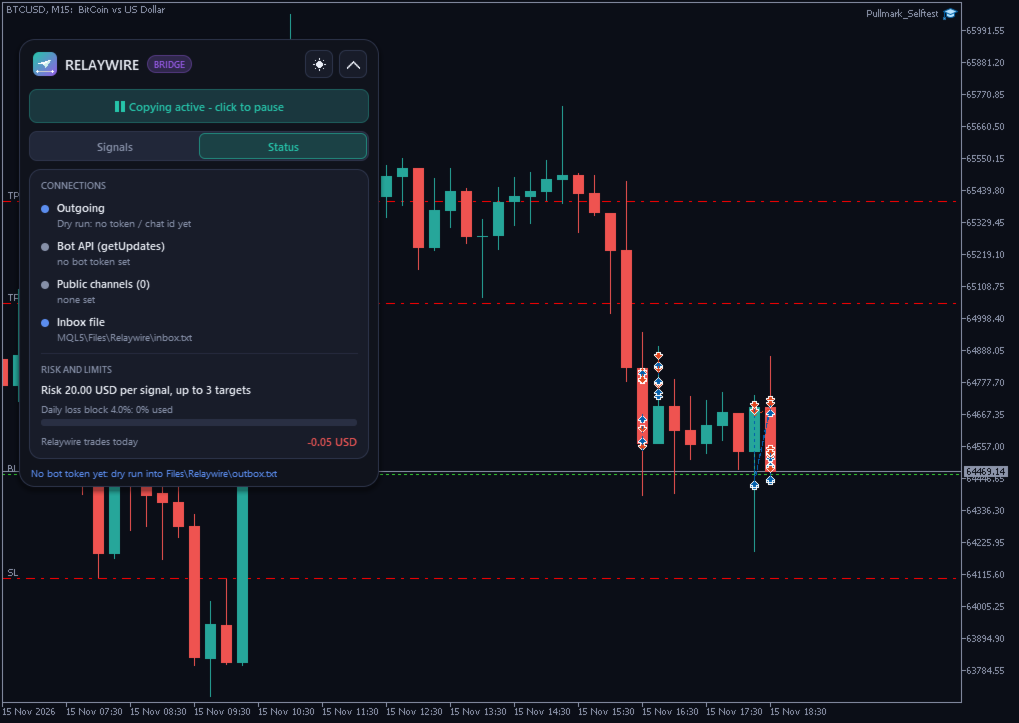
- Status tab: connection state of each source, outgoing state, risk setting, daily loss block usage and today's result of Relaywire trades.
- State is saved (Common\Files\Relaywire\), so a terminal restart does not repeat old signals.
Strategy Tester
In the Strategy Tester there is no Telegram connection. Relaywire then simulates a demo channel (signals, "SL to entry", "close half", "close all", ignored messages) on the tested symbol, so you can watch the panel and the order handling in visual mode.
Setup (5 Minutes)
1. Create a bot with @BotFather and copy the token. Send any message to your bot: Relaywire shows your chat id on the panel while the chat id field is empty.
2. Tools > Options > Expert Advisors: tick "Allow WebRequest for listed URL" and add
https://t.me (only needed for public channel previews)
3. Attach Relaywire to any chart, enter token and chat id, choose your risk, add public channel names if you want.
4. For groups: add the bot to the group and disable "Group Privacy" in @BotFather. For your own channels: add the bot as administrator. For private / paid channels: forward the signals to your bot.
Please Note (honest Limits)
- The terminal must run while signals arrive (24/5, for example on a VPS). Relaywire cannot read messages that were sent while MT5 was closed beyond the "max signal age" setting.
- Private or paid channels where you cannot add a bot are only possible by forwarding the messages to your bot. Relaywire does not log in with your personal Telegram account.
- Public channels are read through their web preview; channels without a preview cannot be read this way. The preview is polled (default every 20 seconds), so there is a small delay.
- Signal texts vary a lot. Relaywire ignores what it cannot read clearly and shows why; start with "Execute trades" off (read only) to see how your channel's messages are understood.
- Copying signals does not make a signal provider better. Results depend on the signals, on your broker's prices and on the delay between the message and the order.
- No DLL is used. All network access goes through MetaTrader's WebRequest to the URLs above.
Tested
Demo account (hedging), MetaTrader 5 build 6238: inbox signals executed on BTCUSD / ETHUSD with 3 targets, pending zones, "close half", "SL to entry", "close all", "cancel", edits of a pending order; lot size checked by hand against tick value and contract size; notifications checked in dry run mode.