Grid Envelopes EA
- Uzmanlar
- Sürüm: 3.5
- Etkinleştirmeler: 5

| Grid Envelopes EA - v3.05 (MetaTrader 5, hedging account) |
|---|
|
Why traders keep asking for an envelope grid that does not panic
Envelopes are one of the oldest tools on any MetaTrader chart, and for good reason: price breathes inside a channel far more often than it escapes it. Grid Envelopes EA takes that calm, familiar idea and gives it a full professional grid engine, a fresh Arctic Steel and Safety Orange control panel and a stability layer that was rebuilt from the ground up in this release.
The goal is simple. You decide how much risk the account can carry; the EA decides when a cycle is worth starting, builds a disciplined ladder, banks profit in small, frequent pieces and keeps the book clean while the market wanders. You watch everything live on the chart without opening a single extra window.
What is new in version 3.05
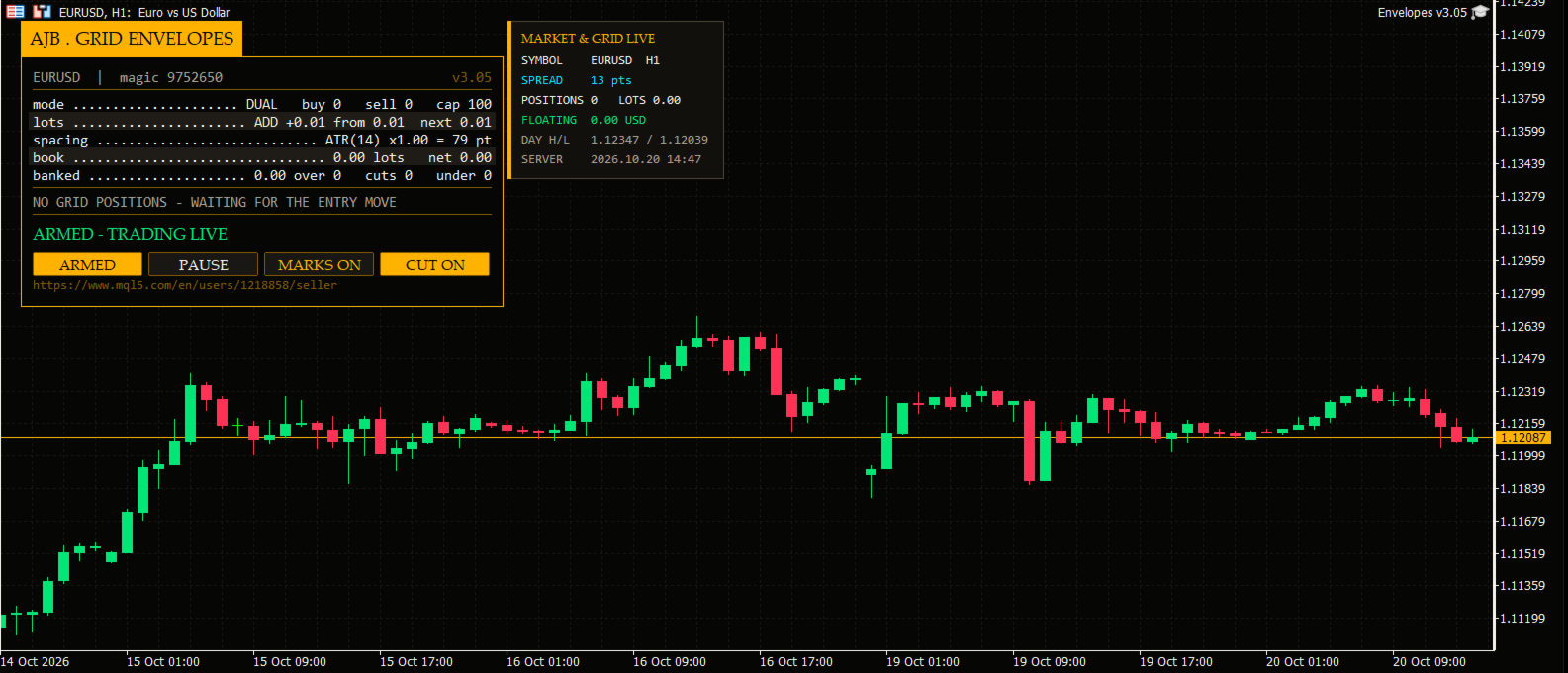
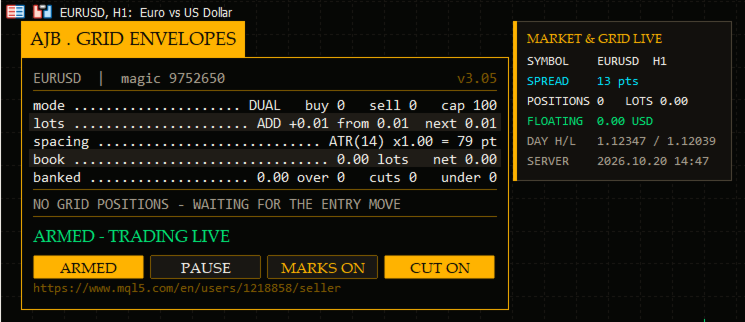
A completely new on-chart interface. The panel now sits in the top-left corner on a graphite card with a safety-orange frame, a clear status line, four flat command buttons and a compact market card next to it. Every box is measured from the real text size, so the layout stays tidy on a laptop screen, a 4K monitor or a small chart window, and nothing is ever placed on the right side where you read price.
Engine stability. Earlier builds could print a false "not enough margin" message on very large balances even with every protection switched off. That path has been rewritten: the EA now checks margin the way the broker does, respects the broker's maximum lot, steps aside politely for a minute if the server ever rejects an order for funds, and never floods the journal. A hedge repair margin check was added as well.
Clean layout fix. The status banner and the header tab were re-spaced so they never touch the separator lines or the card border.
How it behaves on your chart
Think of the EA as a patient partner with three jobs. First it waits for the envelope reading to confirm that a move is worth following; it does not open trades because the clock ticked. Second, once a cycle begins it builds a ladder of levels at a distance that adapts to current volatility, with lots that grow gently instead of doubling. Third, and most important, it closes: it constantly looks for groups of orders that together have reached your target and banks them, including partial closes of the oldest order when that is the smartest way to shrink the book.
That third job is why a grid built on this engine feels different. Profit is taken many times a day in small amounts, the oldest exposure is retired step by step, and a reopen guard makes sure a closure never immediately re-creates the level it just removed.
Who this product is for
Traders who like a grid but hate watching one grow without a plan. Traders who want to see exactly what the robot is doing at any second. Traders who prefer additive lots (0.01, 0.02, 0.03...) to aggressive martingale curves. And traders who want to test thoroughly before risking a cent - the Strategy Tester version is fully functional, so please run it on your own broker's data first.
Quick start in five minutes
1. Attach the EA to any chart on a HEDGING account (the EA checks this and tells you if the account is netting).
2. Leave the defaults for your first test: dual grid, 0.01 starting lot, additive ladder, ATR spacing.
3. If you want to watch before trading, set Run mode to Scan only; the panel will show what it would do.
4. Press ARMED on the panel when you are happy. PAUSE stops new levels at any time; CUT and MARKS toggle closure slicing and chart drawings.
5. Raise the starting lot only after you have seen a few cycles on your own account size.
Every input explained
Grid - how levels are opened. Trade mode: dual grid (BUY and SELL ladders run independently) or a single grid. Grid space between levels: the fixed distance in points when fixed spacing is used. Spacing multiplier per level: 1.0 keeps steps equal, above 1.0 widens deeper levels. Maximum levels per grid. An up move arms the BUY side: sets which direction each side follows. Magic number and order comment: identify this EA's orders. At most one new level per bar: avoids bursts during fast candles.
Lot ladder. Starting lot. Lot sizing mode: add or multiply. Multiplier (multiply mode) and add step (additive mode, 0 = use the starting lot). Maximum lot for any single order (also capped automatically at the broker maximum). Auto-lot on balance, its reference balance, and whether it may scale down.
ATR spacing. Spacing mode (fixed or ATR), ATR timeframe, ATR period, spacing factor, bar shift, minimum and maximum spacing in points, and an option to freeze the spacing for the whole cycle.
Profit target. Desired profit per closure, a final multiplier between 1.00 and 2.00, fixed or scaled mode, and the scaled-mode controls: volume exponent, extra target per open level, ceiling as a multiple of the base and a safety cap as a fraction of one grid step.
Fragment scanner. Multi-order scanning on/off, how many oldest and newest orders may join one closure, how combinations are ranked, whether a combination must also beat the plain pair, and the minimum closing-to-target volume ratio.
Target slicing. Partial closes of the oldest order on/off, profit weighting, smallest slice in percent, whether several newer orders may club together for one slice, and whether a full closure is always preferred when both qualify.
Reopen guard. Mode and safety cushion as a fraction of one grid step.
Account protection. Minimum margin level for new levels, maximum floating loss percent of balance for new levels (0 = off), and an absolute cap on orders per side.
Execution and verification. Run mode (Armed or Scan only), leg send order, maximum slippage, maximum spread, minimum seconds between closures, attempts per leg, verification timeout, waiting through closed markets and its retry interval, automatic resume after a halt, aborting a plan if the book changed, commission handling (both sides, fallback per lot) and the closing comment.
Hedge cycle (off by default). Enable, symbols and rotation, tester symbol cap, cycle lots, slice lots, bonus and whether it is a percent, money and percent safety caps, hedge magic number, reopen on finish, wait for the first grid trade, integrity check interval, automatic repair and naked-leg action, spread and slippage limits, attempts, verification timeout, commission fallback and comment.
Weekly cash day. Pause new cycles and slices over a withdrawal window: day of week and cut-off hour.
Panel and chart. Show panel, X/Y offsets, font size, optional Arabic line (off), chart marks, table rows and panel corner.
Entry trigger. Strategy, distance or both; signal bar, signal validity in bars, allow BUY, allow SELL, invert direction.
Envelopes signal. MA period, MA method, deviation percent, applied price and timeframe.
Debug. Verbose logging for support sessions.
Honest words before you start
A grid manages a position; it does not predict the future. Size the ladder for the balance you really have, test on your own broker's spread and swap, and keep the hedge cycle off until you understand the core grid. Works on any symbol and timeframe, needs no DLL and no external files. If anything is unclear, write to me - I would rather spend ten minutes helping you set it up than have you guess.