
Mozu USDJPY
- Uzmanlar
- Sürüm: 1.11
- Güncellendi: 2 Mayıs 2026

Mozu USDJPY is a scalping EA designed for USDJPY.
Although the EA itself references the M15 timeframe, it trades the same way regardless of which timeframe you display on the chart.
It detects trends and performs scalping by buying on pullbacks and selling on rallies. It is similar to my other EA, Atori, but this one has been optimized over a longer period.
A broker with tight spreads is recommended.
Please test it first on a demo account or with small lot sizes.
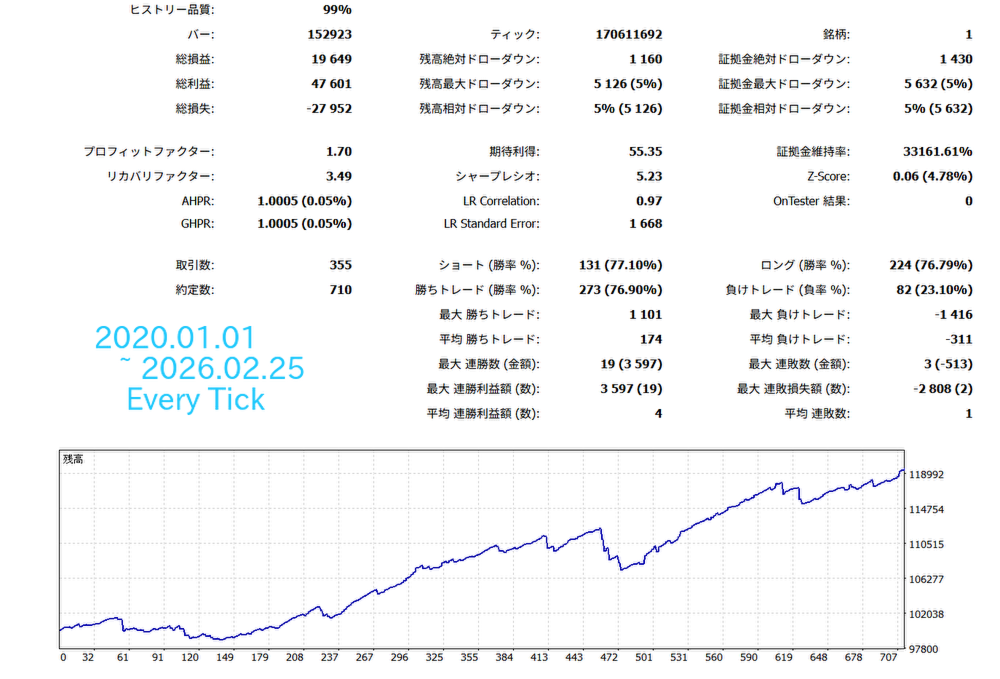
Note: Backtest results do not necessarily guarantee future performance.
■Parameter Description
■TakeProfit --- Take profit value, in points.
■StopLoss --- Stop loss value, also in points.
■TrailingStop --- When set to true, trailing stop is enabled.
■TrailingStopLevel --- When TrailingType is Normal, the stop loss trails the price at the point distance specified here.
■TrailingStart --- When TrailingType is Normal, trailing begins once the price moves in profit by the number of points specified here after entry.
■Slippage --- Specifies the allowable slippage at order execution, in points.
■MaxSpread --- Sets the maximum allowable spread at order execution. For example, if set to 60, the EA will not place orders when the spread exceeds 60 points.
■MagicNumber --- Identification number for the EA. It uses the combination of the symbol and MagicNumber to determine whether a position belongs to this EA. If you run multiple instances of this EA on the same symbol, use different MagicNumbers.
■OrderComment --- Comment attached to positions.
■StartHour --- The hour at which trading begins.
■EndHour --- The hour at which trading ends.
■WeekEndClose --- Determines whether to close positions before the weekend. If true, positions are closed at the specified time on Friday.
■WeekEndCloseTime --- The time on Friday when weekend closing occurs. If UseDaylightSavingTime is true, this time is shifted by +1 hour during daylight saving time.
■LotManagement --- When set to true, compound lot sizing is enabled.
■LotFactor --- When LotManagement is true, this value is used to calculate the lot size.
■FixedLot --- When LotManagement is false, this value becomes the fixed lot size.
■MaxLot --- The maximum lot size allowed for trading. The EA will not trade with a lot size exceeding this value.
■MiniLot --- The minimum lot size allowed for trading. The EA will not trade with a lot size below this value.
■RecoveryMode --- When set to true, Recovery Mode is enabled. In Recovery Mode, the EA remembers the original account balance. If the balance decreases due to losses, the EA increases the lot size with each trade until the balance returns to the original level. The lot size during Recovery Mode is calculated as: (base lot size × RecoveryCount × RecoveryLotMultiplier). RecoveryCount increases by +1 with each trade until the original balance is restored.
The target balance is displayed on the chart as RecoveryGoalBalance. It is not reset even if MT5 is restarted, but it will reset (along with RecoveryCount) if you change the MagicNumber or press the “Reset RecoveryMode” button on the chart.
■MaxRecoveryCount --- Sets the maximum limit for RecoveryCount.
■RecoveryLotMultiplier --- Each time RecoveryCount increases by 1, the lot size is multiplied by this value.









































Very good.Thank you Läuft auf icmarkets