XP SL By Candle for MT4

FREE
Yayınlandı:
30 Mart 2024
Mevcut sürüm:
1.34
Uygun bir robot bulamadınız mı?
Freelance üzerinden kendi
robotunuzu sipariş edin
Freelance'e git
Freelance üzerinden kendi
robotunuzu sipariş edin
Bir alım-satım robotu veya gösterge nasıl satın alınır?
Uzman Danışmanınızı
sanal sunucuda çalıştırın
sanal sunucuda çalıştırın
Satın almadan önce göstergeyi/alım-satım robotunu test edin
Mağazada kazanç sağlamak ister misiniz?
Satış için bir ürün nasıl sunulur?

Alım-satım fırsatlarını kaçırıyorsunuz:
- Ücretsiz alım-satım uygulamaları
- İşlem kopyalama için 8.000'den fazla sinyal
- Finansal piyasaları keşfetmek için ekonomik haberler
Kayıt
Giriş yap
Web sitesi politikasını ve kullanım şartlarını kabul edersiniz
Hesabınız yoksa, lütfen kaydolun
Doesn't seem to work for me. With a BUY order type selected, having bought, it shows No of Positions as 1. But when I set the Stop Loss Price, it does not close the position if the Candle closes under the Stop Loss Price set in the EA. I was trying this on a 1 Min chart, with M1 set in the EA as Candle Timeframe. Yes, the EA is Enabled and Active.
Though, next to TRADE ALLOWED it does show that Import DLLs not allowed in settings! even though I have it enabled in the EA config. This message doesn't seem to go away whether it's enabled or not. But the EA appears to be active, e.g. with the smiley face.
Though, next to TRADE ALLOWED it does show that Import DLLs not allowed in settings! even though I have it enabled in the EA config. This message doesn't seem to go away whether it's enabled or not. But the EA appears to be active, e.g. with the smiley face.
Hi , thanks for contacting me , please double check the meta trader settings to match the attached screenshot
Hi , thanks for contacting me , please double check the meta trader settings to match the attached screenshot
Confirmed these are set -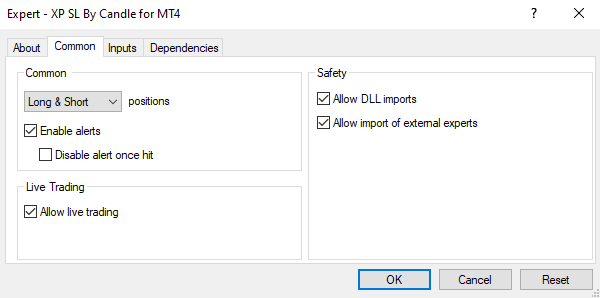 But still get the warning message
Please allow it in global setting too , check the video below
Awesome! That got it working. Thanks
Awesome! That got it working. Thanks
Great to hear that ! It's my pleasure, you are welcome at any time 🙏