XP SL By Candle for MT4

FREE
Published:
30 March 2024
Current version:
1.34
Didn't find a suitable robot?
Order your own one
on Freelance
Go to Freelance
Order your own one
on Freelance
How to buy а trading robot or an indicator
Run your EA on
virtual hosting
virtual hosting
Test аn indicator/trading robot before buying
Want to earn in the Market?
How to present a product for a sell-through

You are missing trading opportunities:
- Free trading apps
- Over 8,000 signals for copying
- Economic news for exploring financial markets
Registration
Log in
You agree to website policy and terms of use
If you do not have an account, please register
Doesn't seem to work for me. With a BUY order type selected, having bought, it shows No of Positions as 1. But when I set the Stop Loss Price, it does not close the position if the Candle closes under the Stop Loss Price set in the EA. I was trying this on a 1 Min chart, with M1 set in the EA as Candle Timeframe. Yes, the EA is Enabled and Active.
Though, next to TRADE ALLOWED it does show that Import DLLs not allowed in settings! even though I have it enabled in the EA config. This message doesn't seem to go away whether it's enabled or not. But the EA appears to be active, e.g. with the smiley face.
Though, next to TRADE ALLOWED it does show that Import DLLs not allowed in settings! even though I have it enabled in the EA config. This message doesn't seem to go away whether it's enabled or not. But the EA appears to be active, e.g. with the smiley face.
Hi , thanks for contacting me , please double check the meta trader settings to match the attached screenshot
Hi , thanks for contacting me , please double check the meta trader settings to match the attached screenshot
Confirmed these are set -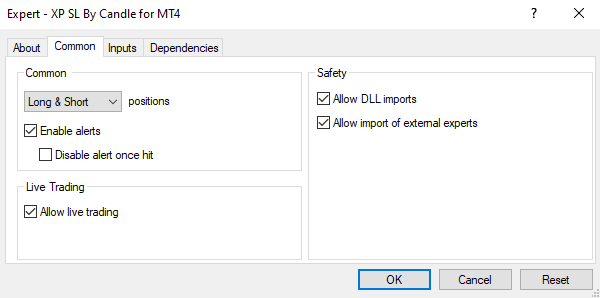 But still get the warning message
Please allow it in global setting too , check the video below
Awesome! That got it working. Thanks
Awesome! That got it working. Thanks
Great to hear that ! It's my pleasure, you are welcome at any time 🙏