 MetaTrader 5
 Uzmanlar
 Göstergeler
 Kütüphaneler
 Yardımcı programlar
 Widget'lar
 Kurallar
YouTube'dan Mağaza ile ilgili öğretici videoları izleyin
Bir alım-satım robotu veya gösterge nasıl satın alınır?
Uzman Danışmanınızı
sanal sunucuda çalıştırın
sanal sunucuda çalıştırın
Satın almadan önce göstergeyi/alım-satım robotunu test edin
Mağazada kazanç sağlamak ister misiniz?
Satış için bir ürün nasıl sunulur?
MetaTrader 4 için yeni alım-satım yardımcı programları - 46
 Aşağıda MetaTrader 4'te Forex alım-satımını kolaylaştıran alım-satım programları bulunmaktadır. Açıklamasını ve amacını okumak için aşağıdaki listeden ürünün üzerine gelin.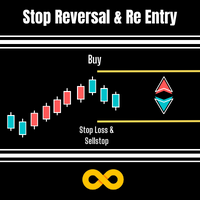
Stop Reversal & Re Entry is a varied way to exit trades and manage your losses.
I all in have made it into a 4 option utility of stop reversal, re entry with break even and partial close features for good measure.
These 4 systems are :
Stop Reversal : When true will place an opposite pending order exactly where the stop level is on your current trade. In the possibility of your trade being wrong it will get you in again in the opposite direction.
Ive added a Only Recover Loss feature that
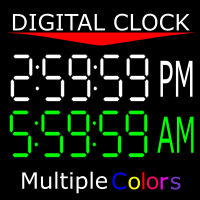
Shows you the time of the server you're on as well as the current time of the time zone you're in. 12-hour clock format (12:00:00 am to 11:59:59 pm) Charts from 1-5 mins are in hour:min:sec format Charts from 15 mins to 1 month are in hour:min format" You can also change the color of the clock to any color MT4 offers. If there is anything you would like me to add ask. As long as it isn't extensive, I might add it.
FREE

Советник риск-менеджер с огромным арсеналом возможностей защиты вашего депозита. Для инвесторов, которые решили передать капитал в доверительное управление. Когда у трейдера нет доступа к настройкам - нивелирует торговые риски. А также для трейдеров, которые осознали необходимость стороннего контроля за их торговлей для улучшения торговых результатов. Для максимальных результатов - должен стоять на отдельном VPS сервере и у трейдера не должно быть возможности менять настройки в торговый период.
FREE

Советник риск-менеджер с огромным арсеналом возможностей защиты вашего депозита. Для инвесторов, которые решили передать капитал в доверительное управление. Когда у трейдера нет доступа к настройкам - нивелирует торговые риски. А также для трейдеров, которые осознали необходимость стороннего контроля за их торговлей для улучшения торговых результатов. Для максимальных результатов - должен стоять на отдельном VPS сервере и у трейдера не должно быть возможности менять настройки в торговый период.

Sanırım herkes böyle bir para yönetimi kuralını «Kasa» olarak biliyor. Bilmeyenler için kasa, işlemdeki kazançlar ayak büyüklüğüyle eşitlendikten sonra pozisyonun yarısını kapatmayı varsayar. Böylece, fiyat açılıp dursa bile, artık para kaybetmeyeceksiniz, çünkü pozisyonun bir kısmı daha önce kapandığında tam olarak aynı miktarda kar elde edildi.
Güvenlik Danışmanının yalnızca bir ayarı vardır – kapanış lotu. Onu 0 konumunda bırakarak, danışman anlaşmanın tam yarısını kapatacaktır.
Danışmanın
FREE
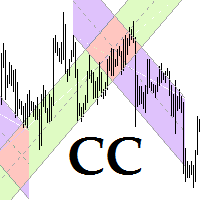
This program is for traders who plot price channels on charts. You just need to specify the width of the channel in the description of the trend line. Enter the "Description" field in the trend line properties and type canal: xxxxx without a space, where xxxxx is the width of the channel in pips. Channel color is set automatically depending on the channel width. The middle line of the channel is also automatically drawn. If the channel width is set to a positive number, the channel is drawn ab

Work with gold and Japanese yen. Now working without pips! While you are trading, Auto StopLoss Defender doing all the routine work. "Must have" for scalping. Best way to save account balance in case of force majeure.(Internet connection loss, power outage, sharp change in price direction) The Utilite automatically adds a stop loss to open and pending orders that have no stoploss set. The anti-requote system is built into the Utilite. That means the stop loss will be registered anyway! In the

While you are trading, Auto StopLoss Premium doing all the routine work. "Must have" for scalping. Best way to save account balance in case of force majeure.(Internet connection loss, power outage, sharp change in price direction) The Utilite automatically adds a stop loss to open and pending orders that have no stoploss set. Also adds a take profit. The anti-requote system is built into the Utilite. That means the stop loss will be registered anyway! In the settings you can set any stop los

This positions risk visualization indicators, indicators allow you to clearly know how much price go back will be generated account Stop Out.
This is a very useful indicator for Controlling Risk when account is open positions, attach this indicator to the chart of the open positions, the indicator will draw a Line Of Stop Out Price on the chart, and output Stop Out Point Value in the upper left corner.
Stop Out Price can give you clearly know what price is Account Stop Out, can give y

Introduction
Auto Chart Alert is a convenient tool to set alert for your trading in your chart. With Auto Chart Alert, you can set the alert line in one click in your desired location in your chart. You can even set alert over the sloped lines in your chart. Auto Chart Alert is a great tool when you have to watch out importnat support and resistance levels for your trading. You can receive the sound alert, email and push notification when the price hit the alert line at you desired location. Au
FREE

This EA will replicate active order. Using for duplicate the orders when you copy from signals in mql5 but your balance is less than the balance of the signal of provider. The replicated orders will close when the active orders close. PARAMETER coefficient=1; //Replicate new order with lots equal active order x 1 DisplayInfo=true; // Display information of your account Please test demo before use in real account.

Description: Please tick "Show object descriptions" in chart properties to enable hrays views
That utility converts a trendline into a horizontal ray known as tool for drawing supply and demand zones. Simply create a trendline on a chart and once selected, it will get converted. Ray remains horizontal while dragging.
Quick ray plot: press "R" key to create horizontal ray. It will be snapped to the nearest OHLC value
Further versions will be improved. For feature request please post new comm

The expert advisor is a product for traders that help draw line or ray in prices to determine the position for buy or sell. This product will help the user instantly place horizontal line or ray using a hotkey drawing in each timeframe and by color. Also, the settings of product can be adjusted like the thickness of the line and the color of choice for each timeframe so that the user can recognize the line imediately. Another feature of the product, it can draw a line with added text "BUY" or "

Trade Simulator With this toolbar you have both: a compact surface, which simultaneously shows you the most important information you need for trading.
You can use it with your real account or also in the strategytester mode. This toolbar allows you to trade in the strategytester as real as possible with every option available from the MT4 platform. Settings available: Magic Number - When the 'MagicNumber' number is 0, the toolbar will watch all orders without a 'MagicNumber'. If th
FREE
Возможности : 1) Утилита, при поступлении сигнала от индикатора RSI, открывает позицию, и далее следит за этой позицией, если убыток, открывает новые позиции. Пока серия не закрыта все сигналы от индикатора игнорируются. 2) Трейдер открывает первую сделку в ручном режиме, а далее утилита уже следит за ситуацией, если был убыток, то открывает новые ордера. 3) Серия состоит из 22 - х позиций, на каждую позицию лот, TP и SL задаются в настройках утилиты. В случае если первая сделка была закрыта по
Утилита помогает открыть сделку со стоп-лоссом не больше той суммы, которую вы указали, или же вообще отказаться от сделки. То есть, она определяет количество лотов, на которые нужно совершить сделку, чтобы стоп-лосс был максимально приближен, но не больше суммы, которую вы указали. Например, она будет незаменима при торговле по стратегии Герчика. То есть, при торговле от рисков, когда у вас фиксированный риск и фиксированный тейк-профит по отношению к стоп-лоссу. Например, если вы всегда входит
Утилита помогает открыть сделку со стоп-лоссом не больше той суммы, которую вы указали, или же вообще отказаться от сделки. То есть, она определяет количество лотов, на которые нужно совершить сделку, чтобы стоп-лосс был максимально приближен, но не больше суммы, которую вы указали. Например, она будет незаменима при торговле по стратегии Герчика. То есть, при торговле от рисков, когда у вас фиксированный риск и фиксированный тейк-профит по отношению к стоп-лоссу. Например, если вы всегда входит

Increase the lot size of the signal you have subscribed When you are using trade copy service, you will have the option to trade more lot sizes with this EA. For example, if the signal provider is trading micro lots, you will be able to add increased lot sizes in the next tick after receiving the trade signal. Parameter description: Enabled : Enable/Disable EA EA magic number : EA Magic number New lot size to trade : Percentage from the providers lot size. This lot size will be used to open
FREE
SonicTradeCopier: (Best for scalping)
Easy Fast Reliable trade copier. Copy trades from one terminal to an other (internet copy feature coming soon.)
MT4 to MT4. MT4 to MT5. MT5 to MT5. MT5 to MT4. MT4/MT5 to any other platform copy possibility for custom made solutions. Reverse trading. Advance filters for traders.
Features:
(Setting up copying policies) Sender only has to setup signal name and start sending signals [ You must start signal sender first always ]. Receiver sets up signal na

Fibonacci Expansion and Retracement Analysis
Fibonacci retracing and extended line tools for the MT4 platform, ideal for traders who use the DiNapoli point trading method and the Golden Section trading
The main function:
1. You can draw multiple sets of Fibonacci retracements directly, and the relationship between important return points is clear at a glance.
2. Can draw Fibonacci extensions
3. The Fibonacci foldback and extension of the line can be moved left and right for easy observation

This is the Free Version of "Just Copier MT4" (Please check : https://www.mql5.com/en/market/product/20920) This free version is available to be used within 2 hours only, and it has limited features. Please also check this product at fxina.hostingerapp.com.
"Just copier" is designed to copy trading without any complicated settings. The copy can be done in one PC. One EA can be set as master (provider) or slave (receiver). The receiver lot can be set to multiple providers lots. Any type of cop
FREE
SymbolAutoChanger PRO There is also version for MetaTreader5 This tool allows you to automatically change the chart symbols in a row. Example: EUR → GBP → JPY → CHF → CAD → AUD → NZD You need only to set up interval in seconds between auto switch. Also, you can choose whether to switch between all symbols provided by your broker or only between symbols available in the Market Watch window.
PRO version has following featuters: Next button Previous button Pause/Continue botton With this extra

Very usefull expert advisor for ichimoku kinko hyo indicator. this expert advisor will notify you whenever there is a cross over/below the clouds or tenken sen /kijun crossing. All Ichimoku traders know the importance and valuable signals when crosses done below or above the clouds or tenkan and kijun crosses. Now you will be alerted quickly to make benefits from the markets This will help you to be alerted for possible trade action. it will simplify your chart observation and be notified wtith
FREE

This EA is based on the relationship between the three currencies, interaction, and thus hedging, I now find the most ideal pair of currencies is the default parameter of the three pairs of currencies, On the parameters
Parameter setting is very simple, "Huoli" is profitable n USD. Users can determine the number of orders according to the funds of the account.
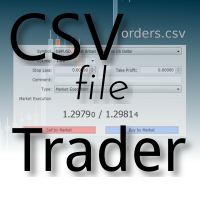
CSV Trader reads CSV files and executes the orders written in. When you need to send orders to mt4 using different platforms or softwares you can easily set them to write their orders to CSV file and then use this EA to execute them in MT4. Many time I read in Freelance section that people needed a CSV trade executor and now I coded a generic one that can fits all your need. Pay attention: if you are in live/demo you should put your CSV files in " MQL4\Files\CSV_Orders\ " , when you backtest it

Overview
The Expert Advisor allows you to receive notifications to the mobile phone (or tablet PC), mailbox or play the sound alert when some events occured: opening or closing position, placing or deleting pending order; changing open price, stop loss or take profit; the account balance, equity, margin level, free margin or drawdown has reached the user specified level. You can specify a notification interval, notification text template and audio file for sound alerts. Expert Advisor saves the

This indicator shows the remaining time for the candle to close, even if the price does not change in value, the clock keeps counting backward. You can also program price alert levels using trend lines.
It can be used together with Expert Advisors and other panels, such as Controller without limit .
MT5 version
Instructions To set a price alert level, you must draw a trend line. Once the object has been drawn, it must be named so that the indicator recognizes the object. In the name, th
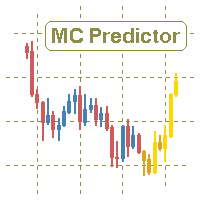
The utility refers to probabilistic analysis tools, in particular the Monte Carlo method. The Monte Carlo method is defined as the simulation of processes in purpose to evaluate their probabilistic characteristics and apply them to the solvable task.
Operation features The simulation uses a tick model with the subsequent transformation to the candles form, as a model as close as possible to the real market process. The utility generates a stream of a random tick sequence until a result with the

Panel "panel_kjutaMultiTerminal" for trading. Opens, modifies, closes and deletes trading and pending orders from the chart using virtual lines, buttons and the active information terminal. Automatically opens an order by indicator levels. Hints in Russian, English or disabled. It has a number of functions for trailing virtual Take Profit lines and limit orders. Displays information on the active information terminal. Hides and includes virtual lines S/L , T / P, buttons "<>","M","X", as well a

Hola Traders. Lot - lot size for pending orders. Martingale - double lot size of pending orders. *(No Martingale = 1.00) TotalGridEachSide - unit each side of pending orders. SpaceOfFirstOrder - distance for the first order in points. Take Profit - profit in points. Stop Loss - loss in points. The entire positioning uses POINTS only. (10 point = 1 pip)
and you can open order BUYLIMIT, SELLLIMIT, ALLBUYANDSELL you can Close Pending, Close orders Profit and Loss and Close All *** ideas for usin

Modify SELL orders v1.0 Managing Orders During trading, you may need to modify orders, i.e. to change stop levels or take profit. This can be done with one click with the script Modify SELL orders v1.0
The script modifies all orders (market ) with specified Take Profit and Stop Loss.(pip or price) If the take profit or(and) stop loss is incorrect, then the value is not changed.
Parameters script : Take Profit (PIP) Stop Loss (PIP) Take Profit (price) Stop Loss (price)

Modify BUY orders_v1.0 Managing Orders During trading, you may need to modify orders, i.e. to change stop levels or take profit. This can be done with one click with THE SCRIPT Modify BUY orders v1.0
The script modifies all orders (market ) with specified Take Profit and Stop Loss.(pip or price) If the take profit or(and) stop loss is incorrect, then the value is not changed.
Parameters SCRIPT; Take Profit (PIP) Stop Loss (PIP) Take Profit (price) Stop Loss (price)

The script opens a separate window and displays information about the current open positions in it.
The informer will be useful to those who operate with a large number of positions open on different instruments in different directions.
It allows you to quickly decompose the loading of the deposit by instruments, visually identify the most tense places in the aggregate position. For the exposed stop orders, it calculates the total risks and goals.

This is a script used for placing pending orders. However, this does not create a trivial grid of orders, but a little "thinks and counts" ;) The general idea that guided me when writing this script is the concept of playing the demand and supply zones by setting pending "limits", but with a predetermined level of risk that I accept. Operating principles: - put a rectangle on the graph, which is supposed to reflect the "zone" we are going to play, - drag the Pending_Orders_1v6_Rectangle script t

Hola Traders. Lot - lot size for pending orders. Martingale - double lot size of pending orders. *(No Martingale = 1.00) TotalGridEachSide - unit each side of pending orders. SpaceOfFirstOrder - distance for the first order in points. Take Profit - profit in points. Stop Loss - loss in points. The entire positioning uses POINTS only. (10 point = 1 pip)
and you can open order BUYSTOP, SELLSTOP, ALLBUYANDSELL you can Close Pending, Close orders Profit and Loss and Close All *** ideas for using

Easiest Trader is an user friendly and very easy to use algorithmic system. Open the first Order according to your own strategy using the buttons that are available on the left corner of the Chart and continue your personal life instead of continuously monitoring the markets. Easiest Trades will assume to set Take Profit, open more Orders using Grid system if needed, protect the percentage of Balance you have set according to settings doing all the work for you without you. Just eight settings

Buffer Scanner is a Scripts to help you export only 2 buffers of your custom indicator data with history date time and open&close price in CSV file, The file name already has rename. More like for BinaryOptions indicators, analyzes, you can modify the input from script parameters,especially~!No need to worry about the indicator sets bars limited, some of the indicators have parameters, but important thing is bars limited, remind you this script just only for "The indicator which has one paramet
FREE
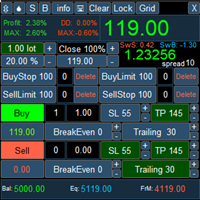
PanelLongProfit -многофункциональная панель нового поколения. Возможности: Позволяет оперативно реагировать на резкие движения рынка, все управление сосредоточено в панели в одном месте экрана Выбор языка сообщений (RUS, ENG) Кнопка "Clear" очищает график от лишних и не нужных объектов Кнопка "Lock" локирует все сделки. Если кнопка включена, то советник постоянно локирует позиции. Кнопка "Grid" возможность выставлять сетку ордеров отложенными ордерами. В параметрах советника можно настроить се

If you need to follow more than 1 open position , you would ike to use this simple TrailingStop EA.
Input 1 You have 4 options to set the TrailingStop , Follow the positions of the graph's symbol. Follow a position that has a given ticket number. Follow the positions that has a given Magic number. Follow All the positions. Input 2 Ticket Number ( if 2nd option is selected as input 1) Input 3
Magic Number ( if 3rd option is selected as input 1) Input 4
Trailing Stop amount in Pips Input 5
2
FREE

ExPad - a trade panel for comfortable trading on financial markets. Suitable for trading any financial instruments. In general, the panel is able to perform the following functions: Open and reverse of deals Operation with visible and hidden StopLoss and TakeProfit Independent management of visible and hidden StopLosses Profit protection due to Breakeven and Trailing Stop Choice of technique for Trailing Stop Distance from market price Moving Average Bolinger Bands Middle Line High and Low pri

Утилита « Loss Control Panel » является информационной панелью для контроля убытков. Во входных параметрах пользователь задает начальный депозит и минимально допустимый размер эквити, при достижении которого все ордера, включая отложенные, принудительно закрываются, предотвращая, таким образом, потерю средств. Также есть возможность детально настроить цветовую схему панели. На панели отображаются следующие данные: Start deposit Начальный депозит. Min allowable deposit Минимально допустимый разме
FREE

VolatilityHunter
VolatilityHunter is an intelligent expert advisor that records unusually high movement bars to csv file.
VolatilityHunter's generated csv file can be found in:
Files/VolatilityHunter/{BROKER_NAME}/{PAIR_NAME} [{TIME_FRAME}].csv
Afterwards it is possible to compare csv data with economic calendar such as:
https://www.investing.com/economic-calendar/ for further analysis.
RECOMMENDATIONS:
Use history ticks data converted to GMT time zone.

ClosureMaster Utility closes all orders and offers 7 additional modes. If you have dozens or even hundreds of orders and need to close them all or some of them selectively by comment, magic number, buy only, sell only, if Stop Loss is not set, only profitable or losing trades, then ClosureMaster Utility can take care of this task.
External parameters:
Close all Losing trades Close all Profitable trades Close all orders without Stop Loss Close Buy orders only Close Sell orders only Close by Magic
FREE

This scanner is a tool used to support trading. Scanner searches on a wide market, in real time setups, created by mutual arrangements of candles (candles pattern). Its basic features are: 8 implemented trading setups (it is possible to add further setups, additional versions of the scanner), the possibility of simultaneous scanning, all financial instruments available on the platform, the possibility of simultaneous scanning, in all timeframes available on the platform, the ability to manua

JustLineTrader is an EA for trading manually using Graphic Objects that are easy to use. There are 6 lines, namely Buy Line, TP Buy Line, SL Buy Line, Sell Line, TP Sell Line, and SL Sell Line. 6 The line is a trend line chart that we manually installed on the Chart. When the price reaches its Line, it will execute the order on the Panel Line Day Trade. JustLineTrader consists of a panel section for manual trading and part 6 lines for installing trend lines as triggers for order-send and order-c
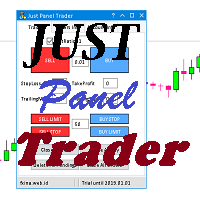
JustPanelTrader is an EA for trading manually using Graphic Objects that is easy to use. Trading is done by clicking the button on the panel Button consists of Sell: To place a Sell order Buy: To place a Sell order SellLimit: To install a Sell order SellStop: To install a Sell Pending Order CloseAll: To close all orders and pending orders ClosePendingOrder: To delete all pending orders CloseSell: To close all Sell orders Close Buy: To close all Buy orders
TextBox consists of LotRatio: to deter

Panel Tool – Button Click Trading (Replaces Default Trade Panel)
Features
1. Open or close Long positions with a button click.
2. Open or close Short positions with a button click.
3. Set lot sizes.
4. Set Stop-Loss (SL) or Take-Profit (TP) points (0 = not used).
5. Set order comments.
6. Display the Break-Even price .
7. Show total Long and Short lot sizes.
8. Display Profit or Loss in USD.
9. Show daily Profit or Loss in USD.
10. Set ID = 0 to manage manual orders together .
FREE

Broker & Account Info / Network Connection / Historical Order Benchmarks / Market Watch Symbols / Current Order Status
Features:
1. Symbol’s Trading Privileges – Ensure the symbol is tradable.
2. Order Execution Mode – Check the broker’s execution type.
3. Trade Session Hours – Verify the trading hours.
4. Min/Max Lot Sizes – Check the allowed lot range.
5. Max Pending Orders – Confirm the maximum number of pending orders allowed.
6. Freeze Point & Pending Order Distance – Minimum distance re
FREE
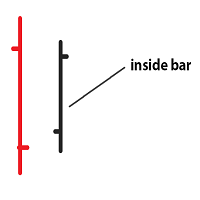
Inside bar price action. Inside bar must be completely engulfed within mother bar (mother bar is indicated as bar 2 in inputs). Stop orders will be placed after the formation of the inside bar at the top and bottom of the mother bar. Inputs: Interval from bar 2 - the distance of placing stop orders from the top and bottom of the mother bar. Lot Size - volume of the trade. Take Profit - multiple of the size of the mother bar. Stop Loss as % of mother bar - adjust the stop loss of the stop orders

Zararı Durdur ve Kar Al yönetimini otomatikleştirerek alım satım deneyiminizi geliştirmek için tasarlanmış güçlü bir araç olan TPSL Sürücü Yardımcı Programı ile tanışın. Bu yardımcı program, kesintisiz sipariş yönetimi ve gelişmiş kar koruma teknikleri isteyen her tacire hitap eder. TPSL Driver Utility ile, iki sipariş yönetimi modu arasında seçim yapma esnekliğine sahipsiniz: Gizli ve Görsel. Gizli mod, Kârı Al ve Zararı Durdur seviyelerini gizlemenize izin vererek işlemlerinizi yönetmek iç

The Easy Strategy Builder (ESB) is a " Do It Yourself " solution that allows you to create a wide range of the automated trading strategies without any line of codes. This is the world’s easiest method to automate your strategies that can be used in STP, ECN and FIFO brokers. No drag and drop is needed. Just by set conditions of your trading strategy and change settings on desired values and let it work in your account. ESB has hundreds of modules to define unlimited possibilities of strategi
This Expert Advisor is a very advanced sequential tool that gives each user the possibility to program
the order of tasks according to specific conditions.
Everything can be done in a simple and intuitive way.
The sequencing of the EA's programming ensures that each operation is carried out one after another.
I present the method of operation in the attached movie.
EA global settings magic – individual EA number . For each EA attached on the same instrument, a different number must be entered

Some traders don't like expose Take Profit/Stop Loss level in their positions, this Expert Advisor can help them.
Put it to chart and set Take Profit/Stop Loss pips (0 means ignore), it watch the price of the symbol on chart and close the position if price reach Hidden TP/SL level.
It hide user's TP/SL price in effect.
Welcome to contact me.
。。。。。。。。。。。。。。。。。。。。。。。。。。。。。

Stay updated with Multicurrency Overview!! The algorithm of this EA releases an average of the movement percentage of all the Forex currencies linked to a single currency, isolating it, letting us to comprehend its real and specific trend.
Above on the left, a panel show us efficiently the trend of the currency, in the timeframe actually used. The second panel will keep you updated on macroeconomic news.
P.N.:The news time is based on your pc clock time, this way you won't have any problem reg
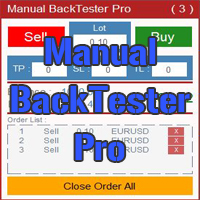
The Manual BackTester Pro utility allows to simulate the manual trading in the MetaTrader 4 strategy tester.
The utility has no parameters at initialization. Time Frame Support: M1, M5, M15, M30, H1, H4, D1, W1, MN1
Panel Description:
The panel has Buy and Sell buttons for placing market orders. It is possible to set the Take Profit, Stop Loss and the Trailing Stop in the TP, SL and TL fields, respectively, measured in points of order opening price. The Lot field sets the lot size. It is pos

Zenner Trading Presents FX Gambit
Streaming Live on YouTube: https://youtu.be/rD9bCSxypio
FX Gambit is an Adaptive, Market Neutral, Dual MT4 based Parallel Launch Automated Trading System, designed to respond to all directional combinations and permutations of the market, and still produce a Net Positive Outcome. There are 2 instances of MT4 with 2 charts in each. The LONG LEG of the HEDGE is in the left chart and the SHORT LEG on the right. The two MT4 instances exchange current market BID
FREE
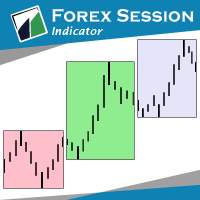
The indicator Forex Session displays official forex session times for Asia, Europe, America.
Main features shows Asian, European and American sessions shows the session volatility it can also be used for breakout trading
Indicator parameters 01: Sessions Session value - number of sessions Last session in developing mode - the session will be progressively displayed Adapts the size session to range - session size adjusts to volatility
02: Display Asia - on/off Europe - on/off America - on/of
FREE

The Market Info is a universal indicator to show basic information about the market in a simple table on the chart.
Main features Displays current market information as: Symbol name Timeframe Price Spread Average daily range Current daily range Broker time Local time Market hours Date Remaining bar time
Indicator parameters All indicator settings are arranged in logical blocks for easy orientation and adjustment. You can set this features: 01: Main Corner - position on chart Left up Left down
FREE

This tool simplifies routine trading tasks (like opening market orders, setting up pending orders, closing of all orders and orders by parameter), helps to control losses by use of break even stop and trailing stop, and adds a little bit of cyber punk edge to your trading
Control Elements Left side of the panel includes: order counter (shows the number of orders); connection status sign (notifies if connection is lost); trade permission sign (notifies if autotrading permisiion is turned off); m

This is a demo version of CyberTrader Assistant tool. In demo version you cannot change lots value (it is set to the minimal value for the given symbol) and price rounding function for pending orders is unavailable This tool simplifies routine trading tasks (like opening market orders, setting up pending orders, closing of all orders and orders by parameter), helps to control losses by use of break even stop and trailing stop, and adds a little bit of cyber punk edge to your trading
Control Ele
FREE

It helps to calculate the risk per trade, the easy installation of a new order, order management with partial closing functions, trailing stop of 7 types and other useful functions.
Additional materials and instructions
Installation instructions - Application instructions - Trial version of the application for a demo account
Line function - shows on the chart the Opening line, Stop Loss, Take Profit. With this function it is easy to set a new order and see its additional characteris

The indicator calculates the historic price statistics: the number of intersections of a level and the number of rollbacks. The levels are set as horizontal lines (the 'Horizontal lines' element on the Toolbar) manually, are are drawn automatically by the indicator with the specified step. Only strong levels are drawn in the automated mode. There are two options for the automated mode: 1. Strong levels of intersection and support/resistance; 2. Strong support/resistance levels. The indicator use

ExpertLines is a productivity expert to open orders by the breaking of the buy or sell lines, providing risk x reward and pips information on every trade. The expert can close the opened order by virtual lines of stop loss and take profit or by close buy or sell button. He also has a trailing stop resource if enabled. All this in a fast and easy way. Arm your trade with ExpertLines and have a good trade.
Main Parameters Magic_Number - It is the magic number that the expert advisor uses to ident
FREE

The script allows you to quickly and easily open trades (place orders) on the market.
Features Buy and sell at a market price; Place pending orders: Buy/Sell Limit and Buy/Sell Stop; Open a trade with a custom volume; Calculate and set TakeProfit; Calculate and set StopLoss; Auto defining the number of decimal places; Auto defining a symbol the script has been applied to.
What you get with the script Ability to calculate each trade instantly; Ability not to enter all calculated values manually

A Utility used for accounts with multiple open positions with Magic numbers added via Expert Advisors or manually. The Utility closes specific Magic number open positions when a certain profit in currency $ has been reached. The Utility also closes specific Magic numbers open positions with a break-even feature when the Expert Advisors or manually a certain amount of open positions has been placed. The Utility also closes all buy stops and sell stops when the "Take profit sum $" has been reache
FREE

A Utility used for accounts with multiple open positions with Magic numbers added via Expert Advisors or manually. The Utility closes specific Magic number open positions when a certain profit in currency $ has been reached. The Utility also closes specific Magic numbers open positions with a break-even feature when the Expert Advisors or manually a certain amount of open positions has been placed. The Utility also closes all buy stops and sell stops when the "Take profit sum $" has been reache
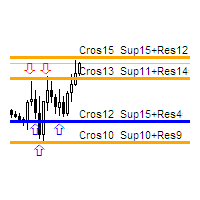
The indicator calculates the number of times the price crossed the levels and bounced off the levels in history. The levels are defined by horizontal lines (Horizontal lines element from the Toolbar). In the free version, the levels are set manually. To calculate the number of crosses and rebounds, the indicator uses the specified tolerance to touching a level. This tolerance is sensitive to the timeframe of the bars. For example: for M5 use a tolerance about 10 pips, for М30 - 30 pips, for D1 -

This utility clones the chart it is running on. It opens the same chart with the same graphical objects, set of indicators (saving the parameters) and the rest of the elements. In essence, it performs a deep copying of the original chart, transferring the template to the opened chart. The symbol and the timeframe of the original chart are also saved.
FREE

The Expert Advisor is a great tool that allows you to control your trade with ease and precision. The tool can be moved in the graphs and offers the following characteristics:
Instant order entry with a single click. Entry of pending orders using price tags and trend lines. Instant order closure with a single click. Instant order closure using trend lines as output levels that the broker can not see. We can modify the way to enter and exit the market, allowing us to choose the way to do it. For

The Yellow mouse manual tool is designed for manual trade management based in the 'EA Yellow mouse scalping' strategy. Trading time and direction are selected using on-screen buttons: "Trade" (allow trading), "Buy" (only allow Buy trades), "Sell" (only allow Sell trades) and "Close" (close all trades). After that the utility will trade in the selected direction with specified settings. When orders are close in any way (by take profit, stop loss or for any other reason), the "Trade" button change
MetaTrader Mağazası, alım-satım robotları ve teknik göstergeler satmak için en iyi yerdir.
MetaTrader platformu için ilgi çekici bir tasarıma ve iyi bir açıklamaya sahip bir uygulama geliştirmeniz yeterlidir. Milyonlarca MetaTrader kullanıcısına sunmak için size ürününüzü Mağazada nasıl yayınlayacağınızı açıklayacağız.

Alım-satım fırsatlarını kaçırıyorsunuz:
- Ücretsiz alım-satım uygulamaları
- İşlem kopyalama için 8.000'den fazla sinyal
- Finansal piyasaları keşfetmek için ekonomik haberler
Kayıt
Giriş yap
Web sitesi politikasını ve kullanım şartlarını kabul edersiniz
Hesabınız yoksa, lütfen kaydolun