 MetaTrader 5
 Uzmanlar
 Göstergeler
 Komut dosyaları
 Kütüphaneler
 Depo
Depo
Fan sayfamıza katılın

SR Zone Scanner - MetaTrader 5 için gösterge

- Görüntülemeler:
- 51
- Derecelendirme:
- Yayınlandı:
-
 Alım-satım fırsatlarını kaçırıyorsunuz:
- Ücretsiz alım-satım uygulamaları
- İşlem kopyalama için 8.000'den fazla sinyal
- Finansal piyasaları keşfetmek için ekonomik haberler
Kayıt Giriş yapWeb sitesi politikasını ve kullanım şartlarını kabul edersiniz
Hesabınız yoksa, lütfen kaydolun -
 Bu koda dayalı bir robota veya göstergeye mi ihtiyacınız var? Freelance üzerinden sipariş edin
Freelance'e git
Bu koda dayalı bir robota veya göstergeye mi ihtiyacınız var? Freelance üzerinden sipariş edin
Freelance'e git
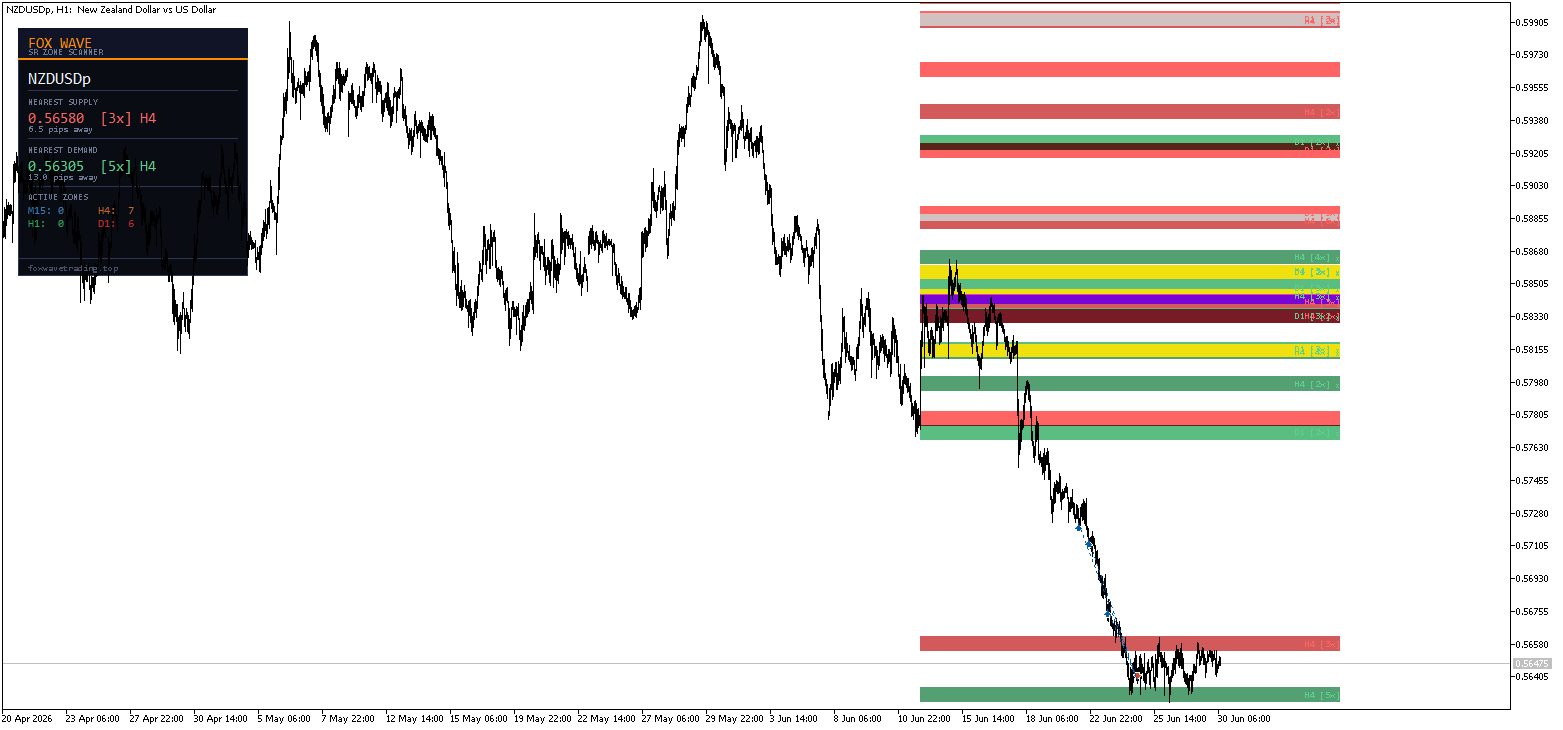
FoxWave SR Zone Scanner, birden fazla zaman diliminden Arz ve Talep bölgelerini otomatik olarak algılar ve doğrudan grafiğinizin üzerine çizer — manuel çizim yapmaya gerek yok, tahminde bulunmaya gerek yok. Fiyatın daha önce tam olarak nerede tepki verdiğini ve her bir seviyenin ne kadar güçlü olduğunu görün; fiyat önemli bir bölgeye yaklaştığı anda uyarı alın.
Öznel, elle çizilmiş çizgiler yerine net ve objektif seviyelere ihtiyaç duyan fiyat hareketi ve scalping yatırımcıları için tasarlanmıştır.
Ne işe yarar?
► Otomatik Çoklu Zaman Dilimi Bölge Algılama Gösterge, M15, H1, H4 ve D1 olmak üzere dört zaman dilimini tarar ve fiyatın tekrar tekrar ters yönüne döndüğü alanları belirler. Her bölge, kümelenmiş pivot yüksekleri (Arz) veya pivot düşükleri (Talep) temel alınarak oluşturulur; böylece keyfi çizgiler değil, gerçek yapıyı görürsünüz.
Daha yüksek zaman dilimlerine (H4, D1) ait bölgeler daha koyu ve doygun renklerle çizilir; böylece M5 gibi daha düşük bir zaman dilimi grafiğinde bile hangi seviyelerin daha fazla ağırlık taşıdığını anında görebilirsiniz.
► Bölge Güç Derecesi Her bölge, bir temas sayısı etiketi gösterir; örneğin, H1 [4x]. Fiyat o seviyede ne kadar çok tepki verirse, bölge o kadar güçlü ve güvenilirdir. Tek temaslı gürültüden kaynaklanan karmaşayı önlemek için, yalnızca anlamlı bölgelerin çizilmesi amacıyla minimum temas sayısı belirleyin.
► Aktif / Kırılmış Bölge Takibi Bölgeler durumlarını otomatik olarak günceller. Fiyat bir bölgeyi kapatarak geçtiğinde, bölge "kırılmış" olarak işaretlenir ve artık uyarı tetiklemez; böylece grafiğiniz ve bildirimleriniz mevcut fiyat yapısıyla alakalı kalır.
► Anlık Bölge Uyarıları Fiyat güçlü bir bölgeye yaklaştığı veya bu bölgeye girdiği anda şu yollarla bilgilendirilirsiniz:
- 🔔 Açılır pencere — ekran üstü uyarı penceresi
- 📱 Anlık bildirim — doğrudan MetaTrader mobil uygulamanıza
- 📧 E-posta — kayıtlı MT5 adresinize gönderilir
Fiyat bölgeye ulaşmadan hemen önce uyarı alabilmek için uyarı mesafesini pip cinsinden ayarlayın — tepki ticareti için hazır olmak isteyen scalper'lar için mükemmeldir.
► Bilgi Paneli Kompakt Fox Wave paneli, bir bakışta şunları gösterir:
- Fiyatın üzerindeki en yakın Arz bölgesi — kesin seviye, temas sayısı, kaynak zaman aralığı, pip cinsinden mesafe
- Fiyatın altındaki en yakın Talep bölgesi — aynı ayrıntılar
- Zaman dilimi başına aktif bölge sayısı (M15 / H1 / H4 / D1)
Temel Özellikler
- 4 zaman dilimini aynı anda tarar: M15, H1, H4, D1
- Zaman dilimi başına bağımsız göster/gizle seçeneği
- Akıllı pivot kümeleme — yakın temas noktalarını tek bir net bölgeye birleştirir
- Zayıf seviyeleri filtrelemek için yapılandırılabilir minimum temas sayısı
- Otomatik kırık bölge algılama
- Üçlü uyarı sistemi: açılır pencere + push bildirimi + e-posta; her biri bağımsız olarak etkinleştirilebilir
- Akıllı uyarı sıfırlama — fiyat bölge içinde kaldığı sürece yinelenen bildirimler olmaz
- Zaman dilimi ve bölge türü (Arz/Talep) başına tam renk özelleştirme
- Hafif — periyodik yeniden tarama, her tik için yeniden hesaplama yükü yok
- Tutarlı Fox Wave koyu panel tasarımı
Girişler Referansı
Taranacak Zaman Dilimleri
| Parametre | Varsayılan | Açıklama |
|---|---|---|
| UseTF_M15 | true | Tarama işlemine M15'i dahil et |
| UseTF_H1 | true | H1'i taramaya dahil et |
| TF_H4'ü kullan | true | Tarama işlemine H4'ü dahil et |
| UseTF_D1 | true | D1'i taramaya dahil et |
Bölge Algılama
| Parametre | Varsayılan | Açıklama |
|---|---|---|
| Geriye Dönük Çubuk Sayısı | 300 | Zaman dilimi başına taranan çubuk sayısı |
| MinTouches | 2 | Bir bölge oluşturmak için gereken minimum pivot temas sayısı |
| Bölge Genişliği (Pips) | 8,0 | Çizilen her bir bölgenin genişliği (pip) |
| Birleştirme Mesafesi (Pips) | 5,0 | Bu mesafeden daha yakın pivotları birleştir |
| MinBarsBetween | 3 | Dokunmalar arasındaki minimum çubuk aralığı |
Görüntüle
| Parametre | Varsayılan | Açıklama |
|---|---|---|
| ShowM15Zones / ShowH1Zones / ShowH4Zones / ShowD1Zones | true | Zaman dilimine göre bölgeleri göster/gizle |
| Bölge Etiketlerini Göster | true | Bölgelerde dokunma sayısı etiketlerini göster |
| Panel'i göster | true | Bilgi panelini göster |
| TF Başına Maksimum Bölge Sayısı | 6 | Zaman dilimi başına çizilen maksimum bölge sayısı |
Uyarılar
| Parametre | Varsayılan | Açıklama |
|---|---|---|
| AlertOnZoneEntry | true | Bölgeye yaklaşma/giriş uyarılarını etkinleştir |
| AlertPips | 2,0 | Bölgeden tetikleme mesafesi (pip) |
| Uyarı Açılır Penceresi | true | Ekran üzerinde açılır uyarı |
| AlertPush | true | Mobil uygulamaya push bildirimi |
| AlertEmail | false | E-posta uyarısı |
Renkler Her zaman diliminde Arz ve Talep bölgeleri için tamamen bağımsız renk kontrolü ve eksiksiz panel renk özelleştirme.
Panel Konumu
| Parametre | Varsayılan | Açıklama |
|---|---|---|
| PanelX | 15 | Grafik kenarından yatay ofset |
| PanelY | 25 | Grafik kenarından dikey ofset |
Push bildirimleri nasıl ayarlanır?
- Mobil cihazınızda MetaTrader 5'i açın
- Ayarlar → Mesajlar 'a gidin ve MetaQuotes kimliğinizi kopyalayın
- MT5 masaüstü sürümünde: Araçlar → Seçenekler → Bildirimler
- MetaQuotes kimliğinizi yapıştırın ve bildirimleri etkinleştirin
- Gösterge girişlerinde AlertPush = true olarak ayarlayın
Kimler için uygundur?
- Destek ve Direnç seviyelerine güvenen ancak bölgeleri manuel olarak yeniden çizmekten bıkmışfiyat hareketi yatırımcıları
- Fiyatın önemli bir tepki seviyesine ulaştığını anında öğrenmek isteyenscalperlar
- M5/M15'te işlem yaparken H4/D1 yapısını görmek isteyençoklu zaman dilimi yatırımcıları
- Öznel çizgiler yerine objektif, dokunma ile doğrulanmış bölgeler isteyenherkes
Kurumsal seviyelerin temelini oluşturan aynı yüksek zaman dilimi yapısıyla işlem yapın — otomatik olarak algılanır, açıkça etiketlenir ve gerçek zamanlı uyarılar sayesinde gözden kaçması imkansızdır.
Uyumluluk
- Platform: MetaTrader 5
- Tüm sembollerde çalışır: Forex çiftleri, endeksler, emtialar, kripto paralar, metaller
- Herhangi bir grafik zaman diliminde çalışır (grafik süresine bakılmaksızın bölgeler M15/H1/H4/D1'den gelir)
- DLL içe aktarımı gerekmez
MetaQuotes Ltd tarafından İngilizceden çevrilmiştir.
Orijinal kod: https://www.mql5.com/en/code/74492
SniperGold SMC ProPlus (Institutional Smart Money Concepts)
SMC chart indicator: market structure (BOS/CHoCH), volume weighted order blocks, multi timeframe FVG, equal highs/lows, liquidity sweeps, premium/discount zones, a 3 time frame bias panel and an optional trade setup readout. Closed bar logic only (no repaint). It draws and alerts, it does not place trades.
Pip Value Calculator
Canlı pip değeri, riske dayalı lot büyüklüğü belirleme, özel hacim risk analizi ve açık pozisyon kâr/zararı — hepsi tek bir panelde.
 Equity Guard — Panik Paneli Özelliğine Sahip Günlük Zarar Sınırı Koruyucusu
Hesap düzeyinde günlük zarar koruyucu: Günlük zararın ayarlanabilir bir tetikleme seviyesine ulaştığında, tüm pozisyonları ve bekleyen emirleri kapatır ve bir sonraki günlük sıfırlamaya kadar hesabı sabit tutar. Yüzde veya para cinsinden limitler, yapılandırılabilir sıfırlama zamanı (sunucu saati), canlı göstergeli sürüklenebilir görsel panel ve tıklayarak onaylanan manuel TÜMÜNÜ KAPAT / KİLİTLE düğmeleri. Herhangi bir broker, sembol, hesap büyüklüğü ve para biriminde çalışır — riskten korunma ve netleştirme, DLL gerektirmez.
Consecutive Bars (with history)
4 adet çizgi analizini gösteren bir osilatör: 1 tanesi ardışık yükseliş çubukları için, 1 tanesi ardışık düşüş çubukları için, 1 tanesi ardışık yükseliş çubuklarının ortalaması için ve 1 tanesi de ardışık düşüş çubuklarının ortalaması için.