 MetaTrader 5
 Experts
 지표
지표
 스크립트
스크립트
 라이브러리
라이브러리
 보관함
보관함
당사 팬 페이지에 가입하십시오

SR Zone Scanner - MetaTrader 5용 지표

- 조회수:
- 37
- 평가:
- 게시됨:
-
 이 코드를 기반으로 한 로봇이나 지표가 필요하신가요? 프리랜스로 주문하세요
프리랜스로 이동
이 코드를 기반으로 한 로봇이나 지표가 필요하신가요? 프리랜스로 주문하세요
프리랜스로 이동

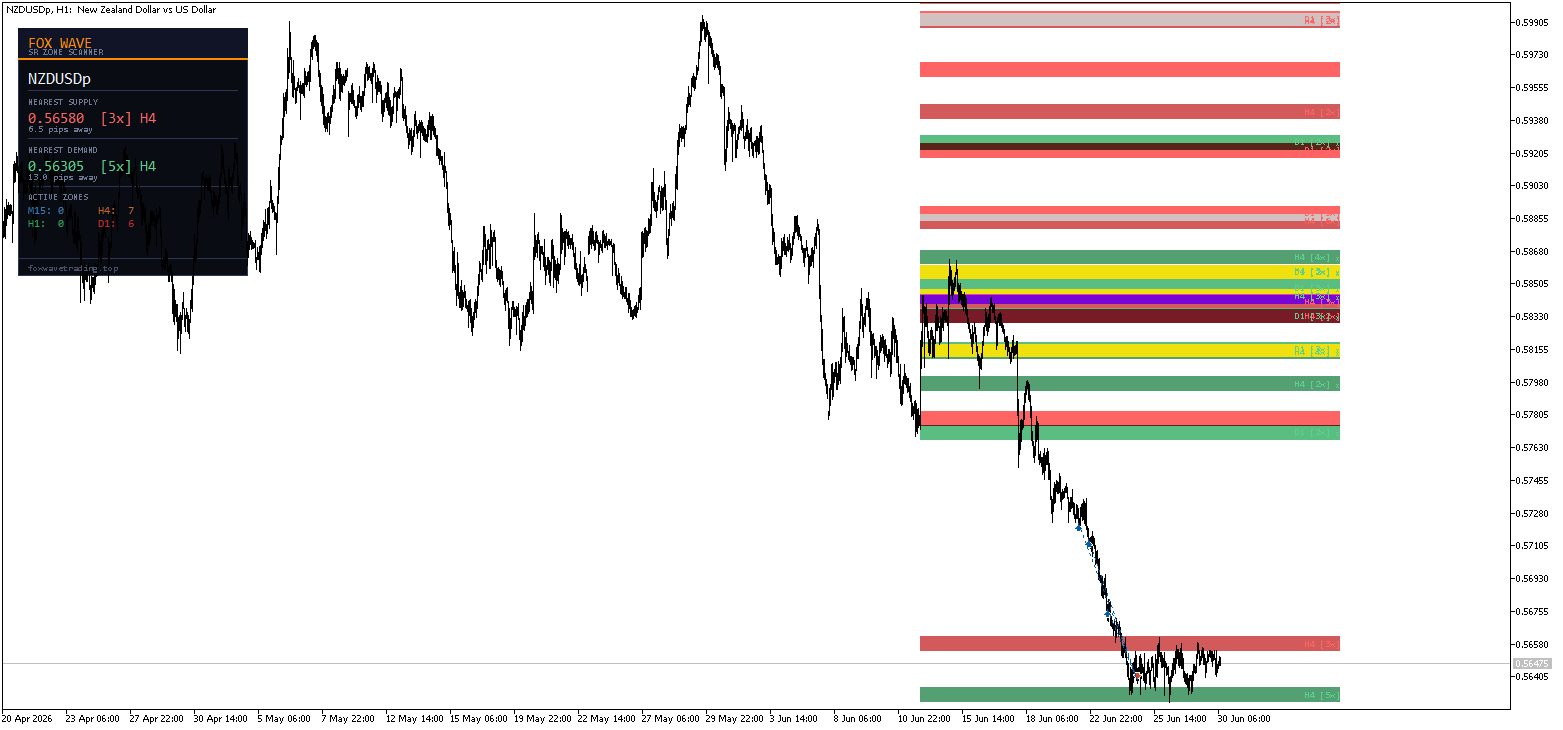
FoxWave SR Zone Scanner는 여러 시간대의 매수·매도 구역을 자동으로 감지하여 차트에 직접 표시해 줍니다. 수동으로 그릴 필요도, 추측할 필요도 없습니다. 가격이 과거에 정확히 어디에서 반응했는지, 각 지지·저항선의 강도가 어느 정도인지 확인하고, 가격이 주요 구역에 접근하는 순간 알림을 받을 수 있습니다.
주관적인 수기 선 대신 명확하고 객관적인 지지선과 저항선이 필요한 가격 움직임(Price Action) 및 스캘핑 트레이더를 위해 설계되었습니다.
기능
► 자동 다중 타임프레임 구역 탐지 이 지표는 M15, H1, H4, D1 등 최대 4개의 타임프레임을 스캔하여 가격이 반복적으로 반전된 구역을 식별합니다. 각 구역은 피벗 고점(공급) 또는 피벗 저점(수요)이 밀집된 지점을 기반으로 형성되므로, 임의의 선이 아닌 실제 시장 구조를 확인할 수 있습니다.
더 높은 시간대(H4, D1)의 존은 더 진하고 채도가 높은 색상으로 표시되어, M5와 같은 낮은 시간대 차트에서도 어떤 수준이 더 큰 비중을 차지하는지 한눈에 파악할 수 있습니다.
► 존 강도 등급 각 존에는 터치 횟수 라벨(예: H1 [4x])이 표시됩니다. 해당 수준에서 가격이 반응한 횟수가 많을수록 존은 더 강력하고 신뢰할 수 있습니다. 최소 터치 횟수를 설정하여 의미 있는 존만 표시되도록 하면, 단 한 번의 터치로 인한 잡음이 차트를 어지럽히지 않습니다.
► 활성/파괴된 존 추적 존의 상태는 자동으로 업데이트됩니다. 가격이 존을 관통하여 종가를 기록하면 해당 존은 ‘파괴됨’으로 표시되며 더 이상 알림을 트리거하지 않습니다. 이를 통해 차트와 알림이 현재 가격 구조에 부합하도록 유지됩니다.
► 실시간 구간 알림 가격이 강력한 구간에 접근하거나 진입하는 순간, 다음을 통해 알림을 받게 됩니다:
- 🔔 팝업 — 화면 내 알림 창
- 📱 푸시 알림 — MetaTrader 모바일 앱으로 바로 전송
- 📧 이메일 — 등록된 MT5 주소로 발송
가격이 해당 구간에 도달하기 직전에 알림을 받을 수 있도록 알림 거리를 핍 단위로 설정하세요. 반응형 거래에 대비하고자 하는 스캘퍼에게 안성맞춤입니다.
► 정보 패널 간결한 Fox Wave 패널을 통해 한눈에 확인할 수 있습니다:
- 가격 상단의 가장 가까운 공급 구역 — 정확한 수준, 접촉 횟수, 출처 타임프레임, 핍 단위 거리
- 가격 아래에 위치한 가장 가까운 수요 구역 — 동일한 세부 정보
- 시간대별(M15 / H1 / H4 / D1) 활성 구역 수
주요 기능
- M15, H1, H4, D1 등 4가지 시간대를 동시에 스캔
- 시간대별 독립적인 표시/숨기기 토글
- 스마트 피벗 클러스터링 — 인접한 터치 지점을 하나의 명확한 구역으로 통합
- 약한 레벨을 필터링하기 위한 최소 터치 횟수 설정 가능
- 자동 영역 돌파 감지
- 3중 알림 시스템: 팝업 + 푸시 알림 + 이메일, 각각 독립적으로 설정 가능
- 스마트 알림 재설정 — 가격이 해당 구역에 머무는 동안 중복 알림 없음
- 시간대별, 구역 유형별(공급/수요) 완전한 색상 사용자 지정
- 경량화 — 주기적 재스캔, 틱당 재계산 부하 없음
- 일관된 Fox Wave 다크 패널 디자인
입력값 참조
스캔할 시간대
| 매개변수 | 기본값 | 설명 |
|---|---|---|
| UseTF_M15 | true | 스캔에 M15 포함 |
| UseTF_H1 | true | 스캔에 H1 포함 |
| UseTF_H4 | true | 스캔에 H4 포함 |
| UseTF_D1 | true | 스캔에 D1 포함 |
영역 감지
| 매개변수 | 기본값 | 설명 |
|---|---|---|
| LookbackBars | 300 | 시간대당 스캔되는 막대 수 |
| 최소 터치 횟수 | 2 | 구간을 형성하기 위한 최소 피벗 접촉 횟수 |
| 존 폭(핍) | 8.0 | 그려지는 각 구역의 폭 (핍) |
| 병합 거리(핍) | 5.0 | 이 거리보다 가까운 피벗은 병합 |
| 최소 바 간격 | 3 | 접촉 지점 간의 최소 막대 간격 |
표시
| 매개변수 | 기본값 | 설명 |
|---|---|---|
| ShowM15Zones / ShowH1Zones / ShowH4Zones / ShowD1Zones | true | 시간대별 구역 표시/숨기기 |
| ShowZoneLabels | true | 구역에 터치 횟수 레이블 표시 |
| 패널 표시 | true | 정보 패널 표시 |
| TF당 최대 구역 수 | 6 | 시간대당 표시되는 최대 구역 수 |
알림
| 매개변수 | 기본값 | 설명 |
|---|---|---|
| AlertOnZoneEntry | true | 구역 근접/진입 알림 활성화 |
| AlertPips | 2.0 | 구역으로부터의 트리거 거리 (핍) |
| 알림 팝업 | true | 화면 내 팝업 알림 |
| 알림 푸시 | true | 모바일 앱으로 푸시 알림 전송 |
| 이메일 알림 | false | 이메일 알림 |
색상 모든 시간대별 매수·매도 구역에 대한 완전히 독립적인 색상 제어 기능과 패널 색상 전체 사용자 정의 기능.
패널 위치
| 매개변수 | 기본값 | 설명 |
|---|---|---|
| PanelX | 15 | 차트 가장자리로부터의 수평 오프셋 |
| PanelY | 25 | 차트 가장자리로부터의 수직 오프셋 |
푸시 알림 설정 방법
- 모바일 기기에서 MetaTrader 5를 실행하세요
- 설정 → 메시지로 이동하여 MetaQuotes ID를 복사하세요
- MT5 데스크톱 버전: 도구 → 옵션 → 알림
- MetaQuotes ID를 붙여넣고 알림을 활성화하세요
- 지표 입력값에서 AlertPush = true로 설정하세요
대상 사용자:
- 지지선과 저항선을 활용하지만 구역을 수동으로 다시 그리는 데 지친가격 움직임 트레이더
- 가격이 주요 반응 수준에 도달했을 때 즉시 알림을 받고 싶은스캘퍼
- M5/M15 차트에서 거래하면서도 H4/D1 구조를 확인하고 싶은다중 시간대 트레이더
- 주관적인 선 대신 객관적이고 터치로 검증된 구간을 원하는모든 분
기관 투자자들의 레벨이 구축되는 기반이 되는 것과 동일한 상위 시간대 구조로 거래하세요 — 자동으로 감지되고, 명확하게 표시되며, 실시간 알림 덕분에 절대 놓칠 수 없습니다.
호환성
- 플랫폼: MetaTrader 5
- 모든 종목에서 작동: 외환 쌍, 지수, 원자재, 암호화폐, 금속
- 모든 차트 시간대에서 작동합니다(차트 기간에 관계없이 M15/H1/H4/D1의 구역이 적용됨)
- DLL 임포트 불필요
MetaQuotes Ltd에서 영어로 번역함.
원본 코드: https://www.mql5.com/en/code/74492
SniperGold SMC ProPlus (Institutional Smart Money Concepts)
SMC chart indicator: market structure (BOS/CHoCH), volume weighted order blocks, multi timeframe FVG, equal highs/lows, liquidity sweeps, premium/discount zones, a 3 time frame bias panel and an optional trade setup readout. Closed bar logic only (no repaint). It draws and alerts, it does not place trades.
Pip Value Calculator
실시간 PIP 값, 리스크 기반 로트 크기 설정, 맞춤형 거래량 리스크 분석 및 미결제 포지션 손익 — 이 모든 기능을 하나의 패널에서 확인하세요.
 Equity Guard — 패닉 패널이 탑재된 일일 손실 한도 관리 기능
계좌 단위 일일 손실 방지 기능: 일일 손실이 설정 가능한 기준치에 도달하면 모든 포지션과 보류 주문을 청산하고, 다음 일일 리셋 시점까지 계좌 잔고를 제로 상태로 유지합니다. 백분율 또는 금액 단위의 한도 설정, 사용자 정의 가능한 리셋 시간(서버 시간), 실시간 게이지가 표시되는 드래그 가능한 시각적 패널, 클릭 확인 방식의 수동 ‘모두 청산(CLOSE ALL)’/‘잠금(LOCK)’ 버튼을 제공합니다. 모든 브로커, 종목, 계좌 규모 및 통화에 적용되며, 헤징 및 네팅 기능을 지원하며 DLL이 필요하지 않습니다.
Consecutive Bars (with history)
4가지 선형 지표를 표시하는 오실레이터입니다. 1개는 연속 상승 봉을, 1개는 연속 하락 봉을, 1개는 연속 상승 봉의 평균을, 그리고 1개는 연속 하락 봉의 평균을 나타냅니다.