 MetaTrader 5
 Uzmanlar
 Göstergeler
 Komut dosyaları
 Kütüphaneler
 Depo
DepoFan sayfamıza katılın
- Yayınlayan:
- [Silindi]
- Görüntülemeler:
- 168
- Derecelendirme:
- Yayınlandı:
- Güncellendi:
-
 Alım-satım fırsatlarını kaçırıyorsunuz:
- Ücretsiz alım-satım uygulamaları
- İşlem kopyalama için 8.000'den fazla sinyal
- Finansal piyasaları keşfetmek için ekonomik haberler
Kayıt Giriş yapWeb sitesi politikasını ve kullanım şartlarını kabul edersiniz
Hesabınız yoksa, lütfen kaydolun -
 Bu koda dayalı bir robota veya göstergeye mi ihtiyacınız var? Freelance üzerinden sipariş edin
Freelance'e git
Bu koda dayalı bir robota veya göstergeye mi ihtiyacınız var? Freelance üzerinden sipariş edin
Freelance'e git

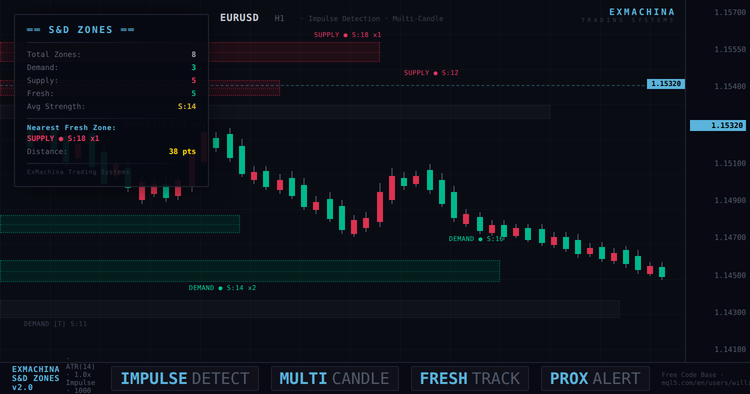
ExMachina Arz ve Talep Bölgeleri v2.0
ExMachina Arz ve Talep Bölgeleri, ATR filtreleme ile dürtü tabanlı algılama kullanarak herhangi bir grafikteki arz ve talep bölgelerini otomatik olarak algılayan profesyonel bir göstergedir. Sürüm 2.0, çok mumlu dürtü algılama, tam aralık ölçümü, bölge birleştirme, dokunma izleme, yakınlık uyarıları ve grafiğinizi profesyonel bir ticaret çalışma alanına dönüştüren bir ExMachina karanlık teması sunar.
Gösterge, kurumsal emir bloklarını geride bırakan keskin yönlü hareketler olan önemli fiyat dürtüleri için son 1000 çubuğu tarar. Bir dürtü tespit edildiğinde, gösterge hareketten önceki temel mumu bir arz veya talep bölgesi olarak işaretler. Her bölge gücüne göre derecelendirilir, tazelik açısından takip edilir ve fiyat dokunuşları ve yakınlık açısından izlenir.
Algılama Nasıl Çalışır?
Çekirdek algoritma, yapılandırılabilir bir çoklu mum penceresi (varsayılan 3 çubuk) üzerindeki dürtü hareketlerini ölçer. Tek bir büyük muma ihtiyaç duymak yerine, gösterge toplam aralığı (yüksek-düşük) veya net hareketi (kapanış-açılış) 2-3 ardışık çubukta toplar ve ATR ile karşılaştırır. Üç çubuk boyunca 1,0x ATR veya daha fazla birleşik hareket bir dürtü olarak nitelendirilir - bu, tek mum algılamanın tamamen kaçırdığı kademeli kurumsal itmeleri yakalar.
Benzer fiyat seviyelerinde aynı türden iki veya daha fazla bölge oluştuğunda, bunlar otomatik olarak daha güçlü tek bir bölge halinde birleştirilir. Bu, kilit seviyelerde üst üste yığılmış dikdörtgenlerin görsel karmaşasını ortadan kaldırır ve bunun yerine temiz, yüksek güvene sahip bir bölge sunar.
Bölge Bilgileri
Her bölge dört veri noktası içeren bir etiket görüntüler: tür (TALEP veya ARZ), tazelik durumu (taze için ●, test edilmiş için [T]), güç puanı (ATR'ye göre dürtü boyutu) ve fiyatın bölgeyi kırmadan kaç kez test ettiğini gösteren dokunma sayısı. Yüksek güç puanına ve birden fazla dokunuşa sahip yeni bir bölge, en yüksek olasılıklı kurulumdur.
Sol üst köşedeki gösterge paneli, toplam bölge sayısını, talep ve arz dağılımını, yeni bölge sayısını, tüm bölgelerdeki ortalama gücü ve puan cinsinden mesafesiyle birlikte en yakın yeni bölgeyi gösterir. Fiyat bir bölgeye yaklaştığında, mesafe değeri görsel bir uyarı olarak sarıya döner.
Uyarı Sistemi
Gösterge iki tür uyarı sağlar. Bölge dokunuşu uyarıları, mevcut mum yeni bir bölgeye girdiğinde ateşlenir. Yakınlık uyarıları, fiyat yeni bir bölgenin yapılandırılabilir bir mesafesine (varsayılan 50 puan) yaklaştığında ateşlenir ve fiyat seviyeye ulaşmadan önce size önceden uyarı verir. Her iki uyarı türü de açılır pencere, ses ve anlık bildirimleri destekler.
Grafik Teması
Etkinleştirildiğinde (varsayılan), gösterge ExMachina karanlık temasını tüm grafiğe uygular: ultra koyu arka plan, deniz mavisi yükseliş mumları, kırmızı düşüş mumları, minimal ızgara ve arz ve talep bölgelerini fiyat hareketini ezmeden görsel olarak farklı kılan profesyonel bir renk paleti.
Parametreler
| Grup | Parametre | Varsayılan |
|---|---|---|
| Algılama | Geri Arama Çubukları | 1000 |
| Algılama | Min İmpuls (ATR x) | 1.0 |
| Algılama | ATR Dönemi | 14 |
| Algılama | Çoklu Mum Penceresi | 3 çubuk |
| Algılama | Kullanım Aralığı (Vücuda Karşı) | Evet |
| Algılama | Birleştirme Mesafesi (ATR x) | 0.5 |
| Görsel | Sadece Taze Göster | Hayır (tümünü göster) |
| Görsel | Bölge Orta Çizgisini Göster | Evet |
| Görsel | Bölgeleri Sağa Genişletin | Evet |
| Uyarılar | Bölge Dokunuşunda Uyarı | Evet |
| Uyarılar | Yakınlık Uyarısı | Evet |
| Uyarılar | Yakınlık Mesafesi | 50 puan |
| Tema | ExMachina Temasını Uygula | Evet |
| Gösterge Tablosu | Gösterge Tablosunu Göster | Evet |
Kurulum
- .mq5 dosyasını indirin ve MQL5/Indicators/ klasörüne yerleştirin.
- MetaEditor'da (F7) derleyin.
- Navigator panelinden herhangi bir grafiğe ekleyin.
- ExMachina koyu teması otomatik olarak uygulanır. Devre dışı bırakmak için, girişlerde "ExMachina Temasını Uygula" seçeneğini false olarak ayarlayın.
- Çok az veya çok fazla bölge görüyorsanız Min Impulse parametresini ayarlayın: düşük değerler (0,8) daha fazla bölge algılar, yüksek değerler (1,5) yalnızca en güçlü bölgeleri algılar.
İpuçları
Forex için (EURUSD, GBPUSD): Varsayılan ayarlar iyi çalışır. H1'de 5'ten az bölge görürseniz, Min Impulse'ı 0,8'e düşürün.
Altın için (XAUUSD): Altın, ATR'ye göre daha büyük mumlara sahiptir. Gürültüyü filtrelemek için Min Impulse değerini 1,2-1,5'e yükseltmek isteyebilirsiniz.
Endeksler için (NAS100, US30): Çoklu mum penceresini 3'te tutun ve aralık modunu kullanın. Endeks dürtüleri genellikle birden fazla çubuğa yayılır.
Uyumluluk
- MetaTrader 5, tüm brokerler
- Tüm enstrümanlar: Forex, Altın, Endeksler, Kripto
- Tüm zaman dilimleri (H1 ve H4 önerilir)
- Riskten korunma ve netleştirme hesapları
Değişiklik Günlüğü
v2.00 - Çoklu mum impuls algılama (1-3 bar pencere). Tam aralıklı ölçüm modu. Bölge yakınlığı birleştirme. Dokunma sayısı izleme. Yakınlık uyarıları. Gösterge tablosunda en yakın bölge. Ortalama güç. ExMachina koyu grafik teması. Ayrı dolgu renklerine sahip noktalı bölge kenarlıkları. İsteğe bağlı bölge orta çizgisi. ATR kolu performans düzeltmesi. Artımlı tazelik güncellemeleri. Varsayılan dürtü 1.0x ATR'ye düşürüldü, geri arama 1000 çubuğa yükseltildi.
v1.00 - İlk sürüm.
ExMachina Ticaret Sistemleri - Kârdan önce hassasiyet.
MetaQuotes Ltd tarafından İngilizceden çevrilmiştir.
Orijinal kod: https://www.mql5.com/en/code/70709
 Inside Bar Detector with Alerts
Grafikteki Inside Bar mum çubuğu formasyonlarını vurgular ve yeni bir formasyon algılandığında isteğe bağlı açılır pencere ve push uyarıları sağlar.
Bid-Ask Pressure Dashboard
Kısa vadeli Alış-Satış baskısını doğrudan grafik üzerinde gösteren hafif, tik odaklı bir gösterge tablosu.
Market Clock Pro
Candle countdown HUD with trading sessions (UTC), live spread and anomaly detection, daily range vs ADR, and market-closed state with reason (holiday / weekend / session). Holidays calendar included for seven major markets.
 OHLCMTF Scalper EA - Multi-Timeframe Price Action
Aynı anda farklı zaman dilimlerinde hassas OHLC koşullarına dayalı olarak işlem yapan katı bir Çok Zaman Dilimli Fiyat Eylemi Uzman Danışmanı. Herhangi bir gecikme göstergesi kullanmadan bekleyen emir girişleri, rol tersine çevirme ve dinamik risk yönetimi özelliklerine sahiptir.