 MetaTrader 5
 Sistemi Esperti
 Indicatori
 Script
 Librerie
 Archiviazione
Unisciti alla nostra fan page
- Pubblicati da::
- [Eliminato]
- Visualizzazioni:
- 206
- Valutazioni:
- Pubblicato:
- Aggiornato:
-
 Ti stai perdendo delle opportunità di trading:
- App di trading gratuite
- Oltre 8.000 segnali per il copy trading
- Notizie economiche per esplorare i mercati finanziari
Registrazione AccediAccetti la politica del sito e le condizioni d’uso
Se non hai un account, registrati -
 Hai bisogno di un robot o indicatore basato su questo codice? Ordinalo su Freelance
Vai a Freelance
Hai bisogno di un robot o indicatore basato su questo codice? Ordinalo su Freelance
Vai a Freelance

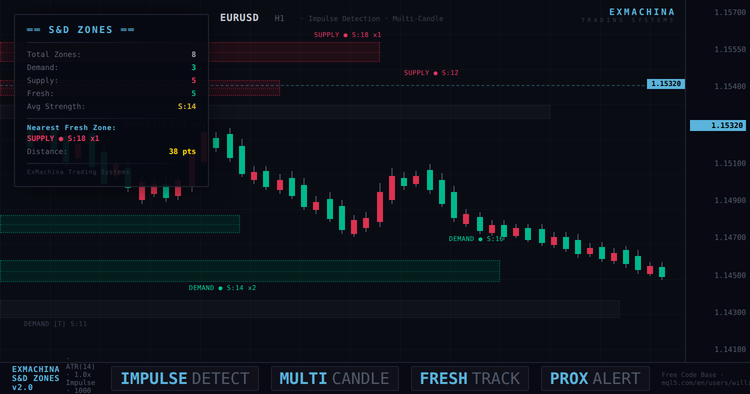
ExMachina Supply & Demand Zones v2.0
ExMachina Supply & Demand Zones è un indicatore professionale che rileva automaticamente le zone di domanda e offerta su qualsiasi grafico utilizzando un rilevamento basato sugli impulsi con filtro ATR. La versione 2.0 introduce il rilevamento degli impulsi multi-candela, la misurazione dell'intero intervallo, l'unione delle zone, il tracciamento dei tocchi, gli avvisi di prossimità e un tema scuro di ExMachina che trasforma il grafico in un'area di lavoro professionale.
L'indicatore analizza le ultime 1.000 barre alla ricerca di impulsi di prezzo significativi - movimenti direzionali bruschi che lasciano dietro di sé blocchi di ordini istituzionali. Quando viene rilevato un impulso, l'indicatore contrassegna la candela di base prima del movimento come zona di domanda o di offerta. Ciascuna zona viene valutata in base alla forza, monitorata in base alla freschezza e controllata per verificare la presenza e la vicinanza dei prezzi.
Come funziona il rilevamento
L'algoritmo di base misura le mosse impulsive su una finestra configurabile di più candele (default 3 barre). Invece di richiedere una singola candela massiccia, l'indicatore somma il range totale (alto-basso) o il movimento netto (chiusura-apertura) in 2-3 barre consecutive e lo confronta con l'ATR. Un movimento combinato di 1,0x ATR o più su tre barre si qualifica come impulso - questo cattura le spinte istituzionali graduali che il rilevamento di una singola candela non riesce a cogliere completamente.
Quando due o più zone dello stesso tipo si formano a livelli di prezzo simili, vengono automaticamente unite in un'unica zona più forte. In questo modo si elimina il disordine visivo dei rettangoli impilati ai livelli chiave e si presenta invece una zona pulita e ad alta affidabilità.
Informazioni sulla zona
Ogni zona mostra un'etichetta con quattro dati: tipo (DEMAND o SUPPLY), stato di freschezza (● per fresco, [T] per testato), punteggio di forza (dimensione dell'impulso rispetto all'ATR) e conteggio delle toccate che mostra quante volte il prezzo ha testato la zona senza romperla. Una zona fresca con un punteggio di forza elevato e più tocchi è la configurazione a più alta probabilità.
Il pannello del cruscotto nell'angolo in alto a sinistra mostra il conteggio totale delle zone, la ripartizione della domanda e dell'offerta, il numero di zone fresche, la forza media di tutte le zone e la zona fresca più vicina con la relativa distanza in punti. Quando il prezzo si avvicina a una zona, il valore della distanza diventa giallo come avvertimento visivo.
Sistema di allerta
L'indicatore fornisce due tipi di avvisi. Gli avvisi di zona si attivano quando la candela corrente entra in una zona fresca. Gli avvisi di prossimità scattano quando il prezzo si avvicina a una distanza configurabile (default 50 punti) da una zona fresca, avvisando prima che il prezzo raggiunga il livello. Entrambi i tipi di avviso supportano notifiche popup, sonore e push.
Tema del grafico
Quando è abilitato (impostazione predefinita), l'indicatore applica il tema scuro di ExMachina all'intero grafico: sfondo ultra-scuro, candele rialziste color verde acqua, candele ribassiste rosse, griglia minima e una tavolozza di colori professionale che distingue visivamente le zone di domanda e offerta senza sovraccaricare l'azione del prezzo.
Parametri
| Gruppo | Parametro | Predefinito |
|---|---|---|
| Rilevamento | Barre di Lookback | 1000 |
| Rilevamento | Impulso minimo (ATR x) | 1.0 |
| Rilevamento | Periodo ATR | 14 |
| Rilevamento | Finestra multi-candela | 3 barre |
| Rilevamento | Campo di utilizzo (vs corpo) | Sì |
| Rilevamento | Distanza di fusione (ATR x) | 0.5 |
| Visivo | Mostra solo fresco | No (mostra tutto) |
| Visivo | Mostra zona centrale | Si |
| Visivo | Estendi zone a destra | Sì |
| Avvisi | Avviso al tocco della zona | Sì |
| Avvisi | Avviso di prossimità | Sì |
| Avvisi | Distanza di prossimità | 50 punti |
| Tema | Applicare il tema ExMachina | Si |
| Cruscotto | Mostra il cruscotto | Sì |
Installazione
- Scaricare il file .mq5 e collocarlo nella cartella MQL5/Indicators/.
- Compilare in MetaEditor (F7).
- Collegare a qualsiasi grafico dal pannello Navigatore.
- Il tema scuro di ExMachina viene applicato automaticamente. Per disattivarlo, impostare "Applica tema ExMachina" su false negli input.
- Regolare il parametro Impulso minimo se si vedono poche o troppe zone: valori più bassi (0,8) rilevano più zone, valori più alti (1,5) rilevano solo le più forti.
Suggerimenti
Per il Forex (EURUSD, GBPUSD): Le impostazioni predefinite funzionano bene. Se si vedono meno di 5 zone su H1, abbassare Min Impulse a 0,8.
Per l'oro (XAUUSD): L'oro presenta candele più grandi rispetto all'ATR. Si consiglia di aumentare Min Impulse a 1,2-1,5 per filtrare il rumore.
Per gli indici (NAS100, US30): Mantenere la finestra multi-candela a 3 e utilizzare la modalità range. Gli impulsi degli indici sono spesso distribuiti su più barre.
Compatibilità
- MetaTrader 5, tutti i broker
- Tutti gli strumenti: Forex, Oro, Indici, Criptovalute
- Tutti i timeframe (consigliati H1 e H4)
- Conti di copertura e compensazione
Changelog
v2.00 - Rilevamento degli impulsi multi-candela (finestra di 1-3 barre). Modalità di misurazione dell'intero intervallo. Unione delle zone di prossimità. Tracciamento del conteggio dei tocchi. Avvisi di prossimità. Zona più vicina nel cruscotto. Forza media. Tema grafico scuro ExMachina. Bordi delle zone tratteggiati con colori di riempimento separati. Linea mediana della zona opzionale. Correzione delle prestazioni della maniglia ATR. Aggiornamenti incrementali della freschezza. Impulso predefinito abbassato a 1,0x ATR, lookback aumentato a 1000 barre.
v1.00 - Rilascio iniziale.
ExMachina Trading Systems - La precisione prima del profitto.
Tradotto dall’inglese da MetaQuotes Ltd.
Codice originale https://www.mql5.com/en/code/70709
 Inside Bar Detector with Alerts
Evidenzia i pattern di candele Inside Bar sul grafico e fornisce avvisi popup e push opzionali quando viene rilevato un nuovo pattern.
Bid-Ask Pressure Dashboard
Un cruscotto leggero e guidato dai tick che rivela la pressione Bid-Ask a breve termine direttamente sul grafico.
Market Clock Pro
Candle countdown HUD with trading sessions (UTC), live spread and anomaly detection, daily range vs ADR, and market-closed state with reason (holiday / weekend / session). Holidays calendar included for seven major markets.
 OHLCMTF Scalper EA - Multi-Timeframe Price Action
Un rigoroso consulente esperto di price action multi-timeframe che opera in base a precise condizioni OHLC su diversi timeframe simultaneamente. Presenta inserimenti di ordini pendenti, inversioni di ruolo e gestione dinamica del rischio senza l'utilizzo di indicatori di ritardo.