Trend Line Optimizer

38 USD
Download demo:
997
Publicado:
4 agosto 2020
Versão atual:
3.5
Não encontrou o robô certo? Encomende um para você
no serviço Freelance.
Ir para o Freelance
no serviço Freelance.
Como comprar um robô de negociação ou indicador?
Execute seu EA na
hospedagem virtual
hospedagem virtual
Teste indicadores/robôs de negociação antes de comprá-los
Quer ganhar dinheiro no Mercado?
Como apresentar um produto para o consumidor final?

Você está perdendo oportunidades de negociação:
- Aplicativos de negociação gratuitos
- 8 000+ sinais para cópia
- Notícias econômicas para análise dos mercados financeiros
Registro
Login
Você concorda com a política do site e com os termos de uso
Se você não tem uma conta, por favor registre-se
is this a joke????
why do you have this included in the trendline pro for MT5 ????????????
Guten Morgen Evgenii,
ich benötige deine Hilfe. Der Optimizer funktioniert. Wenn ich das neue Set in den Trendline Pro lade, übernimmt er nicht die Einstellungen. Keine Reaktion.
Trage ich Sie manuell ein zeigt er nicht das gleiche Ergebnis wie im Optimizer an. Bitte unterstütze mich. Danke
Guten Morgen Evgenii,
ich benötige deine Hilfe. Der Optimizer funktioniert. Wenn ich das neue Set in den Trendline Pro lade, übernimmt er nicht die Einstellungen. Keine Reaktion.
Trage ich Sie manuell ein zeigt er nicht das gleiche Ergebnis wie im Optimizer an. Bitte unterstütze mich. Danke
Hi. You should press Save set file for optimizing pairs
After purchased Tend Line PRO and scanner they will use saved set file automatically
More information how Optimizer works you can find here: https://www.mql5.com/en/blogs/post/738685
After saved you can check set file in the Files/TL_Optimizer folder
Hallo Evgenii!
Wenn ich die Datei aus MQL\Files\TL_Optimizer_Settings\EURUSD_H1 optimiere und lade, ändert sich in Trend Line Pro nichts. Was mache ich falsch??
After running optimizer and saving information, I load the Trend Line Pro indicator. The results match to the optimizer "best result." But the parameters do NOT match. (tlo.jpg)
When I set the parameters in Trend Line Pro to the optimizer, the results are usually much better. Why they don't match??? (tlo2.jpg)
After running optimizer and saving information, I load the Trend Line Pro indicator. The results match to the optimizer "best result." But the parameters do NOT match. (tlo.jpg)
When I set the parameters in Trend Line Pro to the optimizer, the results are usually much better. Why they don't match??? (tlo2.jpg)
Hi Evgenii!
What does this function with the name SR do? I can't see any change when using this feature.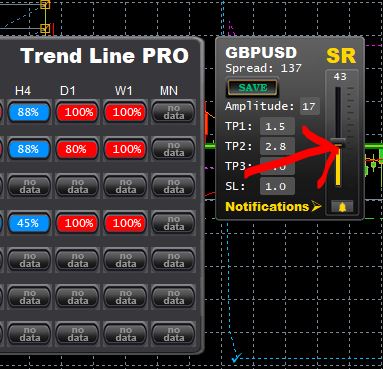
Hi Evgenii!
What does this function with the name SR do? I can't see any change when using this feature.
Hello, I purchased this optimizer. I optimized XAUUSD, how can I optimize other trading varieties?
你好。您需要在要优化的图表中添加 Utility Optimize
Hi. You need to add Utility Optimize to the chart which you want to optimize
I have a question for you: Is it feasible to open an order based on the 5-minute chart and the 1-hour chart at the same time?
Hi. You need to add Utility Optimize to the chart which you want to optimize
As shown in the picture, the 30-minute chart has the first signal. I opened 3 short orders, but they did not reach the target position. Soon, the long signal was shown in 5 minutes, and I opened 3 more long orders. At this time, how can I operate better?
Hi. You need to add Utility Optimize to the chart which you want to optimize
My previous operation was that each chart was opened according to the signal, but in many cases it was in a hedging state, so I felt that my operation was wrong, so I was very confused.
How to open an order based on multi-picture signals to maximize profit, I hope you enlighten me to solve my confusion!After saved you can check set file in the Files/TL_Optimizer fold