MRM Combine
- Utilitários
- Versão: 3.40
- Ativações: 10

Margin and Recovery Monitor (MRM Combine) — a risk station for traders who live on the edge
Full-functionality demo account with all features
See the blow-up BEFORE it happens, not after.
Most margin tools show you where your stop-out is for the positions you already hold. That’s the rear-view mirror: you’re in the trade, the risk is on, all that’s left is to react. MRM Combine looks forward. It calculates the account’s future state before you hit the button: “what happens if I add this lot”, “where does the whole grid go to zero”, “where is my point of no return”. And when you’re away from the desk, you run the same engine from your phone through Telegram.
Built for grid traders, averaging and martingale users, scalpers, account-boosters and anyone who uses locks as a working tool rather than a panic button.
The core: a liquidation forecast before you enter
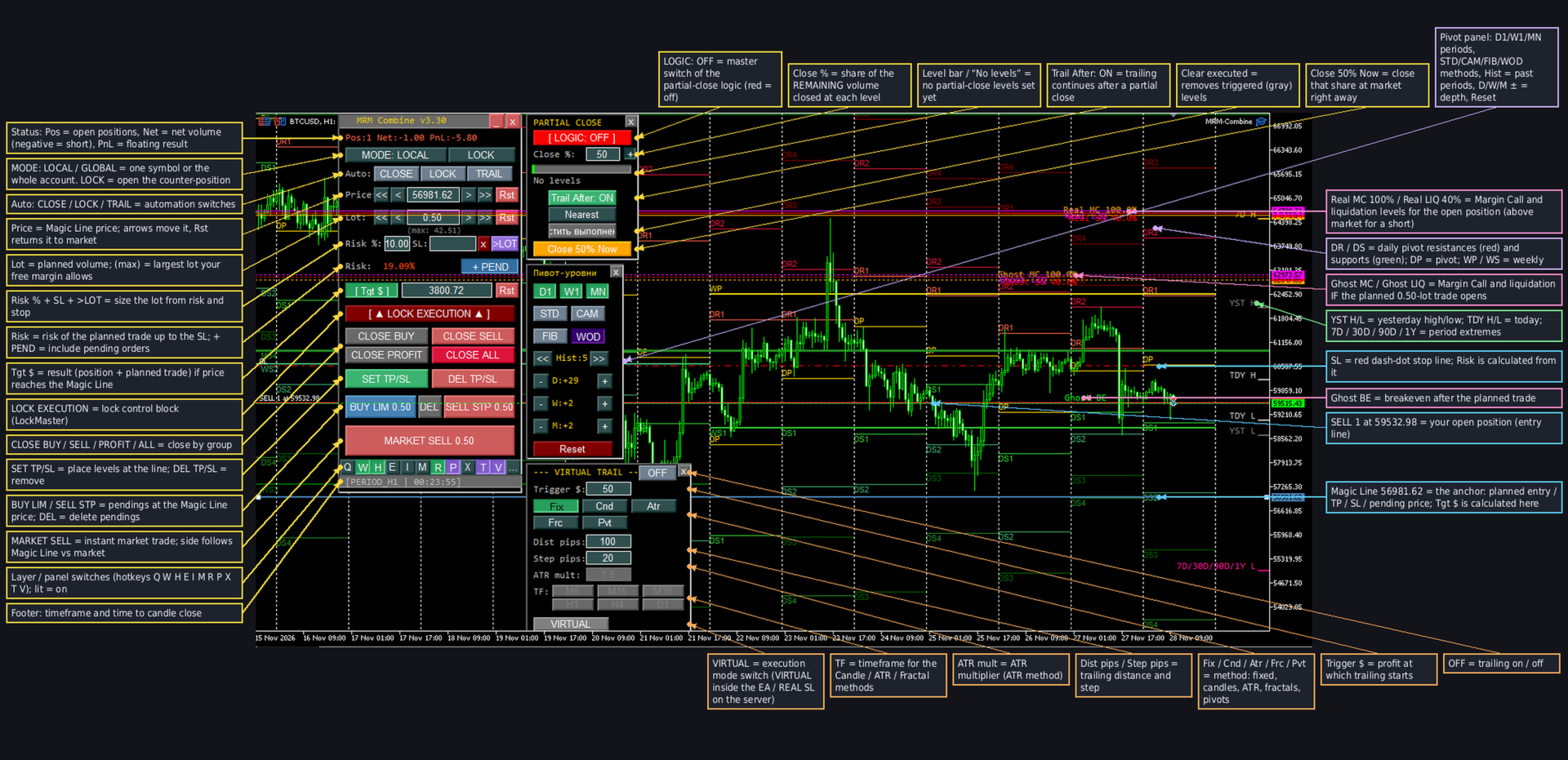
Type a lot into the Lot field, switch on + PEND, and dashed lines appear next to the live ones: Fut BE, Fut ZM, Fut MC, Fut SO. That’s not the margin call you have now. That’s the margin call you WOULD have if the trade filled right now at that size.
The forecast stacks three sources of risk at once:
- Positions already open: net volume and current margin.
- Pending orders (limits and stops): their potential fill is folded in when pending accounting is on, so your whole grid is in the picture.
- The trade you’re about to place: the exact lot you typed.
Drag the Magic Line and the dashed lines follow in real time. Fut SO sitting 12 points from price? You can’t miss it: the next pullback takes you out. No scratch-pad math, no “I’ll check later” when later is too late.
On hedged accounts margin is not a crude sum of both legs. It’s computed by the broker’s real hedging formula, using the official MQL5 formula for each instrument type (Forex, CFD, leveraged CFD, index CFD, exchange stocks).
Margin calibration: when the broker’s numbers differ from the textbook
Every trader has met it: the formula says one thing, the terminal does another. MRM Combine has a built-in calibration block for exactly that.
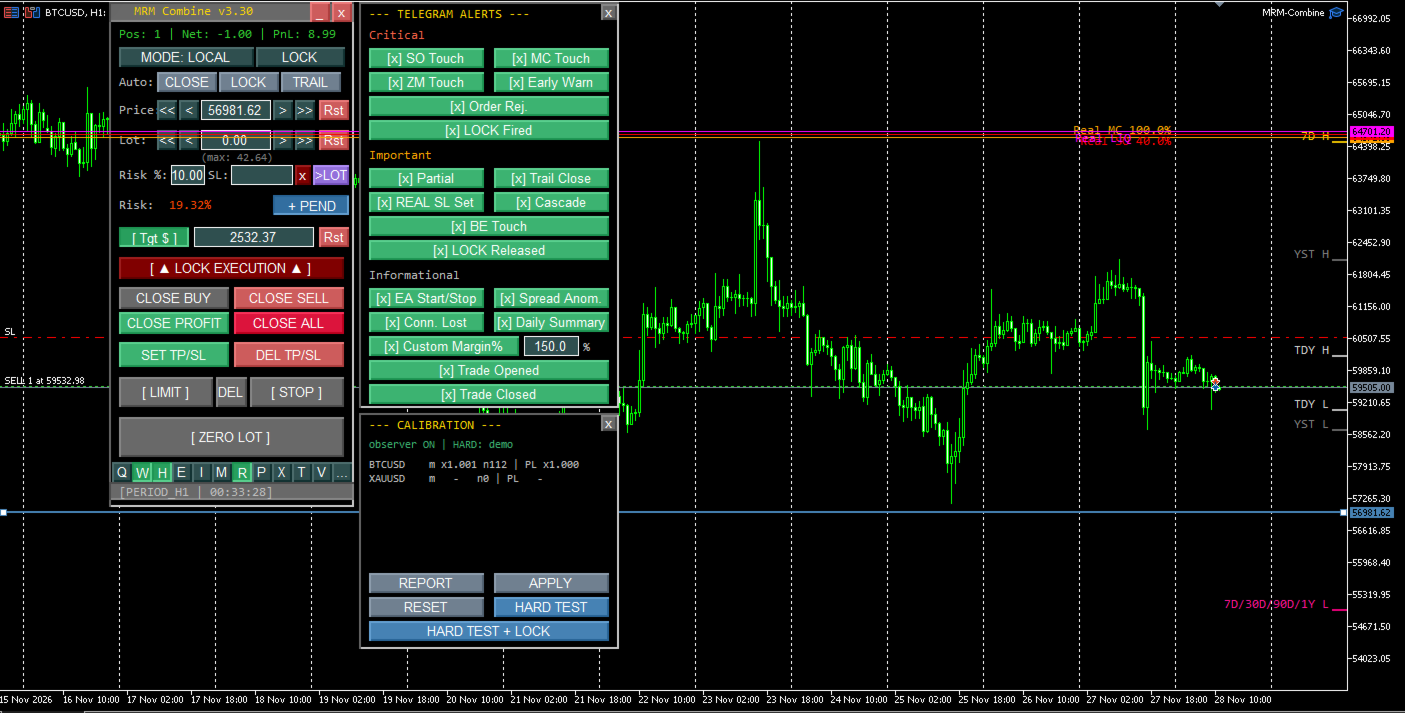
- Quiet observer. Every minute it compares its own calculation with the facts of your account: real margin and real floating P/L. Nothing is traded.
- Correction on your command only. After enough samples the bot suggests a margin correction (/calib shows the report). It is applied with /calib apply and removed with /calib reset. Nothing changes behind your back.
- Spread filter. Samples taken during a spread spike are thrown away, so a news candle doesn’t poison the statistics.
- HARD test. For stubborn brokers the bot can open a real minimum-lot trade (with an optional counter-leg) and measure the actual margin. By default it’s allowed on demo only; on a real account it needs an explicit REAL keyword and your exact account number, plus the usual confirmation. A cost ceiling stops the test if the spread price is too high.
The result: Margin Call and Stop Out lines land where your terminal will actually pull the trigger.
Two modes: Local and Global
Local works on the current symbol. Global sees the whole portfolio: every position and pending order on every symbol collapses into one net figure, and the overall breakeven is projected onto whatever chart you’re looking at. EURUSD and GBPUSD are underwater and you want to pull the account out with gold? Open the gold chart and Fut BE shows exactly the scenario that brings the entire account to zero or into profit.
The station, layer by layer
Magic Line: one anchor for every operation
The line on the chart is your entry, your TP/SL level, your partial-close point and the forecast’s reference, all at once. Drag it and everything recalculates. One interface instead of five.
Fields that compute each other
Type a Lot and Target (expected profit) recalculates. Type an amount into Target with Lot empty and the bot picks the volume for you, accounting for available margin. Drag the line and Target updates live on every tick, showing P&L for the current net position plus the planned trade.
Symmetric lock
A lock here isn’t a “opened the opposite side and forgot” stopgap. Both legs live independently: their own trailing stop, their own reference point, their own trigger. A partial close trims the same percentage on BOTH sides, so the lock shrinks evenly instead of going lopsided. Before opening any counter-position in a group lock, the EA checks free margin (tracking running usage across the whole symbol pass) and spread quality. It won’t send an order you can’t afford.
LockMaster panel: “what happens if I close these?”
Mark the legs of a lock, set the volume, and the panel shows breakeven, 100% margin, Margin Call, Stop Out and margin level now and AFTER closing the marked positions, with distances in points. Then CLOSE SELECTED closes them: confirmation by a second click, everything re-validated before the first order, closing in the order of lowest margin, success verified at the broker, and a report with real P/L per deal and forecast vs fact. While the panel is open, conflicting automation (trailing, partial close, AutoClose, AutoLock) is paused, and broker-side SL/TP are never removed silently.
Cascading partial close
Set one or several price levels; when price touches one, the bot closes the chosen percentage of the REMAINING volume, a classic profit-taking pyramid with no manual lot math at every step. Triggered levels turn gray and get out of your way.
Trailing: five methods, two modes
FIX (fixed distance), CANDLE (candle extremes), ATR (adapts to volatility), FRACTAL (market structure), PIVOT (support/resistance levels). Run it VIRTUAL (logic inside the bot, flexible) or REAL SL (a genuine stop on the broker’s server, which survives a dropped connection or a closed terminal). Change the trailing timeframe and everything it needs rebuilds instantly.
On-chart analytics
Pivots by four methods (Standard, Camarilla, Fibonacci, Woodie) on three timeframes with optional R4/S4, daily candles overlaid on your chart, ATR volatility zones from the month’s open, key highs and lows for day, week, month, quarter and year. Every one of them is a point you can anchor the Magic Line to in one click and set TP, SL or a partial-close level.
SMART BU: lot from a share of free margin
Not “how many lots do I usually take”, but “which lot uses exactly 5% of my free margin right now”. Calculated from the money actually available this moment, not from balance.
Your account in your pocket: full trading over Telegram
This is not a notifier that only drops screenshots. It’s the same trading engine as on the chart, with the same margin and spread checks.
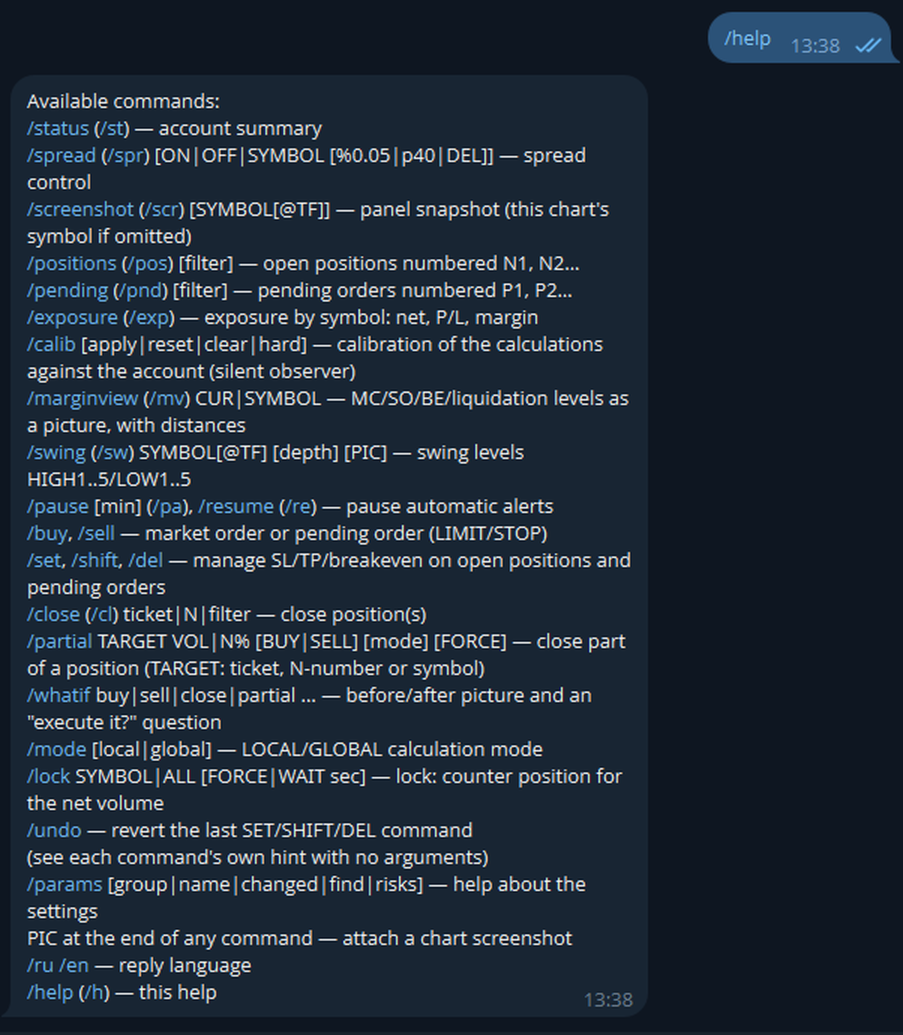
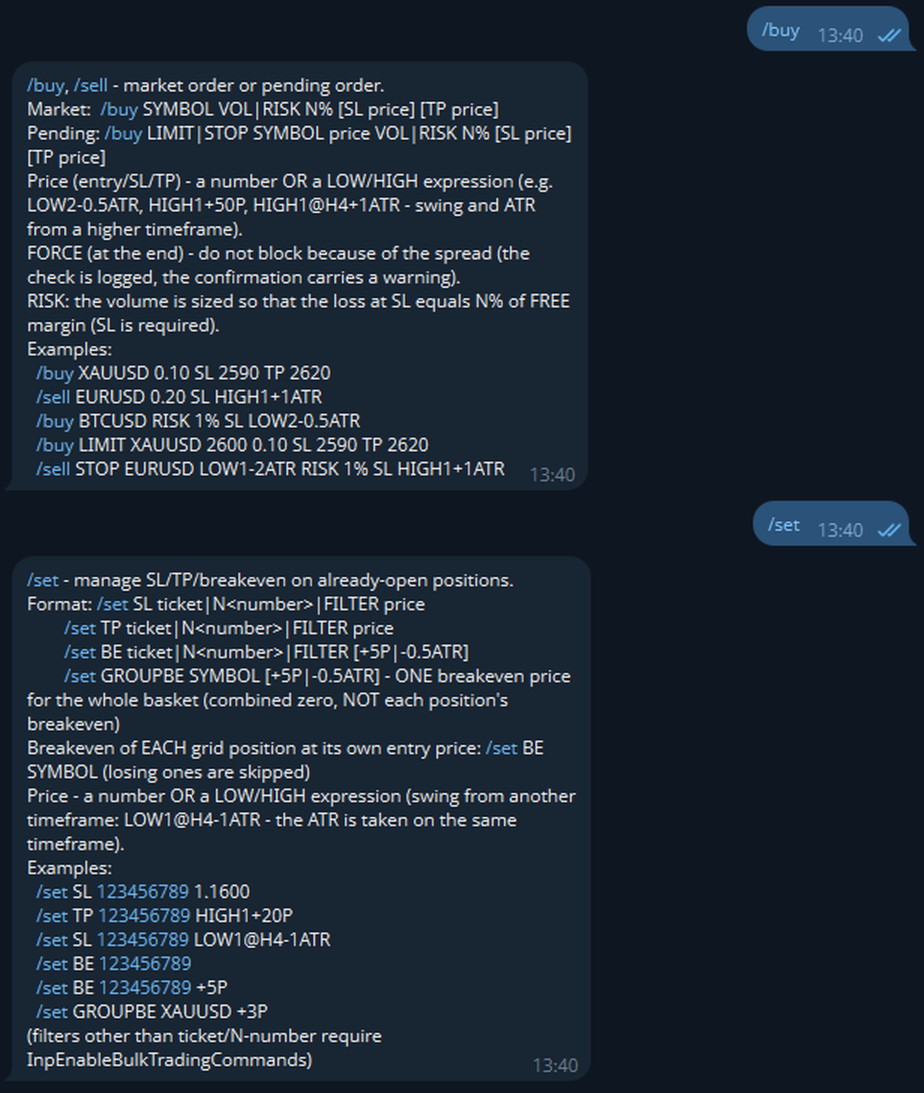
- Market and pending orders. /buy and /sell at market or LIMIT/STOP, with a price or an expression like LOW2-0.5ATR or HIGH1+50P: SL and TP are sized off market structure. A swing can come from any timeframe: HIGH1@H4+1ATR. Volume is a fixed lot or RISK 1%: the bot sizes the lot so the loss at SL equals your percentage of free margin.
- Numbered lists. /pos and /pnd show positions and pendings as N1, N2… and P1, P2…, with filters (BUY, SELL, PROFIT, LOSS, symbol, VOL>1) and a total P/L line. The short number replaces the ticket everywhere: /close N1 N3 does what it sounds like.
- Closing from the phone. By ticket, by number or as a group: ALL, PROFIT, LOSS, BUY, SELL, symbol. Preview with current P/L, confirmation, then a report with the real result of every trade. If a close would break a lock, the preview warns you.
- Breakeven and level management. /set SL, TP, BE and GROUPBE; /shift moves a level by N points or behind a swing (/shift SL N1 HIGH3+0.5ATR); /del removes levels or pendings. Several trades in one command: /set SL N1 N4 N5 1.1600. GROUPBE puts one breakeven price on a whole basket using the same math as the Magic Line, all or nothing: if even one position wouldn’t accept the stop, none is changed. A minimum distance from the market protects against a stop placed right under price.
- /undo reverts the last level change in one step.
- Locking from the phone. /lock SYMBOL or /lock ALL: the bot works out the counter-volume, checks margin and spread, clears SL/TP so stops don’t break the lock, and opens the opposite trade. If the lock fails, the previous SL/TP are restored. FORCE locks immediately; WAIT 20 waits up to 20 seconds for an acceptable spread.
- Exposure and pause. /exposure gives per-symbol BUY/SELL, net, P/L and hedge-formula margin. /pause 30 silences automatic notifications for half an hour (margin alarms can stay on), /resume tells you how many were skipped.
- Per-symbol spread rules. Set your own spread ceiling per symbol, as a percent of price or in points, so a gold spike and an EURUSD spike aren’t judged by the same ruler.
See the result BEFORE you confirm
Every command that waits for your “yes” comes with a chart picture of what WILL happen: entry, SL, TP and breakeven lines, risk and profit zones with the amount in money and in % of equity, “was → will be” arrows for level shifts, marks on positions being closed with their P/L. On netting accounts a net simulator plays out averaging, partial close, full close and reversal.
- /whatif shows a future trade on the chart before you place it: entry, SL/TP, risk and profit zones, net volume and margin. /whatif close and /whatif partial do the same for closing.
- /mv EURUSD sends Margin Call, Stop Out, breakeven and full-liquidation levels as a picture with auto-picked scale and timeframe, plus the distance to every level.
- /swing XAUUSD@H4 PIC gives swing levels HIGH1..5 and LOW1..5 as text and as a picture.
- /scale 120 @H4 fixes the picture scale per timeframe. Snapshots are taken on a service chart that mirrors your working chart: colors, candle type, grid, Bid/Ask lines, position levels.
- After-execution snapshot. Once a command is confirmed, the bot sends a second picture of the symbol as it looks now.
- Level labels that sit close in price are laid out in a column instead of overlapping, even at the chart’s edge.
Safety first
- No trade goes out without confirmation (configurable): a preview with exact margin and the free-margin remainder, confirmed with a word, with automatic timeout cancel. Every number is recalculated at the moment of confirmation, because the market may have moved while you were reading.
- Before any order the EA runs an independent margin check. If the terminal can’t calculate the margin, the trade is rejected rather than treated as “safe”.
- If the broker doesn’t answer in time, the bot says plainly that the result is unknown and tells you to check /pos and /pnd instead of repeating the command.
- Stale commands (sent long ago, delivered late) are not executed blindly.
- One copy, one voice: with the EA on several charts, only one copy talks to Telegram and no duplicate alerts appear.
- English and Russian: switch with /en or /ru right in the chat, no restart needed.
Alerts that don’t spam
Sound, pop-up, push and Telegram alerts for opened and closed trades and for approaching margin levels, with personal Margin Level thresholds and an anti-spam logic. /pause mutes the noise, but critical margin warnings can stay on.
Who this is for
Intraday traders running grids or averaging, where liquidation risk grows with every add-on and can’t be held in your head. Traders who use locks as a working hedging tool. Anyone who wants to see a trade’s effect on the margin call before placing it, not to work out afterwards why the broker closed their positions. And anyone who has ever had to fix a stop or close a trade with no laptop at hand, only a phone.
The story so far
Earlier builds were tested in the open and published on my MQL5 blog. The whole evolution of the project is there: how it grew version by version, what broke, what got fixed and why. 👉 Read the blog
MRM Combine doesn’t trade for you by default. It makes risk visible, before and not after, and when you’re ready to act, it does it from your phone too, with the same checks as on the chart.
Trading leveraged instruments involves a high risk of loss. The tool helps you see and manage risk; it doesn’t promise or guarantee profit.