Phoenix Engine Scalper
- Experts
- Versão: 6.52

Trade Smarter. Stay in Control. Manage Every Opportunity.
What if you could combine automated trading, manual execution and advanced position management in one trading system?
Introducing PHOENIX ENGINE SCALPER – an advanced semi-automated Expert Advisor designed for scalpers and active intraday traders who want flexibility, execution assistance and greater control over their trading activity.
Phoenix Scalper brings together automated trading logic, volatility-based trade management, multiple trading sessions, account-level risk protection, dedicated manual controls and an integrated trading dashboard.
You decide how you want to trade. Phoenix Scalper provides the tools to support your approach.
WHY CHOOSE PHOENIX SCALPER?
Unlike a system that relies entirely on automated execution, Phoenix Scalper combines automation with direct trader control.
-
Want automated trading? Use AUTO mode.
-
Prefer to identify opportunities yourself? Use MANUAL mode.
-
Want to enter a position immediately? Use the BUY or SELL buttons.
-
Want to close profitable positions conveniently? Use CLOSE PROFIT.
-
Want to monitor your trading activity? Use the integrated dashboard.
One EA. Multiple ways to manage your trading.
The Trading System. Automated Execution. Manual Freedom. Smarter Position Management.
Automation when you need it. Control when you want it.
1. AUTOMATED TRADING ENGINE
Let Phoenix Scalper handle its programmed trading process while you monitor the market.
Key capabilities:
-
H1 EMA 50-based directional signal logic.
-
ATR-based Stop Loss and Take Profit.
-
Automatic execution cooldown.
-
M5 ATR-based entry spacing.
-
Session-aware trading conditions.
-
Spread filtering.
-
Broker trading-session validation.
The execution logic is designed to manage trading opportunities according to predefined conditions rather than submitting orders indiscriminately on every market tick.
2. SEMI-AUTOMATED MANUAL TRADING CONTROLS
Automation should assist the trader, not take away the trader's control.
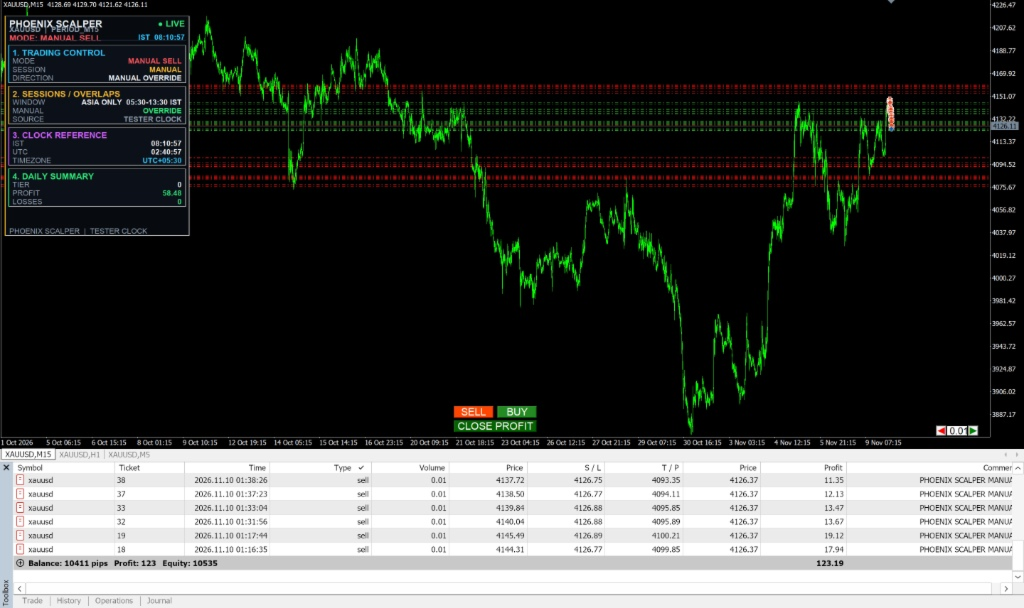
Phoenix Scalper includes dedicated on-chart trading buttons.
BUY
Manually execute a buy order whenever you identify an opportunity.
SELL
Manually execute a sell order whenever you identify an opportunity.
CLOSE PROFIT
Close qualifying profitable Phoenix positions without intentionally closing losing positions.
AUTO / MANUAL MODE
Switch between automated and manual trading workflows.
Manual BUY and SELL execution does not depend on the automatic EMA signal or configured AUTO sessions. Broker trading hours and account-risk restrictions still apply.
These controls are particularly useful for traders who combine automated trading with their own technical analysis and market decisions.
3. ADVANCED POSITION MANAGEMENT
Managing an open position is just as important as entering one.
Phoenix Scalper includes:
-
ATR-based initial Stop Loss.
-
ATR-based Take Profit.
-
Automatic break-even management.
-
Individual position trailing-stop management.
-
Profit protection based on market volatility.
-
Preservation of existing Take Profit levels during stop management.
Multiple Phoenix positions can be managed individually, allowing the EA to apply trade-management logic to qualifying positions rather than treating every position as one combined trade.
4. ACCOUNT-LEVEL RISK PROTECTION
Trading multiple positions requires attention to total account exposure.
Phoenix Scalper incorporates:
-
Aggregate open-risk monitoring.
-
Daily drawdown protection.
-
Automatic liquidation of qualifying Phoenix positions when protection conditions are triggered.
-
Daily profit target controls for AUTO trading.
-
Completed losing-position limits for AUTO trading.
Risk protection is an important part of the system, but it cannot eliminate market risk or guarantee that losses remain within a predetermined amount.
5. INTEGRATED PROFESSIONAL TRADING DASHBOARD
Everything important, directly on your chart.
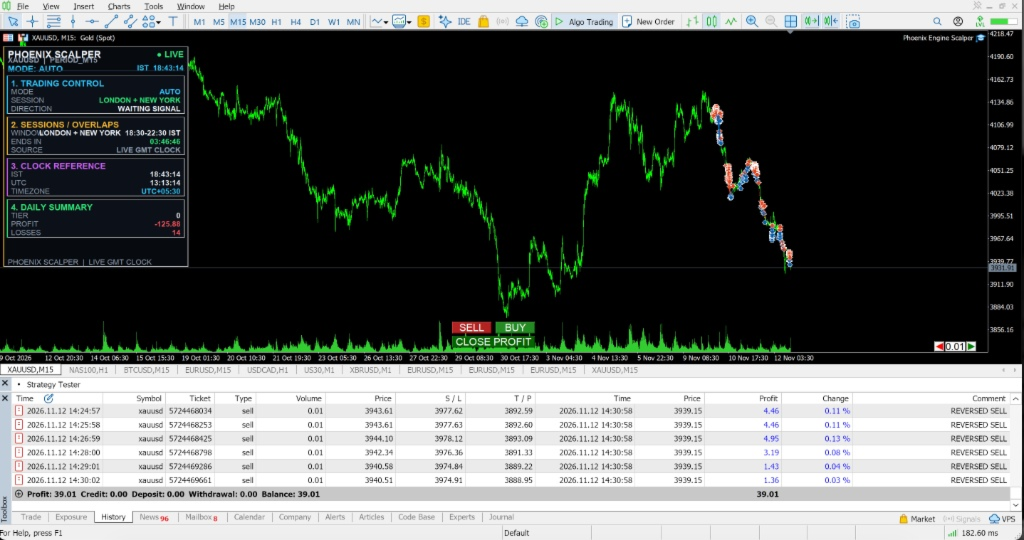
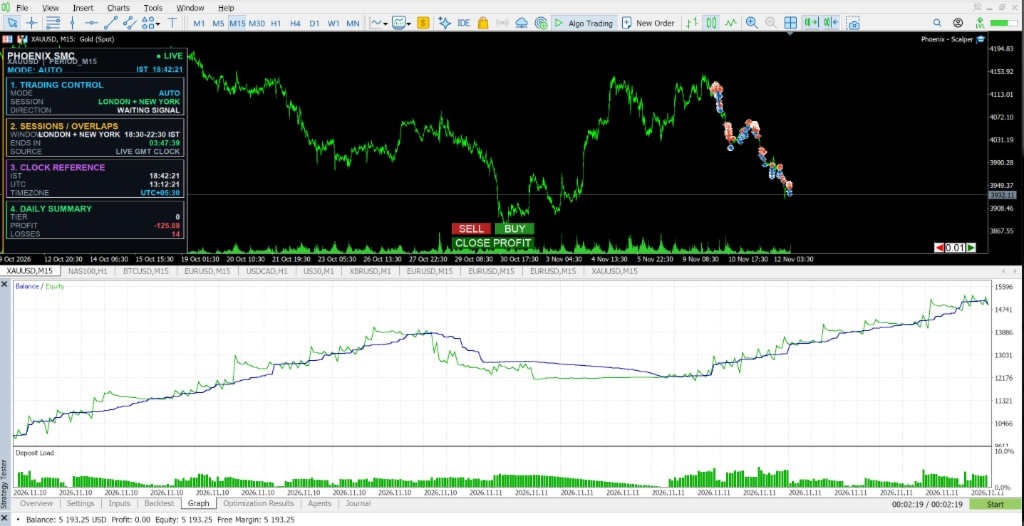
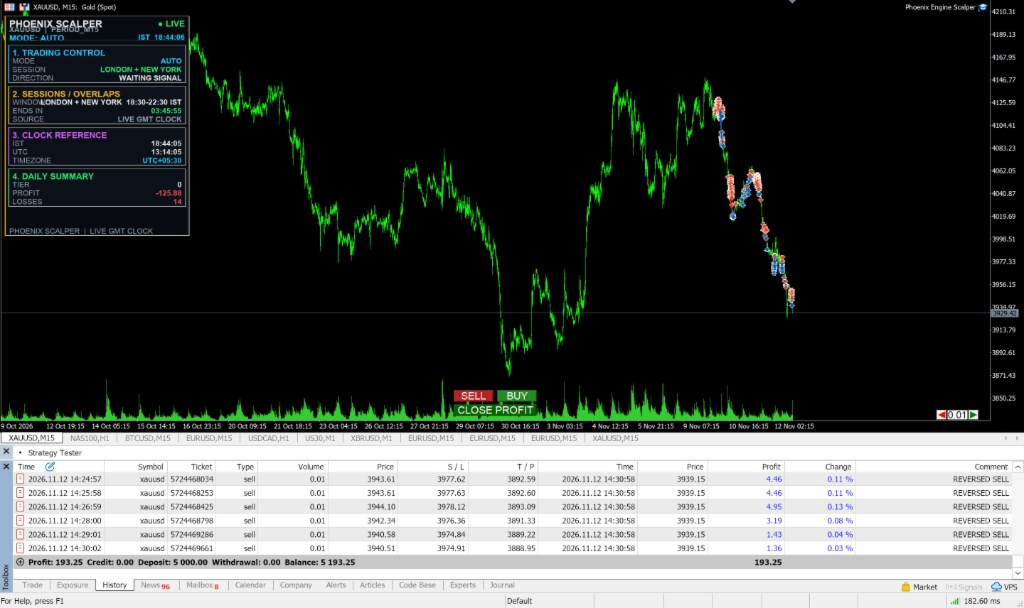
The integrated dashboard helps you monitor the EA without constantly opening settings or navigating between different screens.
Monitor:
-
Current trading mode.
-
EA operating status.
-
Active trading session.
-
Account and risk-protection information.
-
Trading and execution conditions.
-
Session and timing information.
-
Available manual trading controls.
The dashboard provides a convenient overview of the trading system and makes it easier to understand its current operating conditions.
6. GLOBAL TRADING SESSION SUPPORT
Phoenix Scalper supports three major trading sessions:
-
Asia / Tokyo
-
London
-
New York
It also supports the London–New York overlap, with seasonal daylight-saving adjustments.
Trading Session Reference – All Time Zones
| Trading session | UTC / GMT | IST | EST | EDT |
|---|---|---|---|---|
| Asia / Tokyo | 00:00–09:00 | 05:30–14:30 | 19:00–04:00 | 20:00–05:00 |
| London – Winter | 08:00–17:00 | 13:30–22:30 | 03:00–12:00 | 04:00–13:00 |
| London – Summer | 07:00–16:00 | 12:30–21:30 | 02:00–11:00 | 03:00–12:00 |
| New York – Winter | 13:00–22:00 | 18:30–03:30 | 08:00–17:00 | 09:00–18:00 |
| New York – Summer | 12:00–21:00 | 17:30–02:30 | 07:00–16:00 | 08:00–17:00 |
| London–New York overlap – Winter | 13:00–17:00 | 18:30–22:30 | 08:00–12:00 | 09:00–13:00 |
| London–New York overlap – Summer | 12:00–16:00 | 17:30–21:30 | 07:00–11:00 | 08:00–12:00 |
Session information:
-
Times are reference windows, not a guarantee of market liquidity or trading opportunities.
-
London and New York follow different daylight-saving transition dates.
-
Actual execution also depends on broker trading hours and symbol availability.
-
Manual trading controls can be used outside configured AUTO sessions, subject to broker and risk restrictions.
7. RECOMMENDED ACCOUNT SIZE & POSITION MANAGEMENT
Phoenix Scalper supports multiple active positions. Choosing an appropriate account size and lot size is therefore important.
The following figures are illustrative starting guidelines:
| Account balance | Suggested starting lot |
|---|---|
| $500 | 0.01 |
| $1,000 | 0.01 |
| $2,000 | 0.01 |
| $5,000 | 0.01–0.02 |
| $10,000 | 0.01–0.05 |
Suggested Starting Position Capacity
These are illustrative risk-management examples, not hard-coded EA position limits.
| Account balance | Suggested active positions |
|---|---|
| $500 | 1–2 |
| $1,000 | 2–3 |
| $2,000 | 3–5 |
| $5,000 | 5–8 |
| $10,000 | 8–10 |
Important: Actual position capacity depends on instrument, lot size, ATR stop distance, leverage, margin requirements, account currency and combined open risk.
A 0.01-lot Gold position and a 0.01-lot Forex position do not carry identical monetary risk.
Our recommendation is to start with 0.01 lots, test on a demo account and increase exposure only after evaluating actual trading results and drawdown.
8. WHO IS PHOENIX SCALPER DESIGNED FOR?
Phoenix Scalper is designed for:
-
Forex, Crypto and Gold traders.
-
Scalpers and active intraday traders.
-
Traders who want automated execution assistance.
-
Traders who prefer manual control over entries.
-
Traders who combine technical analysis with automated trade management.
-
Traders who want multiple-position management and an integrated dashboard.
-
Traders who value structured execution and account-risk monitoring.
Whether you are developing your trading workflow or looking to add automation to an existing strategy, Phoenix Scalper provides a flexible set of trading tools.
9. HOW TO GET THE MOST OUT OF PHOENIX SCALPER
For a disciplined approach:
-
Begin with a demo account.
-
Start with conservative lot sizes.
-
Test your preferred instruments independently.
-
Evaluate each trading session separately.
-
Monitor spread, slippage and execution quality.
-
Review the performance of multiple trades, not just individual winners.
-
Avoid increasing lot sizes to recover losses.
-
Adjust risk settings according to your account size and risk tolerance.
Remember: no trading system performs equally well in every market condition.
10. IMPORTANT RISK DISCLAIMER
Forex, Gold and CFD trading involve substantial financial risk. Leverage can magnify both profits and losses.
Market gaps, slippage, spread expansion, insufficient liquidity, broker restrictions and execution failures can result in losses beyond the intended trade risk.
Phoenix Scalper is a trading tool, not a guarantee of profitability. It does not guarantee profits, consistent returns, winning trades or protection against all losses.
Backtest results and past performance do not guarantee future results.
Always test the Expert Advisor thoroughly on a demo account before using real funds. Use appropriate risk settings and trade only with capital you can afford to lose.
The trader is responsible for all trading decisions, configuration settings and account management.