NHS BB Break
- Experts
- Versão: 1.0

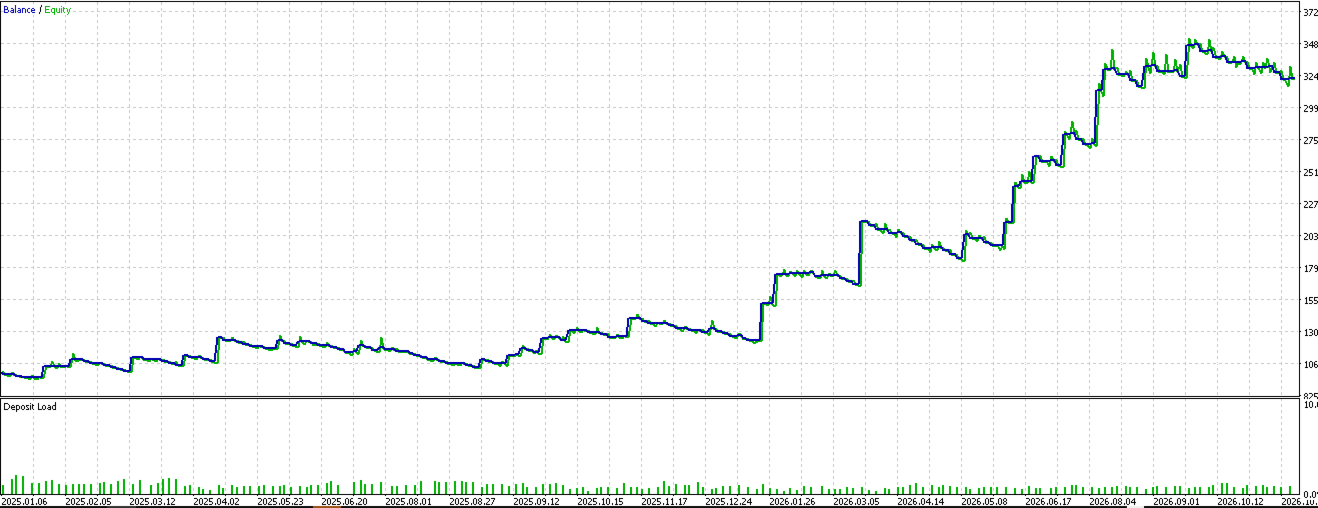
An automated breakout system. It waits for the Bollinger Bands to squeeze tight (low volatility), then enters when price closes outside the band in the direction of the trend. Winners run until the bar-count time stop (a trailing stop and fixed targets are available as options).
How it trades
- Squeeze detection: measures band width against volatility and only arms when the market is genuinely compressed, with a short grace window so the breakout candle still qualifies.
- Trend-aligned entries: breakouts are only taken with the trend (moving-average based, with a neutral zone for sideways markets and an optional chart-structure confirmation).
- Open-ended exits: no fixed take-profit by default — trades exit via break-even at 0.5x ATR profit or a 24-bar time stop. A volatility trailing stop, fixed targets, two-stage partial profits and stale-trade exits are available as options.
- Stacking (optional, off): can add up to 3 positions into a running breakout with minimum spacing and rules for counter-signals.
- Protection: volatility-based stops with floor/ceiling clamps, 1.5%-risk position sizing with spread and commission accounted for, daily loss limit, trade-count and losing-streak pauses, optional equity locks, session/weekly/time windows and a news blackout.
Settings (defaults ready to run)
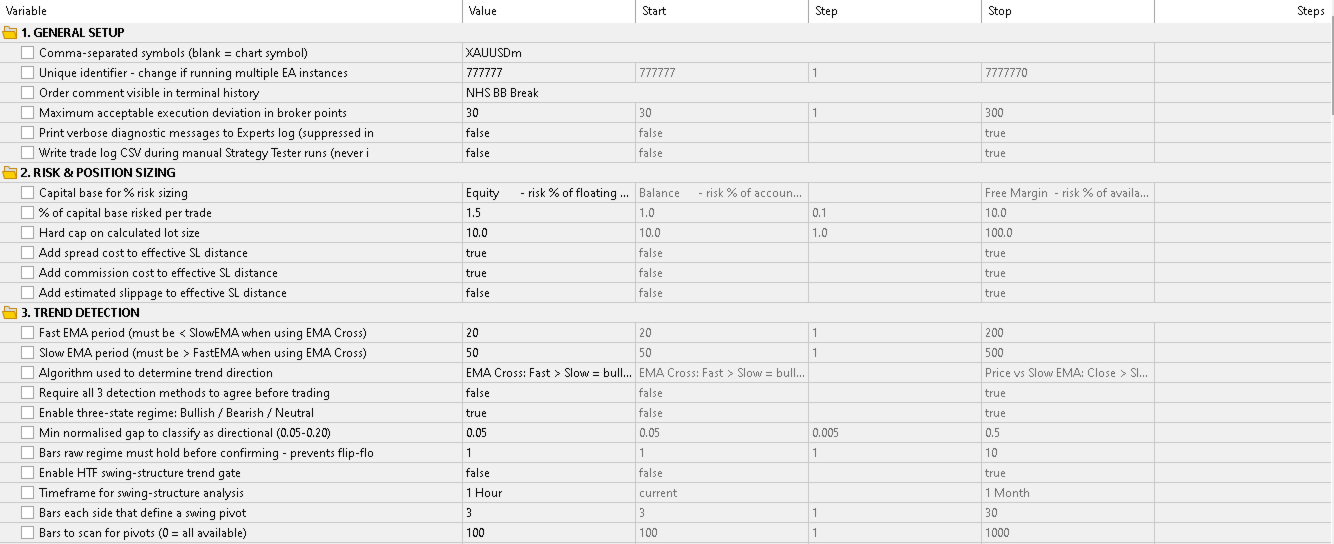
- Signal: standard 20-period bands, squeeze required (3.0x ATR gate), trend filter on with neutral zone.
- Exits: 1.0x-volatility stop, break-even at 0.5x ATR profit, no trailing stop, 24-bar time stop, no fixed target, 1.5% risk per trade.
- Safety: daily loss limit 3%, max 5 trades per day, pause after 3 straight losses. Session, weekly, news and volatility filters are available but off by default.
- Display: on-chart status panel on (can be hidden from the settings).
On-chart display
A read-only status panel (dark steel theme) shows the trend method and neutral state, squeeze state and band settings, exit engine, stacking and structure states, risk overlays, and one row per symbol with positions (direction, profit, time in trade), plus session, exit-time, weekly and daily-loss footers. Entry/exit arrows are drawn on the chart. It has no buttons — display only. Each copy of the EA draws its own panel, so several instances can share a chart without overwriting each other.
Getting started
- Copy the.mq5 file and the icon file into MetaTrader 5 (File → Open Data Folder → MQL5 → Experts) and compile. The icon must sit next to the source or compilation fails.
- Drag the EA onto an XAUUSD H1 chart and tick Allow Algo Trading. The default symbol list is XAUUSDm — leave it, or list other symbols (your broker's suffix is auto-detected).
- Give each copy its own trade ID number in the settings if you run multiple instances.
Good to know
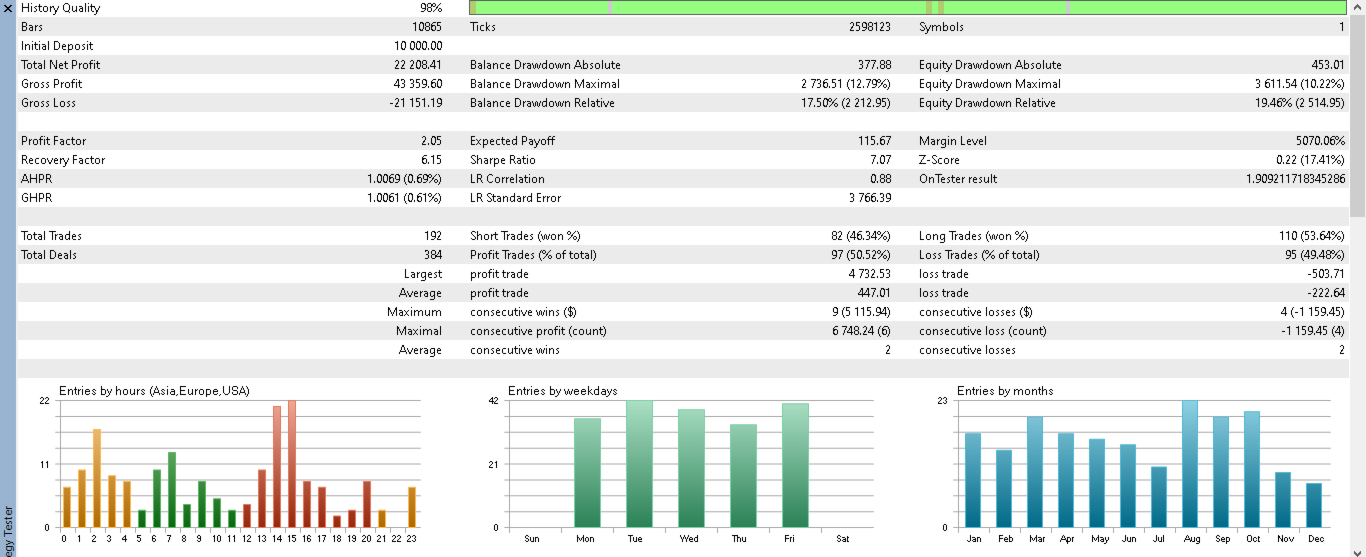
- Few trades: squeeze + closed-outside-band + trend alignment is selective; quiet months are normal.
- Skipped breakouts: usually the market was classed neutral, the squeeze window expired, or a spread/session/news/limit rule blocked it.
- Early exits: the time stop closes trades after 24 bars regardless of profit; break-even moves the stop to entry once 0.5x ATR profit is reached. Lengthen them to hold longer.
- It only touches its own trades (tracked by its trade ID). Manual trades and other EAs are never modified or closed.
- Breakouts struggle in choppy, directionless markets. Start on a demo account and never risk money you cannot afford to lose.
Requirements
MetaTrader 5 hedging account. No extra files, libraries or subscriptions needed.