StopFirst Trade Manager
- Utilitários
-
RUSLAN SLOBODIANIUK
 Знание языков и технологий:C
C++
Visual C++
WinAPI
C#
GDI+
ADO.NET
LINQ to SQL
WPF
WCF
SQL
XHTML
XML
PHP
MySQL
JScript
Unity3D(C# scripting) - Versão: 1.0
- Ativações: 10
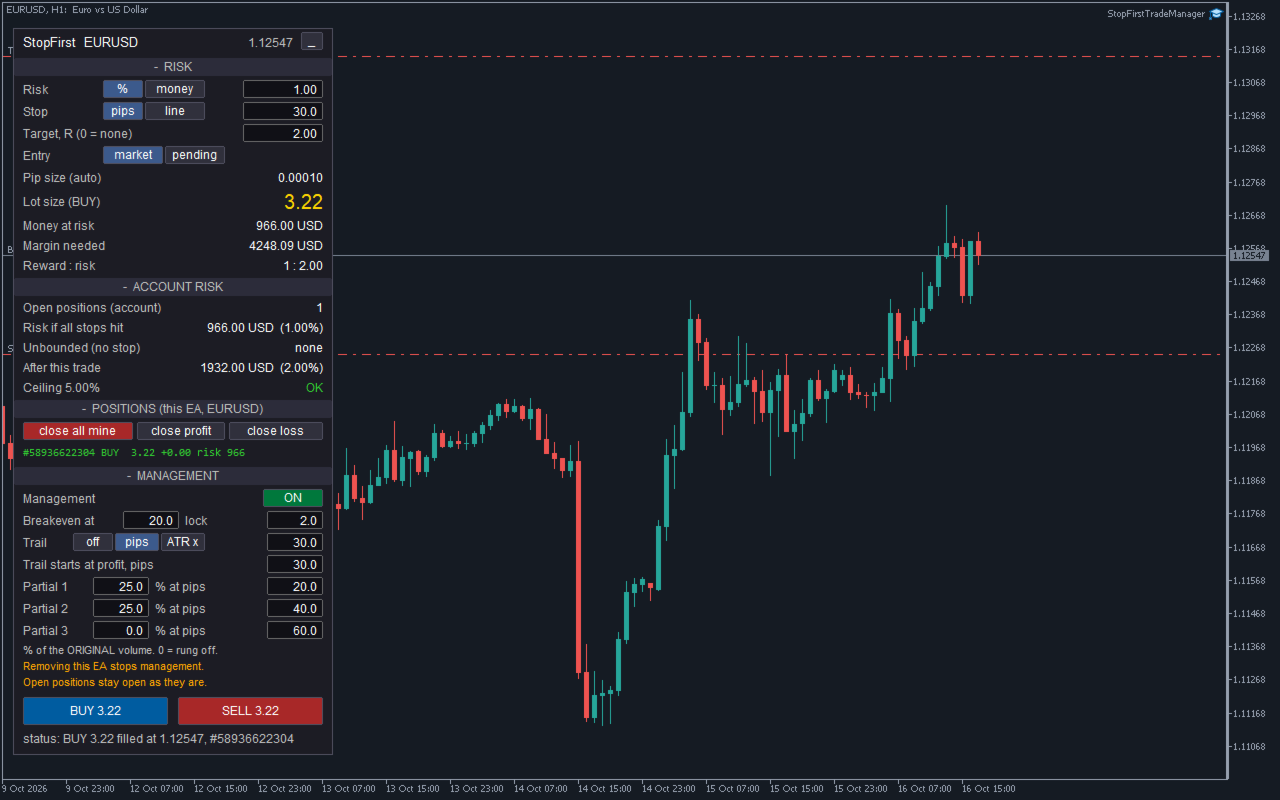
StopFirst Trade Manager opens trades the way a careful trader does: the stop comes first, the lot size follows from it, and the whole account's risk is in front of you before you click. Once the trade is open, it moves the stop to breakeven, trails it and takes partial profits for you.
Every entry carries a stop. There is no way to open a trade from the panel without one.
HOW TO USE IT
1. Attach it to a chart and allow Algo Trading. The panel appears in the corner.
2. Set your risk - a percentage of balance or an amount of money - and your stop, in pips or by dragging a line on the chart.
3. Look at the lot size, the money at risk and the account risk after this trade.
4. Click BUY or SELL. The button changes to CONFIRM; click again within three seconds to send. One-click trading is available as an option.
5. The trade is managed from there: breakeven, trailing stop and partial closes, as you set them.
Everything on the panel can be changed on the panel - risk, stop, target, entry type and all management settings. You do not have to open the inputs dialog while you trade.
THE PANEL
The panel has four sections you can collapse, and the whole panel can be minimised to its title bar.
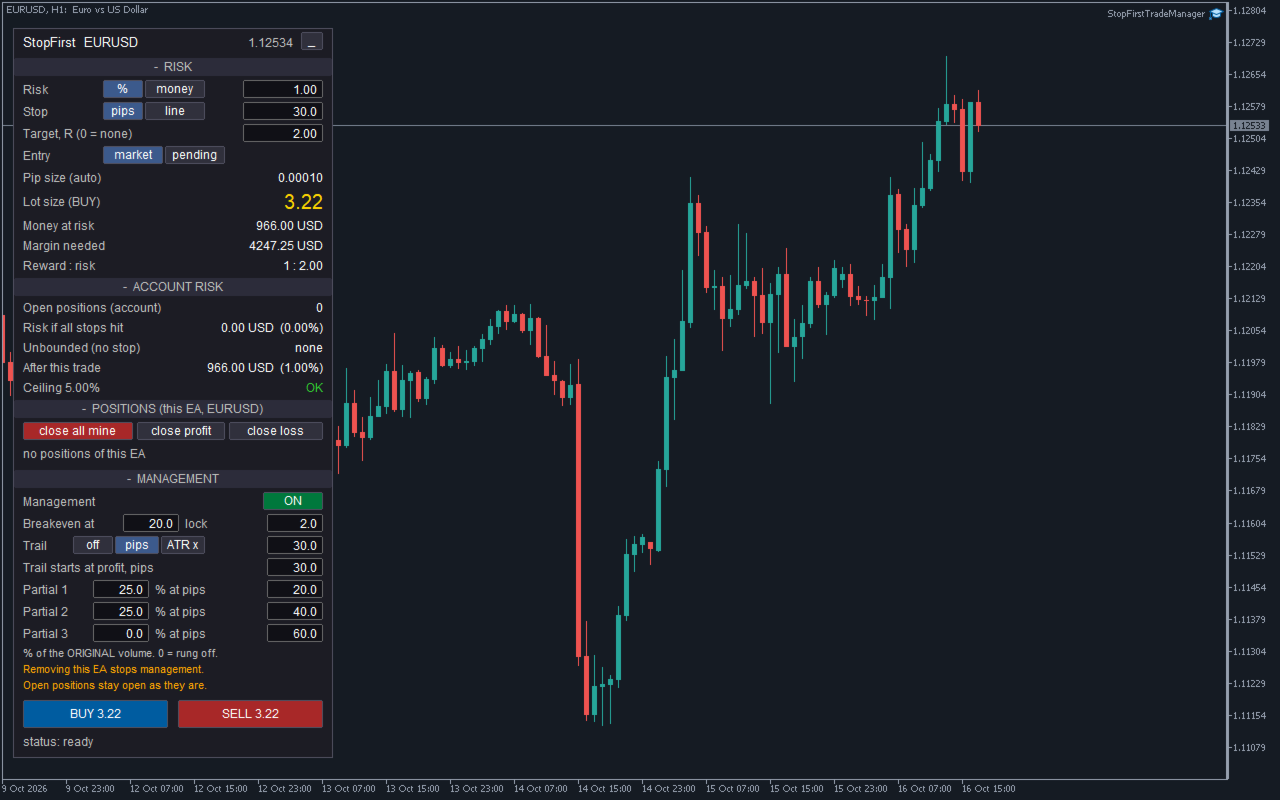
RISK - what this trade will be
- Risk in percent of balance or in money, switched with a button, value typed in.
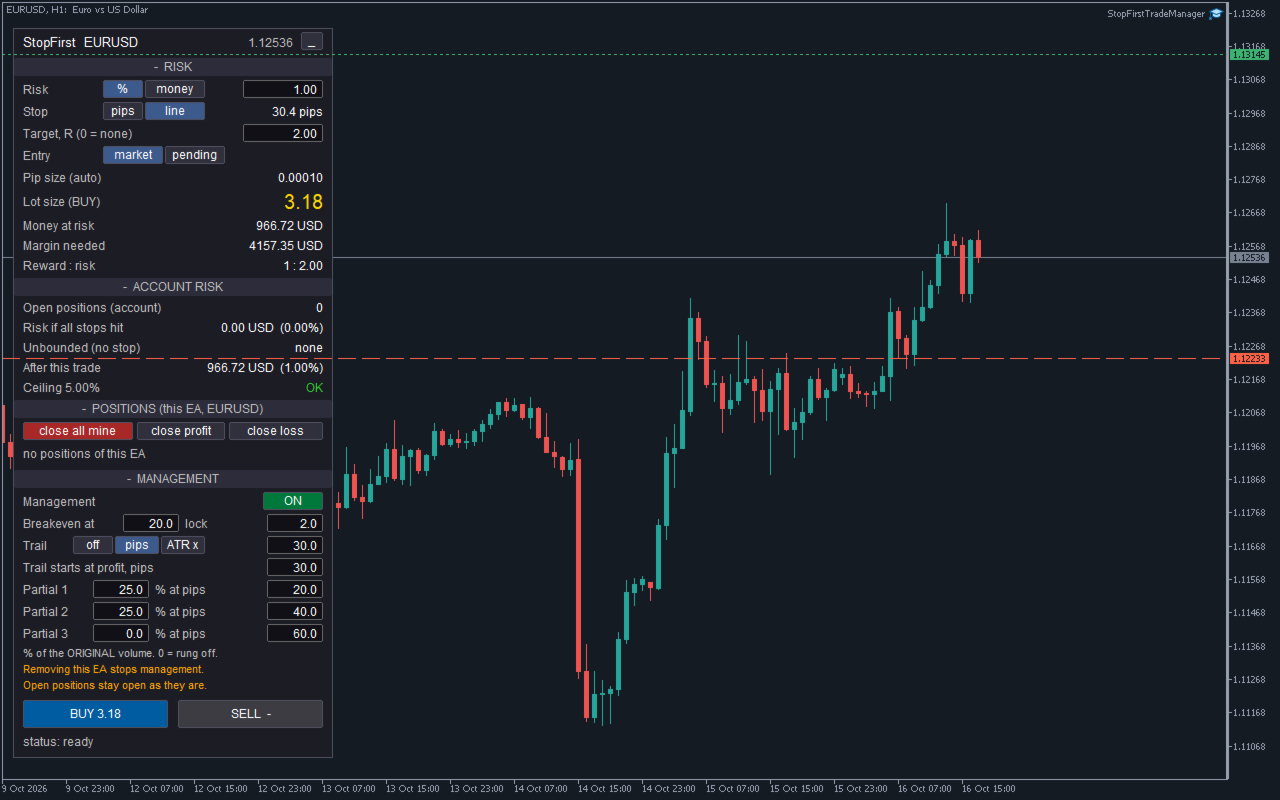
- Stop in pips or by line. In line mode a red line appears on the chart; drag it to where the stop belongs, and a green target line follows.
- Target as a multiple of risk (R). 0 means no target.
- Entry: market, or pending at a draggable entry line.
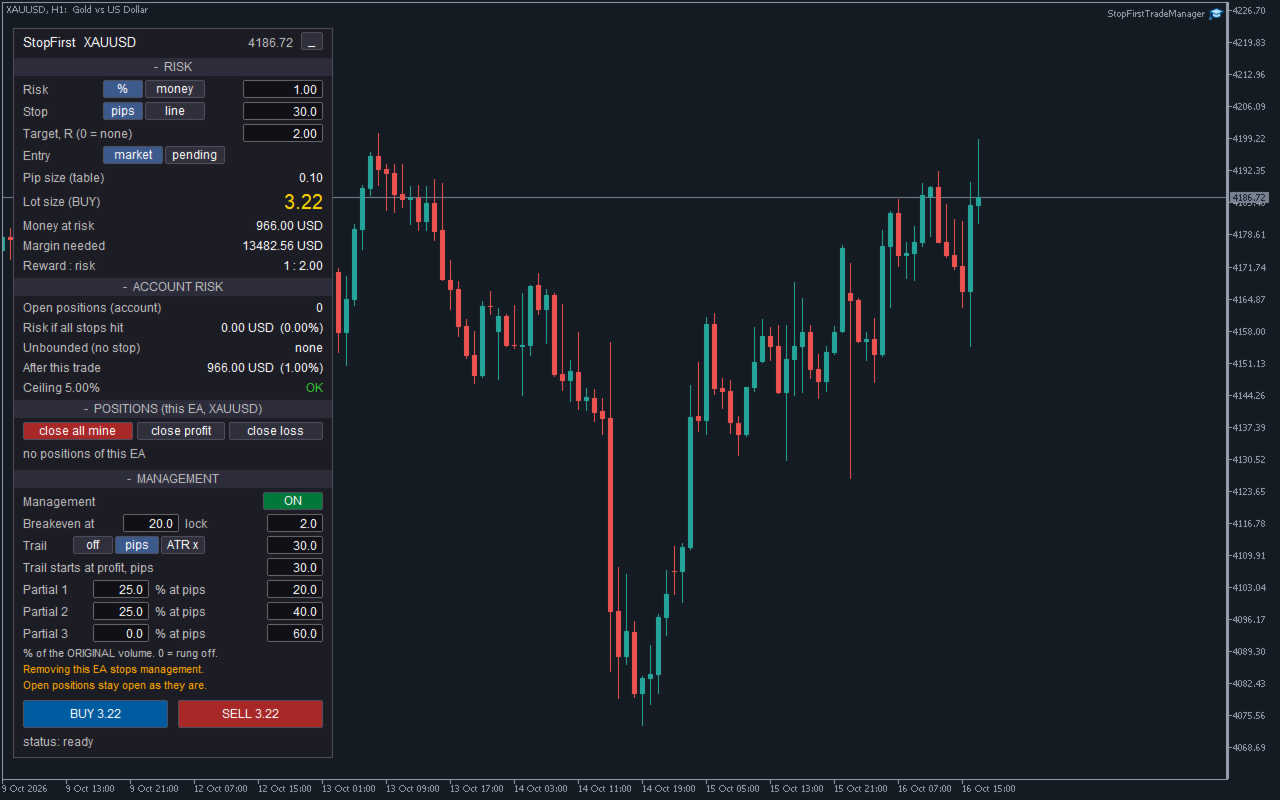
- Pip size in use, and where it came from.
- Lot size, money at risk, margin needed and reward : risk.
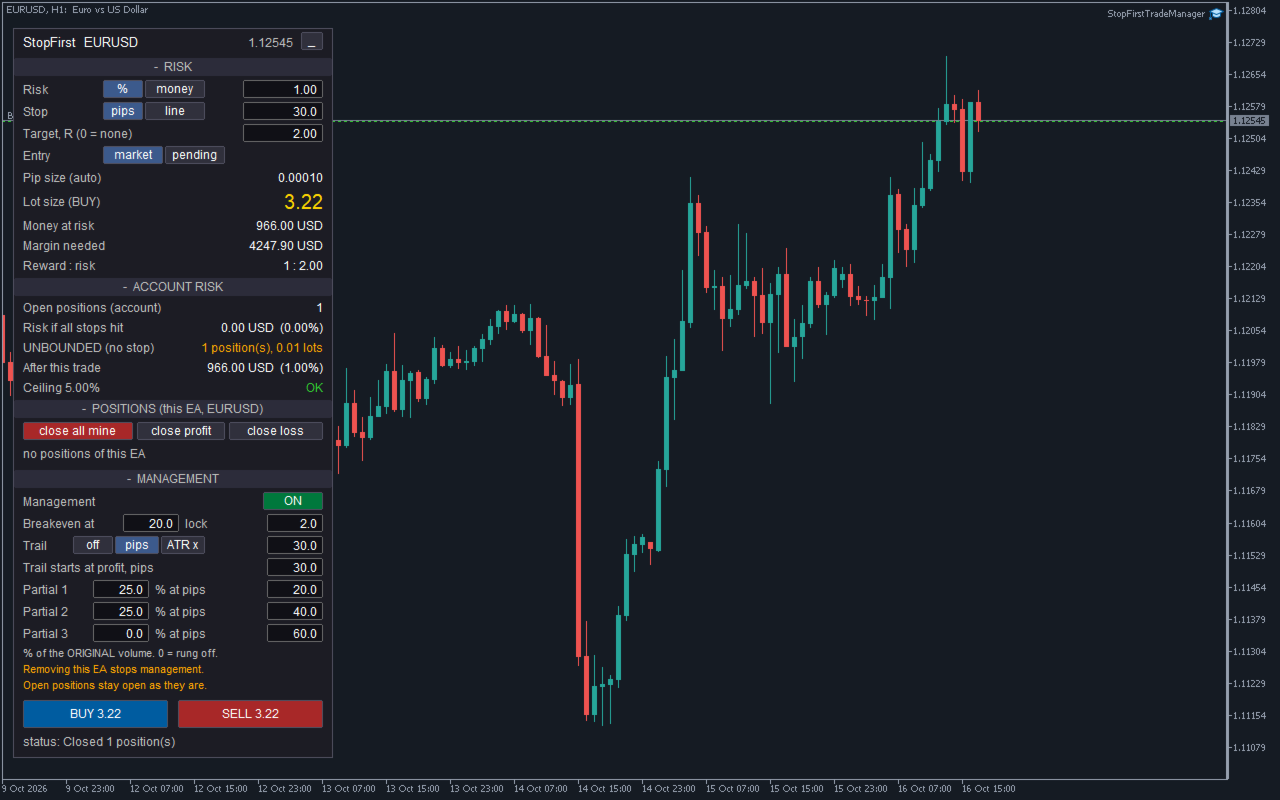
ACCOUNT RISK - what the whole account stands to lose
- Open positions on the account - all of them, manual trades and other EAs included.
- Risk if all stops hit, in money and percent of balance.
- Positions with no stop, counted and shown in the warning colour as UNBOUNDED. A clean total next to a position without a stop would be the most misleading thing a panel could show, so this row is never quiet.
- Pending orders, counted as if they were filled.
- Risk after this trade.
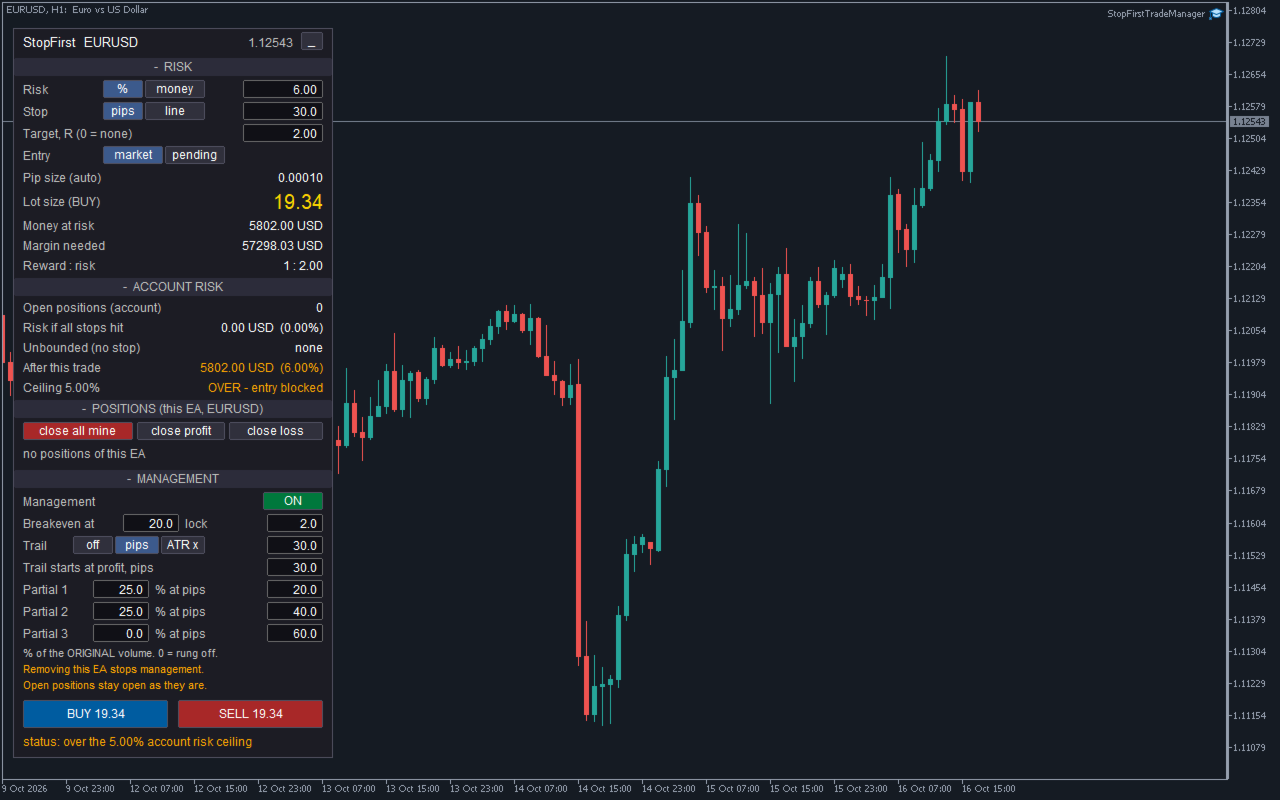
- Your ceiling on total account risk: OK, or OVER - entry blocked.
POSITIONS - this EA's trades on this symbol
- Each position with its direction, volume, current profit and the money it risks, or UNBOUNDED.
- close all mine, close profit, close loss, delete pending. These act on this EA's trades only.
MANAGEMENT - what happens after the entry
- Management on or off.
- Breakeven: move the stop to the entry plus a few pips once the trade is that far in profit.
- Trailing stop: off, a fixed distance in pips, or a multiple of ATR, starting once the profit you set is reached. The stop only ever moves in the direction of profit.
- Up to three partial closes, each a percentage of the ORIGINAL volume at its own profit in pips. Three rungs of 25 % close three equal slices, not 25 % of an ever-smaller remainder.
Under the BUY and SELL buttons a status line tells you what happened: filled, placed, refused and why.
ENTRY
- Market orders, or pending orders at a line you drag. Limit or stop is chosen from where the line sits relative to the price, and the button says which: BUY LIMIT, BUY STOP, SELL LIMIT, SELL STOP.
- Each button plans its own side and shows its own lot size. A button that cannot trade shows a dash, and the panel says why.
- Two clicks within three seconds to confirm, so a stray click never opens a trade. One-click trading can be switched on in the inputs.
- Entry is refused, with the reason on the panel, when:
- the trade would take total account risk over your ceiling;
- the stop line is on the wrong side of the price;
- free margin cannot fund even one minimum lot;
- on a netting account, the symbol already holds a position;
- Algo Trading is switched off.
- If the broker rejects an order you see the broker's reason, with a plain hint for the common ones: market closed, not enough margin, stop too close to the price, volume not allowed.
NUMBERS YOU CAN TRUST
- The lot is rounded down to your broker's volume step, never up. The money at risk shown is for the rounded lot.
- If your risk cannot pay for the minimum lot, the panel says so instead of rounding up.
- If free margin cannot fund the size, the lot is capped and the panel says so and shows the risk after the cap. You can keep part of the free margin in reserve.
- Capped at the broker maximum, and the panel says so.
- Money per pip comes from the terminal's own profit calculation, measured over a long distance so the terminal's rounding to the cent does not distort small pip values. The tick value fields a symbol reports are a last resort: on a live account we saw a broker report gold's tick value ten times too low.
GOLD, INDICES, OIL
A pip on gold is not a pip on EURUSD. Conventional pip sizes are built in:
- Gold: 0.10. Silver: 0.01. Platinum, palladium: 0.10
- Oil (WTI, BRENT, USOIL, UKOIL, XTI, XBR): 0.01. Natural gas: 0.001
- Indices (US30, US100, US500, NAS100, SPX500, GER40, UK100, JP225 and others): 1.0
Broker suffixes are handled. Exchange-traded stocks and ETFs are deliberately excluded, because a ticker can look like an index or a metal by name alone. You can set your own pip size for any symbol, and the panel always shows which pip size is in force and where it came from. The figures are the same as in StopFirst Lot Calculator.
Stocks: a stock's pip is its price step, usually 0.01, so the default 30-pip stop is only 0.30 on the share price. Use the stop line or the ATR trail, or set a larger stop.
MANAGEMENT THAT SURVIVES A RESTART
A partial close must happen once. If the terminal restarts and the EA forgets that the first rung already fired, it would close another slice - from a volume that is already smaller.
StopFirst keeps each position's original volume and which steps have already happened in terminal global variables, and writes them to disk after every change. After a restart, a reconnect or re-attaching the EA, management carries on where it left off. This was tested with a real terminal restart: a position past its partial-close trigger was not closed a second time.
IT ONLY TOUCHES ITS OWN TRADES
- It manages, lists and closes only the positions it opened: its magic number, on its chart symbol.
- Manual trades and other EAs' positions are never modified or closed. They are counted in the account risk, because that is what your account can actually lose.
- Close all, close profit and close loss act on this EA's trades only.
- To run it on two charts of the same symbol, give each a different magic number.
GOOD TO KNOW
- Removing the EA stops management and closes nothing. Your positions keep the stops they have at that moment. The panel reminds you while management is on, and the journal says so if you remove it with positions open.
- Netting accounts hold one position per symbol. A second entry would merge into the first and replace its stop, so it is refused with the reason. Hedging accounts have no such limit.
- It is an Expert Advisor, so it takes the chart's EA slot. If your own EA runs on that chart, open a second chart of the same symbol.
- The ATR trail uses the chart's timeframe.
- Changing the chart's timeframe keeps whatever you changed on the panel. Changing the inputs resets the panel to them.
- Management state is kept per terminal. If you move to another computer or VPS with positions open, their partial closes start again from the current volume. Terminal global variables also expire after four weeks without use.
- Removing the EA leaves the chart exactly as it was: the panel and its lines go with it.
- No DLLs, no internet access, nothing sent anywhere.
STRATEGY TESTER
Nobody clicks in a backtest, so in the Strategy Tester the EA opens demonstration trades every few bars (50 by default, alternating buy and sell), sized and stopped exactly as a click would. In visual mode you can watch the panel, the breakeven, the trailing stop and the partial closes on the chart. Demonstration trades never happen outside the tester.
On a very small test deposit the risk may not pay for one minimum lot. Demonstration trades then use the minimum lot if margin allows, so there is still something to watch; a real entry never does this.
INPUTS
Identity
- Magic number - must be unique per chart.
Risk
- Risk mode and value (default 1 % of balance), stop mode and distance (default 30 pips), reward ratio (default 2 R), maximum share of free margin per trade, ceiling on total account risk (default 5 %).
Instrument
- Pip size override, built-in pip table on or off.
Entry
- Market or pending, one-click trading, maximum slippage.
Management
- On or off, breakeven trigger and lock (default 20 and 2 pips), trailing mode, distance and start (default 30 pips), ATR multiple and period, three partial rungs (default 25 % at 20 pips and 25 % at 40 pips).
Strategy Tester
- Demonstration trades on or off, bars between them.
Automation
- Accept panel commands from another program on the same chart. Off by default; used for automated testing.
Appearance
- Panel position, font size, colours.
Every input is checked when the EA starts. A wrong value stops it with a message saying which one and why. Values you type into the panel are checked the same way.
QUESTIONS
Will it close or change my manual trades?
No. It only manages and closes the trades it opened. Manual trades are counted in the account risk, nothing more.
What happens if I remove it or close the terminal?
Management stops; nothing is closed. Positions keep their stops. When you attach it again, management continues, and partial closes that already happened are not repeated.
Why was my BUY refused?
The status line says why - most often the account risk ceiling, a stop on the wrong side, or Algo Trading switched off.
Why is the lot smaller than I expected?
It is rounded down to the volume step, and may be capped by free margin or the broker maximum. The panel says which.
Can I use it with my own EA?
On another chart, yes - it only touches its own trades. Not on the same chart: MetaTrader allows one EA per chart.
Does it work on netting accounts?
Yes, with one position per symbol. A second entry on the same symbol is refused.
Is there a free version?
StopFirst Lot Calculator is free and does the same sizing as an indicator. It does not trade.