Grid Visual Trend Cascade EA
- Experts
-
AL MOOSAWI ABDULLAH JAFFER BAQER
 To trade successfully we need to go through the proven path that others had gone and reached!
Here are 17 quotes from such successful investors:
1- Limit your size in any position so that fear does not become the prevailing instinct guiding your judgment.
Joe Vidich - Versão: 3.8
- Ativações: 5
| GRID VISUAL TREND CASCADE EA :: build 3.08 :: MT5 hedging |
|---|
|
When several moving averages line up like steps of a waterfall, the trend has momentum behind it. Grid Visual Trend Cascade EA waits for that alignment, joins the move with a measured grid, and then spends most of its intelligence on the part that really decides results: getting out cleanly, in profit, as often as possible.
Five reasons traders choose Trend Cascade
1. It trades with the trend, not against it. A cycle starts only when the cascade filter and price confirmation agree, so the grid is pointed in the direction the market is already flowing.
2. It never doubles you into trouble. The default lot ladder is additive and every order respects your own maximum and the broker's.
3. It takes profit constantly. Groups of orders are banked the moment they cover your target, and partial closes retire heavy old orders step by step.
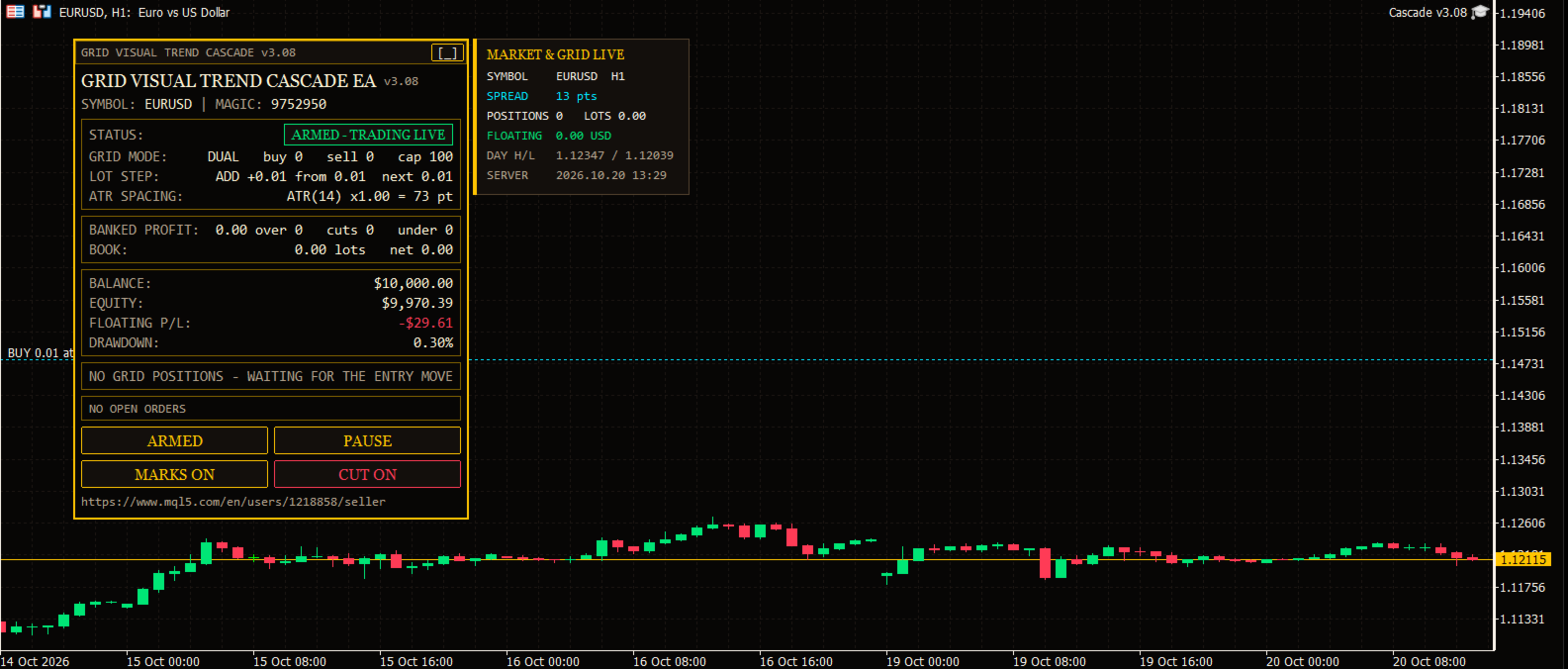
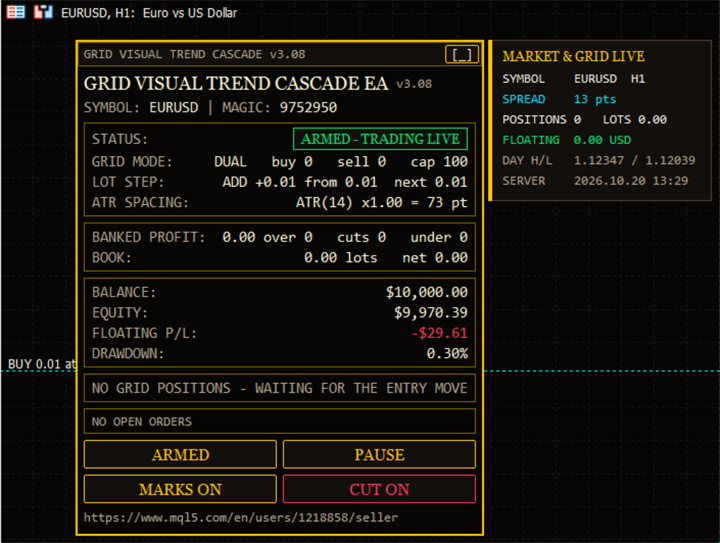
4. You see everything. A large crimson-framed panel shows status, grid mode, lot step, ATR spacing, banked profit, book, balance, equity, floating P/L, drawdown, plan and open orders.
5. It is stable on any account size. The 3.01 engine removes the false "not enough margin" warning that older versions could show on big balances.
What changed in 3.08
New Crimson Slate design with a heavy headline, gold-on-black card sections and four clear command buttons. A live market card (symbol, spread, positions, lots, floating, day range, server time) sits beside the panel so the candles stay visible. All objects stay on the left side, sized from their own text, and adapt to any chart window. The panel drags, minimises and restores in one click. Chart colours are restored when you remove the EA.
Checklist before your first run
[ ] Hedging account (the EA verifies it at start).
[ ] Strategy Tester test on your broker's data - free, and the best way to learn the EA.
[ ] Starting lot sized for your balance (0.01 per few thousand is a calm start).
[ ] Hedge cycle left OFF until you know the core grid.
[ ] Optional: Scan only mode for a day to watch decisions without trading.
Panel buttons
ARMED / SCAN ONLY - trade live or only observe. PAUSE / RESUME - stop or allow new levels. MARKS ON / OFF - show or hide plan lines. CUT ON / OFF - allow or block partial slicing.
Input guide
| Input | Meaning |
|---|---|
| Trade mode | Dual grid (both sides independent) or single grid. |
| Grid space / spacing multiplier | Fixed distance in points and how much each deeper level widens. |
| Maximum levels / maximum orders per side | Hard limits on the size of each grid. |
| Up move arms BUY | Direction mapping for each side. |
| Magic number / order comment | Identify the EA's orders (default 9752950, "GTCS"). |
| One order per bar | At most one new level per candle. |
| Starting lot / lot mode / multiplier / add step | Shape of the lot ladder. |
| Maximum lot per order | Upper cap, also limited by the broker maximum. |
| Auto-lot, base balance, allow decrease | Scale lots with the balance. |
| Spacing mode, ATR timeframe/period/factor/shift | Volatility-based level distance. |
| ATR min/max spacing, freeze on start | Floor, ceiling and cycle-long lock for the spacing. |
| Desired profit per closure, profit multiplier | Your target per banked closure. |
| Profit mode, volume power, depth bonus, max multiple, reach cap | Fixed or scaled targets with safety limits. |
| Multi-leg scan, oldest legs, newest legs, priority | How closures are searched and ranked. |
| Never bank less than pair, volume must exceed, min ratio | Quality rules for every closure. |
| Target slicing, weight power, min slice, multi-closer, prefer full | Partial close behaviour. |
| Reopen guard and cushion | Blocks closures that would immediately reopen a level. |
| Min margin level, max account risk | Stop new levels under a margin level or over a floating loss (0 = off). |
| Run mode, close sequence | Armed or scan only; order in which legs are sent. |
| Max slippage, max spread | Execution limits. |
| Seconds between closures, attempts, verify timeout | Execution pacing and verification. |
| Defer when closed, retry seconds, auto resume | Behaviour around closed markets and halts. |
| Abort if book changed | Cancel a plan if orders changed before sending. |
| Full commission, commission per lot, close comment | Cost accounting and labelling. |
| Hedge cycle group (off by default) | Symbols, rotation, tester cap, cycle and slice lots, bonus and type, money and percent caps, hedge magic, reopen, start condition, integrity check, auto repair, naked action, spread, slippage, attempts, verify, commission, comment. |
| Weekly cash day, day, cut-off hour | Quiet window for withdrawals. |
| Panel settings | Show panel, X/Y offset, font size, Arabic line, chart marks, table rows, corner. |
| Entry trigger, signal bar, valid bars, allow BUY/SELL, reverse | When and which way a cycle may start. |
| Short, medium, long and entry EMA periods | Tune the cascade sensitivity (defaults 5 / 13 / 34 / 10). |
| Debug mode | Verbose logging. |
Realistic expectations
Trend Cascade is a position-management tool with a trend filter, not a crystal ball. Losses are possible, especially with oversized lots, so keep the ladder in proportion to your balance and test first. Any symbol, any timeframe, no DLL, no external indicators. Questions are always welcome - happy trading.