ChartSync MT4

30 USD
Download demo:
29
Publicado:
24 abril 2024
Versão atual:
3.1
Não encontrou o robô certo? Encomende um para você
no serviço Freelance.
Ir para o Freelance
no serviço Freelance.
Como comprar um robô de negociação ou indicador?
Execute seu EA na
hospedagem virtual
hospedagem virtual
Teste indicadores/robôs de negociação antes de comprá-los
Quer ganhar dinheiro no Mercado?
Como apresentar um produto para o consumidor final?

Você está perdendo oportunidades de negociação:
- Aplicativos de negociação gratuitos
- 8 000+ sinais para cópia
- Notícias econômicas para análise dos mercados financeiros
Registro
Login
Você concorda com a política do site e com os termos de uso
Se você não tem uma conta, por favor registre-se
Those:
1. Added a gray Rectangle to H1
2. Blue Rectangle appeared on M1
3. I click outside of the Rectangle on H1 to lose focus
4. I click on H1 on Rectangle to edit and the gray color is pulled up to M1.
There is a small bug when you add a Rectangle. At first, it draws in blue on another chart, but when you edit it again, the desired color is pulled up.
Those:
1. Added a gray Rectangle to H1
2. Blue Rectangle appeared on M1
3. I click outside of the Rectangle on H1 to lose focus
4. I click on H1 on Rectangle to edit and the gray color is pulled up to M1.
Hello, I will check this and fix it, thank you.
I fixed it, update your indicator to the latest version.
Hello, i have several bugs. Mostly of them are related to syncing rather than TradePanel. Please fix them when you have time.
1. Sync problem when clicking on alert
For example, i have NZDUSD charts

But when clicking on the alert from another symbol(for example GBPUSD):

I have this(M1 chart):

Like a lot of alert lines that are not supposed to be there. And also, sometimes, i do not have my rectangles.


2. Sync problem when deleting triggered alert lines
I have a triggered alert
If you click on it you would get the same line on another chart
If you try to delete - it only deletes one
When you click on the line that is not deleted(H1 chart) - it turns red. If you click once more - you have the same red line on both charts
And when you try to delete those red lines - sometimes they are deleted simultaneously or you have to again delete it one by one.
Very annoying bug.
3. A small question: do you plan to add a possibility to sync alerts for the same symbol between different charts ?
I mean usually i have my alerts on the M1 chart, but sometimes it would be great to see the same alert on the H1 chart or vice versa.
Hello, i have several bugs. Mostly of them are related to syncing rather than TradePanel. Please fix them when you have time.
1. Sync problem when clicking on alert
For example, i have NZDUSD charts
But when clicking on the alert from another symbol(for example GBPUSD):
I have this(M1 chart):
Like a lot of alert lines that are not supposed to be there. And also, sometimes, i do not have my rectangles.
2. Sync problem when deleting triggered alert lines
I have a triggered alert
If you click on it you would get the same line on another chart
If you try to delete - it only deletes one
When you click on the line that is not deleted(H1 chart) - it turns red. If you click once more - you have the same red line on both charts
And when you try to delete those red lines - sometimes they are deleted simultaneously or you have to again delete it one by one.
Very annoying bug.
3. A small question: do you plan to add a possibility to sync alerts for the same symbol between different charts ?
I mean usually i have my alerts on the M1 chart, but sometimes it would be great to see the same alert on the H1 chart or vice versa.
Hello,
On what chart do you have the indicator installed?
1)
So you want to say that the indicator drew all these lines spontaneously, these alerts did not exist?
These alerts were not installed at these prices and on other symbols? I want to note that all graphic objects are assigned to the chart window, and not to the symbol.
This means that if the line is installed at a price of 1.0000 on the XXX symbol, and you switch to the YUU symbol, then you will see this line at a price of 1.0000, it will not disappear anywhere.
If you switch the symbol, the graphic objects do not disappear, they remain on the same window and remain visible.
2)
Until the alert is triggered, its line belongs to the panel, and the indicator will not copy it. As soon as the alert is triggered, the line no longer belongs to the panel, and the indicator will copy it - I checked this point, the lines are copied to all windows.
The indicator copies graphic objects (including any actions with it) only from its window to other windows. If you delete a copy of an object, this will not delete the original. Moreover, if you move the original (or perform any other actions with it), the indicator will copy it again.
At the same time, the indicator compares and copies objects only when performing any actions with it. In the background, the indicator does not check objects.
Regarding the color, - what version of the indicator do you have? Let me remind you that the latest version had improvements in color copying.
3)
I do not plan to add such functionality. I do not think that such functionality will be in demand, since users usually use one panel per symbol.
In general, I checked all these points, and I do not see any problems. Describe step by step what I need to do to reproduce these errors.
> On what chart do you have the indicator installed?
On both as in this video that where it put to the each chart: https://youtu.be/s7woWw-bp3w?feature=shared
Have this for both TradePanel`s:
Installed versions:
> On what chart do you have the indicator installed?
On both as in this video that where it put to the each chart: https://youtu.be/s7woWw-bp3w?feature=shared
Have this for both TradePanel`s:
Installed versions:
Ok, I'll check it again, if I can reproduce it, I'll definitely fix it.
> On what chart do you have the indicator installed?
On both as in this video that where it put to the each chart: https://youtu.be/s7woWw-bp3w?feature=shared
Have this for both TradePanel`s:
Installed versions:
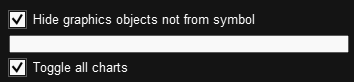
This function:
- hides objects, but does not delete them,
this means that all graphic objects that this function hid will still be on the chart, regardless of whether you switched the symbol or not.
The problem here is not an error, but a conflict between the functionality of applications, this happens step by step:
1) in the first window, you created an alert on the XXX symbol, and a line appeared on the chart.
The line will not be copied to the second window, since this alert has not yet worked, and its line still belongs to the Panel (panel objects are not copied).
2)Next, in the first window, you switched the symbol to YYY. Accordingly, the panel hid the alert line from the chart, you do not see it, but it is still in this window.
3)Next, The chart displays the YYY symbol, and the Alert on the XXX symbol worked. When triggered, the panel renamed the line of this alert, and now it does not belong to the panel and this line is copied to the second window.
4)Next, This line appears in the second window, and the panel that is installed on the second window binds this line to the YYY symbol, because in this window this line appeared exactly on the YYY symbol.
5) as a result, you get:
The panel on the first window will show this line on the XXX symbol, and hide it on other symbols,
The panel on the second window will show this line on the YYY symbol, and hide it on other symbols.
Plus, the indicators will try to copy these contradictory properties of the object (invisibility) between themselves.
The same thing happens with the rectangle.
Solution to the problem - if you use one panel on all terminal symbols (switch symbols), then use only one panel for this. We create functions and test its operation only in this use case. Several panels can be used if they are installed on different symbols, and you do not switch symbols.
Regarding the line repainting in red, - I think that this problem is not related to this indicator,
This is a problem with the panel function that hides objects when switching the symbol, - when hiding an object, the Color and Line Style parameters are most likely reset, I will check this.
By the way, there is another tool that can help with this.
In the panel, you can add an "exception" - this is the name of objects that the panel will not process.
For example, alert lines have the word Alert in their name:
Accordingly, if you enter the prefix Alert in the settings of the second Panel, this panel will not manage copies of the alert lines:
The same can be done for the indicator:
Update your indicator to version 1.4, it has some fixes.
As for the fact that object deletion is not copied - this is due to the fact that the panel disables the properties of the chart, which is needed to determine this event. I made some changes to the panel that will get rid of this problem. The panel update will be released a little later, when I finish the current work on it.