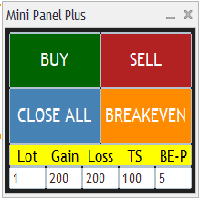
Mini Panel Plus
FREE
Publicado:
12 setembro 2023
Versão atual:
2.4
Não encontrou o robô certo? Encomende um para você
no serviço Freelance.
Ir para o Freelance
no serviço Freelance.
Como comprar um robô de negociação ou indicador?
Execute seu EA na
hospedagem virtual
hospedagem virtual
Teste indicadores/robôs de negociação antes de comprá-los
Quer ganhar dinheiro no Mercado?
Como apresentar um produto para o consumidor final?

Você está perdendo oportunidades de negociação:
- Aplicativos de negociação gratuitos
- 8 000+ sinais para cópia
- Notícias econômicas para análise dos mercados financeiros
Registro
Login
Você concorda com a política do site e com os termos de uso
Se você não tem uma conta, por favor registre-se
Do you have a similar tool for entering pending orders?
Thank you, yep if you don't click the chart the values that you change may not be updated. I'm sorry but I don't have tools for pending orders.
Good and useful utility. Thank you Patrick. My question is, if I'm going with second order on the same pair, how it will manage first order, with new settings? or how to correct each order separately?
Great tool. I would like to know a little more about BE-P and Breakeven. Are they triggered automatically or is it necessary to click Breakeven when there is profit, or click Breakeven before executing orders to set up? I didn't quite understand how this part works.
Thanks! :)
Great tool. I would like to know a little more about BE-P and Breakeven. Are they triggered automatically or is it necessary to click Breakeven when there is profit, or click Breakeven before executing orders to set up? I didn't quite understand how this part works.
Thanks! :)
Hi, get very ugly looks of panel. (
Hi mate there is anyway you could position the buy button to the right and the sell to the left to be identical as MT5? Amazing tool totally would buy it or donate if there is away. Thanks
Hi Rob, ty for your comment, I'll see if I can do that change of positions.
Hi, get very ugly looks of panel. (
Hi, get very ugly looks of panel. (
Someone replied on the forum, suggesting that the fix for MT4 is depicted in the attached images. It's possible that it may also work for MT5.
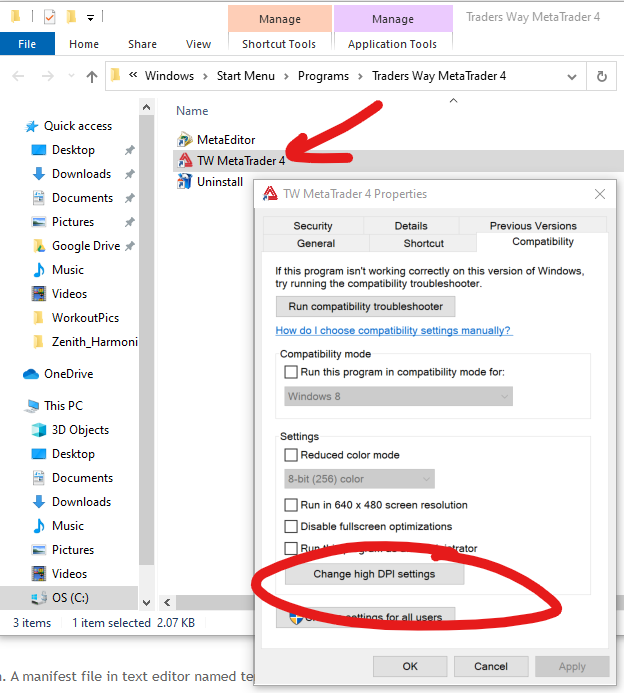
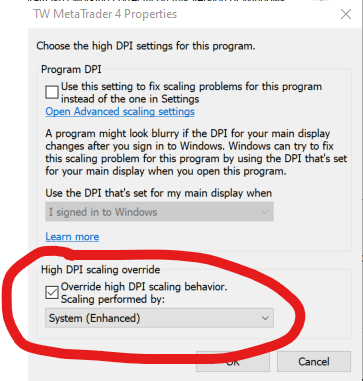
Someone replied on the forum, suggesting that the fix for MT4 is depicted in the attached images. It's possible that it may also work for MT5.
Yesss, that's works for me.
Have a nice weekend!
This EA when i run on EUR usd and others pair. What doing when i click close all on EUR usd he close all position only from EUR usd or closed position from all pair ?
Hello, I'm not sure if I understand your question, but when you press Close All a routine verify the order on the current active chart and close all the order to this specify chart
Here is the fragment of code lines for the button
So it is design to only close the positions on the active chart. As
_Symbolmeans the current chart. I did not tested this EA for many cases so I advise everybody to test it on demo account to not deal with unexpected behavior.
Hey Patrick
Tool is really useful and easy to use but the only thing weird is i have have to input numbers every time i open terminal, just make a setting to auto save it or we can save setting as a file
Thanks
Patrick can you add 1 more column for partials?
Hello 4xMind, thank you for your comments. I am currently working on two other projects, 60 hours a week, so I cannot promise any modifications soon. But when I have some free time, I will look into it.
Hello 4xMind, thank you for your comments. I am currently working on two other projects, 60 hours a week, so I cannot promise any modifications soon. But when I have some free time, I will look into it.
Thanks, 2 new functions
1. Partials
2. Save setting when terminal open