EA Hedger

4

거래 고문을 구입했습니까, 신호를 구독했습니까, 아니면 수동으로 거래하고 있습니까?! 위험 관리를 잊지 마십시오.
EA Hedger 는 헤징을 사용하여 위험을 관리할 수 있는 다양한 설정이 있는 전문 거래 유틸리티입니다.
헤징은 이미 열려 있는 포지션의 반대 포지션을 여는 거래 기법입니다. 헤징을 통해 위치를 완전히 또는 부분적으로 차단(잠금)할 수 있습니다.

이 제품을 사는 것이 유익한 이유:

  • 신뢰성 - 어드바이저가 철저히 점검 및 테스트되었습니다.
  • 유용성-전문가 고문은 실제 거래에 사용되며 그 작업에 효과적입니다
  • 성능-위험 회피와 거래의 결과는 위험 회피없이 거래의 결과보다 훨씬 낫다
  • 가용성-고문의 비용은 한 달에$4.91 또는 하루에$0.17 입니다-이것은 1-2 스프레드입니다
  • 지원 – 토론에서 판매자에게 질문하고 조언을 얻을 수 있습니다.
  • 개발 - 제품에 대한 희망 사항을 작성할 수 있으며 가능한 경우 추가됩니다.
  • 업데이트 - 예정된 업데이트를 사용할 수 있습니다.


예를 들어, 귀하의 계정에 3개의 열린 직위가 있습니다.

EURUSD 매수 0.10
EURUSD 매수 0.20
GBPUSD 0.20 구매
위험을 절반(50%)으로 줄이려면 헤지를 활성화할 때 다음 위치가 열립니다.

EURUSD 매도 0.15 헤지
GBPUSD 매도 0.10 헤지

EA Hedger가 유용할 때
I. 손실을 줄이고 예금을 손실로부터 보호하고 싶습니까?! 이익 또는 자본의 허용 가능한 인출액 또는 최소 가치를 결정하여 포지션을 헤지합니다.
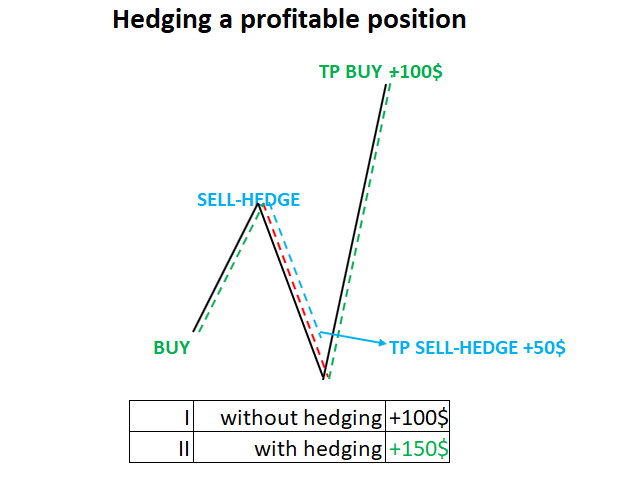
Ⅱ. 당신의 포지션은 올바른 방향으로 열려 있고 수익을 내고 있습니까?! 가격 반전으로부터 이익을 보호하고 이익 목표에 도달하면 포지션을 헤지합니다. 단계별 헤징은 이익 목표가 달성되면 리드 포지션을 줄이는 데 도움이 됩니다.
III. 한자리에 얼어붙은 시장이 복도에서 거래되고 있다?! 이것을 활용하십시오! 가격이 귀하의 포지션과 반대 방향으로 움직일 때 포지션을 헤지하고 이익에 대한 헤지를 마감하거나 가격이 귀하의 메인 포지션을 위해 계속 움직이는 경우 헤지합니다.

헤징의 장점은 주요 거래에 대한 간섭이 없다는 것입니다. 헤징은 병렬로 수행되며 다른 거래 로봇의 주문에는 영향을 미치지 않습니다.
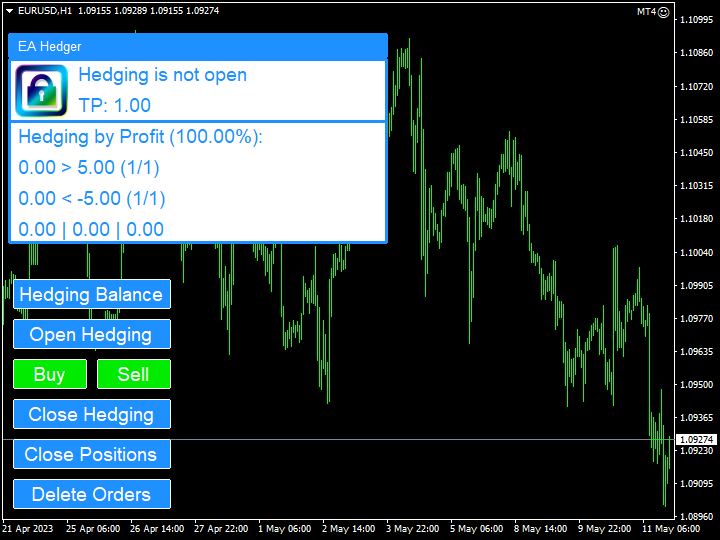
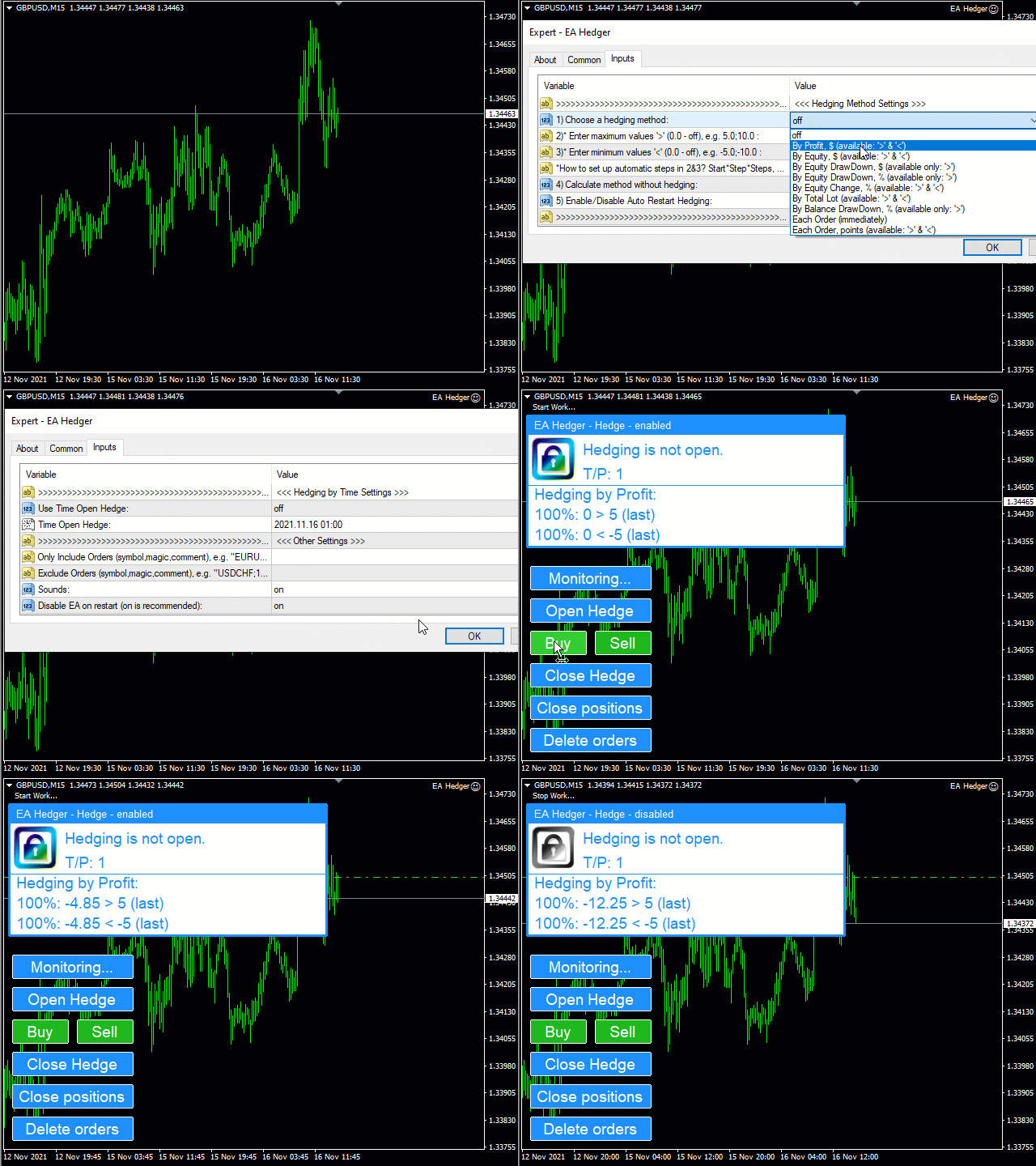
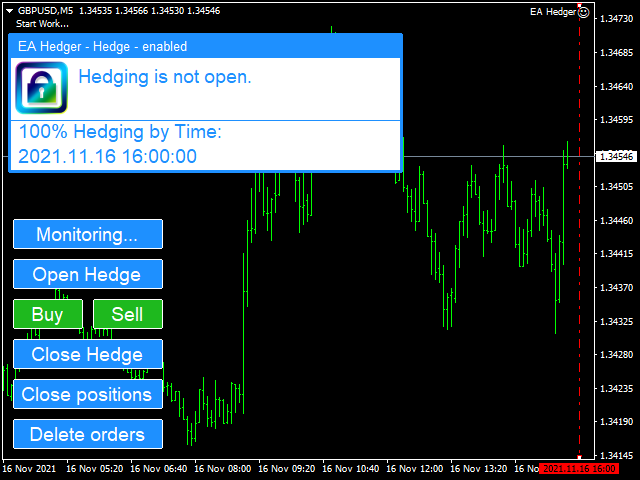
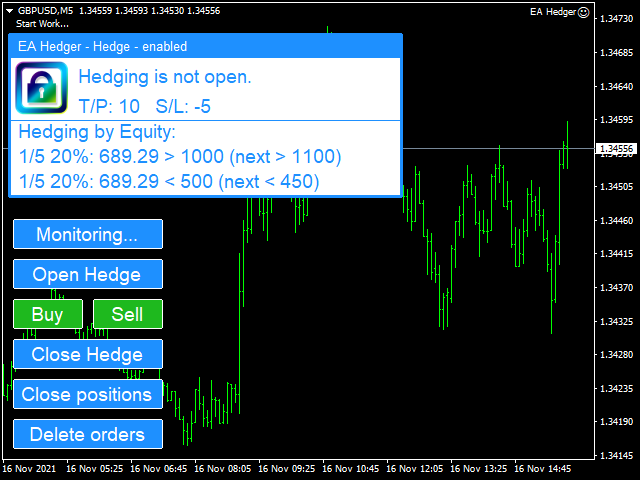
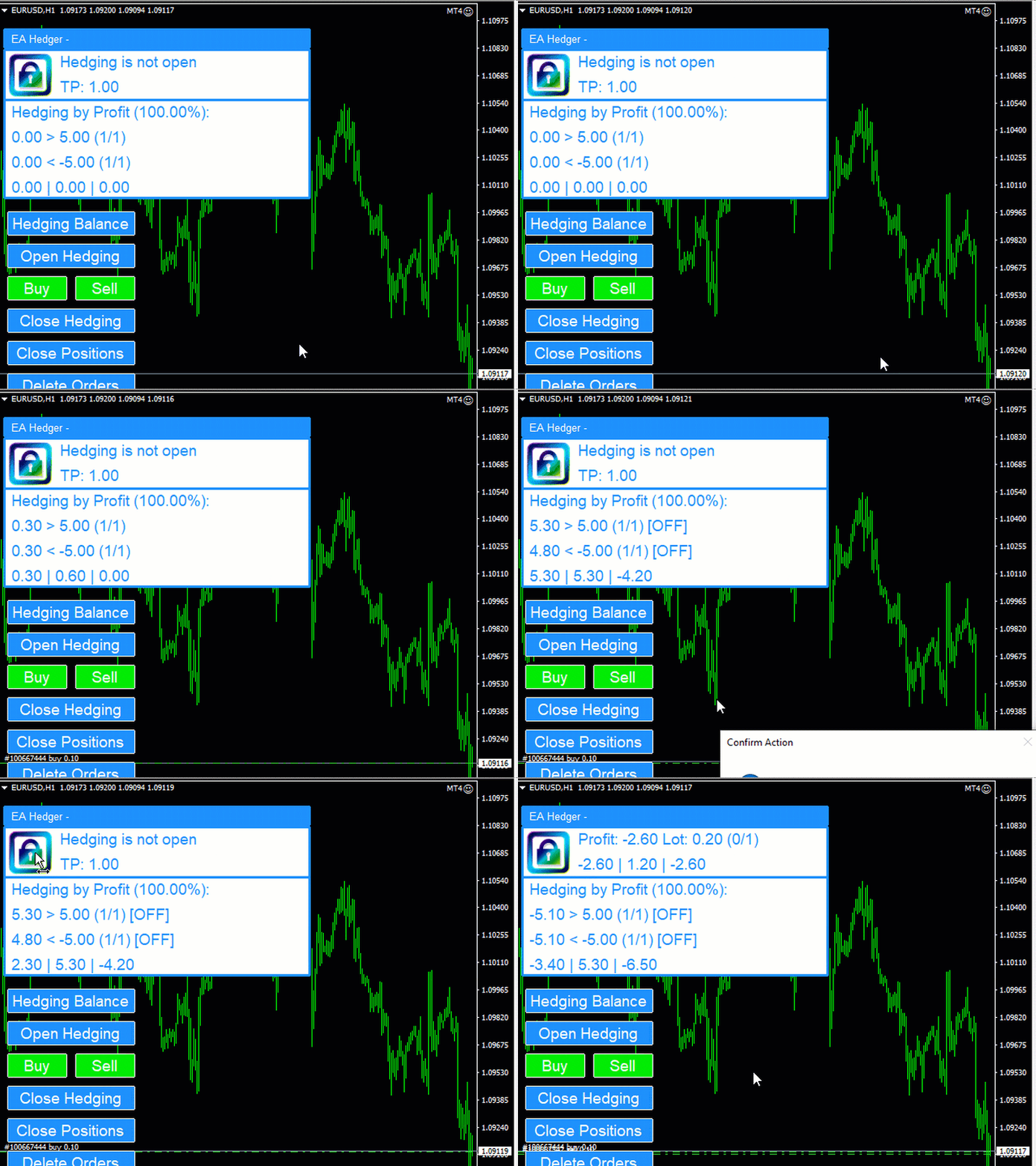
헤징은 14 개의 내장 방법,특수 개방형 헤지 버튼 또는 헤지 밸런스 유지 모드를 사용하여 수행할 수 있습니다. 새 버전은 헤징에 대한 추가 조건의 가능성을 제공합니다(예:그리드의 다섯 번째 순서에서 헤징을 시작할 수 있음).

헤징 프로세스는 이 헤지 조건에 대해 여러 단계로 나눌 수 있으며 " < "는 세미콜론으로 구분된 값 목록을 사용하여 지정할 수 있습니다. 데모 버전을 다운로드하고 저속으로 테스트를 실행하여 작동 방식을 확인하십시오.

헤지 주문은 "Close Hedge" 버튼을 사용하거나 사전 설정된 마감 조건을 사용하여 마감할 수 있습니다.

    • 이익 - 헤지 주문의 총 이익이 지정된 값에 도달했습니다.
    • 손실 - 헤지 주문의 총 손실(마이너스를 표시해야 함)
    • 후행 - 지정된 거리에서 이익 후 정류장을 이동할 수 있습니다.
    • BreakEven - 지정된 이익 크기에 도달하면 지정된 값만큼 스톱을 이동할 수 있습니다.

    평균화 기능을 사용하면 지정된 단계와 횟수로 헤지 주문을 평균화할 수 있습니다(단계 수를 제한하는 것이 좋습니다).
    "자동 재시작" 모드 - 이 모드는 이전 헤지 주문이 마감된 후 헤지 주문을 열기 위한 조건을 자동으로 업데이트하고 필요한 경우 반복적인 헤지가 수행됩니다.
    "헤징 잔액" 기능을 사용하면 헤징 잔액을 유지할 수 있으며 포지션을 열거나 닫는 경우 헤징이 증가하거나 감소합니다.

    "포함만" 및 "제외" 매개변수와 "구매"/"판매" 버튼을 사용하여 볼 주문 바구니를 정의할 수 있습니다. 매개변수를 비워두면 헤지 주문 마법을 사용한 거래를 제외하고 모든 열린 거래가 바구니에 포함됩니다.

    기호,마법,티켓 또는 주석과 같은 기준에 따라 관찰에서 주문을 포함하거나 제외 할 수 있습니다.

      리뷰 4
      Jan Mrakota
      142
      Jan Mrakota 2021.09.10 21:53 
       

      Very nice utility with a lot of functions for a good price. You can setup various hedging modes and adjust a plenty of parameters according to your needs. I use it for hedging of several EAs and it really helped me to reduce losses. Developer is responsive and he explained me everything I asked. I can recommend it.

      ENZO OM
      141
      ENZO OM 2020.11.25 07:08 
       

      excelente producto, solo requiere stoop loss y take profit, break even y traling stoop y seria una maquina de defensa extraordinaria, la recomendaria plenamente, por favor puede hacer una actualizacion? saludos gracias gran obra

      Nikolai Ivankin
      665
      Nikolai Ivankin 2021.05.16 07:52 
       

      Nice product, fast support by the author. DD calculation shows a little bit larger amount and doesn't correspond to other tools, but larger is better than smaller. Also, As for me, I would rather prefer to see the current DD, not the maximum during a basket trade open, but it's fine.

      추천 제품
      Savage Trades M.T.A.  is a Manual Trade Assistant expert advisor. This EA contains self-adaptive market algorithm, which uses price action patterns and standard trading indicators. 1.) Quickly Execute trade entries with the click of a button with your own predetermined Stop Loss and Take Profit. 2.) Non-Repainting retracement and reversal warnings indicated by arrows and system alert. 3.) Auto adjusting Support and Resistance levels with strength indicated by color shade. 4.) Auto adjusting Fibo
      Virtual Collider Manual   is a trading assistant with a built-in panel for manual trading. It automatically moves a position opened by a trader in profit using innovative adaptive grid algorithm of averaging and adaptive pyramiding Know-how of the grid algorithm of averaging and pyramiding of the   Virtual Collider Manual   trading robot is based on fully automatic adaptation of all characteristics of dynamically build order grid and pyramid with actual price movement with no need for adjusting
      News Scalping Executor Pro is an utility which helps to trade high impact and huge volatility   news . This utility helps to create two opposite orders with risk management and profit protection. It moves automatically stop loss level to avoid losses as much as possible by using many different algorithms. It helps to avoid trading the news if spread suddenly becomes very huge. It can lock profit by moving stop loss or partially closing of orders. To be profitable with this type of trading you
      손익분기점을 자동으로 설정하는 유틸리티로, 주어진 거리를 지나갈 때 거래를 손익분기점으로 전환합니다. 위험을 최소화할 수 있습니다. 상인을 위해 전문 상인이 만들었습니다. 유틸리티는 거래자가 수동으로 또는 고문을 사용하여 개설한 모든 시장 주문과 함께 작동합니다. 매직 넘버로 거래를 필터링할 수 있습니다. 유틸리티는 동시에 원하는 수의 주문을 처리할 수 있습니다. MT5 버전 https://www.mql5.com/ru/market/product/57077 유틸리티가 할 수 있는 일: 1핍에서 가상 손익분기점 설정 실제 수준의 손익분기점 설정 각 주문에 대해 개별적으로 작업(손익분기 수준은 각 주문에 대해 별도로 설정됨) 단방향 주문 바구니로 작업(손익분기 수준은 모든 주문에 대해 공통으로 설정되고 별도로 구매 및 판매) 양방향 주문 바스켓으로 작업(손익분기 수준은 모든 주문에 대해 공통으로 설정되며, 함께 구매 및 판매) 테스트 및 작업을 위해 차트의 버튼을 사용할 수 있습니
      SL InfoPanel is an information panel that displays operational trading information on the current instrument. The panel contains the following information: The first column: The fixed profit for the specified period of time and the percentage of this profit to the current deposit (the time period is configured in the "Account History"). The value is colored blue if there is a profit and red if there is a loss. Open Long orders (number of lots/number of orders). Open Short orders (number of l
      Expert Advisor for MT4 Useful utility MUST have for all traders.  With 1 click button, you're able to close all your open positions. Its come with a warning pop up notification when you click to close all your trades, to avoid an accident press the button. Just press 'Yes' to confirm or 'No' to cancel it. The expert will close all your open positions no matter what pairs you currently open or directions. Just attach the expert on 1 of your chart, and you're good to go.
      Three 3TP Easy Trade Pad Expert for MT4 – Download The 3TP Easy Trade Pad Expert is an advanced tool designed for capital management, risk control, and streamlined trading within the MetaTrader 4 (MT4) platform. With its functional and specialized interface, this expert advisor allows traders to effortlessly set and manage Stop Loss (SL) and Take Profit (TP) levels. In addition to simplifying trade execution, the tool provides features for defining acceptable risk, expected profit (R/R), and adv
      This EA utility does not trade on its own, but it only modifies the open  trades  to add take profit and stop loss that was  opened manually or by any other expert advisors.  The distance is based on Average True Range Indicator(ATR). How Does It Work? If Symbol to modify is set to "All Symbol" simply attach it to one chart, and all open trades in the entire terminal will set the take profit and stop loss with the distance of Average True Range value of their corresponding symbol.  If  Symbol
      Utility, which draws buy or sell trendlines, which can also become support or resistances able to close any position on the screen Algorithm that calculates the gain of the position, at the touch closure of the line.   The benefits you get: Works on forex and CFD, timeframe from M1 to Weekly. Easy to use screen control panel. Audible warning messages at the touch of the line. Easy to use.
      It is so very disappointing when the price does not have enough points to achieve Take Profit and makes a reversal. This EA sets virtual levels near the TakeProfit levels. This EA sets virtual levels next to TakeProfit orders. If these levels are reached by price, breakeven or trailing stop is applied for an order. Features This EA does not set new orders. The aim of this EA is to manage stop losses of existing orders that are set by another EA or manually (magic number equals 0). For correct w
      Panel "panel_kjutaMultiTerminal" for trading. Opens, modifies, closes and deletes trading and pending orders from the chart using virtual lines, buttons and the active information terminal. Automatically opens an order by indicator levels. Hints in Russian, English or disabled. It has a number of functions for trailing virtual Take Profit lines and limit orders. Displays information on the active information terminal.  Hides and includes virtual lines S/L , T / P, buttons "<>","M","X", as well a
      This script is designed to automatically open charts for all available forex pairs on the MetaTrader 4 platform, as well as the gold (XAUUSD) chart. The script iterates through all symbols available on the platform, determines which of them are forex pairs, and opens their charts on the M1 (one minute) timeframe. Key Features: Gold Chart Opening: The script automatically opens the XAUUSD (gold/dollar) chart if this symbol is available from your broker. If the gold symbol is not found, an error m
      Close all trades at the specified hour and minute! Once the specified time is hit, all orders will be automatically closed. ========================================== INPUTS: Closing type:   Set to specify if you wanted to close all of the trades on the account or just the trades under the current chart symbol. Closing hour:   Set the exact closing hour. Closing minute:   Set the exact closing minute. If current time is equal or more than the closing minute and is equal to closing hour, then all
      Trade Assistant Pro 36 in 1
      Makarii Gubaydullin
      4.76 (21)
      다기능 거래 도구: 로트 계산기, 그리드 주문, 위험/보상 비율, 거래 관리자, 수급 구역, 가격 행동 분석 등 데모 버전   |   사용자 설명서 트레이딩 어시스턴트 는 전략 테스터에서 작동하지 않습니다: 이 유틸리티 를 테스트하려면 데모 버전을 여기서 다운로드하세요. 질문 /개선 아이디어/버그 발견 시 저에게 연락 하세요 MT5 버전이 필요하시면, 여기서 사용 가능합니다 거래 프로세스 를 단순화, 가속화, 자동화하세요. 이 대시보드 로 표준 터미널 기능을 확장합니다. 트레이딩 패널 은 모든 거래 상품에서 작동합니다: 외환, 주식, 지수, 암호화폐 등. 1. 새로운 거래 열기 : 로트/위험/위험보상비 계산: 수동 거래의 위험 관리 로트 계산기 (위험 크기 기반 거래량 계산) 위험 계산기 (로트 크기 기반 위험 금액) 위험 보상 비율 그리드 주문: + 동적 거리 옵션 및 분할 로트 옵션 주문 활성화 트리거, + Buy StopLimit/Sell StopLimit: Mt4에서도 가능
      Account Protector Metatrader 4
      Emmanuel Lovski Ijeawele Maduagwuna
      Account Protector Meta Trader 4 This utility prevents risk of ruin per trading cycle.  Retail forex trading accounts are designed with   stop out levels   that make it impossible to quickly restore lost trading capital   (to initial levels)   in the event of a human or algorithm trader  " blowing"   an account. This hampers the efforts of a trader who after growing an account investment to a multiple of its initial value, suddenly suffers irreparable loss because of several trade entry mishaps.
      VirtualStops
      Viktor Shpakovskiy
      A utility for managing open positions using virtual (invisible to the broker) stops. Virtual stop loss and virtual take profit can be freely moved around the chart. If the price touches the virtual stop line (TP, SL, TS), the EA will close all orders of the same direction on the current chart. Closing orders by virtual take profit is possible only if there is a profit. With the help of the built-in trading simulator, you can, in the strategy tester, see how the adviser works. Parameters Block
      프리셋 주문 및 자동 로트 계산이 가능한 트레이딩 패널. 트레이딩 패널은 전략 테스터에서 작동하지 않습니다(추적손절 테스트만 가능). 매뉴얼, 설명, 라이트 데모 다운로드. 성공적인 거래자는 자기 훈련과 유능한 자금 관리로 구별됩니다. 고정 된 롯을 사용하는 경우,당신은 위험에 처해 있습니다. 결국,다른 시간대에 다른 거리가 있으며 하나의 수익성이없는 거래는 여러 수익성있는 거래를 커버 할 수 있습니다. 각 트랜잭션에 대한 정지 손실이 보증금의 1%를 초과하지 않도록 자동 로트를 사용하는 경우,당신은이 문제를 해결한다. 또한 거래자는 부분 폐쇄,거래 이전을 손익분기 점,후행 정지,차트 상의 과거 거래 분석을 사용합니다. 이 충분한 뉘앙스,그래서 나는 거래 패널을 작성하기로 결정했다. 내 취향을 위해,그것은 매우 기능적이고 편안한 것으로 밝혀졌습니다. 거래 패널 기능. 모든 계정 및 통화로 작업. 로트 계산을 위한 주문의 시각적 사전 설정. 로트 계산을 위한 보류 중인 주문의 시각적

      Grid Maestro
      Ruslan Brezovskiy
      Grid Maestro is a utility that automatically builds a grid of orders based on specified parameters: grid step, number of orders and volume multiplier. The first trade is opened by pressing a button on the screen. There is also a function for automatic parameter selection calculated based on the analysis of the maximum drawdown for the instrument. Features: • Works only with orders opened by pressing buttons on the screen. • When using automatic mode, a timeframe of at least H1 is recommended for
      Margin Call Shield – Defend Your Margin on Your Terms Margin Call Shield   is a tool for MetaTrader 4 traders who want to decide for themselves which open positions are closed during margin call situations before the platform does so automatically based on its internal rules. By default, the broker or platform decides which positions to close, often using undisclosed algorithms. Margin Call Shield lets you set this order according to your own strategy. Why Was Margin Call Shield Created? In a  
      Risk Commander
      Adisorn Soodkanueng
      Product Name: Risk Commander: Trade Assistant & Strategy Simulator Risk Commander is more than just a trade panel—it is a complete Manual Trading Ecosystem . It serves two powerful purposes: Live Assistant: Helps you execute trades with speed, precision, and perfect risk management in real-time markets. Training Simulator: Fully compatible with the Strategy Tester (Visual Mode) , allowing you to practice manual trading on historical data without risking a cent. NEW! Built-in Simulator Mode S
      ASTA Trade Manager is a semi-automated trading tool designed to assist professional traders in Exit Strategy Management . This EA will not open trading positions automatically. This version is made to manage manual transactions on 1 chart (pair) only. For the Multipair version, you can check the product at:  ASTA Multipair Trade Manager . FEATURES: 1. Entry and Exit Panel Order Panel: Buy, Sell and Pending Orders Exit Button: Close All Order, Close All Buy, Close All Sell Can be used on strategy
      If you found this EA, it's probably because you want to get a funded account with a prop firm, but you see a rule that most of traders fear :   Maximum Daily Drawdown.  I've been through this problem myself as   I'm a prop firm trader   and I've made a bot to solve this rule, and you can get it to solve this problem too. How does it work ? When you first setup this EA, you need to input the   initial deposit   which corresponds to the size of your funded account. For exemple if you get a 10k$ f
      Fever ESM
      Evgenii Morozov
      Trading Advisor for margin currency pairs and metals. Conservative trading of 100,000 units per 0.01 lot. The standard trade is 10,000 units per 0.01 lot. Aggressive trading with high risks of 1000 units per 0.01 lot. You can always pick up your starting lot.  The EA is fully automated, you only have to put up the initial lot depending on your initial deposit. The recommended timeframe is H1. 1. Test on any steam, iron and fuel oil 2. Try starting with convenient depots 3. When going into a dra
      This tool allows you to place pending orders that cannot be triggered by wicks . You set your desired entry price and order type, and the EA watches the level. A trade will only be opened if a full candle body closes beyond your price , ensuring the move is real and confirmed — not just a spike or spread touch. This gives you cleaner entries, eliminates premature triggers, and keeps your strategy disciplined and intentional.
      Один из главных секретов успешного трейдинга - это адекватное управление рисками. Но не всегда получается следовать этому правилу, т.к. иногда эмоции берут верх над трейдером и вход в рынок случается необдуманным. Программа Optimal lot исключает такие ошибки и позволяет быстро принять решение, входить в рынок или нет. Ее уникальность в том, что Вы строите горизонтальную линию с именем "risk". При перемещении этой линии в информационном блоке отображаются следующие данные: Balance - Размер д
      EasySet Panel
      Joe Treacher
      5 (1)
      Easy Set Trade Panel Trade Smarter, Not Harder Take the stress out of trade setup and risk management with the Easy Set Trade Panel — a streamlined, drag-and-drop interface designed for speed, precision, and simplicity. Key Features: Effortless Trade Setup : Just drag your Entry, Stop, and Take Profit lines on the chart. The panel calculates the exact lot size for your trade based on your risk preferences. ️ Smart Risk Management : Choose how you want to control risk: % of Account (e.g., Ri
      Trade Manager 4 Lite is trading panel developed with a goal to make manual trading in some (routine) task easier. Trade Manager 4 Lite also works in Strategy Tester. Version for Meta Trader 5 is here: Trade Manager 5 Lite Main features of Trade Manager 4 Lite Trading for Forex and CFDs Support for 4 and 5 digit brokers 65 combinations to set order Set Take Profit, Stop Loss and entry level for Pending Order with lines positioned on the chart Break Even Trailing Stop Loss Multiple Orders at one
      Auto SLTP Maker MT4  is an assistant for all those who forget to set StopLoss and/or TakeProfit in deal parameters, or trade on a very fast market and fail to place them in time. This tool automatically tracks trades without StopLoss and/or TakeProfit and checks what level should be set in accordance with the settings. The tool works both with market and pending orders. The type of orders to work with can be set in the parameters. It can track either trades for the instrument it runs on, or all
      Risk Order Panel Торговая панель для выставления отложенных ордеров при ручной торговле. Панель позволяет не задумываться о расчетах параметров ордера, типа сделки, размера лота. При необходимости выставления ордера достаточно мышью определить точки входа, Stop Loss, Take Profit, указать сумму риска и нажать на кнопку выставления ордера. Всё остальное панель сделает сама. Основные возможности: Установка точек входа, Stop Loss, Take Profit путем перетаскивания линий прямо на графике. Автоматиче
      A trader's assistant that closes positions in parts with a simple trail to take the optimal profit size when the price of the symbol moves towards the position (s). Initially, the stop loss is moved to breakeven + (the so-called breakeven greed level) - this is when the price closes the stop-loss position during the reverse movement and as a result some profit will still be received. Further, while maintaining the movement in the direction of the position, it is closed in parts on price rollback
      이 제품의 구매자들이 또한 구매함
      Exp COPYLOT CLIENT for MT4
      Vladislav Andruschenko
      4.69 (65)
      MetaTrader 4용 트레이드 복사기.       모든 계정의 외환 거래, 포지션, 주문을 복사합니다. 그것은 최고의 무역 복사기 중 하나입니다       MT4 - MT4, MT5 - MT4       위해       카피롯 MT4       버전(또는       MT4 -  MT5   MT5 - MT5       위해       카피롯 MT5       버전). MT5 버전 전체 설명   +DEMO +PDF 구입 방법 설치하는 방법     로그 파일을 얻는 방법     테스트 및 최적화 방법     Expforex의 모든 제품 복사기   버전         MetaTrader 5   터미널 (   МТ5 - МТ5, МТ4 - МТ5   ) -   Copylot Client MT5 고유한 복사 알고리즘은 마스터 계정에서 고객 계정으로 모든 거래를 정확하게 복사합니다. 이 제품은 또한 높은 작동 속도에서 높은 오류 처리로 유명합니다. 강력한 기능 세트. 프로그램은 여러 터
      Trade Manager EA에 오신 것을 환영합니다. 이 도구는 거래를 보다 직관적이고 정확하며 효율적으로 만들기 위해 설계된 궁극적인 리스크 관리 도구 입니다. 단순한 주문 실행 도구가 아닌, 원활한 거래 계획, 포지션 관리 및 리스크 제어를 위한 종합 솔루션입니다. 초보자부터 고급 트레이더, 빠른 실행이 필요한 스캘퍼에 이르기까지 Trade Manager EA는 외환, 지수, 상품, 암호화폐 등 다양한 시장에서 유연성을 제공합니다. Trade Manager EA를 사용하면 복잡한 계산은 이제 과거의 일이 됩니다. 시장을 분석하고 진입, 손절 및 익절 수준을 차트의 수평선으로 표시한 후 리스크를 설정하면, Trade Manager가 이상적인 포지션 크기를 즉시 계산하고 SL 및 TP 값을 실시간으로 표시합니다. 모든 거래가 간편하게 관리됩니다. 주요 기능: 포지션 크기 계산기 : 정의된 리스크에 따라 거래 크기를 즉시 결정합니다. 간단한 거래 계획 : 진입, 손절, 익절을 위한
      MT4 to Telegram Signal Provider 는 사용하기 쉽고 완전히 사용자 정의가 가능한 도구로, 텔레그램으로 신호를 보내어 계정을 신호 제공자로 변환할 수 있습니다. 메시지 형식은 완전히 사용자 정의가 가능합니다! 그러나 간단한 사용을 위해 미리 정의된 템플릿을 선택하고 메시지의 특정 부분을 활성화하거나 비활성화할 수도 있습니다. [ 데모 ]  [ 매뉴얼 ] [ MT5 버전 ] [ 디스코드 버전 ] [ 텔레그램 채널 ]  New: [ Telegram To MT5 ] 설정 단계별 사용자 가이드 가 제공됩니다. 텔레그램 API에 대한 지식이 필요 없으며, 개발자가 필요한 모든 것을 제공합니다. 주요 기능 구독자에게 보낸 주문 세부 정보를 사용자 정의할 수 있는 기능 예를 들어 브론즈, 실버, 골드와 같은 계층 구독 모델을 만들 수 있습니다. 골드 구독은 모든 신호 등을 받게 됩니다. ID, 심볼 또는 코멘트별 주문 필터링 주문이 실행된 차트의 스크린샷을 포함 보낸


      TradePanel MT4
      Alfiya Fazylova
      4.84 (89)
      Trade Panel은 다기능 거래 보조원입니다. 이 애플리케이션에는 수동 거래를 위한 50개 이상의 거래 기능이 포함되어 있으며 대부분의 거래 작업을 자동화할 수 있습니다. 전략 테스터에서는 애플리케이션이 작동하지 않습니다. 구매하기 전에 데모 계정에서 데모 버전을 테스트할 수 있습니다. 데모 버전 여기 . 전체 지침 여기 . 거래. 한 번의 클릭으로 거래 작업을 수행할 수 있습니다: 자동 위험 계산을 통해 지정가 주문 및 포지션을 엽니다. 한 번의 클릭으로 여러 주문과 포지션을 열 수 있습니다. 주문 그리드를 엽니다. 그룹별 대기 주문 및 포지션을 마감합니다. 포지션 반전(매수 청산 후 매도 개시 또는 매도 청산 후 매수 개시). 포지션 고정(매수 포지션과 매도 포지션의 양을 동일하게 하는 추가 포지션 개설). 한 번의 클릭으로 모든 포지션을 부분 청산합니다. 모든 포지션의 이익실현과 손절매를 동일한 가격 수준으로 설정합니다. 모든 포지션에 대한 손절매를 해당 포지션의 손익 분기


      Ultimate Extractor - Professional Trading Analytics for MT4 Ultimate Extractor transforms your MetaTrader 4 trading history into actionable insights with comprehensive analytics, interactive charts, and real-time performance tracking. Ability to combine multiple accounts and MT4 and MT5 into a single dashboard. What It Does Automatically analyzes your MT4 trading history across all Expert Advisors and generates detailed HTML reports with interactive visualizations. Tracks live performance metric
      Discord To MT4 Receiver
      Levi Dane Benjamin
      5 (1)
      회원으로서 어떤 채널에서도 신호를 복사하세요 (   Bot 토큰이나 관리자 권한이 필요하지 않음  바로 MT4로. 사용자를 고려하여 설계되었으며 관리 및 모니터링에 필요한 많은 기능을 제공합니다. 이 제품은 직관적이고 시각적으로 매력적인 그래픽 인터페이스로 제공됩니다. 설정을 사용자 정의하고 제품을 몇 분 안에 사용을 시작하세요! 사용자 가이드 + 데모  | MT5 버전 | 텔레그램 버전 데모를 시도하려면 사용자 가이드로 이동하세요. 디스코드를 MT4로 보내는 것은 전략 테스터에서 작동하지 않습니다. 디스코드   MT4 기능 회원으로서 어떤 채널에서도 복사하세요. Bot 토큰이나 채팅 ID가 필요하지 않음 위험 % 또는 고정된 로트로 거래하세요 특정 기호 제외 모든 신호를 복사할 것인지 또는 복사할 신호를 사용자 정의하세요 모든 신호를 인식하기 위해 단어 및 구문을 구성하세요 (기본 설정은 신호 제공자의 99%에 대해 작동해야 함) 원하는 경우 시간 및 날짜 설정을 구성하여 신

      The product will copy all telegram signal to MT4   ( which you are member  ) , also it can work as remote copier.  Easy to set up, copy order instant, can work with almost signal formats, image signal, s upport to translate other language to English Work with all type of channel or group, even channel have "Restrict Saving Content", work with  multi channel, multi MT5 Work as remote copier: with signal have ticket number, it will copy exactly via ticket number. Support to backtest signal. How to
      The News Filter
      Leolouiski Gan
      5 (25)
      이 제품은 뉴스 시간 동안 모든 전문가 어드바이저 및 수동 차트를 필터링하여 수동 거래 설정이나 다른 전문가 어드바이저가 입력한 거래가 파괴될 수 있는 급격한 가격 상승으로부터 걱정하지 않아도 됩니다. 이 제품은 또한 뉴스 발표 전에 열린 포지션과 대기 주문을 처리할 수 있는 완전한 주문 관리 시스템이 함께 제공됩니다. The News Filter  를 구매하면 더 이상 내장 뉴스 필터에 의존할 필요가 없으며 이제부터 모든 전문가 어드바이저를 여기서 필터링할 수 있습니다. 뉴스 선택 뉴스 소스는 Forex Factory의 경제 캘린더에서 얻어집니다. USD, EUR, GBP, JPY, AUD, CAD, CHF, NZD 및 CNY와 같은 어떤 통화 기준으로 선택할 수 있습니다. Non-Farm (NFP), FOMC, CPI 등과 같은 키워드 식별을 기준으로 선택할 수도 있습니다. 저, 중, 고 영향을 가지는 뉴스를 필터링할 수 있도록 선택할 수 있습니다. 차트와 관련된 뉴스만 선택하



      일별 및 주별 마감 거래 내역, 현재 진행 중인 거래, 외환 노출을 한 차트에서 즉시 확인하세요! 히트맵을 사용하여 수익성 있는 거래와 거래 포트폴리오 내에서 현재 하락이 있는 위치를 파악하세요. 빠른 마감 버튼 빠른 마감 버튼을 사용하여 단일 심볼에 대한 모든 거래를 마감하거나, 개별 거래를 전체적으로 마감하거나, 버튼을 클릭하여 일부 수익 또는 손실을 실현하세요. 더 이상 목록에서 거래를 찾아 거래의 일부를 마감하는 방법을 알아낼 필요가 없습니다. 대시보드는 외환 쌍을 거래하는 동안 각 통화 심볼에 대한 현재 노출도 표시하므로 주요 뉴스 이벤트에 앞서 과도하게 노출될 수 있는 영역을 파악하는 데 도움이 됩니다. 버튼을 사용하여 뉴스가 나오기 전에 노출을 즉시 빠르게 줄이거나, 이미 뉴스가 발생하여 수익을 창출한 경우 클릭 한 번으로 빠르게 수익을 확보할 수 있습니다! 진행 중인 거래 히트맵 거래 히트맵은 달러 비용 평균화를 사용하여 거래의 확장 및 축소를 수행하는 포지션 거
      VirtualTradePad mt4 Extra
      Vladislav Andruschenko
      4.86 (59)
      한 번의 클릭으로 거래할 수 있는 거래 패널.   위치 및 주문 작업!   차트 또는 키보드에서 거래. 거래 패널을 사용하면 차트에서 클릭 한 번으로 거래하고 표준 MetaTrader 컨트롤보다 30배 빠르게 거래 작업을 수행할 수 있습니다. 거래자의 삶을 더 쉽게 만들고 거래자가 훨씬 빠르고 편리하게 거래 활동을 수행할 수 있도록 도와주는 매개변수 및 기능의 자동 계산. 차트의 무역 거래에 대한 그래픽 팁 및 전체 정보. MT5 버전 전체 설명   +DEMO +PDF 구입 방법 설치하는 방법     로그 파일을 얻는 방법     테스트 및 최적화 방법     Expforex의 모든 제품 열기 및 닫기, 반전 및 잠금, 부분 닫기/오토로트. 가상/실제 손절매/이익 실현/후행 정지/손익분기점, 주문 그리드 .... MetaТrader 4   의 주요 요청 거래 제어판   : 구매, 판매, 구매 중지, 구매 제한, 판매 중지, 판매 제한, 닫기, 삭제, 수정, 후행 중지, 손절매,
      Custom Alerts: 여러 시장을 동시에 모니터링하고 중요한 기회를 놓치지 마세요 개요 Custom Alerts 는 여러 종목에 걸쳐 잠재적 트레이딩 기회를 한눈에 파악하고자 하는 트레이더를 위한 동적인 솔루션입니다. FX Power, FX Volume, FX Dynamic, FX Levels, IX Power와 같은 Stein Investments의 주요 도구들과 통합되어, 여러 차트를 오가거나 기회를 놓치는 일 없이 중요한 시장 변화를 자동으로 알림으로 제공합니다. 이제 브로커가 제공하는 모든 자산군을 지원하며, 기호를 입력할 필요 없이 자산 유형만 선택하면 설정이 완료됩니다. 1. Custom Alerts가 트레이더에게 매우 유용한 이유 올인원 시장 모니터링 • Custom Alerts 는 외환, 금속, 암호화폐, 지수, 주식(브로커가 지원하는 경우)까지 다양한 자산군의 신호를 수집하고 통합합니다. • 여러 차트를 전환할 필요 없이 하나의 창에서 명확한 알림을 받아보
      Copy Cat More Trade Copier MT4 (복사 고양이 MT4) 는 단순한 로컬 트레이드 카피어가 아니라, 오늘날의 거래 환경을 위해 설계된 완전한 리스크 관리 및 실행 프레임워크입니다. Prop Firm 챌린지부터 개인 계좌 관리까지, 강력한 실행력, 자본 보호, 유연한 설정, 고급 거래 처리 기능을 통해 모든 상황에 적응합니다. 이 카피어는 Master(송신자) 와 Slave(수신자) 모드 모두에서 작동하며, 실시간으로 시장가/지정가 주문, 거래 수정, 부분 청산, Close By 작업을 동기화합니다. 데모 및 실계좌 모두 호환되며, 거래용 비밀번호 또는 투자자 비밀번호로도 사용할 수 있습니다. Persistent Trade Memory 기술을 통해 EA, 터미널, VPS가 재시작되더라도 거래가 복원됩니다. 여러 Master와 Slave를 동시에 관리할 수 있으며, 브로커 간 차이는 접두사/접미사 자동 감지 또는 심볼 매핑으로 처리됩니다. 매뉴얼/설정: Copy C
      Everything for chart Technical Analysis indicator MT4 in one tool Draw your supply demand zone with rectangle and support resistance with trendline and get alerts to mobile phone or email alert -  Risk reward indicator Video tutorials, manuals, DEMO download   here .  Find contacts on my   profile . 1.   Extended rectangles and trendlines Object will be extended to the right edge of the chart when price will draw new candles on chart. This is rectangle extender or trendline extender. 2. Price to
      RedFox Copier Pro
      Rui Manh Tien
      4.7 (10)
      Time saving and fast execution Whether you’re traveling or sleeping, always know that Telegram To Mt4 performs the trades for you. In other words, Our   Telegram MT4 Signal Trader  will analyze the trading signals you receive on your selected Telegram channels and execute them to your Telegram to MT4 account. Reduce The Risk Telegram To Mt4   defines the whole experience of copying signals from   Telegram signal copier to mt4 platforms. Users not only can follow all instructions from the signa
      Telegram Signal pro
      Sara Sabaghi
      4.86 (7)
      What is it? Think about it, you can send all the orders/positions info to your telegram channel or group to create your community or VIP signals on telegram. Position info means this EA forward all of your new positions open details (Open price, Open time, Position Type, position Symbol and volume), positions changes ( SL or TP modifying or pending price changes) and position close (Close price, profit or loss, position duration time) and also EA Send NEWS alert (Economic calendar event) on you
      Smart Keys Sniper Entry
      Stephen Sanjeeve Sahayam
      이 2 in 1 무역 관리자는 양초 탈주 거래에 이상적입니다. 풀백에 추가 지정가 주문을 함으로써 평균 거래 비용이 발생할 수 있습니다. 이렇게 하면 모든 포지션에서 최상의 가격을 얻을 수 있고 승리 시 더 높은 RR을 얻을 수 있습니다. 위험은 가장 최근에 마감된 캔들 높이로 계산됩니다. 거래 도우미 버튼은 모든 수동 주문을 관리하는 데 도움이 됩니다. 모든 입력 방법과 함께 사용하십시오. 가격 조치 또는 지표 및 모든 거래 스타일, 스캘핑, 일중 또는 스윙 거래. 특징: 지정가 주문을 사용하여 양초 탈주를 거래하십시오. 특별 비용 평균 기능은 이기는 거래에서 RR을 높입니다. 한 번에 받는 주문 수를 제한하여 초과 거래를 줄입니다. 위험을 계산하고 캔들 기간별로 손절매를 배치하는 일종의 기능 중 하나입니다. 이익 실현을 설정하고 RR로 부분 이익을 확보하십시오. 한 번의 클릭으로 stoploss를 항목으로 이동합니다. 한 번의 클릭으로 부분 포지션을 닫습니다. 일일 손익
      Trade Manager MT4 DaneTrades
      Levi Dane Benjamin
      4.09 (11)
      거래 관리자는 위험을 자동으로 계산하는 동시에 거래를 빠르게 시작하고 종료하는 데 도움을 줍니다. 과잉 거래, 복수 거래 및 감정 거래를 방지하는 데 도움이 되는 기능이 포함되어 있습니다. 거래를 자동으로 관리할 수 있으며 계정 성과 지표를 그래프로 시각화할 수 있습니다. 이러한 기능은 이 패널을 모든 수동 거래자에게 이상적으로 만들고 MetaTrader 4 플랫폼을 향상시키는 데 도움이 됩니다. 다중 언어 지원. MT5 버전  |  사용자 가이드 + 데모 트레이드 매니저는 전략 테스터에서 작동하지 않습니다. 데모를 보려면 사용자 가이드로 이동하세요. 위기 관리 % 또는 $를 기준으로 위험 자동 조정 고정 로트 크기 또는 거래량과 핍을 기반으로 한 자동 로트 크기 계산을 사용하는 옵션 RR, Pips 또는 Price를 사용한 손익분기점 손실 설정 추적 중지 손실 설정 목표 달성 시 모든 거래를 자동으로 마감하는 최대 일일 손실률(%)입니다. 과도한 손실로부터 계정을 보호하고 과도한
      Hedge Trade
      Mothusi Malau
      1 (1)
      ️ Hedge Trade — Smart Fixed-Offset Hedging EA Turn adverse moves into controlled recovery cycles. Hedge Trade is a professional-grade MetaTrader 4 Expert Advisor that protects any open trade by automatically placing and managing one intelligent hedge order. It’s built for traders who prefer to open their own base position but want an automated, disciplined hedging system to manage drawdown and capture counter-moves — safely, transparently, and without martingale. Key Features Automatic Hedg
      Telegram to MT4 Coppy
      Sergey Batudayev
      3.75 (8)
      Telegram에서 MT4로:   최고의 신호 복사 솔루션 최첨단 유틸리티인   Telegram to MT4를   사용하여 거래를 간소화하세요. DLL 없이도 Telegram 채널과 채팅에서 MetaTrader 4 플랫폼으로 거래 신호를 직접 복사할 수 있습니다. 이 강력한 솔루션은 탁월한 정밀도와 맞춤 설정 옵션을 통해 원활한 신호 실행을 보장하여 시간을 절약하고 효율성을 높여줍니다. [ Instructions and DEMO ] 주요 특징 직접 Telegram API 통합 전화번호와 보안 코드를 통해 인증하세요. 사용자 친화적인 EXE 브리지를 사용하여 채팅 ID를 손쉽게 가져오고 관리하세요. 여러 채널/채팅을 추가, 삭제, 새로 고침하여 동시에 신호를 복사합니다. 고급 필터를 사용한 신호 파싱 사용자 정의 예외 단어(예: "보고서", "요약")가 포함된 원치 않는 신호를 건너뜁니다. 유연한 SL 및 TP 형식을 지원합니다: 가격, 핍 또는 포인트. 신호가 가격 대신 지점을 지정
      복사기->편리하고 빠른 인터페이스 상호작용으로 사용자가 바로 사용 가능       ->>>> Windows 컴퓨터 또는 VPS Windows에서 사용하는 것이 좋습니다. 특징: 다양하고 개인화된 복사 거래 설정: 1. 다양한 신호 소스에 대해 다양한 로트 모드를 설정할 수 있습니다. 2. 다양한 신호 소스를 포워드 및 리버스 복사 거래에 대해 설정할 수 있습니다. 3. 신호는 주석으로 설정할 수 있습니다. 4. 계약 로트에 따라 로트를 교정할지 여부 다양하고 개인화된 복사 주문 설정 2: 1. 다양한 품종에 대해 다양한 로트 모드를 설정할 수 있습니다. 2. 정방향 및 역방향 복사 주문에 대해 다양한 품종을 설정할 수 있습니다. 3. 주석으로 신호를 설정할 수 있습니다. 4. 계약 로트에 따라 로트를 교정할지 여부 댓글 필터링, MAGIC 필터링, 시그널 로트 필터링, 로컬 제품 필터링 근무시간 설정 역동기화 SLAVE 닫힘 주문 바인딩 기능: 모든 주문은 설정된 신호 소스 주문
      News Filter EA: Advanced Algo Trading Assistant News Filter EA is an advanced algo trading assistant designed to enhance your trading experience. By using the   News Filter EA , you can integrate a Forex economic news filter into your existing expert advisor, even if you do not have access to its source code. In addition to the news filter, you can also specify   trading days   and   hours   for your expert. The News Filter EA also includes   risk management   and   equity protection   features
      Custom Alerts AIO: 다중 시장을 동시에 모니터링 – 설정 없이 즉시 사용 가능 개요 Custom Alerts AIO 는 복잡한 설정 없이 즉시 사용할 수 있는 통합 시장 모니터링 도구입니다. FX Power, FX Volume, FX Dynamic, FX Levels, IX Power 등 필요한 모든 지표가 내장되어 있어 별도의 설치나 구성 없이 알림 기능을 바로 사용할 수 있습니다. 차트 그래픽 없이 작동하며, Forex, 금속, 지수, 암호화폐 등 주요 자산군을 모두 지원합니다. 주식(Symbols)은 별도로 입력하여 추가할 수 있으나, MetaTrader에서는 일반적으로 제한적으로만 사용됩니다. 1. 왜 Custom Alerts AIO를 선택해야 하나요? 추가 라이선스가 필요 없습니다 • 모든 Stein Investments 지표가 내장되어 있어 별도 구매가 필요 없습니다. • 즉시 알림 기능을 시작할 수 있어 빠르고 간편합니다. 모든 시장을 하나의 도구로
      거래하고자 하는 주요 영역을 파악한 후 자동으로 거래 지원 및 저항 또는 공급 및 수요 구역을 설정합니다. 이 EA를 사용하면 한 번의 클릭으로 매수 및 매도 구역을 그린 다음 가격이 바뀔 것으로 예상되는 정확한 위치에 배치할 수 있습니다. 그런 다음 EA는 해당 구역을 모니터링하고 구역에 대해 지정한 가격 액션에 따라 자동으로 거래를 수행합니다. 초기 거래가 수행되면 EA는 대상 구역이 되는 반대 구역에서 이익을 얻습니다. 그런 다음 거래를 종료하고 진입할 새 구역을 그리거나 이익을 얻고 즉시 반대 방향으로 거래를 역전하여 "항상 시장" 스타일 전략을 만드는 두 가지 선택이 있습니다. 입력 및 전략이 포함된 전체 매뉴얼은 여기에 있습니다: https://www.mql5.com/en/blogs/post/760256 이 EA는 시장에서 고정 또는 하드 스톱 로스를 사용하지 않는 포지션 트레이더 또는 달러 비용 평균 거래 전략을 위해 설계되었습니다. 대신, 다음에 가능한 지지 또는
      Effortlessly calculate lot sizes and manage trades to save time and avoid costly errors The Trade Pad Pro EA is a tool for the Metatrader Platform that aims to help traders manage their trades more efficiently and effectively. It has a user-friendly visual interface that allows users to easily place and manage an unlimited number of trades, helping to avoid human errors and enhance their trading activity. One of the key features of the Trade Pad Pro EA is its focus on risk and position manageme
      Trade Copier Pro
      Vu Trung Kien
      4.57 (14)
      Trade Copier Pro is a tool to copy trade remotely to MT4, MT5 and cTrader accounts at different computers/locations over internet. This is an ideal solution for you if you are a signal provider and want to copy your trades to other receivers globally on your own rules. One provider can copy trades to multiple receivers and one receiver can get trade from multiple providers as well. The provider can even set the subscription expiry for each receiver, so that receiver will not be able to receive t
      Ultimate Trailing Stop EA
      BLAKE STEVEN RODGER
      4.33 (15)
      This EA Utility allows you to manage (with advanced filtering) unlimited open orders (manual or EA) with 16 trailing stop methods: fixed, percent, ATR Exit, Chandelier Exit, Moving Average, Candle High Low Exit, Bollinger Bands, Parabolic, Envelope, Fractal, Ichimoku Kijun-Sen, Alligator, Exit After X Minutes or Bars, RSI and Stochastic. The trailing stop can be either real or virtual, and you can exit fully or with a partial close percent on touch or bar close.  Moreover, you can add (overrid
      Smart Trade Copier is a high-performance trade copying solution designed for fast, accurate, and reliable synchronization between multiple MT4/5 platforms. It supports both local terminal copying and VPS/cloud-based trade replication, making it suitable for professional traders, prop firms, money managers, and signal providers. The system delivers near-instant execution with advanced filtering, risk control, and flexible lot management, while maintaining stability across different environments.
      Take a Break
      Eric Emmrich
      5 (31)
      The most advanced news filter on MQL market - free demo available Take a Break has transformed from a basic news filter into a comprehensive account protection solution. It seamlessly pauses any other Expert Advisors during news events or based on your custom filters, all while safeguarding your EA settings - restoring them automatically when trading resumes for complete peace of mind. Typical use cases: A single news filter for all your EAs. Stop trading during news/high volatility (+ close all
      If you need an advisor on any arrow indicator signals - this utility will definitely help you.  You will be able, with the help of this utility to form an unlimited number of EAs on YOUR signals , with your set of settings, with your copyright and complete source code . You will be able to use the resulting EAs unlimitedly , including adding them to the Market and other resources. Free simple version of the generation script to help you understand how it works - here What does the utility do? 
      DFGX Dashboard
      Tsvetan Tsvetanov
      5 (2)
      Take your trading to the next level with DFGX - our second generation Dynamic Fibonacci Grid. This new, powerful and easy to use application is specially designed and optimized for contrarian intraday trading, scalping and news trading on the Forex market. This system is the ideal solution for active professional traders and scalpers who are looking for innovative ways to optimize their strategy. The system also provides excellent opportunity for new traders who want to learn to trade in a syste
      제작자의 제품 더 보기
      EA Action
      Sergej Chukhista
      EA Action is a non-mechanical trading robot based on the algorithm of continuous adaptation to the current market situation. EA Action is the result of many years of research in the Forex market. The EA uses mathematical methods, probability theory methods and technical analysis to analyze the market. EA Action is quite simple and easy to use. The EA is not overloaded with settings. EA Action trading robot can work on any Deposit. For effective work it is enough to Deposit from $ 100, which al
      EA SpreadBack
      Sergej Chukhista
      Have you ever thought about how much money you pay to the broker in the form of a spread? If you calculate the size of the paid spread for all the transactions opened on your account, then the amount can be impressive. With active trading, the size of the paid environment may exceed the size of the deposit. You give your deposit to a broker. The spread can negate all the results of the trading system, as it eats up a significant part of the profit. Have you noticed that when you open a position,
      Compare Symbols Specifications is a utility indicator that is a summary interactive table of the analyzed parameters. Trading conditions in the market are constantly changing and tracking these changes is a time-consuming task. This tool allows you to compare the trading conditions of all symbols in a matter of seconds, and choose for trading those symbols that meet the requirements of the trading system. This tool will be useful to all traders and will help them to have up-to-date information
      EA Hedger MT5
      Sergej Chukhista
      3 (2)
      Have you bought a trading advisor, subscribed to a signal, or are you trading manually ?! Don't forget about risk management. EA Hedger   is a professional trading utility with many settings that allows you to manage risks using hedging. Hedging is a trading technique that involves opening opposite positions to those already open positions. With the help of hedging, the position can be completely or partially blocked (locked). For example, you have three open positions on your account: EURUSD b
      필터:
      Terry Alan Lamb
      551
      Terry Alan Lamb 2025.01.01 22:53 
       

      Seller has not responded in months to a simple request of providing instructions on what each setting does; this utility is not able to be used with zero instructions; seller had died or moved on.

      Jan Mrakota
      142
      Jan Mrakota 2021.09.10 21:53 
       

      Very nice utility with a lot of functions for a good price. You can setup various hedging modes and adjust a plenty of parameters according to your needs. I use it for hedging of several EAs and it really helped me to reduce losses. Developer is responsive and he explained me everything I asked. I can recommend it.

      Nikolai Ivankin
      665
      Nikolai Ivankin 2021.05.16 07:52 
       

      Nice product, fast support by the author. DD calculation shows a little bit larger amount and doesn't correspond to other tools, but larger is better than smaller. Also, As for me, I would rather prefer to see the current DD, not the maximum during a basket trade open, but it's fine.

      ENZO OM
      141
      ENZO OM 2020.11.25 07:08 
       

      excelente producto, solo requiere stoop loss y take profit, break even y traling stoop y seria una maquina de defensa extraordinaria, la recomendaria plenamente, por favor puede hacer una actualizacion? saludos gracias gran obra

      리뷰 답변