Spread recorder Multi currency PRO

With this EA you are able to record the spread of any currency pair you place in the input parameter.

Just drag and drop the EA to one currency. You can record all currencies from ONE chart. There is no need to open multiple charts! But fill the market watch with all specified symbols!

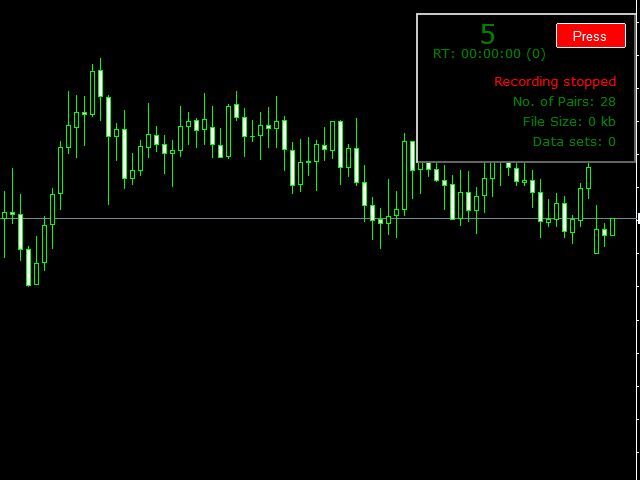
Double click on the background of the panel. So you can move it to another position.

parameters:

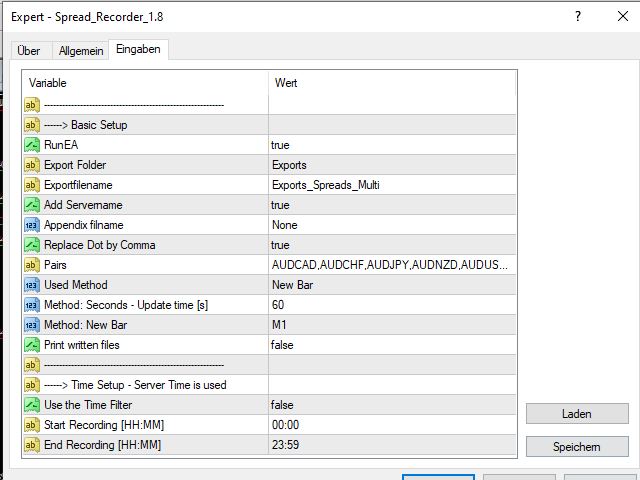
  • RunEA >>> Rec yes/no right from the beginning
  • Export Folder
  • Export Filename
  • Appendix >>> None / Date / Day of Week
  • Update_Time >>> Save Spread every x sec
  • Pairs >>> which Pairs do you want to track? Separate them by ","
  • Used Method: You can setup up a timer as "seconds" or "On New Bar"
  • Print written files >>> Do you want to be notified in the journal?
  • Use Time Filter >>> use the follwoing trading time?
  • Start Recording     >>> REC from
  • End Recording       >>> REC to


If you have any questions, please don't hesitate to contact me! I am glad to help!
추천 제품
MFI Extremes Dashboard is a great tool for quickest possible analysis of multiple currency pairs in terms of Oversold or Overbought at the same time. Money Flow Index (MFI) uses both price and volume to measure buying and selling pressure. MFI is also known as volume-weighted RSI (Relative Strength Index). The number of displayed symbols is 30 and the name of each symbol can be edited in the parameters, so we are able to analyze not only predetermined currency pairs, but also other ones, commodi
The Arrow Scalper
Fawwaz Abdulmantaser Salim Albaker
1 (2)
Dear Friend..  I share with you this simple Expert Adviser .. it is full automatic  this Expert Adviser following the trend of the pair you install on or any stocks or indices , it is works like that: - when the trend on H4 chart show a start of up trend the expert will wait till the 15M & 1H charts show an up trend the EA will open a buy order directly , and do the same for down trend and open a sell order the buy or sell  order lot size and take profit and stop loss will measured manually  by
FREE
Harvest GOLD
Sayan Vandenhout
Harvest GOLD USES THE TREND WAVE INDICATOR AND IT CAN IDENTIFY THE BEGINNING AND THE END OF A NEW WAVE TREND MOVEMENT. AS AN OSCILLATOR, THE INDICATOR IDENTIFIES THE OVERBOUGHT AND OVERSOLD ZONES. IT WORKS GREAT TO CATCH THE SHORT TERM PRICE REVERSALS AND USES A MARTINGALE STRATEGY TO CLOSE ALL TRADES IN PROFIT. USE DEFAULT SETTINGS ON H1 OR HIGHER TIME FRAME ON ANY PAIR FOR MORE ACCURATE TRADES WHY THIS EA : Smart entries calculated by 3 great strategies The EA can be run on even a $30000
H4 GBPUSD Trend Scalper is a trend signal scalper The EA trades according to the trend strategy using original built-in indicator for opening and closing orders. The external inputs for limiting trading on Fridays and Mondays are available. The purpose of the strategy is to use the current trend with the most benefit. According to the results of testing and working on demo and real accounts, the best results achieved by using the Н4 timeframe on the GBP/USD pair Works on MetaTrader 4 Build 971+
Magic EA MT4
Kyra Nickaline Watson-gordon
3 (1)
Magic EA is an Expert Advisor based on Scalping, Elliot Waves and with filters such as RSI, Stochastic and 3 other strategies managed and decided with the robot smartly. Large number of inputs and settings are tested and optimized and embedded in the program thus inputs are limited and very simple. Using EA doesn't need any professional information or Forex Trading Knowledge. EA can trade on all symbols and all time frames, using special and unique strategies developed by the author. The EA wo
MFI Breakout Dashboard is a tool for multiple currency pairs analysis at the same time in terms of breakout from Oversold or Overbought Zone . Money Flow Index (MFI) uses both price and volume to measure buying and selling pressure. MFI is also known as volume-weighted RSI (Relative Strength Index). The number of displayed symbols is 30 and the name of each symbol can be edited in the parameters. The analyzer is perfect for alert notifications, push notifications and email alerts. We can also se
Fibonacci System
Maksim Neimerik
The system applies Fibo levels. Apart from basic Fibo levels (23.6; 38.2; 50.0; 61.8; 100.0;), the EA features custom levels (34.0; 36.0; 64.0; 66.0;). You can decide the levels trading is to be performed from. Sample trade: when the market is bullish and the price rolls back to the levels (as we remember, we select the levels on our own), the EA opens buy orders. The opposite is true for sell orders. The EA can work in three modes. Each of the modes is a separate Fibo levels construction method
Magic Grid
Aliaksandr Charkes
4.54 (28)
Magic Grid is an indicator-free advisor that uses a grid strategy. The strategy is based on automatic reopening of grid pending orders, after closing their market positions (by Take-Profit, Stop-Loss or manually). Pending orders are placed with a specified step from the initial prices, which can be entered manually or generated automatically ( one time at the beginning of the trade ). The robot can trade on any time frame, on any currency pair, on several currency pairs, and on any number of di
FREE
This is a pending order closer, created to fulfill a made for MAC project. The EA originally could not be installed directly on the platform, and this is an attempt to install using this method. You can use it, but it might eventually be removed. You can also contact the original client and request their access. Unauthorized use is prohibited, and you are welcome to contact the developer or employer/client. Use it at your own risk.
FREE
TrendEx Pro
Md Abdur Rahim
We do not want to make you confused with an imaginary high profit screenshot from Strategy Tester which has no relation/guarantee of future profit! We just want to tell you the real thing about our EA. TrendEx Pro has been developed to trade on Gold specially, combining multiple strategies algorithm to ensure Trend catching and trading on. It can identify both short and long trends and opens positions accordingly with excellent built-in risk management logic. There is no use of any dangerous met
Goal Time
Mourad Ezzaki
GOAL TIME is an expert advisor based on the notion of time, it studies the change of price according to time, and it finally detects the best time to execute a good order. The EA is based on an indicator that draws a price curve in relation to time, this curve is deduced by an algorithm that analyzes old data. Then, the EA exploits the generated curve and executes the correct order. In case of incorrect choice, the EA has the mission to limit the losses. After a thorough study of this strategy o
Protect your EA from unauthorized use. With EA Locker you can generate individual licenses for your EA to your customers. Product blog page You can download MT5 version here Protection consists of three parts: 1. Your Unique EA identifier 2. User Identifier 3. Expiration date Description of parts: 1. EA ID is your internal EA identifier. Itcan be the short name of the EA. (MyGridEA, TradeCopierEA...) 2. User identifier can be anything user specific data (Mt4 account number, Account number + U
BreakOut Grid
Catalin Zachiu
This expert is a combination between a grid and a scalper and it uses a grid of ten pending orders , five for long and five for short , with a 500 point spacing between them with a 100 point scalp target. It has three working modes , first , the entry by level , the expert starts operation when the price aproaches an important trade level ( a former resistance or support) , second , the entry by time , launches the expert at a specific time (input by user) and the third type is continuous operat
StarkerFX
Erno Stark
StarkerFX EA is a martingale and trend following robot with trailing stop . This expert advisor is using MACD and Parabolic SAR indicators. T‌here are no complicated settings. The only one input is the equity multiplier for automatic lot calculation. If you want to change it, please backtest it before using on real account. higher equity multiplier = higher lots = higher risk (recommended setting is: 1.0) T‌his EA has been optimized for EUR/USD currency pair and for M5 timeframe. Feel free to ba
FREE
Bar Boss
Iurii Tokman
5 (1)
Bar Boss   Expert   Advisor는 FletBoxPush 지표를 사용하여 시장을 분석하고 거래 신호를 결정합니다. 표시기는 Expert Advisor에 내장되어 있으며 차트에 추가로 설치할 필요가 없습니다. 거래는 플랫의 경계로 정의된 레벨의 브레이크아웃에서 발생합니다. 손실 제한이 사용됩니다. 어드바이저 설정에 대한 설명 TimeFrames - 차트 기간, 표시기 설정 color - 플랫으로 정의된 가격 영역의 색상, 표시기에 대한 설정 직사각형 - 평면으로 정의된 가격 영역 표시, 지표 설정 랏 - 거래 시작 볼륨 MagicNumber - 마법의 주문 수 Count_LOSS - 수익이 0이 될 때까지의 연속 손실 거래 수(0으로 종료) FlatPips - 플랫을 결정하기 위한 포인트 제한, 지표 설정 FlatBars - 평면을 결정하기 위한 막대 수의 제한, 표시기 설정 MinBarsClosedOutside - 종가가 특정 고정 수준 위/아래로 고정된 막대의 수
Indicement MT4
Profalgo Limited
5 (2)
Indicement에 오신 것을 환영합니다! PROP FIRM 준비 완료! ->   여기에서 세트 파일을 다운로드하세요 프로모션 출시: 현재 가격으로는 몇 개밖에 남지 않았습니다! 최종 가격: 990$ NEW: Choose 1 EA for FREE! (limited to 2 trading account numbers) 최고의 콤보 딜     ->     여기를 클릭하세요 공개 그룹에 가입하세요:   여기를 클릭하세요   VERSION 4.0 LIVE RESULTS OLD VERSION FINAL RESULTS INDICEMENT는   제가 15년 동안 축적한 경험을 바탕으로 지수 시장에 전문적 거래 알고리즘을 개발했습니다. EA는 매우 잘 고안된 알고리즘을 사용하여 최상의 진입 가격을 찾고, 거래 위험을 분산하기 위해 내부적으로 여러 가지 전략을 실행합니다. 모든 거래에는 손절매와 이익실현이 있지만, 거래의 위험을 최소화하고 잠재력을 극대화하기 위해 추적 손절매와 추적 이익실현도
This EA will help you to automatically put stop loss and take profit for all your orders. Stop loss point and take profit points can be selected in the tab of the input parameters. You can specify three symbols with SL and TP values (you can see symbol1 , symbol2 ... in the input tab below). The EA performs checks. If a new order with symbol1 appears, it puts SL and TP with stoploss1 and takeprofit1 values (in points). If a new order with symbol2 appears, it puts SL and TP with stoploss2 and tak
HFT Evaluation MT4
Geethika Rasnayake Mudiyanselage
5 (1)
Only 6 copies out of 10 left at $30! This is a limited introductory offer: Buy EA at a special Discount price of only $30 The offer will end when the first 10 copies are sold... After that, the price will be raised to $60 !. HFT Evaluation System is a state-of-the-art algorithmic trading strategy that has been running on live accounts for several years. Unlike conventional systems that are optimized to fit historical data, HFT Evaluation Trading is designed to exploit current market inefficienc
Matrix Arrow EA MT4
Juvenille Emperor Limited
5 (8)
Matrix Arrow EA MT4 는 Matrix Arrow Indicator의 MT4 신호를 차트의 거래 패널과 수동 또는 100% 자동으로 거래할 수 있는 고유한 전문가 조언자입니다. Matrix Arrow Indicator MT4 는 다음과 같은 최대 10개의 표준 지표에서 정보와 데이터를 수집하여 초기 단계에서 현재 추세를 결정합니다. 평균 방향 이동 지수(ADX) ,   상품 채널 지수(CCI) ,   클래식 하이켄 아시 캔들 ,   이동 평균 ,   이동 평균 수렴 발산(MACD) ,   상대 활력 지수(RVI) ,   상대 강도 지수(RSI) ,   포물선 SAR ,   스토캐스틱 오실레이터 ,   윌리엄스의 백분율 범위. 모든 지표가 유효한 매수 또는 매도 신호를 제공하면 강력한 상승/하락 추세를 나타내는 다음 캔들/막대가 시작될 때 해당 화살표가 차트에 인쇄됩니다. 사용자는 사용할 표시기를 선택하고 각 표시기의 매개변수를 개별적으로 조정할 수 있습니다. Matri
Demidov
Andrey Kozak
Demidov is a fully automatic scalping robot in the forex markets. The default settings are for the GBPUSD currency pair. The robot automatically determines the direction of the trend and the most effective points for opening deals. After opening deals, the robot begins to accompany them to get the maximum effect. In the robot settings there is a Risk parameter, with which a trader can adjust the initial trading volume. In this robot, the volume is defined as% of the deposit. Accordingly, when y
VandoraFX Gold
Sayan Vandenhout
VANDORA FX USES THE TREND WAVE INDICATOR AND IT CAN IDENTIFY THE BEGINNING AND THE END OF A NEW WAVE TREND MOVEMENT. AS AN OSCILLATOR, THE INDICATOR IDENTIFIES THE OVERBOUGHT AND OVERSOLD ZONES. IT WORKS GREAT TO CATCH THE SHORT TERM PRICE REVERSALS AND USES A MARTINGALE STRATEGY TO CLOSE ALL TRADES IN PROFIT. USE DEFAULT SETTINGS ON H1 OR HIGHER TIME FRAME ON ANY PAIR FOR MORE ACCURATE TRADES WHY THIS EA : Smart entries calculated by 5 great strategies The EA can be run on even a $20000 a
Gold Standard  USES THE TREND WAVE INDICATOR AND IT CAN IDENTIFY THE BEGINNING AND THE END OF A NEW WAVE TREND MOVEMENT. AS AN OSCILLATOR, THE INDICATOR IDENTIFIES THE OVERBOUGHT AND OVERSOLD ZONES. IT WORKS GREAT TO CATCH THE SHORT TERM PRICE REVERSALS AND USES A MARTINGALE STRATEGY TO CLOSE ALL TRADES IN PROFIT. USE DEFAULT SETTINGS ON H1 OR HIGHER TIME FRAME ON ANY PAIR FOR MORE ACCURATE TRADES WHY THIS EA : Smart entries calculated by 5 great strategies The EA can be run on even a $200
he expert works on the Zigzag levels on the previous candle With some digital way to enter the deal On the five minute frame Work on currency pairs only Do not use TakeProfit or Stop Loss How the expert works It is placed on the three currency pairs GBPUSD GBPJPY GBP AUD Same settings without changing anything When he works, he will work on only one currency of them until it closes on a profit Profit is only seven points Please watch the video Explains how the expert works. Max Spread = 0.3 Bro
King Scalper
Le Dang Nguyen Hoang Vu
King Scalper  is a smart ea that uses the Zigzag indicator to find out sensitivity situation of market price. with this point,  King Scalper EA  automatically create trend line that market movement reacted in this point. with zigzag find the highest and lowest price (support and resistance) and with this point EA trend line. it changes and updates automatically ... if price touches this line expert decide to act with it. BUY or SEll depended on the market situation. you can manage your time that
HMA Trend Expert
Alexander Fedosov
5 (1)
HMA Trend robot for professional traders works with a set of Hull moving averages( HMA ). Advisor Parameters Use Trade Panel  — Use the visual panel to configure and trade robot. Lot  — Lot size for a market entry. Take Profit(points)  — Take Profit for an open order. Stop Loss(points)  — Stol Loss for an open order. Max Spread(0 - disabled)  — Maximum allowable spread at which you can enter the market. 0 - disabled. Magic number  — The magic number of the robot. EA Comment  — Comments of robot.
Elevate your trading experience with   Dynamic Trader EA MT4 , a cutting-edge trading robot designed to optimize your investment strategy. This advanced algorithm harnesses the power of four key indicators:   RSI   ( Relative Strength Index ),   Stochastic Oscillator ,   MACD   ( Moving Average Convergence Divergence ) and   ATR   ( Average True Range ) to make informed and precise trading decisions. ATR is used to dynamically set stop-loss and take-profit levels based on market volatility. IMP
EA KOGORO TREND PROFITABLE HIGHER, FLEXIBLE AND SAFER EA KOGORO is a robot that operates on the most basic principle of the market: "Trend is Friend" combined with the improved Martingale principle with many times more safety than conventional Martingale. - EA KOGORO is a fully automatic EA robot for established pairs. - The principle of order balancing, low DD protects accounts better for high profits. - Opening and closing orders is really flexible. - Safer, high profit. - Manage b
Gold Label
Tran Thanh Tuyen
Gold Label  is an Expert Advisor designed specifically for trading gold.  This EA is specifically designed for   XAUUSD  with low risk and can grow your account from small capital. It is based on machine learning cluster analysis and genetic algorithms. EA contains self-adaptive market algorithm, which uses price action patterns and standard trading indicators. Expert showed stable results on XAU in 2011-2020 period. No dangerous methods of money managment used. Suitable for any broker conditi
Quick Funding in Prop Trading Firms
Abdeljalil El Kedmiri
4.85 (27)
This EA is designed to pass challenges of prop firms (proprietary trading firm) that allow use of High and Low Frequency trading strategies. A Gift i ncluded in this expert    :   Range Breakout strategy  that identify daily support and resistance levels and initiating both Long and Short trades automaticly at these key points. We use special HFT strategy that detect large movements and employ stop loss to protect your equity. It has build-in equity protector which will stop the EA once the pro
How the EA works (simple explanation) Trades on   M5   timeframe Uses   H1 timeframe   to analyze global market context Analyzes   2 or 3 timeframes simultaneously On each timeframe: Checks price position relative to one or two Moving Averages Evaluates MA angle and distance between price and MA Entry logic is based on   trend + volatility conditions , not on random signals The full algorithm is illustrated in the screenshots. Recommended usage Symbol:   EURUSD Timeframe:   M5 Trading
이 제품의 구매자들이 또한 구매함
Trade Manager EA에 오신 것을 환영합니다. 이 도구는 거래를 보다 직관적이고 정확하며 효율적으로 만들기 위해 설계된 궁극적인 리스크 관리 도구 입니다. 단순한 주문 실행 도구가 아닌, 원활한 거래 계획, 포지션 관리 및 리스크 제어를 위한 종합 솔루션입니다. 초보자부터 고급 트레이더, 빠른 실행이 필요한 스캘퍼에 이르기까지 Trade Manager EA는 외환, 지수, 상품, 암호화폐 등 다양한 시장에서 유연성을 제공합니다. Trade Manager EA를 사용하면 복잡한 계산은 이제 과거의 일이 됩니다. 시장을 분석하고 진입, 손절 및 익절 수준을 차트의 수평선으로 표시한 후 리스크를 설정하면, Trade Manager가 이상적인 포지션 크기를 즉시 계산하고 SL 및 TP 값을 실시간으로 표시합니다. 모든 거래가 간편하게 관리됩니다. 주요 기능: 포지션 크기 계산기 : 정의된 리스크에 따라 거래 크기를 즉시 결정합니다. 간단한 거래 계획 : 진입, 손절, 익절을 위한
Local Trade Copier EA MT4
Juvenille Emperor Limited
4.96 (110)
Local Trade Copier EA MT4 를 사용하여 매우 빠른 거래 복사 경험을 해보세요. 1분 안에 간편하게 설정할 수 있으며, 이 거래 복사기를 사용하면 Windows 컴퓨터 또는 Windows VPS에서 여러 개의 MetaTrader 터미널 간에 거래를 0.5초 미만의 초고속 복사 속도로 복사할 수 있습니다. 초보자든 전문가든 Local Trade Copier EA MT4 는 다양한 옵션을 제공하여 사용자의 특정 요구에 맞게 맞춤 설정할 수 있습니다. 이는 수익 잠재력을 높이려는 모든 사람을 위한 최고의 솔루션입니다. 지금 사용해보시고 이것이 왜 시장에서 가장 빠르고 쉬운 무역용 복사기인지 알아보세요! 팁: 여기 에서 데모 계정에서 Local Trade Copier EA MT4 데모 버전을 다운로드하여 사용해 볼 수 있습니다. 다운로드한 무료 데모 파일을 MT4 >> File >> Open Data Folder >> MQL4 >> Experts 폴더에 붙여넣고 터미널
Trade Assistant MT4
Evgeniy Kravchenko
4.43 (197)
거래당 위험 계산, 라인을 사용한 손쉬운 신규 주문, 부분 청산 기능을 통한 주문 관리, 7가지 유형의 트레일링 스탑 및 기타 유용한 기능을 제공합니다. 추가 자료 및 지침 설치 지침 - 애플리케이션 지침 - 데모 계정용 애플리케이션 평가판 라인 기능       - 차트에 개시선, 손절매, 차익실현을 표시합니다. 이 기능을 사용하면 새로운 주문을 쉽게 하고 개봉 전에 추가 특성을 볼 수 있습니다. 위기 관리       -       위험 계산 기능은 설정된 위험과 손절매 주문의 크기를 고려하여 새 주문의 볼륨을 계산합니다. 이를 통해 손절매 크기를 설정하고 동시에 설정된 위험을 존중할 수 있습니다. 로트 계산 버튼 - 위험 계산을 활성화/비활성화합니다. 필요한 위험 값은 위험 필드에 0에서 100 사이의 백분율 또는 예금 통화로 설정됩니다. 설정 탭에서 위험 계산 옵션을 선택합니다. $ 통화, % 잔액, % 지분, % 자유 마진, % 사용자 정의, % AB 이전 일, % AB
Exp COPYLOT CLIENT for MT4
Vladislav Andruschenko
4.69 (65)
MetaTrader 4용 전문 트레이드 복사기 MetaTrader 4 용 빠르고 안정적이며 전문적인 트레이드 복사기입니다. COPYLOT 은 MetaTrader 4 와 MetaTrader 5 터미널 간에 Forex 거래를 복사할 수 있으며, 다양한 계좌 유형과 운용 방식에 맞춰 유연한 동기화 환경을 제공합니다. COPYLOT MT4 버전 지원 방식: MetaTrader 4 → MetaTrader 4 MetaTrader 5 Hedge → MetaTrader 4 MetaTrader 5 Netting → MetaTrader 4   MT5 버전 상세 설명 + DEMO + PDF 구매 방법 설치 방법 로그 파일 확인 방법 테스트 및 최적화 방법 Expforex의 모든 제품 MetaTrader 5 버전 을 사용하면 MetaTrader 5 → MetaTrader 5 및 MetaTrader 4 → MetaTrader 5 복사도 지원됩니다: COPYLOT CLIENT for MT5 COPYLOT 은
작동 체험판 다운로드 Copy Cat More (카피캣) MT4 트레이드 카피어 (Trade Copier) 는 단순한 로컬 트레이드 카피어가 아닙니다. 오늘날의 트레이딩 과제를 위해 설계된 완전한 리스크 관리 및 실행 프레임워크 (risk management and execution framework) 입니다. 프롭 펌 (prop firm) 챌린지부터 개인 포트폴리오 관리까지, 견고한 실행, 자본 보호, 유연한 설정, 고급 트레이드 처리의 조합으로 모든 상황에 적응합니다. 이 카피어는   마스터 (Master, 송신측) 와 슬레이브 (Slave, 수신측)   두 모드 모두에서 작동하며, 시장가 주문과 대기 주문, 트레이드 수정, 부분 청산, 상호 청산 (Close By) 작업을 실시간으로 동기화합니다. 데모 및 실거래 계좌, 트레이딩 또는 인베스터 로그인 모두와 호환되며, EA·터미널·VPS가 재시작되더라도 영구 트레이드 메모리 (Persistent Trade Memory) 시
TradePanel MT4
Alfiya Fazylova
4.84 (95)
Trade Panel은 다기능 거래 도우미입니다. 이 애플리케이션에는 50개 이상의 수동 거래 기능이 포함되어 있으며 대부분의 거래 작업을 자동화할 수 있습니다. 구매하기 전에 데모 계정에서 데모 버전을 테스트할 수 있습니다. 데모 계정용 애플리케이션 체험판 다운로드: https://www.mql5.com/en/blogs/post/750865 . 전체 지침 여기 . 거래. 한 번의 클릭으로 거래를 수행할 수 있습니다: 리스크 자동 계산과 함께 예약 주문 및 포지션 열기. 한 번의 클릭으로 여러 주문 및 포지션 열기. 주문 그리드 열기. 예약 주문 및 포지션을 그룹별로 닫기. 포지션 방향 전환 (Buy 닫기 > Sell 열기, Sell 닫기 > Buy 열기). 포지션 잠금 (부족한 포지션을 열어 Buy와 Sell 포지션의 수량을 동일하게 만들기). 모든 포지션 한 번의 클릭으로 부분적으로 닫기. 모든 포지션의 테이크 프로핏과 스톱로스를 같은 가격 수준에 설정. 모든 포지션의 스톱로스를
Unlimited Trade Copier Pro is a tool to copy trade remotely to multiple MT4, MT5 and cTrader accounts at different computers/locations over internet. This is an ideal solution for you if you are a signal provider and want to copy your trades to other receivers globally on your own rules. One provider can copy trades to multiple receivers and one receiver can get trade from multiple providers as well. The provider can even set the subscription expiry for each receiver, so that receiver will not b
The product will copy all telegram signal to MT4   ( which you are member  ) , also it can work as remote copier.  Easy to set up, copy order instant, can work with almost signal formats, image signal, s upport to translate other language to English Work with all type of channel or group, even channel have "Restrict Saving Content", work with  multi channel, multi MT5 Work as remote copier: with signal have ticket number, it will copy exactly via ticket number. Support to backtest signal. How to
Trade Reverse Copie4
Chukwuemeka Kingsley Anyanwu
Feel free to contact me for any extra features :) [SEE MT5 VERSION  https://www.mql5.com/en/market/product/128846 The Local Reverse Copier is an Expert Advisor designed to synchronize positions between a Master account and a Slave account with a twist: it reverses the trades. When a buy position is opened on the Master account, the EA opens a sell position on the Slave account, and vice versa. This allows for a unique form of trade copying where positions are mirrored in opposite directions bet
VirtualTradePad mt4 Extra
Vladislav Andruschenko
4.85 (61)
한 번의 클릭으로 거래할 수 있는 거래 패널.   위치 및 주문 작업!   차트 또는 키보드에서 거래. 거래 패널을 사용하면 차트에서 클릭 한 번으로 거래하고 표준 MetaTrader 컨트롤보다 30배 빠르게 거래 작업을 수행할 수 있습니다. 거래자의 삶을 더 쉽게 만들고 거래자가 훨씬 빠르고 편리하게 거래 활동을 수행할 수 있도록 도와주는 매개변수 및 기능의 자동 계산. 차트의 무역 거래에 대한 그래픽 팁 및 전체 정보. 새로운 프리미엄 버전 출시:   VirtualTradePad PRO SE 로 트레이딩 워크플로를 업그레이드하세요.   MetaTrader 5   및   MetaTrader 4 를 위한 차세대 전문 트레이딩 패널입니다. MT5 버전 전체 설명   +DEMO +PDF 구입 방법 설치하는 방법     로그 파일을 얻는 방법     테스트 및 최적화 방법     Expforex의 모든 제품 열기 및 닫기, 반전 및 잠금, 부분 닫기/오토로트. 가상/실제 손절매/이익
VirtualTradePad PRO SE MT4 — MetaTrader 4용 고급 트레이딩 패널 및 차트 워크스페이스 VirtualTradePad PRO SE 는 MetaTrader 4 용 전문 트레이딩 패널이자 거래 관리 워크스페이스입니다. 하나의 차트 기반 인터페이스에서 거래를 더 빠르게 열고, 관리하고, 보호하고, 닫고, 분석할 수 있도록 도와줍니다. 이 제품은 단순한 버튼 모음 이상의 기능이 필요한 적극적인 수동 트레이더를 위해 만들어졌습니다. PRO SE는 원클릭 실행, 예약 주문, 포지션 제어, 부분 청산, 바스켓 손익 로직, 평균가 레벨, ATM 규칙, 신호 모니터링, 시장 정보, 전략 테스터 워크플로, VPS 중심 준비를 하나의 구조화된 워크스페이스로 통합합니다. MT5 버전 | 전체 설명 및 스크린샷 | 구입 방법 | 설치 방법 | 로그 파일을 얻는 방법 | 테스트 및 최적화 방법 | Expforex의 모든 제품 일반 수동 트레이딩 대비 장점 여러 창 대신 하나의 워
Trade copier MT4
Alfiya Fazylova
4.59 (34)
Trade Copier는 거래 계정 간의 거래를 복사하고 동기화하도록 설계된 전문 유틸리티입니다. 복사는 공급자의 계정/단말기에서 동일한 컴퓨터 또는 vps에 설치된 수신자의 계정/단말기로 발생합니다. 프로모션 - 이미 "Trade copier MT4"를 구매하셨다면, "Trade copier MT5"를 무료로 받으실 수 있습니다 (MT4 → MT5 및 MT4 ← MT5 복사용). 조건에 대한 자세한 정보를 원하시면, 개인 메시지를 통해 저희에게 문의해 주시기 바랍니다! 구매하기 전에 데모 계정에서 데모 버전을 테스트할 수 있습니다. 데모 버전 여기 . 전체 지침 여기 . 주요 기능 및 이점: 복사기는 "МТ4> МТ4", "МТ4> МТ5", "МТ5> МТ4" 복사를 지원합니다. 복사기는 데모 계정 > 실 계정, 실 계정 > 데모 계정, 데모 계정 > 데모 계정 및 실제 계정 > 실 계정 복사를 지원합니다. 복사기는 읽기 전용 암호가 적용된 투자자 계정에서 복사를 지원합니다. 하
News Filter EA: Advanced Algo Trading Assistant News Filter EA is an advanced algo trading assistant designed to enhance your trading experience. By using the   News Filter EA , you can integrate a Forex economic news filter into your existing expert advisor, even if you do not have access to its source code. In addition to the news filter, you can also specify   trading days   and   hours   for your expert. The News Filter EA also includes   risk management   and   equity protection   features
Exp Averager
Vladislav Andruschenko
4.82 (22)
MetaTrader 4용 Averager — 전문적인 평균 단가 조정 및 포지션 시리즈 관리 시스템 드로우다운에 들어간 포지션을 더 체계적으로 복구하고, 평균 진입가를 개선하며, 전체 포지션 바스켓을 하나의 전략적 구조로 관리하기 위해 설계된 Expert Advisor입니다. 이것은 단순한 물타기 도구가 아니라, 손실 구간의 포지션을 더 효율적으로 재구성하고, 공통 청산 지점까지 더 현실적으로 접근하도록 돕는 실전형 관리 시스템입니다. Averager는 독립적인 자동매매 시스템이 아닙니다. 스스로 진입 신호를 찾는 전략이 아니라, 이미 열려 있는 거래를 추적하면서 평균화, 추가 진입, 공통 트레일링 스톱을 통해 포지션 시리즈 전체를 더 정교하게 관리하는 데 목적이 있습니다. 수동 매매를 하는 트레이더, 자신만의 진입 신호를 사용하는 트레이더, 또는 다른 거래 시스템과 함께 운용하려는 사용자에게 적합합니다. 단일 포지션이 아니라 여러 포지션을 하나의 바스켓으로 운영하고 싶은 경우 특
Strategy Builder offers an incredible amount of functionality. It combines a trade panel with configurable automation (covert indicators into an EA), real-time statistics (profit & draw down) plus automatic optimization of SL, TP/exit, trading hours, indicator inputs. Multiple indicators can be combined into an single alert/trade signal and can include custom indicators, even if just have ex4 file or purchased from Market. The system is easily configured via a CONFIG button and associated pop-up
위험 대비 수익률 관리자(Risk to Reward Ratio Manager)는 체계적인 거래와 전문적인 위험 관리를 지원하도록 설계된 시각적 주문 관리 도구이자 포지션 규모 계산기입니다. 트레이더는 차트에서 진입, 손절매, 이익실현 수준을 시각적으로 직접 설정할 수 있으며, 주문을 전송하기 전에 랏 규모와 위험 대비 수익률을 자동으로 계산합니다. 이 도구는 거래 준비를 표준화하고 각 포지션이 미리 정의되고 통제된 위험 수준에서 개시되도록 보장합니다. 이 도구는 통화쌍, 지수, 금속, 상품, 암호화폐 등 다양한 거래 상품을 지원합니다. 수동 트레이더와 모든 포지션에 위험 관리 규칙을 적용하는 전략 중심 트레이더 모두에게 적합합니다. 계산 시간을 단축하고 수동 오류를 방지함으로써 트레이더가 체결 과정에서 일관성과 명확성을 유지할 수 있도록 지원합니다. 위험 대 보상 비율 관리자       설치 및 입력 가이드 EA 추가 URL에 대한 알림을 받으려면 (       http://www.
PZ Trade Pad Pro MT4
PZ TRADING SLU
3.67 (3)
Effortlessly calculate lot sizes and manage trades to save time and avoid costly errors The Trade Pad Pro EA is a tool for the Metatrader Platform that aims to help traders manage their trades more efficiently and effectively. It has a user-friendly visual interface that allows users to easily place and manage an unlimited number of trades, helping to avoid human errors and enhance their trading activity. [ Installation Guide | Update Guide | Troubleshooting | FAQ | All Products ] One of the k
MT4 to Telegram Signal Provider 는 사용하기 쉽고 완전히 사용자 정의가 가능한 도구로, 텔레그램으로 신호를 보내어 계정을 신호 제공자로 변환할 수 있습니다. 메시지 형식은 완전히 사용자 정의가 가능합니다! 그러나 간단한 사용을 위해 미리 정의된 템플릿을 선택하고 메시지의 특정 부분을 활성화하거나 비활성화할 수도 있습니다. [ 데모 ]  [ 매뉴얼 ] [ MT5 버전 ] [ 디스코드 버전 ] [ 텔레그램 채널 ]  New: [ Telegram To MT5 ] 설정 단계별 사용자 가이드 가 제공됩니다. 텔레그램 API에 대한 지식이 필요 없으며, 개발자가 필요한 모든 것을 제공합니다. 주요 기능 구독자에게 보낸 주문 세부 정보를 사용자 정의할 수 있는 기능 예를 들어 브론즈, 실버, 골드와 같은 계층 구독 모델을 만들 수 있습니다. 골드 구독은 모든 신호 등을 받게 됩니다. ID, 심볼 또는 코멘트별 주문 필터링 주문이 실행된 차트의 스크린샷을 포함 보낸
수동 매매를 위한 전문가용 트레이딩 패널로, 정밀한 진입부터 계좌 보호까지 매매의 전 과정을 차트 위 하나의 창에 담았습니다. 정해진 리스크에 정확히 맞춰 모든 포지션의 거래량을 산정하고, RR Tool로 차트에 직접 라인을 그려 거래를 설계하며, Market 주문과 예약 주문은 물론 Grid와 OCO까지 사용할 수 있습니다. 포지션 관리는 패널이 대신 처리합니다. 최대 다섯 단계 부분 청산, 여섯 가지 트레일링 스탑, 브레이크이븐, Virtual SL/TP를 지원합니다. 일간·주간·월간 한도가 예치금을 지키며, 기준을 넘기는 즉시 자동으로 발동됩니다. 가이드와 무료 Live 데모 무료 Live 데모 버전은 여기에서 이용할 수 있습니다 ( Free Live Demo ). 제품 사용 가이드는 여기에서 확인할 수 있습니다 ( User Manual ). NT Trade Manager는 트레이더의 모든 작업 흐름을 차트 위 작고 간결한 패널 하나에 모아, 터미널 창을 오갈 필요도, 진입할
거래하고자 하는 주요 영역을 파악한 후 자동으로 거래 지원 및 저항 또는 공급 및 수요 구역을 설정합니다. 이 EA를 사용하면 한 번의 클릭으로 매수 및 매도 구역을 그린 다음 가격이 바뀔 것으로 예상되는 정확한 위치에 배치할 수 있습니다. 그런 다음 EA는 해당 구역을 모니터링하고 구역에 대해 지정한 가격 액션에 따라 자동으로 거래를 수행합니다. 초기 거래가 수행되면 EA는 대상 구역이 되는 반대 구역에서 이익을 얻습니다. 그런 다음 거래를 종료하고 진입할 새 구역을 그리거나 이익을 얻고 즉시 반대 방향으로 거래를 역전하여 "항상 시장" 스타일 전략을 만드는 두 가지 선택이 있습니다. 입력 및 전략이 포함된 전체 매뉴얼은 여기에 있습니다: https://www.mql5.com/en/blogs/post/760256 이 EA는 시장에서 고정 또는 하드 스톱 로스를 사용하지 않는 포지션 트레이더 또는 달러 비용 평균 거래 전략을 위해 설계되었습니다. 대신, 다음에 가능한 지지 또는
목표 수익 도달 시 자동 수익 실현 EquityTargetCloser   — 는 MetaTrader 5용 유틸리티 전문가 어드바이저(EA)로,   순자산(Equity)이 현재 잔고를 지정된 수익 금액만큼 초과하면 모든 시장 포지션을 청산하고 예약 주문을 삭제합니다. 모든 포지션을 청산한 후 목표는 자동으로 상향 조정됩니다. 새 임계값 = 새 잔고 + 지정된 수익. EA는 거래를 시작하지 않고 기존 포지션만 관리하여 수익을 확실하게 고정하고 축적된 자금을 보호합니다. MT5-version:  https://www.mql5.com/en/market/product/169839 작동 방식 전문가 어드바이저는   순자산(Equity)   을 동적 목표와 지속적으로 비교합니다. 목표 =   현재 잔고(Balance) + plusMoney   (미국 달러). 순자산이 이 금액 이상이 되면 보호 기능이 작동합니다.   모든 시장 포지션   (모든 심볼)을 청산합니다. 매개변수   Delete p
CloseIfProfitorLoss with Trailing
Vladislav Andruschenko
4.87 (31)
이익 추적 기능으로 총 이익/손실에 도달하면 MetaTrader 4에서 포지션을 청산합니다. 가상 정지 (별도 주문) 을 활성화할 수 있습니다. BUY 및 SELL 포지션을 별도로 계산하고 마감합니다 (BUY SELL 별도). 모든 심볼 또는 현재 심볼 만 닫고 계산합니다 (모든 심볼). 이익을 위해 후행 추적 을 활성화합니다 (후행 이익). 예금 통화, 포인트, 잔액의 %에 대한 총 손익을 마감합니다. 이 애플리케이션은 다른 EA와 함께 또는 수동 거래와 함께 모든 계정에서 사용하도록 설계되었습니다. MT5 버전 전체 설명 + DEMO + PDF 구입 방법 설치하는 방법 로그 파일을 얻는 방법 테스트 및 최적화 방법 Expforex의 모든 제품 일부 쌍 또는 모든 쌍의 총 거래 잔액이 설정에서 지정된 값보다 크거나 같으면 모든 포지션이 닫히고 주문이 삭제됩니다. 이 버전은 지정된 이익 수준에서 포지션을 마감할 수 있을 뿐만 아니라 더 나은 결과를 위해 이익을 추적할 수도 있습니다
DrawDown Limiter MT4
Haidar Lionel Haj Ali
5 (8)
Drawdown Limiter EA You are in the right place if you were searching for Drawdown control, Drawdown limiter, Balance protection, Equity Protection or Daily Drawdown Limit related to Prop Firm, FTMO, or Funded account trading, or if you want to protect your trading account. Have you suffered from controlling your drawdown when trading funded accounts? This EA is meant for you. Prop firms usually set a rule called “Trader Daily Drawdown”, and if it is not respected, you are disqualified.  I am an
Trade Copier Professional — 로컬 복사 솔루션   Trade Copier Professional 은 MetaTrader 4/5 용 신뢰성 높은 로컬 거래 복사 시스템입니다. 동일한 컴퓨터 내 여러 계좌에서 포지션을 즉시 복제할 수 있으며, 내장된 안전 제어 기능과 전문적인 대시보드를 제공합니다.   개요   이 EA는 단일 파일에서 Master 모드와 Slave 모드 모두로 작동하며, 매끄럽게 전환할 수 있습니다. MT4 와 MT5 터미널 간 거래를 인터넷에 의존하지 않고 복사할 수 있으며, 로컬 파일 기반 통신을 통해 최대 속도와 안정성을 보장합니다. 실시간 대시보드는 연결 상태, 복사 통계, 일일 성과를 표시합니다.   로트 및 리스크 관리   네 가지 로트 계산 모드가 제공됩니다: 고정 로트, 배수, 리스크 비율, 잔액 비율. 손절매와 익절은 조정 또는 스케일링이 가능하며, 필요 시 신호를 반대로 복사할 수 있습니다. 안전 기능에는 일일 손실 및 거래
Trading History MT4
Siarhei Vashchylka
5 (9)
Trading History - A program for trading and money management on the history of quotes in stratagy tester. It can work with pending and immediate orders, and is equipped with trailing stop, breakeven and take profit functions. Very good for training and testing different strategies. Manual (Be sure to read before purchasing) Advantages 1. Allows you to test any trading strategy in the shortest possible time 2. An excellent simulator for trading training. You can gain months of trading experience
Trade Copier Global
Laszlo Tormasi
5 (15)
Trade Copier Global: The name speaks for itself. This copier allows you to copy orders between MT4 terminals even if they are not installed on the same computer. Features Copying trades between MT4 terminals around the world with a short delay. Automatically recognizes symbol prefixes. Can connect many Slaves to the same Master. Supports pending and market orders. Supports partial order close (with limitations, see below) Can send messages and notifications to the Slaves from the Master Several
Custom Alerts AIO: 다중 시장을 동시에 모니터링 – 설정 없이 즉시 사용 가능 개요 Custom Alerts AIO 는 복잡한 설정 없이 즉시 사용할 수 있는 통합 시장 모니터링 도구입니다. FX Power, FX Volume, FX Dynamic, FX Levels, IX Power 등 필요한 모든 지표가 내장되어 있어 별도의 설치나 구성 없이 알림 기능을 바로 사용할 수 있습니다. 차트 그래픽 없이 작동하며, Forex, 금속, 지수, 암호화폐 등 주요 자산군을 모두 지원합니다. 주식(Symbols)은 별도로 입력하여 추가할 수 있으나, MetaTrader에서는 일반적으로 제한적으로만 사용됩니다. 1. 왜 Custom Alerts AIO를 선택해야 하나요? 추가 라이선스가 필요 없습니다 • 모든 Stein Investments 지표가 내장되어 있어 별도 구매가 필요 없습니다. • 즉시 알림 기능을 시작할 수 있어 빠르고 간편합니다. 모든 시장을 하나의 도구로
MACD Divergence Scanner is a multi-timeframe and multi-symbol dashboard and alert that checks all timeframes and symbols to find regular and hidden divergences between price chart and MACD indicator. This divergence scanner is integrated with support and resistance zones so you can check the MACD divergences in the most important areas of the chart to find trend reversals in the price chart. Download demo version   (works on M 1,M5,M30,W1   timeframes) Full description of scanner parameters ->  
Telegram to MT4 Coppy
Sergey Batudayev
4.09 (11)
Telegram에서 MT4로:   최고의 신호 복사 솔루션 최첨단 유틸리티인   Telegram to MT4를   사용하여 거래를 간소화하세요. DLL 없이도 Telegram 채널과 채팅에서 MetaTrader 4 플랫폼으로 거래 신호를 직접 복사할 수 있습니다. 이 강력한 솔루션은 탁월한 정밀도와 맞춤 설정 옵션을 통해 원활한 신호 실행을 보장하여 시간을 절약하고 효율성을 높여줍니다. [ Instructions and DEMO ] 주요 특징 직접 Telegram API 통합 전화번호와 보안 코드를 통해 인증하세요. 사용자 친화적인 EXE 브리지를 사용하여 채팅 ID를 손쉽게 가져오고 관리하세요. 여러 채널/채팅을 추가, 삭제, 새로 고침하여 동시에 신호를 복사합니다. 고급 필터를 사용한 신호 파싱 사용자 정의 예외 단어(예: "보고서", "요약")가 포함된 원치 않는 신호를 건너뜁니다. 유연한 SL 및 TP 형식을 지원합니다: 가격, 핍 또는 포인트. 신호가 가격 대신 지점을 지정
Telegram to MT4 Multi-Channel Copier 는 Telegram 채널의 트레이딩 신호를 자동으로 MetaTrader 4로 직접 복사합니다. 봇도, 브라우저 확장 프로그램도, 수동 복사도 필요 없습니다. Telegram에서 신호를 받으면 EA가 몇 초 안에 터미널에서 거래를 엽니다. 본 제품은 두 가지 구성 요소로 구성되어 있습니다: Telegram 채널을 감시하는 Windows 애플리케이션과 MT4 터미널에서 신호를 실행하는 이 Expert Advisor입니다. MT5 버전도 제공됩니다. 설정 가이드 및 애플리케이션 다운로드: https://www.mql5.com/en/blogs/post/768988 작동 방식 Windows 애플리케이션은 봇이 아닌 사용자 자신의 API 자격 증명을 사용하여 Telegram에 연결됩니다. 이는 프라이빗 및 VIP 채널을 포함하여 구독 중인 모든 채널, 그룹 또는 주제를 읽을 수 있음을 의미합니다. 신호를 감지하면 이를 파싱하여
제작자의 제품 더 보기
Fast Symbol Changer
Florian Riedrich
4 (1)
I was looking for a lean symbol changer. I could not find any. Normally other products hide lot's of screen space. So I developed a very lean symbol changer Just click on the 2 currencies you want to combine. The order does not matter. If you miss some pairs, you can add up to 5 custom symbols. Please make sure, your broker support your custom symbols. Drag an drop the panel with the green button. In future I plan to include suffix and prefix als well.
FREE
History data loader
Florian Riedrich
5 (1)
================================================================================ The utility is useful when you have to load history data for many symbols and timeframes. It loads the symbol used in the market watch. One symbol is scanned for all timeframes. Then the charts will be closed and the next symbol is scanned. You cannot abort the operation. Wait till it is done. ================================================================================
FREE
When I was testing several EAs on my demo account I realised, that I could not distinguish between the running orders. There were simply too many orders opened. For this I wrote this EA. Normally I test over 10 EAs on one demo account at a time. As you can see in the screenshot, there is one table with open positions. All orders are grouped by Magic Number. Now you see the opened orders, the profit and the drawdown of each Magic Number.  In addition there is an option to connect the Magic Num
Every trader is watching over his account over and over.... trying to anlayse every system he or she has. With this tool you are able to  export your complete history of every account export withdrawls / deposits / rebates to a separate file export account status with balance / equity / current drawdown recalculate micro to standard lots / profits ...  export decimal by "." or ","  combine a series of Magic Numbers to one unique Magic Number   filter to ignore OrderComments.
Pearl
Florian Riedrich
5 (1)
This is my own developed EA "Pearl" It trades the whole market and tries to catch reversals. But it tries to trade within the overall D1-trend. It trades currency pairs only It uses martingale-strategies. It does use flexible grids though. It is free to you when to increase the lotsize of grid levels A grid level can be skipped. If the price overruns a grid level and volatility is still high, a trade will not open. The EA waits till volatility has decreased. Grid distances can be extended by
Trade Assistant – Position & History Overview Streamline your trading workflow with a powerful all-in-one panel for MetaTrader 5. Trade Assistant is a professional EA panel that gives you full control over your trades — from order execution to real-time position monitoring — all within a clean, intuitive on-chart interface. Key Features One-Click Order Execution Instant   Market Orders   (Buy / Sell) with configurable Lot, SL and TP Full   Pending Order   support: Buy/Sell Limit & Buy/Se
필터:
리뷰 없음
리뷰 답변