Grid Adaptive Moving Average EA
- Experts
-
AL MOOSAWI ABDULLAH JAFFER BAQER
 To trade successfully we need to go through the proven path that others had gone and reached!
Here are 17 quotes from such successful investors:
1- Limit your size in any position so that fear does not become the prevailing instinct guiding your judgment.
Joe Vidich - 버전: 3.13
- 업데이트됨: 30 10월 2026
- 활성화: 5
A TREND LINE THAT KNOWS WHEN THE MARKET IS JUST NOISE
Grid Adaptive Moving Average EA uses Perry Kaufman's adaptive average to decide when a grid cycle is worth opening, then hands the position to a disciplined manager that books small net gains and shrinks its oldest orders step by step.
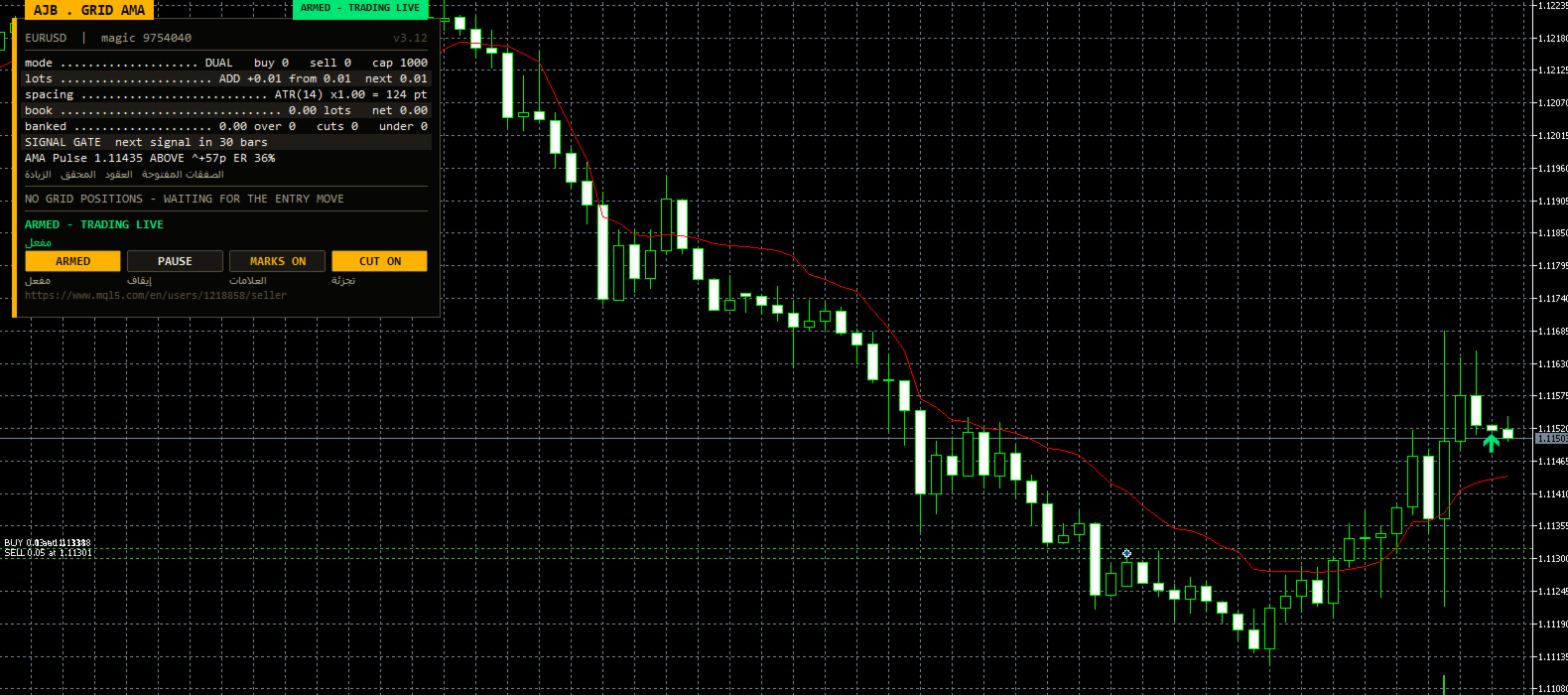
See it work before you commit a cent: open the MetaTrader 5 Strategy Tester, pick any symbol, tick visual mode and play back your broker's history. You will watch the AMA line follow the candles, arrows appear on bars where a cycle was armed, and the AMA Pulse row update with every closed bar. In our own runs on EURUSD H1 and XAUUSD D1 the tester finished with zero "not enough money" errors and zero stop-outs; repeat the test on your data and judge for yourself.
- Signal: the standard Kaufman Adaptive Moving Average (period 9, fast 2, slow 30), evaluated on finished candles only, with a slope filter that ignores flat markets.
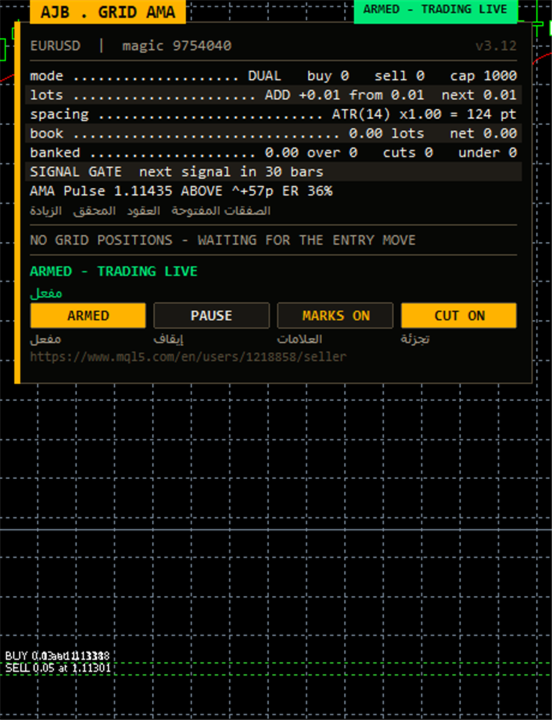
- AMA Pulse row: line value, distance of price from the line, a slope arrow and the efficiency ratio as a percentage.
- Grid engine: separate buy and sell ladders, ATR-based spacing, group closures measured after swap and commission, partial reduction of the largest order.
- Isolated per chart: state, retries and order scans are tied to account, symbol and magic numbers.
- No DLLs, no external indicators, hedging and netting accounts both supported.
FIRST 10 MINUTES: A QUICK-START CHECKLIST
New to this EA? Follow these steps in order and you will understand its behaviour before risking anything.
- Minute 1: open the Strategy Tester, choose the EA, select EURUSD H1, modelling "Every tick based on real ticks" if your broker offers it.
- Minute 2: keep every input at its default and enable visual mode.
- Minutes 3 to 5: start the run and watch the AMA Pulse row; notice how the EA sits idle while the slope arrow is flat and the efficiency ratio is low.
- Minutes 6 to 7: when the first arrow appears, follow the plan cards: see which orders are grouped for closure and how the target is shown.
- Minute 8: open the tester journal and confirm there are no money or volume errors on your broker's contract specs.
- Minute 9: repeat with a deposit close to what you would really use, to see how deep the floating drawdown can go.
- Minute 10: on a live or demo chart, set RunMode to scan only, assign unique magic numbers, and arm from the panel only once the plans make sense to you.
WHY KAUFMAN'S ADAPTIVE AVERAGE
Kaufman's line measures how efficiently price has travelled: the net move over a window divided by the total distance covered bar by bar. That figure is the efficiency ratio. When price walks cleanly in one direction the ratio climbs, and the line speeds up towards its fast setting. When price zigzags without progress the ratio falls, and the line slows to almost a standstill near its slow setting.
For a grid this is a natural gatekeeper. Ladders opened in aimless chop tend to collect levels that never reach a target. By requiring a real slope on the adaptive line, the EA leans towards periods with genuine movement and stays out when the market is undecided. Because only closed bars are checked, an arrow once drawn stays where it is.
THE AMA PULSE ROW (NEW IN THIS LISTING)
One panel line summarises the indicator: the current AMA value, how far price sits from it, an arrow showing whether the slope points up, down or sideways relative to your threshold, and the efficiency ratio as ER %. A high ER means movement has been orderly and the line is responsive; a low ER warns of choppy conditions where the EA is likely to wait. You can read the market's character at a glance without opening another window.
HOW A CYCLE UNFOLDS
Idle. While the slope is below threshold or the minimum bar spacing since the last signal has not passed, no order opens. The panel says why.
Start. A finished bar shows a qualifying slope in an allowed direction; the first level opens and the candle receives an arrow.
Ladder. If price drifts away, further levels follow at a distance derived from ATR, kept between a minimum and maximum, or at fixed points if you choose. Buy and sell sides can run at the same time with independent counters.
Harvest. The closer pairs early and recent orders on one side and closes the group once its combined result after costs clears the target. If the oldest order is too heavy, a slice of it is closed instead, funded by profit already held by newer orders.
Protection. A reopen guard prevents closures that would instantly reopen the same level. Closures are confirmed against deal history, failed legs are retried, and a plan is cancelled if positions changed between scan and send.
Hedge cycle (optional). Off by default. When enabled, it keeps a balanced buy and sell pair on a chosen symbol and retires it in equal slices paid for by a modest surcharge on grid closures. It exists to generate volume; usual trading costs apply.
THE PANEL
Docked on the left so the price scale stays clear, it shows symbol, magic, status, grid mode, lot step, spacing, realised result, the signal gate and the AMA Pulse row. Plan cards describe the next closure for each side with a manual close button, and a table lists open orders. Buttons switch armed or scan only, pause, chart marks and slicing. It can be dragged or collapsed, sizes itself to its content and is not drawn during non-visual optimisation.
ALL INPUTS
Grid
- TradeMode - both ladders together (default) or a single side.
- GridSpacePoints - level distance in points for fixed spacing (25).
- GridSpaceMultiplier - factor applied to each next gap; 1.0 keeps gaps equal.
- MaxGridLevels - maximum levels per ladder (1000).
- UpDirectionIsBuy - true: an upward signal arms the buy side; false swaps the sides.
- EAMagicNumber - grid order identifier (9754040); use a different one on every chart.
- GridOrderComment - comment saved on grid orders.
- OneOrderPerBar - no more than one new level per candle.
Lot ladder
- InitialLotSize - first level volume (0.01).
- LotSizingMode - additive (default) or multiplicative growth.
- LotMultiplier - growth factor in multiplicative mode (1.25).
- LotAddStep - volume added per level in additive mode (0.01); 0 reuses the starting lot.
- MaxOrderVolume - largest volume allowed per order (1.0).
- UseAutoLot - scales the starting lot with balance.
- AutoLotBaseBalance - balance matching the starting lot (1000).
- AutoLotAllowDecrease - lets auto sizing drop below the starting lot.
ATR spacing
- GridSpacingMode - ATR-based (default) or fixed points.
- ATRTimeframe, ATRPeriod, ATRBarShift - timeframe, length (14) and bar used (1 = last closed).
- ATRSpacingFactor - multiplier turning ATR into the gap (1.0).
- ATRMinSpacingPts, ATRMaxSpacingPts - floor (50) and ceiling (5000) in points; 0 removes the limit.
- ATRFreezeOnStart - keeps the first gap fixed for the entire cycle.
Profit target
- DesiredProfitPerClosure - base amount each closure should net (2.0).
- ProfitMultiplier - final multiplier between 1.00 and 2.00.
- ProfitTargetMode - fixed or scaled with book size (scaled by default).
- ProfitVolumePower - influence of volume on a scaled target (1 = proportional, 0 = none).
- ProfitDepthBonus - extra target for each additional level (0.10).
- ProfitMaxMultiple - ceiling of a scaled target as a multiple of the base (50).
- ProfitMaxReachFraction - keeps the target reachable within this fraction of one step (0.50).
Fragment scanner
- UseMultiLegScan - tests multi-order groups before the simple pair.
- MaxOldestLegs, MaxNewestLegs - orders taken from the oldest end (3) and newest end (6).
- ScanPriority - how competing valid groups are ranked.
- NeverBankLessThanPair - a group must also exceed the plain pair's target.
- RequireCloseVolumeExceedsTarget, MinCloseVolumeRatio - closing volume must be at least this multiple of the target order (1.5).
Target slicing
- EnableTargetSlicing - closes part of the oldest order when all of it is not yet affordable.
- FragProfitWeightPower - weighting of profit per closing lot (1.5).
- FragMinSlicePercent - minimum slice as percent of the target order (20).
- FragAllowMultiCloser - several recent orders may share the cost of one slice.
- FragPreferFullClosure - chooses a full closure when both are possible.
Reopen guard
- ReopenGuard - rejects closures likely to reopen a level straight away.
- ReopenGuardCushion - safety distance as a fraction of one step (0.90).
Account protection
- MinMarginLevelPercent - no new levels below this margin level; 0 turns it off.
- MaxAccountRiskPercent - no new levels once floating loss passes this share of balance; 0 turns it off.
- NetMaxMarginPercent - netting accounts: cap on net position margin as percent of equity (5).
- MaxTotalOrders - hard limit of grid orders per side (1000).
Execution and verification
- RunMode - armed or scan only.
- CloseSequence - which leg is sent first (oldest by default).
- MaxSlippagePoints - accepted slippage (30).
- MaxSpreadPoints - trading pauses above this spread (7500).
- MinSecondsBetweenClosures - gap between closures on one side (5).
- CloseAttemptsPerLeg, VerifyTimeoutSeconds - attempts per leg (3) and confirmation window (90 seconds).
- DeferWhenMarketClosed, MarketClosedRetrySeconds - waits for the session and retries every 30 seconds instead of halting.
- AutoResumeAfterSeconds - clears a halt automatically after 300 seconds; 0 waits for the panel.
- AbortIfBookChanged - drops a plan if a leg changed before sending.
- UseFullCommission, CommissionPerLot - counts round-turn commission; manual fallback per lot when history lacks it.
- CloseOrderComment - comment on closing deals.
Hedge cycle
- EnableHedgeCycle - turns the hedge engine on; off as delivered.
- HedgeSymbols - comma-separated symbols (XAGUSD); repeating one gives it more turns.
- HedgeSymbolRotation - how the next cycle's symbol is chosen.
- HedgeMaxSymbolsInTester - tester only: limits rotation to this many symbols (2).
- HedgeCycleLots, HedgeSliceLots - lots per side and lots retired per slice (0.01 each).
- HedgeFragmentBonus, HedgeBonusIsPercent - margin above slice cost (100, as percent by default, or a flat amount).
- HedgeMaxSurcharge, HedgeMaxSurchargePercent - money and percent caps on raising a closure target (0 and 50).
- HedgeMagicNumber - hedge identifier (9754041); must differ from the grid magic.
- HedgeReopenOnFinish - opens a new pair after one completes.
- HedgeStartRequiresTrade - waits for grid activity before the first pair.
- HedgeIntegritySeconds, HedgeAutoRepair, HedgeNakedAction - balance check interval (5 seconds) and response to a missing leg.
- HedgeMaxSpreadPoints, HedgeSlippagePoints, HedgeAttemptsPerLeg, HedgeVerifyTimeout - spread, slippage, attempt and confirmation limits for hedge orders.
- HedgeCommissionPerLot, HedgeOrderComment - fallback commission and comment for hedge deals.
Weekly cash day
- WeeklyCashDay - pauses new cycles and slices around your withdrawal time.
- CashDayOfWeek, CashCutoffHour - weekday (0 = Sunday, default 1) and server hour (21) after which slices stop.
Panel and chart
- ShowPanel - shows or hides the panel.
- PanelX, PanelY, PanelCorner - offsets (12, 15) and chosen corner.
- PanelFontSize - text size (9).
- ShowArabic - Arabic line beneath each English label.
- ShowChartMarks - draws levels and planned closures on the chart.
- MaxTableRows - open orders listed per ladder (13).
Entry trigger
- EntryTriggerMode - what opens the first level; the AMA strategy by default.
- SignalBarShift - bar evaluated; 1 = last closed candle.
- SignalBarsDelay - minimum bars between accepted signals (30).
- SignalValidBars - bars a signal remains usable (3).
- SignalAllowBuy, SignalAllowSell - enable or block each direction.
- SignalReverse - flips the signal direction.
Adaptive Moving Average
- AMA_TF - timeframe for the AMA (current chart by default).
- AMA_Period - window for the efficiency ratio (9).
- AMA_FastEMA - fastest smoothing used in efficient trends (2).
- AMA_SlowEMA - slowest smoothing used in choppy markets (30).
- AMA_Shift - horizontal shift of the line in bars (0).
- AMA_Price - applied price (close).
- AMA_SlopeBars - bars over which slope is measured (3).
- AMA_MinSlopePts - minimum slope in points before the market counts as trending (5); larger means fewer cycles.
- AMA_ShowOnChart - draws the AMA on live and visual charts.
- InpShowSignalArrows - arrows on candles where a cycle was armed.
Debug
- DebugMode - detailed log output in the Experts journal.
COMMON QUESTIONS
Nothing has opened for a long time. Is something wrong? Probably not. Check the slope arrow and ER % in the Pulse row; a flat arrow means the filter is holding the EA back on purpose. Reduce AMA_MinSlopePts or SignalBarsDelay for more activity, raise them for less.
Should I change the AMA periods? The defaults are Kaufman's classic values and a reasonable baseline. A longer AMA_Period reacts more slowly to shifts in efficiency; a higher AMA_TF gives a calmer bias while the grid still trades your chart.
Several charts at once? Yes, give each chart its own grid and hedge magic numbers; the EA will not start on a magic already in use.
WHO IT SUITS
Traders who want grid recovery with an entry filter that sits out disorderly markets, and who size their account to withstand floating drawdown. It is not for anyone who needs a hard stop on every position or expects fixed monthly income.
REALISTIC EXPECTATIONS
A smarter start does not remove risk. A long move against an open ladder can produce a large floating loss, and there is no automatic close-all; protection works by refusing new levels. Spread, swap, commission, symbol and lot size all shape the outcome, and past test results do not predict future ones. Test on your own broker, start small and scale only once you know how far your instrument usually runs.
If Grid Adaptive Moving Average EA turns out to be helpful in your testing or trading, an honest review, positive or critical, helps other traders make an informed choice.