PulseFlow NAS100 Breakout
- Experts
- 버전: 1.4
- 업데이트됨: 30 10월 2026
- 활성화: 10

Nasdaq 100 robot for MetaTrader 5 with two independent engines, long and short. Every order carries its stop loss on the broker's server. At most one position per engine. No grid, no martingale.
You do not have to sit in front of the Nasdaq 100 chart all day. PulseFlow NAS100 Breakout trades it for you with two engines that work side by side, puts a stop loss on every order before it fills, and sizes each trade from the risk you choose. You decide how much of the balance a stop may cost, and the robot does the rest.
- Engine 1 is a breakout engine. It only buys, with a pending order, a stop loss and a take profit, and a trailing stop that follows the market's volatility. In the backtest it traded about 33 times a year.
- Engine 2 is an intraday engine. It buys or sells, makes at most one trade a day and never keeps a position overnight. In the backtest it traded about 73 times a year, about 3 times out of 5 as a buy.
The two engines do not wait for each other: on a hedging account they can hold positions at the same time, even in opposite directions.
How PulseFlow limits risk
- A stop loss on the broker's server for every order, from the moment it is sent.
- A lot sized from the risk you choose, so that a stop loses about the same share of the balance at any Nasdaq price, as long as the balance is large enough for the broker's minimum lot (see "Choose your risk"). Each engine has its own risk setting, capped at 10% of the balance.
- Engine 1: a take profit on the server and a trailing stop that only moves the stop loss up. Pending orders are cancelled when they are no longer needed.
- Engine 2: the robot closes its position on the same day.
- At most one position per engine. No grid, no martingale, no averaging down.
- Free margin checked before every order. Engine 2 also counts the margin of the pending order of engine 1. The lot is reduced if the margin is not enough.
- Engine 2 does not trade on US market holidays.
- An optional maximum spread for both engines.
The lot never grows to win back a loss.
Choose your risk
Two settings decide the risk: the risk per trade of engine 1 and the risk per trade of engine 2, each as a percentage of the balance. The defaults are 1% for engine 1 and 0.5% for engine 2: a trade of engine 1 that reaches its stop loses about 1% of the balance, and one of engine 2 about 0.5%. Engine 2 trades more often and has more losing trades in a row, which is why its default risk is lower. Doubling a risk setting doubles the lots of that engine, and so, roughly, its losses and drawdowns. If you prefer a fixed lot, set the lot mode to Fixed lot and choose the lot size; both engines then use that lot.
The lot is rounded to the broker's lot step and never goes below the broker's minimum lot, so the balance has to be large enough for that lot. Engine 1 needs the larger balance: with a CFD of 1 index per lot and the Nasdaq 100 near 25,000, a stop on 0.01 lot was usually worth less than $4 in the backtest, so the default 1% risk needs about $400 of balance for each 0.01 lot. In a very fast market the stop is wider. On a smaller balance PulseFlow trades the minimum lot, and a stop loses more than the risk you set. The robot writes it in the log the first time it happens after each start.
Check the size of your broker's lot before you start. If one lot is 10 indexes, the same 1% needs about $4,000 for each 0.01 lot, and with 20 indexes about $8,000.
Who it is for
- Traders who want a fully automated Nasdaq 100 robot that can earn in rising and falling markets, with a hard stop on every order.
- Traders who accept many small losses and fewer, larger winning trades.
Who it is not for
- Anyone who cannot accept losing streaks. About one trade in three is a winner. In the backtest engine 2 had 13 runs of ten or more losing trades in a row, the longest of 20, about 2 months in 5 were losing months, and 2023 was a losing year.
- Anyone who wants a smooth equity curve or a guaranteed monthly income.
- Futures accounts. On futures the smallest order is a whole contract, so keeping the risk near the default needs a very large balance.
- Symbols other than the Nasdaq 100.
Quick start
1. Open a Nasdaq 100 chart: NAS100, US100 or USTEC, depending on the broker. Any chart timeframe works.
2. Attach PulseFlow NAS100 Breakout to the chart.
3. Choose the risk per trade of each engine, and leave the rest at the defaults.
4. Turn on Algo Trading in MetaTrader 5.
5. Keep the terminal running, ideally on a VPS (virtual private server), with the correct clock and time zone.
Specifications
- Platform: MetaTrader 5
- Account: hedging recommended. On a netting account the two engines cannot hold positions at the same time, so engine 2 skips the days when engine 1 has a pending order or a position, and engine 1 places no order while another position is open on the symbol, whether it is a manual trade, another robot or engine 2.
- Symbol: Nasdaq 100 index CFD (NAS100, US100 or USTEC, depending on the broker).
- Timeframe: any chart timeframe. Each engine works on its own timeframe by itself.
- Balance: about $400 for each 0.01 lot at the default risk on a CFD of 1 index per lot (see "Choose your risk"). We recommend at least $1,000. The published backtest started with $10,000.
- Leverage: 1:20 or higher. PulseFlow skips or reduces a position when the free margin is not enough.
- Broker: low spread and low commission on the Nasdaq 100. Engine 2 enters and exits at market, so trading costs and slippage matter: check your broker's commission per lot before you start.
- Clock: engine 2 follows the US stock market hours. On a live account PulseFlow measures the broker's time zone by itself from the server time and your computer's clock, so keep the computer or VPS clock and time zone correct. The robot prints the time zone it uses in the log at every start.
- Strategy Tester: set "Strategy Tester: server time of the price history" to the daylight-saving rule of your broker's server: European (the default), US, or a fixed offset from UTC (then set the hours in the next setting). Ask your broker if you do not know it. This setting is not used on a live account.
- Price history: PulseFlow needs some price history before its first order. MetaTrader 5 usually has it; in the Strategy Tester the first trade can come some time after the start date.
- VPS: recommended. The stops are on the server, but the trailing stop, the pending orders and the closing of engine 2 positions are handled by the robot.
- After a restart PulseFlow finds its own orders and positions again and does not duplicate them.
- It manages only its own orders, by magic number, and never touches manual trades or other robots. Engine 1 uses the magic number you set and engine 2 uses that number plus 500000: if you run PulseFlow on several charts, give each chart a different magic number and do not use those numbers for anything else.
- Removing PulseFlow from the chart deletes its pending order. If it cannot (for example with Algo Trading turned off), the log says so: then delete the order by hand. Any open position keeps its stop loss on the server; close an engine 2 position by hand, because without the robot it will not be closed at the end of the day. Do not change the chart's symbol while PulseFlow has a pending order.
- No DLLs, no web requests, no external files.
Settings
- Risk: lot mode (risk per trade or fixed lot), fixed lot, risk per trade of engine 1 and of engine 2 in % of the balance, maximum spread.
- General: magic number, order comment, show the levels on the chart, verbose log, and the two Strategy Tester clock settings.
Every strategy setting is built in. You do not need .set files.
On the chart
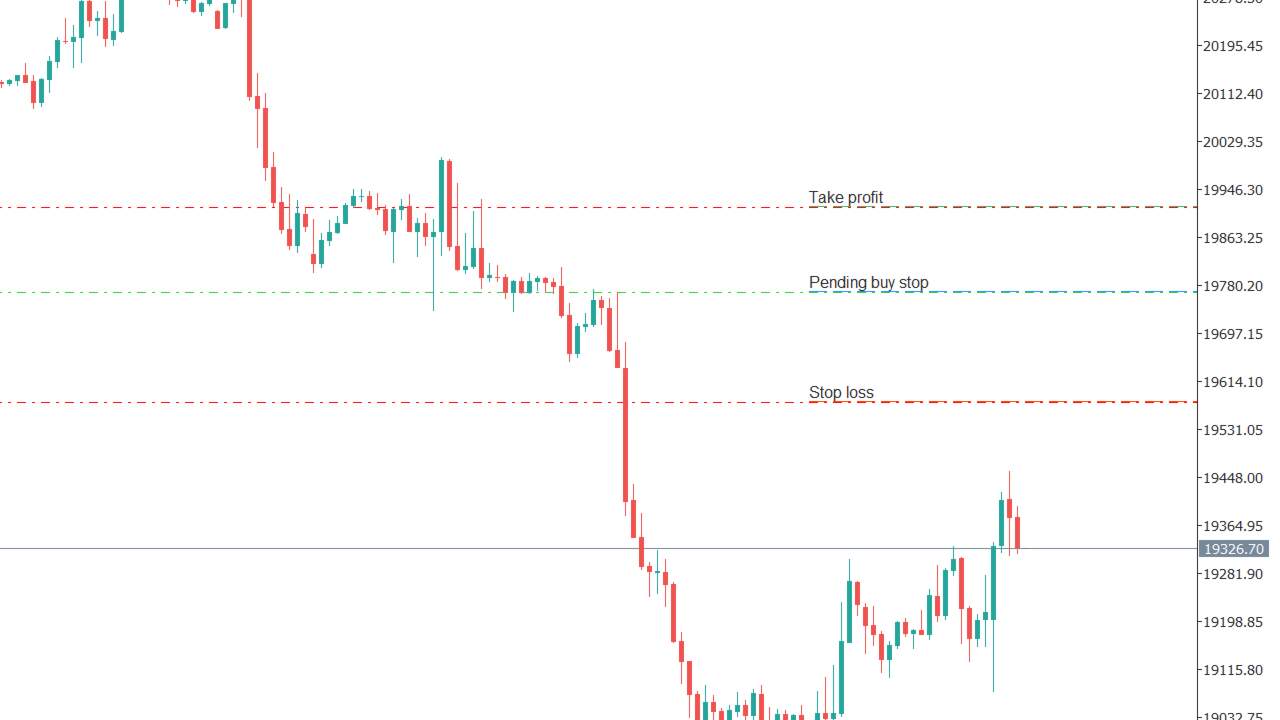
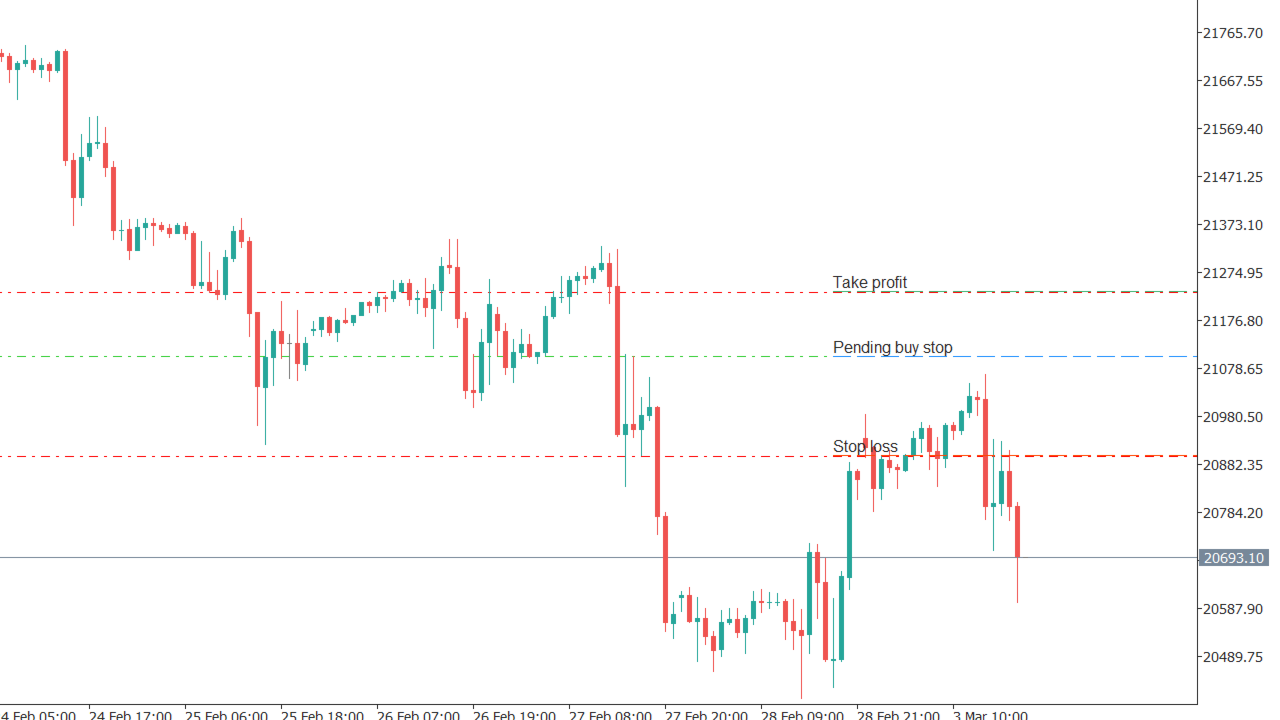
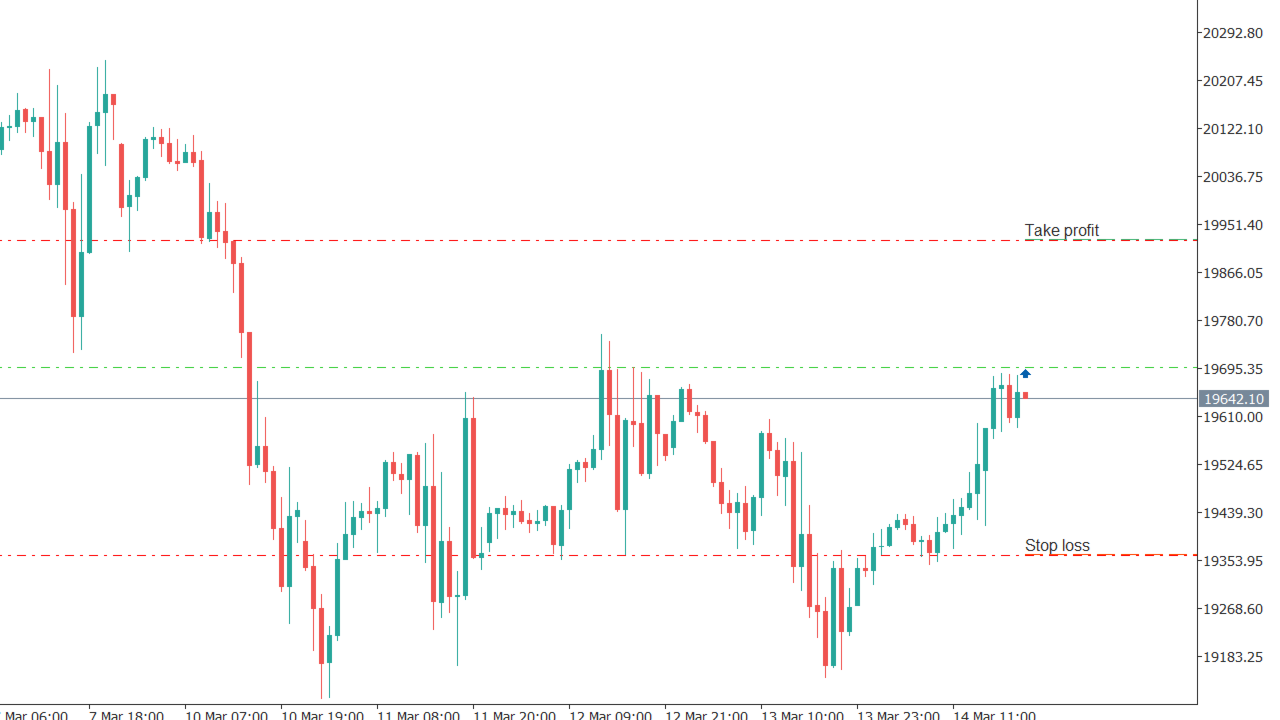
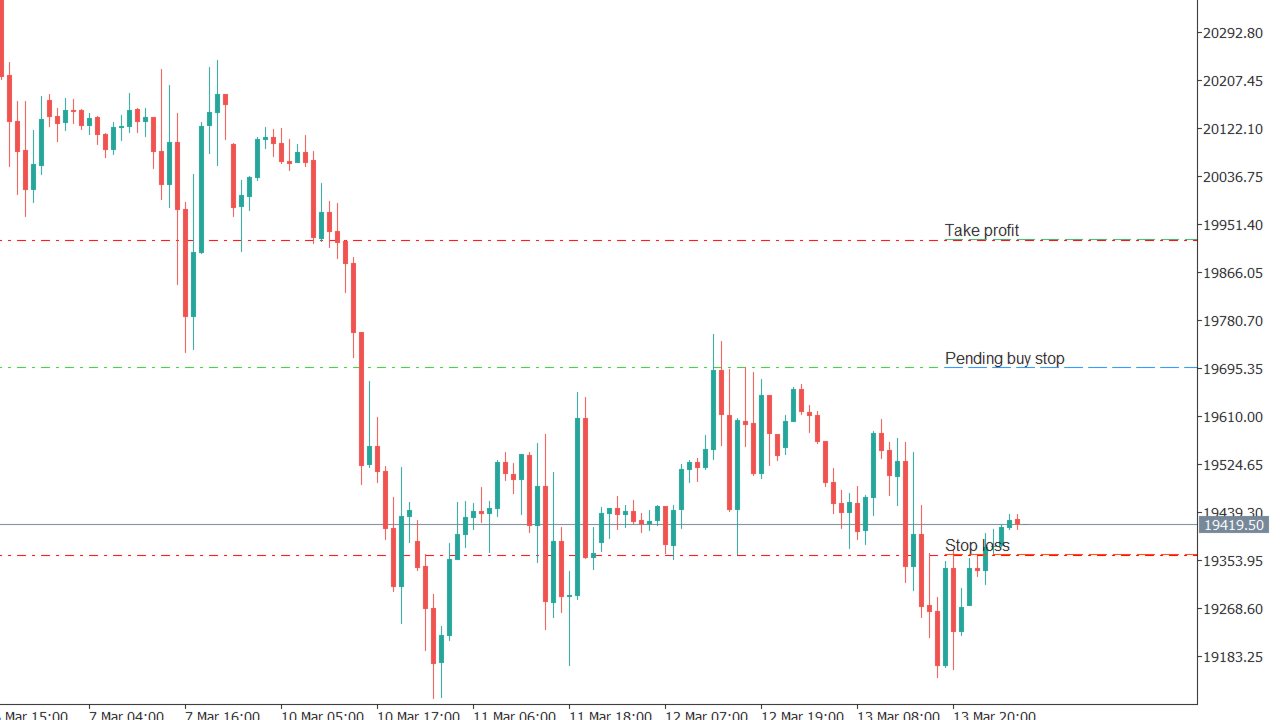
Dashed lines for the pending buy order of engine 1, its stop loss and its take profit, and for the stop loss of engine 2, each with a small caption, and a one-line status in the corner. You can hide the levels.
What is included
- One robot with both engines and every strategy setting built in.
- Updates through the MQL5 Market at no extra cost.
Backtest results
These are backtest results, not live trading results. MetaTrader 5 Strategy Tester, "Every tick based on real ticks" mode, Dukascopy tick data of the Nasdaq 100 CFD, H1, 1 January 2016 to 30 September 2026, starting balance $10,000, leverage 1:500, default settings (risk 1% per trade for engine 1 and 0.5% for engine 2).
- Net profit $62,527 (+625%, about 20% a year), profit factor (gross profit divided by gross loss) 1.50, maximum equity drawdown 16.0%, 1,142 trades (353 of engine 1 and 789 of engine 2), 31.8% winners.
- Return by year in the same backtest: 2016 +33.0%, 2017 +2.3%, 2018 +39.3%, 2019 +10.0%, 2020 +26.9%, 2021 +34.2%, 2022 +16.7%, 2023 -4.2%, 2024 +38.7%, 2025 +19.9%, 2026 (January to September) +9.8%.
- Engine 2 was designed and tested on 2016 to 2022 and then tested once, with its rules unchanged, on January 2023 to September 2026, data it had never seen. It was still profitable there.
- The Strategy Tester fills market orders at the quoted price, without slippage. With one index point of slippage on every entry and every exit of engine 2, the same backtest makes about 14% a year instead of 20%, and the balance drawdown grows from 13.6% to about 24%.
The lot follows the balance, so the total compounds. The return of each year tells more than the total.
Read this before you buy
- With the default settings, a stop of engine 1 loses about 1% of the balance and a stop of engine 2 about 0.5%, more on a small balance where the broker's minimum lot is used. Both engines can lose on the same day, and many stops can come in a row. The worst equity drawdown in the backtest was 16.0%, and a future one can be deeper.
- There is no daily loss limit and no drawdown limit: the risk is controlled trade by trade.
- In a fast market or at a gap, an order or a stop can fill beyond its price, so a trade can lose more than the risk you set. In the backtest, one trade of engine 2 lost more than five times its planned risk on a day of sudden news.
- Results in a live account are likely to be lower than in the backtest because of slippage and commissions (see "Backtest results").
- Your results depend on your broker's prices, spreads, commissions and execution. Past performance is not a guarantee of future results.
- Try the demo in the Strategy Tester, and run PulseFlow on a demo account before you use real money.