ZAIN Gold Scalping V6 — All-In-One Trading System
Zain Gold Scalping EA is a sophisticated, fully automated trading advisor designed specifically for high-frequency scalping strategies on the XAU/USD (Gold/US Dollar) pair. Developed with a strong focus on risk management, it targets small, rapid price movements in the gold market during periods of high liquidity.
Key Features and Advantages:
Dedicated to Gold (XAU/USD):
Forex
Smart Entry Filters: Utilizes multi-layered technical indicators and trend filters to minimize false signals (such as false breakouts) and execute high-probability trades.
Advanced Protection System: Includes built-in mechanisms to move the entry point to break-even and employs a dynamic trailing stop feature to effectively secure profits and protect open trades.
Compatibility with Raw/ECN Accounts: Optimized for ECN and Raw account environments characterized by tight spreads, ensuring minimal slippage and optimal execution speed. Full Customization: Offers clear settings that allow traders to adjust risk ratios, lot sizes, and Take Profit/Stop Loss levels to align with their capital management strategies. Recommended Settings:
Pair: XAUUSD (Gold)
Timeframe: M1, M5, M15, M30, or 1H
Account Type: ECN / Raw Spread (characterized by low latency and tight spreads).
Minimum Deposit: $500 (or the equivalent in cent accounts), while maintaining prudent risk management (the default setting is 1.0% risk per trade).
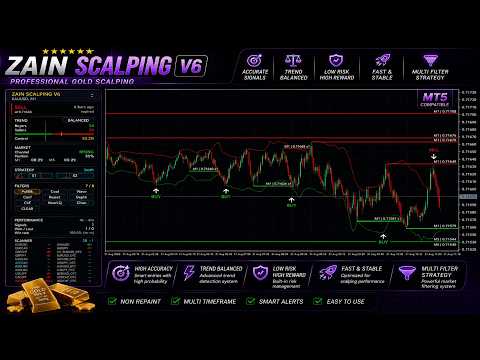
A complete, professional-grade trading system purpose-built for fast-moving markets like Gold, combining dual independent signal engines, automatic chart analysis, and a full set of configurable confirmation filters — all wrapped in a clean, live dashboard.
Dual Signal Engine
Two independent detection methods work side by side, each scanning price action from a different angle. They can run together for broader coverage, or independently if you prefer a single, focused approach.
Nine Optional Confirmation Filters
Every signal can be filtered through up to nine independent, fully toggleable checks, letting you dial the system from highly selective to more frequent signals, matching your own trading style. Each filter can be switched on or off individually from the on-chart panel:
Trend Filter — only signals in the direction of the broader market trend, and pauses both directions when the market is flat/sideways.
Liquidity Zone Filter (NearLQ) — only signals near a chart-confirmed support/resistance zone, on the correct side.
Channel Location Filter (RegLoc) — requires price to actually reach the outer edge of the plotted price channel before accepting a signal, rejecting setups that fire too early.
Pullback Filter (PullBk) — waits for momentum to ease back before signaling, instead of firing in the middle of a sharp move.
Rejection Confirmation (Reject) — confirms the prior candle has genuinely pulled back into a normal range before entry.
Re-Arm Filter (ReArm) — blocks a repeat trade in the same direction until momentum has returned to a neutral point first.
Cooldown Filter — enforces a fixed rest period (in candles) after every trade before allowing another in the same direction.
Single-Wave Filter (Wave) — limits the tool to one trade per ongoing price swing, until that move has fully resolved.
Early Confirmation Marker (Confirm) — flags developing setups the moment momentum starts building, before the official signal appears.
Automatic Market Structure Detection
The system continuously scans the chart and automatically plots key support and resistance zones across multiple timeframes, along with a self-adjusting price channel that reshapes itself as new candles form — giving you a constantly updated map of where price is likely to react.
Live On-Chart Dashboard
A built-in control panel shows, in real time:
Current market trend read-out
Active/inactive filters at a glance, with one-click toggles
Win/loss statistics and recent performance tracking
A multi-symbol scanner monitoring dozens of pairs simultaneously for fresh setups
Candle countdown timers for multiple timeframes
Non-Repainting Signals
Every arrow and marker is locked in the moment its candle closes and never changes afterward — what you see in real time is exactly what remains in the chart's history.
Full Trade Automation (EA version)
One-click AUTO / MANUAL mode switch
Manual BUY / SELL / CLOSE ALL buttons
Flexible exit logic combining a candle-based time exit with broker-side stop-loss/take-profit as a safety net
Adjustable risk percentage or fixed position sizing, editable live from the panel — no need to reopen the Inputs window
Alerts on Every Signal
Pop-up, push notification, and email alerts keep you informed the moment a confirmed setup appears, even when you're away from the screen.
Important Notice
This product is an analytical and execution tool, not a guarantee of profit. All trading involves risk, and any historical statistics shown in the built-in panel reflect past performance on available chart data — they do not guarantee future results. Always test thoroughly on a demo account before committing real capital, and trade only with funds you can afford to risk.

 Professional MQL5 Developer and Algorithmic Trader with extensive experience in creating high-performance technical indicators and custom trading tools for MetaTrader 5. Dedicated to delivering robust, non-repaint solutions and robust analytical resources for traders worldwide.