BitFalcon Momentum
- Experts
- 버전: 1.33
- 활성화: 5

BitFalcon Momentum is a fully automated trend-and-momentum Expert Advisor developed for MetaTrader 5.
Limited Launch Price
The current introductory price is available for the first 10 purchases only. Immediately after purchase number 10, the price will increase permanently.
The EA will remain available after the launch stage, but not at the current introductory price. If BitFalcon Momentum meets your requirements after testing the demo, purchasing during the launch period secures the lower price.
Product Overview
BitFalcon Momentum is designed for traders who want a structured and automated approach to momentum and trend trading. The EA continuously analyzes market conditions, looks for directional strength that agrees with its trend logic, and executes trades only when its internal strategy requirements are satisfied.
Once activated, the EA handles market analysis, trade execution and position management according to its configured rules. Its purpose is to apply the same decision process consistently, without emotional intervention or impulsive manual entries.
Core Strategy Concept
Trend and momentum describe two different aspects of market movement:
- Trend identifies the prevailing market direction.
- Momentum measures whether price is moving with sufficient directional strength.
BitFalcon Momentum combines these concepts within its internal trading logic. It waits for its required conditions to align before considering an entry. When the conditions are not satisfied, the EA remains inactive and continues monitoring the market.
This selective, rules-based process is intended to reduce random entries and provide repeatable execution. However, no filter can eliminate losing trades, false momentum or changing market conditions.
How the EA Operates
- The EA continuously evaluates current market conditions.
- It checks whether its momentum and trend requirements are aligned.
- A trade may be opened when the complete internal entry logic is confirmed.
- The open position is managed according to the EA's configured trade-management rules.
- After the position is closed, the EA returns to monitoring for the next valid setup.
The entire process is automated after the EA has been correctly installed, configured and allowed to trade in MetaTrader 5.
Main Advantages
- Fully automated market analysis and trade execution.
- Trend-following and momentum-based strategy concept.
- Consistent rule-based decisions without emotional intervention.
- Automatic monitoring of market conditions.
- Automated handling of entries and open positions.
- Adjustable operation through the EA input settings.
- Compatible with the MetaTrader 5 Strategy Tester.
- Suitable for historical testing before live or demo use.
Visual Backtest Demonstration
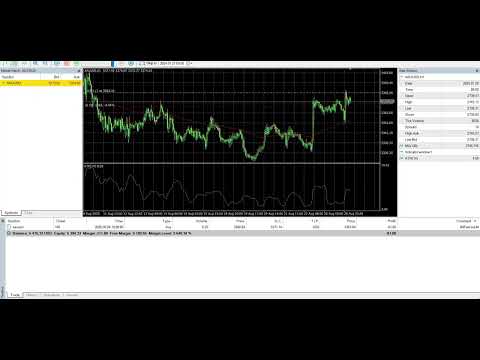
The video attached to this product page demonstrates BitFalcon Momentum operating in the MetaTrader 5 Strategy Tester using Every Tick modelling.
The visual test allows you to observe how the EA reacts to historical market movement, including its entries, exits and position-management behaviour directly on the chart.
The demonstration is provided for transparency and evaluation. It represents a historical simulation under the specific data, settings and trading conditions shown in the test. It is not a live trading result or a prediction of future performance.
Test Before Purchasing
MQL5 provides a free demonstration version that can be tested inside the MetaTrader 5 Strategy Tester. You are strongly encouraged to test BitFalcon Momentum before purchasing.
When testing, use conditions that are relevant to your intended trading environment, including:
- Your intended trading symbol and timeframe.
- High-quality historical data.
- A realistic initial deposit and leverage.
- Realistic spread and commission settings.
- The same EA inputs you intend to use.
- Different historical periods and market conditions.
Testing multiple periods is important because a momentum strategy may behave differently during trending, ranging, volatile and low-liquidity conditions.
Installation and Initial Setup
- Install BitFalcon Momentum from the MQL5 Market through MetaTrader 5.
- Open the symbol and timeframe you intend to test or trade.
- Attach the EA to the chart.
- Review every parameter in the Inputs tab.
- Enable algorithmic trading in MetaTrader 5.
- Run a Strategy Tester backtest before using the EA on a chart.
- Continue with a demo account before considering live use.
Do not use settings you do not understand. Begin with conservative exposure and change only one group of parameters at a time when evaluating different configurations.
Practical Recommendations
- Use the product screenshots and video as the reference configuration for reproducing the demonstrated test.
- Always compare results using data from your own broker.
- Include realistic spreads, commissions and execution conditions in your tests.
- Start with a demo account and observe the EA over a meaningful period.
- Use conservative trade sizing appropriate for your account.
- If continuous operation is required, consider using a stable VPS connection.
- Do not assume that one profitable historical period represents every market environment.
Who BitFalcon Momentum Is Designed For
- Traders seeking an automated momentum and trend strategy for MetaTrader 5.
- Users who prefer repeatable, rules-based execution.
- Traders who want to evaluate an EA in the Strategy Tester before purchasing.
- Users who understand that every automated strategy includes risk and periods of weaker performance.
- Traders prepared to test settings and use responsible position sizing.
Important Information
- Trade frequency depends on market conditions and the selected settings.
- The EA may remain inactive when its internal entry requirements are not satisfied.
- Results can differ between brokers because of pricing data, spreads, commissions, slippage and execution conditions.
- Historical performance does not guarantee future performance.
- No Expert Advisor can predict every market movement or eliminate trading risk.
- Always test the EA and understand its behaviour before considering live use.
Support
If you have a question about installation, settings or operation, use the Comments section or send a private message through MQL5.
When requesting technical assistance, include your MetaTrader 5 version, broker, symbol, timeframe, EA settings and any relevant screenshots or Journal messages. Providing these details makes troubleshooting faster and more accurate.
Risk Warning
Trading financial markets involves substantial risk and may not be suitable for every trader. Backtests and demonstrations are based on historical data and cannot guarantee future results. Market conditions, spreads, commissions, slippage, execution quality and user-selected settings can materially affect performance.
You are responsible for testing the EA, selecting appropriate settings and determining whether it is suitable for your objectives and risk tolerance. Never trade with funds you cannot afford to lose.
Launch Pricing Reminder
The introductory price applies to the first 10 purchases only. After purchase number 10, the price will increase permanently.