Magaiver
- Experts
- 버전: 1.0
- 활성화: 7

The EA is currently in version 1.0. Updates will be released whenever necessary, and the corresponding configuration files will be made available.
- Expert Advisor developed for MetaTrader 5 and capable of operating on any trading symbol.
- The provided configuration has been optimized for Gold, XAUUSD, on the M5 timeframe using a day-trading approach.
- A simple strategy based on channel analysis and the trading frequency of the asset.
- This strategy is called Cycle Theory and was created by Marcelo Ferreira, the creator of Fimathe.
- Compatible with mini, micro, and standard contracts.
All financial metrics displayed on the panel are shown in US dollars.
IMPORTANT
After purchasing, send me a private message to receive the .set parameter configuration file.
Discounted launch price. The price will increase by USD 25 after every 10 sales.
Final price: USD 497.
Timeframe and Trading Symbol
-
Recommended timeframe: M5.
-
Target symbol: XAUUSD. Symbol variations are accepted, such as XAUUSD.m, XAUUSD+, and XAUUSD.m+.
-
For other instruments, a preliminary optimization must be performed using the Fast Genetic Optimization method.
Strategy Logic
-
At the beginning of the configured trading session, the EA defines an Opening Range, referred to as the CA, using the first candles of the day on the M5 chart.
-
The CA is classified into two regimes according to its size:
-
Normal Channel: the EA waits for the CA to be completed, then waits for a breakout candle to form C1. The combination of CA + C1 is used as the trading reference.
-
Split Channel: when the CA exceeds a configurable point threshold, the EA trades the breakout of the CA directly, without requiring the formation of C1.
-
-
After the channel has been validated, the EA waits for a buy or sell trigger at the levels defined by the strategy.
-
Entries can be executed either as market orders or pending orders, with a pullback level calculated proportionally to the channel.
-
The Stop Loss is positioned on the opposite side of the drawn channel.
-
The Take Profit is calculated as a configurable multiple of the channel height. Separate parameters are available for Normal and Split Channels.
-
If the first trade is stopped out, the EA may automatically execute a reversal trade in the opposite direction, using its own independent parameters.
Configurable Second Order
Optional feature.
-
When enabled, the EA opens a second order at a configurable position within the channel, in the same direction as the primary order.
-
The second-order position can be configured between 20% and 80% of the channel width, measured from the broken channel line. A value of 50% corresponds to the midpoint of the channel.
-
The second-order lot size can be defined in three ways: equal to the first order, a fixed lot size, or an independent percentage-based risk.
-
Configurable Take Profit based on a risk-to-reward ratio.
-
Independent break-even setting, measured as a percentage of the distance between the entry price and the Take Profit.
-
The second order can also be included in the reversal-trade system when this option is enabled.
Level-Based Trailing Stop
Optional feature.
-
When enabled, the EA moves the Stop Loss in fixed steps as the price advances by multiples of the height of the drawn channel.
-
Separate trailing-stop multipliers can be configured for Normal and Split Channels.
-
The Stop Loss never moves backward. Each adjustment is permanent while the position remains open.
-
It works together with the break-even percentage. Whichever feature first produces the most protected Stop Loss price takes precedence.
-
It can be enabled independently for the initial trade and the reversal trade.
Risk Management
-
Risk per trade is defined as a percentage of the account balance.
-
The lot size is recalculated when a pending order is activated, considering the actual distance between the pullback entry price and the Stop Loss. This keeps the real exposure aligned with the configured risk percentage.
-
Configurable daily loss limit. Once this limit is reached, the EA ends the trading day and does not open any additional trades.
-
Weekly and monthly limits can also be monitored through the control panel.
-
Controls for the maximum number of trades per day and the maximum number of reversal trades per session.
-
Option to use the broker’s minimum permitted lot size when the risk-based calculation produces a value below the minimum allowed volume.
Filters and Protections
-
Spread filter: blocks new entries when the current spread exceeds the configured limit.
-
News filter integrated with the MetaTrader 5 Economic Calendar, with options to block new entries and close open positions before high-impact economic events.
-
Mandatory closing time with a two-stage verification process to ensure that no position remains open after the configured time.
-
Configurable session expiration time, preventing new entries after a specified time of day.
-
Automatic United States Daylight Saving Time adjustment, maintaining a consistent market-time reference throughout the year without requiring manual parameter changes.
-
Symbol validation during OnInit : if the selected instrument is not enabled for trading, the EA will not initialize.
On-Chart Control Panel
The visual control panel includes the following sections:
-
Current state-machine status and the latest blocking reason, when applicable.
-
Trading symbol identification, current time, and configured session start time.
-
Drawn channels, including Normal and Split Channels, with the active regime highlighted.
-
Buy and sell trigger prices.
-
Trade information section displaying the calculated lot size, Stop Loss distance, and Take Profit distance in US dollars and as percentages.
-
Results of the primary trade and, when enabled, the second order.
-
Persistent financial section displaying daily, weekly, monthly, and total results, both in US dollars and as percentages of the account balance. Results are filtered by the EA’s Magic Number.
Manual Channel-Line Adjustment
-
Allows the trader to drag the upper and lower channel lines directly on the chart while the EA is waiting for an entry.
-
The EA validates every adjustment. Invalid changes are automatically reverted.
-
When permitted, the adjustment reclassifies the channel regime as Normal or Split and automatically realigns the entry triggers, projected Stop Loss, and Take Profit levels.
-
Once an order has been opened, manual channel adjustment is disabled until the next trading day.
Persistence and Recovery
-
All relevant state parameters are saved to disk.
-
After restarting the trading terminal, chart, or VPS, the EA reconstructs its previous state, reconnects to existing positions and pending orders, and continues the current trading cycle without creating duplicate orders.
-
Automatic reconciliation is included for asynchronous executions from brokers that report completed trades with a delay.
Usage Recommendations
-
Run the EA in the MetaTrader 5 Strategy Tester before using it on a live account. This allows you to observe its behavior under conditions similar to live execution.
-
Adjust the channel, Take Profit, and risk settings according to your broker’s volatility profile and the selected trading instrument.
-
Begin with a demo account until the strategy has been properly validated, including the news filter and mandatory closing-time features.
-
Each broker provides slightly different price charts and trading conditions. Therefore, identical results cannot be guaranteed across different brokers.
Tested Brokers
-
Infinox
-
Fusion Markets
The EA can operate with any broker. However, for better performance, it is recommended to optimize the setup so that the parameters are adapted to your broker’s specific price data and trading conditions.
-
Excessively large channels are controlled through the percentage-based risk system, depending on the account balance and risk value selected by the user.
-
Since XAUUSD is a highly leveraged instrument, micro-lot or cent accounts are recommended for traders with smaller capital.
-
With capital of USD 500 or more, a standard account with regular lot sizes may be used, provided that appropriate risk settings are applied.
Support
-
Questions and support requests can be submitted through the integrated chat system on the MQL5 platform.
Important Disclaimers
-
The use of this Expert Advisor involves financial risk. No person, strategy, or automated system can eliminate the possibility of losses in financial-market trading.
-
Backtest results and past performance, whether produced by the seller, the user, or third parties, do not guarantee future results.
-
The user is solely responsible for selecting parameters compatible with their risk tolerance, account balance, broker conditions, and trading environment.
-
This Expert Advisor operates based on a strategy that has demonstrated profitability under specific market conditions. However, average channel sizes may change from year to year. Therefore, the EA should not be left operating for several years without periodic parameter reviews and adjustments.
-
This Expert Advisor is not intended for anyone expecting a system that will generate immediate wealth or guaranteed profits overnight.
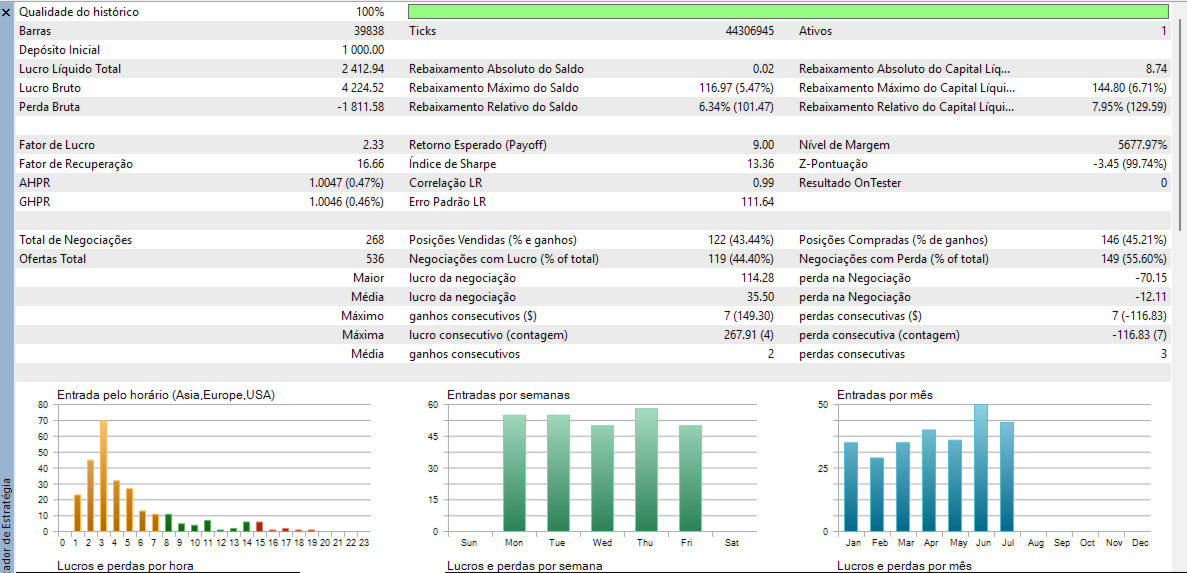
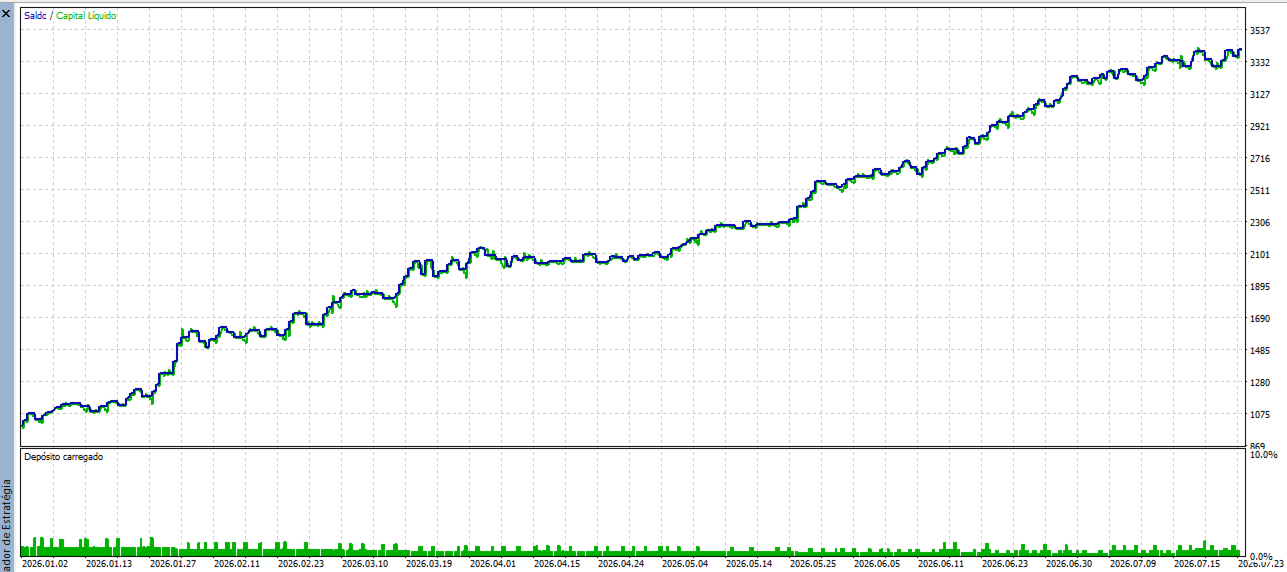
The backtest shown in the images below was performed from January 1, 2026, to July 23, 2026, using an initial balance of USD 1,000.