Smart Object Alert Pro
- 지표
-
Sedjro Noel Akogbeto
 Independent Trader | Software Developer
 - 버전: 1.10
- 업데이트됨: 3 6월 2026
- 활성화: 5
Never Miss Your Custom Key Price Levels Again
Smart Object Alert PRO automatically monitors chart objects and instantly alerts you when price reaches them.
This indicator is designed for all traders, whether they draw their levels manually or use indicators that generate objects. Ultra-lightweight, it won't slow down your platform, even with hundreds of objects on the chart.
No more staring at charts waiting for price to touch a support, resistance, trendline, channel, Fibonacci level, or trading zone.
Draw your levels, configure the indicator with your preferred settings, and let it watch the market for you.
Receive alerts directly on your platform, mobile phone, or through sound notifications as soon as price reaches an important level.
Why All Traders Need This Tool
First of all, it helps you save time for other tasks. Many traders spend hours waiting for price to reach critical technical levels.
Important opportunities are often missed because:
- Price touches a trendline while you are away.
- A support or resistance level is reached during another trading session.
- Fibonacci levels are hit without notice.
- Trading zones are tested while monitoring multiple charts.
Smart Object Alert PRO solves this problem by continuously monitoring your chart objects and notifying you immediately when price interacts with them.
Settings
Parameter
Description
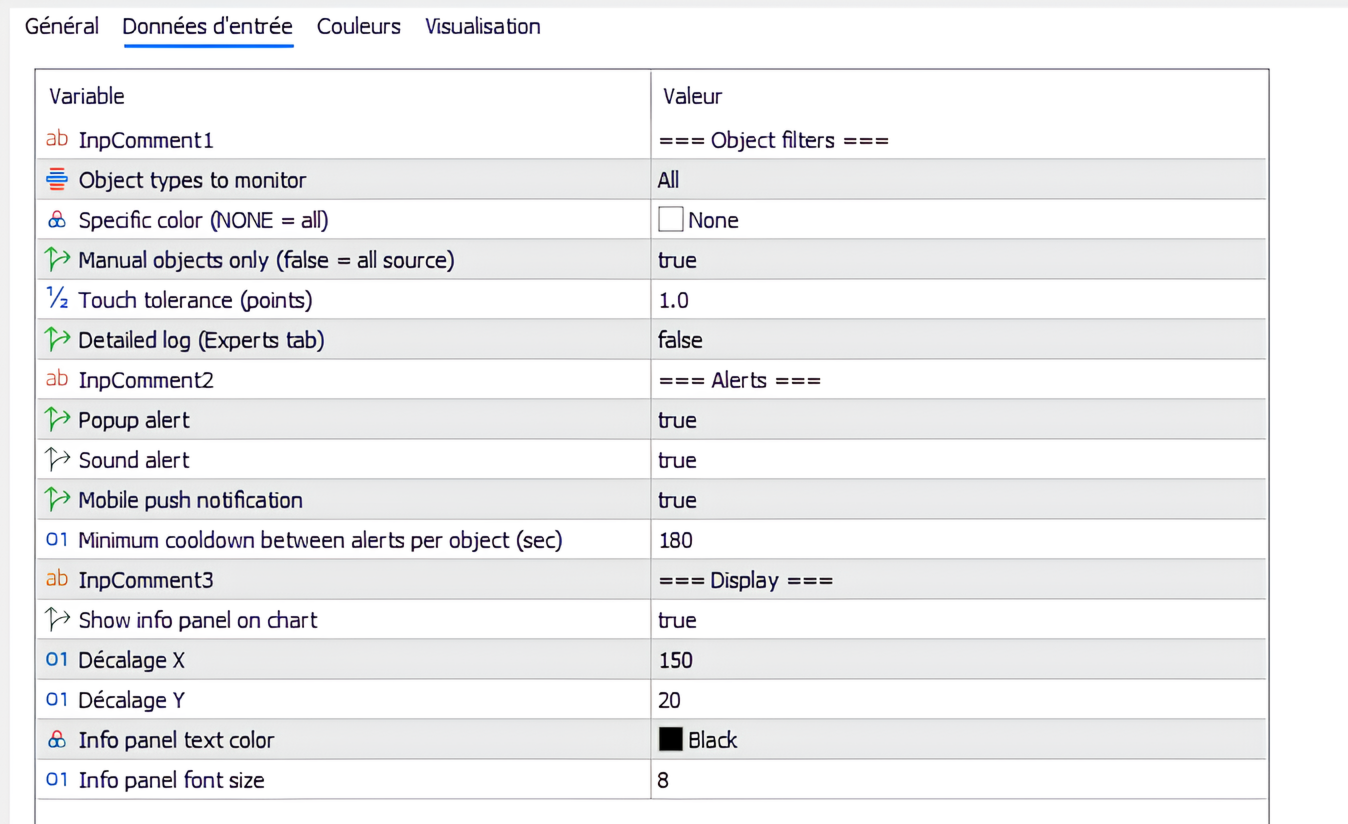
Object types to monitor
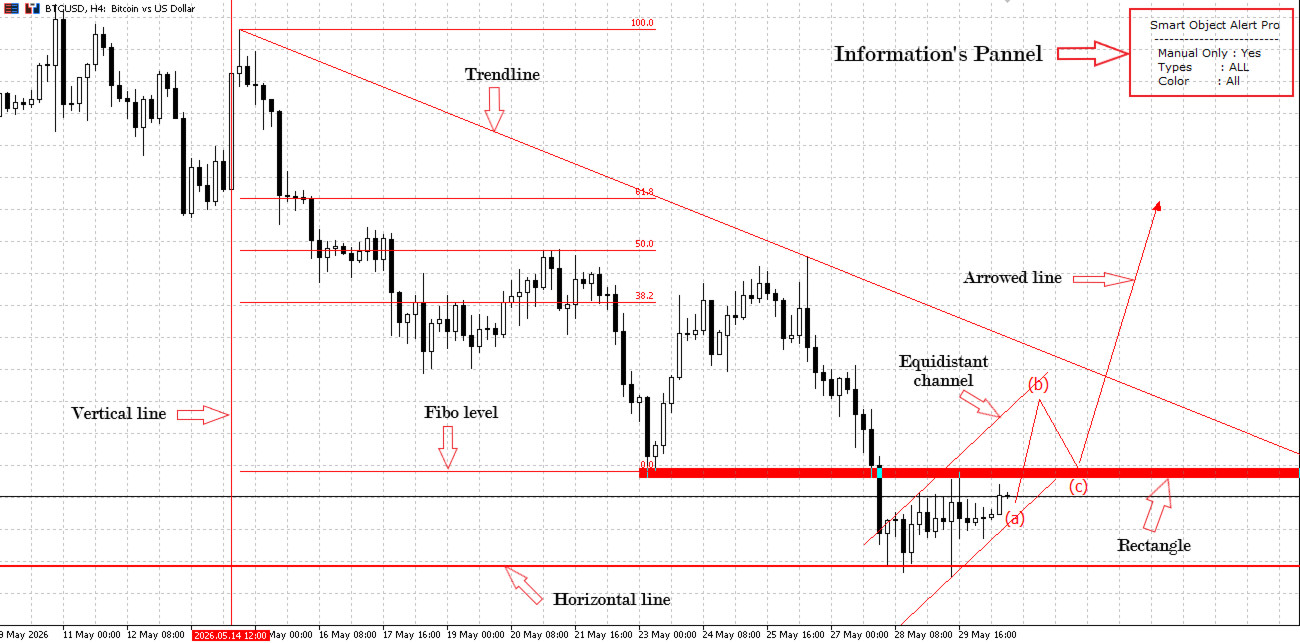
Select which chart objects will generate alerts. Supported types: Horizontal Lines, Trendlines, Arrowed Lines, Rectangles, Equidistant Channels, Vertical Lines, and Fibonacci Retracement levels. You can combine them arbitrarily.
Specific color
Restrict alerts to objects with exactly this color. Choose clrNONE to ignore the color filter and monitor all colors.
Manual objects only
When enabled, only manually drawn objects trigger alerts – indicator-generated objects are ignored. The system automatically detects manual objects. Ideal for charts with multiple indicators.
Touch tolerance
How close (in points) the price must come to a level to be considered a “touch”. A small tolerance reduces false triggers, a larger one accounts for spreads and volatility
Detailed log
Outputs diagnostic information to the Experts tab for troubleshooting.
Popup alert
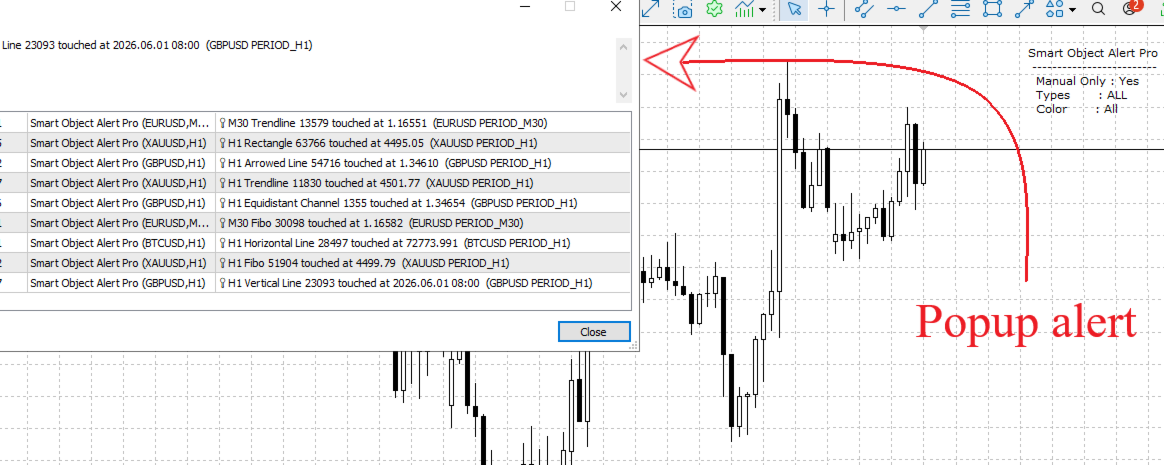
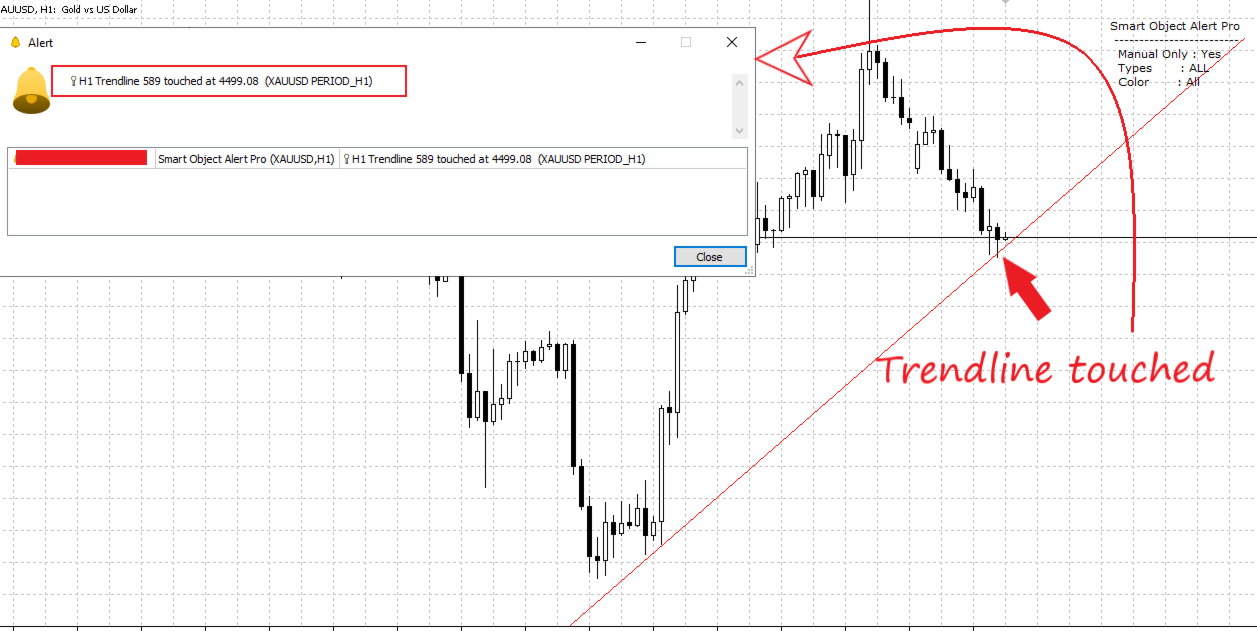
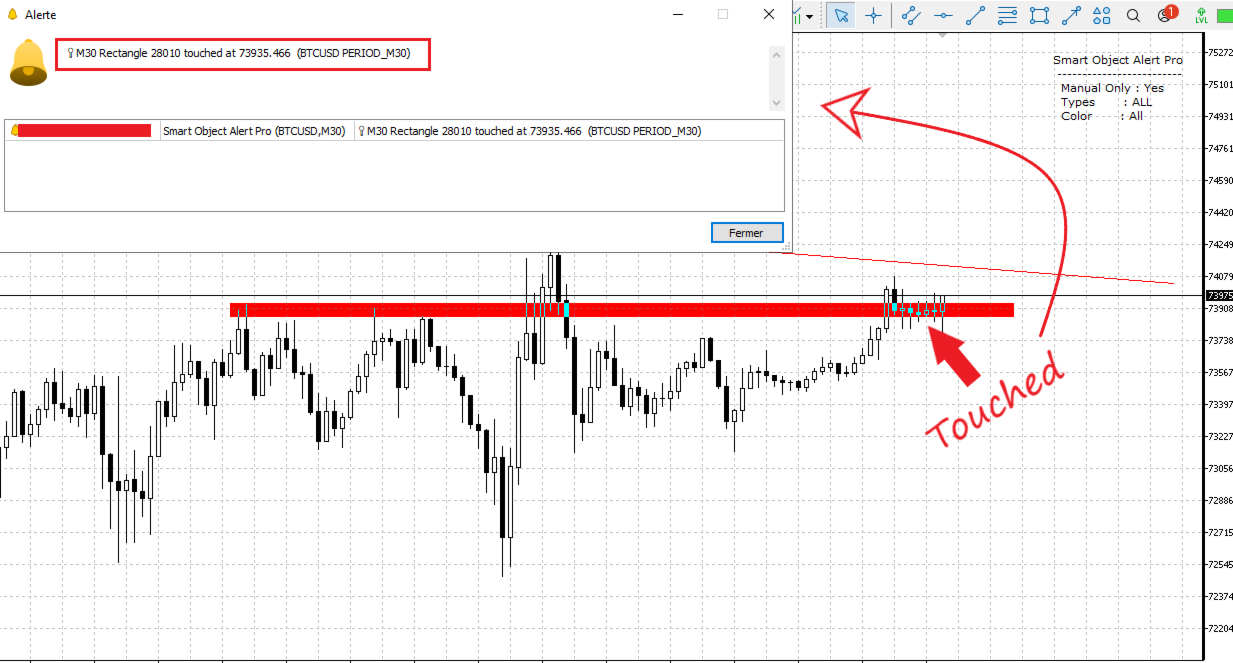
Displays a standard MT5 popup when a touch occurs
Sound alert
Plays the alert2.wav sound.
Mobile push notification
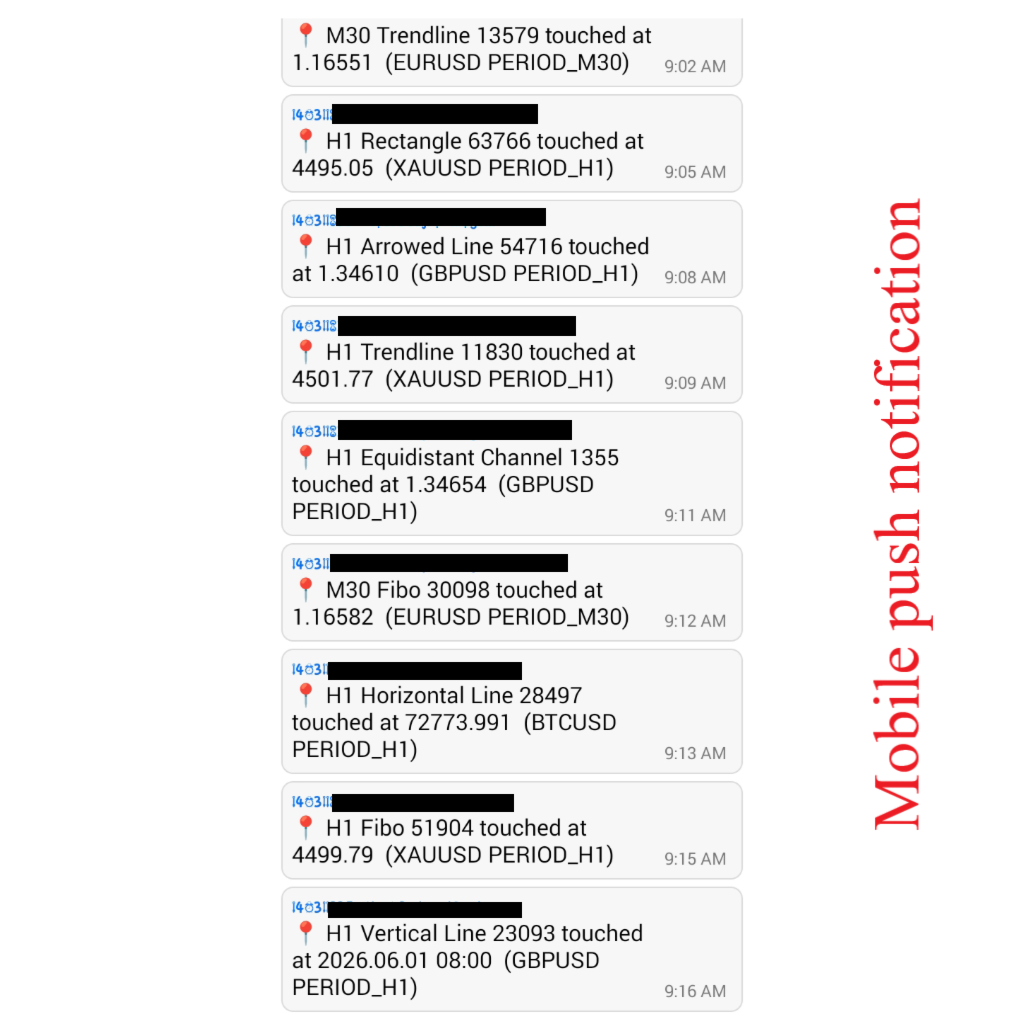
Sends a push alert to your mobile device (requires MT5 mobile app and proper notification setup).
Cooldown (sec)
Minimum time between two alerts for the same object. This anti‑spam technology prevents repeated notifications while price hovers around a level
Show info panel
Displays a compact on‑chart label summarizing the current settings.
Panel X offset / Y offset Adjust the position of the info panel. Info text color / font size Customize the appearance of the info panel.
| Parameter | Description |
|---|---|
| Object types to monitor | Select which chart objects will generate alerts. Supported types: Horizontal Lines, Trendlines, Arrowed Lines, Rectangles, Equidistant Channels, Vertical Lines, and Fibonacci Retracement levels. You can combine them arbitrarily. |
| Specific color | Restrict alerts to objects with exactly this color. Choose clrNONE to ignore the color filter and monitor all colors. |
| Manual objects only | When enabled, only manually drawn objects trigger alerts – indicator-generated objects are ignored. The system automatically detects manual objects. Ideal for charts with multiple indicators. |
| Touch tolerance | How close (in points) the price must come to a level to be considered a “touch”. A small tolerance reduces false triggers, a larger one accounts for spreads and volatility |
| Detailed log | Outputs diagnostic information to the Experts tab for troubleshooting. |
| Popup alert | Displays a standard MT5 popup when a touch occurs |
| Sound alert | Plays the alert2.wav sound. |
| Mobile push notification | Sends a push alert to your mobile device (requires MT5 mobile app and proper notification setup). |
| Cooldown (sec) | Minimum time between two alerts for the same object. This anti‑spam technology prevents repeated notifications while price hovers around a level |
| Show info panel | Displays a compact on‑chart label summarizing the current settings. |
| Panel X offset / Y offset | Adjust the position of the info panel. |
| Info text color / font size | Customize the appearance of the info panel. |
Typical Use Cases
- Support and Resistance Trading: Draw your key levels and wait for alerts when price reaches them.
- Trendline Trading: Receive notifications when price touches dynamic trendlines.
- Fibonacci Trading: Get alerted automatically when important retracement levels are reached.
- Supply and Demand Zones: Monitor rectangles representing trading zones and react immediately when price enters them.
- Session Timing: Use vertical lines to receive notifications at specific market times.
Main Features
- Works on all symbols
- Works on all timeframes
- Monitors multiple objects across multiple charts simultaneously
- Supports manual and automatic object filtering
- Mobile push notifications
- Lightweight and efficient
- No chart clutter
- Easy setup
Installation and Usage
- Attach the indicator to a chart.
- Draw your preferred chart objects.
- Set up and select which object types to monitor.
- Configure alert methods.
- Wait for notifications when price reaches your levels.
The indicator does the monitoring while you focus on trading.
Updates and Support
Smart Object Alert PRO is actively maintained and regularly improved based on user feedback.
Future updates may include new features, additional object support, performance improvements, and compatibility updates with new MetaTrader 5 builds.
If you have questions, encounter any issues, or would like to suggest a feature, feel free to contact me through the MQL5 messaging system.
I am committed to providing responsive support and continuously improving the product to meet traders' needs.
Important Note
This indicator does not generate buy or sell signals.
Its purpose is to notify traders when price reaches their own important technical levels, whether defined manually or generated by indicators, allowing them to make their own trading decisions.