Azad ZonePulse MT5
- Experts
- 버전: 1.0
- 활성화: 5

Official Preset File
The official XAUUSD M15 preset file is available here:
Download Gold XAUUSD M15 Preset
Preset installation guide:
Official Azad ZonePulse MT5 Preset Guide
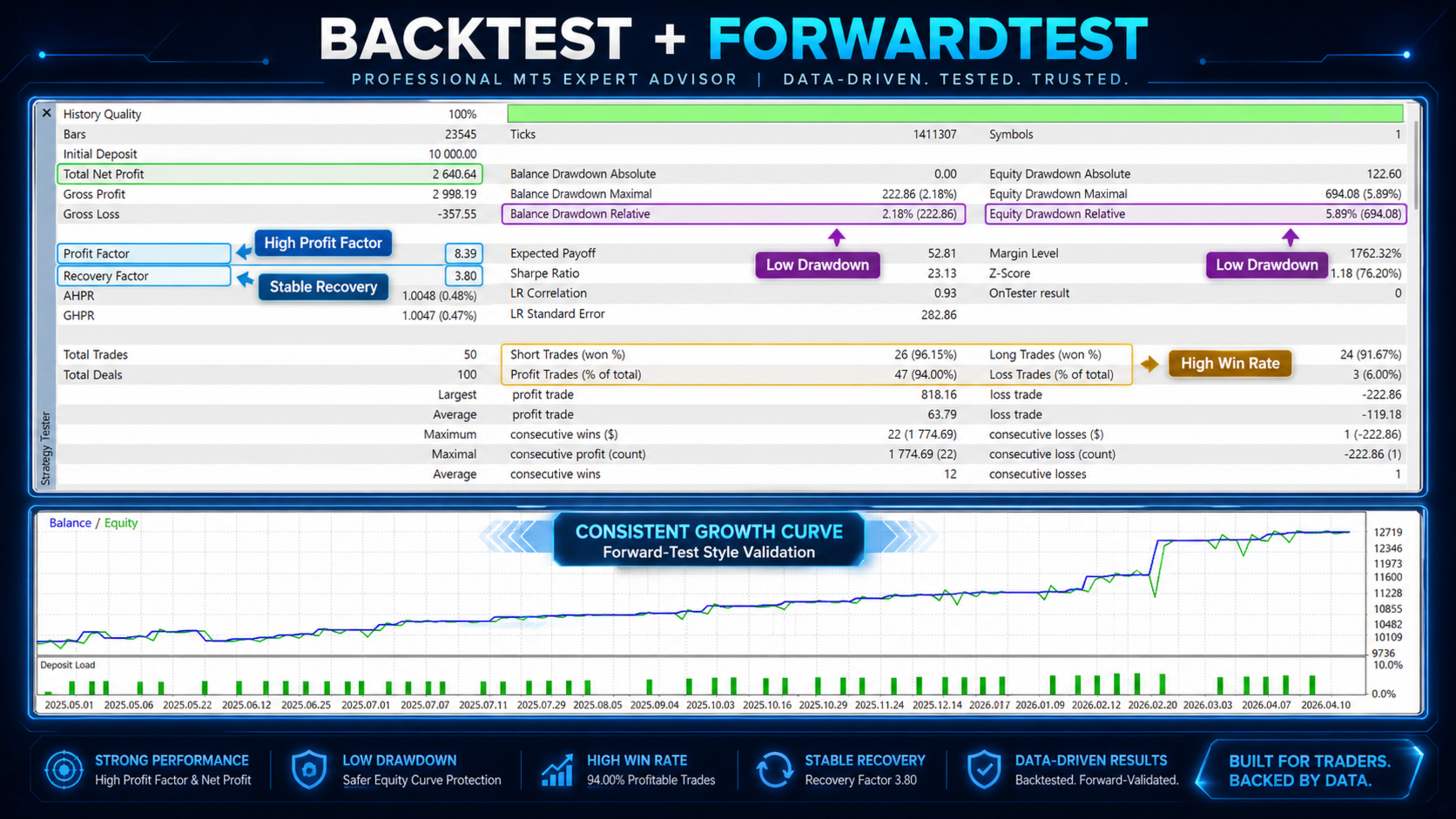
This preset is optimized for Gold / XAUUSD on the M15 timeframe and can be used with the demo version for forward-test style evaluation after May 1. For other symbols or timeframes, users are advised to run their own optimization and adjust the parameters according to spread, commission, broker execution and market behavior.
------------------------------------------------------------------------
Azad ZonePulse MT5 is an advanced MetaTrader 5 Expert Advisor built around market structure, multi-timeframe Supply/Demand zones, VWAP direction and tick-volume confirmation.
The EA detects verified and proven support/resistance zones internally, without depending on external custom indicators. It scans multiple selectable timeframes, builds dynamic trading zones, filters nearby zones using ATR distance, and uses these areas for trade confirmation, stop placement, take-profit planning and active position management.
The strategy is not based on Martingale, Grid or arbitrage logic. It focuses on price reaction around meaningful levels, trend confirmation and controlled trade management.
Main Features
Internal Supply/Demand Zone Engine
Azad ZonePulse identifies support and resistance areas using fast and slow fractal logic, ATR-based zone expansion, retest counting, zone strength classification and optional merging of overlapping zones.
Multi-Timeframe Level Analysis
The EA can scan up to three configurable zone timeframes, such as M15, H1 and H4. This allows the strategy to react to both intraday and higher-timeframe market structure.
Three Independent Entry Logic Modes
- Volume + VWAP + Barrier Logic
Uses tick-volume Bollinger bands, volume breakout validation, candle quality filters, daily anchored VWAP slope and VWAP position to confirm directional momentum. - Support/Resistance Range Ratio Logic
Measures the position of price between the nearest support and resistance zones. It can detect when price is closer to one side of a range and only trade when the distance ratio and ATR range conditions are satisfied. - Breakout Logic
Detects confirmed breakouts through Supply/Demand zones using volume expansion, previous-close validation, directional candle confirmation and SMMA trend filters.
Dynamic SL/TP Planning
Initial Stop Loss and Take Profit levels are built from the nearest relevant Supply/Demand zones with configurable pip buffers. The EA validates all levels against broker stop-distance rules.
ATR-Based Trailing Stop
Once a trade reaches the required ATR-based profit distance, the EA can trail the stop using configurable ATR start, distance and step parameters.
Zone-Based Stop Tightening
When a new qualifying support or resistance zone appears after entry, the EA can tighten the stop loss based on the newly formed structure.
Optional TP Reduction on New Barriers
If a new closer barrier forms ahead of the trade, the EA can reduce the take-profit target, subject to an ATR-based profit and minimum-distance filter.
Basket Watermark Profit Lock
The EA can monitor total floating profit of its own positions and close them if floating profit pulls back from a configured profit watermark.
Timed Profit Exit
Profitable positions can be closed automatically after a configurable number of days.
Visual Diagnostics
The EA draws zones, signal labels and detailed chart comments, making it easier to validate the logic visually during testing and optimization.
Suitable For
Azad ZonePulse MT5 is designed for traders who prefer structured level-based trading, volume confirmation and dynamic risk management. It can be tested on different liquid symbols and timeframes, especially where support/resistance reactions and intraday trend movements are important.
Important Notes
Trading is disabled by default and must be enabled manually from the EA inputs. Always test the EA in the Strategy Tester and on a demo account before using it on a live account. Results depend on symbol, timeframe, broker conditions, spreads, commissions and optimization settings.
-----------------------------------
Version & Preset Notice
This version was uploaded on May 1. From this date onward, you can use the preset file provided with the product to test the Expert Advisor in the demo version for any period you prefer. This allows users to evaluate the EA under forward-test conditions before considering live trading.
The provided preset is optimized for Gold and has been forward tested through the first four months of the new calendar year. For other symbols, users are advised to run their own optimization and adjust the parameters according to the selected symbol, timeframe, spread, commission and broker execution conditions.
If you need additional guidance for setup, optimization or adapting the EA to another market, please contact me.