Precision Sniper EA
- Experts
-
Hammad Dilber
 Professional MQL5 developer specializing in automated trading solutions. I create custom Expert Advisors, trading bots, and technical indicators for MetaTrader 5 platforms.
Services:
• Custom Expert Advisors (EA) from scratch
• Trading bot development with risk management - 버전: 1.0
- 활성화: 10
PrecisionSniper EA
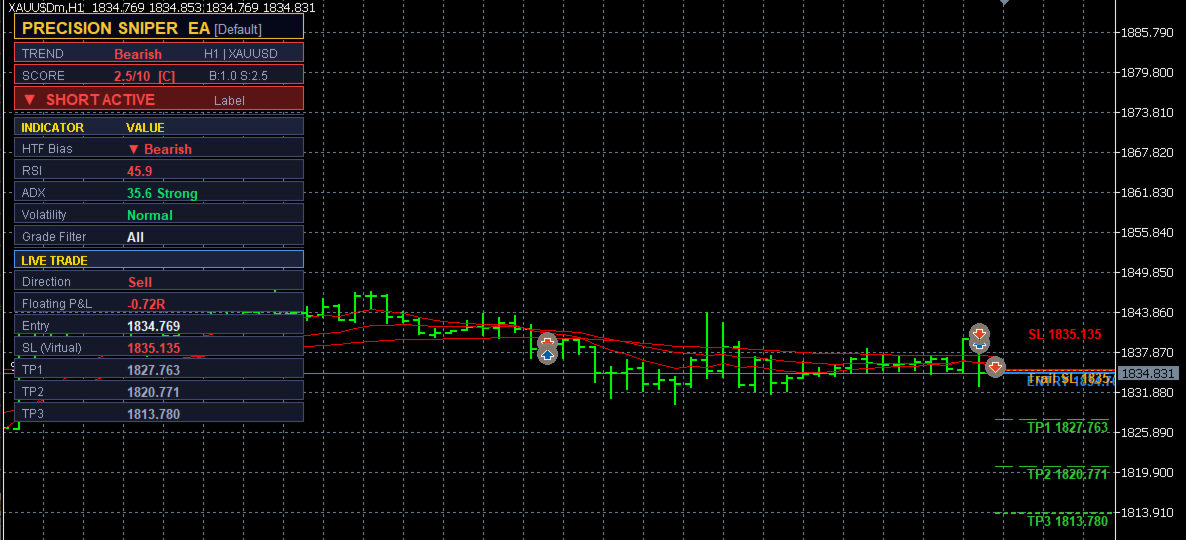
PrecisionSniper EA is a multi-confluence Expert Advisor for MetaTrader 5 that combines EMA crossovers, RSI momentum, MACD histogram, ADX trend strength, volume analysis, and an optional higher timeframe bias filter to identify high-probability trade entries. Every signal is scored on a 10-point scale and assigned a grade (A+, A, or B) so that only the setups with the strongest confluence reach execution. Stop loss levels are calculated either from recent swing structure or from an ATR multiplier, and three configurable take-profit targets are managed through partial closes, a single exit, or a full trailing stop. A built-in economic calendar filter blocks new entries and sends a push notification when upcoming high-impact news threatens an open position. All SL and TP levels are kept virtual and never sent to the broker, protecting the trade from broker interference. A real-time on-chart dashboard shows trend direction, live score, RSI, ADX, volatility regime, and floating profit-and-loss in R-multiples.
The EA is suitable for forex pairs, gold, indices, and crypto across any timeframe from M1 to Monthly. Seven built-in presets (Scalping, Aggressive, Default, Conservative, Swing, Crypto, Gold) configure all internal indicator periods automatically based on the chosen trading style, and a Custom preset exposes every period individually for full manual control.
Key features at a glance:
- Multi-confluence signal scoring. Six independent conditions each contribute to a buy or sell score. Only signals that clear the minimum score threshold and pass the grade filter are executed.
- Structure-based or ATR-based stop loss. The EA scans recent swing highs and lows over a configurable lookback window and places the stop just beyond the nearest structure level. If structure is disabled, the stop is placed at a fixed ATR multiplier distance.
- Three take-profit targets with flexible exit modes. Choose full close at TP1, TP2, or TP3; partial close of one-third at each TP with the stop moved to breakeven after TP1 and to TP1 after TP2; or trail the entire position toward TP3.
- Trailing stop (pips or ATR). The trailing stop moves in configurable pip or ATR steps and is displayed as an orange dotted line on the chart.
- Higher timeframe bias filter. An optional second timeframe EMA alignment check ensures entries are in the direction of the broader trend.
- Economic calendar news filter. Blocks new entries during a configurable window around high, medium, or low impact news events for the traded currency pair. Sends a push notification if a position is open when news approaches.
- Fixed lot or risk-based lot sizing. In risk mode, lot size is calculated from a percentage of account balance divided by the actual stop loss distance in monetary terms, ensuring consistent risk per trade regardless of stop distance.
- Pre-trade margin check. Before every order, the EA verifies that free margin is sufficient for the calculated lot size with a 10% safety buffer. Trades are skipped silently if margin is insufficient, preventing order errors on small accounts.
- Virtual SL and TP. No stop loss or take profit is sent to the broker. All management is handled inside the EA on every tick, making the levels invisible to the broker.
- On-chart dashboard. Displays symbol, timeframe, preset, trend direction, signal score with grade, HTF bias, RSI value, ADX value, volatility regime, and live trade details including floating P&L in R-multiples.
- Seven built-in presets plus Custom. Presets automatically configure EMA periods, RSI period, ATR period, and minimum score. An Auto mode selects the preset based on the chart timeframe.
- Cooldown bar guard. A minimum bar gap between signals prevents the EA from re-entering immediately after a loss in a choppy market.
Input Parameters
| Parameter | Default | Description |
|---|---|---|
| — STRATEGY — | ||
| Preset | Default | Trading style preset. Options: Auto, Scalping, Aggressive, Default, Conservative, Swing, Crypto, Gold, Custom. Auto selects a preset based on the chart timeframe. |
| HTF | PERIOD_CURRENT (off) | Higher timeframe for the bias filter. Set to PERIOD_CURRENT to disable the HTF filter. When enabled, entries are only taken in the direction of the HTF EMA alignment. |
| CooldownBars | 5 | Minimum number of bars that must pass between two consecutive signals. Prevents repeated entries in choppy conditions. |
| StructureSL | true | When true, the stop loss is placed just beyond the nearest swing high or low within the lookback window. When false, the stop is placed at a fixed ATR multiplier distance from entry. |
| SwingLB | 10 | Number of bars to scan when looking for a swing high or low for the structure-based stop loss. |
| GradeFilter | All Signals | Minimum signal grade required for execution. Options: All Signals (score 5+), A+ and A Only (score 6.5+), A+ Only (score 8+). |
| HideCGrade | true | When true, signals with a score below 5.0 (C grade) are never executed regardless of the grade filter setting. |
| — CUSTOM PARAMETERS (Preset = Custom only) — | ||
| C_EmaFast | 9 | Fast EMA period. Used only when Preset is set to Custom. |
| C_EmaSlow | 21 | Slow EMA period. Used only when Preset is set to Custom. |
| C_EmaTrend | 55 | Trend EMA period used for the above/below trend filter. Used only when Preset is set to Custom. |
| C_RSI | 13 | RSI period for the momentum filter. Used only when Preset is set to Custom. |
| C_ATR | 14 | ATR period used for stop loss calculation and volatility regime detection. Used only when Preset is set to Custom. |
| C_MinScore | 5 | Minimum confluence score (out of 10) required to trigger an entry. Used only when Preset is set to Custom. |
| C_SLMult | 1.5 | ATR multiplier for the stop loss distance when StructureSL is disabled. Used only when Preset is set to Custom. |
| — TP / SL — | ||
| SLMult | 1.5 | Global ATR multiplier applied to all presets when StructureSL is disabled. This value always overrides the preset-specific SL multiplier. |
| TP1_RR | 1.0 | First take-profit target expressed as a risk-to-reward ratio. A value of 1.0 means TP1 is placed at 1R from entry. |
| TP2_RR | 2.0 | Second take-profit target expressed as a risk-to-reward ratio. |
| TP3_RR | 3.0 | Third take-profit target expressed as a risk-to-reward ratio. |
| ExitMode | Partial close at each TP | Determines how the position is closed. Options: Full close at TP1, Full close at TP2, Full close at TP3, Partial close at each TP (1/3 at TP1, half of remainder at TP2, rest at TP3), Trail entire position to TP3. |
| — TRAILING STOP — | ||
| UseTrail | true | Enables or disables the trailing stop. When disabled, the stop loss remains fixed at the original placement. |
| TrailMode | Pips | Trailing stop calculation method. Pips uses a fixed pip distance; ATR Multiplier calculates the distance dynamically from the current ATR value. |
| TrailPips | 15.0 | Distance in pips between the current price and the trailing stop level. Active when TrailMode is set to Pips. |
| TrailATRMult | 1.0 | ATR multiplier for the trailing distance. Active when TrailMode is set to ATR Multiplier. |
| TrailStepPips | 1.0 | Minimum pip movement required before the trailing stop advances. Prevents the stop from updating on every tick in low-volatility conditions. |
| — LOT SIZING — | ||
| LotMode | Fixed Lot | Lot sizing method. Fixed Lot uses the FixedLot value directly. Risk % of Balance calculates the lot size from RiskPercent and the actual stop loss distance. |
| FixedLot | 0.01 | Lot size used when LotMode is Fixed Lot. |
| RiskPercent | 1.0 | Percentage of account balance to risk per trade. Active when LotMode is Risk % of Balance. |
| — NEWS FILTER — | ||
| UseNewsFilter | true | Enables or disables the economic calendar news filter. |
| NewsImpact | High Impact Only | Which news events trigger the filter. Options: High Impact Only, High + Medium, High + Medium + Low. |
| NewsMinsBefore | 30 | Number of minutes before a news event during which new entries are blocked. |
| NewsMinsAfter | 15 | Number of minutes after a news event before new entries are allowed again. |
| — DISPLAY — | ||
| ShowLines | true | Shows or hides the entry, stop loss, and take-profit level lines on the chart. |
| ShowTrailLine | true | Shows or hides the trailing stop line on the chart. Visible only when UseTrail is enabled. |
| ShowDash | true | Shows or hides the on-chart dashboard panel displaying signal scores, indicator values, and live trade details. |
Note: Always test on a demo account before running on a live account. Past backtest performance does not guarantee future results. The news filter requires an active internet connection and a broker that provides the MetaTrader 5 economic calendar feed.